kubernetes
172 Topics
Workload Orchestration in the Azure portal is now available: Deploy in minutes, scale with ease
Edge deployments rarely stay simple for long. What begins as an application running on a single Kubernetes cluster can quickly expand across stores, factories, branches, or other distributed locations, each having different configuration needs. That is exactly where workload orchestration for Azure Arc comes in. Workload orchestration helps teams manage that complexity by providing a centralized approach to consistently define, configure, and deploy applications across distributed cloud, on-premises, and edge environments, all while catering to custom configuration needs of individual sites and deployment targets. See the experience in action Evaluating a new deployment approach often starts slowly: study the documentation, package an application, complete the setup, and only then decide whether it fits. The Azure portal reverses that order with its jumpstart onboarding experience. Bring your Azure Arc-enabled Kubernetes cluster and deploy a pre-packaged application in minutes. Whether you are validating a proof of concept or introducing the product to your broader team, the new portal onboarding experience turns the end-to-end workflow into something you can quickly try on your own cluster. Scale from first deployment to production Once you have validated the first deployment, you can evolve the same approach for production. Onboard your infrastructure into workload orchestration, organize your deployment sites into hierarchies, and define shared configurations for all deployments – all without leaving the portal. This lets you expand from one cluster to a distributed fleet while retaining centralized governance, repeatability, and site-level flexibility. Ready to try it? Try now by deploying your first application with workload orchestration in the Azure portal. Explore the product documentation for the complete set of capabilities.285Views0likes0CommentsAzure Arc Server June Forum
Please find the recording for the monthly Azure Arc Server Forum on YouTube! During the June 2026 Azure Arc Server Forum, we discussed: Arc Server AI Agent assists with onboarding and troubleshooting through an integrated LLM with plans for surfacing the experience through Azure Copilot and in Azure Portal. Azure Arc Multicloud Connector Updates focused on both the Public Preview of the Google Cloud Platform (GCP) Connector and Public Preview of Azure Arc-enablement of detected EKS Clusters. WS 2016 ESU Updates with planned changes versus WS 2012 ESUs and expected timelines anticipating the WS 2016 end-of-support date of January 2027. Note, WS 2012 ESUs will end in October 2026. SQL 2016 ESU Updates discussed enrollment processes, licensing basics, and overall guidance with end-of-support in July 2026. To sign up for the Azure Arc Server Forum and newsletter, please register with contact details at https://aka.ms/arcserverforumsignup/. For the latest agent release notes, check out What's new with Azure Connected Machine agent - Azure Arc | Microsoft Learn. We are skipping July and August, and will resume after summer holidays with the September forum to be held on Thursday, September 17 at 9:30 AM PST / 12:30 PM EST. Finally, I wanted to thank everyone for the attendance and community over the last few years, I will no longer be leading the community calls. Please stay in touch, and Mason Torres, Yunis Hussein, and Meagan McCrory from the Arc PM team will be taking the community forward. We look forward to you joining us, thank you!305Views1like0CommentsMicrosoft Agent Framework Multi-Agent Workflow Architecture for Automated Kubernetes Assessments
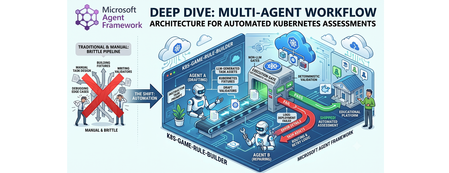
Why this system generates tests (design rationale) This project does not generate tests just to "check code." It generates tests because, in a Kubernetes learning game, the test suite is the grading contract. The design goals are: Scale content creation: instructors should not hand-author every task and checker. Keep grading objective: student success is measured against Kubernetes API state, not subjective review. Avoid fragile tasks: generated tasks must survive empty/wrong cluster states without crashing. Make failures repairable: when checks break, the system should patch and re-validate automatically. So the pipeline generates a full task package (setup, answer, check, cleanup) where tests define exactly what "correct" means. Lifecycle: from concept to production-ready grader Reader mental model: this is a content compiler with validation stages, not a single chat completion. Phase 1: Pedagogical intent -> structured concept The Idea Agent converts a topic into a constrained concept object (objective, progression, task IDs, difficulty variants). Memory rules block duplicates and previously failed concepts. Phase 2: Concept -> executable grading package The Generator Agent turns that concept into files: student instructions (instruction.md) learning material (concept.md) parameter source (session.json) setup and answer manifests (setup.template.yaml, answer.template.yaml) deterministic pytest flow (test_01 ... test_06) At this point, output is still untrusted draft content. Phase 3: Structural correctness gate Deterministic validation checks file presence, syntax, JSON/YAML shape, and template correctness. This catches basic integrity issues before cluster execution. Phase 4: Behavioral correctness gate (real cluster) Pytest executes against Kubernetes and verifies runtime behavior using real kubectl-derived state. This proves that generated checks actually evaluate cluster resources as intended. Phase 5: Anti-false-positive gate (skip-answer mode) The same suite runs with SKIP_ANSWER_TESTS=True to verify grader integrity: answer deployment is skipped test_05_check.py must fail If it still passes, the grader is invalid (it would accept wrong student submissions). Phase 6: Self-healing repair loop On any failure, deterministic error logs are fed into the Fixer Agent, which patches only broken files. The workflow then re-enters validation + test gates. Phase 7: Finalization If all gates pass -> task is kept as production-ready content. If retries are exhausted -> task is moved to unsuccessful/ with FAILURE_REPORT.txt for human triage. This lifecycle explains the core architecture decision: LLMs generate candidate graders, deterministic execution certifies them. Concrete generated sample (what the pipeline actually produces) Below is a representative generated task for topic: ConfigMap Environment Variable Injection. Generated directory layout tests/game01/050_configmap_env_injection/ ├── __init__.py ├── instruction.md ├── concept.md ├── session.json ├── setup.template.yaml ├── answer.template.yaml ├── test_01_setup.py ├── test_02_ready.py ├── test_03_answer.py ├── test_05_check.py └── test_06_cleanup.py session.json (runtime variables) { "namespace": "{{random_name()}}{{random_number(100,999)}}{{student_id()}}", "configmap_name": "{{random_name()}}", "deployment_name": "{{random_name()}}", "container_name": "app", "env_key": "APP_MODE", "env_value": "production" } Why this exists: task values are randomized per student/session, so tests verify behavior by variable contract instead of hardcoded names. setup.template.yaml (baseline state only) apiVersion: v1 kind: Namespace metadata: name: {{ namespace }} Why this exists: setup should create prerequisites only. It must not accidentally include the final answer. answer.template.yaml (expected correct solution) apiVersion: v1 kind: ConfigMap metadata: name: {{ configmap_name }} namespace: {{ namespace }} data: {{ env_key }}: "{{ env_value }}" --- apiVersion: apps/v1 kind: Deployment metadata: name: {{ deployment_name }} namespace: {{ namespace }} spec: replicas: 1 selector: matchLabels: app: env-demo template: metadata: labels: app: env-demo spec: containers: - name: {{ container_name }} image: nginx:latest env: - name: {{ env_key }} valueFrom: configMapKeyRef: name: {{ configmap_name }} key: {{ env_key }} Why this exists: defines canonical "correct cluster state" that graders must detect. test_02_ready.py (wait for setup resources) import json import time from tests.helper.kubectrl_helper import build_kube_config, run_kubectl_command class TestReady: def test_001_namespace_active(self, json_input): kube_config = build_kube_config( json_input["cert_file"], json_input["key_file"], json_input["host"] ) time.sleep(2) result = run_kubectl_command( kube_config, f"kubectl get namespace {json_input['namespace']} -o json", ) data = json.loads(result) assert data.get("status", {}).get("phase") == "Active" Why this matters: validates setup-stage readiness only. It should not check answer resources yet. test_05_check.py (student grading contract) import json from tests.helper.kubectrl_helper import build_kube_config, run_kubectl_command class TestCheck: def test_001_configmap_key_exists(self, json_input): kube_config = build_kube_config( json_input["cert_file"], json_input["key_file"], json_input["host"] ) result = run_kubectl_command( kube_config, f"kubectl get configmap {json_input['configmap_name']} -n {json_input['namespace']} -o json", ) data = json.loads(result) assert data["data"][json_input["env_key"]] == json_input["env_value"] def test_002_deployment_uses_configmap_env(self, json_input): kube_config = build_kube_config( json_input["cert_file"], json_input["key_file"], json_input["host"] ) result = run_kubectl_command( kube_config, f"kubectl get deployment {json_input['deployment_name']} -n {json_input['namespace']} -o json", ) data = json.loads(result) env = data["spec"]["template"]["spec"]["containers"][0].get("env", []) matched = [ e for e in env if e.get("name") == json_input["env_key"] and e.get("valueFrom", {}).get("configMapKeyRef", {}).get("name") == json_input["configmap_name"] and e.get("valueFrom", {}).get("configMapKeyRef", {}).get("key") == json_input["env_key"] ] assert matched, "Deployment container must consume env var from ConfigMap key" Why this matters: this is the real grading logic. If a student deploys wrong resource wiring, this test fails with explicit reason. Why skip-answer validation is essential for this sample When SKIP_ANSWER_TESTS=True, answer deployment is skipped. In this mode: test_03_answer.py should be skipped test_05_check.py must fail (ConfigMap/Deployment wiring is absent) If test_05_check.py still passes, the grader is broken (false positive), and the workflow routes to Fixer. Rule Builder Workflow Flowchart Multi-graph architecture views 1) Control-plane graph (orchestration DAG) 2) Runtime sequence (who calls what) 3) State machine (task lifecycle) 4) Prompt lifecycle graph (how prompts evolve) 5) MCP + Kubernetes execution boundary graph Core Agent Framework Primitives Used This repository is a practical example of Agent Framework as a graph orchestrator, not just an agent wrapper. WorkflowBuilder builds a typed DAG with explicit edges. @executor functions implement deterministic nodes (validation, pytest, decisions, routing prep). AgentExecutor wraps LLM agents so they behave as graph nodes. WorkflowContext shared state carries typed data and retry metadata between nodes. add_multi_selection_edge_group(...) + selector functions enforce conditional routing. MCPStdioTool connects filesystem MCP tools into agents for controlled file I/O. Production graph construction (from workflow/builder.py) looks like this: workflow = ( WorkflowBuilder(start_executor=initialize_retry) .add_edge(initialize_retry, generator_executor) .add_edge(generator_executor, parse_generated_task) .add_edge(parse_generated_task, run_validation) .add_edge(run_validation, run_pytest) .add_edge(run_pytest, make_decision) .add_multi_selection_edge_group( make_decision, [keep_task, remove_task], selection_func=select_action, ) .add_edge(keep_task, run_pytest_skip_answer) .add_multi_selection_edge_group( run_pytest_skip_answer, [check_loop, complete_workflow], selection_func=select_skip_answer_action, ) .add_multi_selection_edge_group( check_loop, [fix_task, complete_workflow], selection_func=select_loop_action, ) .add_edge(fix_task, fixer_executor) .add_edge(fixer_executor, parse_generated_task) .build() ) This is the architectural heart of the system: agents and deterministic executors are first-class nodes in the same graph. Detailed Node-by-Node Mechanics 1. Idea Agent (🧠): Concept Synthesis with Memory Constraints The Idea Agent (agents/k8s_task_idea_agent.py) generates a structured concept with three difficulty variations (BEGINNER/INTERMEDIATE/ADVANCED). It is memory-aware: task_ideas_memory.json tracks successful concepts. task_ideas_failure_memory.json tracks concepts that failed downstream. Memory constraints are injected using AgentMiddleware (system-level prompt injection) to avoid duplicate or previously failed concepts. For Responses-only models, the agent switches to a tool-call contract (save_k8s_task_concept) instead of structured response formatting. 2. Generator Agent (⚙️): MCP-Backed File Authoring The Generator Agent receives a strict prompt and writes task files through MCP filesystem tools. Key framework details: Built through chat_client.as_agent(...). MCP tool attached via tools=mcp_tool. Function-call execution observability added with LoggingFunctionMiddleware. Uses absolute-path-only policy in instructions to prevent path drift. 3. Deterministic Validation + Test (✅): Non-LLM Gates After generation, the graph moves through deterministic executors: run_validation calls pure Python checks (k8s_task_validator). run_pytest executes pytest --import-mode=importlib --rootdir=. .... Raw pytest output is persisted in workflow state for later fixing. This is critical: no LLM is asked whether code is correct. 4. Skip-Answer Test (🧪): Grader Correctness Gate Even if standard tests pass, the workflow enforces a second tier: SKIP_ANSWER_TESTS=True pytest --import-mode=importlib --rootdir=. Implementation detail: the executor writes JUnit XML, parses it, and asserts that: test_03_answer.py is skipped test_05_check.py fails as expected If test_05_check.py does not fail, the task is treated as invalid and sent back to retry/fix. 5. Fixer Agent + Retry Loop (🔧): Bounded Self-Healing On failure, fix_task builds a targeted prompt containing: failure reasons from deterministic nodes full captured pytest output explicit rule to patch only broken files in place The Fixer Agent runs through AgentExecutor, writes patches via MCP, and the graph loops back to parse_generated_task. Retries are stateful (retry_count, max_retries) and hard-bounded. On exhaustion, complete_workflow moves the task to unsuccessful/<game>/ and writes FAILURE_REPORT.txt. Agent Prompt Design (The Part That Makes It Work) If you want to understand why this pipeline works, you need to inspect prompts as operational contracts, not generic instructions. Real Idea Agent Prompt (from code) IDEA_AGENT_INSTRUCTIONS = ( "You are a Kubernetes task idea generator that creates detailed task concepts with three difficulty variations. " "Read official K8s documentation and propose comprehensive learning concepts for a Kubernetes game. " "\n\nYour task:\n" "1. Choose ONE Kubernetes concept not yet covered (check context for existing concepts)\n" "2. Generate exactly 3 variations: BEGINNER, INTERMEDIATE, and ADVANCED\n" "3. Use 3-digit task IDs (001-999) in format: XXX_concept_name_level (e.g., 041_secrets_basic)\n" "4. Each variation should build on the previous one with increasing complexity\n" "5. Include practical, hands-on scenarios covering: Workloads, Services, Storage, Configuration, Security, Scheduling, Policies\n" "\nProvide the concept, tags, description, and 3 variations with task_id, difficulty, title, objective, key_skills, and estimated_time." ) Responses-only models use a stricter tool-call version: IDEA_AGENT_INSTRUCTIONS_TOOL_CALL = ( IDEA_AGENT_INSTRUCTIONS + "\n\n" "**CRITICAL**: You MUST call the save_k8s_task_concept tool to save your generated concept.\n" "...\n" "Always call save_k8s_task_concept with your generated concept." ) Idea Agent Prompt Contract The Idea Agent prompt enforces: one concept per run exactly three difficulty variations strict task ID format (XXX_concept_name_level) practical skill progression Core pattern: You are a Kubernetes task idea generator... 1. Choose ONE Kubernetes concept not yet covered 2. Generate exactly 3 variations: BEGINNER, INTERMEDIATE, ADVANCED 3. Use 3-digit task IDs in format XXX_concept_name_level ... It is strengthened by runtime memory injection: previously generated concepts are blocked previously failed concepts are blocked For Responses-only models, the contract becomes tool-driven: CRITICAL: You MUST call the save_k8s_task_concept tool... This reduces ambiguity in output structure and makes downstream parsing deterministic. Real Generator Agent Prompt (from code) def _get_generator_instructions(): return ( "You are a Kubernetes task generator with filesystem tools.\n" f"The MCP filesystem is rooted at: {PATHS.tests_root.parent}\n" f"You MUST use ABSOLUTE paths for ALL file operations.\n" f"Task directory: {PATHS.game_root}/XXX_task_name/\n" "...\n" "CRITICAL: test_02_ready.py checks resources from setup.template.yaml, NOT answer.template.yaml.\n" "...\n" "MUST use polling loops (60s timeout, 15s interval)\n" "MUST use try/except and safe .get() JSON access\n" ) The generator prompt is long on purpose: it encodes path correctness, file schema, YAML/Jinja structure, and testing strategy in a single deterministic contract. Generator Agent Prompt Contract The Generator prompt is intentionally long and prescriptive because it defines filesystem safety and grading correctness requirements. Key constraints encoded in the prompt: Absolute path writes only (prevents writing to wrong workspace paths) No directory creation (directory is pre-created by executor) Required file set (instruction.md, concept.md, session.json, templates, tests) test-flow invariants: test_01_setup.py deploys setup test_02_ready.py checks setup resources only test_03_answer.py deploys answer test_05_check.py validates final solution robust test coding style: polling loops, try/except, .get()-based JSON parsing, explicit debug output Example contract fragment: CRITICAL PATH RULES: ✅ CORRECT: /abs/path/tests/gameXX/050_task/file.py ❌ WRONG: tests/gameXX/050_task/file.py (relative) CRITICAL: test_02_ready.py checks resources from setup.template.yaml, NOT answer.template.yaml. This is why generation quality is high before the Fixer loop even starts. Real Runtime Retry Prompt Builder (from code) def _build_retry_generation_prompt(combined: CombinedValidationResult) -> str: task_id = combined.test.task_id failure_reasons = _build_failure_reasons(combined) return ( f"Generate a complete Kubernetes learning task with ID '{task_id}' about '{combined.target_topic}'. " f"This is retry attempt {combined.retry_count + 1} of {combined.max_retries}. " f"\n\n⚠️ PREVIOUS ATTEMPT FAILED:" f"\n{chr(10).join([f' - {reason}' for reason in failure_reasons])}" f"\n\nIMPORTANT: You MUST use the exact task ID '{task_id}' - do not generate a new ID." f"\n\n✅ Directory already exists: {PATHS.game_root}/{task_id}/" f"\nWrite all files directly into this directory. Do NOT call create_directory." "..." ) This means retries are not generic retries; they are failure-conditioned retries with precise constraints. Fixer Agent Prompt Contract The Fixer prompt is a repair protocol, not a regeneration prompt. It includes: exact failure reasons from deterministic validators raw pytest output instruction to read current task files first strict directive to patch only broken files Core behavior constraints: DO NOT rewrite all files. Make TARGETED FIXES to ONLY the broken files. Use ABSOLUTE paths for all file operations. This keeps retries cheap, preserves working artifacts, and improves convergence speed. Real Runtime Fix Prompt Builder (from code) def _build_fix_prompt(combined: CombinedValidationResult, raw_test_output: str) -> str: task_id = combined.test.task_id failure_reasons = _build_failure_reasons(combined) prompt = ( f"Fix the failed Kubernetes task '{task_id}' located in '{PATHS.game_root}/{task_id}/'." f"\n\nThis is fix attempt {combined.retry_count + 1} of {combined.max_retries}." f"\n\n⚠️ TASK FAILED WITH THESE ERRORS:" f"\n{chr(10).join([f' - {reason}' for reason in failure_reasons])}" ) if raw_test_output: prompt += f"\n\n📋 FULL TEST OUTPUT:\n```\n{raw_test_output}\n```" prompt += ( f"\n\n🔍 YOUR TASK:" f"\n1. READ all files from '{PATHS.game_root}/{task_id}/'" f"\n6. Make TARGETED FIXES to ONLY the broken files" f"\n7. WRITE ONLY the fixed files back" f"\n\n⚠️ CRITICAL: DO NOT rewrite all files! Only fix the broken ones!" ) return prompt How Prompt Output Enters the Agent Framework Graph The prompt builders above are used by deterministic executors and sent to agent nodes through AgentExecutorRequest: await ctx.send_message( AgentExecutorRequest( messages=[Message(role="user", contents=[fix_prompt])], should_respond=True ) ) So prompt generation and graph routing are tightly coupled: each route transition emits a specific prompt payload into the next LLM node. Runtime-Constructed Prompts in Executors The most important prompts are built dynamically in workflow executors: _build_retry_generation_prompt(...) _build_fix_prompt(...) These functions inject live context: retry_count / max_retries concept + objective metadata validation/test failure reasons full captured test logs So each retry is context-rich and specific, not another blind generation attempt. Prompt + Middleware + Deterministic Gates = Reliability In this repository, reliability does not come from prompt text alone. It comes from three layers working together: Prompt contracts constrain agent behavior. Middleware injects memory and logs tool invocations. Deterministic executors enforce objective pass/fail gates. That combination is why the workflow remains auditable and predictable even when LLM outputs vary. Agent Framework Execution Model in This Repo Strongly-Typed Message Passing workflow/models.py defines transport models used between nodes: ValidationResult and TestResult (Pydantic) CombinedValidationResult (dataclass with should_keep and should_retry) InitialWorkflowState (seed payload for each run) This keeps node contracts explicit and simplifies selector logic. Fail-Fast Shared State Management Executors use ctx.get_state(...) with a sentinel (_MISSING) and raise explicit exceptions if required state is absent. This prevents hidden fallback behavior and catches graph/data wiring errors early. Conditional Routing with Selectors Selectors (workflow/selectors.py) encode graph decisions: select_action → keep vs remove select_skip_answer_action → complete vs loop select_loop_action → fix vs complete This separates decision policy from executor implementation. Streaming Workflow Runtime workflow.run(initial_state, stream=True) emits output events incrementally. The runner (workflow/runner.py) consumes these events to detect successful completions and update concept memory accordingly. Agent Construction and API Selection Strategy The repository uses Azure CLI auth (AzureCliCredential) and dynamically selects API mode by deployment name (agents/config.py): Chat Completions path: OpenAIChatCompletionClient Responses-only model path: OpenAIChatClient or custom ResponsesAgent Why this matters: some codex-class deployments are Responses-only, so the architecture supports both without changing workflow logic. How MCP Actually Controls Kubernetes (Important Distinction) In this repo, MCP is used for filesystem control; Kubernetes control is done through kubectl tools. 1) MCP server role: controlled file I/O The workflow starts MCP stdio servers (official filesystem server) and mounts them into agents: docs_mcp_tool = MCPStdioTool( name="filesystem_docs", command="npx", args=["-y", "@modelcontextprotocol/server-filesystem", str(PATHS.k8s_docs_root)], load_prompts=False, ) tests_mcp_tool = MCPStdioTool( name="filesystem_tests", command="npx", args=["-y", "@modelcontextprotocol/server-filesystem", str(PATHS.tests_root.parent)], load_prompts=False, ) Those MCP tools are passed into Generator/Fixer agents, which then call MCP file functions (read/write/list) inside allowed roots only. 2) Kubernetes cluster control role: kubectl execution tool Cluster actions are not performed by MCP filesystem server; they are performed by a dedicated function tool: def run_kubectl_command(command: str) -> str: kubeconfig_path = os.environ.get("KUBECONFIG", "/home/developer/.kube/config") cmd_list = ["kubectl"] + command.split() result = subprocess.run( cmd_list, capture_output=True, text=True, check=True, env={**os.environ, "KUBECONFIG": kubeconfig_path}, ) return result.stdout And the Kubernetes agent forces tool usage: agent = responses_client.as_agent( name="KubernetesAgent", instructions="...You MUST use the run_kubectl_command tool...", tools=[run_kubectl_command], default_options={"tool_choice": "required"}, ) So the control plane is: MCP filesystem → manipulate generated task files. kubectl tool → query/mutate real cluster state. deterministic pytest/validator executors → accept or reject results. 3) End-to-end command flow in practice When generated tests run, they execute real kubectl get ... -o json checks in test code, and the deterministic runner captures raw output: pytest_command = f"pytest --import-mode=importlib --rootdir=. {task_with_val.task_directory}/" result = run_pytest_command(pytest_command) ctx.set_state(f"raw_output_{task_with_val.task_id}", raw_output) This means Kubernetes state verification is always grounded in live command output, not model speculation. Should MCP run Kubernetes tests? Short answer: not in this design. Current architecture keeps test execution deterministic and local: pytest is run by run_pytest_command(...) (pure Python subprocess runner) test results are parsed and stored in workflow state retry/fix routing uses those deterministic outputs This is intentional. If test execution were delegated to an LLM-facing MCP command tool, you would lose strict control over execution semantics and error handling. Recommended pattern: Use MCP for file/document access and controlled editing. Use deterministic executors for pytest and validation. Use LLM agents only for generation and repair. If you still want MCP-driven test execution, add a separate locked-down command MCP server (only whitelisted pytest/kubectl commands), but keep pass/fail decision logic in deterministic executors. How tests are run in this workflow (with code) The workflow executes tests in deterministic executors, not inside LLM agents. 1) Workflow node calls pytest runner run_pytest executor builds the command and calls the pure Python runner: @executor(id="run_pytest") async def run_pytest(task_with_val: TaskWithValidation, ctx: WorkflowContext[TestResult]) -> None: from agents.pytest_runner import run_pytest_command pytest_command = f"pytest --import-mode=importlib --rootdir=. {task_with_val.task_directory}/" result = run_pytest_command(pytest_command) raw_output = result["details"][0] if result.get("details") else "" ctx.set_state(f"raw_output_{task_with_val.task_id}", raw_output) ... 2) Deterministic subprocess execution The runner normalizes command flags and executes pytest via subprocess: def run_pytest_command(command: str) -> dict[str, Any]: normalized_command = _normalize_pytest_command(command) # adds -s if needed cmd_list = shlex.split(normalized_command) result = subprocess.run( cmd_list, capture_output=True, text=True, check=False, cwd=str(PATHS.pytest_rootdir), ) combined_output = result.stdout + "\n" + result.stderr _save_test_output(normalized_command, combined_output, skip_answer) ... Exit codes are interpreted deterministically: 0 → pass 5 → no tests collected (fail) others → fail with exit code reason 3) Skip-answer validation tier After normal pass, the workflow runs pytest again with SKIP_ANSWER_TESTS=True and parses JUnit XML: os.environ["SKIP_ANSWER_TESTS"] = "True" pytest_command = f"pytest --import-mode=importlib --rootdir=. --junitxml={junit_path} {task_dir}/" result = run_pytest_command(pytest_command) test_05_failed, test_03_skipped = _parse_skip_answer_junit(junit_path) The parser checks per-testcase outcomes: if "test_05_check.py" in context and has_failure_or_error: test_05_failed = True if "test_03_answer.py" in context and has_skipped: test_03_skipped = True 4) How failures trigger fix loop If pytest fails (or skip-answer logic fails), failure reasons and raw output are pushed into state, then the Fixer Agent receives a generated fix prompt containing that output: ctx.set_state(f"failure_reasons_{task_id}", reasons) ctx.set_state(f"raw_output_{task_id}", raw_output) fix_prompt = _build_fix_prompt(combined, raw_test_output) await ctx.send_message( AgentExecutorRequest( messages=[Message(role="user", contents=[fix_prompt])], should_respond=True ) ) That is the key loop: deterministic test output drives LLM repair, then deterministic tests re-run. ResponsesAgent Internals (Advanced Agent Framework Pattern) The custom ResponsesAgent (agents/responses_agent.py) demonstrates a lower-level integration pattern: Connect MCP tool lazily. Call Responses API. Parse ResponseFunctionToolCall items. Execute tools (MCP + custom callables). Feed function_call_output back to model. Repeat until final text response. It also runs a middleware chain around tool invocations, preserving observability and consistency with standard agent paths. Why This Architecture Is Robust This design works because Agent Framework is used as a deterministic orchestration layer around probabilistic generation: LLM creativity is constrained by typed state and strict prompts. deterministic executors act as objective quality gates. retries are targeted, bounded, and auditable. failures produce durable forensic artifacts (FAILURE_REPORT.txt + test logs). For Kubernetes education pipelines, this yields high throughput without sacrificing grader reliability. GitHub Repo - https://github.com/wongcyrus/k8s-game-rule-builder About the Author Cyrus Wong is the senior lecturer of Hong Kong Institute of Information Technology (HKIIT) @ IVE(Lee Wai Lee).and he focuses on teaching public Cloud technologies. He is a passionate advocate for the adoption of cloud technology across various media and events. With his extensive knowledge and expertise, he has earned prestigious recognitions such as AWS AI Hero, Microsoft MVP- Microsoft Foundry, and Google Developer Expert - Cloud(AI).398Views0likes0CommentsBuild, deploy, and govern sovereign AI with Foundry Local on Azure Local
Not every AI workload can run in the cloud. For many of our customers, data needs to stay within defined boundaries, connectivity may be limited or absent, and latency, governance, and auditability are non-negotiable. With Foundry Local on Azure Local, you can use the same model catalog, developer workflows, and governance capabilities you know from Azure, while running AI entirely within your own environment where your data resides. Foundry Local provides the model catalog and developer experience. Azure Local provides the customer-managed infrastructure. Azure Arc provides unified policy, governance, and lifecycle management across cloud and local environments. This gives developers a consistent way to build, deploy, and operate AI. The same az commands, the same model catalog, the same Arc policies, all running on hardware you control. Expansion of Foundry Local on Azure Local We're expanding the Foundry Local model offering on Azure Local, with support for multi-node deployments and new agents and tools that run locally, in preview. Deploy and run AI models locally. Run models with Foundry Local in customer-managed environments on Azure Local, across sovereign, private, and edge scenarios, including fully disconnected operation. Choose from a flexible, high-performance model catalog. Access proprietary and community models through Foundry Local, now expanded with vLLM-optimized models alongside ONNX-based offerings. You explore and deploy through the same catalog API experience, then operate locally on Azure Local. Build for production realities. Bring governance, identity, and auditability into your applications while keeping execution inside your controlled boundary. See what’s new in Foundry Local on Azure Local in the Tech Community blog. From intelligence to action: agents and tools inside the enterprise boundary Most production AI use cases need two things: grounded answers and the ability to act on them, without sending data outside the environment. Here's how we're enabling that locally. Preview: Agentic retrieval with Foundry Local: Ground agents in enterprise data using retrieval-augmented generation across local Microsoft 365 services, including Exchange and SharePoint. Read the Tech Community blog to learn more. Preview: Agents and tools with Foundry Local: Build AI systems that reason, retrieve information, and take action within customer-controlled environments. Learn more. Preview: Developer acceleration templates: Jump-start local AI application development with new Foundry solution templates, including local chat experiences and video agents, powered by Azure AI Video Indexer. Read the Tech Community to learn more. GitHub Enterprise Local: Now available in public preview Sovereign AI is also about how systems are built and secured, not just where they run. With GitHub Enterprise Local on Azure Local, you can bring your full software development lifecycle on-premises: Source control and repositories CI/CD pipelines Security and DevSecOps workflows GitHub Enterprise Local deploys entirely within customer-owned infrastructure, so teams get the developer tools they expect without compromising on data residency or operational control. This extends modern DevSecOps practice into sovereign environments and pairs naturally with the AI development workflows above: build, secure, and ship your AI applications within the same boundary where they run. Read the tech community blog to learn more about GitHub Enterprise Local and how to join the preview. Accelerating High-performance AI at the Edge with NVIDIA We are expanding our collaboration with NVIDIA to deliver high-performance AI capabilities directly at the edge. At Build, we are bringing: Azure Local and Foundry Local on NVIDIA-powered GPUs, including NVIDIA RTX PRO 6000 Blackwell Server Edition, with expanded GPU support coming soon Integration with Nemotron models, optimized for enterprise performance A scalable foundation for data-intensive, low-latency workloads This partnership ensures that organizations can run advanced AI workloads where data is generated - without dependency on centralized cloud infrastructure. Hardware options: AI factory configurations are available now in the catalog Alongside our hardware partners, we’re bringing integrated solutions to customers building AI within sovereign environments. The Azure Local hardware catalog now includes AI factory configurations from our OEM partners, including NVIDIA-certified 8xH100 systems, with options from DataON, Dell, HPE, and Lenovo. These configurations are sized for the performance that model serving and agentic workloads require on customer-managed infrastructure. Together with Microsoft, we are advancing sovereign AI by bringing the open NVIDIA Nemotron model family to Microsoft Foundry Local on Azure Local. This collaboration gives organizations a production-ready AI platform that enables them to deploy AI where their data resides while maintaining the governance, control, and performance needed to scale AI across the enterprise.” Kari Briski, VP Generative AI Software Products, NVIDIA ”Sovereign AI is becoming increasingly important for governments, regulated industries, and enterprises that want to use AI while maintaining control of their data, location, and operations. Lenovo’s ThinkAgile MX Series delivers trusted, enterprise-grade infrastructure with global deployment expertise to help customers run AI wherever their data resides. Co-engineered with Foundry Local and Azure Local, this solution provides an optimized platform to deploy, run, and scale AI locally with greater simplicity, consistency, and control, while helping meet strict data residency, security, and compliance requirements." Scott Patti - VP Infrastructure Solutions Group (ISG), Lenovo From AI models to trusted, mission-critical systems: what this unlocks for developers and operators AI is evolving from systems that answer questions to systems that plan, reason, and take action across workloads. These capabilities move AI from a cloud-only assumption to something you can deploy where sensitive work actually happens, with governance and operational controls intact. For our customers, this means you can now: Keep data, identities, and audit trails inside your sovereign boundary. Run AI inference and agentic workloads in connected, intermittently connected, or fully disconnected modes. Apply consistent policy and governance across cloud and local environments through Azure Arc. Use the same Foundry catalog and developer experience you already know, on infrastructure you own. Build, secure, and ship your AI applications with GitHub Enterprise Local, keeping source control, CI/CD, and DevSecOps workflows inside the same sovereign boundary. Resources Join us at Build OD837 Shipping physical AI to the edge with Azure Local and Foundry Local https://github.com/microsoft/build26-OD837 OD839 Foundry Local: AI solutions for industrial and sovereign needs https://github.com/microsoft/build26-OD839 LTG425 Expanding horizons: Foundry Local for devices and on-prem https://build.microsoft.com/en-US/sessions/LTG425 Request to join the Foundry Local on Azure Local preview Hands-on walkthrough: Your first model deployment on Foundry Local on Azure Local: from catalog to inference in 10 minutes | Microsoft Community Hub Read our Tech Community blogs: Foundry Local announcing multi-node and vLLM support Agentic Retrival with Foundry Local blog: https://aka.ms/AgentsAndToolsBuildBlog2026 Code sample / model catalog blog: https://aka.ms/foundry-local-model-catalog-blog For more details on the expanded capabilities of Foundry Local for highly secure environments, contact your Microsoft account team Discover Microsoft Sovereign Cloud Explore product documentation at: Foundry Local models on Azure Local: https://aka.ms/FoundryLocalonAzureLocal_documentation Local Agentic retrieval with Foundry Local: https://aka.ms/edge-agentic-retrieval-docs1.7KViews0likes1CommentAzure Availability Zone Mapping and VM Resilience Analysis Guidance using SRE.AZURE.COM Agent
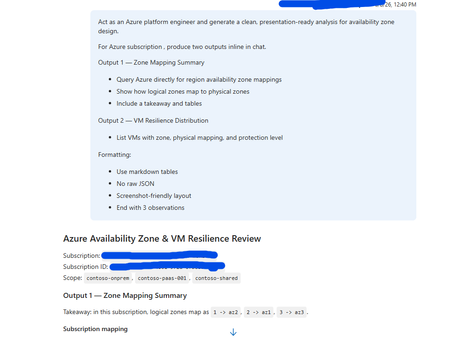
Overview This guidance, supported and tested using SRE.Azure.com, helps Azure platform engineers understand how Availability Zones are mapped within their subscription and how virtual machines (VMs) are distributed across those zones. SRE.Azure.com enables discovery and analysis of zone mappings, VM placement, and infrastructure resilience. Why This Matters Azure uses logical zones (1, 2, 3), but these map differently to physical datacenter zones (az1, az2, az3) in each subscription. This means workloads in the same logical zone across subscriptions may not be physically co-located. Understanding this is critical for high availability, disaster recovery, compliance, and resilience planning. Example sub-prod-eastus-01 -> Zone 1 → az3 sub-prod-eastus-01 -> Zone 2 → az1 sub-prod-eastus-01 -> Zone 3 → az2 sub-prod-weu-01 -> Zone 1 → az1 sub-prod-weu-01 -> Zone 2 → az2 sub-prod-weu-01 -> Zone 3 → az3 Key takeaway: Logical zone numbers do not guarantee physical separation across subscriptions. What SRE.Azure.com agent Enables - Discover logical-to-physical zone mappings - Analyze VM distribution across zones - Identify resilience gaps - Generate presentation-ready reports Suggested Prompt “Act as an Azure platform engineer and generate a clean, presentation-ready analysis for availability zone design. For Azure subscription <subscription-id>, produce two outputs inline in chat. Output 1 — Zone Mapping Summary - Query Azure directly for region availability zone mappings - Show how logical zones map to physical zones - Include a takeaway and tables Output 2 — VM Resilience Distribution - List VMs with zone, physical mapping, and protection level Formatting: - Use markdown tables - No raw JSON - Screenshot-friendly layout - End with 3 observations” Example output: And so on …… Next Steps: Get Started | Azure SRE Agent What is SRE Agent? | Azure SRE Agent359Views2likes0CommentsPreview of multiparty analytics with Azure Confidential Clean Rooms
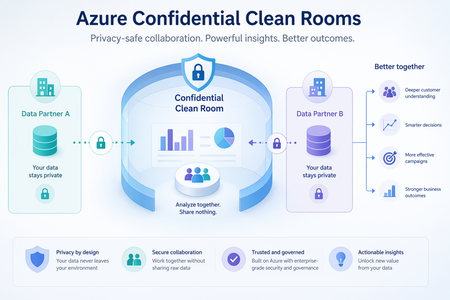
Today, we are excited to announce the preview of multiparty analytics feature of Azure Confidential Clean Rooms, a fully managed service that allows customers and their partners to securely analyze privacy-sensitive datasets from multiple parties. It uses confidential compute enabled Apache Spark-based big-data analytics (Spark SQL) which helps protect their raw data from other collaborators and from the Azure operator by performing computations in a Trusted Execution Environment (TEE). Privacy-sensitive datasets include personally identifiable information (PII), protected health information (PHI) and cryptographic secrets. Organizations across industries are increasingly looking to supplement their data with data from business partners, to build a complete view of their business. For example, brands, publishers, and their partners need to collaborate using datasets containing Intellectual Property (IP) to improve the relevance of their campaigns. Confidential data clean rooms help solve this challenge by enabling organizations to share and analyze granular datasets in a secure environment that helps prevent raw data exfiltration—protecting intellectual property, preserving customer privacy, and addressing concerns around regulatory compliance. You can sign up for the preview here Key Features Fully Managed: Azure takes care of the infrastructure provisioning and scaling with no user intervention. This significantly reduces your onboarding effort allowing you to focus on the queries and insights, not on infra management. Confidential Spark SQL: Spark SQL allows you to query large datasets and run complex queries in a distributed computing environment. In the confidential computing enabled version, the Spark driver and executors are fully attested policy-governed enclaves running as virtual nodes on confidential Azure Container Instances (ACI) which helps prevent exfiltration of collaborators’ data during query execution. Governance: Helps manage membership to cleanrooms, enables and verifies approval for queries from relevant collaborators before executing them and verifies consent to access sensitive collaborator data. It also helps generate tamper-resistant audit trails containing salient clean room events. This is made possible with the help of an implementation of the Confidential Consortium Framework (CCF). Telemetry: Throughout every clean-room run, detailed logs are streamed out in real time to monitor performance, troubleshoot issues, and keep the analytics healthy — all without ever exposing the collaborators’ data at any time. Verifiable trust: Cryptographic remote attestation viz. full attestation based on confidential hardware reports allows independent verification of the TEE along with along with all components that are part of it, without just trusting the cloud provider, before sensitive data and decryption keys are made available to the TEE Open-source containers: All Microsoft provided cleanroom containers and sidecars are open-sourced here and can be verified for provenance and integrity guarantees using GitHub artifact attestation Use Cases Multi-party confidential big-data analytics unlocks value in scenarios where data sensitivity, regulatory pressure, or competitive concerns previously blocked collaboration. These are some early scenarios that can benefit from this. Media & Advertising Collaboration of advertiser CRM data with publisher data for audience targeting and segment activation. Collaboration of audience data with measurement partners for measurement and attribution. Banking & Finance Collaboration between banks and insurance firms to upsell relevant products to existing bank customers without sharing raw data from either side Collaboration with retailers to generate customized offers for bank customers, without exposing either party’s underlying data. Government & Public Sector Secure collaboration of data across government departments to deliver better citizen welfare outcomes. Secure collaboration between government and private enterprises on shared-interest workloads such as traffic monitoring and weather systems. Healthcare Enable healthcare firms — including biopharma organizations — to combine their data with third-party institutions to accelerate clinical development, like identifying eligible participants for a clinical trial, without exposing underlying patient data. Combine patient datasets across hospitals to study disease patterns or outcomes without exposing sensitive protected health information. "A higher standard for protecting user privacy and trust, the phase-out of third-party cookies, and global regulations demand more sophisticated data collaboration tools to support advertising marketplaces. Azure Confidential Cleanrooms (ACCR) provides a secure, feature-rich, and flexible foundation to implement privacy-preserving functions and enable insights without sharing privacy-sensitive data outside of organization boundaries. Built on the Azure Confidential Compute (ACC) platform and offering cohesion with Azure's diverse set of services, ACCR offers the attestation, audit, fine-grained access control, and verifiable trust tools required for secure and privacy-safe data collaboration in today's world." — Andrei Mackenzie, Engineering Manager, Microsoft AI "Azure Confidential Clean Rooms enabled our team to evaluate how clean room capabilities can support secure, governed data collaboration at scale. Through the Proof-of-Concept (PoC), we explored how privacy-preserving workflows, trusted access controls, and scalable compute can create a stronger foundation for responsibly leveraging first-party data. This helps reduce operational friction while supporting business growth, improving customer engagement, and enabling more relevant customer experiences." — Nic Dregne, Director, Microsoft AdTech Engineering Beyond Spark SQL Realizing other multi-party scenarios like custom analytics, ML training and inferencing on Azure Confidential Clean Rooms is in our roadmap. If you have such a scenario to be realized, you can fill in and submit the preview signup form with the details of your scenario and we’ll get back to you. Learn More · Signup for the preview of Azure Confidential Clean Rooms for Analytics · Confidential Consortium Framework (CCF) · Virtual Nodes on Azure Container InstancesUnlock On-Prem Productivity with Agentic Retrieval in Foundry Local
In today’s connected world, customers expect instant, context-rich interactions, even in environments where cloud connectivity isn’t guaranteed. That’s where Retrieval-Augmented Generation at the edge comes in. Since we launched into public preview, we’ve watched teams across regulated, disconnected, and mission-critical environments push this technology into places cloud GenAI simply couldn’t reach. What we heard back shaped everything in this release: customers don’t just want retrieval. They want reasoning, they want agency, and they want an end-user experience that feels as natural as the one they already use in the cloud. Today at Build 2026, we're excited to introduce Agentic Retrieval, the next evolution of our on-prem RAG platform, enabled by Azure Arc and powered by Foundry language models. Agentic Retrieval is part of Microsoft's Adaptive Cloud approach, which extends Azure capabilities to wherever customer data and workloads actually live, with Edge AI focused on bringing reasoning and grounding to on-prem, distributed, and disconnected environments. Together with Foundry Local, Agentic Retrieval continues to shape Microsoft's Foundry Anywhere commitment: flexibility, resilience, and intelligence wherever customers operate. What’s new at Build 2026 This release introduces three major pillars that work independently or together: Agentic Retrieval engine: a first-party orchestration runtime for planning, reasoning, conversation state, and tool calls over your local data Knowledge: a dedicated layer for organizing, curating, and governing your grounding data, exposed via MCP and connectable to any agentic retrieval layer Chat UI: a production-ready, polished conversational experience that ships as the default UX for Agentic Retrieval and can also be deployed standalone Alongside, we’re delivering the platform upgrades customers asked for: flexible deployment modes (Agentic-only, Knowledge-only, or Combined), BYOM with pluggable backends, Foundry Local model catalog integration, Entra ID support, disconnected-ready, and hybrid search combined with agentic retrieval. Agentic Retrieval: From Answering to Reasoning Classic RAG retrieves, then generates. Agentic Retrieval plans, reasons, and acts, running multi-step retrieval and tool invocation under a first-party orchestration runtime, entirely on your infrastructure. Under the hood it manages query planning, iterative multi-hop retrieval, tool calls via MCP, conversation state, and mandatory grounding with citations and audit logging built in. What customers can achieve: Compliance, policy, and permit workflows for public sector, regulators, and defense operations, with data never leaving sovereign infrastructure Multi-document synthesis across standards, technical manuals, contracts, and field procedures for industrial operators An agentic chat experience for regulated and operational teams (engineers, inspectors, analysts) that reasons like a subject-matter expert Auditable AI for sovereign and mission-critical environments, with every answer traceable to its source Knowledge: A First-Class, Governed Data Layer Great answers start with great knowledge. Knowledge is now a standalone component customers can deploy on its own or alongside Agentic Retrieval, exposed through an MCP wrapper so it can connect to any agentic retrieval layer, ours or yours. This release brings Collections (segmented groups of indexed knowledge with granular access permissions), multi-source ingestion across documents, tables, images, and SharePoint (indexed source moving to public preview), high-fidelity parsing for complex enterprise content, Bring Your Own MCP to connect customer-owned data sources directly into Agentic Retrieval and the chat experience, and governance enforced at the data layer itself. ent view - collections, sources, and permission scopes What customers can achieve: Scope knowledge access to different slices of the same corpus, by plant, site, classification, or jurisdiction Enforce data sovereignty, residency, and regulatory compliance at the knowledge layer itself Ground both first-party Agentic Retrieval and BYO orchestration through a single governed source of truth across distributed sites Keep classified, proprietary, and operational data fully on-prem while delivering premium chat experiences Chat UI: Production-Ready Conversational Experience Agentic Retrieval now ships with a polished, production-ready Chat UI as its default experience, and the same component can be deployed standalone for customers building their own stack on Foundry Local. Highlights include Entra ID authentication (MSAL login, Bearer tokens, user identity display), pluggable backends across AI Foundry, BYOM, or mock mode with zero code changes, Chain-of-Thought visibility and inline citations that make grounding transparent to end users, standalone frontend deployment via Helm chart and container image, and disconnected-ready operation for air-gapped environments. What customers can achieve: Deliver a polished end-user experience to operators, inspectors, and analysts without building UI from scratch Build trust in regulated and industrial workflows through transparent, inspectable reasoning and grounding Run the same UI across air-gapped facilities, sovereign clouds, and connected industrial sites Accelerate rollout across public sector, defense, manufacturing, and other mission-critical environments Why This Release Matters Every update to our on-prem RAG platform has moved us toward a simple conviction: GenAI should be useful wherever customers operate, whether regulated or open, connected or disconnected, centralized or distributed. With Agentic Retrieval, Knowledge, and Chat UI coming together, backed by Foundry on Arc, BYOM, and fully disconnected support, this is no longer “cloud RAG, but local.” It’s an agentic knowledge platform purpose-built for the realities of enterprise data: on-prem, governed, and increasingly autonomous. Learn More Explore Agentic retrieval documentation Read Foundry Local on Azure Local model inferencing blog post For more information reach out to the team at FoundryLocalOnAzure@microsoft.com725Views0likes0CommentsScale On-Prem AI with Foundry Local on Azure Local: Multi-Node Inference and vLLM Support
Since announcing the public preview of Foundry Local on Azure Local for single-node, we’ve seen strong adoption in regulated industries and consistent customer demand to expand the platform for scalable deployments. Today, we’re expanding Foundry Local model offering on Azure Local (preview) with three additions that broaden where and how you can use it: Multi-node scheduling - distribute inference workloads across the GPU capacity in your Azure Local cluster, not just a single node vLLM runtime support - a high-throughput serving engine purpose-built for large language models and concurrent workloads An expanded model catalog - new models available in vLLM optimized format alongside the existing ONNX offerings Together, these additions let you scale to higher concurrency, serve more users from a single endpoint, and run larger models on-premises. They round out Foundry Local on Azure Local into a more complete, production-grade on-premises inference platform - covering a wider range of model sizes, concurrency profiles, and hardware footprints, while preserving the same Kubernetes-native, OpenAI-compatible patterns you're already using. Runs disconnected - no cloud round-trip required Foundry Local on Azure Local is designed to run fully on-premises, including in disconnected and intermittently-connected environments. Model weights, prompts, and inference traffic stay entirely inside your Arc-enabled cluster - there is no per-request call to Azure, no data exfiltration to the cloud, and no dependency on a live WAN to serve inference. Models are cached locally on Persistent Volumes after the first pull. Once cached, the inference endpoint keeps serving even when the WAN is down - across reboots, network outages, and extended disconnected operation. API-key authentication continues working uninterrupted during disconnected periods. Microsoft Entra ID auth resumes seamlessly when connectivity returns. The control plane is local to the cluster. The Foundry Local operator, the model catalog, and the inference runtimes all live inside Azure Local - Arc is used for fleet management and updates, not for the inference data path. For factory floors, offshore platforms, sovereign data centers, classified sites, and remote branch offices where cloud connectivity is unreliable, restricted, or prohibited, this is what makes on-premises AI inference actually viable in production. Multi-node scheduling: more scenarios, more capacity Foundry Local on Azure Local now expands to support multiple nodes in your cluster. The inference operator schedules and manages deployments across the GPU capacity available cluster-wide, so you can: GPU capacity from any node in the cluster, not just a single node’s resources Place inference workloads where the hardware lives, with the operator managing deployments across nodes The same Model Deployment custom resource you already use defines the workload, and it is served through the standard OpenAI-compatible endpoint (POST /v1/chat/completions). The API used to interact with conversational AI models by sending structured messages and receiving model-generated responses. Existing applications work against multi-node deployments with zero code changes. vLLM runtime: high-throughput serving for production workloads Alongside ONNX-GenAI, Foundry Local now offers vLLM as a first-class inference runtime. vLLM is an open-source, high-throughput serving engine that has become the standard for production LLM inference in the cloud. Bringing it to Foundry Local on Azure Local means the same performance characteristics are available on your factory floor, in your sovereign data center, or at your remote site. Why vLLM matters for edge and on-premises inference Capability ONNX-GenAI vLLM Hardware CPU and GPU GPU only Throughput Optimized for single-user, low-latency Optimized for high-throughput, multi-user concurrency Memory management Standard allocation PagedAttention - efficient KV-cache management reduces VRAM waste Continuous batching Not supported Supported - incoming requests are batched dynamically for higher GPU utilization FP8 KV cache Not supported Supported on compatible models and GPUs - roughly doubles token capacity Best for Compact models, CPU-only nodes, single-client scenarios Larger models, multi-user workloads, GPU-equipped clusters Automatic GPU inference tuning with the vLLM planner One of the operational challenges with vLLM is configuration tuning - setting GPU memory utilization, context length, batch sizes, and other parameters for a given model on a given hardware profile. Get it wrong and the pod either OOMs (runs out of memory) on startup or wastes GPU capacity. Foundry Local addresses this with the vLLM planner, an automatic tuning component that inspects the available GPU resources, analyzes the target model's footprint, and generates a memory-safe, high-performance configuration before the model server starts. You declare what model you want to run; the planner figures out how to run it optimally on your hardware. Full configuration reference is in the vLLM planner docs. Identity-based access for multi-user workloads Serving more concurrent users isn't only a throughput problem - it's also an access-control problem. Foundry Local supports two authentication modes side by side on the same endpoint: API keys - primary and secondary keys per deployment, with zero-downtime rotation. Ideal for service-to-service traffic and automated pipelines. Microsoft Entra ID with Azure RBAC - per-identity access using the Cognitive Services OpenAI User role (or any role granting the equivalent data-plane action). JWT validation runs inside the inference pod; authorization is enforced through the cluster's Arc-managed identity. Enable both, and clients can present either credential type in the same Authorization: Bearer header - the platform detects which one was sent and routes to the right validation path. API-key callers also keep working uninterrupted if external connectivity is briefly lost, giving you a natural degradation story for edge and disconnected sites. For a multi-user AI assistant on the factory floor or in a sovereign data center, this is the difference between a shared service account and a per-user audit trail. Expanded model catalog: ONNX and vLLM side by side The Foundry Local model catalog now includes models in both ONNX and vLLM formats. The same model can appear multiple times in the catalog - once per runtime/compute target - so you can pick the build that matches your hardware without leaving the platform. The operator selects the right container image automatically based on the entry you reference. Broader open-model support Beyond the Phi and GPTOSS families, the catalog now includes additional models across multiple open-source lineups that customers have requested for on-prem and sovereign deployments, including Mistral and NVIDIA Nemotron. Both are available as catalog entries, served by the vLLM runtime on GPU, and accessible through the same OpenAI-compatible endpoint you already use. In collaboration with NVIDIA, Foundry Local now supports the latest Nemotron models, optimized for enterprise performance on NVIDIA powered Azure Local hardware including NVIDIA RTX Pro 6000. Nemotron models are tuned for reasoning, instruction-following, and agentic workflows, and run on the vLLM runtime with PagedAttention, continuous batching, and FP8 KV cache on compatible GPUs. The vLLM planner handles GPU memory utilization and context-length sizing automatically. you declare the catalog entry, the platform sizes the deployment to your hardware. Models available in vLLM format (see the model catalog docs for the full, regularly updated list) Model ONNX vLLM Notes Phi-4 ✓ ✓ Microsoft's flagship SLM Phi-4-mini ✓ ✓ Compact, fast inference Phi-4-mini-reasoning ✓ ✓ Chain-of-thought reasoning Phi-4-reasoning — ✓ vLLM-only, reasoning-focused gpt-oss-20b ✓ ✓ Mid-range generative gpt-oss-120b — ✓ Large generative, vLLM-only Mistral-7B-v0.2 ✓ ✓ Popular open-source LLM DeepSeek-R1 (7b/14b) ✓ — Reasoning-focused Qwen2.5 (0.5b–14b) ✓ — Multilingual, coder variants Qwen3 (0.6b–14b) ✓ — Latest generation Whisper (multiple sizes) ✓ — Speech-to-text Nemotron ✓ (CPU) ✓ The catalog now includes a growing list of models across both runtimes. Models in vLLM format are served using the vLLM engine with all its performance benefits - PagedAttention, continuous batching, FP8 KV cache - while ONNX models continue to serve on CPU or GPU through the ONNX-GenAI runtime. Bring-your-own model (BYOM) When you need a model that isn’t in the catalog, bring-your-own model still works the same way: package your model as an OCI artifact in any ORAS-compatible registry (Azure Container Registry, GitHub Container Registry, Docker Hub) and reference it from your ModelDeployment. The operator caches it locally and reuses the cached copy on subsequent deployments. Choosing the right runtime ONNX-GenAI when you're running on CPU-only hardware, serving a single application with a compact model, or need the broadest model compatibility including speech and predictive workloads. vLLM when you have GPU hardware, need to serve concurrent users, want to run larger models, or need production-grade throughput from your inference endpoint. Both runtimes expose the same OpenAI-compatible REST API - the choice is transparent to application code. vLLM ModelDeployment is as simple as this: Everything else - memory utilization, context length, batch sizing - is handled by the vLLM planner. See the model catalog docs for the BYO pattern and full configuration options. What hasn't changed Everything from the public preview remains fully supported: Two installation paths - Azure Arc extension (recommended for fleet management) and Helm chart (for platform engineers who need full control) OpenAI-compatible REST endpoints - POST /v1/chat/completions and standard patterns API key and Microsoft Entra ID authentication - secured with bearer tokens, with the per-identity RBAC model described above TLS-enabled ingress - encrypted traffic in transit Disconnected operation - models cached on local PersistentVolumes continue serving when WAN connectivity drops Bring-your-own predictive models - deploy custom ONNX models from OCI registries Multi-model orchestration - agent-style patterns coordinating multiple local models Your existing ModelDeployment manifests continue to work. Applications targeting the ONNX-GenAI runtime don't need any changes. The new capabilities are additive. Real-world scenarios, now at scale Over the past few months, we’ve partnered with customers in early preview to build and validate real-world scenarios. A consistent theme across these engagements is the need to run AI where data resides—on-premises—while maintaining the governance and consistency enabled by Azure Arc. "In energy operations, AI needs to run where the work happens – at remote facilities, offshore platforms, and field locations where connectivity is often limited, and safety is paramount. Foundry Local gives us a path to bring AI-driven decision-making closer to our operational data, with the governance our industry demands. The ability to deploy and run AI workloads consistently across edge and field environments, even when disconnected, is critical as we advance Chevron's vision for autonomous and intelligent operations." (Chevron) Ed Moore - OT Strategist and Distinguished Engineer With multi-node and vLLM, the scenarios from our initial preview scale to meet production demands: Manufacturing: multi-user quality inspection A quality-control system on a production line previously ran Phi-4-mini for single-station anomaly explanation. With vLLM's continuous batching, the same Foundry Local endpoint now serves 10+ inspection stations concurrently - each sending defect images and sensor telemetry for real-time root-cause analysis - without response-time degradation. Sovereign: identity-scoped document processing A government agency processing sensitive casework needs production-grade throughput and a strict audit trail. Foundry Local serves the workload on-premises across multiple GPU nodes, with per-analyst access enforced through Entra ID and Azure RBAC, so every inference call is tied to a real identity - and no data leaves the cluster. Energy: disconnected multi-user operations An offshore platform runs Foundry Local on a multi-node Azure Local cluster. When WAN connectivity drops, the vLLM-powered endpoint continues serving safety procedure lookups, maintenance guidance, and operational queries to multiple crew members simultaneously - each accessing the inference endpoint from their local application. API-key auth keeps working through the outage; Entra ID resumes seamlessly when the WAN comes back. Getting started If you're already running Foundry Local on Azure Local in the public preview: Once installed the Foundry Local extension is automatically kept up to date, with multi-node and vLLM support included. Browse the updated catalog to discover models available in vLLM format Deploy a vLLM model by setting runtime: vllm in your ModelDeployment manifest Let the vLLM planner optimize - override only the preferences you care about and let the planner handle the rest If you're new to Foundry Local on Azure Local: Follow the get-started code-sample blog to see the end-to-end flow Request preview deployment access to get started Read the documentation for architecture overview and deployment guide What's next Multi-node and vLLM are just the beginning. We're continuing to invest in: Distributed LLM serving with LLM-D - KV-cache-aware routing and disaggregated serving for large models that span multiple nodes Autoscaling for inference workloads - dynamic capacity that follows demand Broader model catalog expansion - more model families, more sizes, more task types Enhanced monitoring and observability for inference workloads Performance optimization for specific Azure Local hardware profiles Expanded GPU hardware validation across the Azure Local catalog We're building Foundry Local to be the production AI inference platform for edge and sovereign environments. Your feedback is shaping every release - keep it coming. Learn more: Foundry Local Model and inferencing on multi node demo Foundry Local for devices (GA) For more information reach out to the team at FoundryLocalOnAzure@microsoft.com953Views0likes0CommentsAzure Arc Server April 2026 Forum
Please find the recording for the monthly Azure Arc Server Forum on YouTube! During the April 2026 Azure Arc Server Forum, we discussed: Public Preview of Essential Machine Management, learn more at aka.ms/EMM-blog and sign up at aka.ms/EMM-feedback Engage with product group on exploration of AI on bring your own Kubernetes by signing up at aka.ms/arc-ai-survey Product group is investing in extending the Multi-cloud Connector provide customers the ability to connect their MECM environments to Azure for inventory, monitoring, and management To sign up for the Azure Arc Server Forum and newsletter, please register with contact details at https://aka.ms/arcserverforumsignup/. For the latest agent release notes, check out What's new with Azure Connected Machine agent - Azure Arc | Microsoft Learn. Our May 2026 forum will be held on Thursday, May 21 at 9:30 AM PST / 12:30 PM EST. We look forward to you joining us, thank you!347Views1like0Comments
Introducing cert-manager for Azure Arc-enabled Kubernetes: now in Public Preview
Today we’re releasing a public preview of cert-manager for Azure Arc-enabled Kubernetes. It’s an Arc extension that automates TLS certificate and trust bundle management for edge Kubernetes clusters. If you’re running Kubernetes at the edge: in factories, retail stores, remote sites, you’ve probably hit the certificate problem already. Certificates expire. Each cluster has its own tooling. Nobody owns the renewal process until something breaks. We routinely hear from customers that certificate issues are a common source of unplanned outages and last-minute firefighting, especially as workload counts grow. This extension packages the open-source cert-manager and trust-manager into a managed Arc extension with Microsoft support. You get automated lifecycle management and trust distribution without having to run and maintain these tools yourself. What it does The extension bundles two CNCF-graduated projects: cert-manager and trust-manager, into a single Arc-K8s extension that you install once per cluster. From there: 1. You can issue, renew, and rotate certificates automatically. You do not need to manage them manually. 2. You can distribute trusted CA certificates consistently across namespaces. No more per-workload trust configuration. 3. You choose the CA issuer: built-in self-signed for dev/test, or your enterprise PKI for production. 4. The extension ships with enterprise support, regular security patches, and proactive maintenance from Microsoft team. Why we built it We built Microsoft cert-manager for Azure Arc-enabled Kubernetes to address three recurring problems we saw in real hybrid and edge environments. Problem 1: Manual certificate issuance. Many organisations still issue, install, and renew certificates through manual steps across clusters and namespaces. That creates operational overhead, slows teams down, and increases the risk of outages when certificates expire or are configured incorrectly. The answer is automation. With cert-manager running as an Arc-enabled extension, teams can automate certificate issuance, renewal, and rotation through Kubernetes-native workflows instead of relying on tickets, scripts, and manual intervention. Problem 2: Fragmented approaches to automation. Even when teams try to automate, they often end up with a mix of scripts, custom controllers, product-specific setups, and one-off operational patterns. That fragmentation makes certificate management harder to scale, harder to standardise, and harder to operate consistently across environments. The answer is to standardise on cert-manager. It provides a common, Kubernetes-native approach to certificate lifecycle management, helping teams reduce tool sprawl, align on a consistent operating model, and simplify how certificates are managed across clusters. Problem 3: Maintenance and upgrade burden for open-source cert-manager. cert-manager is a powerful open-source project, but many organisations do not want the ongoing burden of packaging, validating, patching, upgrading, and supporting it themselves as a production dependency. That can create operational risk, delay updates, and make long-term ownership unclear. The answer is a Microsoft-supported Arc-enabled extension. Microsoft cert-manager for Azure Arc-enabled Kubernetes gives customers a supported way to use cert-manager, with Microsoft handling packaging, delivery, and ongoing maintenance so teams can adopt the capability without taking on the full operational burden of managing the OSS component themselves. What’s in the public preview Here’s what you get: Certificate lifecycle automation with cert-manager: issuance, renewal, rotation, all handled for you. Trust bundle distribution with trust-manager: push trusted CA certs to every namespace that needs them. Self-signed or external CA. Start with the built-in CA, swap in your enterprise PKI when you’re ready. Secure by default. We turned on the security settings you’d want enabled anyway: TLS enforcement, least-privilege RBAC, restricted pod security. Tested at the edge. Validated on AKS Edge Essentials, AKS on Azure Local, and several third-party Kubernetes distros. Works offline. Fits into your Arc stack If you’re already running Azure IoT Operations or Azure Monitor on Arc-enabled clusters, the extension handles TLS between those services with minimal setup. No custom certificate plumbing required: install the extension and the other Arc components pick it up. Get started The extension is available now in public preview. 👉 Documentation and quickstart488Views0likes0Comments