kubernetes
3 TopicsFour Methods to Access Azure Key Vault from Azure Kubernetes Service (AKS)
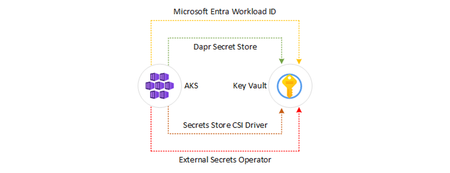
In this article, we will explore various methods that an application hosted on Azure Kubernetes Service (AKS) can use to retrieve secrets from an Azure Key Vault resource. You can find all the scripts on GitHub. Microsoft Entra Workload ID with Azure Kubernetes Service (AKS) In order for workloads deployed on an Azure Kubernetes Services (AKS) cluster to access protected resources like Azure Key Vault and Microsoft Graph, they need to have Microsoft Entra application credentials or managed identities. Microsoft Entra Workload ID integrates with Kubernetes to federate with external identity providers. To enable pods to have a Kubernetes identity, Microsoft Entra Workload ID utilizes Service Account Token Volume Projection. This means that a Kubernetes token is issued and OIDC federation enables Kubernetes applications to securely access Azure resources using Microsoft Entra ID, based on service account annotations. As shown in the following diagram, the Kubernetes cluster becomes a security token issuer, issuing tokens to Kubernetes Service Accounts. These tokens can be configured to be trusted on Microsoft Entra applications and user-defined managed identities. They can then be exchanged for an Microsoft Entra access token using the Azure Identity SDKs or the Microsoft Authentication Library (MSAL). In the Microsoft Entra ID platform, there are two kinds of workload identities: Registered applications have several powerful features, such as multi-tenancy and user sign-in. These capabilities cause application identities to be closely guarded by administrators. For more information on how to implement workload identity federation with registered applications, see Use Microsoft Entra Workload Identity for Kubernetes with a User-Assigned Managed Identity. Managed identities provide an automatically managed identity in Microsoft Entra ID for applications to use when connecting to resources that support Microsoft Entra ID authentication. Applications can use managed identities to obtain Microsoft Entra tokens without having to manage any credentials. Managed identities were built with developer scenarios in mind. They support only the Client Credentials flow meant for software workloads to identify themselves when accessing other resources. For more information on how to implement workload identity federation with registered applications, see Use Azure AD Workload Identity for Kubernetes with a User-Assigned Managed Identity. Advantages Transparently assigns a user-defined managed identity to a pod or deployment. Allows using Microsoft Entra integrated security and Azure RBAC for authorization. Provides secure access to Azure Key Vault and other managed services. Disadvantages Requires using Azure libraries for acquiring Azure credentials and using them to access managed services. Requires code changes. Resources Use Microsoft Entra Workload ID with Azure Kubernetes Service (AKS) Deploy and Configure an AKS Cluster with Workload Identity Configure Cross-Tenant Workload Identity on AKS Use Microsoft Entra Workload ID with a User-Assigned Managed Identity in an AKS-hosted .NET Application Azure Key Vault Provider for Secrets Store CSI Driver in AKS The Azure Key Vault provider for Secrets Store CSI Driver enables retrieving secrets, keys, and certificates stored in Azure Key Vault and accessing them as files from mounted volumes in an AKS cluster. This method eliminates the need for Azure-specific libraries to access the secrets. This Secret Store CSI Driver for Key Vault offers the following features: Mounts secrets, keys, and certificates to a pod using a CSI volume. Supports CSI inline volumes. Allows the mounting of multiple secrets store objects as a single volume. Offers pod portability with the SecretProviderClass CRD. Compatible with Windows containers. Keeps in sync with Kubernetes secrets. Supports auto-rotation of mounted contents and synced Kubernetes secrets. When auto-rotation is enabled for the Azure Key Vault Secrets Provider, it automatically updates both the pod mount and the corresponding Kubernetes secret defined in the secretObjects field of SecretProviderClass. It continuously polls for changes based on the rotation poll interval (default is two minutes). If a secret in an external secrets store is updated after the initial deployment of the pod, both the Kubernetes Secret and the pod mount will periodically update, depending on how the application consumes the secret data. Here are the recommended approaches for different scenarios: Mount the Kubernetes Secret as a volume: Utilize the auto-rotation and sync K8s secrets features of Secrets Store CSI Driver. The application should monitor changes from the mounted Kubernetes Secret volume. When the CSI Driver updates the Kubernetes Secret, the volume contents will be automatically updated. Application reads data from the container filesystem: Take advantage of the rotation feature of Secrets Store CSI Driver. The application should monitor file changes from the volume mounted by the CSI driver. Use the Kubernetes Secret for an environment variable: Restart the pod to acquire the latest secret as an environment variable. You can use tools like Reloader to watch for changes on the synced Kubernetes Secret and perform rolling upgrades on pods. Advantages Secrets, keys, and certificates can be accessed as files from mounted volumes. Optionally, Kubernetes secrets can be created to store keys, secrets, and certificates from Key Vault. No need for Azure-specific libraries to access secrets. Simplifies secret management with transparent integration. Disadvantages Still requires accessing managed services such as Azure Service Bus or Azure Storage using their own connection strings from Azure Key Vault. Cannot utilize Microsoft Entra ID integrated security and managed identities for accessing managed services. Resources Using the Azure Key Vault Provider for Secrets Store CSI Driver in AKS Access Azure Key Vault with the CSI Driver Identity Provider Configuration and Troubleshooting Options for Azure Key Vault Provider in AKS Azure Key Vault Provider for Secrets Store CSI Driver Dapr Secret Store for Key Vault Dapr (Distributed Application Runtime) is a versatile and event-driven runtime that simplifies the development of resilient, stateless, and stateful applications for both cloud and edge environments. It embraces the diversity of programming languages and developer frameworks, providing a seamless experience regardless of your preferences. Dapr encapsulates the best practices for building microservices into a set of open and independent APIs known as building blocks. These building blocks offer the following capabilities: Enable developers to build portable applications using their preferred language and framework. Are completely independent from each other, allowing flexibility and freedom of choice. Have no limits on how many building blocks can be used within an application. Dapr offers a built-in secrets building block that makes it easier for developers to consume application secrets from a secret store such as Azure Key Vault, AWS Secret Manager, and Google Key Management, and Hashicorp Vault. You can follow these steps to use Dapr's secret store building block: Deploy the Dapr extension to your AKS cluster. Set up a component for a specific secret store solution. Retrieve secrets using the Dapr secrets API in your application code. Optionally, reference secrets in Dapr component files. You can watch this overview video and demo to see how Dapr secrets management works. The secrets management API building block offers several features for your application. Configure secrets without changing application code: You can call the secrets API in your application code to retrieve and use secrets from Dapr-supported secret stores. Watch this video for an example of how the secrets management API can be used in your application. Reference secret stores in Dapr components: When configuring Dapr components like state stores, you often need to include credentials in component files. Alternatively, you can place the credentials within a Dapr-supported secret store and reference the secret within the Dapr component. This approach is recommended, especially in production environments. Read more about referencing secret stores in components. Limit access to secrets: Dapr provides the ability to define scopes and restrict access permissions to provide more granular control over access to secrets. Learn more about using secret scoping. Advantages Allows applications to retrieve secrets from various secret stores, including Azure Key Vault. Simplifies secret management with Dapr's consistent API. Supports Azure Key Vault integration with managed identities. Supports third-party secret stores, such as Azure Key Vault, AWS Secret Manager, and Google Key Management, and Hashicorp Vault. Disadvantages Requires injecting a sidecar container for Dapr into the pod, which may not be suitable for all scenarios. Resources Dapr Secrets Overview Azure Key Vault Secret Store in Dapr Secrets management quickstart: Retrieve secrets in the application code from a configured secret store using the secrets management API. Secret Store tutorial: Learn how to use the Dapr Secrets API to access secret stores. Authenticating to Azure for Dapr How-to Guide for Managed Identities with Dapr External Secrets Operator with Azure Key Vault The External Secrets Operator is a Kubernetes operator that enables managing secrets stored in external secret stores, such as Azure Key Vault, AWS Secret Manager, and Google Key Management, and Hashicorp Vault.. It leverages the Azure Key Vault provider to synchronize secrets into Kubernetes secrets for easy consumption by applications. External Secrets Operator integrates with Azure Key vault for secrets, certificates and Keys management. You can configure the External Secrets Operator to use Microsoft Entra Workload ID to access an Azure Key Vault resource. Advantages Manages secrets stored in external secret stores like Azure Key Vault, AWS Secret Manager, and Google Key Management, Hashicorp Vault, and more. Provides synchronization of Key Vault secrets into Kubernetes secrets. Simplifies secret management with Kubernetes-native integration. Disadvantages Requires setting up and managing the External Secrets Operator. Resources External Secrets Operator Azure Key Vault Provider for External Secrets Operator Hands On Labs You are now ready to see each technique in action. Configure Variables The first step is setting up the name for a new or existing AKS cluster and Azure Key Vault resource in the scripts/00-variables.sh file, which is included and used by all the scripts in this sample. # Azure Kubernetes Service (AKS) AKS_NAME="<AKS-Cluster-Name>" AKS_RESOURCE_GROUP_NAME="<AKS-Resource-Group-Name>" # Azure Key Vault KEY_VAULT_NAME="<Key-Vault-name>" KEY_VAULT_RESOURCE_GROUP_NAME="<Key-Vault-Resource-Group-Name>" KEY_VAULT_SKU="Standard" LOCATION="EastUS" # Choose a location # Secrets and Values SECRETS=("username" "password") VALUES=("admin" "trustno1!") # Azure Subscription and Tenant TENANT_ID=$(az account show --query tenantId --output tsv) SUBSCRIPTION_NAME=$(az account show --query name --output tsv) SUBSCRIPTION_ID=$(az account show --query id --output tsv) The SECRETS array variable contains a list of secrets to create in the Azure Key Vault resource, while the VALUES array contains their values. Create or Update AKS Cluster You can use the following Bash script to create a new AKS cluster with the az aks create command. This script includes the --enable-oidc-issuer parameter to enable the OpenID Connect (OIDC) issuer and the --enable-workload-identity parameter to enable Microsoft Entra Workload ID. If the AKS cluster already exists, the script updates it to use the OIDC issuer and enable workload identity by calling the az aks update command with the same parameters. #!/bin/Bash # Variables source ../00-variables.sh # Check if the resource group already exists echo "Checking if [$AKS_RESOURCE_GROUP_NAME] resource group actually exists in the [$SUBSCRIPTION_NAME] subscription..." az group show --name $AKS_RESOURCE_GROUP_NAME &>/dev/null if [[ $? != 0 ]]; then echo "No [$AKS_RESOURCE_GROUP_NAME] resource group actually exists in the [$SUBSCRIPTION_NAME] subscription" echo "Creating [$AKS_RESOURCE_GROUP_NAME] resource group in the [$SUBSCRIPTION_NAME] subscription..." # create the resource group az group create --name $AKS_RESOURCE_GROUP_NAME --location $LOCATION 1>/dev/null if [[ $? == 0 ]]; then echo "[$AKS_RESOURCE_GROUP_NAME] resource group successfully created in the [$SUBSCRIPTION_NAME] subscription" else echo "Failed to create [$AKS_RESOURCE_GROUP_NAME] resource group in the [$SUBSCRIPTION_NAME] subscription" exit fi else echo "[$AKS_RESOURCE_GROUP_NAME] resource group already exists in the [$SUBSCRIPTION_NAME] subscription" fi # Check if the AKS cluster already exists echo "Checking if [$AKS_NAME] AKS cluster actually exists in the [$AKS_RESOURCE_GROUP_NAME] resource group..." az aks show \ --name $AKS_NAME \ --resource-group $AKS_RESOURCE_GROUP_NAME \ --only-show-errors &>/dev/null if [[ $? != 0 ]]; then echo "No [$AKS_NAME] AKS cluster actually exists in the [$AKS_RESOURCE_GROUP_NAME] resource group" echo "Creating [$AKS_NAME] AKS cluster in the [$AKS_RESOURCE_GROUP_NAME] resource group..." # create the AKS cluster az aks create \ --name $AKS_NAME \ --resource-group $AKS_RESOURCE_GROUP_NAME \ --location $LOCATION \ --enable-oidc-issuer \ --enable-workload-identity \ --generate-ssh-keys \ --only-show-errors &>/dev/null if [[ $? == 0 ]]; then echo "[$AKS_NAME] AKS cluster successfully created in the [$AKS_RESOURCE_GROUP_NAME] resource group" else echo "Failed to create [$AKS_NAME] AKS cluster in the [$AKS_RESOURCE_GROUP_NAME] resource group" exit fi else echo "[$AKS_NAME] AKS cluster already exists in the [$AKS_RESOURCE_GROUP_NAME] resource group" # Check if the OIDC issuer is enabled in the AKS cluster echo "Checking if the OIDC issuer is enabled in the [$AKS_NAME] AKS cluster..." oidcEnabled=$(az aks show \ --name $AKS_NAME \ --resource-group $AKS_RESOURCE_GROUP_NAME \ --only-show-errors \ --query oidcIssuerProfile.enabled \ --output tsv) if [[ $oidcEnabled == "true" ]]; then echo "The OIDC issuer is already enabled in the [$AKS_NAME] AKS cluster" else echo "The OIDC issuer is not enabled in the [$AKS_NAME] AKS cluster" fi # Check if Workload Identity is enabled in the AKS cluster echo "Checking if Workload Identity is enabled in the [$AKS_NAME] AKS cluster..." workloadIdentityEnabled=$(az aks show \ --name $AKS_NAME \ --resource-group $AKS_RESOURCE_GROUP_NAME \ --only-show-errors \ --query securityProfile.workloadIdentity.enabled \ --output tsv) if [[ $workloadIdentityEnabled == "true" ]]; then echo "Workload Identity is already enabled in the [$AKS_NAME] AKS cluster" else echo "Workload Identity is not enabled in the [$AKS_NAME] AKS cluster" fi # Enable OIDC issuer and Workload Identity if [[ $oidcEnabled == "true" && $workloadIdentityEnabled == "true" ]]; then echo "OIDC issuer and Workload Identity are already enabled in the [$AKS_NAME] AKS cluster" exit fi echo "Enabling OIDC issuer and Workload Identity in the [$AKS_NAME] AKS cluster..." az aks update \ --name $AKS_NAME \ --resource-group $AKS_RESOURCE_GROUP_NAME \ --enable-oidc-issuer \ --enable-workload-identity \ --only-show-errors if [[ $? == 0 ]]; then echo "OIDC issuer and Workload Identity successfully enabled in the [$AKS_NAME] AKS cluster" else echo "Failed to enable OIDC issuer and Workload Identity in the [$AKS_NAME] AKS cluster" exit fi fi Create or Update Key Vault You can use the following Bash script to create a new Azure Key Vault if it doesn't already exist, and create a couple of secrets for demonstration purposes. #!/bin/Bash # Variables source ../00-variables.sh # Check if the resource group already exists echo "Checking if [$KEY_VAULT_RESOURCE_GROUP_NAME] resource group actually exists in the [$SUBSCRIPTION_NAME] subscription..." az group show --name $KEY_VAULT_RESOURCE_GROUP_NAME &>/dev/null if [[ $? != 0 ]]; then echo "No [$KEY_VAULT_RESOURCE_GROUP_NAME] resource group actually exists in the [$SUBSCRIPTION_NAME] subscription" echo "Creating [$KEY_VAULT_RESOURCE_GROUP_NAME] resource group in the [$SUBSCRIPTION_NAME] subscription..." # create the resource group az group create --name $KEY_VAULT_RESOURCE_GROUP_NAME --location $LOCATION 1>/dev/null if [[ $? == 0 ]]; then echo "[$KEY_VAULT_RESOURCE_GROUP_NAME] resource group successfully created in the [$SUBSCRIPTION_NAME] subscription" else echo "Failed to create [$KEY_VAULT_RESOURCE_GROUP_NAME] resource group in the [$SUBSCRIPTION_NAME] subscription" exit fi else echo "[$KEY_VAULT_RESOURCE_GROUP_NAME] resource group already exists in the [$SUBSCRIPTION_NAME] subscription" fi # Check if the key vault already exists echo "Checking if [$KEY_VAULT_NAME] key vault actually exists in the [$SUBSCRIPTION_NAME] subscription..." az keyvault show --name $KEY_VAULT_NAME --resource-group $KEY_VAULT_RESOURCE_GROUP_NAME &>/dev/null if [[ $? != 0 ]]; then echo "No [$KEY_VAULT_NAME] key vault actually exists in the [$SUBSCRIPTION_NAME] subscription" echo "Creating [$KEY_VAULT_NAME] key vault in the [$SUBSCRIPTION_NAME] subscription..." # create the key vault az keyvault create \ --name $KEY_VAULT_NAME \ --resource-group $KEY_VAULT_RESOURCE_GROUP_NAME \ --location $LOCATION \ --enabled-for-deployment \ --enabled-for-disk-encryption \ --enabled-for-template-deployment \ --sku $KEY_VAULT_SKU 1>/dev/null if [[ $? == 0 ]]; then echo "[$KEY_VAULT_NAME] key vault successfully created in the [$SUBSCRIPTION_NAME] subscription" else echo "Failed to create [$KEY_VAULT_NAME] key vault in the [$SUBSCRIPTION_NAME] subscription" exit fi else echo "[$KEY_VAULT_NAME] key vault already exists in the [$SUBSCRIPTION_NAME] subscription" fi # Create secrets for INDEX in ${!SECRETS[@]}; do # Check if the secret already exists echo "Checking if [${SECRETS[$INDEX]}] secret actually exists in the [$KEY_VAULT_NAME] key vault..." az keyvault secret show --name ${SECRETS[$INDEX]} --vault-name $KEY_VAULT_NAME &>/dev/null if [[ $? != 0 ]]; then echo "No [${SECRETS[$INDEX]}] secret actually exists in the [$KEY_VAULT_NAME] key vault" echo "Creating [${SECRETS[$INDEX]}] secret in the [$KEY_VAULT_NAME] key vault..." # create the secret az keyvault secret set \ --name ${SECRETS[$INDEX]} \ --vault-name $KEY_VAULT_NAME \ --value ${VALUES[$INDEX]} 1>/dev/null if [[ $? == 0 ]]; then echo "[${SECRETS[$INDEX]}] secret successfully created in the [$KEY_VAULT_NAME] key vault" else echo "Failed to create [${SECRETS[$INDEX]}] secret in the [$KEY_VAULT_NAME] key vault" exit fi else echo "[${SECRETS[$INDEX]}] secret already exists in the [$KEY_VAULT_NAME] key vault" fi done Create Managed Identity and Federated Identity Credential All the techniques use Microsoft Entra Workload ID. The repository contains a folder for each technique. Each folder includes the following create-managed-identity.sh Bash script: #/bin/bash # Variables source ../00-variables.sh source ./00-variables.sh # Check if the resource group already exists echo "Checking if [$AKS_RESOURCE_GROUP_NAME] resource group actually exists in the [$SUBSCRIPTION_ID] subscription..." az group show --name $AKS_RESOURCE_GROUP_NAME &>/dev/null if [[ $? != 0 ]]; then echo "No [$AKS_RESOURCE_GROUP_NAME] resource group actually exists in the [$SUBSCRIPTION_ID] subscription" echo "Creating [$AKS_RESOURCE_GROUP_NAME] resource group in the [$SUBSCRIPTION_ID] subscription..." # create the resource group az group create \ --name $AKS_RESOURCE_GROUP_NAME \ --location $LOCATION 1>/dev/null if [[ $? == 0 ]]; then echo "[$AKS_RESOURCE_GROUP_NAME] resource group successfully created in the [$SUBSCRIPTION_ID] subscription" else echo "Failed to create [$AKS_RESOURCE_GROUP_NAME] resource group in the [$SUBSCRIPTION_ID] subscription" exit fi else echo "[$AKS_RESOURCE_GROUP_NAME] resource group already exists in the [$SUBSCRIPTION_ID] subscription" fi # check if the managed identity already exists echo "Checking if [$MANAGED_IDENTITY_NAME] managed identity actually exists in the [$AKS_RESOURCE_GROUP_NAME] resource group..." az identity show \ --name $MANAGED_IDENTITY_NAME \ --resource-group $AKS_RESOURCE_GROUP_NAME &>/dev/null if [[ $? != 0 ]]; then echo "No [$MANAGED_IDENTITY_NAME] managed identity actually exists in the [$AKS_RESOURCE_GROUP_NAME] resource group" echo "Creating [$MANAGED_IDENTITY_NAME] managed identity in the [$AKS_RESOURCE_GROUP_NAME] resource group..." # create the managed identity az identity create \ --name $MANAGED_IDENTITY_NAME \ --resource-group $AKS_RESOURCE_GROUP_NAME &>/dev/null if [[ $? == 0 ]]; then echo "[$MANAGED_IDENTITY_NAME] managed identity successfully created in the [$AKS_RESOURCE_GROUP_NAME] resource group" else echo "Failed to create [$MANAGED_IDENTITY_NAME] managed identity in the [$AKS_RESOURCE_GROUP_NAME] resource group" exit fi else echo "[$MANAGED_IDENTITY_NAME] managed identity already exists in the [$AKS_RESOURCE_GROUP_NAME] resource group" fi # Get the managed identity principal id echo "Retrieving principalId for [$MANAGED_IDENTITY_NAME] managed identity..." PRINCIPAL_ID=$(az identity show \ --name $MANAGED_IDENTITY_NAME \ --resource-group $AKS_RESOURCE_GROUP_NAME \ --query principalId \ --output tsv) if [[ -n $PRINCIPAL_ID ]]; then echo "[$PRINCIPAL_ID] principalId or the [$MANAGED_IDENTITY_NAME] managed identity successfully retrieved" else echo "Failed to retrieve principalId for the [$MANAGED_IDENTITY_NAME] managed identity" exit fi # Get the managed identity client id echo "Retrieving clientId for [$MANAGED_IDENTITY_NAME] managed identity..." CLIENT_ID=$(az identity show \ --name $MANAGED_IDENTITY_NAME \ --resource-group $AKS_RESOURCE_GROUP_NAME \ --query clientId \ --output tsv) if [[ -n $CLIENT_ID ]]; then echo "[$CLIENT_ID] clientId for the [$MANAGED_IDENTITY_NAME] managed identity successfully retrieved" else echo "Failed to retrieve clientId for the [$MANAGED_IDENTITY_NAME] managed identity" exit fi # Retrieve the resource id of the Key Vault resource echo "Retrieving the resource id for the [$KEY_VAULT_NAME] key vault..." KEY_VAULT_ID=$(az keyvault show \ --name $KEY_VAULT_NAME \ --resource-group $KEY_VAULT_RESOURCE_GROUP_NAME \ --query id \ --output tsv) if [[ -n $KEY_VAULT_ID ]]; then echo "[$KEY_VAULT_ID] resource id for the [$KEY_VAULT_NAME] key vault successfully retrieved" else echo "Failed to retrieve the resource id for the [$KEY_VAULT_NAME] key vault" exit fi # Assign the Key Vault Secrets User role to the managed identity with Key Vault as a scope ROLE="Key Vault Secrets User" echo "Checking if [$ROLE] role with [$KEY_VAULT_NAME] key vault as a scope is already assigned to the [$MANAGED_IDENTITY_NAME] managed identity..." CURRENT_ROLE=$(az role assignment list \ --assignee $PRINCIPAL_ID \ --scope $KEY_VAULT_ID \ --query "[?roleDefinitionName=='$ROLE'].roleDefinitionName" \ --output tsv 2>/dev/null) if [[ $CURRENT_ROLE == $ROLE ]]; then echo "[$ROLE] role with [$KEY_VAULT_NAME] key vault as a scope is already assigned to the [$MANAGED_IDENTITY_NAME] managed identity" else echo "[$ROLE] role with [$KEY_VAULT_NAME] key vault as a scope is not assigned to the [$MANAGED_IDENTITY_NAME] managed identity" echo "Assigning the [$ROLE] role with [$KEY_VAULT_NAME] key vault as a scope to the [$MANAGED_IDENTITY_NAME] managed identity..." for i in {1..10}; do az role assignment create \ --assignee $PRINCIPAL_ID \ --role "$ROLE" \ --scope $KEY_VAULT_ID 1>/dev/null if [[ $? == 0 ]]; then echo "Successfully assigned the [$ROLE] role with [$KEY_VAULT_NAME] key vault as a scope to the [$MANAGED_IDENTITY_NAME] managed identity" break else echo "Failed to assign the [$ROLE] role with [$KEY_VAULT_NAME] key vault as a scope to the [$MANAGED_IDENTITY_NAME] managed identity, retrying in 5 seconds..." sleep 5 fi if [[ $i == 3 ]]; then echo "Failed to assign the [$ROLE] role with [$KEY_VAULT_NAME] key vault as a scope to the [$MANAGED_IDENTITY_NAME] managed identity after 3 attempts" exit fi done fi # Check if the namespace exists in the cluster RESULT=$(kubectl get namespace -o 'jsonpath={.items[?(@.metadata.name=="'$NAMESPACE'")].metadata.name'}) if [[ -n $RESULT ]]; then echo "[$NAMESPACE] namespace already exists in the cluster" else echo "[$NAMESPACE] namespace does not exist in the cluster" echo "Creating [$NAMESPACE] namespace in the cluster..." kubectl create namespace $NAMESPACE fi # Check if the service account already exists RESULT=$(kubectl get sa -n $NAMESPACE -o 'jsonpath={.items[?(@.metadata.name=="'$SERVICE_ACCOUNT_NAME'")].metadata.name'}) if [[ -n $RESULT ]]; then echo "[$SERVICE_ACCOUNT_NAME] service account already exists" else # Create the service account echo "[$SERVICE_ACCOUNT_NAME] service account does not exist" echo "Creating [$SERVICE_ACCOUNT_NAME] service account..." cat <<EOF | kubectl apply -f - apiVersion: v1 kind: ServiceAccount metadata: annotations: azure.workload.identity/client-id: $CLIENT_ID azure.workload.identity/tenant-id: $TENANT_ID labels: azure.workload.identity/use: "true" name: $SERVICE_ACCOUNT_NAME namespace: $NAMESPACE EOF fi # Show service account YAML manifest echo "Service Account YAML manifest" echo "-----------------------------" kubectl get sa $SERVICE_ACCOUNT_NAME -n $NAMESPACE -o yaml # Check if the federated identity credential already exists echo "Checking if [$FEDERATED_IDENTITY_NAME] federated identity credential actually exists in the [$AKS_RESOURCE_GROUP_NAME] resource group..." az identity federated-credential show \ --name $FEDERATED_IDENTITY_NAME \ --resource-group $AKS_RESOURCE_GROUP_NAME \ --identity-name $MANAGED_IDENTITY_NAME &>/dev/null if [[ $? != 0 ]]; then echo "No [$FEDERATED_IDENTITY_NAME] federated identity credential actually exists in the [$AKS_RESOURCE_GROUP_NAME] resource group" # Get the OIDC Issuer URL AKS_OIDC_ISSUER_URL="$(az aks show \ --only-show-errors \ --name $AKS_NAME \ --resource-group $AKS_RESOURCE_GROUP_NAME \ --query oidcIssuerProfile.issuerUrl \ --output tsv)" # Show OIDC Issuer URL if [[ -n $AKS_OIDC_ISSUER_URL ]]; then echo "The OIDC Issuer URL of the [$AKS_NAME] cluster is [$AKS_OIDC_ISSUER_URL]" fi echo "Creating [$FEDERATED_IDENTITY_NAME] federated identity credential in the [$AKS_RESOURCE_GROUP_NAME] resource group..." # Establish the federated identity credential between the managed identity, the service account issuer, and the subject. az identity federated-credential create \ --name $FEDERATED_IDENTITY_NAME \ --identity-name $MANAGED_IDENTITY_NAME \ --resource-group $AKS_RESOURCE_GROUP_NAME \ --issuer $AKS_OIDC_ISSUER_URL \ --subject system:serviceaccount:$NAMESPACE:$SERVICE_ACCOUNT_NAME if [[ $? == 0 ]]; then echo "[$FEDERATED_IDENTITY_NAME] federated identity credential successfully created in the [$AKS_RESOURCE_GROUP_NAME] resource group" else echo "Failed to create [$FEDERATED_IDENTITY_NAME] federated identity credential in the [$AKS_RESOURCE_GROUP_NAME] resource group" exit fi else echo "[$FEDERATED_IDENTITY_NAME] federated identity credential already exists in the [$AKS_RESOURCE_GROUP_NAME] resource group" fi The Bash script performs the following steps: It sources variables from two files: ../00-variables.sh and ./00-variables.sh. It checks if the specified resource group exists. If not, it creates the resource group. It checks if the specified managed identity exists within the resource group. If not, it creates a user-assigned managed identity. It retrieves the principalId and clientId of the managed identity. It retrieves the id of the Azure Key Vault resource. It assigns the Key Vault Secrets User role to the managed identity with the Azure Key Vault as the scope. It checks if the specified Kubernetes namespace exists. If not, it creates the namespace. It checks if a specified Kubernetes service account exists within the namespace. If not, it creates the service account with the annotations and labels required by Microsoft Entra Workload ID. It checks if a specified federated identity credential exists within the resource group. If not, it retrieves the OIDC Issuer URL of the specified AKS cluster and creates the federated identity credential. You are now ready to explore each technique in detail. Hands-On Lab: Use Microsoft Entra Workload ID with Azure Kubernetes Service (AKS) Workloads deployed on an Azure Kubernetes Services (AKS) cluster require Microsoft Entra application credentials or managed identities to access Microsoft Entra protected resources, such as Azure Key Vault and Microsoft Graph. Microsoft Entra Workload ID integrates with Kubernetes capabilities to federate with external identity providers. To enable pods to use a Kubernetes identity, Microsoft Entra Workload ID utilizes Service Account Token Volume Projection (service account). This allows for the issuance of a Kubernetes token, and OIDC federation enables secure access to Azure resources with Microsoft Entra ID, based on annotated service accounts. Utilizing the Azure Identity client libraries or the Microsoft Authentication Library (MSAL) collection, alongside application registration, Microsoft Entra Workload ID seamlessly authenticates and provides access to Azure cloud resources for your workload. You can create a user-assigned managed identity for the workload, create federated credentials, and assign the proper permissions to it to read secrets from the source Key Vault using the create-managed-identity.sh Bash script. Then, you can run the following Bash script to retrieve the URL of the Azure Key Vault endpoint and then starts a demo pod in the workload-id-test namespace. The pod receives two parameters via environment variables: KEYVAULT_URL: The Azure Key Vault endpoint URL. SECRET_NAME: The name of a secret stored in Azure Key Vault. #/bin/bash # Variables source ../00-variables.sh source ./00-variables.sh # Retrieve the Azure Key Vault URL echo "Retrieving the [$KEY_VAULT_NAME] key vault URL..." KEYVAULT_URL=$(az keyvault show \ --name $KEY_VAULT_NAME \ --query properties.vaultUri \ --output tsv) if [[ -n $KEYVAULT_URL ]]; then echo "[$KEYVAULT_URL] key vault URL successfully retrieved" else echo "Failed to retrieve the [$KEY_VAULT_NAME] key vault URL" exit fi # Create the pod echo "Creating the [$POD_NAME] pod in the [$NAMESPACE] namespace..." cat <<EOF | kubectl apply -n $NAMESPACE -f - apiVersion: v1 kind: Pod metadata: name: $POD_NAME labels: azure.workload.identity/use: "true" spec: serviceAccountName: $SERVICE_ACCOUNT_NAME containers: - image: ghcr.io/azure/azure-workload-identity/msal-net:latest name: oidc env: - name: KEYVAULT_URL value: $KEYVAULT_URL - name: SECRET_NAME value: ${SECRETS[0]} nodeSelector: kubernetes.io/os: linux EOF exit Below you can read the C# code of the sample application that uses the Microsoft Authentication Library (MSAL) to acquire a security token to access Key Vault and read the value of a secret. // <directives> using System; using System.Threading; using Azure.Security.KeyVault.Secrets; // <directives> namespace akvdotnet { public class Program { static void Main(string[] args) { Program P = new Program(); string keyvaultURL = Environment.GetEnvironmentVariable("KEYVAULT_URL"); if (string.IsNullOrEmpty(keyvaultURL)) { Console.WriteLine("KEYVAULT_URL environment variable not set"); return; } string secretName = Environment.GetEnvironmentVariable("SECRET_NAME"); if (string.IsNullOrEmpty(secretName)) { Console.WriteLine("SECRET_NAME environment variable not set"); return; } SecretClient client = new SecretClient( new Uri(keyvaultURL), new MyClientAssertionCredential()); while (true) { Console.WriteLine($"{Environment.NewLine}START {DateTime.UtcNow} ({Environment.MachineName})"); // <getsecret> var keyvaultSecret = client.GetSecret(secretName).Value; Console.WriteLine("Your secret is " + keyvaultSecret.Value); // sleep and retry periodically Thread.Sleep(600000); } } } } public class MyClientAssertionCredential : TokenCredential { private readonly IConfidentialClientApplication _confidentialClientApp; private DateTimeOffset _lastRead; private string _lastJWT = null; public MyClientAssertionCredential() { // <authentication> // Microsoft Entra ID Workload Identity webhook will inject the following env vars // AZURE_CLIENT_ID with the clientID set in the service account annotation // AZURE_TENANT_ID with the tenantID set in the service account annotation. If not defined, then // the tenantID provided via azure-wi-webhook-config for the webhook will be used. // AZURE_AUTHORITY_HOST is the Microsoft Entra authority host. It is https://login.microsoftonline.com" for the public cloud. // AZURE_FEDERATED_TOKEN_FILE is the service account token path var clientID = Environment.GetEnvironmentVariable("AZURE_CLIENT_ID"); var tokenPath = Environment.GetEnvironmentVariable("AZURE_FEDERATED_TOKEN_FILE"); var tenantID = Environment.GetEnvironmentVariable("AZURE_TENANT_ID"); var host = Environment.GetEnvironmentVariable("AZURE_AUTHORITY_HOST"); _confidentialClientApp = ConfidentialClientApplicationBuilder .Create(clientID) .WithAuthority(host, tenantID) .WithClientAssertion(() => ReadJWTFromFSOrCache(tokenPath)) // ReadJWTFromFS should always return a non-expired JWT .WithCacheOptions(CacheOptions.EnableSharedCacheOptions) // cache the the AAD tokens in memory .Build(); } public override AccessToken GetToken(TokenRequestContext requestContext, CancellationToken cancellationToken) { return GetTokenAsync(requestContext, cancellationToken).GetAwaiter().GetResult(); } public override async ValueTask<AccessToken> GetTokenAsync(TokenRequestContext requestContext, CancellationToken cancellationToken) { AuthenticationResult result = null; try { result = await _confidentialClientApp .AcquireTokenForClient(requestContext.Scopes) .ExecuteAsync(); } catch (MsalUiRequiredException ex) { // The application doesn't have sufficient permissions. // - Did you declare enough app permissions during app creation? // - Did the tenant admin grant permissions to the application? } catch (MsalServiceException ex) when (ex.Message.Contains("AADSTS70011")) { // Invalid scope. The scope has to be in the form "https://resourceurl/.default" // Mitigation: Change the scope to be as expected. } return new AccessToken(result.AccessToken, result.ExpiresOn); } /// <summary> /// Read the JWT from the file system, but only do this every few minutes to avoid heavy I/O. /// The JWT lifetime is anywhere from 1 to 24 hours, so we can safely cache the value for a few minutes. /// </summary> private string ReadJWTFromFSOrCache(string tokenPath) { // read only once every 5 minutes if (_lastJWT == null || DateTimeOffset.UtcNow.Subtract(_lastRead) > TimeSpan.FromMinutes(5)) { _lastRead = DateTimeOffset.UtcNow; _lastJWT = System.IO.File.ReadAllText(tokenPath); } return _lastJWT; } } The Program class contains the Main method, which initializes a SecretClient object using a custom credential class MyClientAssertionCredential. The Main method code retrieves the Key Vault URL and secret name from environment variables, checks if they are set, and then enters an infinite loop where it fetches the secret from Key Vault and prints it to the console every 10 minutes. The MyClientAssertionCredential class extends TokenCredential and is responsible for authenticating with Microsoft Entra ID using a client assertion. It reads necessary environment variables for client ID, tenant ID, authority host, and federated token file path from the respective environment variables injected by Microsoft Entra Workload IDinto the pod. Environment variable Description AZURE_AUTHORITY_HOST The Microsoft Entra ID endpoint (https://login.microsoftonline.com/). AZURE_CLIENT_ID The client ID of the Microsoft Entra ID registered application or user-assigned managed identity. AZURE_TENANT_ID The tenant ID of the Microsoft Entra ID registered application or user-assigned managed identity. AZURE_FEDERATED_TOKEN_FILE The path of the projected service account token file. The class uses the ConfidentialClientApplicationBuilder to create a confidential client application that acquires tokens for the specified scopes. The ReadJWTFromFSOrCache method reads the JWT from the file system and caches it to minimize I/O operations. You can find the code, Dockerfile, and container image links for other programming languages in the table below. Language Library Code Image Example Has Windows Images C# microsoft-authentication-library-for-dotnet Link ghcr.io/azure/azure-workload-identity/msal-net Link ✅ Go microsoft-authentication-library-for-go Link ghcr.io/azure/azure-workload-identity/msal-go Link ✅ Java microsoft-authentication-library-for-java Link ghcr.io/azure/azure-workload-identity/msal-java Link ❌ Node.JS microsoft-authentication-library-for-js Link ghcr.io/azure/azure-workload-identity/msal-node Link ❌ Python microsoft-authentication-library-for-python Link ghcr.io/azure/azure-workload-identity/msal-python Link ❌ The application code retrieves the secret value specified by the SECRET_NAME parameter and logs it to the standard output. Therefore, you can use the following Bash script to display the logs generated by the pod. #!/bin/bash # Variables source ../00-variables.sh source ./00-variables.sh # Check if the pod exists POD=$(kubectl get pod $POD_NAME -n $NAMESPACE -o 'jsonpath={.metadata.name}') if [[ -z $POD ]]; then echo "No [$POD_NAME] pod found in [$NAMESPACE] namespace." exit fi # Read logs from the pod echo "Reading logs from [$POD_NAME] pod..." kubectl logs $POD -n $NAMESPACE The script should generate an output similar to the following: Reading logs from [demo-pod] pod... START 02/10/2025 11:01:36 (demo-pod) Your secret is admin Alternatively, you can use the Azure Identity client libraries in your workload code to acquire a security token from Microsoft Entra ID using the credentials of the registered application or user-assigned managed identity federated with the Kubernetes service account. You can choose one of the following approaches: Use DefaultAzureCredential, which attempts to use the WorkloadIdentityCredential. Create a ChainedTokenCredential instance that includes WorkloadIdentityCredential. Use WorkloadIdentityCredential directly. The following table provides the minimum package version required for each language ecosystem's client library. Ecosystem Library Minimum version .NET Azure.Identity 1.9.0 C++ azure-identity-cpp 1.6.0 Go azidentity 1.3.0 Java azure-identity 1.9.0 Node.js @azure/identity 3.2.0 Python azure-identity 1.13.0 In the following code samples, DefaultAzureCredential is used. This credential type uses the environment variables injected by the Azure Workload Identity mutating webhook to authenticate with Azure Key Vault. .NET C++ Go Java Node.js Python Here is a C# code sample that uses DefaultAzureCredential for user credentials. using Azure.Identity; using Azure.Security.KeyVault.Secrets; string keyVaultUrl = Environment.GetEnvironmentVariable("KEYVAULT_URL"); string secretName = Environment.GetEnvironmentVariable("SECRET_NAME"); var client = new SecretClient( new Uri(keyVaultUrl), new DefaultAzureCredential()); KeyVaultSecret secret = await client.GetSecretAsync(secretName); Hands-On Lab: Azure Key Vault Provider for Secrets Store CSI Driver in AKS The Secrets Store Container Storage Interface (CSI) Driver on Azure Kubernetes Service (AKS) provides various methods of identity-based access to your Azure Key Vault. You can use one of the following access methods: Service Connector with managed identity Workload ID User-assigned managed identity This article outlines focus on the Workload ID option. Please see the documentantion for the other methods. Run the following Bash script to upgrade your AKS cluster with the Azure Key Vault provider for Secrets Store CSI Driver capability using the az aks enable-addons command to enable the azure-keyvault-secrets-provider add-on. The add-on creates a user-assigned managed identity you can use to authenticate to your key vault. Alternatively, you can use a bring-your-own user-assigned managed identity. #!/bin/bash # Variables source ../00-variables.sh source ./00-variables.sh # Enable Addon echo "Checking if the [azure-keyvault-secrets-provider] addon is enabled in the [$AKS_NAME] AKS cluster..." az aks addon show \ --addon azure-keyvault-secrets-provider \ --name $AKS_NAME \ --resource-group $AKS_RESOURCE_GROUP_NAME &>/dev/null if [[ $? != 0 ]]; then echo "The [azure-keyvault-secrets-provider] addon is not enabled in the [$AKS_NAME] AKS cluster" echo "Enabling the [azure-keyvault-secrets-provider] addon in the [$AKS_NAME] AKS cluster..." az aks addon enable \ --addon azure-keyvault-secrets-provider \ --enable-secret-rotation \ --name $AKS_NAME \ --resource-group $AKS_RESOURCE_GROUP_NAME else echo "The [azure-keyvault-secrets-provider] addon is already enabled in the [$AKS_NAME] AKS cluster" fi You can create a user-assigned managed identity for the workload, create federated credentials, and assign the proper permissions to it to read secrets from the source Key Vault using the create-managed-identity.sh Bash script. The next step is creating an instance of the SecretProviderClass custom resource in your workload namespace. The SecretProviderClass is a namespaced resource in Secrets Store CSI Driver that is used to provide driver configurations and provider-specific parameters to the CSI driver. The SecretProviderClass allows you to indicate the client ID of a user-assigned managed identity used to read secret material from Key Vault, and the list of secrets, keys, and certificates to read from Key Vault. For each object, you can optionally indicate an alternative name or alias using the objectAlias property. In this case, the driver will create a file with the alias as the name. You can even indicate a specific version of a secret, key, or certificate. You can retrieve the latest version just by assigning the objectVersion the null value or empty string. #/bin/bash # For more information, see: # https://learn.microsoft.com/en-us/azure/aks/csi-secrets-store-driver # https://learn.microsoft.com/en-us/azure/aks/csi-secrets-store-identity-access # Variables source ../00-variables.sh source ./00-variables.sh # Get the managed identity client id echo "Retrieving clientId for [$MANAGED_IDENTITY_NAME] managed identity..." CLIENT_ID=$(az identity show \ --name $MANAGED_IDENTITY_NAME \ --resource-group $AKS_RESOURCE_GROUP_NAME \ --query clientId \ --output tsv) if [[ -n $CLIENT_ID ]]; then echo "[$CLIENT_ID] clientId for the [$MANAGED_IDENTITY_NAME] managed identity successfully retrieved" else echo "Failed to retrieve clientId for the [$MANAGED_IDENTITY_NAME] managed identity" exit fi # Create the SecretProviderClass for the secret store CSI driver with Azure Key Vault provider echo "Creating the SecretProviderClass for the secret store CSI driver with Azure Key Vault provider..." cat <<EOF | kubectl apply -n $NAMESPACE -f - apiVersion: secrets-store.csi.x-k8s.io/v1 kind: SecretProviderClass metadata: name: $SECRET_PROVIDER_CLASS_NAME spec: provider: azure parameters: clientID: "$CLIENT_ID" keyvaultName: "$KEY_VAULT_NAME" tenantId: "$TENANT_ID" objects: | array: - | objectName: username objectAlias: username objectType: secret objectVersion: "" - | objectName: password objectAlias: password objectType: secret objectVersion: "" EOF The Bash script creates a SecretProviderClass custom resource configured to read the latest value of the username and password secrets from the source Key Vault. You can now use the following Bash script to deploy the sample application. #/bin/bash # Variables source ../00-variables.sh source ./00-variables.sh # Create the pod echo "Creating the [$POD_NAME] pod in the [$NAMESPACE] namespace..." cat <<EOF | kubectl apply -n $NAMESPACE -f - kind: Pod apiVersion: v1 metadata: name: $POD_NAME labels: azure.workload.identity/use: "true" spec: serviceAccountName: $SERVICE_ACCOUNT_NAME containers: - name: nginx image: nginx resources: requests: memory: "32Mi" cpu: "50m" limits: memory: "64Mi" cpu: "100m" volumeMounts: - name: secrets-store mountPath: "/mnt/secrets" readOnly: true volumes: - name: secrets-store csi: driver: secrets-store.csi.k8s.io readOnly: true volumeAttributes: secretProviderClass: "$SECRET_PROVIDER_CLASS_NAME" EOF The YAML manifest contains a volume definition called secrets-store that uses the secrets-store.csi.k8s.io Secrets Store CSI Driver and references the SecretProviderClass resource created in the previous step by name. The YAML configuration defines a Pod with a container named nginx that mounts the secrets-store volume in read-only mode. On pod start and restart, the driver will communicate with the provider using gRPC to retrieve the secret content from the Key Vault resource you have specified in the SecretProviderClass custom resource. You can run the following Bash script to print the value of each files, one for each secret specified in the SecretProviderClass custom resource, from the /mnt/secrets mounted volume. #!/bin/bash # Variables source ../00-variables.sh source ./00-variables.sh # Check if the pod exists POD=$(kubectl get pod $POD_NAME -n $NAMESPACE -o 'jsonpath={.metadata.name}') if [[ -z $POD ]]; then echo "No [$POD_NAME] pod found in [$NAMESPACE] namespace." exit fi # List secrets from /mnt/secrets volume echo "Reading files from [/mnt/secrets] volume in [$POD_NAME] pod..." FILES=$(kubectl exec $POD -n $NAMESPACE -- ls /mnt/secrets) # Retrieve secrets from /mnt/secrets volume for FILE in ${FILES[@]} do echo "Retrieving [$FILE] secret from [$KEY_VAULT_NAME] key vault..." kubectl exec $POD --stdin --tty -n $NAMESPACE -- cat /mnt/secrets/$FILE;echo;sleep 1 done Hands-On Lab: Dapr Secret Store for Key Vault Distributed Application Runtime (Dapr) is is a versatile and event-driven runtime that can help you write and implement simple, portable, resilient, and secured microservices. Dapr works together with Kubernetes clusters such as Azure Kubernetes Services (AKS) and Azure Container Apps as an abstraction layer to provide a low-maintenance and scalable platform. The first step is running the following script to check if Dapr is actually installed on your AKS cluster, and if not, install the Dapr extension. For more information, see Install the Dapr extension for Azure Kubernetes Service (AKS) and Arc-enabled Kubernetes. #!/bin/bash # Variables source ../00-variables.sh source ./00-variables.sh # Install AKS cluster extension in your Azure subscription echo "Check if the [k8s-extension] is already installed in the [$SUBSCRIPTION_NAME] subscription..." az extension show --name k8s-extension &>/dev/null if [[ $? != 0 ]]; then echo "No [k8s-extension] extension actually exists in the [$SUBSCRIPTION_NAME] subscription" echo "Installing [k8s-extension] extension in the [$SUBSCRIPTION_NAME] subscription..." # install the extension az extension add --name k8s-extension if [[ $? == 0 ]]; then echo "[k8s-extension] extension successfully installed in the [$SUBSCRIPTION_NAME] subscription" else echo "Failed to install [k8s-extension] extension in the [$SUBSCRIPTION_NAME] subscription" exit fi else echo "[k8s-extension] extension already exists in the [$SUBSCRIPTION_NAME] subscription" fi # Checking if the the KubernetesConfiguration resource provider is registered in your Azure subscription echo "Checking if the [Microsoft.KubernetesConfiguration] resource provider is already registered in the [$SUBSCRIPTION_NAME] subscription..." az provider show --namespace Microsoft.KubernetesConfiguration &>/dev/null if [[ $? != 0 ]]; then echo "No [Microsoft.KubernetesConfiguration] resource provider actually exists in the [$SUBSCRIPTION_NAME] subscription" echo "Registering [Microsoft.KubernetesConfiguration] resource provider in the [$SUBSCRIPTION_NAME] subscription..." # register the resource provider az provider register --namespace Microsoft.KubernetesConfiguration if [[ $? == 0 ]]; then echo "[Microsoft.KubernetesConfiguration] resource provider successfully registered in the [$SUBSCRIPTION_NAME] subscription" else echo "Failed to register [Microsoft.KubernetesConfiguration] resource provider in the [$SUBSCRIPTION_NAME] subscription" exit fi else echo "[Microsoft.KubernetesConfiguration] resource provider already exists in the [$SUBSCRIPTION_NAME] subscription" fi # Check if the ExtenstionTypes feature is registered in your Azure subscription echo "Checking if the [ExtensionTypes] feature is already registered in the [Microsoft.KubernetesConfiguration] namespace..." az feature show --namespace Microsoft.KubernetesConfiguration --name ExtensionTypes &>/dev/null if [[ $? != 0 ]]; then echo "No [ExtensionTypes] feature actually exists in the [Microsoft.KubernetesConfiguration] namespace" echo "Registering [ExtensionTypes] feature in the [Microsoft.KubernetesConfiguration] namespace..." # register the feature az feature register --namespace Microsoft.KubernetesConfiguration --name ExtensionTypes if [[ $? == 0 ]]; then echo "[ExtensionTypes] feature successfully registered in the [Microsoft.KubernetesConfiguration] namespace" else echo "Failed to register [ExtensionTypes] feature in the [Microsoft.KubernetesConfiguration] namespace" exit fi else echo "[ExtensionTypes] feature already exists in the [Microsoft.KubernetesConfiguration] namespace" fi # Check if Dapr extension is installed on your AKS cluster echo "Checking if the [Dapr] extension is already installed on the [$AKS_NAME] AKS cluster..." az k8s-extension show \ --name dapr \ --cluster-name $AKS_NAME \ --resource-group $AKS_RESOURCE_GROUP_NAME \ --cluster-type managedClusters &>/dev/null if [[ $? != 0 ]]; then echo "No [Dapr] extension actually exists on the [$AKS_NAME] AKS cluster" echo "Installing [Dapr] extension on the [$AKS_NAME] AKS cluster..." # install the extension az k8s-extension create \ --name dapr \ --cluster-name $AKS_NAME \ --resource-group $AKS_RESOURCE_GROUP_NAME \ --cluster-type managedClusters \ --extension-type "Microsoft.Dapr" \ --scope cluster \ --release-namespace "dapr-system" if [[ $? == 0 ]]; then echo "[Dapr] extension successfully installed on the [$AKS_NAME] AKS cluster" else echo "Failed to install [Dapr] extension on the [$AKS_NAME] AKS cluster" exit fi else echo "[Dapr] extension already exists on the [$AKS_NAME] AKS cluster" fi You can create a user-assigned managed identity for the workload, create federated credentials, and assign the proper permissions to it to read secrets from the source Key Vault using the create-managed-identity.sh Bash script. Then, you can run the following Bash script to retrieve the clientId for the user-assigned managed identity used to access Key Vault and create a Dapr secret store component for the secret store CSI driver with Azure Key Vault provider. The YAML manifest of the Dapr component assigns the following values to the component metadata: Key Vault name to the vaultName attribute. Client id of the user-assigned managed identity to the azureClientId attribute. #!/bin/bash # Variables source ../00-variables.sh source ./00-variables.sh # Get the managed identity client id echo "Retrieving clientId for [$MANAGED_IDENTITY_NAME] managed identity..." CLIENT_ID=$(az identity show \ --name $MANAGED_IDENTITY_NAME \ --resource-group $AKS_RESOURCE_GROUP_NAME \ --query clientId \ --output tsv) if [[ -n $CLIENT_ID ]]; then echo "[$CLIENT_ID] clientId for the [$MANAGED_IDENTITY_NAME] managed identity successfully retrieved" else echo "Failed to retrieve clientId for the [$MANAGED_IDENTITY_NAME] managed identity" exit fi # Create the Dapr secret store for Azure Key Vault echo "Creating the secret store for [$KEY_VAULT_NAME] Azure Key Vault..." cat <<EOF | kubectl apply -n $NAMESPACE -f - apiVersion: dapr.io/v1alpha1 kind: Component metadata: name: $SECRET_STORE_NAME spec: type: secretstores.azure.keyvault version: v1 metadata: - name: vaultName value: ${KEY_VAULT_NAME,,} - name: azureClientId value: $CLIENT_ID EOF The next step is deploying the demo application using the following Bash script. The service account used by the Kubernetes deployment is federated with the user-assigned managed identity. Aldo note that the deployment is configured to use Dapr via the following Kubernetes annotations: dapr.io/app-id: The unique ID of the application. Used for service discovery, state encapsulation and the pub/sub consumer ID. dapr.io/enabled: Setting this paramater to true injects the Dapr sidecar into the pod. dapr.io/app-port: This parameter tells Dapr which port your application is listening on. For more information on Dapr annotations, see Dapr arguments and annotations for daprd, CLI, and Kubernetes. #!/bin/bash # Variables source ../00-variables.sh source ./00-variables.sh # Check if the namespace exists in the cluster RESULT=$(kubectl get namespace -o 'jsonpath={.items[?(@.metadata.name=="'$NAMESPACE'")].metadata.name'}) if [[ -n $RESULT ]]; then echo "[$NAMESPACE] namespace already exists in the cluster" else echo "[$NAMESPACE] namespace does not exist in the cluster" echo "Creating [$NAMESPACE] namespace in the cluster..." kubectl create namespace $NAMESPACE fi # Create deployment echo "Creating [$APP_NAME] deployment in the [$NAMESPACE] namespace..." cat <<EOF | kubectl apply -n $NAMESPACE -f - kind: Deployment apiVersion: apps/v1 metadata: name: $APP_NAME labels: app: $APP_NAME spec: replicas: 1 selector: matchLabels: app: $APP_NAME azure.workload.identity/use: "true" template: metadata: labels: app: $APP_NAME azure.workload.identity/use: "true" annotations: dapr.io/enabled: "true" dapr.io/app-id: "$APP_NAME" dapr.io/app-port: "80" spec: serviceAccountName: $SERVICE_ACCOUNT_NAME containers: - name: nginx image: nginx imagePullPolicy: Always ports: - containerPort: 80 resources: requests: memory: "64Mi" cpu: "250m" limits: memory: "128Mi" cpu: "500m" EOF You can run the following Bash script to connect to the demo pod and print out the value of the two sample secrets stored in Key Vault. #!/bin/bash # Variables source ../00-variables.sh source ./00-variables.sh # Get pod name POD=$(kubectl get pod -n $NAMESPACE -o 'jsonpath={.items[].metadata.name}') if [[ -z $POD ]]; then echo 'no pod found, please check the name of the deployment and namespace' exit fi # List secrets from /mnt/secrets volume for SECRET in ${SECRETS[@]} do echo "Retrieving [$SECRET] secret from [$KEY_VAULT_NAME] key vault..." json=$(kubectl exec --stdin --tty -n $NAMESPACE -c $CONTAINER $POD \ -- curl http://localhost:3500/v1.0/secrets/key-vault-secret-store/$SECRET;echo) echo $json | jq . done Hands-On Lab: External Secrets Operator with Azure Key Vault In this sectioon you will see the steps to configure the External Secrets Operator to use Microsoft Entra Workload ID to access an Azure Key Vault resource. You can install the operator to your AKS cluster using Helm, as shown in the following Bash script: #!/bin/bash # Variables source ../00-variables.sh source ./00-variables.sh # Add the external secrets repository helm repo add external-secrets https://charts.external-secrets.io # Update local Helm chart repository cache helm repo update # Deploy external secrets via Helm helm upgrade external-secrets external-secrets/external-secrets \ --install \ --namespace external-secrets \ --create-namespace \ --set installCRDs=true Then, you can create a user-assigned managed identity for the workload, create federated credentials, and assign the proper permissions to it to read secrets from the source Key Vault using the create-managed-identity.sh Bash script. Next, you can run the following Bash script to retrieve the vaultUri of your Key Vault resource and create a secret store custom resource. The YAML manifest of the secret store assigns the following values to the properties of the azurekv provider for Key Vault: authType: WorkloadIdentity configures the provider to utilize user-assigned managed identity with the proper permissions to access Key Vault. vaultUrl: Specifies the vaultUri Key Vault endpoint URL. serviceAccountRef.name: specifies the Kubernetes service account in the workload namespace that is federated with the user-assigned managed identity. #/bin/bash # For more information, see: # https://medium.com/@rcdinesh1/access-secrets-via-argocd-through-external-secrets-9173001be885 # https://external-secrets.io/latest/provider/azure-key-vault/ # Variables source ../00-variables.sh source ./00-variables.sh # Get key vault URL VAULT_URL=$(az keyvault show \ --name $KEY_VAULT_NAME \ --resource-group $KEY_VAULT_RESOURCE_GROUP_NAME \ --query properties.vaultUri \ --output tsv \ --only-show-errors) if [[ -z $VAULT_URL ]]; then echo "[$KEY_VAULT_NAME] key vault URL not found" exit fi # Create secret store echo "Creating the [$SECRET_STORE_NAME] secret store..." cat <<EOF | kubectl apply -n $NAMESPACE -f - apiVersion: external-secrets.io/v1beta1 kind: SecretStore metadata: name: $SECRET_STORE_NAME spec: provider: azurekv: authType: WorkloadIdentity vaultUrl: "$VAULT_URL" serviceAccountRef: name: $SERVICE_ACCOUNT_NAME EOF # Get the secret store kubectl get secretstore azure-store -n $NAMESPACE -o yaml For more information on secret stores for Key Vault, see Azure Key Vault in the official documentation of the External Secrets Operator. #/bin/bash # Variables source ../00-variables.sh source ./00-variables.sh # Create secrets cat <<EOF | kubectl apply -n $NAMESPACE -f - apiVersion: external-secrets.io/v1beta1 kind: ExternalSecret metadata: name: $EXTERNAL_SECRET_NAME spec: refreshInterval: 1h secretStoreRef: kind: SecretStore name: $SECRET_STORE_NAME target: name: $EXTERNAL_SECRET_NAME creationPolicy: Owner dataFrom: # find all secrets starting with user - find: name: regexp: "^user" data: # explicit type and name of secret in the Azure KV - secretKey: password remoteRef: key: secret/password EOF Azure Key Vault manages different object types. The External Secrets Operator supports keys, secrets, and certificates. Simply prefix the key with key, secret, or cert to retrieve the desired type (defaults to secret). Object Type Return Value secret The raw secret value. key A JWK which contains the public key. Azure Key Vault does not export the private key. certificate The raw CER contents of the x509 certificate. You can create one or more ExternalSecret objects in your workload namespace to read keys, secrets, and certificates from Key Vault. To create a Kubernetes secret from the Azure Key Vault secret, you need to use Kind=ExternalSecret. You can retrieve keys, secrets, and certificates stored inside your Key Vault by setting a / prefixed type in the secret name. The default type is secret, but other supported values are cert and key. The following Bash script creates an ExternalSecret object configured to reference the secret store created in the previous step. The ExternalSecret object has two sections: dataFrom: This section contains a find element that uses regular expressions to retrieve any secret whose name starts with user. For each secret, the Key Vault provider will create a key-value mapping in the data section of the Kubernetes secret using the name and value of the corresponding Key Vault secret. data: This section specifies the explicit type and name of the secrets, keys, and certificates to retrieve from Key Vault. In this sample, it tells the Key Vault provider to create a key-value mapping in the data section of the Kubernetes secret for the password Key Vault secret, using password as the key. For more information on external secrets, see Azure Key Vault in the official documentation of the External Secrets Operator. #/bin/bash # Variables source ../00-variables.sh source ./00-variables.sh # Create secrets cat <<EOF | kubectl apply -n $NAMESPACE -f - apiVersion: external-secrets.io/v1beta1 kind: ExternalSecret metadata: name: $EXTERNAL_SECRET_NAME spec: refreshInterval: 1h secretStoreRef: kind: SecretStore name: $SECRET_STORE_NAME target: name: $EXTERNAL_SECRET_NAME creationPolicy: Owner dataFrom: # find all secrets starting with user - find: name: regexp: "^user" data: # explicit type and name of secret in the Azure KV - secretKey: password remoteRef: key: secret/password EOF Finally, you can run the following Bash script to print the key-value mappings contained in the Kubernetes secret created by the External Secrets Operator. #/bin/bash # Variables source ../00-variables.sh source ./00-variables.sh # Print secret values from the Kubernetes secret json=$(kubectl get secret $EXTERNAL_SECRET_NAME -n $NAMESPACE -o jsonpath='{.data}') # Decode the base64 of each value in the returned json echo $json | jq -r 'to_entries[] | .key + ": " + (.value | @base64d)' Conclusions In this article, we explored different methods for reading secrets from Azure Key Vault in Azure Kubernetes Services (AKS). Each technology offers its own advantages and considerations. Here's a summary: Microsoft Entra Workload ID: Transparently assigns a user-defined managed identity to a pod or deployment. Allows using Microsoft Entra integrated security and Azure RBAC for authorization. Provides secure access to Azure Key Vault and other managed services. Azure Key Vault provider for Secrets Store CSI Driver: Secrets, keys, and certificates can be accessed as files from mounted volumes. Optionally, Kubernetes secrets can be created to store keys, secrets, and certificates from Key Vault. No need for Azure-specific libraries to access secrets. Simplifies secret management with transparent integration. Dapr Secret Store for Key Vault: Allows applications to retrieve secrets from various secret stores, including Azure Key Vault. Simplifies secret management with Dapr's consistent API. Supports Azure Key Vault integration with managed identities. Supports third-party secret stores, such as Azure Key Vault, AWS Secret Manager, and Google Key Management, and Hashicorp Vault. External Secrets Operator: Manages secrets stored in external secret stores like Azure Key Vault, AWS Secret Manager, and Google Key Management, Hashicorp Vault, and more. Provides synchronization of Key Vault secrets into Kubernetes secrets. Simplifies secret management with Kubernetes-native integration. Depending on your requirements and preferences, you can choose the method that best fits your use case. Each technology offers unique features and benefits to securely access and manage secrets in your AKS workloads. For more information and detailed documentation on each mechanism, refer to the provided resources in this article.7.5KViews4likes5CommentsAKS Edge Essentials: A Lightweight “Easy Button” for Linux Containers on Windows Hosts
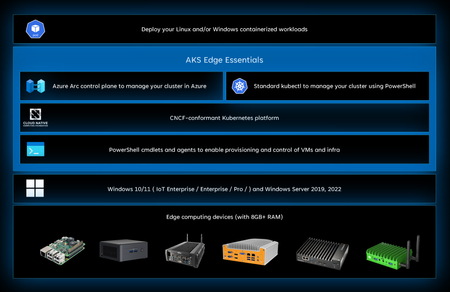
[Note: This post was revised on November 26, 2024. The change was in the EFLOW section due to product direction changes.] Hello, Mike Bazarewsky writing again, now on our shiny new ISV blog! My topic today is on a product that hasn’t gotten a huge amount of press, but actually brings some really nice capabilities to the table, especially with respect to IoT scenarios as we look to the future with Azure IoT Operations. That product is AKS Edge Essentials, or AKS-EE for short. What did Microsoft have before AKS-EE? AKS-EE is intended to be the “easy button” for running Linux-based and/or Windows-based containers on a Windows host, including a Windows IoT Enterprise host. It’s been possible to run Docker-hosted containers on Windows for a long time, and it’s even been possible to run orchestrators including Kubernetes on Windows for some time now. There’s even formal documentation on how to do so in Microsoft Learn. Meanwhile, in parallel, and specific to IoT use cases, Microsoft offers Azure IoT Edge for Linux on Windows, or EFLOW for short. EFLOW offers the Azure IoT Edge container orchestrator on a Windows host by leveraging a Linux virtual machine. That virtual machine runs a customized deployment of CBL-Mariner, Microsoft’s first-party Linux distribution designed for secure, cloud-focused use cases. As an end-to-end Microsoft offering on a Microsoft platform, EFLOW is updated through Microsoft Update and as such, “plays nice” with the rest of the Windows ecosystem and bringing the benefits of that ecosystem while allowing running targeted Linux containers to run with a limited amount of “ceremony”. What does AKS-EE bring to the table? Taking this information all into account, it’s reasonable to ask “What are the gaps? Why would it make sense to bring another product into the space?” The answer is two-fold: For some ISVs, particularly those coming from traditional development models (e.g. IoT developers, web service developers), the move to “cloud native” technologies such as containers is a substantial shift on its own, before worrying about deployment and management of an orchestrator. However, an orchestrator is still something those ISVs need to be able to get to scalability and observability as they work through their journey of “modernization” around containers. EFLOW works very, very well for its intended target, which is Azure IoT Edge. However, that is a specialized use case that does not generalize well to general application workloads. There is a hidden point here as well. Windows containers are a popular option in many organizations, but Linux containers are more common. At the same time, many enterprises (and thus, ISV customers) prefer the management, hardware support, and long-term OS support paths that Windows offers. Although through technologies such as Windows container hosting, Windows Subsystem for Linux, and Hyper-V allow for running Linux containers on a Windows host, they have different levels of complexity and management overhead, and in some situations, they are not practical. The end result of all of this is that there is a need in the marketplace for a low-impact, easily-deployed, easily-updated container hosting solution for Linux containers on Windows hosts that supports orchestration. This is especially true as we look at a solution like Azure IoT Operations, which is the next-generation, Kubernetes-centric Azure IoT platform, but is also true for customers looking to move from the simplistic orchestration offered by the EFLOW offering to the more sophisticated orchestration offered by Kubernetes. Besides bringing that to the table, AKS-EE builds on top of the standard k3s or k8s implementations, which means that popular Kubernetes management tools such as k9s can be used. It can be Azure Arc enabled, allowing centralized management of the solution in the Azure Portal, Azure PowerShell, or Azure CLI. Azure Arc supports this through an outgoing connection from the cluster to the Azure infrastructure, which means it’s possible to remotely manage the environment, including deploying workloads, collecting telemetry and metrics, and so on, without needing incoming access to the host or the cluster. And, because it’s possible to manage Windows IoT Enterprise using Azure Arc, even the host can be connected to remotely, with centrally managed telemetry and updates (including AKS-EE through Microsoft Update). This means that it’s possible to have an end-to-end centrally managed solution across a fleet of deployment locations, and it means an ISV can offer “management as a service”. An IoT ISV can even offer packaged hardware offerings with Windows IoT Enterprise, AKS-EE, and their workload, all centrally managed through Azure Arc, which is an extremely compelling and powerful concept! What if I am an IoT Edge user using EFLOW today? As you might be able to determine from the way I’ve presented AKS-EE, one possible way to think about AKS-EE is as a direct replacement for EFLOW in IoT Edge scenarios. If you're looking at moving from EFLOW to a Kubernetes-based solution, AKS-EE is a great option to explore! Conclusion Hopefully, this short post gives you a better understanding of the “why” of AKS-EE as an offering and how it relates to some other offerings in the Microsoft space. If you’re looking to evaluate AKS-EE, the next step would be to review the Quickstart guide to get started! Looking forward, if you are interested in production AKS-EE architecture, FastTrack ISV and FastTrack for Azure (Mainstream) have worked with multiple AKS-EE customers at this point, from single host deployments to multi-host scale-out deployments, including leveraging both the Linux and the Windows node capabilities of AKS-EE and leveraging the preview GPU support in the product. Take a look at those sites to learn more about how we can help you with derisking your AKS-EE deployment, or help you decide if AKS-EE is in fact the right tool for you!2.2KViews3likes0CommentsDeploy Kaito on AKS using Terraform
The Kubernetes AI toolchain operator (Kaito) is a Kubernetes operator that simplifies the experience of running OSS AI models like Falcon and Llama2 on your AKS cluster. You can deploy Kaito on your AKS cluster as a managed add-on for Azure Kubernetes Service (AKS). The Kubernetes AI toolchain operator (Kaito) uses Karpenter to automatically provision the necessary GPU nodes based on a specification provided in the Workspace custom resource definition (CRD) and sets up the inference server as an endpoint for your AI models. This add-on reduces onboarding time and allows you to focus on AI model usage and development rather than infrastructure setup. In this project, I will show you how to: Deploy the Kubernetes AI Toolchain Operator (Kaito) and a Workspace on Azure Kubernetes Service (AKS) using Terraform. Utilize Kaito to create an AKS-hosted inference environment for the Falcon 7B Instruct model. Develop a chat application using Python and Chainlit that interacts with the inference endpoint exposed by the AKS-hosted model. By following this guide, you will be able to easily set up and use the powerful capabilities of Kaito, Python, and Chainlit to enhance your AI model deployment and create dynamic chat applications. For more information on Kaito, see the following resources: Kubernetes AI Toolchain Operator (Kaito) Deploy an AI model on Azure Kubernetes Service (AKS) with the AI toolchain operator Intelligent Apps on AKS Ep02: Bring Your Own AI Models to Intelligent Apps on AKS with Kaito Open Source Models on AKS with Kaito The companion code for this article can be found in this GitHub repository. NOTE This article provides information on the Kubernetes AI Toolchain (Kaito) operator, which is currently in the early stages of development and undergoing frequent updates. Please note that the content of this article is applicable to Kaito version 0.2.0. It is advised to regularly check for the latest updates and changes in subsequent versions of Kaito. NOTE You can find the architecture.vsdx file used for the diagram under the visio folder. Prerequisites An active Azure subscription. If you don't have one, create a free Azure account before you begin. Visual Studio Code installed on one of the supported platforms along with the HashiCorp Terraform. Azure CLI version 2.59.0 or later installed. To install or upgrade, see Install Azure CLI. aks-preview Azure CLI extension of version 2.0.0b8 or later installed Terraform v1.7.5 or later. The deployment must be started by a user who has sufficient permissions to assign roles, such as a User Access Administrator or Owner . Your Azure account also needs Microsoft.Resources/deployments/write permissions at the subscription level. Architecture The following diagram shows the architecture and network topology deployed by the sample: This project provides a set of Terraform modules to deploy the following resources: Azure Kubernetes Service: A public or private Azure Kubernetes Service(AKS) cluster composed of a: A system node pool in a dedicated subnet. The default node pool hosts only critical system pods and services. The worker nodes have node taint which prevents application pods from beings scheduled on this node pool. A user node pool hosting user workloads and artifacts in a dedicated subnet. User-defined Managed Identity: a user-defined managed identity used by the AKS cluster to create additional resources like load balancers and managed disks in Azure. Azure Virtual Machine: Terraform modules can optionally create a jump-box virtual machine to manage the private AKS cluster. Azure Bastion Host: a separate Azure Bastion is deployed in the AKS cluster virtual network to provide SSH connectivity to both agent nodes and virtual machines. Azure NAT Gateway: a bring-your-own (BYO) Azure NAT Gateway to manage outbound connections initiated by AKS-hosted workloads. The NAT Gateway is associated to the SystemSubnet , UserSubnet , and PodSubnet subnets. The outboundType property of the cluster is set to userAssignedNatGateway to specify that a BYO NAT Gateway is used for outbound connections. NOTE: you can update the outboundType after cluster creation and this will deploy or remove resources as required to put the cluster into the new egress configuration. For more information, see Updating outboundType after cluster creation. Azure Storage Account: this storage account is used to store the boot diagnostics logs of both the service provider and service consumer virtual machines. Boot Diagnostics is a debugging feature that allows you to view console output and screenshots to diagnose virtual machine status. Azure Container Registry: an Azure Container Registry (ACR) to build, store, and manage container images and artifacts in a private registry for all container deployments. Azure Key Vault: an Azure Key Vault used to store secrets, certificates, and keys that can be mounted as files by pods using Azure Key Vault Provider for Secrets Store CSI Driver. For more information, see Use the Azure Key Vault Provider for Secrets Store CSI Driver in an AKS cluster and Provide an identity to access the Azure Key Vault Provider for Secrets Store CSI Driver. Azure Private Endpoints: an Azure Private Endpoint is created for each of the following resources: Azure Container Registry Azure Key Vault Azure Storage Account API Server when deploying a private AKS cluster. Azure Private DNDS Zones: an Azure Private DNS Zone is created for each of the following resources: Azure Container Registry Azure Key Vault Azure Storage Account API Server when deploying a private AKS cluster. Azure Network Security Group: subnets hosting virtual machines and Azure Bastion Hosts are protected by Azure Network Security Groups that are used to filter inbound and outbound traffic. Azure Log Analytics Workspace: a centralized Azure Log Analytics workspace is used to collect the diagnostics logs and metrics from all the Azure resources: Azure Kubernetes Service cluster Azure Key Vault Azure Network Security Group Azure Container Registry Azure Storage Account Azure jump-box virtual machine Azure Monitor workspace: An Azure Monitor workspace is a unique environment for data collected by Azure Monitor. Each workspace has its own data repository, configuration, and permissions. Log Analytics workspaces contain logs and metrics data from multiple Azure resources, whereas Azure Monitor workspaces currently contain only metrics related to Prometheus. Azure Monitor managed service for Prometheus allows you to collect and analyze metrics at scale using a Prometheus-compatible monitoring solution, based on the Prometheus. This fully managed service allows you to use the Prometheus query language (PromQL) to analyze and alert on the performance of monitored infrastructure and workloads without having to operate the underlying infrastructure. The primary method for visualizing Prometheus metrics is Azure Managed Grafana. You can connect your Azure Monitor workspace to an Azure Managed Grafana to visualize Prometheus metrics using a set of built-in and custom Grafana dashboards. Azure Managed Grafana: an Azure Managed Grafana instance used to visualize the Prometheus metrics generated by the Azure Kubernetes Service(AKS) cluster deployed by the Bicep modules. Azure Managed Grafana is a fully managed service for analytics and monitoring solutions. It's supported by Grafana Enterprise, which provides extensible data visualizations. This managed service allows to quickly and easily deploy Grafana dashboards with built-in high availability and control access with Azure security. NGINX Ingress Controller: this sample compares the managed and unmanaged NGINX Ingress Controller. While the managed version is installed using the Application routing add-on, the unmanaged version is deployed using the Helm Terraform Provider. You can use the Helm provider to deploy software packages in Kubernetes. The provider needs to be configured with the proper credentials before it can be used. Cert-Manager: the cert-manager package and Let's Encrypt certificate authority are used to issue a TLS/SSL certificate to the chat applications. Prometheus: the AKS cluster is configured to collect metrics to the Azure Monitor workspace and Azure Managed Grafana. Nonetheless, the kube-prometheus-stack Helm chart is used to install Prometheus and Grafana on the AKS cluster. Kaito Workspace: a Kaito workspace is used to create a GPU node and the Falcon 7B Instruct model. Workload namespace and service account: the Kubectl Terraform Provider and Kubernetes Terraform Provider are used to create the namespace and service account used by the chat applications. Azure Monitor ConfigMaps for Azure Monitor managed service for Prometheus and cert-manager Cluster Issuer are deployed using the Kubectl Terraform Provider and Kubernetes Terraform Provider.` The architecture of the kaito-chat application can be seen in the image below. The application calls the inference endpoint created by the Kaito workspace for the Falcon-7B-Instruct model. Kaito The Kubernetes AI toolchain operator (Kaito) is a managed add-on for AKS that simplifies the experience of running OSS AI models on your AKS clusters. The AI toolchain operator automatically provisions the necessary GPU nodes and sets up the associated inference server as an endpoint server to your AI models. Using this add-on reduces your onboarding time and enables you to focus on AI model usage and development rather than infrastructure setup. Key Features Container Image Management: Kaito allows you to manage large language models using container images. It provides an HTTP server to perform inference calls using the model library. GPU Hardware Configuration: Kaito eliminates the need for manual tuning of deployment parameters to fit GPU hardware. It provides preset configurations that are automatically applied based on the model requirements. Auto-provisioning of GPU Nodes: Kaito automatically provisions GPU nodes based on the requirements of your models. This ensures that your AI inference workloads have the necessary resources to run efficiently. Integration with Microsoft Container Registry: If the license allows, Kaito can host large language model images in the public Microsoft Container Registry (MCR). This simplifies the process of accessing and deploying the models. Architecture Overview Kaito follows the classic Kubernetes Custom Resource Definition (CRD)/controller design pattern. The user manages a workspace custom resource that describes the GPU requirements and the inference specification. Kaito controllers automate the deployment by reconciling the workspace custom resource. The major components of Kaito include: Workspace Controller: This controller reconciles the workspace custom resource, creates machine custom resources to trigger node auto-provisioning, and creates the inference workload (deployment or statefulset) based on the model preset configurations. Node Provisioner Controller: This controller, named gpu-provisioner in the Kaito Helm chart, interacts with the workspace controller using the machine CRD from Karpenter. It integrates with Azure Kubernetes Service (AKS) APIs to add new GPU nodes to the AKS cluster. Note that the gpu-provisioner is an open-source component maintained in the Kaito repository and can be replaced by other controllers supporting Karpenter-core APIs. Using Kaito greatly simplifies the workflow of onboarding large AI inference models into Kubernetes, allowing you to focus on AI model usage and development without the hassle of infrastructure setup. Benefits There are some significant benefits of running open source LLMs with Kaito. Some advantages include: Automated GPU node provisioning and configuration: Kaito will automatically provision and configure GPU nodes for you. This can help reduce the operational burden of managing GPU nodes, configuring them for Kubernetes, and tuning model deployment parameters to fit GPU profiles. Reduced cost: Kaito can help you save money by splitting inferencing across lower end GPU nodes which may also be more readily available and cost less than high-end GPU nodes. Support for popular open-source LLMs: Kaito offers preset configurations for popular open-source LLMs. This can help you deploy and manage open-source LLMs on AKS and integrate them with your intelligent applications. Fine-grained control: You can have full control over data security and privacy, model development and configuration transparency, and the ability to fine-tune the model to fit your specific use case. Network and data security: You can ensure these models are ring-fenced within your organization's network and/or ensure the data never leaves the Kubernetes cluster. Models At the time of this writing, Kaito supports the following models. Llama 2 Meta released Llama 2, a set of pretrained and refined LLMs, along with Llama 2-Chat, a version of Llama 2. These models are scalable up to 70 billion parameters. It was discovered after extensive testing on safety and helpfulness-focused benchmarks that Llama 2-Chat models perform better than current open-source models in most cases. Human evaluations have shown that they align well with several closed-source models. The researchers have even taken a few steps to guarantee the security of these models. This includes annotating data, especially for safety, conducting red-teaming exercises, fine-tuning models with an emphasis on safety issues, and iteratively and continuously reviewing the models. Variants of Llama 2 with 7 billion, 13 billion, and 70 billion parameters have also been released. Llama 2-Chat, optimized for dialogue scenarios, has also been released in variants with the same parameter scales. For more information, see the following resources: Llama 2: Open Foundation and Fine-Tuned Chat Models Llama 2 Project Falcon Researchers from Technology Innovation Institute, Abu Dhabi introduced the Falcon series, which includes models with 7 billion, 40 billion, and 180 billion parameters. These models, which are intended to be causal decoder-only models, were trained on a high-quality, varied corpus that was mostly obtained from online data. Falcon-180B, the largest model in the series, is the only publicly available pretraining run ever, having been trained on a dataset of more than 3.5 trillion text tokens. The researchers discovered that Falcon-180B shows great advancements over other models, including PaLM or Chinchilla. It outperforms models that are being developed concurrently, such as LLaMA 2 or Inflection-1. Falcon-180B achieves performance close to PaLM-2-Large, which is noteworthy given its lower pretraining and inference costs. With this ranking, Falcon-180B joins GPT-4 and PaLM-2-Large as the leading language models in the world. For more information, see the following resources: The Falcon Series of Open Language Models Falcon-40B-Instruct Falcon-180B Falcon-7B Falcon-7B-Instruct Mistral Mistral 7B v0.1 is a cutting-edge 7-billion-parameter language model that has been developed for remarkable effectiveness and performance. Mistral 7B breaks all previous records, outperforming Llama 2 13B in every benchmark and even Llama 1 34B in crucial domains like logic, math, and coding. State-of-the-art methods like grouped-query attention (GQA) have been used to accelerate inference and sliding window attention (SWA) to efficiently handle sequences with different lengths while reducing computing overhead. A customized version, Mistral 7B — Instruct, has also been provided and optimized to perform exceptionally well in activities requiring following instructions. For more information, see the following resources: Mistral-7B-Instruct Mistral-7B Phi-2 Microsoft introduced Phi-2, which is a Transformer model with 2.7 billion parameters. It was trained using a combination of data sources similar to Phi-1.5. It also integrates a new data source, which consists of NLP synthetic texts and filtered websites that are considered instructional and safe. Examining Phi-2 against benchmarks measuring logical thinking, language comprehension, and common sense showed that it performed almost at the state-of-the-art level among models with less than 13 billion parameters. For more information, see the following resources: Phi-2 Chainlit Chainlit is an open-source Python package that is specifically designed to create user interfaces (UIs) for AI applications. It simplifies the process of building interactive chats and interfaces, making developing AI-powered applications faster and more efficient. While Streamlit is a general-purpose UI library, Chainlit is purpose-built for AI applications and seamlessly integrates with other AI technologies such as LangChain, LlamaIndex, and LangFlow. With Chainlit, developers can easily create intuitive UIs for their AI models, including ChatGPT-like applications. It provides a user-friendly interface for users to interact with AI models, enabling conversational experiences and information retrieval. Chainlit also offers unique features, such as the ability to display the Chain of Thought, which allows users to explore the reasoning process directly within the UI. This feature enhances transparency and enables users to understand how the AI arrives at its responses or recommendations. For more information, see the following resources: Documentation Examples API Reference Cookbook Deploy Kaito using Azure CLI As stated in the documentation, enabling the Kubernetes AI toolchain operator add-on in AKS creates a managed identity named ai-toolchain-operator-<aks-cluster-name> . This managed identity is utilized by the GPU provisioner controller to provision GPU node pools within the managed AKS cluster via Karpenter. To ensure proper functionality, manual configuration of the necessary permissions is required. Follow the steps outlined in the following sections to successfully install Kaito through the AKS add-on. Register the AIToolchainOperatorPreview feature flag using the az feature register command. It takes a few minutes for the registration to complete. az feature register --namespace "Microsoft.ContainerService" --name "AIToolchainOperatorPreview" Verify the registration using the az feature show command. az feature show --namespace "Microsoft.ContainerService" --name "AIToolchainOperatorPreview" Create an Azure resource group using the az group create command. az group create --name ${AZURE_RESOURCE_GROUP} --location $AZURE_LOCATION Create an AKS cluster with the AI toolchain operator add-on enabled using the az aks create command with the --enable-ai-toolchain-operator and --enable-oidc-issuer flags. az aks create --location $AZURE_LOCATION \ --resource-group $AZURE_RESOURCE_GROUP \ --name ${CLUSTER_NAME} \ --enable-oidc-issuer \ --enable-ai-toolchain-operator AI toolchain operator enablement requires the enablement of OIDC issuer. On an existing AKS cluster, you can enable the AI toolchain operator add-on using the az aks update command as follows: az aks update --name ${CLUSTER_NAME} \ --resource-group ${AZURE_RESOURCE_GROUP} \ --enable-oidc-issuer \ --enable-ai-toolchain-operator Configure kubectl to connect to your cluster using the az aks get-credentials command. az aks get-credentials --resource-group $AZURE_RESOURCE_GROUP --name $CLUSTER_NAME Export environment variables for the MC resource group, principal ID identity, and Kaito identity using the following commands: export MC_RESOURCE_GROUP=$(az aks show --resource-group $AZURE_RESOURCE_GROUP \ --name $CLUSTER_NAME \ --query nodeResourceGroup \ -o tsv) export PRINCIPAL_ID=$(az identity show --name "ai-toolchain-operator-$CLUSTER_NAME" \ --resource-group $MC_RESOURCE_GROUP \ --query 'principalId' \ -o tsv) export KAITO_IDENTITY_NAME="ai-toolchain-operator-${CLUSTER_NAME,,}" Get the AKS OIDC Issuer URL and export it as an environment variable: export AKS_OIDC_ISSUER=$(az aks show --resource-group "${AZURE_RESOURCE_GROUP}" \ --name "${CLUSTER_NAME}" \ --query "oidcIssuerProfile.issuerUrl" \ -o tsv) Create a new role assignment for the service principal using the az role assignment create command. The Kaito user-assigned managed identity needs the Contributor role on the resource group containing the AKS cluster. az role assignment create --role "Contributor" \ --assignee $PRINCIPAL_ID \ --scope "/subscriptions/$AZURE_SUBSCRIPTION_ID/resourcegroups/$AZURE_RESOURCE_GROUP" Create a federated identity credential between the KAITO managed identity and the service account used by KAITO controllers using the az identity federated-credential create command. az identity federated-credential create --name "Kaito-federated-identity" \ --identity-name "${KAITO_IDENTITY_NAME}" \ -g "${MC_RESOURCE_GROUP}" \ --issuer "${AKS_OIDC_ISSUER}" \ --subject system:serviceaccount:"kube-system:Kaito-gpu-provisioner" \ --audience api://AzureADTokenExchange Verify that the deployment is running using the kubectl get command: kubectl get deployment -n kube-system | grep Kaito Deploy the Falcon 7B-instruct model from the Kaito model repository using the kubectl apply command. kubectl apply -f https://raw.githubusercontent.com/Azure/Kaito/main/examples/Kaito_workspace_falcon_7b-instruct.yaml Track the live resource changes in your workspace using the kubectl get command. kubectl get workspace workspace-falcon-7b-instruct -w Check your service and get the service IP address of the inference endpoint using the kubectl get svc command. export SERVICE_IP=$(kubectl get svc workspace-falcon-7b-instruct -o jsonpath='{.spec.clusterIP}') Run the Falcon 7B-instruct model with a sample input of your choice using the following curl command: kubectl run -it --rm -n $namespace --restart=Never curl --image=curlimages/curl -- curl -X POST http://$serviceIp/chat -H "accept: application/json" -H "Content-Type: application/json" -d "{\"prompt\":\"Tell me about Tuscany and its cities.\", \"return_full_text\": false, \"generate_kwargs\": {\"max_length\":4096}}" NOTE As you track the live resource changes in your workspace, the machine readiness can take up to 10 minutes, and workspace readiness up to 20 minutes. Deploy Kaito using Terraform At the time of this writing, the azurerm_kubernetes_cluster resource in the AzureRM Terraform provider for Azure does not have a property to enable the add-on and install the Kubernetes AI toolchain operator (Kaito) on your AKS cluster. However, you can use the AzAPI Provider to deploy Kaito on your AKS cluster. The AzAPI provider is a thin layer on top of the Azure ARM REST APIs. It complements the AzureRM provider by enabling the management of Azure resources that are not yet or may never be supported in the AzureRM provider, such as private/public preview services and features. The following resources replicate the actions performed by the Azure CLI commands mentioned in the previous section. data "azurerm_resource_group" "node_resource_group" { count = var.Kaito_enabled ? 1 : 0 name = module.aks_cluster.node_resource_group depends_on = [module.node_pool] } resource "azapi_update_resource" "enable_Kaito" { count = var.Kaito_enabled ? 1 : 0 type = "Microsoft.ContainerService/managedClusters@2024-02-02-preview" resource_id = module.aks_cluster.id body = jsonencode({ properties = { aiToolchainOperatorProfile = { enabled = var.Kaito_enabled } } }) depends_on = [module.node_pool] } data "azurerm_user_assigned_identity" "Kaito_identity" { count = var.Kaito_enabled ? 1 : 0 name = local.KAITO_IDENTITY_NAME resource_group_name = data.azurerm_resource_group.node_resource_group.0.name depends_on = [azapi_update_resource.enable_Kaito] } resource "azurerm_federated_identity_credential" "Kaito_federated_identity_credential" { count = var.Kaito_enabled ? 1 : 0 name = "Kaito-federated-identity" resource_group_name = data.azurerm_resource_group.node_resource_group.0.name audience = ["api://AzureADTokenExchange"] issuer = module.aks_cluster.oidc_issuer_url parent_id = data.azurerm_user_assigned_identity.Kaito_identity.0.id subject = "system:serviceaccount:kube-system:Kaito-gpu-provisioner" depends_on = [azapi_update_resource.enable_Kaito, module.aks_cluster, data.azurerm_user_assigned_identity.Kaito_identity] } resource "azurerm_role_assignment" "Kaito_identity_contributor_assignment" { count = var.Kaito_enabled ? 1 : 0 scope = azurerm_resource_group.rg.id role_definition_name = "Contributor" principal_id = data.azurerm_user_assigned_identity.Kaito_identity.0.principal_id skip_service_principal_aad_check = true depends_on = [azurerm_federated_identity_credential.Kaito_federated_identity_credential] } Here is a description of the code above: azurerm_resource_group.node_resource_group : Retrieves the properties of the node resource group in the current AKS cluster. azapi_update_resource.enable_Kaito : Enables the Kaito add-on. This operation installs the Kaito operator on the AKS cluster and creates the related user-assigned managed identity in the node resource group. azurerm_user_assigned_identity.Kaito_identity : Retrieves the properties of the Kaito user-assigned managed identity located in the node resource group. azurerm_federated_identity_credential.Kaito_federated_identity_credential : Creates the federated identity credential between the Kaito managed identity and the service account used by the Kaito controllers in the kube-system namespace, particularly the Kaito-gpu-provisioner controller. azurerm_role_assignment.Kaito_identity_contributor_assignment : Assigns the Contributor role to the Kaito managed identity with the AKS resource group as the scope. Create the Kaito Workspace using Terraform To create the Kaito workspace, you can utilize the kubectl_manifest resource from the Kubectl Provider in the following manner. resource "kubectl_manifest" "Kaito_workspace" { count = var.Kaito_enabled ? 1 : 0 yaml_body = <<-EOF apiVersion: Kaito.sh/v1alpha1 kind: Workspace metadata: name: workspace-falcon-7b-instruct namespace: ${var.namespace} annotations: Kaito.sh/enablelb: "False" resource: count: 1 instanceType: "${var.instance_type}" labelSelector: matchLabels: apps: falcon-7b-instruct inference: preset: name: "falcon-7b-instruct" EOF depends_on = [kubectl_manifest.service_account] } To access the OpenAPI schema of the Workspace custom resource definition, execute the following command: kubectl get crd workspaces.Kaito.sh -o jsonpath="{.spec.versions[0].schema}" | jq -r Kaito Workspace Inference Endpoint Kaito creates a Kubernetes service with the same name and inside the same namespace of the workspace. This service exposes an inference endpoint that AI applications can use to call the API exposed by the AKS-hosted model. Here is an example of an inference endpoint for a Falcon model from the Kaito documentation: curl -X POST \ -H "accept: application/json" \ -H "Content-Type: application/json" \ -d '{ "prompt":"YOUR_PROMPT_HERE", "return_full_text": false, "clean_up_tokenization_spaces": false, "prefix": null, "handle_long_generation": null, "generate_kwargs": { "max_length":200, "min_length":0, "do_sample":true, "early_stopping":false, "num_beams":1, "num_beam_groups":1, "diversity_penalty":0.0, "temperature":1.0, "top_k":10, "top_p":1, "typical_p":1, "repetition_penalty":1, "length_penalty":1, "no_repeat_ngram_size":0, "encoder_no_repeat_ngram_size":0, "bad_words_ids":null, "num_return_sequences":1, "output_scores":false, "return_dict_in_generate":false, "forced_bos_token_id":null, "forced_eos_token_id":null, "remove_invalid_values":null } }' \ "http://<SERVICE>:80/chat" Here are the parameters you can use in a call: prompt : The initial text provided by the user, from which the model will continue generating text. return_full_text : If False only generated text is returned, else full text is returned. clean_up_tokenization_spaces : True/False, determines whether to remove potential extra spaces in the text output. prefix : Prefix added to the prompt. handle_long_generation : Provides strategies to address generations beyond the model's maximum length capacity. max_length : The maximum total number of tokens in the generated text. min_length : The minimum total number of tokens that should be generated. do_sample : If True, sampling methods will be used for text generation, which can introduce randomness and variation. early_stopping : If True, the generation will stop early if certain conditions are met, for example, when a satisfactory number of candidates have been found in beam search. num_beams : The number of beams to be used in beam search. More beams can lead to better results but are more computationally expensive. num_beam_groups : Divides the number of beams into groups to promote diversity in the generated results. diversity_penalty : Penalizes the score of tokens that make the current generation too similar to other groups, encouraging diverse outputs. temperature : Controls the randomness of the output by scaling the logits before sampling. top_k : Restricts sampling to the k most likely next tokens. top_p : Uses nucleus sampling to restrict the sampling pool to tokens comprising the top p probability mass. typical_p : Adjusts the probability distribution to favor tokens that are "typically" likely, given the context. repetition_penalty : Penalizes tokens that have been generated previously, aiming to reduce repetition. length_penalty : Modifies scores based on sequence length to encourage shorter or longer outputs. no_repeat_ngram_size : Prevents the generation of any n-gram more than once. encoder_no_repeat_ngram_size : Similar to no_repeat_ngram_size but applies to the encoder part of encoder-decoder models. bad_words_ids : A list of token ids that should not be generated. num_return_sequences : The number of different sequences to generate. output_scores : Whether to output the prediction scores. return_dict_in_generate : If True, the method will return a dictionary containing additional information. pad_token_id : The token ID used for padding sequences to the same length. eos_token_id : The token ID that signifies the end of a sequence. forced_bos_token_id : The token ID that is forcibly used as the beginning of a sequence token. forced_eos_token_id : The token ID that is forcibly used as the end of a sequence when max_length is reached. remove_invalid_values : If True, filters out invalid values like NaNs or infs from model outputs to prevent crashes. Deploy the Terraform modules Before deploying the Terraform modules in the project, specify a value for the following variables in the terraform.tfvars variable definitions file. name_prefix = "Anubi" location = "westeurope" domain = "babosbird.com" kubernetes_version = "1.29.2" network_plugin = "azure" network_plugin_mode = "overlay" network_policy = "azure" system_node_pool_vm_size = "Standard_D4ads_v5" user_node_pool_vm_size = "Standard_D4ads_v5" ssh_public_key = "ssh-rsa XXXXXXXXXXXXXXXXXXXXXXXXXXXXX" vm_enabled = true admin_group_object_ids = ["XXXXXXXX-XXXX-XXXX-XXXX-XXXXXXXXXXXX"] web_app_routing_enabled = true dns_zone_name = "babosbird.com" dns_zone_resource_group_name = "DnsResourceGroup" namespace = "Kaito-demo" service_account_name = "Kaito-sa" grafana_admin_user_object_id = "XXXXXXXX-XXXX-XXXX-XXXX-XXXXXXXXXXXX" vnet_integration_enabled = true openai_enabled = false Kaito_enabled = true instance_type = "Standard_NC12s_v3" This is the description of the parameters: name_prefix : Specifies a prefix for all the Azure resources. location : Specifies the region (e.g., westeurope) where deploying the Azure resources. domain : Specifies the domain part (e.g., subdomain.domain) of the hostname of the ingress object used to expose the chatbot via the NGINX Ingress Controller. kubernetes_version : Specifies the Kubernetes version installed on the AKS cluster. network_plugin : Specifies the network plugin of the AKS cluster. network_plugin_mode : Specifies the network plugin mode used for building the Kubernetes network. Possible value is overlay. network_policy : Specifies the network policy of the AKS cluster. Currently supported values are calico, azure and cilium. system_node_pool_vm_size : Specifies the virtual machine size of the system-mode node pool. user_node_pool_vm_size : Specifies the virtual machine size of the user-mode node pool. ssh_public_key : Specifies the SSH public key used for the AKS nodes and jumpbox virtual machine. vm_enabled : a boleean value that specifies whether deploying or not a jumpbox virtual machine in the same virtual network of the AKS cluster. admin_group_object_ids : when deploying an AKS cluster with Microsoft Entra ID and Azure RBAC integration, this array parameter contains the list of Microsoft Entra ID group object IDs that will have the admin role of the cluster. web_app_routing_enabled : Specifies whether the application routing add-on is enabled. When enabled, this add-on installs a managed instance of the NGINX Ingress Controller on the AKS cluster. dns_zone_name : Specifies the name of the Azure Public DNS zone used by the application routing add-on. dns_zone_resource_group_name : Specifies the resource group name of the Azure Public DNS zone used by the application routing add-on. namespace : Specifies the namespace of the workload application. service_account_name : Specifies the name of the service account of the workload application. grafana_admin_user_object_id : Specifies the object id of the Azure Managed Grafana administrator user account. vnet_integration_enabled : Specifies whether API Server VNet Integration is enabled. openai_enabled : Specifies whether to deploy Azure OpenAI Service or not. This sample does not require the deployment of Azure OpenAI Service. Kaito_enabled : Specifies whether to deploy the Kubernetes AI Toolchain Operator (Kaito). instance_type : Specifies the GPU node SKU (e.g. Standard_NC12s_v3 ) to use in the Kaito workspace. NOTE We suggest reading sensitive configuration data such as passwords or SSH keys from a pre-existing Azure Key Vault resource. For more information, see Referencing Azure Key Vault secrets in Terraform. Before proceeding, also make sure to run the register-preview-features.sh Bash script in the terraform folder to register any preview feature used by the AKS cluster. GPU VM-family vCPU quotas Before installing the Terraform module, make sure to have enough vCPU quotas in the selected region for the GPU VM family specified in the instance_type parameter. In case you don't have enough quota, follow the instructions described in Increase VM-family vCPU quotas. The steps for requesting a quota increase vary based on whether the quota is adjustable or non-adjustable. Adjustable quotas: Quotas for which you can request a quota increase fall into this category. Each subscription has a default quota value for each VM family and region. You can request an increase for an adjustable quota from the Azure Portal My quotas page, providing an amount or usage percentage for a given VM family in a specified region and submitting it directly. This is the quickest way to increase quotas. Non-adjustable quotas: These are quotas which have a hard limit, usually determined by the scope of the subscription. To make changes, you must submit a support request, and the Azure support team will help provide solutions. If you don't have enough vCPU quota for the selected instance type, the Kaito workspace creation will fail. You can check the error description using the Azure Monitor Activity Log, as shown in the following figure: To read the logs of the Kaito GPU provisioner pod in the kube-system namespace, you can use the following command. kubectl logs -n kube-system $(kubectl get pods -n kube-system | grep Kaito-gpu-provisioner | awk '{print $1; exit}') In case you exceeded the quota for the selected instance type, you could see an error message as follows: {"level":"INFO","time":"2024-04-04T08:42:40.398Z","logger":"controller","message":"Create","machine":{"name":"ws560b34aa2"}} {"level":"INFO","time":"2024-04-04T08:42:40.398Z","logger":"controller","message":"Instance.Create","machine":{"name":"ws560b34aa2"}} {"level":"INFO","time":"2024-04-04T08:42:40.398Z","logger":"controller","message":"createAgentPool","agentpool":"ws560b34aa2"} {"level":"ERROR","time":"2024-04-04T08:42:48.010Z","logger":"controller","message":"Reconciler error","controller":"machine.lifecycle","controllerGroup":"karpenter.sh","controllerKind":"Machine","Machine":{"name":"ws560b34aa2"},"namespace":"","name":"ws560b34aa2","reconcileID":"b6f56170-ae31-4b05-80a6-019d3f716acc","error":"creating machine, creating instance, agentPool.BeginCreateOrUpdate for \"ws560b34aa2\" failed: PUT https://management.azure.com/subscriptions/1a45a694-af23-4650-9774-89a981c462f6/resourceGroups/AtumRG/providers/Microsoft.ContainerService/managedClusters/AtumAks/agentPools/ws560b34aa2\n--------------------------------------------------------------------------------\nRESPONSE 400: 400 Bad Request\nERROR CODE: PreconditionFailed\n--------------------------------------------------------------------------------\n{\n \"code\": \"PreconditionFailed\",\n \"details\": null,\n \"message\": \"Provisioning of resource(s) for Agent Pool ws560b34aa2 failed. Error: {\\n \\\"code\\\": \\\"InvalidTemplateDeployment\\\",\\n \\\"message\\\": \\\"The template deployment '490396b4-1191-4768-a421-3b6eda930287' is not valid according to the validation procedure. The tracking id is '1634a570-53d2-4a7f-af13-5ac157edbb9d'. See inner errors for details.\\\",\\n \\\"details\\\": [\\n {\\n \\\"code\\\": \\\"QuotaExceeded\\\",\\n \\\"message\\\": \\\"Operation could not be completed as it results in exceeding approved standardNVSv3Family Cores quota. Additional details - Deployment Model: Resource Manager, Location: eastus, Current Limit: 0, Current Usage: 0, Additional Required: 24, (Minimum) New Limit Required: 24. Submit a request for Quota increase at https://aka.ms/ProdportalCRP/#blade/Microsoft_Azure_Capacity/UsageAndQuota.ReactView/Parameters/%7B%22subscriptionId%22:%221a45a694-af23-4650-9774-89a981c462f6%22,%22command%22:%22openQuotaApprovalBlade%22,%22quotas%22:[%7B%22location%22:%22eastus%22,%22providerId%22:%22Microsoft.Compute%22,%22resourceName%22:%22standardNVSv3Family%22,%22quotaRequest%22:%7B%22properties%22:%7B%22limit%22:24,%22unit%22:%22Count%22,%22name%22:%7B%22value%22:%22standardNVSv3Family%22%7D%7D%7D%7D]%7D by specifying parameters listed in the ‘Details’ section for deployment to succeed. Please read more about quota limits at https://docs.microsoft.com/en-us/azure/azure-supportability/per-vm-quota-requests\\\"\\n }\\n ]\\n }\",\n \"subcode\": \"\"\n}\n--------------------------------------------------------------------------------\n"} Kaito Chat Application The project provides the code of a chat application using Python and Chainlit that interacts with the inference endpoint exposed by the AKS-hosted model. As an alternative, the chat application can be configured to call the REST API of an Azure OpenAI Service. For more information about how to configure the chat application with Azure OpenAI Service, see the following articles: Create an Azure OpenAI, LangChain, ChromaDB, and Chainlit chat app in AKS using Terraform (Azure Samples)(My GitHub)(Tech Community) Deploy an OpenAI, LangChain, ChromaDB, and Chainlit chat app in Azure Container Apps using Terraform (Azure Samples)(My GitHub)(Tech Community) This is the code of the sample application. # Import packages import os import sys import requests import json from openai import AsyncAzureOpenAI import logging import chainlit as cl from azure.identity import DefaultAzureCredential, get_bearer_token_provider from dotenv import load_dotenv from dotenv import dotenv_values # Load environment variables from .env file if os.path.exists(".env"): load_dotenv(override=True) config = dotenv_values(".env") # Read environment variables temperature = float(os.environ.get("TEMPERATURE", 0.9)) top_p = float(os.environ.get("TOP_P", 1)) top_k = float(os.environ.get("TOP_K", 10)) max_length = int(os.environ.get("MAX_LENGTH", 4096)) api_base = os.getenv("AZURE_OPENAI_BASE") api_key = os.getenv("AZURE_OPENAI_KEY") api_type = os.environ.get("AZURE_OPENAI_TYPE", "azure") api_version = os.environ.get("AZURE_OPENAI_VERSION", "2023-12-01-preview") engine = os.getenv("AZURE_OPENAI_DEPLOYMENT") model = os.getenv("AZURE_OPENAI_MODEL") system_content = os.getenv("AZURE_OPENAI_SYSTEM_MESSAGE", "You are a helpful assistant.") max_retries = int(os.getenv("MAX_RETRIES", 5)) timeout = int(os.getenv("TIMEOUT", 30)) debug = os.getenv("DEBUG", "False").lower() in ("true", "1", "t") useLocalLLM = os.getenv("USE_LOCAL_LLM", "False").lower() in ("true", "1", "t") aiEndpoint = os.getenv("AI_ENDPOINT", "") if not useLocalLLM: # Create Token Provider token_provider = get_bearer_token_provider( DefaultAzureCredential(), "https://cognitiveservices.azure.com/.default", ) # Configure OpenAI if api_type == "azure": openai = AsyncAzureOpenAI( api_version=api_version, api_key=api_key, azure_endpoint=api_base, max_retries=max_retries, timeout=timeout, ) else: openai = AsyncAzureOpenAI( api_version=api_version, azure_endpoint=api_base, azure_ad_token_provider=token_provider, max_retries=max_retries, timeout=timeout, ) # Configure a logger logging.basicConfig( stream=sys.stdout, format="[%(asctime)s] {%(filename)s:%(lineno)d} %(levelname)s - %(message)s", level=logging.INFO, ) logger = logging.getLogger(__name__) @cl.on_chat_start async def start_chat(): await cl.Avatar( name="Chatbot", url="https://cdn-icons-png.flaticon.com/512/8649/8649595.png", ).send() await cl.Avatar( name="Error", url="https://cdn-icons-png.flaticon.com/512/8649/8649595.png", ).send() await cl.Avatar( name="You", url="https://media.architecturaldigest.com/photos/5f241de2c850b2a36b415024/master/w_1600%2Cc_limit/Luke-logo.png", ).send() if not useLocalLLM: cl.user_session.set( "message_history", [{"role": "system", "content": system_content}], ) @cl.on_message async def on_message(message: cl.Message): # Create the Chainlit response message msg = cl.Message(content="") if useLocalLLM: payload = { "prompt": f"{message.content} answer:", "return_full_text": False, "clean_up_tokenization_spaces": False, "prefix": None, "handle_long_generation": None, "generate_kwargs": { "max_length": max_length, "min_length": 0, "do_sample": True, "early_stopping": False, "num_beams":1, "num_beam_groups":1, "diversity_penalty":0.0, "temperature": temperature, "top_k": top_k, "top_p": top_p, "typical_p": 1, "repetition_penalty": 1, "length_penalty": 1, "no_repeat_ngram_size":0, "encoder_no_repeat_ngram_size":0, "bad_words_ids": None, "num_return_sequences":1, "output_scores": False, "return_dict_in_generate": False, "forced_bos_token_id": None, "forced_eos_token_id": None, "remove_invalid_values": True } } headers = {"Content-Type": "application/json", "accept": "application/json"} response = requests.request( method="POST", url=aiEndpoint, headers=headers, json=payload ) # convert response.text to json result = json.loads(response.text) result = result["Result"] # remove all double quotes if '"' in result: result = result.replace('"', "") msg.content = result else: message_history = cl.user_session.get("message_history") message_history.append({"role": "user", "content": message.content}) logger.info("Question: [%s]", message.content) async for stream_resp in await openai.chat.completions.create( model=model, messages=message_history, temperature=temperature, stream=True, ): if stream_resp and len(stream_resp.choices) > 0: token = stream_resp.choices[0].delta.content or "" await msg.stream_token(token) if debug: logger.info("Answer: [%s]", msg.content) message_history.append({"role": "assistant", "content": msg.content}) await msg.send() Here's a brief explanation of each variable and related environment variable: temperature : A float value representing the temperature for Create chat completion method of the OpenAI API. It is fetched from the environment variables with a default value of 0.9. top_p : A float value representing the top_p parameter that uses nucleus sampling to restrict the sampling pool to tokens comprising the top p probability mass. top_k : A float value representing the top_k parameter that restricts sampling to the k most likely next tokens. api_base : The base URL for the OpenAI API. api_key : The API key for the OpenAI API. The value of this variable can be null when using a user-assigned managed identity to acquire a security token to access Azure OpenAI. api_type : A string representing the type of the OpenAI API. api_version : A string representing the version of the OpenAI API. engine : The engine used for OpenAI API calls. model : The model used for OpenAI API calls. system_content : The content of the system message used for OpenAI API calls. max_retries : The maximum number of retries for OpenAI API calls. timeout : The timeout in seconds. debug : When debug is equal to true , t , or 1 , the logger writes the chat completion answers. useLocalLLM : the chat application calls the inference endpoint of the local model when the parameter value is set to true. aiEndpoint : the URL of the inference endpoint. The application calls the inference endpoint using the requests.request method when the useLocalLLM environment variable is set to true . You can run the application locally using the following command. The -w flag` indicates auto-reload whenever we make changes live in our application code. chainlit run app.py -w NOTE To locally debug your application, you have two options to expose the AKS-hosted inference endpoint service. You can either use the kubectl port-forward command or utilize an ingress controller to expose the endpoint publicly. Deployment Scripts and YAML manifests You can locate the Dockerfile, Bash scripts, and YAML manifests for deploying the chat application to your AKS cluster in the companion sample under the scripts folder. Conclusions In conclusion, while it is possible to manually create a GPU-enabled agent nodes, deploy, and tune open-source large language models (LLMs) like Falcon, Mistral, or Llama 2 on Azure Kubernetes Service (AKS), using the Kubernetes AI toolchain operator (Kaito) automates these steps for you. Kaito simplifies the experience of running OSS AI models on your AKS clusters by automatically provisioning the necessary GPU nodes and setting up the inference server as an endpoint for your models. By utilizing Kaito, you can reduce the time spent on infrastructure setup and focus more on AI model usage and development. Additionally, Kaito has just been released, and new features are expected to follow, providing even more capabilities for managing and deploying AI models on AKS.5.1KViews4likes0Comments