kubernetes
182 Topics
Building a Trusted Ecosystem for Sovereign Private Cloud: Azure Local validated partner solutions
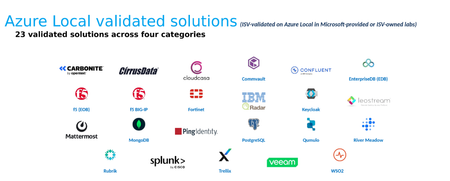
When organizations move critical workloads to Azure Local, the first question usually isn't about the platform. It's about everything that runs on and around it: Will my backup tool work? Can my Security Operations Center (SOC) still see the workloads it needs to monitor? Will my identity provider support authentication if the site loses its cloud connection? The answers can determine how confidently a sovereign or edge deployment moves to production. Customers want to run the independent software vendor (ISV) solutions they already trust, with confidence in how those solutions have been validated for their Azure Local environments. That's why we built the Azure Local Validated ISV Program. Why an ecosystem program, and why now Demand for Sovereign Private Cloud is increasing as organizations look for greater control over where and how their workloads operate. Governments, regulated industries, critical infrastructure providers and telecom operators want cloud-style operations while maintaining control of their data, security, compliance and operational boundaries. Azure Local supports a range of deployment architectures, including connected and disconnected operating models, and hyperconverged, disaggregated and multi-rack configurations. Infrastructure alone, however, does not make a production environment. Customers have invested for years in the tools that run their operations, including monitoring, security, data protection, identity and line-of-business applications. Successful adoption also depends on understanding how existing operational tools integrate with Azure Local and that need is growing now. As more sovereign and regulated workloads move to production on Azure Local, including disconnected and multi-rack deployments, customers need to know before they deploy that their existing tools are supported. That's why we're launching the program at Ignite with a published list of validated solutions and clear validation scope. How we validate We don't treat validation as a logo exercise. Our focus is on technical validation that gives customers greater clarity about supported configurations and integration scenarios. Each partner solution goes through a structured process: Architecture validation: Microsoft and the ISV review the solution architecture for Azure Local, including its deployment pattern, dependencies and integration points. Lab and product validation: Partner solutions undergo testing against defined scenarios and configurations to evaluate their operation on Azure Local. Deployment-specific validation: Validation scope is documented by supported deployment configuration, which may include connected, disconnected operations or multi-rack environments, as applicable. That last point matters. Every validated solution comes with documented information about the capabilities, scenarios and configurations evaluated. We'd rather be precise than broad, because customers make architecture and procurement decisions based on what we publish. Where we are today: 23 validated solutions across four solution categories The solutions are organized into four categories: Category Validated partners Security & Identity f5 BIG-IP, f5 eBPF Observability (EOB), Fortinet, IBM QRadar, Keycloak, Ping Identity, Splunk, Trellix, WSO2 Data Streaming & AI Confluent (Kafka), MongoDB, Qumulo Business Continuity & Migration Carbonite, Cirrus Data, CloudCasa / Catalogic, Commvault, RiverMeadow, Rubrik, Veeam Application Platform & DevOps EnterpriseDB (EDB), Leostream, Mattermost, PostgreSQL A few points stand out: Resiliency where it matters most. Validated backup, disaster recovery, and migration solutions provide customers with additional options for protecting and moving supported workloads. The capabilities available depend on the selected solution and its validated configuration. Identity for connected and disconnected environment: Five identity providers are validated. The five validated identity providers can support local authentication architectures for Azure Local workloads including certain disconnected scenarios where the required identity dependencies are available locally. Security across network and workload environments. F5 and Fortinet offer capabilities for application delivery, firewalling and deep network visibility. F5 EOB, for example, uses extended Berkeley Packet Filter (eBPF) technology to observe traffic in supported workload environments. Trellix provides endpoint security capabilities for supported workloads, subject to validated deployment configurations. Of the four categories, only Business Continuity & Migration provides workload resiliency directly. The other three contribute security, identity, observability, data and application-platform capabilities that support a well-run environment. We describe each category by the role it is validated to support so customers can design with accurate expectations. From validated products to repeatable solutions The next phase of the program goes beyond validating individual products. We're moving toward repeatable customer solutions. Our goal is to develop validated solution patterns that bring together Azure Local and complementary partner technologies for defined customer scenarios, such as a sovereign security operations center (SOC), a resilient manufacturing site, or a disconnected government deployment. The aim is to help customers evaluate solution compatibility and plan production deployments with greater confidence Get involved Customers: Talk to your Microsoft account team about which validated solutions fit your Azure Local deployment and confirm the validation scope for your configuration. Independent software vendors (ISVs): If your solution supports customers operating in sovereign, edge or regulated environments, we'd like to hear from you about joining the validation program. A platform is only as strong as the ecosystem around it. We're grateful to every partner who has invested engineering time to validate on Azure Local, and we're just getting started. Customers looking for help beyond Azure Local platforms or our partner ISV products can also work with global system integrators (GSIs). Your Microsoft account team can share a list of GSIs with specialized Azure Local expertise that offer services across the solution lifecycle, from design, deployment and integration to ongoing operations as a managed services partner. Validation applies to the specific capabilities and deployment configurations documented for each partner solution. Confirm the scope with your Microsoft or partner contact before making architecture or procurement decisions. For more information: Azure local learn page - Validated partner solutions980Views1like1CommentShrinking the trusted computing base for sensitive cloud workloads
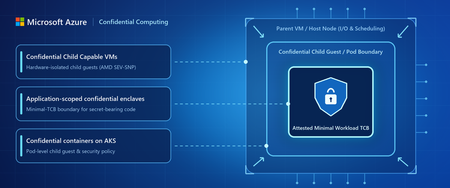
Azure confidential computing is investing across three connected layers to help shrink the workload trusted computing base (TCB): next-generation Confidential Child Capable VMs, confidential enclaves for application-scoped isolation, and support for these next-generation VMs in confidential containers on Azure Kubernetes Service (AKS).
C-ACI: Security Practices for Healthcare and Financial Services
Healthcare and financial services organizations need to put sensitive data to work, whether analyzing patient records, detecting fraud, or running AI applications. Protecting that data means more than encrypting it in storage and during transmission. It also means limiting who and what can access it while an application is processing it. This post explores how confidential containers on Azure Container Instances (C-ACI) help address that challenge, using healthcare and financial services examples to explain security practices, architecture choices, and operational considerations. While this post focuses on healthcare and financial services, the same patterns extend to any industry or application that works with sensitive data or proprietary code, such as government, defense, and manufacturing. As AI companies and enterprises build agents that act autonomously and run code and workflows against sensitive data, confidential computing will be critical to keeping that data, and the code that processes it, protected and verifiable. For Linux workloads that run code they didn't write, such as AI-generated scripts, plug-ins, or third-party tools, enclaves for confidential containers on ACI (preview) let the main application hand that code to a separate confidential environment with no network access of its own. What are confidential containers on Azure Container Instances? C-ACI runs Linux and Windows (preview) containers in a hardware-protected environment without requiring customers to manage the underlying servers. This environment, called a trusted execution environment (TEE), helps protect application code and sensitive data during processing. For customers, this means reducing reliance on the underlying infrastructure and its administrators to keep that data confidential. Execution policies control permitted operations, while attestation provides verifiable evidence before granting access to sensitive information. How confidential containers achieve isolation Traditional containers rely on the host operating system and its administrators for isolation. C-ACI adds a hardware-backed boundary around the container group, reducing reliance on that infrastructure. Three capabilities work together: Hardware-backed isolation. The container group runs in a protected virtual machine using AMD SEV-SNP. This hardware technology encrypts memory and helps prevent the host and hypervisor from inspecting or changing it. Containers in the group share this security boundary. Execution-policy enforcement. A policy defines which container images, commands, and settings may run. Software inside the protected environment enforces these rules. Policies are generated with the Azure CLI confcom extension using az confcom acipolicygen and reviewed against the application’s security requirements. Permissive or debug policies weaken the protection. Attestation before access. Attestation provides hardware-signed evidence of the environment and its execution policy. Microsoft Azure Attestation (MAA) validates this evidence and issues a signed token. For Secure Key Release (SKR), Azure Key Vault Premium or Azure Key Vault Managed HSM checks the workload’s token against the key’s release rules and verifies authorization before releasing the key. Key Vault Standard does not support SKR. In short, hardware protects the environment, policy controls what may run, and attestation provides evidence of its trustworthiness. Attestation-based key release must be configured; it is not automatic in every deployment. Two ways to deploy confidential containers This security foundation supports two deployment paths: direct deployment through Azure Container Instances or integration with existing AKS workflows. For workloads already managed in AKS, virtual nodes preserve the existing orchestration workflow. For workloads that do not require Kubernetes, direct C-ACI deployment provides a simpler starting point. Direct deployment with C-ACI Direct C-ACI deployment provides serverless execution without operating a Kubernetes cluster. The following diagram shows the protected container group, execution-policy enforcement, and how attestation supports access to keys and sensitive data. Protect sensitive data during processing without managing servers or a Kubernetes cluster. AKS with confidential ACI execution For applications managed through Kubernetes, virtual nodes deploy AKS pods as confidential container groups running on ACI. AKS provides the orchestration workflow, while C-ACI provides the protected execution environment. The AKS control plane sits outside the TEE, and the enforced execution policy prevents cluster administrators from running images, commands, or settings that the policy does not allow inside the protected environment. The following diagram shows how these responsibilities fit together. C-ACI protects data during processing while AKS retains deployment and orchestration responsibilities. Applying these security practices in healthcare and financial services Secure workload design depends on which data needs protection, which software may process it, and what evidence is required before granting access. The following illustrative healthcare and financial services examples connect these choices to business value, security controls, and day-to-day operations. Each uses C-ACI directly for simplicity; the same pattern can also be deployed through AKS virtual nodes. Enclave support, mentioned in two of the examples, is currently available only with direct C-ACI deployment. Healthcare: putting sensitive data to work with controlled access The following examples show how C-ACI can support sensitive healthcare workloads. Validate clinical AI without handing over patient records or proprietary models A hospital wants to evaluate a third-party clinical AI model against its patient population while protecting patient records and the developer’s model intellectual property. The hospital and developer each retain control of their own encryption key and key-release policy, and both agree on the container image and execution policy. Their encrypted data and model are processed together in C-ACI, with each key released only when its owner’s attestation and release-policy requirements are met. Evaluation scripts and analysis tools, whether supplied by the developer or generated by AI, run in an enclave (preview), a separate confidential environment with its own execution policy and no network access. The main application keeps the data connections, and everything those tools return passes back through it. The hospital receives approved evaluation results, not unrestricted access to the model; the developer does not gain unrestricted access to patient records. This approach supports evaluation of third-party clinical AI while protecting patient records and model intellectual property. The essential controls are approved code, restricted connectivity, carefully reviewed outputs, and audit records that exclude sensitive payloads. C-ACI protects patient data from the infrastructure, and the enclave limits what third-party code can do with it. Analyze genomic data with controlled access to patient information A precision-medicine team needs to analyze genomic records alongside clinical histories without unnecessarily exposing patient information. In this C-ACI design, encrypted inputs are processed inside a confidential container group, with decryption keys released only when configured attestation requirements are met. The data provider supplies study identifiers instead of direct patient identifiers wherever possible and maintains the identity mapping under restricted access. The application controls which research results leave the environment, while access restrictions and logging practices help limit further exposure. For technology and security leaders, the value is enabling sensitive analysis with a clearer trust boundary, while recognizing that study identifiers alone do not make genomic data anonymous. Financial services: protecting transaction processing and payment data The following examples show how C-ACI can support sensitive transaction analysis and payment processing. Investigate suspicious transactions without broadening access to raw records A bank wants to investigate suspicious transactions without broadening access to raw account histories and customer information. Authorized analysts submit requests to an approved analysis container running in C-ACI, which returns a bounded set of risk indicators and supporting evidence rather than unrestricted access to the underlying records. When an AI agent writes queries or analysis code for an investigation, that code runs in an enclave (preview) with no network access, while the agent and the bank’s data connections stay in the main application. This approach expands analytical capability within a more explicit trust boundary. Engineering teams must still enforce least-privilege data access, restrict outbound connections, protect logs, and validate results. If an AI agent assists the investigation, its generated code should not automatically receive access to raw records or decryption keys. The enclave turns that principal into a boundary: generated code works on the data it is given but no network path of its own. Keep payment tokenization separate from the wider application A payment provider wants business applications and analytics to use tokens rather than raw card numbers. In this C-ACI design, a dedicated tokenization service processes encrypted payment data inside a confidential container group, with decryption keys released only when configured attestation requirements are met. The application returns tokens to downstream systems, while retrieval of original card details requires separate authorization and auditing. This approach limits how widely sensitive payment data flows. The operational priorities are least-privilege access, protected token mappings, restricted connectivity, and logs that exclude card details. Confidential processing does not by itself remove systems from Payment Card Industry Data Security Standard (PCI DSS) scope or replace its requirements; any scope reduction depends on the tokenization design and validated controls. See the PCI SSC tokenization guidance. Production readiness also requires testing end-to-end latency and sustained throughput under expected payment volumes, and validating high availability and failover across the tokenization service, token mappings, and key-release dependencies. To summarize all four scenarios follow the same pattern: encrypted data enters a protected environment, keys are released only when the environment and execution policy meet configured verification requirements, and only application-approved results leave it. The data and authorized recipients vary by workload. Workloads with these requirements are candidates for confidential containers. When part of a workload runs code you don't fully trust, such as AI-generated code, plug-ins, or analyst scripts, consider enclaves (preview) to give that code its own confidential execution boundary. Get started A practical starting point is a single sensitive workload, with clear requirements for permitted code, data access, and key release. Direct C-ACI deployment offers serverless execution, while AKS virtual nodes retain existing Kubernetes orchestration. The documentation for confidential containers on Azure Container Instances and Virtual Nodes v2 (preview), delivered as an AKS cluster extension, provides guidance for planning an initial deployment.Azure IoT Operations 2610 is now available: Scaling the foundation for Physical AI
AI is moving out of dashboards and onto factory floors, oil fields, and production lines, where it can sense, reason, and act in the physical world. Most industrial organizations are only beginning to make that shift, and they need a platform that lets them start with confidence and keep going as their ambitions grow. Azure IoT Operations 2610 is built for exactly that. For the first time, Azure IoT Operations ships on two channels at once. The generally available (GA) release delivers production-ready capabilities that help organizations understand their operations across many more sites, at lower cost. A new public preview channel gives customers hands-on access to the capabilities that are coming next, including governed access to operations for AI agents and AI inference running directly inside edge data pipelines. Taken together, the two channels show where the platform is today and where it is heading. This release is part of a broader set of Physical AI announcements at Microsoft Ignite. Microsoft's Ignite Physical AI announcement (https://aka.ms/Ignite2026/PhysicalAIBlog) describes how IoT, Industrial AI, and Physical AI connect data, decisions, and action: IoT helps organizations understand their operations, Industrial AI helps them reason, and Physical AI helps them act, together forming a continuous learning loop. Within Microsoft's adaptive cloud approach, Azure IoT Operations is the on-site foundation for that loop. This post goes one level deeper into what 2610 delivers and what it makes possible. Physical AI and where Azure IoT Operations fits Physical AI is AI that works in the physical world. It perceives what is happening across an operation, reasons about what it means, and acts to improve the outcome. Getting there is a journey rather than a single leap, and customers should not feel they have to take on everything at once. Azure IoT Operations is designed to make that journey practical, so organizations can start simply, prove value, and evolve toward far more sophisticated applications of AI and agents at their own pace. The journey begins with easy integration into the physical operation customers already run. Many start with perception: connecting equipment, bringing in data from sensors and cameras, and seeing what is happening in real time. From there, they move into reasoning, with AI models and agents that diagnose issues and recommend improvements. Ultimately, they move into action, where approved decisions reach equipment through partner control systems. Each step builds on the one before it, on the same platform. Azure IoT Operations is also designed from the ground up to protect each customer's proprietary operational data. Customers decide who can access which data and how, and that applies to AI agents as much as to people and applications. They also decide what data leaves the site, if any at all. That control lets customers choose the deployment model that fits their operation: cloud-first deployments that rely on AI in the cloud, hybrid deployments that combine cloud AI with local AI models and agents, and fully local deployments where AI and agents run only on site and data never leaves it. Whichever path and deployment model a customer chooses, the role of Azure IoT Operations comes down to three core functions and two key intersections with the systems around it. Three core functions Understand the operation. Azure IoT Operations keeps trusted operational context close to the process: what each asset is, what its data means, how equipment relates, its current and historical state, observations from cameras and other sensors, and the capabilities and constraints of the process. Standards such as OPC UA and W3C Web of Things are the tools. The outcome is context that people and AI can rely on. Optimize the operation. AI models and agents run at the edge, next to the operational data and the process, where they can perceive, diagnose, recommend, optimize, and coordinate. Microsoft Foundry supplies the models and agent development capabilities. Azure IoT Operations supplies the operational environment in which those agents become useful. Govern action. When an agent proposes an action, Azure IoT Operations turns it into an authorized, bounded, and observable operation. It authenticates the actor, evaluates policy and current conditions, obtains approval where required, invokes an authoritative command path, records the decision, and verifies the result. Two key intersections Where AI meets control: Azure IoT Operations optimizes, partners actuate. Azure IoT Operations decides, predicts, and recommends, sometimes in the form of a control input such as a new setpoint, and issues that intent through governed interfaces. Partner control systems and robots run the deterministic real-time loop and own safety, for people and machines, at all times. As a simple example, Azure IoT Operations can set the thermostat, but the thermostat and the HVAC system get the room to the correct temperature. Partners are already proving this pattern. Azure IoT Operations integrates with Rockwell Automation's FactoryTalk Optix and is part of Schneider Electric's EcoStruxure Automation Expert. In Schneider's green-hydrogen pilot with H2E Power, AI agents validated control logic in simulation before deploying it to hardware; the system ran for more than 6,000 hours autonomously and cut the levelized cost of hydrogen by roughly 10%. Where edge meets cloud: local intelligence at the edge, enterprise intelligence in the cloud. Azure IoT Operations integrates local operational intelligence at each site. Microsoft Fabric integrates enterprise-wide and cross-site intelligence. The two are federated, so when customers choose to share data beyond the site, the context created at the edge flows to the cloud without being rebuilt. These three core functions follow the same path customers take into Physical AI: understanding the operation turns raw data into trusted context, optimizing it is where AI reasons over that context, and governing action is how decisions safely reach the physical world. Clear roles at each intersection are what make AI credible to the people who run plants. Customers get AI that is useful on the floor without trading away the control systems, certifications, and safety practices they already trust. What 2610 delivers Azure IoT Operations already provides the foundation many industrial customers run in production today: governed cloud-to-edge management actions, no-code data flow graphs, broad industrial connectivity, and unified health reporting. Release 2610 builds on that foundation in two directions. The GA release deepens the first core function, understanding the operation, and makes it practical at fleet scale. It also strengthens the intersection where edge meets cloud by landing edge data directly in the lakehouse. The preview release takes the first concrete steps into the second and third core functions: running AI against live operational data at the edge, and giving AI agents governed, auditable access to operations. Core function Generally available in 2610 In preview with 2610 Understand the operation Essentials SKU for large fleets, ODBC-based connector for SQL Server, smarter OPC UA collection, leaner data flow writes to the lakehouse Asset context with Web of Things and the edge registry, type-based OPC UA discovery, live data in the operations experience, Azure Marketplace connectors and the Akri Connector Builder, Microsoft Fabric integration Optimize the operation Service calls from custom WebAssembly modules, AI-assisted data flow authoring in VS Code Inference connector with Foundry Local and Azure Machine Learning, file-backed graph processing Govern action Management actions for HTTP/REST assets MCP server with policy-governed tool access, data-driven management actions, application lifecycle for agents and MCP servers Two release channels: what you can run today, and what is coming next Starting with 2610, every Azure IoT Operations release ships on two channels. GA (stable) is production-ready and fully supported. This is what you run on the factory floor. Preview includes everything in GA plus new capabilities that are ready for hands-on feedback. Use it in test or pilot environments to evaluate what is coming and help shape it before it reaches GA. You choose a channel when you deploy, through the Azure portal deployment wizard or the Azure CLI, and you upgrade within that channel. Switching an existing instance between GA and preview is not supported, so production deployments stay on a predictable, stable path. Connector and transform versions follow the same rule: GA instances see only GA versions, while preview instances see both. For technology leaders, the second channel changes how you can plan. You no longer have to wait for GA to evaluate a major capability or sign up for a one-off private preview. The preview channel is a working view of the roadmap, available every release, that your teams can put in front of real equipment and real operators while production keeps running. Generally available: understanding operations at scale Physical AI is only as good as the operational context beneath it, and that context has to exist at every site, not just at the flagship plant. The GA capabilities in 2610 turn on-site data into actionable intelligence: they make operational context cheaper to establish, broader in what it covers, and easier to hand up to enterprise analytics. Bring Physical AI to more sites: Azure IoT Operations Essentials A new Essentials SKU sits alongside the full-featured offering, now called Standard. Essentials delivers the core of Azure IoT Operations, the edge MQTT broker, Akri connectors, and data flows, on single-node clusters at a lower price point. Many organizations need a reliable edge data layer at hundreds or thousands of small sites, such as stores, substations, wind turbines, or remote equipment, that do not need the full industrial feature set. Essentials makes those fleet-wide rollouts cost-effective. Standard remains the choice for full industrial deployments that need OPC UA connectivity or multi-node clusters. You choose the SKU when you create an instance, and moving to Essentials requires a new deployment. Together with ARM64 support, generally available since release 2607, Essentials lowers both the cost and the hardware bar for line-level and pilot deployments. Data flow graphs that land data directly in your lakehouse Data flow graphs write directly to Azure Data Lake Storage Gen2 in Delta or Parquet, Microsoft Fabric OneLake tables in Delta, and Azure Data Explorer or local storage in Parquet. Teams can branch, window, filter, and run custom WebAssembly transforms at the edge, then write the result straight into analytics-ready tables with no extra messaging hop and no second pipeline to maintain. In 2610, Delta Lake writes use less memory and carry less transaction-log overhead, with checkpoints running in the background. Less, cleaner data goes to the cloud, which lowers storage and ingestion costs. This is where edge meets cloud, in practice: the edge does the local work, and Fabric receives context it can use for cross-site analysis. More of the plant, connected The new ODBC-based connector for SQL Server brings data from the databases behind MES, quality, batch, and historian systems into the same pipelines as OPC UA and MQTT telemetry. Teams configure a SQL Server connection and its assets in the operations experience and define datasets with SQL queries, with no custom extraction code. Management actions now extend to assets connected through the HTTP/REST connector as well, so teams can collect data from and act on REST-connected equipment alongside everything else. That brings governed management actions to more of the plant. Smarter OPC UA data collection OPC UA is a widely used open standard that lets industrial machines share their data, and 2610 makes the Azure IoT Operations connector for it smarter about what it collects and sends. It can now ignore values that barely change, drop readings the equipment itself flags as unreliable, and sample data at a fixed interval. Filtering out noise and bad readings at the source means less data to move and store, lower cloud costs, and cleaner input for analytics and AI. When a machine restarts or the network drops, applications can request a complete snapshot of the machine's current state, or receive one automatically when a key value changes, instead of waiting for values to trickle back in. Optional health signals confirm that the connection is alive and that data has been delivered, and an optional fast failover gets data flowing again sooner when a connection fails. Faster to build, easier to operate Several GA capabilities shorten the path from idea to running pipeline. Developers can describe a data flow in plain language to GitHub Copilot in VS Code, validate it locally, and deploy it. Custom WebAssembly modules in data flow graphs can now call request-response services over MQTT while processing a message, for enrichment, lookups, routing decisions, or asset management actions. The edge state store now supports paged key scans and multi-key reads, so applications can discover and retrieve the context available to them. Live data views in the Azure IoT Operations Data Flow extension for VS Code speed up commissioning and troubleshooting, and an updated navigation layout in the operations experience makes instances and their resources easier to find. Public preview: AI that reasons over operations, with action that stays governed The preview channel is where 2610 reaches furthest toward Physical AI. These capabilities put agentic AI to work on live plant data at the edge, within the governance controls the customer sets, and give agents a governed path into operations. Customers can evaluate them now in test and pilot environments. Connect AI agents to edge operations, with guardrails Azure IoT Operations now includes a Model Context Protocol (MCP) server that gives compatible AI agents and assistants authenticated, authorized access to live MQTT telemetry and state store data at the edge. A single endpoint aggregates supported first-party and third-party MCP tools, so teams can register their own MCP servers behind the same entry point instead of managing separate client connections. Authentication and authorization policies that you control govern access to every registered tool, so each agent gets only the tools its role allows, and publishing MQTT messages requires Admin permissions. New application lifecycle capabilities also let teams deploy and manage agents and MCP servers on the cluster, alongside connectors. This is the third core function, govern action, taking shape. Teams want AI copilots that can answer "why is line 3 down?" or "which assets are unhealthy?" without giving AI broad access to production systems. With a single governed entry point, organizations bring the agent they already use and decide exactly what that agent can see and do. Run predictive AI models in the data pipeline The new Inference connector runs registered machine learning models, using predictive models served by Foundry Local on the cluster or models hosted in Azure Machine Learning, with multiple models running concurrently. Large inputs such as high-resolution images are read from files rather than passed through the message broker, and new graph-level file stores let custom WebAssembly transforms read and write those files on persistent cluster storage. Moving a model from a notebook onto a live production line usually means custom integration code for every model. With the Inference transform, a model becomes another step in the pipeline, and its results can feed downstream transforms or trigger management actions on connected assets, closing the loop from perception through reasoning to action. This is the second core function, optimize the operation, running where the data is. Give data meaning: asset context and the edge registry Raw tag values are not enough for analytics or AI to reason about an operation. A new WoT Enrich transform uses Web of Things mappings to give asset messages a consistent structure and add context such as what a value means and its units, and a new Microsoft Fabric integration formats and batches that telemetry for Eventhouse or Lakehouse. The new edge registry stores JSON Schemas and Web of Things Thing Models and Thing Descriptions on the cluster, where local workloads can reach them, and keeps them in sync with the cloud registry. Type-based OPC UA discovery finds assets and event groups from OPC UA type information, and assets such as Modbus pumps or S7 PLCs can be onboarded through OPC UA servers that implement the OPC UA Web of Things Connectivity API. When context travels with the data from the source, both Fabric reports and AI agents understand what they are looking at, even when cloud connectivity is interrupted. See data as it flows, and connect more sources Live data in the operations experience lets authorized users inspect incoming asset messages and validate data as it moves through transforms, WebAssembly modules, and data flow graphs, which answers the first question in every rollout: is the data arriving, and does it look right? To broaden connectivity, customers on the preview channel can discover and deploy supported third-party connectors from Azure Marketplace through the Azure portal or Azure CLI. For protocols that no connector covers yet, the Akri Connector Builder, a GitHub Copilot agent plugin, turns protocol specifications into connector code, tests, and documentation, and validates the result against a generated protocol simulator and a local Azure IoT Operations environment. Azure IoT Operations in Azure Government Azure IoT Operations is now in public preview in Azure Government (US Gov Virginia), running the 2610 GA feature set. US government agencies and their partners can evaluate edge data collection and processing in a government cloud, deploying through Azure CLI and using the operations experience. The preview channel is not available in Azure Government. Physical AI in action Customers are already putting this foundation to work. Unilever, working with Microsoft, NVIDIA, and Accenture, has built an advanced digital twin that captures the behavior of a whole factory as a connected system. The solution uses Azure IoT Operations to ingest and integrate sensor data, contextualize it at the edge, and feed it to edge and cloud AI services. By identifying bottlenecks, testing interventions, and recommending actions before issues affect production, it helps unlock greater efficiency, faster changeovers, and reduced waste, while giving engineers and factory teams AI-powered insight to make faster, better-informed decisions. What comes next Each Azure IoT Operations release now shows two things: what is ready for production, and what is coming next. Over the coming releases, the platform will keep moving from perceiving and informing, to reasoning and recommending, to orchestrating action through partner control systems. As it does, the human role shifts from approving every step to overseeing the system with the ability to intervene, and the platform's two key intersections, with partner control systems and with the cloud, stay the same throughout. Get started Deploy Azure IoT Operations 2610 with the Azure portal deployment wizard, Azure CLI, or Bicep, and choose the GA or preview channel and the Essentials or Standard SKU at deployment. Upgrade existing instances with Azure CLI, following the release-specific upgrade instructions. To try preview capabilities, deploy a new instance on the preview channel in a test or pilot environment. Review the public documentation (https://aka.ms/aiodocs) and release notes (https://github.com/Azure/azure-iot-operations/releases) for full details. Read Microsoft's Ignite Physical AI announcement (https://aka.ms/Ignite2026/PhysicalAIBlog) for the full picture across Azure IoT Hub, Azure Device Registry, Azure Local, Microsoft Fabric, and our partner ecosystem. Azure IoT Operations 2610 strengthens the foundation that is in production today and shows where Physical AI is heading. Wherever your organization is starting from, we look forward to building the next era of Physical AI with you.474Views3likes0Comments
Simplify Kubernetes operations with Upgrade Insights and GitOps with Azure Kubernetes Fleet Manager
As organizations expand their Kubernetes environments, operating clusters consistently becomes increasingly challenging. Platform teams may be responsible for hundreds or even thousands of clusters distributed across Azure, on-premises datacenters, edge locations, and other clouds. At this scale, two challenges become particularly important: keeping Kubernetes clusters safely up to date and consistently deploying applications and configuration across those clusters. We’re introducing new capabilities to help platform teams address both: Upgrade Insights for Azure Arc-enabled Kubernetes (In public preview), helps teams assess Kubernetes upgrade readiness and identify potential issues before beginning an upgrade. Flux GitOps integration with Azure Kubernetes Fleet Manager (In public preview), brings GitOps together with Fleet Manager workload placement to simplify how applications and configurations are delivered across Kubernetes fleets. Together, these capabilities help platform teams establish a more consistent approach to managing both Kubernetes infrastructure and applications across distributed environments. Understand upgrade risks before you upgrade Kubernetes upgrades can introduce risk when applications still depend on deprecated APIs, cluster components aren't compatible with the target Kubernetes version, or configurations prevent workloads from being safely moved during an upgrade. Upgrade Insights for Azure Arc-enabled Kubernetes helps teams identify these issues earlier by assessing upgrade readiness across three key areas: Deprecated Kubernetes APIs: Identifies workloads and controllers using APIs that may be deprecated or removed in the target Kubernetes version. Component compatibility: Evaluates commonly used Kubernetes components, such as cert-manager, Istio, Cilium, and containerd, for compatibility with the target version. Upgrade readiness: Identifies configuration issues, such as Pod Disruption Budgets, that could interfere with node drains and upgrades. For teams operating Kubernetes at scale, these insights provide a centralized way to understand which clusters are ready to upgrade, and which require remediation first. For Azure Arc-enabled Kubernetes, Upgrade Insights is advisory. It helps operators understand potential upgrade risks while leaving the actual Kubernetes upgrade under the control of the underlying Kubernetes platform. Simplify GitOps across Kubernetes fleets Keeping Kubernetes infrastructure current is only one part of operating at scale. Platform teams also need a consistent way to deploy applications and configuration across many clusters. The Flux extension integration with Azure Kubernetes Fleet Manager brings GitOps together with Fleet Manager's multi-cluster workload placement capabilities. Flux runs on the Fleet Manager hub cluster and reconciles application manifests and Fleet resources from a Git or OCI source. Fleet Manager then evaluates placement policies and distributes the appropriate resources to member clusters. The responsibilities are straightforward: Git or OCI provides the source of truth. Flux provides GitOps reconciliation. Fleet Manager determines where resources should run across the fleet. This means application definitions don't need to identify every destination cluster individually. Teams can define the desired state and placement intent, while Fleet Manager determines which clusters should receive the resources. Author once. Reconcile through GitOps. Place across the fleet. Bringing upgrade readiness and application management together Together, Upgrade Insights and the Flux integration with Fleet Manager address two important challenges for platform teams operating Kubernetes at scale. Upgrade Insights helps teams understand whether their clusters and workloads are ready for Kubernetes upgrades before changes are introduced. Flux and Fleet Manager provide a scalable GitOps model for defining application state and placing those applications consistently across a changing fleet of clusters. As Kubernetes environments grow, platform teams need to understand what is ready to change, where that change should be applied, and how to manage it consistently across the fleet. Upgrade Insights provides visibility before infrastructure changes, while Flux and Azure Kubernetes Fleet Manager provide a scalable foundation for managing applications across the Kubernetes estate. Attending Ignite 2026? See related sessions and resources below. Tuesday, November 17 3:45–5:00 PM | LAB724 | Govern your estate with Azure Arc and Azure Resource Manager MCP 4:10–4:55 PM | TT1691 | Audit-ready everywhere: governance for hybrid and edge AI Wednesday, November 18 9:00–9:45 AM | TT1694 | Discover everything: Unified hybrid and edge AI asset inventory 10:15-11:00 AM | BRK421 | Operate a global AKS fleet across regions, edge, and sovereign clouds 12:00–1:15 PM | LAB724 | Govern your estate with Azure Arc and Azure Resource Manager MCP Thursday, November 19 1:00–2:15 PM | LAB724 | Govern your estate with Azure Arc and Azure Resource Manager MCP 1:30–2:15 PM | BRK413 | Govern, secure, and operate anywhere with Azure Arc Friday, November 20 9:00–10:15 AM | LAB724 | Govern your estate with Azure Arc and Azure Resource Manager MCP Learn more: https://aka.ms/Ignite26/ArcBlog FAQ: 1. How can organizations assess Kubernetes upgrade readiness across hybrid and multicloud environments? Organizations can use Upgrade Insights for Azure Arc-enabled Kubernetes to assess upgrade readiness across Kubernetes clusters running on-premises and in other clouds. Upgrade Insights identifies potential issues, including deprecated Kubernetes APIs, incompatible components, and configuration problems that could disrupt upgrades. These insights help platform teams identify and address risks before initiating Kubernetes version upgrades. 2. What is Upgrade Insights for Azure Arc-enabled Kubernetes? Upgrade Insights for Azure Arc-enabled Kubernetes is a capability in public preview that helps platform teams identify potential Kubernetes upgrade risks before updating cluster versions. It assesses deprecated API usage, component compatibility, and configuration issues such as Pod Disruption Budgets. Upgrade Insights provides advisory recommendations, while the underlying Kubernetes platform remains responsible for executing upgrades. 3. How does Azure Arc help organizations manage Kubernetes clusters across multiple clouds? Azure Arc extends Azure management capabilities to Kubernetes clusters running outside Azure, including on-premises datacenters and other cloud environments. With Azure Arc-enabled Kubernetes, organizations can bring distributed clusters into a common management model. Combined with Azure Kubernetes Fleet Manager, platform teams can coordinate workload placement and apply consistent application configurations across their Kubernetes environments. 4. How does Flux GitOps integration with Azure Kubernetes Fleet Manager simplify application deployment? Flux GitOps integration with Azure Kubernetes Fleet Manager helps platform teams deploy applications and configurations consistently across multiple Kubernetes clusters. Flux reconciles application manifests and Fleet resources from a Git or OCI source on the Fleet Manager hub cluster, while Fleet Manager uses placement policies to determine which member clusters receive those resources. This reduces the need to manage deployment destinations individually and supports a more scalable approach to multi-cluster application management. 5. What is the difference between Azure Arc-enabled Kubernetes and Azure Kubernetes Fleet Manager? Azure Arc-enabled Kubernetes extends Azure management capabilities to Kubernetes clusters running outside Azure, including on-premises and multicloud environments. Azure Kubernetes Fleet Manager focuses on managing groups of Kubernetes clusters together, providing capabilities such as workload placement, coordinated updates, and fleet-level resource management. Together, they help organizations establish a more consistent approach to managing distributed Kubernetes infrastructure and applications.131Views0likes0CommentsAnnouncing General Availability of GCP support in the Azure Arc Multicloud Connector
We're excited to announce the general availability of Google Cloud Platform (GCP) support in the Multicloud Connector enabled by Azure Arc! For teams that have been evaluating the GCP connector in Public Preview, you can build on the experience you already know: discover supported Google Cloud resources, maintain a shared inventory in Azure, and onboard eligible virtual machines to Azure Arc without moving your workloads. Integrated Azure Cloud Shell support also simplifies connector setup by letting you authenticate to Google Cloud and run setup commands directly from the Azure portal, reducing context switching and the need to prepare a separate execution environment. Build on your existing Multicloud management experience The core workflow remains familiar: connect your Google Cloud environment, choose your solutions, and define the scope of resources you want to discover and onboard. The Inventory solution maintains Azure representations of supported Google Cloud resources through periodic synchronization. Teams can query those resources alongside Azure and AWS resources through Azure Resource Graph, using imported metadata to understand their connected environments. Azure tags and Azure policies can also be applied to those representations to help organize and govern inventory. With Arc VM onboarding, eligible Google Cloud VMs are connected to Azure Arc through installation of the Azure Connected Machine agent. Supported region and GCP label filters help teams control onboarding scope, while periodic synchronization allows newly discovered machines that meet the prerequisites and configured filters to be onboarded automatically. For Kubernetes workloads, Arc GKE onboarding (Public Preview) is also available now, bringing discovery and Azure Arc onboarding together for eligible Google Kubernetes Engine clusters. Choose the solutions that match your workloads The following Multicloud Connector solutions are available for GCP, covering resource inventory, Azure Arc onboarding, security configuration assessment, licensing, and Extended Security Updates. Supported solution What it enables Inventory View supported Google Cloud resources in a shared inventory and query their Azure representations through Azure Resource Graph. Arc VM onboarding Connect eligible GCP VMs to Azure Arc, enabling access to services such as Azure Monitor and Microsoft Defender for Cloud when configured. Arc GKE onboarding (preview) Discover and connect eligible GKE clusters to Azure Arc-enabled Kubernetes. Security Baselines (preview) Audit connected machines against security baselines, including CIS Benchmarks and the Azure security baseline, powered by Machine Configuration. SQL Server licensing and ESU Manage SQL Server licensing and subscribe to Extended Security Updates for eligible SQL Server instances. Windows Server ESU Attach an Extended Security Updates license to eligible Azure Arc-enabled Windows Server machines. Security Baselines, SQL Server licensing and ESU, and Windows Server ESU require Arc VM onboarding, along with applicable configuration, eligibility, and licensing requirements. For more information about these solutions, their prerequisites, and how to get started, see our companion article: Expanding Multicloud Management with Azure Arc | Microsoft Community Hub. Take the next step Ready to get started? Follow the Multicloud Connector setup documentation to connect your Google Cloud environment.130Views0likes0CommentsExpanding Multicloud Management with Azure Arc
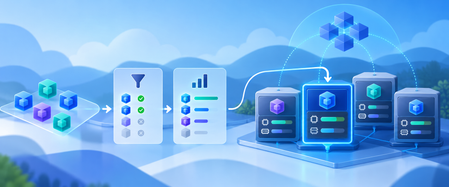
For many organizations, applications run across Azure, AWS, and Google Cloud. Across that environment, teams face familiar questions: What resources do we have? Are they connected to our management tools? How do we assess their security configuration? And how do we take action without constantly switching consoles? The Azure Arc Multicloud Connector was designed to help with these scenarios. For the Multicloud Connector, we’re very excited to introduce six new solutions: Google Kubernetes Engine (GKE) onboarding, Amazon Elastic Kubernetes Service (EKS) onboarding, Windows Server Extended Security Updates (ESU), SQL Server ESU, Security Baselines, and Power Cycle Management. Building on the connector’s existing inventory and server onboarding capabilities, these solutions help organizations move from discovering their multicloud resources to managing them - with workloads staying in the clouds where they run. GKE onboarding (preview): Bring Google Cloud Kubernetes into Azure Arc The new GKE onboarding solution helps organizations discover eligible Kubernetes clusters in Google Cloud and connect them to Azure Arc-enabled Kubernetes through the multicloud connector. For platform teams, this reduces the manual work required to bring clusters into a shared management estate. Onboarding filters help scope the rollout to the intended workloads, while periodic discovery helps teams keep pace as their Kubernetes environment evolves. Once onboarded, supported clusters can use Azure Arc-enabled Kubernetes capabilities, including GitOps configuration management and applicable governance and monitoring services. EKS onboarding (preview): Connect AWS Kubernetes through the same workflow The new EKS onboarding solution brings a similar experience to Kubernetes clusters running in AWS. Teams can discover supported EKS clusters and onboard them to Azure Arc-enabled Kubernetes through the connector, using region and tag filters to align onboarding with their operational requirements. Together, EKS and GKE onboarding help organizations bring their Kubernetes fleets into a more consistent management model. Platform teams can establish a shared foundation for connected clusters while application teams retain their existing cloud platforms and deployment choices. The benefit is less repetitive onboarding work and a clearer path to applying supported Azure Arc management capabilities across cloud environments. Windows Server ESU: Support legacy workloads while modernization moves forward Modernization takes planning. The new Windows Server ESU solution brings Extended Security Updates enablement into the multicloud connector experience, helping organizations connect eligible servers with Azure Arc-enabled ESU capabilities. For qualifying workloads within an active ESU coverage period, organizations can continue receiving applicable security updates while completing their upgrade or migration plans. Bringing this workflow closer to resource discovery and onboarding helps teams address legacy server needs as part of their broader multicloud management strategy. ESU eligibility, licensing, and coverage requirements continue to apply. SQL Server ESU: Address database lifecycle needs alongside infrastructure An application’s operating system and database can reach end of support on different schedules. Protecting the server does not automatically address the database running on it. The new SQL Server ESU solution adds a database-focused workflow to the multicloud connector, helping organizations enable Azure Arc-based Extended Security Updates for eligible SQL Server workloads. This helps teams address qualifying database security-update needs while preparing to upgrade or migrate. It also brings SQL Server lifecycle management closer to the infrastructure workflows already used to discover and connect multicloud servers. Security Baselines (preview): Powered by Machine Configuration Visibility is the starting point for multicloud management. Understanding whether connected machines meet your security configuration standards is the next step. The new Security Baselines (preview) solution, powered by Azure Machine Configuration, helps organizations audit connected machines against security baselines, including CIS Benchmarks and the Azure security baseline. By bringing baseline auditing into the multicloud connector experience, teams can assess configuration against their selected standards and use the findings to identify gaps and prioritize remediation. This gives infrastructure and security teams a shared foundation for improving security posture across connected machines. Power cycle management (preview): Take action on AWS compute from Azure Sometimes the next operational step is not another assessment. It is starting a stopped instance, stopping a running one, or restarting a machine. The new Power Cycle management solution enables these actions for supported AWS EC2 instances directly from Azure. Teams can act on discovered resources without switching to the AWS console for each routine power operation. The solution supports AWS EC2 instances discovered by the connector, whether inventory-only or onboarded to Azure Arc, with the required permissions and connector configuration in place. This extends the connector’s value beyond onboarding: discovered resources can become actionable even when they have not been connected to Azure Arc. The scope is focused on starting, stopping, and restarting AWS EC2 instances. Take the next step with the Azure Arc multicloud connector With these new solutions, the multicloud connector brings more of your day-to-day operations into Azure - from connecting Kubernetes clusters and enabling eligible security updates to auditing machine configurations and taking action on AWS compute. Your workloads stay where they belong, while your teams gain a more consistent way to manage them. For solution details, prerequisites, and setup guidance, explore the Azure Arc multicloud connector documentation on Microsoft Learn.208Views0likes0CommentsAKS Pod Scheduling Demystified
1. The scheduling question Picture four Azure Kubernetes Service (AKS) worker nodes with the same hardware. One keeps receiving new batch Jobs even as its CPU usage climbs. The natural question is: why does Kubernetes send another pod to a node that already looks busy? The answer is that the scheduler does not work like a live CPU load balancer. Its normal resource checks rely on the requests declared by pods. The process has two decisions: Filtering: Which nodes can run the incoming pod? Scoring: Which of those eligible nodes is the best match according to scheduling rules? Binding and runtime come next. The example below follows the same pod through all five stages. 2. Capacity, allocatable, requests, and usage Term What it means Capacity The CPU and memory a node has. Allocatable The portion Kubernetes makes available to pods, after reservations for system services. Requests The CPU and memory a pod asks Kubernetes to reserve for scheduling. Actual usage The CPU and memory containers are using right now. Suppose a node has 16 allocatable CPU cores. Its running pods request 11 cores but are currently consuming 14 cores. Kubernetes counts 5 unrequested cores when deciding whether another pod fits, not 2 idle cores. A CPU limit is different from a request. A request influences placement; a limit can restrict how much CPU a container uses. 3. One pod from arrival to completion We'll follow one batch pod, batch-worker-01, across workers A, B, C, and D. Each worker has 16 allocatable CPU cores and 64 GiB allocatable memory. Figure 1. The entire scheduling journey, with decisions at filtering, scoring, runtime, and Job completion. Follow the same pod from top to bottom. Stage 1: Filtering. Can each node run the pod? A new pod arrives and asks for 0.25 CPU cores (250m) and 0.5 GiB memory (512Mi). The scheduler checks each worker. For CPU and memory, the fit rule uses the formular: Existing requests + Incoming pod request <= Node allocatable The rule is checked separately for CPU and memory. Required placement rules, including taints and affinity, must also pass. Worker Unrequested CPU before pod Unrequested memory before pod Can the 0.25 CPU / 0.5 GiB pod fit? A 4.80 cores 29 GiB Yes B 4.20 cores 32 GiB Yes C 4.40 cores 43 GiB Yes D 4.60 cores 34 GiB Yes Result: All four workers pass filtering. None has won yet. Their actual CPU usage has not entered this calculation. Stage 2: Scoring. Which eligible node ranks highest? For this walkthrough, look at the default NodeResourcesFit LeastAllocated resource-scoring calculation. It favors a node with more capacity not already requested by pods. We use equal CPU and memory weights of 1 each and MaxNodeScore = 100. The Kubernetes source implements the weighted calculation as: LeastAllocated score: Here A is node allocatable capacity, R is requested capacity including the incoming pod, and w is the resource weight. See the official Kubernetes LeastAllocated implementation and scheduler configuration reference. The denominator is 2 here because CPU and memory each have weight 1. The scheduler considers the incoming pod's request, so subtract 0.25 CPU and 0.5 GiB before scoring each candidate: Worker CPU left after pod Memory left after pod Formula using 16 CPU and 64 GiB allocatable Score / 100 A 4.55 28.5 GiB [(4.55/16 × 100) + (28.5/64 × 100)] / 2 36.5 B 3.95 31.5 GiB [(3.95/16 × 100) + (31.5/64 × 100)] / 2 37.0 C 4.15 42.5 GiB [(4.15/16 × 100) + (42.5/64 × 100)] / 2 46.2 D 4.35 33.5 GiB [(4.35/16 × 100) + (33.5/64 × 100)] / 2 39.8 For worker C: Worker C score after accounting for the incoming pod: Result: Worker C ranks first for this resource-scoring calculation. Worker A has slightly more unrequested CPU, but C's larger memory advantage wins under equal weighting. The default Kubernetes scheduler also has other scoring components, including resource balance and image locality. Thus, this is the resource-plugin score, not a guarantee of the final combined result. Stage 3: Binding. Where does the pod go? Assume the other scoring components do not change the ranking. The scheduler assigns batch-worker-01 to worker C. Result: The pod has a selected node. The kubelet on that node can now start its container. Stage 4: Runtime. Why can worker C still become busy? The pod's CPU request stays at 0.25 cores, even if its program starts consuming substantially more CPU. Suppose its workload uses 1.2 cores while it runs. Scheduler accounts for Pod actually consumes 0.25 CPU requested 1.2 CPU cores in use Worker C still has request-based headroom Worker C may be busy running other pods Future pods are checked against requests More overlapping work can increase CPU contention Try the CPU behavior in a test cluster. The following Pod runs two CPU-working Python processes for around 45 seconds. Unlike a sleep command, the processes actively use CPU. Their exact consumption depends on what CPU is available, but their request remains 250m. apiVersion: v1 kind: Pod metadata: name: batch-worker-01 labels: app: batch-cpu-demo spec: restartPolicy: Never containers: - name: worker image: python:3.12-alpine command: - python - -c - | import multiprocessing as mp import time def work(): end = time.monotonic() + 45 while time.monotonic() < end: pass processes = [mp.Process(target=work) for _ in range(2)] for p in processes: p.start() for p in processes: p.join() resources: requests: cpu: 250m memory: 512Mi Save as batch-worker.yaml, then run in an approved test namespace: kubectl apply -n <test-namespace> -f .\batch-worker.yaml kubectl get pod batch-worker-01 -n <test-namespace> -o wide kubectl top pod batch-worker-01 -n <test-namespace> --containers kubectl delete pod batch-worker-01 -n <test-namespace> Run kubectl top while the pod is active, and use Grafana if you want a graph of CPU consumption over time. This tests the difference between requested and actual CPU; a single pod will not demonstrate a lasting node-wide scheduling imbalance. Stage 5: Completion. What happens to its reservation? When the workload finishes and the completed pod stops counting toward active scheduling requests, its 0.25-core reservation is released. Its CPU usage also stops. Worker C may therefore look attractive again when the next Job arrives. A new Job begins a new filtering and scoring cycle. Worker C does not automatically win again, but repeated short-lived Jobs can keep a node busy while reservations are repeatedly freed and reused. The journey in one sentence: A pod fits on four nodes, worker C scores highest under the example resource score, the scheduler binds it there, it runs using more CPU than requested, then finishes and frees its reservation for the next scheduling cycle. 4. Why memory can outweigh CPU All four workers have the same 64 GiB allocatable memory, but their existing pods reserve different amounts: Worker Memory reserved by existing pods Unrequested memory A 35 GiB 29 GiB B 32 GiB 32 GiB C 21 GiB 43 GiB D 30 GiB 34 GiB Worker C does not have more physical memory. It simply has less memory requested by the pods already there. Under equal-weight LeastAllocated scoring, that can be enough to give C the higher resource score even if another worker has more unrequested CPU. 5. How to investigate an uneven placement pattern Start with these three questions: Which nodes were eligible? Compare allocatable resources, pod requests, taints, affinities, and pod-count limits. Why might one node score better? Compare CPU and memory requests, not just live usage. What happened after binding? Compare actual CPU usage, new pods per node, Job completions, and pod startup time. For current node state, use PowerShell and kubectl: kubectl config current-context kubectl get nodes -o wide kubectl describe node <node-name> kubectl describe node shows current state, not what the node looked like last week. In Grafana, look for historical kube_node_status_allocatable, kube_pod_container_resource_requests, kube_pod_info, and container_cpu_usage_seconds_total. Compare nodes at the same timestamps. Where available, use kube_pod_status_scheduled_time for pod scheduling times, rather than treating pod creation time as binding time. For control-plane evidence, AKS can export the kube-scheduler log category through diagnostic settings. These logs establish which pod was bound, where, and when, but do not always contain scoring details. See AKS monitoring resource logs. 6. How to prevent pods piling onto one node A few workload-level changes usually deserve attention before changing scheduler profiles: Right-size CPU requests. If pods commonly consume much more CPU than they request, scheduling can pack too much real work onto a node. Size requests from actual application measurements. Spread related pods. A hostname-based topologySpreadConstraints rule can encourage more even placement. ScheduleAnyway prefers spreading, while DoNotSchedule can block placements that exceed a configured skew. Control batch concurrency. Limit .spec.parallelism for individual Jobs, or use controller-side limits or Kueue admission for many independent Jobs. Reintroduce nodes carefully. Uncordoning immediately makes a node eligible for ordinary scheduling. Test with approved workloads and monitor placements before opening it fully. For example, a Job template can include: topologySpreadConstraints: - maxSkew: 2 topologyKey: kubernetes.io/hostname whenUnsatisfiable: ScheduleAnyway labelSelector: matchLabels: app: batch-worker Remember that ScheduleAnyway is a preference, not a guarantee of equal pod counts. Test rules against your own workload mix. Changing to a bin-packing strategy such as MostAllocated is not an automatic fix for CPU-heavy workloads that under-request CPU. 7. Conclusion and references The Kubernetes scheduler starts with pod requests, not the node's live CPU graph. Filtering determines where the pod can run, and scoring decides which eligible node is preferred. In our example, worker C wins the resource score because its unrequested memory offsets a small CPU difference. Once the pod runs, its real CPU use may exceed what the scheduler reserved. Practical takeaway: Use realistic requests, spread workloads where balance matters, manage Job concurrency, and compare scheduler evidence with runtime metrics before deciding that a busy node is being scheduled incorrectly. Learn more Kubernetes scheduling framework Kubernetes scheduler configuration Kubernetes LeastAllocated scoring source Kubernetes resource management Kubernetes topology spread constraints AKS scheduler guidance AKS control-plane logsAdvancing sovereign AI with Foundry Local and Azure Local
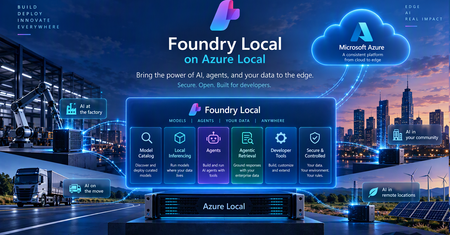
The next chapter of AI is about more than powerful models. It’s about bringing AI closer to the data, applications, and systems that organizations depend on every day. For governments, regulated industries, and organizations operating critical infrastructure, this means making AI accessible in environments where data is sensitive, connectivity may be limited, and greater operational control is essential. Microsoft’s approach to sovereign AI starts with the requirements of each workload. Our vision is to give organizations the choice and flexibility to determine where AI runs, which models they use, and how their data and infrastructure are managed. Depending on the workload, this can include control over where data and models reside, who can access and operate the environment, how AI workloads are governed, and whether critical operations can continue when cloud connectivity is restricted or unavailable. The goal is to help organizations meet their security, regulatory, and operational requirements while maintaining access to modern cloud and AI capabilities. With Foundry Local, entering general availability on Azure Local at Ignite, we're bringing advanced AI capabilities to customer-controlled environments. This enables organizations to build and run AI applications closer to their data, with greater control over how AI workloads are deployed and operated, extending the possibilities of AI beyond the public cloud. Bringing the Microsoft Foundry experience to customer-controlled environments AI delivers the greatest value when organizations can connect it securely to the data, applications, and processes that power their business. Microsoft Foundry is our unified platform for building, optimizing, and governing AI applications and agents. Foundry Local extends these capabilities to customer-controlled environments, allowing organizations to deploy and run supported AI models on Azure Local infrastructure, with local inference, model management, and GPU acceleration. Built on Azure Arc-enabled Kubernetes, Foundry Local supports CPU- and GPU-backed deployments, model lifecycle management, and OpenAI-compatible APIs. Developers can select from an integrated model catalog or bring their own supported models. Models and inference workloads can run locally, including in supported disconnected environments. We're also expanding what organizations can build with Foundry Local, moving beyond standalone inference toward intelligent applications and agents that can securely interact with enterprise data. These capabilities include: Model catalog (general available): Offers a curated model catalog, making it easy to discover and deploy AI models optimized for local and edge environments. Gives organizations greater flexibility to select models based on capability, performance, latency, resource requirements, and the sovereignty needs of individual workloads. Agentic Retrieval (general available): Enables applications to ground responses in enterprise knowledge through local data ingestion, indexing, and multistep retrieval, with citations that allow users to verify the underlying sources. Agents and enterprise connectors (available in preview): Emerging capabilities for orchestrating agents and connecting them to enterprise systems, including on-premises Exchange Server, SharePoint Server, and SQL databases through Model Context Protocol (MCP). Configurable AI guardrails (available in preview): Support for applying safety and compliance controls to local AI workloads, with flexibility to select guardrail models based on security requirements and available compute resources. Together, these capabilities help organizations build AI applications where the data lives instead of requiring the data to move to the AI. From local inference to sovereign AI applications Running AI models locally is an important first step, but sovereign AI extends beyond inference. Organizations need to connect models to enterprise knowledge, build intelligent applications and agents, and maintain control over how those applications are developed, deployed, and operated. Foundry Local helps make this possible by bringing AI capabilities closer to enterprise data and applications. Developers can use familiar Microsoft tools and technologies to build AI applications across cloud and customer-controlled environments, with greater flexibility over where models run and how they interact with organizational data. Azure Local provides the infrastructure foundation for running these workloads across datacenters, distributed locations, and edge environments, including sovereign private cloud scenarios. For organizations requiring greater operational independence, Azure Local disconnected operations enables supported infrastructure and services to operate through a local control plane without continuous connectivity to the public cloud. Sovereignty also extends to the software development lifecycle. With GitHub Enterprise Local, becoming generally available at Ignite, organizations can bring familiar GitHub development capabilities to customer-controlled infrastructure on Azure Local. Developers can manage source code, collaborate, and automate build and deployment processes using GitHub Actions and self-hosted runners while maintaining greater control over their repositories, workflows, and artifacts. Foundry Local can also provide locally hosted models for AI-assisted development scenarios in supported disconnected environments. Together, Foundry Local, Azure Local, and GitHub Enterprise Local provide a foundation for building, deploying, and operating AI applications within customer-controlled environments, extending sovereignty from the infrastructure to the models, applications, and development processes that run on it. What this means for customers The significance of these capabilities is ultimately about what they enable organizations to do. Keep sensitive data in the environment they control. Organizations can bring AI to data that may need to remain within a specific facility, geography, security boundary, or operational environment. Run AI where decisions need to happen. Manufacturers, retailers, transportation providers, healthcare organizations, governments, and others can bring intelligence closer to physical operations and distributed locations rather than depending on every interaction traveling to a remote cloud service. Support environments with limited or disconnected connectivity. Organizations operating in remote, isolated, or highly controlled environments can continue to pursue AI scenarios where constant public cloud connectivity may not be appropriate or possible. Maintain greater control over the AI stack. Customers can make deliberate choices across infrastructure, data, models, applications, operations, and governance based on the requirements of individual workloads. Turn enterprise data into useful AI experiences. Retrieval, connectors, agents, and model capabilities can help organizations build AI experiences grounded in their own information and business processes while keeping those capabilities closer to the systems they support. Most importantly, customers do not have to define a single architecture for every workload. Some AI workloads will benefit from the scale and rapid innovation of the public cloud. Others will require greater local control. Many organizations will need both. Our strategy is to give customers the flexibility to choose the right architecture for each workload while maintaining a consistent foundation across their environments. Sovereignty that enables innovation As AI becomes more deeply embedded across applications, operations, and critical infrastructure, organizations will need architecture that give them both powerful AI capabilities and meaningful control over how those capabilities are deployed. With Azure Local and Foundry Local, we’re continuing to bring Microsoft AI innovation to the places customers need it, from the cloud to customer-controlled datacenters and edge locations. That is the foundation of our approach to sovereign AI: giving every organization the control and choice to pursue its AI ambitions on its own terms. Resources Join us at Microsoft Ignite in San Francisco to explore the latest innovations across Microsoft AI, Azure Local, and sovereign cloud. Learn about AI workloads on Azure Local Explore digital sovereignty at Microsoft Learn more about Microsoft Sovereign Private Cloud870Views2likes0CommentsGitOps with Argo CD extension for AKS is Now Generally Available
We are excited to announce the general availability (GA) of GitOps with Argo CD extension for Azure Kubernetes Service (AKS)! Argo CD has become one of the most widely adopted GitOps tooling in the Kubernetes ecosystem, helping organizations deploy and operate applications on Kubernetes. As customers scale Kubernetes across teams and environments, they need more than powerful GitOps capabilities. They need a solution that is secure, reliable, observable, and easy to operate in production. GitOps with Argo CD for AKS combines the flexibility of upstream Argo CD with a Microsoft-managed experience that reduces operational complexity while providing the security, integrations, and lifecycle management that enterprises expect from Azure. What's Included in General Availability Secure Authentication and Access Enable enterprise-grade access controls with single sign-on (SSO) through Microsoft Entra ID and securely authenticate to Azure Container Registry (ACR) and Azure DevOps using workload identity federation. By eliminating the need for long-lived credentials and secrets, teams can strengthen security without increasing operational overhead. Enterprise-Ready Security GitOps with Argo CD for AKS is built on hardened Azure Linux images to help reduce exposure to vulnerabilities and improve security posture. Customers can also opt in to automatic patch updates to stay current with critical fixes while reducing the burden of managing the Argo CD platform. Aligned with Upstream Argo CD The managed offering remains aligned with the upstream Argo CD project, allowing customers to use the tools and workflows they already know while benefiting from Microsoft support and lifecycle management. Supported capabilities include: ApplicationSets High Availability (HA) deployments Hub-and-spoke and multi-cluster topologies Azure-Native Observability With support for Azure Managed Prometheus metrics, platform teams can gain deeper operational insights into Argo CD environments and integrate GitOps observability into their existing monitoring workflows. Simplified Lifecycle Management Deploy Argo CD directly through Azure-native tools including the Azure portal, Azure CLI, Terraform etc. Microsoft manages the extension lifecycle, helping teams spend less time operating their GitOps platform and more time delivering applications. Whether you're adopting GitOps for the first time, or looking for a managed alternative to self-hosting Argo CD, GitOps with Argo CD for AKS provides a secure, observable, and enterprise-ready path to application delivery on Kubernetes. Please note that GitOps with Argo CD extension for Azure Arc enabled Kubernetes clusters continues to be available in public preview. Stay tuned for more updates! Get Started Follow this Tutorial to install and configure GitOps with Argo CD extension on your AKS cluster. We're excited to see what you build with GitOps with Argo CD extension on Azure! FAQ: 1. What is GitOps with Argo CD for AKS? GitOps with Argo CD for Azure Kubernetes Service (AKS) is a cluster extension that helps customers deploy and manage Kubernetes applications using Git for example as the source of truth. It combines upstream Argo CD workflows with Azure-native identity, security, observability, and lifecycle management. 2. How is GitOps with Argo CD for AKS different from self-managed Argo CD? GitOps with Argo CD for AKS reduces the operational effort of running Argo CD yourself. Microsoft can manage the extension lifecycle while customers retain familiar Argo CD capabilities and workflows, including Applications, ApplicationSets, the Argo CD UI, and CLI. 3. How does GitOps with Argo CD for AKS improve security? GitOps with Argo CD integrates with Microsoft Entra ID for single sign-on and supports workload identity federation for secure access to services such as Azure Container Registry (ACR) and Azure DevOps, reducing reliance on long-lived credentials. 4. Does GitOps with Argo CD support multiple Kubernetes clusters? Yes. GitOps with Argo CD supports multi-cluster scenarios, including hub-and-spoke architectures, high availability, and ApplicationSets for deploying applications consistently across multiple clusters and environments. 5. How are Argo CD updates and lifecycle management handled? Customers can opt in to automatic updates to help stay current with critical fixes. 6. Is GitOps with Argo CD available for Azure Arc-enabled Kubernetes? Yes, but GitOps with Argo CD for Azure Arc-enabled Kubernetes remains in public preview. This GA announcement applies specifically to Azure Kubernetes Service (AKS).884Views0likes0Comments