knowledge
21 TopicsSharePoint Showcase: 10 Custom AI Skills Every SharePoint Site Owner Should Build
In this edition of SharePoint Showcase, we explore how skills work, how to create or install them, and ten practical examples to help SharePoint site owners get started. These examples are not an exhaustive list, but a curated starting point for identifying everyday processes that can become reusable, team-ready skills.9.4KViews4likes2CommentsSharePoint Showcase: 5 Ways Organizations Improve Business Processes with Copilot in SharePoint
AI becomes most impactful when it helps with the work teams already do every day. The challenge is rarely a lack of information. It is turning trusted information into a clear, repeatable process without starting from scratch each time. That is where Copilot in SharePoint can help. It works with the content and structure already in SharePoint, including sites, pages, lists, libraries, and files. Teams can ask questions, compare and summarize content, organize information, create outputs, and turn repeatable multi-step processes into reusable skills. The examples below are based on real customer scenarios from organizations exploring Copilot in SharePoint. To protect customer confidentiality, organization names and identifying details have been generalized. What matters is the pattern: start with trusted SharePoint content, define the work that needs to happen, keep people in control, and make the process easier to repeat.1.8KViews0likes0Comments
Beyond Benchmarks: The Lifecycle of Measuring Agentic Quality in AI Content Management
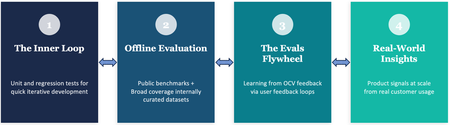
By Sujay Kumar Jauhar, Spriha Chandrayan, Natasha Gaitonde, Zhen Lei, Reed Pankhurst, Anush Sankaran, Amrit Shandilya, Ryen W. White Organizations put their most important content in OneDrive and SharePoint, trusting us to deliver AI experiences they can depend on. That trust runs across everything Copilot does with their content — surfacing the right information through retrieval, and, increasingly, driving agentic workflows that reason over documents and take action on their behalf. Living up to that trust is what we care about most, and it's why we put the quality of these experiences — and consequently the ways we measure that quality — at the center of how we build. It turns out that this is a non-trivial problem, because quality in AI is rarely binary. An agent can call exactly the right tools and still produce an answer that's subtly, confidently wrong. A search result can be technically relevant and still miss what the user was really after. An AI-generated page can be well-structured and fluent and still omit the one detail that mattered. Quality here is continuous, context-dependent, and multidimensional — and when these experiences are serving hundreds of millions of enterprise users, measuring it demands scientific rigor across the full lifecycle of building AI products. Across OneDrive and SharePoint — the knowledge platform for Copilot and Agents — we’ve spent the past year building a rigorous practice around evaluation: determining what to measure, developing the right methods to measure it, and learning how to act on those measurements to improve our systems and experiences. In software engineering, tests verify correctness and telemetry monitors health. The boundaries are well-defined: a function returns the right value or it doesn’t; a service meets its service level objective or it doesn’t. AI evaluation requires an analogous discipline, but the problem is structurally harder — there is rarely a single correct answer, and quality depends on factors that shift with every user, task, and context. This post describes the evaluation practice we are building across Copilot capabilities in OneDrive and SharePoint. It follows the arc of what we think of as the evaluation lifecycle — from rapid inner-loop validation, through rigorous offline measurement, to customer-grounded evaluation that evolves with real feedback, and ultimately to understanding whether our metrics predict what users actually experience. Each stage addresses a question the previous ones cannot, but they don’t run in a straight line. What we learn downstream can reshape the data and methodology of upstream measurements. That’s what makes this a lifecycle — and together they form a strategy for building AI systems that aim to earn user trust at enterprise scale. We're on a journey — learning and evolving as we build this practice. Some of the things we're actively working on, omitted from this blog post for the sake of brevity, are: holding ourselves to public, industry-standard benchmarks such as GAIA and GDPval, with more in the pipeline; and investing in the foundations that keep evaluation trustworthy, by generating realistic synthetic evaluation data so our test sets keep pace with new models, and monitoring the health of our benchmarks for saturation. The inner loop: "Did I break anything?" The first requirement of any AI development workflow is a fast feedback signal. Teams are experimenting constantly on internal builds — adjusting prompts, swapping model versions, rearchitecting retrieval pipelines — and they need to know within minutes whether a change helped or hurt. That is the role of our unit-level evaluations: a rapid inner loop for feature crews. A developer modifies a system prompt or adjusts the grounding context, runs it against a targeted set of test cases, and gets immediate feedback on whether key behaviors are preserved. These checks are fast, focused, and designed to catch regressions before they compound. The distinction from traditional unit testing is worth noting. In software, a test asserts an exact expected output. In AI, you are validating behavioral properties — coherence, completeness, tool selection, factual consistency — against approximate expectations. The pass/fail boundary is softer, but the engineering purpose is the same: give teams confidence to iterate without fear of silent degradation. One of the crews building Copilot's agentic features over SharePoint Lists knows this loop well. They keep a large set of prompts that engineers run whenever they change something — a tweak to a tool's description, a different setting passed to the model, a reworded prompt. Many of those questions run over the same synthetic data: lists of bakery orders, each row carrying details like the baker, the delivery agent, the profit on the order, and its status. The same lists come in a range of sizes, from a few thousand rows up to a million. The largest are used to push the system's limits but the inner loop lives at the lower end. There, most questions are ones the system has gotten right for a long time, so when a change quietly breaks one of them, it shows up right away. An engineer can try an idea, run the set quickly, and whether they've introduced a regression. Fast iteration checks are essential, but they only tell you whether something regressed. They cannot tell you how good the system actually is. Offline evaluation: "How good is this, really?" This is the domain of our offline evaluation practice. We maintain curated, scenario-focused benchmarks evaluated in a controlled harness that reflect the tasks and content types our enterprise users encounter, alongside public benchmarks that situate our systems in the broader AI landscape. The goal is to bring each AI scenario to a state of decision-readiness: explicit success criteria, representative evaluation datasets, metrics we attempt to validate against real outcomes, and systematic coverage of known failure modes. We try to do this rigorously by running evals against the real product. Each test case is a plan — a short script of things a user might ask for — paired with criteria (or assertions) describing what a good outcome looks like, sorted by how much each one matters: Critical, Expected, or Aspirational. An LLM plays the user: it drives the live product through the browser, sends the opening request, and then reacts the way a person would, confirming an action card here or answering a clarifying question there, so the system is exercised end to end. When the conversation finishes, the harness gathers the evidence of what actually happened — the responses in the chat, the state of the page, and screenshots where the judgment is visual. That evidence goes to a second model acting as judge — the increasingly standard "LLM-as-a-judge" approach — which scores the run against the original assertions. And because a model grading a model is only as trustworthy as its agreement with people, those scores are calibrated against human raters. Using a high-priority, curated slice of these evals, the team ran big proposed changes side by side to see which ones came out ahead. One of those comparisons looked at how the orchestrator is told about the tools it can use. At one extreme, you hand the model the full description of every tool up front; at the other, you give it only short, tweet-length summaries and let it pull a tool's full description and parameters only when it decides it needs them. Configuration Quality % Latency vs. default Cost vs. default Baseline 83.0 1.00x 1.00x Default tool discovery 90.3 1.11x 0.62x Rearchitected tool discovery 85.6 0.97x 0.73x Semantic tool search 92.8 0.95x 0.74x Hybrid 93.5 0.82x 0.62x Table 1: A comparison of the different approaches for tool selection we experimented with. Based on internal evaluation results using our internal test environment, and test configurations of the product. Quality was measured through LLM judgement of AI responses based on a set of criteria, latency was measured by the harness running the evaluations, and cost is based on publicly disclosed price heuristics for token usage for the LLM API being used for orchestration. Results were calculated from 500 scenario tests based on synthetic data. The table above summarizes our results from an internal offline evaluation on a curated slice. In this evaluation, we found that the baseline which loads everything up front was, predictably, the most expensive. The out-of-the-box tool-discovery method cut token usage sharply — but was a bit slower. Pushing further, a rearchitecting of the orchestrator for tool discovery did speed things up, but at the cost of quality. Meanwhile semantic tool search improved on both quality and latency relative to the baseline but wasn’t as cost-efficient as the default tool discovery method. Overall, in this evaluation, a strong balance of quality, token usage, and latency came from a hybrid — the standard tool-learning architecture with a few targeted semantic-search changes, which still resulted in a more than 35% reduction in token usage when compared with full tool descriptions. Offline benchmarks, however carefully constructed, have an inherent limitation. They represent a fixed snapshot — based often on what product teams believe will be important use cases, particularly for features that have not yet shipped to real customers. As the product evolves and real usage patterns emerge, the gap between what our benchmarks measure and what actually matters can widen. The evals flywheel: "Are we measuring what users care about?" This is the motivation behind what we call the Evals Flywheel: a closed-loop system that translates real user dissatisfaction directly into better evaluations and, ultimately, better systems. In software engineering, there is a well-established discipline of turning production bugs into tests. In the AI analog, user feedback provided with appropriate consent helps produce new evaluation data, systematic failure diagnoses, and targeted improvements. Take for instance a user that consents to share feedback with us (via a thumbs down). At first glance, this seems like a single interaction. But to us, it's an opportunity to learn. We investigate what happened, identify the underlying reason for the user dissatisfaction, and ask a critical question: was this an isolated mistake, or does it reveal a broader weakness in how the system understands documents like this one? Here's a representative example. A user uploaded a 120-page quarterly financial report packed with dense tables, nested headers, footnotes, and appendices. They asked a straightforward question: "What was our actual spending in Q3?" The answer seemed like it should be easy — the relevant numbers were all in the document. The assistant responded confidently with a figure from one of the summary tables; but it cited the budgeted amount, not the actual spend. The mistake stemmed from the document's complexity. The table spanned multiple pages, with a top-level "Q3" header extending across several sub-columns such as Budget, Actual, Forecast, and Variance. On its own, that's one mistake in one document. However, it pointed at something more general: whenever a table uses a heading that spans multiple columns, or stacks two rows of headers, or tucks a small table inside a larger one, then the link between a header label and its value turns fragile. Understanding the text is often not enough — the assistant must also accurately preserve and reason over intricate document structure, table relationships, and context that can span dozens of pages. Hence, instead of patching that single file, we built a family of evaluation documents that deliberately stress that exact structure. Each eval document pairs a question with the single correct answer and a short list of "tempting but wrong" answers which are the nearby values a confused reader would most likely grab. That last part is the key: an eval that only checks for the right answer can be passed by luck, but an eval that includes likely distractors tells you whether the system is genuinely reasoning or just guessing. This example reflects a repeatable method. The first step is resisting the urge to treat a user dissatisfaction as an isolated bug. Instead, we ask why it happened and not "what's the right answer for this question." That root-cause identification is what turns the user feedback into a useful signal. The payoff is a flywheel between real-world experience and offline evaluation. The improvement ships back into the product, where future interactions validate it — and surface the next gap. Each loop widens our coverage and, just as importantly, helps us prioritize the improvements that matter most to the people using the product. But it raises a deeper question: when our benchmarks are representative of user concerns, do improvements actually translate into better experiences in production? Real-world insights: "Does this actually matter to users?" It is possible to improve a benchmark score and have it mean nothing in practice. A model that scores five points higher on an offline evaluation may produce no detectable difference in user satisfaction or task success. Conversely, a change that barely moves the needle offline might transform the user experience in unexpected ways. This gap between offline measurement and real-world impact is the focus of our online evaluation work. Through production telemetry, we study user-AI interaction patterns at scale. The objective is not simply to monitor system health, but to develop an empirical understanding of how users experience our AI features in context. In traditional software, production telemetry provides crisp, well-defined signals: uptime, latency percentiles, error rates. In AI, the equivalent signals — satisfaction, intent alignment, task success — are inherently noisier and harder to define. The central challenge here is alignment: do our offline metrics predict real user value? Answering that depends first on being able to measure value reliably in production at all. Consider a recent experiment on one of our top-of-funnel entry points — the most common way users first reach the assistant. The team suspected that engagement was low (around 1%) simply because users weren't noticing the entry point. So they ran a user-level A/B test across a sample of 900,000 Copilot-licensed users over 21 days, swapping the entry point's icon for a more contextually relevant one. The effect was a statistically significant 42% lift in click-through, alongside a 1.7% increase in active users. That result is encouraging, but it also illustrates a subtle nuance. We moved an engagement metric sharply without touching quality at all — this tells us that we had an education gap, but didn’t inform our understanding of the AI system’s performance. To get closer to that distinction, we looked at kept rate: the share of AI responses where the user does something that signals the answer was worth keeping — copying the result, clicking through to a citation or a suggested follow-up, or providing a thumbs up. And because it's captured passively, from actions users take anyway, it scales to every response rather than the small fraction where someone leaves explicit feedback. Even an indirect, partial signal like kept rate lets us close the offline-online loop. Once we have a read on what users valued, we can start to ask how well it correlates with our offline benchmarks. When offline gains track with a rise in kept rate, for example, it's early evidence the benchmark is steering us toward something real; when they are uncorrelated, it's a warning that we may be hill-climbing in a wrong direction. Beyond quality Quality matters — but in production systems, it is entangled with cost and latency in ways that cannot be evaluated in isolation. A high-quality response that is unacceptably slow degrades the user experience regardless of its correctness. Or a frontier model that is marginally better than a smaller alternative may not justify the cost differential. This is the next frontier of our evaluation work: learning to reason about quality, cost, and latency as a tradeoff surface rather than independent dimensions. The goal is to build the instrumentation and frameworks that make these tradeoffs visible and deliberate, so that teams can make principled decisions about how they ship. To make this concrete, consider some early findings from our internal evaluations. We took a range of system configurations — models, reasoning levels, tool access — and, for a set of representative tasks — QA over lists, the AppWorld public benchmark, and a collection of complex multi-step plans that stress-test the Copilot in SharePoint agent — plotted each one by the quality it achieved against what it cost to run. The result is a Pareto frontier: the curve of the best quality reachable at each price, with everything below it dominated by something strictly better. Two things stand out. First, different tasks live in different performance regions. Simple, factual lookups like those in ListsQA cost fractions of a cent; harder, more agentic tasks like those in AppWorld and Copilot in SharePoint run to cents or dollars; there is no single answer to what "good" costs. Second, the shape of each curve tells you where spending more is actually worth it. Where the frontier rises sharply, additional cost buys real quality; where it flattens, you have hit diminishing returns, paying more for gains a user may not notice. In short, the decision stops being "is the quality good enough to ship?" and becomes "which point on this curve is right for this scenario?" given budget and latency constraints — a question a feature crew can answer, with the tradeoffs in front of them. What we've learned so far We are still early in this work. Models are improving rapidly, user expectations are evolving, and the definition of quality continues to shift. But several principles have become clear to us. No single evaluation approach is sufficient. Inner-loop checks catch regressions but cannot establish absolute quality. Offline benchmarks provide rigor but go stale. Customer feedback grounds evaluation in real needs but covers only the cases where dissatisfaction is expressed. Online metrics reveal real behavioral patterns but cannot always explain the mechanisms behind them. A credible evaluation practice requires all of these, operating in concert and informing each other. Evaluation is not a gate you pass before shipping — it is a continuous discipline that evolves with the product. The teams that build the best AI experiences are not necessarily those with the highest benchmark scores, but those with the clearest understanding of where their systems fall short and the most systematic approach to closing those gaps. And measuring what matters is itself a scientific problem, one that demands the same rigor we apply to the systems being measured. Developing evaluation methods that are reliable, predictive of real user value, and robust to the rapid evolution of AI capabilities is core to our mission across OneDrive and SharePoint. It is how we work to earn the trust of the enterprise users who depend on these experiences, and we are committed to advancing this work and sharing what we learn.1.5KViews2likes0CommentsSharePoint Showcase: How Microsoft uses Copilot in SharePoint, and how you can get started
For this month's SharePoint showcase, we're zooming in on AI skills in Sharepoint and real Microsoft use cases for Copilot in SharePoint. We're also introducing a new "Product Drops" standing section to recap all the new GA functionality across the platform each month. As always, would love to hear from you in the comments. Let's get into it!2.8KViews0likes1CommentSharePoint Showcase: Automation updates for smarter workflows & business processes
The way work gets done continues to evolve. Across organizations, everyday tasks are moving beyond manual handoffs toward intelligent, connected workflows where AI helps coordinate activity and people focus on outcomes.10KViews2likes7CommentsFoundry IQ: Give Your AI Agents a Knowledge Upgrade
If you’re learning to build AI agents, you’ve probably hit a familiar wall: your agent can generate text, but it doesn’t actually know anything about your data. It can’t look up your documents, search across your files, or pull facts from multiple sources to answer a real question. That’s the gap Foundry IQ fills. It gives your AI agents structured access to knowledge, so they can retrieve, reason over, and synthesize information from real data sources instead of relying on what’s baked into the model. Why Should You Care? As a student or early-career developer, understanding how AI systems work with external knowledge is one of the most valuable skills you can build right now. Retrieval-Augmented Generation (RAG), knowledge bases, and multi-source querying are at the core of every production AI application, from customer support bots to research assistants to enterprise copilots. Foundry IQ gives you a hands-on way to learn these patterns without having to build all the plumbing yourself. You define knowledge bases, connect data sources, and let your agents query them. The concepts you learn here transfer directly to real-world AI engineering roles. What is Foundry IQ? Foundry IQ is a service within Azure AI Foundry that lets you create knowledge bases, collections of connected data sources that your AI agents can query through a single endpoint. Instead of writing custom retrieval logic for every app you build, you: Define knowledge sources — connect documents, data stores, or web content (SharePoint, Azure Blob Storage, Azure AI Search, Fabric OneLake, and more). Organize them into a knowledge base — group multiple sources behind one queryable endpoint. Query from your agent — your AI agent calls the knowledge base to get the context it needs before generating a response. This approach means the knowledge layer is reusable. Build it once, and any agent or app in your project can tap into it. The IQ Series: A Three-Part Learning Path The IQ Series is a set of three weekly episodes that walk you through Foundry IQ from concept to code. Each episode includes a tech talk, visual doodle summaries, and a companion cookbook with sample code you can run yourself. 👉 Get started: https://aka.ms/iq-series Episode 1: Unlocking Knowledge for Your Agents (March 18, 2026) Start here. This episode introduces the core architecture of Foundry IQ and explains how AI agents interact with knowledge. You’ll learn what knowledge bases are, why they matter, and how the key components fit together. What you’ll learn: The difference between model knowledge and retrieved knowledge How Foundry IQ structures the retrieval layer The building blocks: knowledge sources, knowledge bases, and agent queries Episode 2: Building the Data Pipeline with Knowledge Sources (March 25, 2026) This episode goes deeper into knowledge sources, the connectors that bring data into Foundry IQ. You’ll see how different content types flow into the system and how to wire up sources from services you may already be using. What you’ll learn: How to connect sources like Azure Blob Storage, Azure AI Search, SharePoint, Fabric OneLake, and the web How content is ingested and indexed for retrieval Patterns for combining multiple source types Episode 3: Querying Multi-Source Knowledge Bases (April 1, 2026) The final episode shows you how to bring it all together. You’ll learn how agents query across multiple knowledge sources through a single knowledge base endpoint and how to synthesize answers from diverse data. What you’ll learn: How to query a knowledge base from your agent code How retrieval works across multiple connected sources Techniques for synthesizing information to answer complex questions Get Hands-On with the Cookbooks Every episode comes with a companion cookbook in the GitHub repo, complete with sample code you can clone, run, and modify. This is the fastest way to go from watching to building. 👉 Explore the repo: https://aka.ms/iq-series Inside you’ll find: Episode links — watch the tech talks and doodle recaps Cookbooks — step-by-step code samples for each episode Documentation links — official Foundry IQ docs and additional learning resources What to Build Next Once you’ve worked through the series, try applying what you’ve learned: Study assistant — connect your course materials as knowledge sources and build an agent that can answer questions across all your notes and readings. Project documentation bot — index your team’s project docs and READMEs into a knowledge base so everyone can query them naturally. Research synthesizer — connect multiple data sources (papers, web content, datasets) and build an agent that can cross-reference and summarize findings. Start Learning The IQ Series is designed to take you from zero to building knowledge-driven AI agents. Watch the episodes, run the cookbooks, and start experimenting with your own knowledge bases. 👉 https://aka.ms/iq-series587Views1like0CommentsSharePoint: Using agents, AI-powered authoring, and automation, for high impact content management
With over 2 billion files added and 2 million sites created per day, SharePoint is the world’s most powerful and flexible content management platform. SharePoint allows you to create stunning intranets, orchestrate powerful workflows and develop business-critical applications, while also powering a breadth of innovations across Microsoft 365 in Teams, OneDrive, and Copilot. The SharePoint event today showcased an exciting breadth of innovations across SharePoint. With these innovations, we believe SharePoint is the best platform for managing content for AI, and the best application for using AI to achieve high impact business outcomes. The innovations shown today span three key areas – Agents built in SharePoint: create and manage AI experts for your SharePoint content with just a few clicks. AI-powered authoring for stunning intranets: use AI to easily create beautiful looking intranet sites using the best of what the web has to offer. Automation for streamlining business workflows: automate critical content-based business processes with AI. Visit the new event microsite on adoption.microsoft.com | Access all new videos, adoption resources, hackathon details, and more: https://aka.ms/SharePointEvent/Adoption https://aka.ms/SharePointEvent/Adoption. Agents built in SharePoint: AI experts for every user At Microsoft Ignite 2024, we announced the general availability of agents built in SharePoint. These agents are tailored assistants scoped to specific SharePoint sites and content, becoming your subject matter experts working on behalf of a person, team, or organization to handle simple tasks or more complex business processes. Every SharePoint site now includes an agent grounded to that site’s data ready for immediate use. With just a few clicks users can easily create their own custom agents with specialized skills scoped to their specific SharePoint files and folders. And of course, agents adhere to existing SharePoint content permissions and governance polices, ensuring your data and content are used in a safe and secure manner. We see our customers using agents today for a range of scenarios such as onboarding, product support, planning and more. Amey is just one such customer who is using agents built in SharePoint to get the most out of their content and knowledge real estate on SharePoint. AI-powered authoring: Create and communicate with AI. Today you saw a range of capabilities that allow you to build SharePoint sites that look better than ever. With improvements like flexible layouts, design ideas, co-authoring, and Copilot throughout the experience, this represents a huge step forward for SharePoint’s UX capabilities. Creating high quality, engaging content on SharePoint has never been easier. Creating with Copilot With the new "create with Copilot" feature you can either use a prompt or use a selection of templates to create an engaging page, grounded in the content of your choosing, in minutes. This allows you to spend less time on the mechanics of creating the page and instead focus on the core message and content to maximize engagement and impact. Using Microsoft 365 Copilot in SharePoint to help create and design the sites you want with ease, and assistance. Design ideas: Augment creativity with AI. Design Ideas leverages your content and provides several professionally designed suggestions, automatically taking your content-specific requirements into account. You can easily invoke Design Ideas with just the click of a single button and in seconds, transform your sections into user-ready content. You can even use Design Ideas starting with blank sections or plain blocks of text! Design Ideas in the right pane of a SharePoint page showcasing different suggestions. Flexible sections: Build unconstrained For the longest time ever, SharePoint restricted you to building within the three columns framework. We heard your feedback - with Flexible sections, you now have access to all 12 columns on the SharePoint canvas! Move images, text, and all your other favorite web parts around with fine control, and freely resize them in an easy, intuitive manner. And with AI-based authoring features like Design Ideas, it allows you to take full advantage of Flexible sections to provide the best possible layout recommendations for your content. 12 column canvas with Flexible Sections on a SharePoint page. These innovations and more have been rolling out to customers over the past several months. See how customers such as Avanade are using these capabilities to create engaging and beautiful content, and how Takeda sees a future with the latest innovations. AI and automation for streamlining your work Billions of pieces of content are added to SharePoint each day relevant to both, small team collaborations, and broad company-wide initiatives. This puts SharePoint in the middle of business processes both big and small. From out of the box simple approvals and automation, to site, doclib, and list templates and all the way to Power Platform integration – Automation in SharePoint spans the continuum of business processes to get work done faster and at higher quality. As just one example, over 3 billion Power Automate flows run against SharePoint every week. In this next phase of innovation, we are excited to share more about how automation and AI integrate together. Enhance business processes with AI Autofill is one feature that enriches content by extracting and generating structured metadata at scale – increasing the value of your content real estate. Using a natural language prompt you can describe the metadata you need, easily classifying, extracting, or generating new content as metadata. This will automate the process of new and modified files, saving you time and enhancing your business processes. Price change updates As part of our commitment to make advanced AI accessible to everyone, we are also excited to announce that SharePoint Autofill pricing has adjusted from $0.05 per page to $0.005 per page starting in March 2025! Learn more about SharePoint pay-as-you-go services. Next steps We are excited to announce the next SharePoint Hackathon - and invite you, our customers, partners, and MVPs, to craft experiences using AI and the latest SharePoint features. See more details and register here! SharePoint Hackathon - Share your designs and engage with likeminded makers: https://aka.ms/SharePointHackathon. And finally, I personally invite you all to attend the Microsoft 365 Community Conference (May 6-8, 2025) in Las Vegas. We’re showcasing the latest news and best practices for SharePoint and M365 with leaders, product makers, partners, and MVPs. We can’t wait to hear more about how you put Microsoft 365 to work in your organization. Thank you! Learn more and explore! To skill up your SharePoint IQ even further – review the full event + AMA, visit our new microsite, register for the hackathon, watch our new, in-depth SharePoint learning series videos from our incredible product team members: "SharePoint: From concept to creation to impact + Live AMA" New SharePoint Event microsite on adoption.microsoft.com SharePoint Hackathon + upcoming webinar series YouTube playlist of all 17 new video assets (Main event, learning series, customer voices, and upcoming hackathon webinars) 5-part SharePoint learning series SharePoint customer stories: Amey, Takeda, and Avanade The trust and feedback from you all, the SharePoint community, developers, customers and MVPs have helped us evolve SharePoint to be the best content cloud solution in the world. Thank you! Related resources Getting started with SharePoint is a breeze! Check out the latest tutorial on building a SharePoint site. NEW agents built in SharePoint adoption guide (adoption.microsoft.com) Agents built in SharePoint (adoption.microsoft.com) Subscribe to the SharePoint community blog Add and upvote feature request: SharePoint Feedback PortalS14KViews6likes1Comment