javascript
121 Topics
What is GitHub Codespaces and how can Students access it for free?
GitHub Codespaces is a new service that is free for anyone to develop with powerful environments using Visual Studio Code. In this post, we'll cover how you can make use of this new technology and take advantage of its most powerful features.48KViews5likes6Comments
PDF viewer does not work with JavaScript
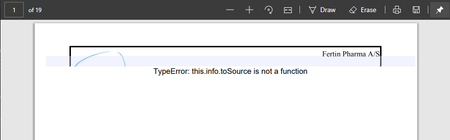
Hi All of our corporate documents are managed in a document solution that generates PDF files from the documents with a specific header in the document stating when they have been requested etc. This header uses JavaScript build into the PDF which works just fine in Adobe Acrobat Reader, Internet Explorer (as it uses Acrobat Reader) etc. But sadly in Edge it only loads the top of the header on each page and displays an error saying: "TypeError: this.info.toSource is not a function". The rest of each page is missing (see screenshot below) This means that thousands of documents that cannot be viewed with the build-in PDF viewer in Edge, but we have to manually download the file and then open it in Adobe Reader.33KViews0likes6CommentsSpreadsheets in Space just became more powerful with a new API in Microsoft Excel
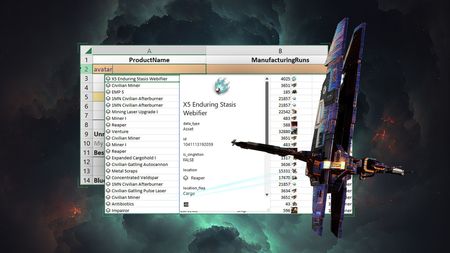
We are always looking for new ways to help people do more and create new experiences, so the Excel team was excited to collaborate with CCP Games as they developed a powerful new Excel add-in that will supercharge the EVE Online game experience by making data analytics accessible to all players, no programming knowledge required. This valuable tool enables players of all skill levels to effortlessly access and analyze data to optimize gameplay as they strive for galactic domination.32KViews1like1Comment
javax.mail.AuthenticationFailedException: LOGIN failed
We are facing issues to connect to the Office365 mailbox from java class on/from DB server(Oracle 11.2.0.4.0).The following error is thrown javax.mail.AuthenticationFailedException: LOGIN failed. at com.sun.mail.imap.IMAPStore.protocolConnect(IMAPStore.java) at javax.mail.Service.connect(Service.java) 1. The same code on other server is failing for the same mailbox. 2. The same code on the same server is failing for other similar mailbox. 3. java.net.SocketPermissions for connect,resolve for outlook.office365.com are enabled to the DB user 4. Port = 993, protocol = IMAP, server= outlook.office365.com, JDK on DB server: 1.6.0_43, JavaMail Version tried 1.3.2 / 1.3.5 / 1.5.6 Following is the code used to set IMAP properties: private Properties getIMAPProperties(String protocol, int port) { Properties props = System.getProperties(); props.put("mail.imap.host", "outlook.office365.com"); final String SSL_FACTORY = "javax.net.ssl.SSLSocketFactory"; if (protocol.equalsIgnoreCase("IMAP") || protocol.equalsIgnoreCase("IMAPS")) { // Set manual Properties props.setProperty("mail.imap.socketFactory.class", SSL_FACTORY); props.setProperty("mail.imap.socketFactory.fallback", "false"); props.setProperty("mail.imap.port", "993"); props.setProperty("mail.imap.socketFactory.port", "993"); props.setProperty("mail.imap.auth.plain.disable", "true"); props.setProperty("mail.imap.auth.gssapi.disable", "true"); props.setProperty("mail.imap.auth.ntlm.disable", "true"); props.setProperty("mail.imap.ssl.enable", "true"); } return props; } Below is the excerpt of the Store usage in the Java code on DB server import javax.mail.Store; Store store = null; store = session.getStore(protocol.toLowerCase()); --protocol = IMAP store.connect(server, port, username, password); --ERROR is thrown at this step18KViews0likes1CommentAdding custom javascript to sharepoint
Hi, i would like to create a webpart that pops up on a site at random location with something like "Congratz, you won!". I am absolutely new to sharepoint development, but i am very familiar with java. So i guess i can manipulate the DOM somehow with javascript and insert somewhere my visible part of the webpart. I followed https://learn.microsoft.com/en-us/sharepoint/dev/spfx/web-parts/get-started/build-a-hello-world-web-part but i am already struggling. Where i can inject the javascript so it gets executed? Because everything is getting escaped (and the code is shown). I found some old code on one of our servers which "loads" some .js from inside a .ts like: link = document.createElement("script"); link.setAttribute('type', 'module'); link.setAttribute('src', srcPath); link.setAttribute(dataIdentifier, 'true'); and then adding it with document.head.appendChild(link), but i am not sure if this is really how this is supposed to work or if there is something like "addJavascript(...)" or any other better approach to add javascript on client side. Any help is very appreciated!18KViews0likes3CommentsWeb Development for Beginners: A new Learning Path on Microsoft Learn
There are roughly 16 million developers in the world today. Roughly half of those, 8 million are web developers. Web development is therefore a good skill to have as you are looking to land that first job and build a career in tech. But where do you begin to learn all that? With this path https://docs.microsoft.com/en-us/learn/paths/web-development-101/. It covers everything from HTML, CSS, JavaScript to Accessibility.17KViews0likes2CommentsHack Together: RAG Hack - Building RAG Applications with LangChain.js
In the rapidly evolving landscape of Artificial Intelligence and Natural Language Processing, the use of Retrieval Augmented Generation (RAG) has emerged as a powerful solution to enhance the accuracy and relevance of responses generated by language models. In this article, we will explore the talk given during the Hack Together: RAG Hack event, where Glaucia Lemos, a Cloud Advocate at Microsoft, and Yohan Lasorsa, a Senior Cloud Advocate at Microsoft, demonstrated how LangChain.js is revolutionizing the development of RAG applications, making it easier to create intelligent applications that combine large language models (LLMs) with your own data sources.How to Integrate Playwright MCP for AI-Driven Test Automation
Test automation has come a long way, from scripted flows to self-healing and now AI-driven testing. With the introduction of Model Context Protocol (MCP), Playwright can now interact with AI models and external tools to make smarter testing decisions. This guide walks you through integrating MCP with Playwright in VSCode, starting from the basics, enabling you to build smarter, adaptive tests today. What Is Playwright MCP? Playwright: An open-source framework for web testing and automation. It supports multiple browsers (Chromium, Firefox, and WebKit) and offers robust features like auto-wait, capturing screenshots, along with some great tooling like Codegen, Trace Viewer. MCP (Model Context Protocol): A protocol that enables external tools to communicate with AI models or services in a structured, secure way. By combining Playwright with MCP, you unlock: AI-assisted test generation. Dynamic test data. Smarter debugging and adaptive workflows. Why Integrate MCP with Playwright? AI-powered test generation: Reduce manual scripting. Dynamic context awareness: Tests adapt to real-time data. Improved debugging: AI can suggest fixes for failing tests. Smarter locator selection: AI helps pick stable, reliable selectors to reduce flaky tests. Natural language instructions: Write or trigger tests using plain English prompts. Getting Started in VS Code Prerequisites Node.js Download: nodejs.org Minimum version: v18.0.0 or higher (recommended: latest LTS) Check version: node --version Playwright Install Playwright: npm install @playwright/test Step 1: Create Project Folder mkdir playwrightMCP-demo cd playwrightMCP-demo Step 2: Initialize Project npm init playwright@latest Step 3: Install MCP Server for VS Code Navigate to GitHub - microsoft/playwright-mcp: Playwright MCP server and click install server for VS Code Search for 'MCP: Open user configuration' (type ‘>mcp’ in the search box) You will see a file mcp.json is created in your user -> app data folder, which is having the server details. { "servers": { "playwright": { "command": "npx", "args": [ "@playwright/mcp@latest" ], "type": "stdio" } }, "inputs": [] } Alternatively, install an MCP server directly GitHub MCP server registry using the Extensions view in VS Code. From GitHub MCP server registry Verify installation: Open Copilot Chat → select Agent Mode → click Configure Tools → confirm microsoft/playwright-mcp appears in the list. Step 4: Create a Simple Test Using MCP Once your project and MCP setup are ready in VS Code, you can create a simple test that demonstrates MCP’s capabilities. MCP can help in multiple scenarios, below is the example for Test Generation using AI: Scenario: AI-Assisted Test Generation- Use natural language prompts to generate Playwright tests automatically. Test Scenario - Validate that a user can switch the Playwright documentation language dropdown to Python, search for “Frames,” and navigate to the Frames documentation page. Confirm that the page heading correctly displays “Frames.” Sample Prompt to Use in VS Code (Copilot Agent Mode):Create a Playwright automated test in JavaScript that verifies navigation to the 'Frames' documentation page following below steps and be more specific about locators to avoid strict mode violation error Navigate to : Playwright documentation select “Python” from the dropdown options, labelled “Node.js” Type the keyword “Frames” into the search box. Click the search result for the Frames documentation page Verify that the page header reads “Frames”. Log success or provide a failure message with details. Copilot will generate the test automatically in your tests folder Step 5: Run Test npx playwright test Conclusion Integrating Playwright with MCP in VS Code helps you build smarter, adaptive tests without adding complexity. Start small, follow best practices, and scale as you grow. Note - Installation steps may vary depending on your environment. Refer to MCP Registry · GitHub for the latest instructions.