it pro
204 Topics
Teams External Access vs. B2B Direct Connect vs. B2B Collab
I've received conflicting info regarding whether B2B Direct Connect and Teams External Access are the same thing. Last time I looked into this, they both seemed to rely on the 'Default External Identities' controls from Entra - they were two faces of the same coin. Now it's not so clear. Can someone clarify?8Views0likes1Comment
Microsoft Teams transcription language settings
Hi! With a Microsoft 365 Business Premium license and a Copilot license, I can use transcription during a Teams meeting by setting the spoken language to Auto Detect. However, the transcription is sometimes inaccurate. Is there a way to limit the language detection scope? For example, is it possible that I select only English and Chinese, and Auto Detect is restricted to those two languages instead of also attempting to detect languages such as Spanish or French ?31Views0likes1Comment
Architectural Limitation: Move LBR from Gateway to Voice Routes for Shared Trunks
The Problem: Currently, Location-Based Routing (LBR) in Microsoft Teams is hard-locked to the root OnlinePSTNGateway object (e.g., via -GatewaySiteLbrEnabled). This creates two major administrative roadblocks: Derived Trunk Limitations: For organizations utilizing multi-tenant partner architectures and derived trunking models (such as AudioCodes Live Pro/Express), the underlying global gateway configuration is owned and managed by the provider. Because administrators lack root modification rights over these shared gateway objects, they cannot enable or configure LBR. https://imgur.com/a/RzTE4nu Managing gateways via the Teams Admin Center (Voice > Direct Routing > SBCs) results in restricted or failing LBR configurations. Rigid Global Enforcement: Forcing LBR as a strict hardware-level switch creates deployment roadblocks, such as entirely blocking unmapped or remote workers. This is overly restrictive in regions like North America, where strict anti-toll-bypass compliance is not a legal mandate (unlike regions like India). The Proposed Solution: Decouple LBR from the Gateway Object: Shift LBR evaluation away from the root hardware gateway switch toggle and allow it to occur at the Voice Route, PSTN Usage, or Calling Policy layer. Support Derived & Shared Trunks: This decoupling will instantly make LBR compatible with multi-tenant SBC models, allowing enterprises to manage geographic routing via distinct voice routes (which are already peered with gateways), bypassing the need for root gateway property access. Regional Flexibility & Compliant Enforcement: Enable regional flexibility so enterprises can bypass unnecessary toll-bypass blocks in regions where they aren't mandated (like North America) without breaking calls for "Unknown" network sites. Crucially, for heavily regulated regions like India, system-enforced policies should automatically lock LBR on to strictly maintain local country regulations without relying on manual overrides. Business Impact: This enhancement will unlock advanced routing flexibility for thousands of enterprises utilizing modern cloud-hosted and derived trunking architectures. It bridges the gap between legacy PBX design constraints and modern multi-tenant cloud voice management, significantly reducing deployment friction for global organizations.11Views0likes0Comments
Management of unsupported WFH Teams-certified desk phones
Hello, I'm looking for best practice or suggestions on management of unsupported WFH Teams-certified desk phones for company with Microsoft enterprise E3 and E5 licensed users. We're a Microsoft shop with Teams for messaging, but not for desk phones. So far, we've had only one employee buy their own Yealink Teams-certified desk phone for WFH use. It showed up as an incident in our MTR Pro Management portal for Account management Sign in (Teams) and we found out it was for a personal Yealink Teams-certified desk phone they setup and logged into at home. I asked multiple IT groups at the company I work for, and this is the answer they gave me "This device was allowed to enroll into Intune/Entra/MTR Pro portal because the user is a user in our Microsoft Tenant. The Android AOSP enrollment does not have any method of limiting what devices are allowed to enroll or of identifying that it is either personal or corporate. I was unable to find any Microsoft documentation that would have prevented this from occurring. If another user finds a used Teams Room device at a garage sale and thinks it would be cool to have one at home, the same thing will happen again." What are our options to manage unsupported Teams-certified desk phones in our environment? TIA130Views0likes1Comment
External Teams federation broken after Dunloe Dataplane Service provisioning failure
Repost without tenantID Since June 26, all external Teams chat/federation is broken for our organization. Messages to all external users fail with "Send failed". In our Entra audit log we found the root cause: on June 26 at 05:57 UTC, Microsoft Azure AD Internal - Jit Provisioning failed to provision "Dunloe Dataplane Service" in our tenant (multiple SpnValidationException errors, only 1 of 6 succeeded). We have verified all settings are correct: Get-CsTenantFederationConfiguration → AllowFederatedUsers: True, AllowedDomains: AllowAllKnownDomains Get-CsExternalAccessPolicy → EnableFederationAccess: True Entra Cross-tenant access settings → All B2B inbound/outbound: All allowed This appears to be a Microsoft-side provisioning issue. We need Microsoft to re-provision the Dunloe Dataplane Service for our tenant.Solved201Views0likes2CommentsDirect Routing PSTN calls to Teams Auto Attendant does not forward to Shared Voicemail
Hi all, I’m running into a strange issue with a Teams Auto Attendant and I’m hoping someone here has seen it before. We have a Direct Routing number where business hours calls go to a Call Queue, which works, and after hours calls should go to Shared Voicemail for a Microsoft 365 Group. If I call the Auto Attendant from inside our Teams tenant, the after-hours Shared Voicemail works correctly. I can leave a message and the voicemail is delivered to the group inbox as expected. If I call the same number from the PSTN over Direct Routing, I hear the after-hours greeting, so the schedule and call flow are clearly being hit, but once the greeting finishes I get: “Sorry, we cannot connect your call at the moment, please try again later.” I have already verified that the resource account has the correct Teams Phone Resource Account license, Enterprise Voice is enabled, the LineURI is assigned, the Online Voice Routing Policy is assigned, the Direct Routing route and SBC look healthy, the Auto Attendant is associated with the correct resource account, the after-hours call flow points to the correct Microsoft 365 Group, and the group mailbox exists and is healthy. What makes this more confusing is that redirects to internal or tenant-side destinations work, but redirect to Shared Voicemail from a PSTN-originated call does not work. I also tested redirect to an external PSTN number, and that fails with the same error as well. Because the after-hours greeting plays correctly, and because internal Teams calls can successfully leave voicemail in the shared mailbox, I do not think the issue is with the Auto Attendant configuration itself or with the Microsoft 365 Group mailbox. At this point it looks more like the handoff or redirect path for PSTN-originated calls over Direct Routing is where things break. Has anyone run into this with a Teams Auto Attendant, Shared Voicemail, and inbound PSTN over Direct Routing? I’m trying to figure out whether this is a known limitation, a bug, or if there is some specific setting related to PSTN-originated redirects that I am missing. Thanks!411Views1like1CommentTeams duplicates contacts until it maxed out at 15000
Hi, I have a weird issue with some users, Teams seems to be duplicating old Skype for Business contacts until it maxes out at 15000 contacts. I have been digging into it a bit and found out the location of the folder through Exchange powershell but I can't clear or delete it. Skype for Business is phased out and disabled in my tenant for a long time now so I couldn't do much there, I can't login to it through powershell. We've had Teams since like 2017 so I suspect this is a niche legacy issue popping up recently somehow. Manual deleting is possible through the browser environment but that is such a hassle because it keeps glitching if you delete per 100 and skipping pages and stuff, need to refresh constantly. Just a pain, it would take days. And no guarentee its not coming back either. See screenshots. Does anyone know why this is happening and how to fix this? Thanks for reading, cheers!313Views0likes3CommentsMulti-app camera - Stops Teams from detecting webcams
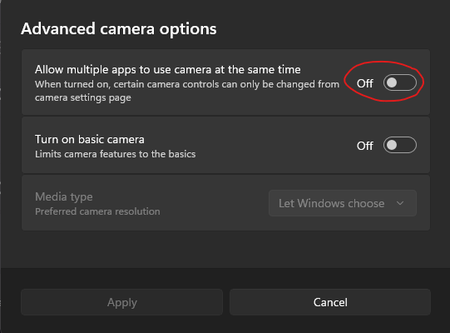
Hi. We have a load of shared meeting rooms that are setup with Jabra panacast webcams. When you open Teams it shows that no devices are connected but if you open the camera app or any other app like zoom the camera works fine. The only way to get it to work is to enable this setting. This settings for Multi-app camera cannot be enabled by Intune or powershell/regedit. There are some posts on reddit that suggest I am not alone and there are others having this issues too. So.. its either a bug with the Teams app itself or the windows OS Thanks, Cam227Views0likes0Comments
Out-of-warranty Lenovo MTR Reimage - can't upgrade to Windows 11
Hello everyone. Got a couple of Lenovo MTR NUCs that we needed to reimage. Cause they are out of warranty, Lenovo only provides the image that it was shipped with for reimage (I can't use Cloud Deploy). The problem is, when trying to run the Windows 11 update, I get the error code "0x0000400". This is because these come with the Windows 10 IoT Enterprise edition, which is known to have this problem. The issue is that I can't use the ISO file or load the Windows 11 image, as this will get rid of the MTR system. Does anyone know a way around this/is there an image available? Thanks!143Views0likes0Comments