ipv6
9 Topics
Issues After Disabling IPv6 on Your NIC on SBS 2008
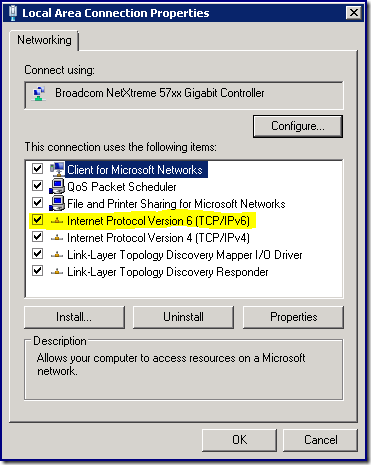
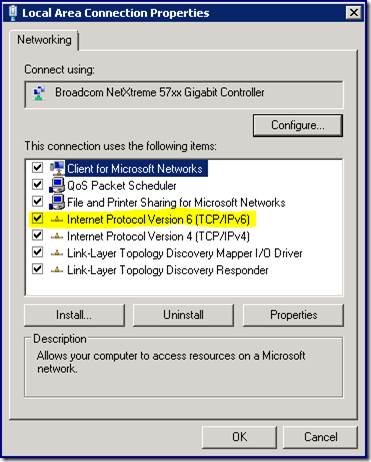
First published on TechNet on Oct 24, 2008 [Today's post comes to us courtesy of Justin Crosby, Ed Walters, and Doug Boyd]If you uncheck the IPv6 protocol from your network interface card on your Windows SBS 2008 server you may see the following issues after a reboot:Microsoft Exchange services fail to start Server hangs at "Applying Computer Settings.Small Business Server 2011 Slow to Boot and Several Services Fail to Start
First published on TechNet on Feb 18, 2011 [Today's post comes to us courtesy of Justin Crosby and Shawn Sullivan from Commercial Technical Support]If you uncheck the IPv6 protocol from your network interface card on your Windows SBS 2011 server you may see the following issues after a reboot:Microsoft Exchange services fail to start Server hangs at "Applying Computer Settings.Internet speed over wifi is very slow and ipv6 has no internet access
HI, I am using windows 11 , my system experiences very slow internet speed over wi fi , but when I connected it to the ethernet of the same router, The speed is up to the mark. In my settings, I've noticed that my Ipv6 has no internet access. I've tried troubleshooting, network reset all these options , still don't found the solution...Solved1.9KViews0likes2Comments
windows server rras record other C/S address in SSTP tunnel over ipv6
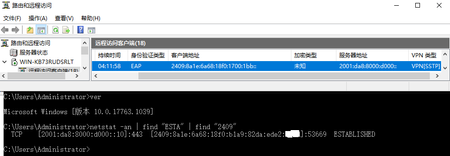
We can see that Client/Server ipv6 addresses in RRAS MMC console are not the same with netstat log. In rras SSTP mode, client connect to server port 443/tcp. Using packet capture tool such as wireshark, I found netstat tells the right address. Why RRAS mmc console print strange C/S addresses, with the same ipv6 prefix /64 as the netstat answer. Radius auth/accounting records are the same with rras mmc console. The same problem found in windows server 2016. When switch to IKEv2 tunnel mode, addresses in MMC are the same with netstat. The problem was not found in ipv4 tunnel. DirectAccess feature is not enable. Is this C/S addresses transform a feature? What for? Maybe Directaccess?933Views0likes1CommentWindows CLAT is Now Generally Available
As organizations move toward IPv6-only and IPv6-mostly networks, some applications still depend on IPv4-only applications or services. Windows CLAT helps those applications continue to work when a network does not provide native IPv4 connectivity. CLAT is the client-side component of 464XLAT. It statelessly translates IPv4 traffic from the Windows client into IPv6 for transport across the network to a provider-side translator (PLAT), which provides stateful NAT64 translation to IPv4. Why CLAT? Compatibility with IPv4 resources: IPv6-only devices can reach IPv4 resources without requiring the whole network to be dual-stack. Reduced IPv4 address requirements: Devices can share a public IPv4 address through NAT64, reducing demand for scarce IPv4 addresses. This is critical for organizations that cannot obtain a significant block of IPv4 addresses for new networks due to IPv4 address depletion. Simpler network configuration: Organizations can deploy IPv6-only networks while retaining access to IPv4 resources. Seamless user experience: Translation happens as needed, without requiring users to know whether a service uses IPv4 or IPv6. Potential cost savings: IPv6-only deployment can reduce costs associated with IPv4 addresses and operating dual-stack infrastructure. Minimized security risk exposure: Similar to the above, dual‑stack networks expose two attack surfaces, each with its own vulnerabilities and configuration requirements. CLAT helps to reduce this by removing the need to secure an additional network. Incremental deployment: Organizations can introduce IPv6 in stages while maintaining IPv4 compatibility, rather than overhaul the entire network at once. A foundation for future IPv6 growth: CLAT helps organizations build on IPv6 rather than depend on an increasingly limited supply of IPv4 addresses. How Windows CLAT Helps Organizations Accelerate To IPv6-Only Feature What it is Why it’s important IPv4 application access on IPv6 networks CLAT is the client-side component of the 464XLAT architecture (RFC 6877). It translates IPv4 traffic so IPv4-only applications can communicate over an IPv6 network (where a NAT64/PLAT service exists.) Organizations can move network infrastructure toward IPv6 without waiting for every application or destination to support IP Local IPv4 compatibility for applications Allows IPv4 addresses to be assigned to support IPv4-only application flow on IPv6-only devices and networks. Helps existing applications continue to use familiar IPv4 networking while the device uses an IPv6 network underneath. Support across network interfaces The feature is designed for IPv6-capable connections across Wi-Fi, Ethernet, and cellular interfaces. Devices can maintain IPv4 application compatibility as they connect through different network types. Automatic recognition of IPv6-only networks CLAT can begin configuration discovery when IPv4 connectivity is unavailable, or when a network signals IPv6-only-preferred operation using DHCP Option 108 (RFC 8925). Reduces the need for users to configure connectivity themselves and gives networks a standards-based way to indicate that clients should prefer IPv6. Prefix discovery from network advertisements CLAT can discover the translation prefix from PREF64 information in IPv6 Router Advertisements, as defined by RFC 8781. Allows compatible routers to provide the information devices need to use for translation, and to advertise prefix changes as the network evolves. DNS-based prefix discovery CLAT can also discover the translation prefix by querying ipv4only.arpa, following RFC 7050 and RFC 8880. This provides an alternative when the network does not provide PREF64 through Router Advertisements. Gives organizations another standards-based discovery option for networks that rely on DNS to provide IPv4/IPv6 transition information. Where to Get More Details For a practical overview of enabling Windows CLAT, confirming its configuration, and collecting logs, see our Windows CLAT Public Preview blog. For a deeper explanation of what CLAT is and how it works, see Windows CLAT Enters Private Preview: A Milestone for IPv6 Adoption. Accelerating the Global IPv6 Migration We’re excited about the role Windows CLAT can play in the global transition to IPv6. By helping IPv4-dependent applications continue to work as networks evolve, this feature can make it easier for organizations to move toward IPv6-only and IPv6-mostly environments. We’re grateful to the customers and partners whose feedback helped bring Windows CLAT to general availability, and we look forward to seeing its impact across the IPv6 community.702Views0likes0Comments
Enable ipv6 for azure-iot-edge user-defined network
We have a Raspberry Pi that we use as an edge device. One of our modules needs to communicate over IPv6 in the local network. Since the module is automatically connected to the "azure-iot-edge" network in Docker, I'd like a method to easily enable IPv6 on this network. To achieve this, I tried following the steps described in the https://github.com/Azure/iotedge/blob/main/doc/IPv6Configuration.md. For me, this worked only for the default bridge network but not for the "azure-iot-edge" network. I also checked the https://github.com/Azure/iotedge/blob/1.5.16/doc/networking.md and attempted to configure the network using the mentioned /etc/aziot/edged/config.yaml file. However, this file did not exist initially, and when I manually added it, it seemed to be completely ignored. The only way I have been able to get IPv6 to work for the "azure-iot-edge" network so far is by completely removing it and manually recreating it with IPv6 enabled. This also required me to manually disconnect and later reconnect all modules. This does not feel like the correct way to achieve this. I would assume there should be a way to configure this either from the module definition in the IoT Hub or by adding some configuration on the device.199Views0likes0Comments