iot security
33 Topics
Latest Threat Intelligence (September 2025)
Microsoft Defender for IoT has released the September 2025 Threat Intelligence package. The package is available for download from the Microsoft Defender for IoT portal (click Updates, then Download file). Threat Intelligence updates reflect the combined impact of proprietary research and threat intelligence carried out by Microsoft security teams. Each package contains the latest CVEs (Common Vulnerabilities and Exposures), IOCs (Indicators of Compromise), and other indicators applicable to IoT/ICS/OT networks (published during the past month) researched and implemented by Microsoft Threat Intelligence Research - CPS. The CVE scores are aligned with the National Vulnerability Database (NVD). Starting with the August 2023 threat intelligence updates, CVSSv3 scores are shown if they are relevant; otherwise the CVSSv2 scores are shown. Guidance Customers are recommended to update their systems with the latest TI package in order to detect potential exposure risks and vulnerabilities in their networks and on their devices. Threat Intelligence packages are updated every month with the most up-to-date security information available, ensuring that Microsoft Defender for IoT can identify malicious actors and behaviors on devices. Update your system with the latest TI package The package is available for download from the Microsoft Defender for IoT portal (click Updates, then Download file), for more information, please review Update threat intelligence data | Microsoft Docs. MD5 Hash: 14bf7b135c8c6d61d39ba6c28991f300 For cloud connected sensors, Microsoft Defender for IoT can automatically update new threat intelligence packages following their release, click here for more information.
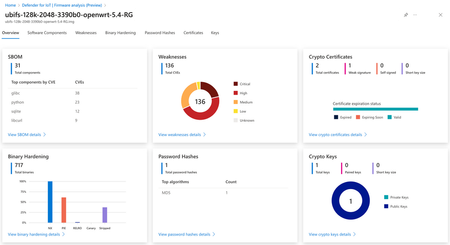
New Blog | Analyze IoT/OT device firmware with Microsoft Defender for IoT
Consider an organization that has thousands of endpoints on their network that are running 10-year old, unpatched SSH servers. Or when a critical vulnerability like log4shell is discovered, having no easy way to know which of those endpoints are exploitable. This is the situation organizations find themselves in when it comes to IoT and OT devices. This problem is so important that the US National Cybersecurity Strategy released a report in March 2023 indicating the IoT security threat as a strategic objective. Read the full blog here: Analyze IoT/OT device firmware with Microsoft Defender for IoTHow to Secure an IoT Solution: A Beginner's Guide
IoT security is crucial to protect against unauthorized access to IoT systems. A zero-trust security model ensures basic identity, device, and access security practices. Divide security into device, connection, and cloud security. Include hardware manufacturer, solution developer, deployer, and operator in your IoT security strategy. Microsoft Defender for IoT can provide additional security monitoring and recommendations. Ensure minimum hardware requirements and secure hardware for device security. Consider implementing encryption for data protection. Incorporate threat modeling into the design phase for comprehensive security.3.2KViews0likes0CommentsWebinar: Sentinel IT/OT Threat Monitoring
Join us on Thursday 28.7 for a webinar on Sentinel IT/OT Threat Monitoring with Defender for IoT solution. Learn how Defender for IoT's built-in integration with Sentinel helps bridge the gap between IT and OT security. Registration is now open , for July 28 There has been a long-standing split between ICS/SCADA (OT) and Corporate (IT) cybersecurity. This split was often driven by significant differences in technology/tooling. Microsoft Defender for IoT's integration with Microsoft Sentinel drives convergency by providing a single pane for coverage of both D4IOT (OT) and Microsoft Sentinel (IT) alerting. This solution includes Workbooks and Analytics rules providing a guide OT detection and Analysis.3.7KViews0likes8Comments
Is Raspberry PI Bullseye also supported by Defender for IoT agent installation?
Hello, As Azure IoT Edge is https://azure.microsoft.com/en-us/updates/azure-iot-edge-supports-debian-bullseye-arm32v7/ on a Raspberry PI, I was hoping to install the Defender for IoT agent on this device. But when I follow the Debian installation steps, I get an exception: sudo apt-get install defender-iot-micro-agent Reading package lists... Done Building dependency tree... Done Reading state information... Done Some packages could not be installed. This may mean that you have requested an impossible situation or if you are using the unstable distribution that some required packages have not yet been created or been moved out of Incoming. The following information may help to resolve the situation: The following packages have unmet dependencies: defender-iot-micro-agent : Depends: libcurl3 but it is not installable E: Unable to correct problems, you have held broken packages. Unfortunately, I'm not able to install libcurl3: sudo apt install libcurl3 Reading package lists... Done Building dependency tree... Done Reading state information... Done Package libcurl3 is not available, but is referred to by another package. This may mean that the package is missing, has been obsoleted, or is only available from another source However the following packages replace it: libcurl4 E: Package 'libcurl3' has no installation candidate Because libcurl3 is mandatory instead of optional, I'm not able to let the installer ignore it. Is there some solution? Thanks, SanderSolvedDefender for IoT Automating processes
Hello, I am trying to automate some processes we are performing using Defender for IoT, running on a virtual machine in Azure. Part of the tasks can be performed using the Defender For IoT Cli, another part can be done using the API functionalities. However, there are some tasks that I cannot yet find a way how to perform. A good example of such a task is playing pcap files. You can upload the pcap files to the desired location using a script. Is it possible to play the files using a script/ some other way? Any input will be much appreciated. Thank you for your time. Kind regards, Vanina(Updated 21-DEC) Security Advisory - Apache Log4j CVE-2021-44228, CVE-2021-45046, CVE-2021-45105
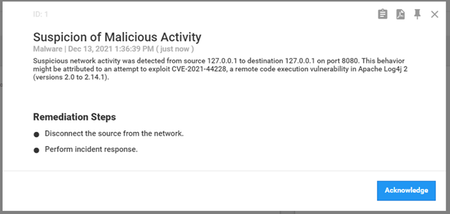
Microsoft is investigating the remote code execution vulnerability related to Apache Log4j (a logging tool used by many Java-based applications) disclosed on 9 Dec 2021. Mitre has designated this vulnerability as CVE-2021-44228 with a severity rating of 10.0. This was followed by vulnerabilities disclosed on Dec 14 th 2021 (CVE-2021-45046) potentially affecting non-standard configurations and Dec 16 th 2021 (CVE-2021-45105). For the latest status of Microsoft’s investigation, please see Microsoft’s Response to CVE-2021-4428 Apache Log4j 2. This advisory will continue to be updated as new information becomes available. (Last Updated 21-DEC-2021) The advisory was updated to reflect that version 10.5.5 has been released with the latest Apache Log4j 2.17.0 and validated to mitigate CVE-2021-44228, CVE-2021-45046 and CVE-2021-45105. We strongly recommend our customers implement the following mitigation steps based on an internal analysis of possible attack vectors. Mitigation Guidance for Microsoft Defender for IoT For Defender for IoT security appliances (OT network sensors and on-premises management console): Deploy the latest software release As of version 10.5.4, all components that were affected by CVE-2021-44228, CVE-2021-45046 and CVE-2021-45105 have been upgraded and secured. Customers are strongly encouraged to apply this update as soon as possible. Manual Workaround The workarounds described below will mitigate CVE-2021-44228, CVE-2021-45046 and CVE-2021-45105, and can be used until upgrading to version 10.5.4 or above. > OT Network Sensor Using SSH, login as an administrator with full privileges. Execute the following: echo "find /var/cyberx/components/ -name \"start.sh\" -exec grep -L Dlog4j2.formatMsgNoLookups=true {} \; | xargs -I '{}' sed -i '/java_args.append(\"-Dlog4j.configurationFile=.*)/a java_args.append(\"-Dlog4j2.formatMsgNoLookups=true\")' {} && sed -i 's/args = \[\x27java\x27, \x27-Dlog4j\.configurationFile=\/var\/cyberx\/properties\/log4j2-active-tool\.xml\x27, \x27-jar\x27,/args = \[\x27java\x27, \x27-Dlog4j\.configurationFile=\/var\/cyberx\/properties\/log4j2-active-tool\.xml\x27, \x27-Dlog4j2\.formatMsgNoLookups=true\x27, \x27-jar\x27,/' /usr/local/bin/cyberx-xsense-cip-query-controllers && monit restart all" | sudo at now + 1 minutes > On Premises Management Console Using SSH, login as an administrator with full privileges. Execute the following: echo "find /var/cyberx/components/ -name \"start.sh\" -exec grep -L Dlog4j2.formatMsgNoLookups=true {} \; | xargs -I '{}' sed -i '/java_args.append(\"-Dlog4j.configurationFile=.*)/a java_args.append(\"-Dlog4j2.formatMsgNoLookups=true\")' {} && monit restart all" | sudo at now + 1 minutes If you need further assistance Please open a support ticket to contact our support team. The Defender for IoT cloud service does not use log4j and is not vulnerable to any active attack vector caused by CVE-2021-44228 and CVE-2021-45046. Latest Threat Intelligence Update for Monitoring CVE-2021-44228, CVE-2021-45046, CVE-2021-45105 Microsoft has released a dedicated Threat Intelligence update package for detecting Log4j exploit attempts on the network (example below). The package is available for download from the Microsoft Defender for IoT portal (Click Updates, then Download file). MD5 Hash - 512081a7ce19e436c9ff7ed672024354 Update your system with the latest TI package: Microsoft Defender for IoT now pushes new threat intelligence packages to cloud-connected sensors upon release, click here for more information. Starting with sensor version 10.3, users can automatically receive up-to-date threat intelligence packages through Microsoft Defender for IoT. Working with automatic updates reduces operational effort and ensures greater security. Enable automatic updating on the Defender for IoT portal by onboarding your cloud-connected sensor with the toggle for Automatic Threat Intelligence Updates turned on. Additionally, the package can be downloaded from the Microsoft Defender for IoT portal, under Updates: To update a package on a single sensor: Go to the Microsoft Defender for IoT Updates page. Download and save the Threat Intelligence package. Sign into the sensor console. On the side menu, select System Settings. Select Threat Intelligence Data, and then select Update. Upload the new package. To update a package on multiple sensors simultaneously: Go to the Microsoft Defender for IoT Updates page. Download and save the Threat Intelligence package. Sign into the management console. On the side menu, select System Settings. In the Sensor Engine Configuration section, select the sensors that should receive the updated packages. In the Select Threat Intelligence Data section, select the plus sign (+). Upload the package. For more information, please review Update threat intelligence data | Microsoft Docs For further information Follow the MSRC blog for more information, which is updated with information and protection details as they become available. For a more in-depth analysis of the vulnerability, exploitation, detections, and mitigations, consult the RiskIQ (acquired by Microsoft in August 2021) analysis. Microsoft’s Response to CVE-2021-44228 Apache Log4j 2 – Microsoft Security Response Center Guidance for preventing, detecting, and hunting for CVE-2021-44228 Log4j 2 exploitation - Microsoft Security Blog Log4j – Apache Log4j Security Vulnerabilities CVE - CVE-2021-44228 (mitre.org)20KViews1like0CommentsBuilding a Balancing Robot with Azure Sphere
In this blog post, we’re going to describe a balancing robot demo device built with Azure Sphere, showing how software, hardware, and physical design come together to create a real working device, which we then distributed to some end users. 6.3KViews1like0Comments