ios
40 Topics
Microsoft Partner Center Support Not Working
Hi, I was wondering if someone can help, I recently created a Microsoft Partner Center Individual account, created an app in ten languages, and released it into the Microsoft Store. That part was the easy part. Then I noticed the search terms weren't working for my app, if I used all seven, my app didn't appear. My app only appears if I search for it by name, so nobody is ever going to see it, unless they guess my app name. So I go into Microsoft Partner Center to see if I can get some help, nothing in there works for help, I don't see a workspace for 'Apps and Games'. If I try to get help on my account settings I'm taken to something called the 'Engage Center', which doesn't work, it shows 2 flashing '...' icons and nothing more. So I'm a bit stuck, I cannot find any other way to contact Microsoft for help, I guess there is something wrong with my account maybe? Anyone got any advice on how I can get help with my Microsoft Partner Center issues? (Oh and yeah, I cannot post this either without using a tag which makes no sense either so sorry about that) Thanks, Phil.86Views0likes2Comments
Debugging a .Net 11 Maui app for iPad
I am using Visual Studio 2026 to develop a .net 11 maui app for an iPad. The iPad is connected to my build map via USB. I understand debugging support on a physical device is not yet supported in .Net 11, but will be in the general release in Novenber. I've tried using the simulator on my windows machine but it is extreamly slow and freezes most of the time. How do I debug and continue development prior to the general release?356Views0likes1Comment
Error when trying to test Maui iOS app using a simulator from a Mac
I am using VS2022 on a PC and have a Maui app that i want to test the iOS version on a simulator (Mac is running Sequoia). However every time i try to run it it gives me the following error: MessagingRemoteException: An error occurred on client Build1808319 while executing a reply for topic xvs/build/18.0.8319/execute-task/App.iOS/cebe602002fUnpackLibraryResources NotImplementedException: The method or operation is not implemented. Both PC and Mac are running .NET 8.0.411 and are running Maui 18.0.8319/8.0.100 from the SDK 8.0.400 Is anyone having similar issues, is it a bug in the maui-iOS component or, does anyone know the answer to this?221Views0likes0Comments
Error on Publishing ios app (pc->imac)
Hi there, i have my PC connected to my imac. The imac builds and runs and supplies the simulator correctly so it's great from that point of view. When i try and have the imac build the IPA file from the PC - i get the above error. has anyone any thoughts on the solution might be?321Views0likes2Comments
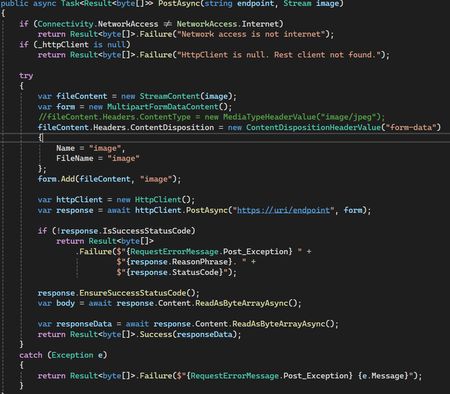
Maui How to upload a file to web API in .NET 9
Hi, everyone I'm trying to upload an image to an API from a maui project. But when I send the file, the response is always BadRequest. However the API works if I use Postman. I create a client in a console project and it worked. So I don't know why the same code in .NET MAUI it doesn't work. Problem is not in URI or something. I hope you could help me. Reegrets. Victor Cueto API throws the next exception: Microsoft.AspNetCore.Http.BadHttpRequestException: Required parameter "IFormFile image" was not provided from form file. at lambda_method3(Closure, Object, HttpContext, Object) at Microsoft.AspNetCore.Http.RequestDelegateFactory.<>c__DisplayClass103_2.<<HandleRequestBodyAndCompileRequestDelegateForForm>b__2>d.MoveNext() --- End of stack trace from previous location --- at Microsoft.AspNetCore.Diagnostics.DeveloperExceptionPageMiddlewareImpl.Invoke(HttpContext context) code Minimal API: error:326Views0likes0Comments
Maui.NET and XCode validation
My application is developed on a Windows PC using Visual Studio 2022 (ver. 17.12.1) and .NET MAUI framework (ver. 9). After a successful build and testing using a virtual iPhone interface, Visual Studio connects remotely to the MacBook (Mac OS 15.1) sending the necessary project files to Xcode 16.1 targeting iOS version 18. The files are sent to Xcode successfully. However, Xcode validation fails with 4 errors. No matter what I change, the same errors persist. These validation errors are preventing me from deploying the code to TestFlight. Apple support refuses to help stating it is a problem with Visual Studio compilation of the package for Xcode. While I am not 100% confident, I suspect that the entries in the plist.info file contained within the project do not agree with where the files are physically located (even though they appear correct. However, I cannot see the key values in the plist file in the Xcode IPA package. I also notice that Maui opted to create entries in the plist.info file for “Assets.xcassets/AppIcon.appiconset”, but according to apple this is not how it should be done anymore. Could anyone provide the specific changes in detail that need to happen to this project to have a successful XCode validation? I have been at this for two weeks with no solution in site. Below is a link to the referenced resources. https://drive.google.com/drive/folders/1leQVXD2TTdExr0SuyfbRIpME2KdUnWRl Your help is greatly appreciated360Views0likes0Comments
Unique Device Identifier in MAUI
I am looking for a way to get a device identifier in NET MAUI that is cross platform compliant between Android/iOS/Windows. I originally had this code working in Xamarin Forms with the following: Android Context context = Application.Context; id = Settings.Secure.GetString(context.ContentResolver, Settings.Secure.AndroidId); iOS UIDevice.CurrentDevice.IdentifierForVendor.AsString().Replace("-", ""); Is there anything currently or planned in the future for use in NET MAUI. Thanks In Advance, Stuart Ferguson12KViews3likes1Comment
Synchronizing Photos and Data with Xamarin, Asp.Net Core, and MSSQL
Good day! I am in the process of developing an internal application for merchandising purposes, intended not for the general user base. However, I'm encountering an issue: our employees often find themselves in locations with either no internet connection or a very poor one, which hinders their ability to upload necessary photos for their tasks. The development is utilizing Xamarin, Asp.Net Core for the API and MSSQL as the database. My question to the community is: how can we implement functionality that would allow employees to collect the required data throughout the day and upload it at the touch of a "Upload" button at the end of the day when internet access becomes available? Are there proven approaches or tools that could facilitate the implementation of such a solution? Your advice and experience would be incredibly valuable in overcoming this challenge.341Views0likes0CommentsHow can I publish my Xamarin App to the App Store?
Hello everyone, I tried to publish my application in the App Store, but during this process I've faced an issue. I already prepared everything I need for the distrubution. I have a certificate, an identifier with the same bundleID like my application and a provisioning profile. Anytime I try to build my application, everything worked fine until the distribution process. I already defined the build options of my IOS project, I selected the distribution certificate and the provisioning profile I generated and I included the property list file (info.plist) into the build options. So anytime I try to publish the application through the visual studio assistant it gets to the point, an .ipa file gets generated and afterwards it complains with the message "unable to validate archive". My next try was opening the created archive file with XCode and trying to publish the application with XCode itself. Even there anything worked without issues, until I had to choose a provisioning profile for the distribution. After selecting the created provisioning profile XCode complained about missing entitlements inside the provision profile, although I already defined them inside the property list file of my Xamarin IOS project. Inside my Apple Development account I don't have the opportunity to set any entitlements like in the property list. I also tried to contact the Apple Development Support, whether they can give me a permission to edit those entitlements inside the provisioning profile. But they rejected my request, due to the fact that I use a thrid party plattform (visual studio) for the distribution. Now my question is, how can I solve the conflict between the missing entitlements inside the provisioning profile and the property list I've already included into my build options? Or is there another possibility to add such entitlements inside the provisioning profile? If anyone knows how to solve that issue or knows what I could have missed during this process, please let me know. Thanks in advance.729Views0likes0Comments
Migrating Xamarin app to MAUI Startup Much Slower
I am migrating a Xamarin iOS / Android app to MAUI. When I start the MAUI app using Visual Studio for Mac on either Android or iOS, the startup time is about 12 seconds longer. This is near the beginning soon after loading all of the debug DLLs. I initially show a LoadingPage that is a simple ContentPage by setting App.MainPage = new LoadingPage(). I then pause for about 1 second to allow that to finish loading and set App.MainPage = new MainPage(). MainPage is also a ContentPage and has many views as children. One of its children is ContentView called MainView. These are all XAML files with simple code behind and then ViewModels to implement all binding. When starting up the MAUI version of my app, there are about 12 additional seconds where the screen is just blank between the loading page and the main page. I am not asking here for someone to know the answer without all my code. I am asking here for suggestions on where to look and how to diagnose this startup issue...650Views0likes0Comments