integration
65 TopicsDesigning and Implementing Modern Data Architecture on Azure Cloud.
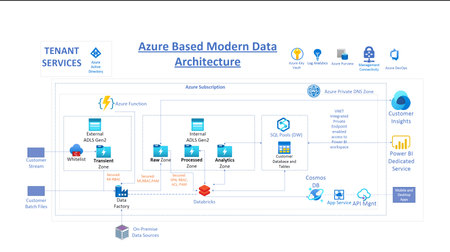
Designing a modern, cloud data architecture is a critical component of the digital transformation journey of any enterprise. In this post, we cover some of the Azure Data Services used to deliver a solution designed to meet the customer's current and evolving future needs.44KViews8likes2CommentsExploring AI Agent-Driven Auto Insurance Claims RAG Pipeline.
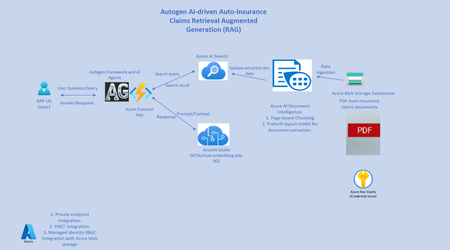
In this post, I explore a recent experiment aimed at creating a RAG pipeline tailored for the insurance industry, specifically for handling automobile insurance claims, with the goal of potentially reducing processing times.4.8KViews5likes0CommentsCreating an Media Upload Workflow using Azure Storage, Logic Apps and Media Services
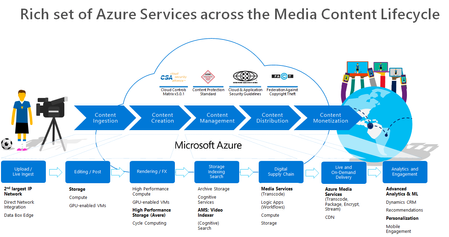
Over the last two months, I’ve engaged with a few media companies who wanted to learn how to integrate Azure Media Services into their workflow. Azure Media Services (AMS) offers a whole range of media capabilities for content ingest, storage, transcoding, video AI, encryption, dynamic packaging, and delivery – be it for live streaming or VOD through a single or multi-CDN.8KViews5likes1CommentBuilding AI Agents: Workflow-First vs. Code-First vs. Hybrid
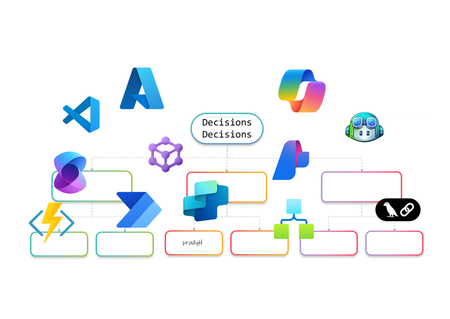
AI Agents are no longer just a developer’s playground. They’re becoming essential for enterprise automation, decision-making, and customer engagement. But how do you build them? Do you go workflow-first with drag-and-drop designers, code-first with SDKs, or adopt a hybrid approach that blends both worlds? In this article, I’ll walk you through the landscape of AI Agent design. We’ll look at workflow-first approaches with drag-and-drop designers, code-first approaches using SDKs, and hybrid models that combine both. The goal is to help you understand the options and choose the right path for your organization. Why AI Agents Need Orchestration Before diving into tools and approaches, let’s talk about why orchestration matters. AI Agents are not just single-purpose bots anymore. They often need to perform multi-step reasoning, interact with multiple systems, and adapt to dynamic workflows. Without orchestration, these agents can become siloed and fail to deliver real business value. Here’s what I’ve observed as the key drivers for orchestration: Complexity of Enterprise Workflows Modern business processes involve multiple applications, data sources, and decision points. AI Agents need a way to coordinate these steps seamlessly. Governance and Compliance Enterprises require control over how AI interacts with sensitive data and systems. Orchestration frameworks provide guardrails for security and compliance. Scalability and Maintainability A single agent might work fine for a proof of concept, but scaling to hundreds of workflows requires structured orchestration to avoid chaos. Integration with Existing Systems AI Agents rarely operate in isolation. They need to plug into ERP systems, CRMs, and custom apps. Orchestration ensures these integrations are reliable and repeatable. In short, orchestration is the backbone that turns AI Agents from clever prototypes into enterprise-ready solutions. Behind the Scenes I’ve always been a pro-code guy. I started my career on open-source coding in Unix and hardly touched the mouse. Then I discovered Visual Studio, and it completely changed my perspective. It showed me the power of a hybrid approach, the best of both worlds. That said, I won’t let my experience bias your ideas of what you’d like to build. This blog is about giving you the full picture so you can make the choice that works best for you. Workflow-First Approach Workflow-first platforms are more than visual designers and not just about drag-and-drop simplicity. They represent a design paradigm where orchestration logic is abstracted into declarative models rather than imperative code. These tools allow you to define agent behaviors, event triggers, and integration points visually, while the underlying engine handles state management, retries, and scaling. For architects, this means faster prototyping and governance baked into the platform. For developers, it offers extensibility through connectors and custom actions without sacrificing enterprise-grade reliability. Copilot Studio Building conversational agents becomes intuitive with a visual designer that maps prompts, actions, and connectors into structured flows. Copilot Studio makes this possible by integrating enterprise data and enabling agents to automate tasks and respond intelligently without deep coding. Building AI Agents using Copilot Studio Design conversation flows with adaptive prompts Integrate Microsoft Graph for contextual responses Add AI-driven actions using Copilot extensions Support multi-turn reasoning for complex queries Enable secure access to enterprise data sources Extend functionality through custom connectors Logic Apps Adaptive workflows and complex integrations are handled through a robust orchestration engine. Logic Apps introduces Agent Loop, allowing agents to reason iteratively, adapt workflows, and interact with multiple systems in real time. Building AI Agents using Logic Apps Implement Agent Loop for iterative reasoning Integrate Azure OpenAI for goal-driven decisions Access 1,400+ connectors for enterprise actions Support human-in-the-loop for critical approvals Enable multi-agent orchestration for complex tasks Provide observability and security for agent workflows Power Automate Multi-step workflows can be orchestrated across business applications using AI Builder models or external AI APIs. Power Automate enables agents to make decisions, process data, and trigger actions dynamically, all within a low-code environment. Building AI Agents using Power Automate Automate repetitive tasks with minimal effort Apply AI Builder for predictions and classification Call Azure OpenAI for natural language processing Integrate with hundreds of enterprise connectors Trigger workflows based on real-time events Combine flows with human approvals for compliance Azure AI Foundry Visual orchestration meets pro-code flexibility through Prompt Flow and Connected Agents, enabling multi-step reasoning flows while allowing developers to extend capabilities through SDKs. Azure AI Foundry is ideal for scenarios requiring both agility and deep customization. Building AI Agents using Azure AI Foundry Design reasoning flows visually with Prompt Flow Orchestrate multi-agent systems using Connected Agents Integrate with VS Code for advanced development Apply governance and deployment pipelines for production Use Azure OpenAI models for adaptive decision-making Monitor workflows with built-in observability tools Microsoft Agent Framework (Preview) I’ve been exploring Microsoft Agent Framework (MAF), an open-source foundation for building AI agents that can run anywhere. It integrates with Azure AI Foundry and Azure services, enabling multi-agent workflows, advanced memory services, and visual orchestration. With public preview live and GA coming soon, MAF is shaping how we deliver scalable, flexible agentic solutions. Enterprise-scale orchestration is achieved through graph-based workflows, human-in-the-loop approvals, and observability features. The Microsoft Agent Framework lays the foundation for multi-agent systems that are durable and compliant. Building AI Agents using Microsoft Agent Framework Coordinate multiple specialized agents in a graph Implement durable workflows with pause and resume Support human-in-the-loop for controlled autonomy Integrate with Azure AI Foundry for hosting and governance Enable observability through OpenTelemetry integration Provide SDK flexibility for custom orchestration patterns Visual-first platforms make building AI Agents feel less like coding marathons and more like creative design sessions. They’re perfect for those scenarios when you’d rather design than debug and still want the option to dive deeper when complexity calls. Pro-Code Approach Remember I told you how I started as a pro-code developer early in my career and later embraced a hybrid approach? I’ll try to stay neutral here as we explore the pro-code world. Pro-code frameworks offer integration with diverse ecosystems, multi-agent coordination, and fine-grained control over logic. While workflow-first and pro-code approaches both provide these capabilities, the difference lies in how they balance factors such as ease of development, ease of maintenance, time to deliver, monitoring capabilities, and other non-functional requirements. Choosing the right path often depends on which of these trade-offs matter most for your scenario. LangChain When I first explored LangChain, it felt like stepping into a developer’s playground for AI orchestration. I could stitch together prompts, tools, and APIs like building blocks, and I enjoyed the flexibility. It reminded me why pro-code approaches appeal to those who want full control over logic and integration with diverse ecosystems. Building AI Agents using LangChain Define custom chains for multi-step reasoning [it is called Lang“Chain”] Integrate external APIs and tools for dynamic actions Implement memory for context-aware conversations Support multi-agent collaboration through orchestration patterns Extend functionality with custom Python modules Deploy agents across cloud environments for scalability Semantic Kernel I’ve worked with Semantic Kernel when I needed more control over orchestration logic, and what stood out was its flexibility. It provides both .NET and Python SDKs, which makes it easy to combine natural language prompts with traditional programming logic. I found the planners and skills especially useful for breaking down goals into smaller steps, and connectors helped integrate external systems without reinventing the wheel. Building AI Agents using Semantic Kernel Create semantic functions for prompt-driven tasks Use planners for dynamic goal decomposition Integrate plugins for external system access Implement memory for persistent context across sessions Combine AI reasoning with deterministic code logic Enable observability and telemetry for enterprise monitoring Microsoft Agent Framework (Preview) Although I introduced MAF in the earlier section, its SDK-first design makes it relevant here as well for advanced orchestration and the pro-code nature… and so I’ll probably write this again in the Hybrid section. The Agent Framework is designed for developers who need full control over multi-agent orchestration. It provides a pro-code approach for defining agent behaviors, implementing advanced coordination patterns, and integrating enterprise-grade observability. Building AI Agents using Microsoft Agent Framework Define custom orchestration logic using SDK APIs Implement graph-based workflows for multi-agent coordination Extend agent capabilities with custom code modules Apply durable execution patterns with pause and resume Integrate OpenTelemetry for detailed monitoring and debugging Securely host and manage agents through Azure AI Foundry integration Hybrid Approach and decision framework I’ve always been a fan of both worlds, the flexibility of pro-code and the simplicity of workflow drag-and-drop style IDEs and GUIs. A hybrid approach is not about picking one over the other; it’s about balancing them. In practice, this to me means combining the speed and governance of workflow-first platforms with the extensibility and control of pro-code frameworks. Hybrid design shines when you need agility without sacrificing depth. For example, I can start with Copilot Studio to build a conversational agent using its visual designer. But if the scenario demands advanced logic or integration, I can call an Azure Function for custom processing, trigger a Logic Apps workflow for complex orchestration, or even invoke the Microsoft Agent Framework for multi-agent coordination. This flexibility delivers the best of both worlds, low-code for rapid development (remember RAD?) and pro-code for enterprise-grade customization with complex logic or integrations. Why go Hybrid Ø Balance speed and control: Rapid prototyping with workflow-first tools, deep customization with code. Ø Extend functionality: Call APIs, Azure Functions, or SDK-based frameworks from visual workflows. Ø Optimize for non-functional requirements: Address maintainability, monitoring, and scalability without compromising ease of development. Ø Enable interoperability: Combine connectors, plugins, and open standards for diverse ecosystems. Ø Support multi-agent orchestration: Integrate workflow-driven agents with pro-code agents for complex scenarios. The hybrid approach for building AI Agents is not just a technical choice but a design philosophy. When I need rapid prototyping or business automation, workflow-first is my choice. For multi-agent orchestration and deep customization, I go with code-first. Hybrid makes sense for regulated industries and large-scale deployments where flexibility and compliance are critical. The choice isn’t binary, it’s strategic. I’ve worked with both workflow-first tools like Copilot Studio, Power Automate, and Logic Apps, and pro-code frameworks such as LangChain, Semantic Kernel, and the Microsoft Agent Framework. Each approach has its strengths, and the decision often comes down to what matters most for your scenario. If rapid prototyping and business automation are priorities, workflow-first platforms make sense. When multi-agent orchestration, deep customization, and integration with diverse ecosystems are critical, pro-code frameworks give you the flexibility and control you need. Hybrid approaches bring both worlds together for regulated industries and large-scale deployments where governance, observability, and interoperability cannot be compromised. Understanding these trade-offs will help you create AI Agents that work so well, you’ll wonder if they’re secretly applying for your job! About the author Pradyumna (Prad) Harish is a Technology leader in the WW GSI Partner Organization at Microsoft. He has 26 years of experience in Product Engineering, Partner Development, Presales, and Delivery. Responsible for revenue growth through Cloud, AI, Cognitive Services, ML, Data & Analytics, Integration, DevOps, Open-Source Software, Enterprise Architecture, IoT, Digital strategies and other innovative areas for business generation and transformation; achieving revenue targets via extensive experience in managing global functions, global accounts, products, and solution architects across over 26 countries.12KViews4likes0CommentsAzure AI Foundry, GitHub Copilot, Fabric and more to Analyze usage stats from Utility Invoices
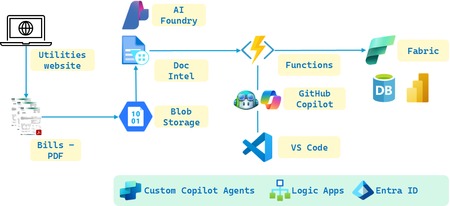
Overview With the introduction of Azure AI Foundry, integrating various AI services to streamline AI solution development and deployment of Agentic AI Workflow solutions like multi-modal, multi-model, dynamic & interactive Agents etc. has become more efficient. The platform offers a range of AI services, including Document Intelligence for extracting data from documents, natural language processing and robust machine learning capabilities, and more. Microsoft Fabric further enhances this ecosystem by providing robust data storage, analytics, and data science tools, enabling seamless data management and analysis. Additionally, Copilot and GitHub Copilot assist developers by offering AI-powered code suggestions and automating repetitive coding tasks, significantly boosting productivity and efficiency. Objectives In this use case, we will use monthly electricity bills from the utilities' website for a year and analyze them using Azure AI services within Azure AI Foundry. The electricity bills is simply an easy start but we could apply it to any other format really. Like say, W-2, I-9, 1099, ISO, EHR etc. By leveraging the Foundry's workflow capabilities, we will streamline the development stages step by step. Initially, we will use Document Intelligence to extract key data such as usage in kilowatts (KW), billed consumption, and other necessary information from each PDF file. This data will then be stored in Microsoft Fabric, where we will utilize its analytics and data science capabilities to process and analyze the information. We will also include a bit of processing steps to include Azure Functions to utilize GitHub Copilot in VS Code. Finally, we will create a Power BI dashboard in Fabric to visually display the analysis, providing insights into electricity usage trends and billing patterns over the year. Utility Invoice sample Building the solution Depicted in the picture are the key Azure and Copilot Services we will use to build the solution. Set up Azure AI Foundry Create a new project in Azure AI Foundry. Add Document Intelligence to your project. You can do this directly within the Foundry portal. Extract documents through Doc Intel Download the PDF files of the power bills and upload them to Azure Blob storage. I used Document Intelligence Studio to create a new project and Train custom models using the files from the Blob storage. Next, in your Azure AI Foundry project, add the Document Intelligence resource by providing the Endpoint URL and Keys. Data Extraction Use Azure Document Intelligence to extract required information from the PDF files. From the resource page in the Doc Intel service in the portal, copy the Endpoint URL and Keys. We will need these to connect the application to the Document Intelligence API. Next, let’s integrate doc intel with the project. In the Azure AI Foundry project, add the Document Intelligence resource by providing the Endpoint URL and Keys. Configure the settings as needed to start using doc intel for extracting data from the PDF documents. We can stay within the Azure AI Foundry portal for most of these steps, but for more advanced configurations, we might need to use the Document Intelligence Studio. GitHub Copilot in VS Code for Azure Functions For processing portions of the output from Doc Intel, what better way to create the Azure Function than in VS Code, especially with the help of GitHub Copilot. Let’s start by installing the Azure Functions extension in VS Code, then create a new function project. GitHub Copilot can assist in writing the code to process the JSON received. Additionally, we can get Copilot to help generate unit tests to ensure the function works correctly. We could use Copilot to explain the code and the tests it generates. Finally, we seamlessly integrate the generated code and unit tests into the Functions app code file, all within VS Code. Notice how we can prompt GitHub Copilot from step 1 of Creating the Workspace to inserting the generated code into the Python file for the Azure Function to testing it and all the way to deploying the Function. Store and Analyze information in Fabric There are many options for storing and analyzing JSON data in Fabric. Lakehouse, Data Warehouse, SQL Database, Power BI Datamart. As our dataset is small, let’s choose either SQL DB or PBI Datamart. PBI Datamart is great for smaller datasets and direct integration with PBI for dashboarding while SQL DB is good for moderate data volumes and supports transactional & analytical workloads. To insert the JSON values derived in the Azure Functions App either called from Logic Apps or directly from the AI Foundry through the API calls into Fabric, let’s explore two approaches. Using REST API and the other Using Functions with Azure SQL DB. Using REST API – Fabric provides APIs that we can call directly from our Function to insert records using HTTP client in the Function’s Python code to send POST requests to the Fabric API endpoints with our JSON data. Using Functions with Azure SQL DB – we can connect it directly from our Function using the SQL client in the Function to execute SQL INSERT statements to add records to the database. While we are at it, we could even get GitHub Copilot to write up the Unit Tests. Here’s a sample: Visualization in Fabric Power BI Let's start with creating visualizations in Fabric using the web version of Power BI for our report, UtilitiesBillAnalysisDashboard. You could use the PBI Desktop version too. Open the PBI Service and navigate to the workspace where you want to create your report. Click on "New" and select "Dataset" to add a new data source. Choose "SQL Server" from the list of data sources and enter "UtilityBillsServer" as the server name and "UtilityBillsDB" as the DB name to establish the connection. Once connected, navigate to the Navigator pane where we can select the table "tblElectricity" and the columns. I’ve shown these in the pictures below. For a clustered column (or bar) chart, let us choose the columns that contain our categorical data (e.g., month, year) and numerical data (e.g., kWh usage, billed amounts). After loading the data into PBI, drag the desired fields into the Values and Axis areas of the clustered column chart visualization. Customize the chart by adjusting the formatting options to enhance readability and insights. We now visualize our data in PBI within Fabric. We may need to do custom sort of the Month column. Let’s do this in the Data view. Select the table and create a new column with the following formula. This will create a custom sort column that we will use as ‘Sum of MonthNumber’ in ascending order. Other visualizations possibilities: Other Possibilities Agents with Custom Copilot Studio Next, you could leverage a custom Copilot to provide personalized energy usage recommendations based on historical data. Start by integrating the Copilot with your existing data pipeline in Azure AI Foundry. The Copilot can analyze electricity consumption patterns stored in your Fabric SQL DB and use ML models to identify optimization opportunities. For instance, it could suggest energy-efficient appliances, optimal usage times, or tips to reduce consumption. These recommendations can be visualized in PBI where users can track progress over time. To implement this, you would need to set up an API endpoint for the Copilot to access the data, train the ML models using Python in VS Code (let GitHub Copilot help you here… you will love it), and deploy the models to Azure using CLI / PowerShell / Bicep / Terraform / ARM or the Azure portal. Finally, connect the Copilot to PBI to visualize the personalized recommendations. Additionally, you could explore using Azure AI Agents for automated anomaly detection and alerts. This agent could monitor electricity bill data for unusual patterns and send notifications when anomalies are detected. Yet another idea would be to implement predictive maintenance for electrical systems, where an AI agent uses predictive analytics to forecast maintenance needs based on the data collected, helping to reduce downtime and improve system reliability. Summary We have built a solution that leveraged the seamless integration of pioneering AI technologies with Microsoft’s end-to-end platform. By leveraging Azure AI Foundry, we have developed a solution that uses Document Intelligence to scan electricity bills, stores the data in Fabric SQL DB, and processes it with Python in Azure Functions in VS Code, assisted by GitHub Copilot. The resulting insights are visualized in Power BI within Fabric. Additionally, we explored potential enhancements using Azure AI Agents and Custom Copilots, showcasing the ease of implementation and the transformative possibilities. Finally, speaking of possibilities – With Gen AI, the only limit is our imagination! Additional resources Explore Azure AI Foundry Start using the Azure AI Foundry SDK Review the Azure AI Foundry documentation and Call Azure Logic Apps as functions using Azure OpenAI Assistants Take the Azure AI Learn courses Learn more about Azure AI Services Document Intelligence: Azure AI Doc Intel GitHub Copilot examples: What can GitHub Copilot do – Examples Explore Microsoft Fabric: Microsoft Fabric Documentation See what you can connect with Azure Logic Apps: Azure Logic Apps Connectors About the Author Pradyumna (Prad) Harish is a Technology leader in the GSI Partner Organization at Microsoft. He has 26 years of experience in Product Engineering, Partner Development, Presales, and Delivery. Responsible for revenue growth through Cloud, AI, Cognitive Services, ML, Data & Analytics, Integration, DevOps, Open Source Software, Enterprise Architecture, IoT, Digital strategies and other innovative areas for business generation and transformation; achieving revenue targets via extensive experience in managing global functions, global accounts, products, and solution architects across over 26 countries.5.3KViews4likes1CommentAI for Operations
Solutions idea This solution series shows some examples of how Azure OpenAI and its LLM models can be used on Operations and FinOps issues. With a view to the use of models linked to the Enterprise Scale Landing Zone, the solutions shown, which are available on a dedicated GitHub, are designed to be deployed within a dedicated subscription, in the examples called ‘OpenAI-CoreIntegration’. The examples we are going to list are: SQL BPA AI Enhanced Azure Update Manager AI Enhanced Azure Cost Management AI Enhanced Azure AI Anomalies Detection Azure OpenAI Smart Doc Creator Enterprise Scale AI for Operations Landing Zone Design Architecture SQL BPA AI Enhanced Architecture This LogApp is an example of integrating ARC SQL practices assessment results with OpenAI, creating an HTML report and CSV file send via Email with OpenAI comment of Severity High and/or Medium results based on the actual Microsoft Documentation. Dataflow Initial Trigger Type: Recurrence Configuration: Frequency: Weekly Day: Monday Time: 9:00 AM Time Zone: W. Europe Standard Time Description: The Logic App is triggered weekly to gather data for SQL Best Practice Assessments. Step 1: Data Query Action: Run_query_and_list_results Description: Executes a Log Analytics query to retrieve SQL assessment results from monitored resources. Output: A dataset containing issues classified by severity (High/Medium). Step 2: Variable Initialization Actions: Initialize_variable_CSV: Initializes an empty array to store CSV results. Open_AI_API_Key: Sets up the API key for Azure OpenAI service. HelpLinkContent: Prepares a variable to store useful links. Description: Configures necessary variables for subsequent steps. Step 3: Process Results Action: For_eachSQLResult Description: Processes the query results with the following sub-steps: Condition: Checks if the severity is High or Medium. OpenAI Processing: Sends structured prompts to the GPT-4 model for recommendations on identified issues. Parses the JSON response to extract specific insights. CSV Composition: Creates an array containing detailed results. Step 4: Report Generation Actions: Create_CSV_table: Converts processed data into a CSV format. Create_HTML_table: Generates an HTML table from the data. ComposeMailMessage: Prepares an HTML email message containing the results and a link to the report. Description: Formats the data for sharing. Step 5: Saving and Sharing Actions: Create_file: Saves the HTML report to OneDrive. Send_an_email_(V2): Sends an email with the reports attached (HTML and CSV). Post_message_in_a_chat_or_channel: Shares the results in a Teams channel. Description: Distributes the reports to defined recipients. Components Azure OpenAI service is a platform provided by Microsoft that offers access to powerful language models developed by OpenAI, including GPT-4, GPT-4o, GPT-4o mini, and others. The service is used in this scenario for all the natural language understanding and generating communication to the customers. Azure Logic Apps is a cloud platform where you can create and run automated workflows with little to no code. Azure Logic Apps Managed Identities allow to authenticate to any resource that supports Microsoft Entra authentication, including your own applications. Azure ARC SQL Server enabled by Azure Arc extends Azure services to SQL Server instances hosted outside of Azure: in your data center, in edge site locations like retail stores, or any public cloud or hosting provider. SQL Best Practices Assessment feature provides a mechanism to evaluate the configuration of your SQL Server instance. Azure Monitor is a comprehensive monitoring solution for collecting, analyzing, and responding to monitoring data from your cloud and on-premises environments. Azure Kusto Query is a powerful tool to explore your data and discover patterns, identify anomalies and outliers, create statistical modeling, and more Potential use cases SQL BPA AI Enhanced exploits the capabilities of the SQL Best Practice Assessment service based on Azure ARC SQL Server. The collected data can be used for the generation of customised tables. The solution is designed for customers who want to enrich their Assessment information with Generative Artificial Intelligence. Azure Update Manager AI Enhanced Architecture This LogApp solution example retrieves data from the Azure Update Manager service and returns an output processed by generative artificial intelligence. Dataflow Initial Trigger Type: Recurrence Trigger Frequency: Monthly Time Zone: W. Europe Standard Time Triggers the Logic App at the beginning of every month. Step 1: Initialize API Key Action: Initialize Variable Variable Name: Api-Key Step 2: Fetch Update Status Action: HTTP Request URI: https://management.azure.com/providers/Microsoft.ResourceGraph/resources Query: Retrieves resources related to patch assessments using patchassessmentresources. Step 3: Parse Update Status Action: Parse JSON Content: Response body from the HTTP request. Schema: Extracts details such as VM Name, Patch Name, Patch Properties, etc. Step 4: Process Updates For Each: Body('Parse_JSON')?['data'] Iterates through each item in the parsed update data. Condition: If Patch Name is not null and contains "KB": Action: Format Item Parses individual update items for VM Name, Patch Name, and additional properties. Action: Send to Azure OpenAI Description: Sends structured prompts to the GPT-4 model Headers: Content-Type: application/json api-key: @variables('Api-Key') Body: Prompts Azure OpenAI to generate a report for each virtual machine and patch, formatted in Italian. Action: Parse OpenAI Response Extracts and formats the response generated by Azure OpenAI. Action: Append to Summary and CSV Adds the OpenAI-generated response to the Updated Summary array. Appends patch details to the CSV array. Step 5: Finalize Report Action: Create Reports (I, II, III) Formats and cleans the Updated Summary variable to remove unwanted characters. Action: Compose HTML Email Content Constructs an HTML email with the following: Report summary generated using OpenAI. Disclaimer about possible formatting anomalies. Company logo embedded. Step 6: Generate CSV Table Action: Converts the CSV array into a CSV format for attachment. Step 7: Send E-Mail Action: Send Email Recipient: user@microsoft.com Subject: Security Update Assessment Body: HTML content with report summary. Attachment: Name: SmartUpdate_<timestamp>.csv Content: CSV table of update details. Components Azure OpenAI service is a platform provided by Microsoft that offers access to powerful language models developed by OpenAI, including GPT-4, GPT-4o, GPT-4o mini, and others. The service is used in this scenario for all the natural language understanding and generating communication to the customers. Azure Logic Apps is a cloud platform where you can create and run automated workflows with little to no code. Azure Logic Apps Managed Identities allow to authenticate to any resource that supports Microsoft Entra authentication, including your own applications. Azure Update Manager is a unified service to help manage and govern updates for all your machines. You can monitor Windows and Linux update compliance across your machines in Azure and on-premises/on other cloud platforms (connected by Azure Arc) from a single pane of management. You can also use Update Manager to make real-time updates or schedule them within a defined maintenance window. Azure Arc Server lets you manage Windows and Linux physical servers and virtual machines hosted outside of Azure, on your corporate network, or other cloud provider. Potential use cases Azure Update Manager AI Enhanced is an example of a solution designed for all those situations where the IT department needs to manage and automate the telling of information in a readable format on the status of updates to its infrastructure thanks to an output managed by generative artificial intelligence Azure Cost Management AI Enhanced Architecture This LogApp solution retrieves consumption data from the Azure environment and generates a general and detailed cost trend report on a scheduled basis. Dataflow Initial Trigger Type: Manual HTTP Trigger The Logic App is triggered manually using an HTTP request. Step 1: Set Current Date and Old Date Action: Set Actual Date Current date is initialized to @utcNow('yyyy-MM-dd'). Example Value: 2024-11-22. Action: Set Actual Date -30 Old date is set to 30 days before the current date. Example Value: 2024-10-23. Action: Set old date -30 Sets the variable currentdate to 30 days prior to the old date. Example Value: 2024-09-23. Action: Set old date -60 Sets the variable olddate to 60 days before the current date. Example Value: 2024-08-23. Step 2: Query Cost Data Action: Query last 30 days Queries Azure Cost Management for the last 30 days. Example Data Returned:json{ "properties": { "rows": [ ["Virtual Machines", 5000], ["Databases", 7000], ["Storage", 3000] ] } } Copia codice Action: Query -60 -30 days Queries Azure Cost Management for 30 to 60 days ago. Example Data Returned:json{ "properties": { "rows": [ ["Virtual Machines", 4800], ["Databases", 6800], ["Storage", 3050] ] } } Copia codice Step 3: Download Detailed Reports Action: Download_report_actual_month Generates and retrieves a detailed cost report for the current month. Action: Download_report_last_month Generates and retrieves a detailed cost report for the previous month. Step 4: Process and Store Reports Action: Actual_Month_Report Parses the JSON from the current month's report. Retrieves blob download links for the detailed report. Action: Last_Month_Report Parses the JSON from the last month's report. Retrieves blob download links for the detailed report. Action: Create_ActualMonthDownload and Create_LastMonthDownload Initializes variables to store download links. Action: Get_Actual_Month_Download_Link and Get_Last_Month_Download_Link Iterates through blob data and assigns the download link variables. Step 5: Generate Questions for OpenAI Action: Set_Question Prepares the first question for Azure OpenAI: "Describe the key differences between the previous and current month's costs, and create a bullet-point list detailing these differences in Euros." Action: Set_Second_Question Prepares a second question for Azure OpenAI: "Briefly describe in Italian the major cost differences between the two months, rounding the amounts to Euros." Step 6: Send Questions to Azure OpenAI Action: Passo result to OpenAI Sends the first question to OpenAI for generating detailed insights. Action: Get Description from OpenAI Sends the second question to OpenAI for a brief summary in Italian. Step 8: Process OpenAI Responses Action: Parse_JSON and Parse_JSON_Second_Question Parses the JSON response from OpenAI for both questions. Retrieves the content of the generated insights. Action: For_each_Description Iterates through OpenAI's responses and assigns the description to a variable DescriptionOutput. Step 9: Compose and send E-Mail Action: Compose_Email Composes an HTML email including: Key insights from OpenAI. Links to download the detailed reports. Example Email Content: Azure automated cost control system: - Increase of €200 in Virtual Machines. - Reduction of €50 in Storage. Download details: - Current month: [Download Report] - Previous month: [Download Report]. Action: Send_an_email_(V2) Sends the composed email. Components Azure OpenAI service is a platform provided by Microsoft that offers access to powerful language models developed by OpenAI, including GPT-4, GPT-4o, GPT-4o mini, and others. The service is used in this scenario for all the natural language understanding and generating communication to the customers. Azure Logic Apps is a cloud platform where you can create and run automated workflows with little to no code. Azure Logic Apps Managed Identities allow to authenticate to any resource that supports Microsoft Entra authentication, including your own applications. Potential use cases Azure Cost Management AI Enhanced is an example of a solution designed for those who need to programme the generation of reports related to FinOps topics with the possibility to customise the output and send the results via e-mail or perform a customised upload. Azure AI Anomalies Detection Architecture This LogApp solution leverages Azure Monitor's native machine learning capabilities to retrieve anomalous data within application logs. These will then be analysed by OpenAI. Dataflow Initial Trigger Type: Recurrence Trigger Frequency: Monthly Time Zone: W. Europe Standard Time Triggers the Logic App at the beginning of every month. Step 1: Initialize API Key Action: Initialize Variable Variable Name: Api-Key Step 2: Fetch Update Status Action: HTTP Request URI: https://management.azure.com/providers/Microsoft.ResourceGraph/resources Query: Retrieves resources related to patch assessments using patchassessmentresources. Step 3: Parse Update Status Action: Parse JSON Content: Response body from the HTTP request. Schema: Extracts details such as VM Name, Patch Name, Patch Properties, etc. Step 4: Process Updates For Each: @body('Parse_JSON')?['data'] Iterates through each item in the parsed update data. Condition: If Patch Name is not null and contains "KB": Action: Format Item Parses individual update items for VM Name, Patch Name, and additional properties. Action: Send to Azure OpenAI Description: Sends structured prompts to the GPT-4 model. Headers: Content-Type: application/json api-key: @variables('Api-Key') Body: Prompts Azure OpenAI to generate a report for each virtual machine and patch, formatted in Italian. Action: Parse OpenAI Response Extracts and formats the response generated by Azure OpenAI. Action: Append to Summary and CSV Adds the OpenAI-generated response to the Updated Summary array. Appends patch details to the CSV array. Step 5: Finalize Report Action: Create Reports (I, II, III) Formats and cleans the Updated Summary variable to remove unwanted characters. Action: Compose HTML Email Content Constructs an HTML email with the following: Report summary generated using OpenAI. Disclaimer about possible formatting anomalies. Company logo embedded. Step 6: Generate CSV Table Action: Converts the CSV array into a CSV format for attachment. Step 7: Send Notifications Action: Send Email Recipient: user@microsoft.com Subject: Security Update Assessment Body: HTML content with report summary. Attachment: Name: SmartUpdate_<timestamp>.csv Content: CSV table of update details. Components Azure OpenAI service is a platform provided by Microsoft that offers access to powerful language models developed by OpenAI, including GPT-4, GPT-4o, GPT-4o mini, and others. The service is used in this scenario for all the natural language understanding and generating communication to the customers. Azure Logic Apps is a cloud platform where you can create and run automated workflows with little to no code. Azure Logic Apps Managed Identities allow to authenticate to any resource that supports Microsoft Entra authentication, including your own applications. Azure Monitor is a comprehensive monitoring solution for collecting, analyzing, and responding to monitoring data from your cloud and on-premises environments. Azure Kusto Queryis a powerful tool to explore your data and discover patterns, identify anomalies and outliers, create statistical modeling, and more Potential use cases Azure AI Anomalies Detection is an example of a solution that exploits the Machine Learning capabilities of Azure Monitor to diagnose anomalies within application logs that will then be analysed by Azure OpenAI. The solution can be customized based on Customer requirements. Azure OpenAI Smart Doc Creator Architecture This Function App solution leverages the Azure OpenAI LLM Generative AI to create a docx file based on the Azure architectural information of a specific workload (Azure Metadata based). The function exploits the 'OpenAI multi-agent' concept. Dataflow Step 1: Logging and Configuration Setup Initialize Logging: Advanced logging is set up to provide debug-level insights. Format includes timestamps, log levels, and messages. Retrieve OpenAI Endpoint: QUESTION_ENDPOINT is retrieved from environment variables. Logging confirms the endpoint retrieval. Step 2: Authentication Managed Identity Authentication: The ManagedIdentityCredential class is used for secure Azure authentication. The SubscriptionClient is initialized to access Azure subscriptions. Retrieves a token for Azure Cognitive Services (https://cognitiveservices.azure.com/.default). Step 3: Flattening Dictionaries Function: flatten_dict Transforms nested dictionaries into a flat structure. Handles nested lists and dictionaries recursively. Used for preparing metadata for storage in CSV. Step 4: Resource Tag Filtering Functions: get_resources_by_tag_in_subscription: Filters resources in a subscription based on a tag key and value. get_resource_groups_by_tag_in_subscription: Identifies resource groups with matching tags. Purpose: Retrieve Azure resources and resource groups tagged with specific key-value pairs. Step 5: Resource Metadata Retrieval Functions: get_all_resources: Aggregates resources and resource groups across all accessible subscriptions. get_resources_in_resource_group_in_subscription: Retrieves resources from specific resource groups. get_latest_api_version: Determines the most recent API version for a given resource type. get_resource_metadata: Retrieves detailed metadata for individual resources using the latest API version. Purpose: Collect comprehensive resource details for further processing. Step 6: Documentation Generation Function: generate_infra_config Processes metadata through OpenAI to generate documentation. OpenAI generates detailed and human-readable descriptions for Azure resources. Multi-stage review process: Initial draft by OpenAI. Feedback loop with ArchitecturalReviewer and DocCreator for refinement. Final content is saved to architecture.txt. Step 7: Workload Overview Function: generate_workload_overview Reads from the generated CSV file to create a summary of the workload. Sends resource list to OpenAI for generating a high-level overview. Step 8: Conversion to DOCX Function: txt_to_docx Creates a Word document (Output.docx) with: Section 1: "Workload Overview" (generated summary). Section 2: "Workload Details" (detailed resource metadata). Adds structured headings and page breaks. Step 9: Temporary Files Cleanup Function: cleanup_files Deletes temporary files: architecture.txt resources_with_expanded_metadata.csv Output.docx Ensures no residual files remain after execution. Step 10: CSV Metadata Export Function: save_resources_with_expanded_metadata_to_csv Aggregates and flattens resource metadata. Saves details to resources_with_expanded_metadata.csv. Includes unique keys derived from all metadata fields. Step 11: Architectural Review Process Functions: ArchitecturalReviewer: Reviews and suggests improvements to documentation. DocCreator: Incorporates reviewer suggestions into the documentation. Purpose: Iterative refinement for high-quality documentation. Step 12: HTTP Trigger Function Function: smartdocs Accepts HTTP requests with tag_key and tag_value parameters. Orchestrates the entire workflow: Resource discovery. Metadata retrieval. Documentation generation. File cleanup. Responds with success or error messages. Components Azure OpenAI service is a platform provided by Microsoft that offers access to powerful language models developed by OpenAI, including GPT-4, GPT-4o, GPT-4o mini, and others. The service is used in this scenario for all the natural language understanding and generating communication to the customers. Azure Functions is a serverless solution that allows you to write less code, maintain less infrastructure, and save on costs. Instead of worrying about deploying and maintaining servers, the cloud infrastructure provides all the up-to-date resources needed to keep your applications running. Azure Function App Managed Identities allow to authenticate to any resource that supports Microsoft Entra authentication, including your own applications. Azure libraries for Python (SDK) are the open-source Azure libraries for Python designed to simplify the provisioning, management and utilisation of Azure resources from Python application code. Potential use cases The Azure OpenAI Smart Doc Creator Function App, like all proposed solutions, can be modified to suit your needs. It can be of practical help when there is a need to obtain all the configurations, in terms of metadata, of the resources and services that make up a workload. Contributors Principal author: Tommaso Sacco | Cloud Solutions Architect Simone Verza | Cloud Solution Architect Extended Contribution: Saverio Lorenzini | Senior Cloud Solution Architect Andrea De Gregorio | Technical Specialist Gianluca De Rossi | Technical Specialist Special Thanks: Carmelo Ferrara | Director CSA Marco Crippa | Sr CSA Manager3.8KViews4likes3Comments