integration account
10 Topics📢 Announcement !! Premium Integration Account and Enhanced EDI Connectors
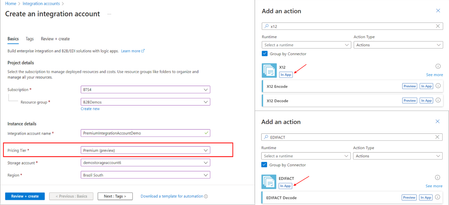
In today's fast-paced business landscape, the ability to seamlessly manage B2B and EDI workloads within a secure and scalable environment is super important. We're thrilled to launch the first round of capabilities that would help how you handle these critical tasks. Let's dive into the details...6.8KViews2likes6Comments🎉Announcing the HL7 connector for Azure Logic Apps Standard and Hybrid (Public Preview)
We’re excited to announce the Public Preview of the HL7 connector for Azure Logic Apps, empowering healthcare organizations to seamlessly integrate clinical applications and automate data exchange using industry-standard HL7 protocols. Why HL7 Integration Matters Healthcare organizations are complex ecosystems, with departments such as admissions, laboratories, nursing stations, and billing all generating and consuming critical patient data. Efficient, secure, and standardized data exchange is essential for delivering quality care and streamlining operations. HL7 Connector: Key Capabilities Simplified healthcare application integration with HL7-specific adapters and schemas. Standardized clinical data interchange between diverse medical applications. Automated communication processes to minimize manual intervention. End-to-end business process support for scenarios like admissions, discharge, and transfer, using publisher/subscriber patterns. Typical Scenarios End-to-End Integration: Publishers (e.g., Admissions Discharge and Transfer systems) send HL7 messages to subscribers (Hospital Information System, Pharmacy System). Azure Logic Apps processes, validates, reformats, and routes these messages, with acknowledgments sent back to publishers. Interrogative (Query/Response): Line-of-business applications can query other systems (e.g., requesting lab results from the Hospital Information System), with Azure Logic Apps managing routing and responses. HL7 Encode/Decode actions The HL7 connector provides native parsing and serialization of HL7 messages. It provides a Decode action that receives an HL7 message to decode in flat file format to produce an XML file, and an Encode action that receives a message to encode, with a header to encode to produce a Flat file. Decode Input: Flat file HL7 message. Output: Decoded XML message content and XML header content. Encode Input: XML message and header content. Output: Encoded HL7 flat file message. Important Considerations HL7 Message Schemas: Supports HL7 v2.X flat-file and XML schemas. Schema Management: Upload BizTalk schemas directly into integration accounts for seamless migration. Hybrid Deployment: Integration accounts connect to Azure. Message Processing: Logic Apps currently supports single message processing, with batching planned for future updates. Multipart Handling: Logic Apps exposes header, body, and custom segments as first-class outputs, simplifying orchestration compared to BizTalk’s multipart pipelines. Connector Availability: HL7 is available for both hybrid and Logic App Standard. Integration accounts: Currently we only support uploading schemas in Integration accounts. Announcing MLLP Private Preview We’re pleased to announce that MLLP support is now available as a private preview. MLLP Adapter: Enables HL7 messaging over the Minimal Lower Layer Protocol (MLLP). MLLP is available only in hybrid due to port restrictions in app services. Customers interested in early access and providing feedback can sign up via this survey: Private bundle for MLLP request Get Started To learn more about the HL7 connector and how it can transform your healthcare integration workflows, visit our documentation at Integrate Healthcare Systems with HL7 in Standard Workflows | Microsoft Learn. Video explaining the features of the new HL7 connector1.2KViews1like0Comments🎉Built for Enterprise: Integration Account Premium SKU Hits General Availability
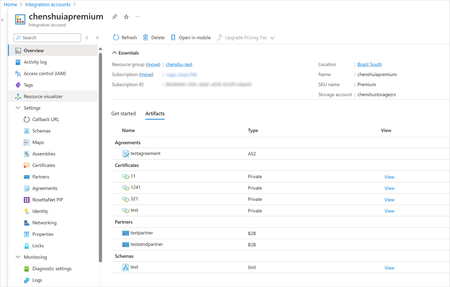
We are thrilled to announce the General Availability (GA) of the Premium SKU for Integration Account! Since the Preview release, we’ve incorporated enhancements to deliver greater reliability and enable Integration Accounts to seamlessly operate within VNETs—a critical requirement for enterprise workloads. These updates provide a secure, scalable foundation tailored for your B2B and EDI integrations. What’s New in GA? Availability Zone Support Integration Accounts now support Availability Zones by default, ensuring enhanced reliability and resilience. Customers can enable AZ support for the underlying storage to achieve a fully AZ-enabled architecture. VNET Support Integration Accounts can now operate within a VNET, enabling you to: Host both the Integration Account and its underlying storage in a secure VNET environment. Strengthen the security and isolation of your enterprise workflows. These features, combined with unlimited artifacts, ensure that Integration Account provides a secure, reliable, and scalable platform for running mission-critical B2B and EDI workloads. There are no changes to the pricing. The Premium SKU pricing will be like Standard Account Pricing and will be billed at the rate of $1.37 per hour. Don’t Miss: EDI Actions in Logic Apps Standard Complementing the Integration Account, EDI actions for different EDI standards (AS2, X12, EDIFACT) are available as built-in actions in Logic Apps Standard. These actions empower you to: Process messages individually or in batches. Handle payloads up to 100MB by default, with support for even larger sizes using higher compute tiers. Achieve secure and scalable message processing for your enterprise workflows. Do you have business requirements for handling even larger payloads? We’d love to hear from you! Use Cases Here are just a few examples of how businesses can leverage these new capabilities: Retail and Supply Chain: Automate purchase orders, shipping notices, and invoices using X12. Healthcare: Process claims and remittances securely with HIPAA-compliant EDIFACT transactions. Manufacturing: Optimize production schedules with automated order exchanges using AS2. Try It Today Start leveraging the Integration Account Premium SKU and EDI actions for your enterprise integrations either through Azure Portal or VS Code. For detailed documentation and best practices, check out our documentation page.834Views1like0Comments