install
1 Topic
OneDrive won't reinstall after Force Removal with Geek Uninstaller: existing OneDrive instance"error
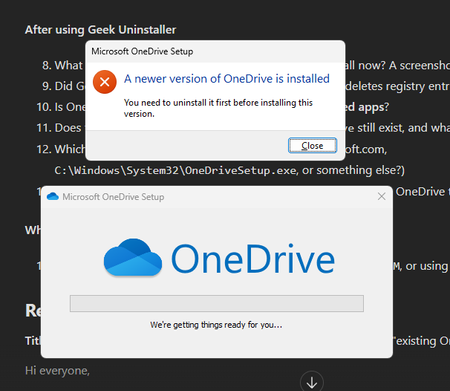
a { text-decoration: none; color: #464feb; } tr th, tr td { border: 1px solid #e6e6e6; } tr th { background-color: #f5f5f5; } Hi everyone, I have a OneDrive problem that started as a sign-in issue and has now turned into an install issue. At this point OneDrive won't reinstall on my laptop at all. Setup Laptop: my own personal device (not managed by my school), about 2 years old, Windows reinstalled several times OS: Edition Windows 11 Pro Version 25H2 Installed on 15.04.2026 OS build 26200.9457 Experience Windows Feature Experience Pack 1000.26100.360.0 Account: school Microsoft 365 account OneDrive: downloaded from the official Microsoft website The original problem When I tried to sign in to OneDrive with my school account, it got stuck in a loading loop right after I entered my email address. It never got any further, so I could never sync my files locally. We don't know what caused it, and no error code ever came up. Signing in with the same school account works fine in other apps like Teams and Outlook. Only OneDrive has the problem. I wasn't able to test with any account other than my own. What we tried with the school IT office Disconnected my school account from Windows (Settings → Accounts → Access work or school) and signed in again Uninstalled and reinstalled OneDrive Reset OneDrive with: %localappdata%\Microsoft\OneDrive\onedrive.exe /reset None of this fixed the sign-in loop. Where it broke completely Next, the IT staff removed OneDrive with Geek Uninstaller using "Force Removal". Since then, the OneDrive installer from the Microsoft website won't run. It says there is already a OneDrive instance on the PC that has to be removed first: Current state OneDrive is not listed under Settings → Apps → Installed apps The folder %localappdata%\Microsoft\OneDrive no longer exists So I can't find any visible trace of OneDrive, but the installer still thinks it's installed I haven't run sfc /scannow or DISM yet, and I haven't tested with a new Windows user What I'm looking for I'd really like to avoid reinstalling Windows again, especially since OneDrive might fail the same way afterwards. I'm hoping for either: A way to clean up whatever is left of OneDrive so it installs properly again, or A workaround to use my OneDrive files locally (in File Explorer, not only in the browser) Thanks to everyone who reads this. I hope it helps others with the same problem too. -Kemal :)114Views0likes4Comments