insider
237 Topics
Windows 11 Insider Beta version add smarter instant captions and fixes an issue with file history
After I updated KB5124008 recently, file history was disabled, and many users reported being affected. Some netizens said they had spoken with others and confirmed that other users had encountered similar issues, but they had not yet confirmed that KB5124008 was the root cause. https://learn.microsoft.com/zh-tw/windows-insider/release-notes/experimental/preview-build-26340-9502 https://learn.microsoft.com/zh-tw/windows-insider/release-notes/beta/preview-build-26220-9492 Microsoft released version 26340.9502/26220.9492. These two URLs contain fixes for the issue where backups using [File History] unexpectedly fail and display the error message "No available disk drive found". So happy What is Windows 11 Insider Beta? When will all these features be released to everyone?158Views0likes0Comments
Windows 11 Insider Build 26220.9223 fails with 0xC1900101
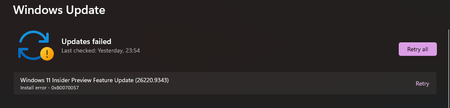
Hi, I am using Windows 11 Insider Preview and I cannot install Feature Update 26220.9223. The update downloads and starts installing. After the PC restarts, the installation fails and Windows rolls back to the previous build. Windows Update then shows the same update with a Retry option. Error code: 0xC1900101 Failed date: 23-08-2026 I have already restarted the PC and reset Windows Update components. The Windows Update and BITS services are running normally. Could anyone help me identify what is causing this error? Is there a known issue with build 26220.9223, or could a driver be causing the installation to roll back? Thank you.471Views0likes4Comments
CRITICAL REGRESSION: Build 26200 broke Mic, Game FPS & Cursors!
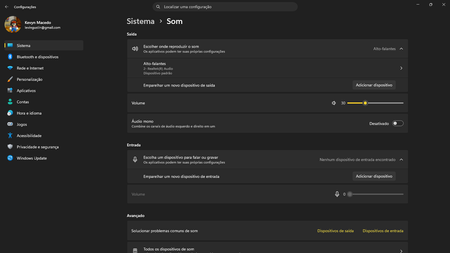
System Specifications: Device: Acer Aspire 5 A515-57 Memory: 16GB RAM Storage: 2x 250GB SSDs OS Build: Windows Insider Preview Build 26200 (KB5120998) Edição Windows 11 Home Single Language Versão 25H2 Instalado em 18/07/2026 Compilação do SO 26200.9278 Pacote de recursos Pacote de Experiência de Recursos do Windows 1000.26100.360.0 Issue 1: Integrated Microphone Failure Immediately after installing this build, the integrated microphone completely stopped working and disappeared from the system inputs. The audio jack still accepts headset microphones, but the internal laptop mic is dead and undetected. Issue 2: Severe Performance/FPS Drop in Gaming Game performance has been severely crippled. In Dragon Quest X S Definitive Edition (Steam), I consistently reached 40 to 50 FPS prior to this update. Post-update, the game is heavily bottlenecked, only reaching 20 to 30 FPS. This feels like a major regression in GPU scheduling, driver compatibility, or background AI/VBS overhead introduced in this preview build. Issue 3: Custom Cursors (.cur, .ani, .ini) Blocked Applying custom cursors manually no longer works. Even after moving the custom cursor files directly into the official C:\Windows\Cursors directory, the system refuses to apply .ini, .ani, or .cur files. This feature worked perfectly prior to the update. Please investigate and fix these regressions in the 26200 flight. Attached are screenshots demonstrating the update build and the issues.442Views0likes2Comments
Turn on diagnostic data to continue with Insider Program
The device I'm using for Insider Program updates tells me I need to turn on optional diagnostic data in order to continue in the Program, however, when I try to turn that on, I get "Your organisation prevents sending diagnostic data to Microsoft". This device is a personal laptop so no "organisation" is involved. How can I fix this?58Views0likes0CommentsHow to Leave Windows Insider Preview and Return to a Stable Release?
Hello Community, I am currently running Windows 11 Home Insider Preview Single Language Version 26H2 (OS Build 26300.8935) on an ASUS device and would like to leave the Windows Insider Program and move back to a stable, generally available version of Windows. I understand that Insider builds are intended for testing and may include experimental features, bugs, or compatibility issues. Before proceeding, I would appreciate guidance from the community regarding the best approach. Specifically: What is the recommended method to leave the Windows Insider Program? Can I move directly from Build 26300.8935 to a stable public release without reinstalling Windows? Is a clean installation required when transitioning from a higher Insider build to a lower production build? Are there any important precautions, such as data backup or account-related considerations, before opting out? Any recommendations, best practices, or experiences from members who have recently exited the Insider Program would be greatly appreciated506Views0likes1Comment
Windows 11 Insider Preview (26H2 - 26300.8935) expires by 08/11, what to do? No updates available
Edizione Windows 11 Home Insider Preview Versione 26H2 Data installazione: 30/01/2026 Data di scadenza della valutazione 11/08/2026 20:09 Build sistema operativo 26300.8935 Feature Pack Pacchetto di esperienze per funzionalità Windows 1000.26100.416.0300Views0likes2Comments
Build 26300 Activation fail..
After I Upgrade to 26300 from Broken Foced Update 26200, Begging of April 2026. Struggle with Help of Co-pilot & Gemini, 20 Hrs a Day, Couldn't Fix... I Tried Reinstall 26100 & 26200 from Usb, Format, Cleaned by Co-pilot & Gemini Min 40+ Times, Cannot Fix., I Upgraded to 26300, Problem Still Exist but 70% of 26100 & 26200 , but, I Cannot Actibate Pre-installed with Dell Xps 8960 , Upgraded Pro, After 26200 Trouble, Pro Licence Gone, with Help Co-pilot & Gemini, Retrieve Machin Id with Cmd, but Activation, Reject. Ms Activation Chat Cannot Fix, Ms Recommend to Start a Session Here... Jay C212Views0likes3Comments