insider preview
15 Topics
Windows Update fails with “Something went wrong – Undoing changes” unless installed via ISO
Hi everyone, I'm facing a strange issue with Windows Update on my laptop and I wanted to know if anyone else experienced something similar. Problem: When I install updates through Windows Update, the update downloads normally and during restart it goes up to 100%, but then I get the message: Something went wrong. Undoing changes. After that, Windows rolls back the update. Observation: Interestingly, updates that start directly from the “You're there” stage sometimes install correctly. Policy change I made: Previously Windows would automatically download and install updates and frequently ask for restarts. Because of that behavior, I changed the policy to manual download and install so updates would not start installing automatically. Thermal precaution I tried: Since my laptop has a faulty CPU fan, I also limited the maximum CPU state to 99% in Power Options to prevent aggressive turbo boosting and reduce potential thermal throttling during the update process. Another important observation: If I install the same update using a Windows ISO (in-place upgrade / repair install), the update installs successfully and does not fail at 100%. Possible hardware issue: My laptop currently has: A broken battery A faulty CPU fan So I'm wondering if the update process might be failing due to power or thermal issues during the installation phase. System info: OS: Windows 11 Pro Insider Preview Channel: Release Preview Current build: 26200.7840 Update that fails: KB5077241 (Build 26200.7922) Questions: Can hardware issues like a damaged battery or faulty CPU fan cause Windows Update installation failures? Why would updates succeed when installing from an ISO but fail through Windows Update? Which logs should I check to identify the exact cause? (CBS.log, WindowsUpdate.log, etc.) Any suggestions, troubleshooting steps, or similar experiences would be appreciated. Thanks!1.4KViews0likes4Comments
Microsoft Account Stolen and Frozen, Unable to Exit Insider Program
Hello everyone, I’m facing a rather challenging situation and would greatly appreciate your assistance. The Microsoft account I used to join the Windows Insider Program has been hacked and stolen. After reaching out to Microsoft Support, the account has been frozen to prevent further misuse. As a result, I'm currently unable to exit the Windows Insider Program: the new Microsoft account has not joined the program, and the old account cannot be logged in. I kindly request your help in either recovering the old account or finding a way to exit the Insider Program so that I can return to the stable version. Thank you in advance for your support!198Views0likes1Comment
leave insider preview without clean install .
Getting popup whenever i starts windows " this build of windows will expire soon " whenever I click to leave insider preview im getting this " This email address is not registered as a Windows Insider. " What to do?? I don't want to clean installation. I'm using win 11 pro ( insider Prev DEV ) version 24H2450Views0likes1CommentUnable to can't install 26100.1000 (KB5039304)
Hello, I'm currently stuck on KB 24H2 26100.994, which is quite peculiar since I was expecting a different version. In fact, I believe this might be linked to my issue. Unfortunately, I'm unable to upgrade to the newer version 26100.1000. Every time I try to download it, I encounter the error code 0x800f0805. I've already exhausted troubleshooting options such as running SFC, DISM, and checking the SoftwareDistribution folder, but nothing seems to work. This is unusual behavior, as I've never experienced this with a patch installation before. Can anyone shed some light on what might be causing this issue?769Views0likes1CommentRoll back to previous Insider Build
Hello I am Currently on Windows 11 Insider Preview 10.0.26052.1100 (ge_release) Ive had some issues with the Taskbar Prewiev and with Multitasking. I wanted to Roll back to Windows 11 Insider Preview 23619.1000 (ni_prerelease) which was working flawlessly. Any guide on how to perform that?640Views0likes1Comment
Wanted to join Beta Channel, ended up forced to upgrade to Windows 11 Insider Preview, how to stop?
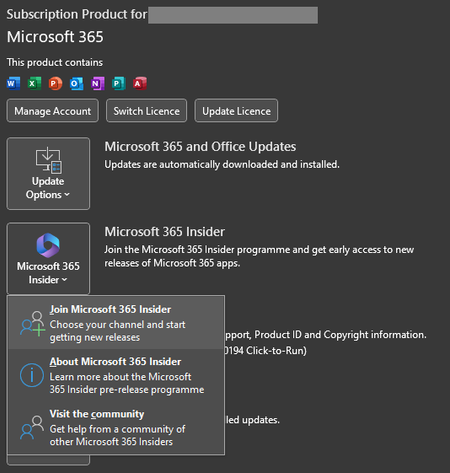
So, it all started with me wanting to join the Beta Channel for Excel since I wanted to have the new features available there. So, in Excel I couldn't find the Insider Button at Account menu even though I am a MS365 Subscriber. So, I thought I had to go to Windows Settings -> Update & Security -> Windows Insider Programme to use it. After I registered there, instead of showing me in Excel Beta Channel it now is downloading and installing Windows 11 Insider Preview, what I don't want and theoretically shouldn't be able to get since my processor is too bad, it tells me that in the same window at the right side. (I am currently on Windows 10 Home 22H2-19045.3324) I have already tried to leave the program and i am getting different response to that, the Windows Insider Programme in the settings tells me that I am still set to get Insider Preview builds and the Windows Update menu also. But when I click on Leave the Insider Programme in Windows Insider Programme it directs me to a page which says This email address is not registered as a Windows Insider.... And yes it's the same E-Mail address that's linked to the program and which was connected to the page that told me the E-Mail address is not registered. Also, Sidenote: Many buttons are not responding at all, clicking on fix the problem (see image) doesn't work, before that, changing Channels, adding E-Mail all did not work first time. And In Office clicking on Join MS365 Insider doesn't do anything either. This whole program seems verry unstable. My questions are: 1. How to undo all that so I don't must upgrade to Windows 11 Insider Preview 2. How to join Office Beta Channel the correct way?Solved4.5KViews2likes8CommentsError installation Windows Server 2022 Insider Preview - 0x80070001
Hello, I've got a new PC and I want to install Windows Server 2022 Insider Preview. I've tried to install it with a Ventoy Usb Key, that doesn't work so I tried with a new bootable usb key. But, when the process of installation begin, I have this error code : 0x80070001. I've searched on Google the solutions and I just found to reset the bios and I make it but the problem persists... I have a Lenovo ThinkCentre M73 with Intel CELERON G1820T 2.4GHZ 8GO RAM 320GO HDD Thanks in advance for your help Friezer2.9KViews1like5Comments
Taskbar not showing up
I have noticed a weird issue with my taskbar. I have selected the auto hide taskbar setting but when I move my mouse in the buttom of the screen when I am using an app in full screen the taskbar isnt showing up so I have to minimaze or restore in order to use the taskbar. I am usind the windows 11 home isnider preview with the latest preview build (22543.1000). Is this a bug or an issue with my version of windows?1.3KViews0likes1Comment