ingestion
16 Topics
Ingestion and replication: moving from detection in hours to detection in minutes.
It seems that currently, we only become aware of a problem once there is a visible impact on tracking or on the tables consumed by the business. In many cases, the root cause appears to occur much earlier—for instance, when a package or replication process stops running correctly, starts skipping steps, or begins to accumulate delays. Would it make sense to move toward earlier detection? I was thinking of something that periodically monitors data from `replication.package` and similar sources to identify anomalies before tracking alerts are triggered: Packages that haven't run in the last *N* minutes. Failed jobs. Recurring skips. Abnormal increases in the time between executions. Growing discrepancies between expected timestamps and actual processed timestamps. It could even evolve into an agent that not only alerts but also provides context: "Package X on server Y hasn't run for 35 minutes. The last execution failed, and the likely impact is on the BayCity tracking tables." My impression is that this could help us significantly reduce detection time, since we often end up investigating only after a delay of several hours has already built up. What do you think? Is there already a tool or monitoring system in place that addresses this need—one I might not be aware of? We are working with Azure Databricks; I was planning to implement this using an agent, but I need...177Views0likes0Comments
Make system-generated LogARepublisher Threat Intelligence updates non-billable (_IsBillable = false)
Problem Statement: Currently, Microsoft Sentinel regularly reruns an internal background process called LogARepublisher. This process periodically republishes existing Threat Intelligence data into the ThreatIntelIndicators table on an ongoing 7-to-10 day cycle to maintain freshness. Because these system-generated updates write new records into the workspace, they are flagged as _IsBillable = true. This results in organizations paying multiple times for the exact same threat indicators over their lifecycle. In general, this is a small amount of data but can form a larger percentage of ingest/analytic cost for customers with low ingestion volumes, and becomes noticeable at scale when managing many Azure tenants. Why This Matters: Unintended Cost Allocation: Customers are being billed for automated, backend data-maintenance cycles triggered by Microsoft, rather than true new log ingestion or external feed consumption. Artificial Volume Inflation: Large TI datasets can exponentially inflate monthly data volume metrics solely due to repeating republication, making budget forecasting unpredictable. No Added Analytical Value: Rerunning the exact same indicators does not offer new security value or unique logs; it simply updates the timestamp metadata on a new row. Proposed Solution: Modify the backend pipeline so that when a record is ingested via LastUpdateMethod == "LogARepublisher", the system-generated metadata property _IsBillable is automatically set to false. Customers should only be billed for the initial ingestion of a threat indicator, not for the automated system maintenance required to keep it fresh within the Sentinel ecosystem.287Views0likes1Comment
Ingesting Logs through Azure Private Link
Hi, We are currently using Azure Private Link within our environment and we are attempting to ingest logs into Log Analytics. When I reached out to Microsoft Support, it appears that the CCF connectors will not work using Private Link and the Azure Functions connectors are becoming depricated. Has anyone else run into this issue and what is the solution for getting logs into Sentinel through the Private Link, specifically API log sources? Did this require a custom app for each of these log sources or some sort of custom script that lives on an AMA host within the Private Link to ingest the logs? Any advice here would be greatly appeciated. Thank you,560Views0likes4CommentsSome Fabric Lakehouse tables not appearing in Microsoft Purview after scan
Hi everyone, I’m running into an issue where several tables from a Fabric Lakehouse aren’t appearing in Microsoft Purview after a workspace scan. Here’s the situation: I scanned a Fabric workspace that contains multiple Lakehouses. For most Lakehouses, the tables appear correctly in Purview after the scan. However, for one specific Lakehouse, several tables that I know exist aren’t showing up in the scanned assets — even after adding the Lakehouse as an asset to a data product in the Unified Catalog. What I’ve tried: I rescanned the workspace and the specific Lakehouses. I verified that the tables are persistent (not temporary) and appear under the Tables section in Fabric, not only as files. I confirmed permissions for the Purview connection account. Scan results and errors: After the rescan, the tables still didn’t appear. The scan logs show several ingestion errors with messages like: Failed to ingest asset with type fabric_lakehouse and qualified name [qualified name] due to invalid data payload to data map I checked the error entries to see which assets they point to, and none of them are related to the tables in the Lakehouse in question. There were four of these errors in the last run. Additional context: Some older Lakehouses that had been archived months ago in Fabric still appeared as active in Purview before the rescan, so there may be stale metadata being retained. Notes: I’m aware Fabric scanning in Purview currently has sub-item scanning limitations where item-level metadata is prioritised, and individual tables aren’t always picked up. But given that tables from other Lakehouses appear as expected, and given the ingestion errors (even though the errors do not point to the missing tables), it feels like there may be a metadata sync or processing issue rather than a simple coverage limitation. Question: Has anyone encountered this behaviour or the “invalid data payload to data map” error before? Any guidance on further troubleshooting steps would be appreciated. Thanks in advance!491Views1like1Comment
Ingesting .CSV log files from Azure Blob Storage into Microsoft Sentinel
Overview: Organizations generate vast amounts of log data from various applications, services, and systems. These logs are often stored in .CSV (Comma-Separated Values) format in Azure Blob Storage, a scalable cloud-based storage solution. To enhance security monitoring, compliance, and threat detection, it is important to bring this log data into a centralized security tool like Microsoft Sentinel. The main goal is to automatically collect and analyze .CSV log files stored in Azure Blob Storage using Sentinel’s advanced analytics and automation capabilities. This enables better visibility into security events and helps in proactive threat management. Benefits: Flexible Log Ingestion via logic app: Allows ingestion of logs from systems without built-in Sentinel connectors, including custom, third-party, or legacy systems. Uses Existing Storage Workflows: Reuses Azure Blob Storage where logs are already being saved, with no need to change current export methods. Structured and Clean Data Format: .CSV files offer a structured format that makes mapping and parsing data into Sentinel efficient and reliable. Enables Custom Analysis: Once in Sentinel, the data can be queried using Kusto Query Language (KQL) for in-depth analysis and reporting. Operational Efficiency: Reduces manual efforts in collecting, uploading, or processing logs. Saves time for IT and security teams by automating the data pipeline. Improves Threat Visibility: Ingested data is available in real-time. Dashboards and visualizations make it easy to understand what's happening. Pre-requisites: Log Analytics Workspace A configured workspace to receive and analyze the ingested data. Blob Storage Path The exact location in Azure Blob Storage where the CSV log files are stored. Required Roles and Permissions Microsoft Sentinel Contributor– to manage Sentinel resources. Logic App Contributor– to create and manage automation workflows. Access to the Storage Account– to read and retrieve log files from Blob Storage. Implementation Steps: Configure the Logic App trigger to run whenever a new blob is added or an existing one is modified. Select the storage account and container details, then configure the recurrence based on how frequently data is uploaded to the storage account. Choose the authentication type to connect with storage account. CSV Retrieval: Use the Logic App action to retrieve the CSV blob content by specifying the exact file path of the container. CSV Parsing: Use built-in Logic App actions along with regex to parse the CSV content. Apply the Composeaction to split the file contents by new lines, converting them into an array for structured processing. Here is the expression used in SplitLines compose action: split(body('Get_blob_content_(V2)'),decodeUriComponent('%0D%0A')) Follow the below MS Doc to write expressions: Removing last(empty) line from previous output using another compose action as shown below, take(outputs('SplitLines'),add(length(outputs('SplitLines')),-1)) Separating field names using compose action: split(first(outputs('SplitLines')), ',') Column Mapping: Repeat the required expression using the Select action to map each column from the CSV file to its corresponding field in the structured output. **From**: **`skip(outputs('RemoveLastLine'), 1)`** **Map:** **`outputs('SplitFieldName')[0]`** **`split(item(), ',')?[0]`** **`outputs('SplitFieldName')[1]`** **`split(item(), ',')?[1]`** Data Ingestion to Sentinel: Leveraging the Microsoft Sentinel connector to ingest the parsed data into the appropriate table. The connection to be configured using the workspace ID, shared key, and target table name. Key Highlights: The Logic App is triggered whenever a file is added or modified in the Blob container. The CSV content is parsed within the Logic App before being ingested into Sentinel. Leveraged the Microsoft Sentinel connector to ingest the parsed data into Sentinel. To support dynamic updates, we recommended overwriting the existing CSV file in the storage account. Outcome: Log Visibility in Sentinel Workspace: Once the Logic App is triggered, the custom table will be created automatically in Microsoft Sentinel, and logs can be viewed by running a KQL query in the Sentinel workspace. Conclusion: Ingesting .CSV log files from Azure Blob Storage into Microsoft Sentinel is a powerful way to centralize and automate the organization’s security monitoring. It enhances visibility, supports compliance, and empowers security teams with timely insights and alerts.
KQL Query output limit of 5 lakh rows
Hi , i have a kusto table which has more than 5 lakh rows and i want to pull that into power bi. When i run the kql query it gives error due to the 5 lakh row limit but when i use set notruncation before the query then i do not get this row limit error on power bi desktop but get this error in power bi service after applying incremental refresh on that table. My question is that will set notruncation always work and i will not face any error further for millions of rows and is this the only limit or there are other limits on ADE due to which i may face error due to huge volume of data or i should export the data from kusto table to azure blob storage and pull the data from blob storage to power bi. Which will be the best way to do it?254Views0likes0CommentsAzure ADX - UpdatePolicy fails to insert data
Hi Everyone, I believe everyone is doing good and safe. I am facing challenge with ADX. Please find the problem details below. Problem statement: We are unable to insert a result data into a target table from source table using an UpdatePolicy. Description: We have written an UpdatePolicy on a table. This UpdatePolicy will accept query parameters as an ADX function. This function returns output result in the form of table. Further, This table output result received should be inserted into target table. Additional Details: UpdatePolicy helps to update the data into a target table from source table dynamically/automatically. UpdatePolicy is almost equivalent to Triggers in SQL Server to do dynamic insert into a target table. Syntax of UpdatePolicy .alter table TargetTable policy update ``` [ { "IsEnabled": true, "Source": "SourceTable", "Query": "SourceTable | extend Result = G3MS_ClearAlarm(Id, CountryCode, OccuredTime) | project AlarmId = Result.AlarmId, ClearAlarmId = Result.ClearAlarmId, ClearTime = Result.ClearTime", "IsTransactional": true, "PropagateIngestionProperties": false } ] ``` Error Received when executed Error during execution of a policy operation: Request is invalid and cannot be processed: Semantic error: SEM0085: Tabular expression is not expected in the current context. If anyone has any suggestions/thoughts on this will be very beneficial to complete the requirement.642Views0likes1Comment[New blog post] Azure Data Explorer connection for CosmosDB change feed
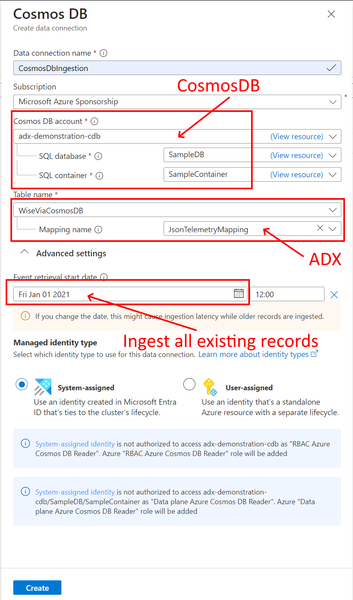
Did you know Azure Data Explorer can ingest Azure CosmosDB documents using a non-code data connection? This records both inserts and updates as a stream. Check out this walk-through. You can even record historical data if needed. Read the details at https://sandervandevelde.wordpress.com/2023/09/10/azure-data-explorer-connection-for-cosmosdb-change-feed/501Views0likes0Comments
Monitoring & Ingestion
Anyone got any suggestions to get around some of the lengthy ingestion times you get with Log Analytics sometimes ? Alerting on Heartbeat provides a simple way of checking a VM is up and running but we've seen instances of up to an hour for the latest Heartbeat to be available for querying in Log Analytics. So you either have a lengthy period to check for (i.e. if no Heartbeat received for > 60mins then or alert) or you face plenty of false positives if you set the threshold for say 10mins. Any ideas ?2.2KViews0likes2Comments
Data Factory command ".ingest into" adding new columns
I have this table: .create table lsa_datahub_country_codes ( DWH_LOAD_DATE:datetime, DWH_SOURCE_ID:string, DWH_CREATION_DATE:datetime, FIFA: string, DIAL: string, ISO3166_1_ALPHA_3: string, MARC: string, IS_INDEPENDENT: string, ISO3166_1_NUMERIC: string, GAUL: string, FIPS: string, WMO: string, ISO3166_1_ALPHA_2: string, ITU: string, IOC: string, DS: string, UNTERM_SPANISH_FORMAL: string, GLOBAL_CODE: string, INTERMEDIATE_REGION_CODE: string, OFFICIAL_NAME_FR: string, UNTERM_FRENCH_SHORT: string, ISO4217_CURRENCY_NAME: string, DEVELOPED_DEVELOPING_COUNTRIES: string, UNTERM_RUSSIAN_FORMAL: string, UNTERM_ENGLISH_SHORT: string, ISO4217_CURRENCY_ALPHABETIC_CODE: string, SMALL_ISLAND_DEVELOPING_STATES_SIDS: string, UNTERM_SPANISH_SHORT: string, ISO4217_CURRENCY_NUMERIC_CODE: string, UNTERM_CHINESE_FORMAL: string, UNTERM_FRENCH_FORMAL: string, UNTERM_RUSSIAN_SHORT: string, M49: int, SUB_REGION_CODE: string, REGION_CODE: string, OFFICIAL_NAME_AR: string, ISO4217_CURRENCY_MINOR_UNIT: string, UNTERM_ARABIC_FORMAL: string, UNTERM_CHINESE_SHORT: string, LAND_LOCKED_DEVELOPING_COUNTRIES_LLDC: string, INTERMEDIATE_REGION_NAME: string, OFFICIAL_NAME_ES: string, UNTERM_ENGLISH_FORMAL: string, OFFICIAL_NAME_CN: string, OFFICIAL_NAME_EN: string, ISO4217_CURRENCY_COUNTRY_NAME: string, LEAST_DEVELOPED_COUNTRIES_LDC: string, REGION_NAME: string, UNTERM_ARABIC_SHORT: string, SUB_REGION_NAME: string, OFFICIAL_NAME_RU: string, GLOBAL_NAME: string, CAPITAL: string, CONTINENT: string, TLD: string, LANGUAGES: string, GEONAME_ID: int, CLDR_DISPLAY_NAME: string, EDGAR: string ) with ( docstring = "Datahub country codes", folder = "LSA" ); and this command in Data Factory: .ingest into table lsa_datahub_country_codes ("https://xxxxxx.blob.core.windows.net/datahub/20220108/country_codes.csv;yyyyyy") with ( format = "CSV", creationTime = "2022-01-08", ignoreFirstRecord=true, ingestionMapping = ```[ {"Column":"DWH_LOAD_DATE", "Properties": {"ConstValue": "2022-01-08"}}, {"column":"DWH_SOURCE_ID", "Properties": {"ConstValue": "https://xxxxxxx.blob.core.windows.net/datahub/country_codes.csv"}}, {"Column":"DWH_CREATION_DATE", "Properties": {"ConstValue": "2022-01-08 00:00:00"}}, {"column":"FIFA", "Properties":{"Ordinal":"0"}}, {"column":"DIAL", "Properties":{"Ordinal":"1"}}, {"column":"ISO3166_1_ALPHA_3", "Properties":{"Ordinal":"2"}}, {"column":"MARC", "Properties":{"Ordinal":"3"}}, {"column":"IS_INDEPENDENT", "Properties":{"Ordinal":"4"}}, {"column":"ISO3166_1_NUMERIC", "Properties":{"Ordinal":"5"}}, {"column":"GAUL", "Properties":{"Ordinal":"6"}}, {"column":"FIPS", "Properties":{"Ordinal":"7"}}, {"column":"WMO", "Properties":{"Ordinal":"8"}}, {"column":"ISO3166_1_ALPHA_2", "Properties":{"Ordinal":"9"}}, {"column":"ITU", "Properties":{"Ordinal":"10"}}, {"column":"IOC", "Properties":{"Ordinal":"11"}}, {"column":"DS", "Properties":{"Ordinal":"12"}}, {"column":"UNTERM_SPANISH_FORMAL", "Properties":{"Ordinal":"13"}}, {"column":"GLOBAL_CODE", "Properties":{"Ordinal":"14"}}, {"column":"INTERMEDIATE_REGION_CODE", "Properties":{"Ordinal":"15"}}, {"column":"OFFICIAL_NAME_FR", "Properties":{"Ordinal":"16"}}, {"column":"UNTERM_FRENCH_SHORT", "Properties":{"Ordinal":"17"}}, {"column":"ISO4217_CURRENCY_NAME", "Properties":{"Ordinal":"18"}}, {"column":"DEVELOPED_DEVELOPING_COUNTRIES", "Properties":{"Ordinal":"19"}}, {"column":"UNTERM_RUSSIAN_FORMAL", "Properties":{"Ordinal":"20"}}, {"column":"UNTERM_ENGLISH_SHORT", "Properties":{"Ordinal":"21"}}, {"column":"ISO4217_CURRENCY_ALPHABETIC_CODE", "Properties":{"Ordinal":"22"}}, {"column":"SMALL_ISLAND_DEVELOPING_STATES_SIDS", "Properties":{"Ordinal":"23"}}, {"column":"UNTERM_SPANISH_SHORT", "Properties":{"Ordinal":"24"}}, {"column":"ISO4217_CURRENCY_NUMERIC_CODE", "Properties":{"Ordinal":"25"}}, {"column":"UNTERM_CHINESE_FORMAL", "Properties":{"Ordinal":"26"}}, {"column":"UNTERM_FRENCH_FORMAL", "Properties":{"Ordinal":"27"}}, {"column":"UNTERM_RUSSIAN_SHORT", "Properties":{"Ordinal":"28"}}, {"column":"M49", "Properties":{"Ordinal":"29"}}, {"column":"SUB_REGION_CODE", "Properties":{"Ordinal":"30"}}, {"column":"REGION_CODE", "Properties":{"Ordinal":"31"}}, {"column":"OFFICIAL_NAME_AR", "Properties":{"Ordinal":"32"}}, {"column":"ISO4217_CURRENCY_MINOR_UNIT", "Properties":{"Ordinal":"33"}}, {"column":"UNTERM_ARABIC_FORMAL", "Properties":{"Ordinal":"34"}}, {"column":"UNTERM_CHINESE_SHORT", "Properties":{"Ordinal":"35"}}, {"column":"LAND_LOCKED_DEVELOPING_COUNTRIES_LLDC", "Properties":{"Ordinal":"36"}}, {"column":"INTERMEDIATE_REGION_NAME", "Properties":{"Ordinal":"37"}}, {"column":"OFFICIAL_NAME_ES", "Properties":{"Ordinal":"38"}}, {"column":"UNTERM_ENGLISH_FORMAL", "Properties":{"Ordinal":"39"}}, {"column":"OFFICIAL_NAME_CN", "Properties":{"Ordinal":"40"}}, {"column":"OFFICIAL_NAME_EN", "Properties":{"Ordinal":"41"}}, {"column":"ISO4217_CURRENCY_COUNTRY_NAME", "Properties":{"Ordinal":"42"}}, {"column":"LEAST_DEVELOPED_COUNTRIES_LDC", "Properties":{"Ordinal":"43"}}, {"column":"REGION_NAME", "Properties":{"Ordinal":"44"}}, {"column":"UNTERM_ARABIC_SHORT", "Properties":{"Ordinal":"45"}}, {"column":"SUB_REGION_NAME", "Properties":{"Ordinal":"46"}}, {"column":"OFFICIAL_NAME_RU", "Properties":{"Ordinal":"47"}}, {"column":"GLOBAL_NAME", "Properties":{"Ordinal":"48"}}, {"column":"CAPITAL", "Properties":{"Ordinal":"49"}}, {"column":"CONTINENT", "Properties":{"Ordinal":"50"}}, {"column":"TLD", "Properties":{"Ordinal":"51"}}, {"column":"LANGUAGES", "Properties":{"Ordinal":"52"}}, {"column":"GEONAME_ID", "Properties":{"Ordinal":"53"}}, {"column":"CLDR_DISPLAY_NAME", "Properties":{"Ordinal":"54"}}, {"column":"EDGAR", "Properties":{"Ordinal":"55"}} ]``` ) to ingest this csv https://datahub.io/core/country-codes/r/country-codes.csv and, after the execution, Data Explorer create new columns in the table (in the end of the table, with the same csv first line header columns): "DWH_LOAD_DATE": 2022-01-08T00:00:00Z, "DWH_SOURCE_ID": country_codes.csv, "DWH_CREATION_DATE": 2022-01-09T02:19:45Z, "FIFA": TPE, "DIAL": , "ISO3166_1_ALPHA_3": , "MARC": ch, "IS_INDEPENDENT": , "ISO3166_1_NUMERIC": , "GAUL": 925, "FIPS": TW, "WMO": , "ISO3166_1_ALPHA_2": , "ITU": , "IOC": TPE, "DS": RC, "UNTERM_SPANISH_FORMAL": , "GLOBAL_CODE": , "INTERMEDIATE_REGION_CODE": , "OFFICIAL_NAME_FR": , "UNTERM_FRENCH_SHORT": , "ISO4217_CURRENCY_NAME": , "DEVELOPED_DEVELOPING_COUNTRIES": , "UNTERM_RUSSIAN_FORMAL": , "UNTERM_ENGLISH_SHORT": , "ISO4217_CURRENCY_ALPHABETIC_CODE": , "SMALL_ISLAND_DEVELOPING_STATES_SIDS": , "UNTERM_SPANISH_SHORT": , "ISO4217_CURRENCY_NUMERIC_CODE": , "UNTERM_CHINESE_FORMAL": , "UNTERM_FRENCH_FORMAL": , "UNTERM_RUSSIAN_SHORT": , "M49": , "SUB_REGION_CODE": , "REGION_CODE": , "OFFICIAL_NAME_AR": , "ISO4217_CURRENCY_MINOR_UNIT": , "UNTERM_ARABIC_FORMAL": , "UNTERM_CHINESE_SHORT": , "LAND_LOCKED_DEVELOPING_COUNTRIES_LLDC": , "INTERMEDIATE_REGION_NAME": , "OFFICIAL_NAME_ES": , "UNTERM_ENGLISH_FORMAL": , "OFFICIAL_NAME_CN": , "OFFICIAL_NAME_EN": , "ISO4217_CURRENCY_COUNTRY_NAME": , "LEAST_DEVELOPED_COUNTRIES_LDC": , "REGION_NAME": , "UNTERM_ARABIC_SHORT": , "SUB_REGION_NAME": , "OFFICIAL_NAME_RU": , "GLOBAL_NAME": , "CAPITAL": , "CONTINENT": , "TLD": .tw, "LANGUAGES": , "GEONAME_ID": , "CLDR_DISPLAY_NAME": , "EDGAR": , "Dial": 886, "ISO3166_1_Alpha_3": TWN, "is_independent": Yes, "ISO3166_1_numeric": 158, "ISO3166_1_Alpha_2": TW, "UNTERM_Spanish_Formal": , "Global_Code": , "Intermediate_Region_Code": , "official_name_fr": , "UNTERM_French_Short": , "ISO4217_currency_name": , "Developed_Developing_Countries": , "UNTERM_Russian_Formal": , "UNTERM_English_Short": , "ISO4217_currency_alphabetic_code": , "Small_Island_Developing_States_SIDS": , "UNTERM_Spanish_Short": , "ISO4217_currency_numeric_code": , "UNTERM_Chinese_Formal": , "UNTERM_French_Formal": , "UNTERM_Russian_Short": , "Sub_region_Code": , "Region_Code": , "official_name_ar": , "ISO4217_currency_minor_unit": , "UNTERM_Arabic_Formal": , "UNTERM_Chinese_Short": , "Land_Locked_Developing_Countries_LLDC": , "Intermediate_Region_Name": , "official_name_es": , "UNTERM_English_Formal": , "official_name_cn": , "official_name_en": , "ISO4217_currency_country_name": , "Least_Developed_Countries_LDC": , "Region_Name": , "UNTERM_Arabic_Short": , "Sub_region_Name": , "official_name_ru": , "Global_Name": , "Capital": Taipei, "Continent": AS, "Languages": zh-TW,zh,nan,hak, "Geoname_ID": 1668284, "CLDR_display_name": Taiwan, But, when i execute the same command from Data Explorer web or Kusto Explorer these new columns are not created and the data is saved correctly. What's happening?843Views0likes0Comments