infrastructure
271 TopicsAzure Local LENS workbook—deep insights at scale, in minutes
Azure Local at scale needs fleet-level visibility As Azure Local deployments grow from a handful of instances to hundreds (or even thousands), the operational questions change. You’re no longer troubleshooting a single environment—you’re looking for patterns across your entire fleet: Which sites are trending with a specific health issue? Where are workload deployments increasing over time, do we have enough capacity available? Which clusters are outliers compared to the rest? Today we’re sharing Azure Local LENS: a free, community-driven Azure Workbook designed to help you gain deep insights across a large Azure Local fleet—quickly and consistently—so you can move from reactive troubleshooting to proactive operations. Get the workbook and step-by-step instructions to deploy it here: https://aka.ms/AzureLocalLENS Who is it for? This workbook is especially useful if you manage or support: Large Azure Local fleets distributed across many sites (retail, manufacturing, branch offices, healthcare, etc.). Central operations teams that need standardized health/update views. Architects who want to aggregate data to gain insights in cluster and workload deployment trends over time. What is Azure Local LENS? Azure Local - Lifecycle, Events & Notification Status (or LENS) workbook brings together the signals you need to understand your Azure Local estate through a fleet lens. Instead of jumping between individual resources, you can use a consistent set of views to compare instances, spot outliers, and drill into the focus areas that need attention. Fleet-first design: Start with an estate-wide view, then drill down to a specific site/cluster using the seven tabs in the workbook. Operational consistency: Standard dashboards help teams align on “what good looks like” across environments, update trends, health check results and more. Actionable insights: Identify hotspots and trends early so you can prioritize remediation and plan health remediation, updates and workload capacity with confidence. What insights does it provide? Azure Local LENS is built to help you answer the questions that matter at scale, such as: Fleet scale overview and connection status: How many Azure Local instances do you have, and what are their connection, health and update status? Workload deployment trends: Where have you deployed Azure Local VMs and AKS Arc clusters, how many do you have in total, are they connected and in a healthy state? Top issues to prioritize: What are the common signals across your estate that deserve operational focus, such as update health checks, extension failures or Azure Resource Bridge connectivity issues? Updates: What is your overall update compliance status for Solution and SBE updates? What is the average, standard deviation or 95 th percentile update duration run times for your fleet? Drilldown workflow: After spotting an outlier, what does the instance-level view show, so you can act or link directly to Azure portal for more actions and support? Get started in minutes If you are managing Azure Local instances, give Azure Local LENS a try and see how quickly a fleet-wide view can help with day-to-day management, helping to surface trends & actionable insights. The workbook is an open-source, community-driven project, which can be accessed using a public GitHub repository, which includes full step-by-step instructions for setup at https://aka.ms/AzureLocalLENS. Most teams can deploy the workbook and start exploring insights in a matter of minutes. (depending on your environment). An example of the “Azure Local Instances” tab: How teams are using fleet dashboards like LENS Weekly fleet review: Use a standard set of views to review top outliers and trend shifts, then assign follow-ups. Update planning: Identify clusters with system health check failures, and prioritize resolving the issues based on frequency of the issue category. Update progress: Review clusters update status (InProgress, Failed, Success) and take action based on trends and insights from real-time data. Baseline validation: Spot clusters that consistently differ from the norm—can be a sign of configuration or environmental difference, such as network access, policies, operational procedures or other factors. Feedback and what’s next This workbook is a community driven, open source project intended to be practical and easy to adopt. The project is not a Microsoft‑supported offering. If you encounter any issues, have feedback, or a new feature request, please raise an Issue on the GitHub repository, so we can track discussions, prioritize improvements, and keep updates transparent for everyone. Author Bio Neil Bird is a Principal Program Manager in the Azure Edge & Platform Engineering team at Microsoft. His background is in Azure and hybrid / sovereign cloud infrastructure, specialising in operational excellence and automation. He is passionate about helping customers deploy and manage cloud solutions successfully using Azure and Azure Edge technologies.1KViews6likes4CommentsReference Architecture for Highly Available Multi-Region Azure Kubernetes Service (AKS)
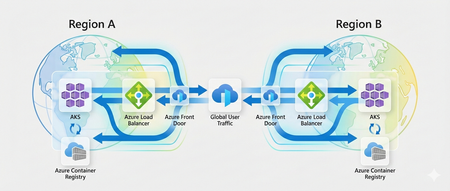
Introduction Cloud-native applications often support critical business functions and are expected to stay available even when parts of the platform fail. Azure Kubernetes Service (AKS) already provides strong availability features within a single region, such as availability zones and a managed control plane. However, a regional outage is still a scenario that architects must plan for when running important workloads. This article walks through a reference architecture for running AKS across multiple Azure regions. The focus is on availability and resilience, using practical patterns that help applications continue to operate during regional failures. It covers common design choices such as traffic routing, data replication, and operational setup, and explains the trade-offs that come with each approach. This content is intended for cloud architects, platform engineers, and Site Reliability Engineers (SREs who design and operate Kubernetes platforms on Azure and need to make informed decisions about multi-region deployments. Resilience Requirements and Design Principles Before designing a multi-region Kubernetes platform, it is essential to define resilience objectives aligned with business requirements: Recovery Time Objective (RTO): Maximum acceptable downtime during a regional failure. Recovery Point Objective (RPO): Maximum acceptable data loss. Service-Level Objectives (SLOs): Availability targets for applications and platform services. The architecture described in this article aligns with the Azure Well-Architected Framework Reliability pillar, emphasizing fault isolation, redundancy, and automated recovery. Multi-Region AKS Architecture Overview The reference architecture uses two independent AKS clusters deployed in separate Azure regions, such as West Europe and North Europe. Each region is treated as a separate deployment stamp, with its own networking, compute, and data resources. This regional isolation helps reduce blast radius and allows each environment to be operated and scaled independently. Traffic is routed at a global level using Azure Front Door together with DNS. This setup provides a single public entry point for clients and enables traffic steering based on health checks, latency, or routing rules. If one region becomes unavailable, traffic can be automatically redirected to the healthy region. Each region exposes applications through a regional ingress layer, such as Azure Application Gateway for Containers or an NGINX Ingress Controller. This keeps traffic management close to the workload and allows regional-specific configuration when needed. Data services are deployed with geo-replication enabled to support multi-region access and recovery scenarios. Centralized monitoring and security tooling provides visibility across regions and helps operators detect, troubleshoot, and respond to failures consistently. The main building blocks of the architecture are: Azure Front Door as the global entry point Azure DNS for name resolution An AKS cluster deployed in each region A regional ingress layer (Application Gateway for Containers or NGINX Ingress) Geo-replicated data services Centralized monitoring and security services Deployment Patterns for Multi-Region AKS There is no single “best” way to run AKS across multiple regions. The right deployment pattern depends on availability requirements, recovery objectives, operational maturity, and cost constraints. This section describes three common patterns used in multi-region AKS architectures and highlights the trade-offs associated with each one. Active/Active Deployment Model In an active/active deployment model, AKS clusters in multiple regions serve production traffic at the same time. Global traffic routing distributes requests across regions based on health checks, latency, or weighted rules. If one region becomes unavailable, traffic is automatically shifted to the remaining healthy region. This model provides the highest level of availability and the lowest recovery time, but it requires careful handling of data consistency, state management, and operational coordination across regions. Capability Pros Cons Availability Very high availability with no single active region Requires all regions to be production-ready at all times Failover behavior Near-zero downtime when a region fails More complex to test and validate failover scenarios Data consistency Supports read/write traffic in multiple regions Requires strong data replication and conflict handling Operational complexity Enables full regional redundancy Higher operational overhead and coordination Cost Maximizes resource utilization Highest cost due to duplicated active resources Active/Passive Deployment Model In an active/passive deployment model, one region serves all production traffic, while a second region remains on standby. The passive region is kept in sync but does not receive user traffic until a failover occurs. When the primary region becomes unavailable, traffic is redirected to the secondary region. This model reduces operational complexity compared to active/active and is often easier to operate, but it comes with longer recovery times and underutilized resources. Capability Pros Cons Availability Protects against regional outages Downtime during failover is likely Failover behavior Simpler failover logic Higher RTO compared to active/active Data consistency Easier to manage single write region Requires careful promotion of the passive region Operational complexity Easier to operate and test Manual or semi-automated failover processes Cost Lower cost than active/active Standby resources are mostly idle Deployment Stamps and Isolation Deployment stamps are a design approach rather than a traffic pattern. Each region is deployed as a fully isolated unit, or stamp, with its own AKS cluster, networking, and supporting services. Stamps can be used with both active/active and active/passive models. The goal of deployment stamps is to limit blast radius, enable independent lifecycle management, and reduce the risk of cross-region dependencies. Capability Pros Cons Availability Limits impact of regional or platform failures Requires duplication of platform components Failover behavior Enables clean and predictable failover Failover logic must be implemented at higher layers Data consistency Encourages clear data ownership boundaries Data replication can be more complex Operational complexity Simplifies troubleshooting and isolation More environments to manage Cost Supports targeted scaling per region Increased cost due to duplicated infrastructure Global Traffic Routing and Failover In a multi-region setup, global traffic routing is responsible for sending users to the right region and keeping the application reachable when a region becomes unavailable. In this architecture, Azure Front Door acts as the global entry point for all incoming traffic. Azure Front Door provides a single public endpoint that uses Anycast routing to direct users to the closest available region. TLS termination and Web Application Firewall (WAF) capabilities are handled at the edge, reducing latency and protecting regional ingress components from unwanted traffic. Front Door also performs health checks against regional endpoints and automatically stops sending traffic to a region that is unhealthy. DNS plays a supporting role in this design. Azure DNS or Traffic Manager can be used to define geo-based or priority-based routing policies and to control how traffic is initially directed to Front Door. Health probes continuously monitor regional endpoints, and routing decisions are updated when failures are detected. When a regional outage occurs, unhealthy endpoints are removed from rotation. Traffic is then routed to the remaining healthy region without requiring application changes or manual intervention. This allows the platform to recover quickly from regional failures and minimizes impact to users. Choosing Between Azure Traffic Manager and Azure DNS Both Azure Traffic Manager and Azure DNS can be used for global traffic routing, but they solve slightly different problems. The choice depends mainly on how fast you need to react to failures and how much control you want over traffic behavior. Capability Azure Traffic Manager Azure DNS Routing mechanism DNS-based with built-in health probes DNS-based only Health checks Native endpoint health probing No native health checks Failover speed (RTO) Low RTO (typically seconds to < 1 minute) Higher RTO (depends on DNS TTL, often minutes) Traffic steering options Priority, weighted, performance, geographic Basic DNS records Control during outages Automatic endpoint removal Relies on DNS cache expiration Operational complexity Slightly higher Very low Typical use cases Mission-critical workloads Simpler or cost-sensitive scenarios Data and State Management Across Regions Kubernetes platforms are usually designed to be stateless, which makes scaling and recovery much easier. In practice, most enterprise applications still depend on stateful services such as databases, caches, and file storage. When running across multiple regions, handling this state correctly becomes one of the hardest parts of the architecture. The general approach is to keep application components stateless inside the AKS clusters and rely on Azure managed services for data persistence and replication. These services handle most of the complexity involved in synchronizing data across regions and provide well-defined recovery behaviors during failures. Common patterns include using Azure SQL Database with active geo-replication or failover groups for relational workloads. This allows a secondary region to take over when the primary region becomes unavailable, with controlled failover and predictable recovery behavior. For globally distributed applications, Azure Cosmos DB provides built-in multi-region replication with configurable consistency levels. This makes it easier to support active/active scenarios, but it also requires careful thought around how the application handles concurrent writes and potential conflicts. Caching layers such as Azure Cache for Redis can be geo-replicated to reduce latency and improve availability. These caches should be treated as disposable and rebuilt when needed, rather than relied on as a source of truth. For object and file storage, Azure Blob Storage and Azure Files support geo-redundant options such as GRS and RA-GRS. These options provide data durability across regions and allow read access from secondary regions, which is often sufficient for backup, content distribution, and disaster recovery scenarios. When designing data replication across regions, architects should be clear about trade-offs. Strong consistency across regions usually increases latency and limits scalability, while eventual consistency improves availability but may expose temporary data mismatches. Replication lag, failover behavior, and conflict resolution should be understood and tested before going to production. Security and Governance Considerations In a multi-region setup, security and governance should look the same in every region. The goal is to avoid special cases and reduce the risk of configuration drift as the platform grows. Consistency is more important than introducing region-specific controls. Identity and access management is typically centralized using Azure Entra ID. Access to AKS clusters is controlled through a combination of Azure RBAC and Kubernetes RBAC, allowing teams to manage permissions in a way that aligns with existing Azure roles while still supporting Kubernetes-native access patterns. Network security is enforced through segmentation. A hub-and-spoke topology is commonly used, with shared services such as firewalls, DNS, and connectivity hosted in a central hub and application workloads deployed in regional spokes. This approach helps control traffic flows, limits blast radius, and simplifies auditing. Policy and threat protection are applied at the platform level. Azure Policy for Kubernetes is used to enforce baseline configurations, such as allowed images, pod security settings, and resource limits. Microsoft Defender for Containers provides visibility into runtime threats and misconfigurations across all clusters. Landing zones play a key role in this design. By integrating AKS clusters into a standardized landing zone setup, governance controls such as policies, role assignments, logging, and network rules are applied consistently across subscriptions and regions. This makes the platform easier to operate and reduces the risk of gaps as new regions are added. AKS Observability and Resilience Testing Running AKS across multiple regions only works if you can clearly see what is happening across the entire platform. Observability should be centralized so operators don’t need to switch between regions or tools when troubleshooting issues. Azure Monitor and Log Analytics are typically used as the main aggregation point for logs and metrics from all clusters. This makes it easier to correlate signals across regions and quickly understand whether an issue is local to one cluster or affecting the platform as a whole. Distributed tracing adds another important layer of visibility. By using OpenTelemetry, requests can be traced end to end as they move through services and across regions. This is especially useful in active/active setups, where traffic may shift between regions based on health or latency. Synthetic probes and health checks should be treated as first-class signals. These checks continuously test application endpoints from outside the platform and help validate that routing, failover, and recovery mechanisms behave as expected. Observability alone is not enough. Resilience assumptions must be tested regularly. Chaos engineering and planned failover exercises help teams understand how the system behaves under failure conditions and whether operational runbooks are realistic. These tests should be performed in a controlled way and repeated over time, especially after platform changes. The goal is not to eliminate failures, but to make failures predictable, visible, and recoverable. Conclusion and Next Steps Building a highly available, multi-region AKS platform is mostly about making clear decisions and understanding their impact. Traffic routing, data replication, security, and operations all play a role, and there are always trade-offs between availability, complexity, and cost. The reference architecture described in this article provides a solid starting point for running AKS across regions on Azure. It focuses on proven patterns that work well in real environments and scale as requirements grow. The most important takeaway is that multi-region is not a single feature you turn on. It is a set of design choices that must work together and be tested regularly. Deployment Models Area Active/Active Active/Passive Deployment Stamps Availability Highest High Depends on routing model Failover time Very low Medium Depends on implementation Operational complexity High Medium Medium to high Cost Highest Lower Medium Typical use case Mission-critical workloads Business-critical workloads Large or regulated platforms Traffic Routing and Failover Aspect Azure Front Door + Traffic Manager Azure DNS Health-based routing Yes No Failover speed (RTO) Seconds to < 1 minute Minutes (TTL-based) Traffic steering Advanced Basic Recommended for Production and critical workloads Simple or non-critical workloads Data and State management Data Type Recommended Approach Notes Relational data Azure SQL with geo-replication Clear primary/secondary roles Globally distributed data Cosmos DB multi-region Consistency must be chosen carefully Caching Azure Cache for Redis Treat as disposable Object and file storage Blob / Files with GRS or RA-GRS Good for DR and read scenarios Security and Governance Area Recommendation Identity Centralize with Azure Entra ID Access control Combine Azure RBAC and Kubernetes RBAC Network security Hub-and-spoke topology Policy enforcement Azure Policy for Kubernetes Threat protection Defender for Containers Governance Use landing zones for consistency Observability and Testing Practice Why It Matters Centralized monitoring Faster troubleshooting Metrics, logs, traces Full visibility across regions Synthetic probes Early failure detection Failover testing Validate assumptions Chaos engineering Build confidence in recovery Recommended Next Steps If you want to move from design to implementation, the following steps usually work well: Start with a proof of concept using two regions and a simple workload Define RTO and RPO targets and validate them with tests Create operational runbooks for failover and recovery Automate deployments and configuration using CI/CD and GitOps Regularly test failover and recovery, not just once For deeper guidance, the Azure Well-Architected Framework and the Azure Architecture Center provide additional patterns, checklists, and reference implementations that build on the concepts discussed here.1.9KViews6likes6CommentsUnlocking Advanced Data Analytics & AI with Azure NetApp Files object REST API
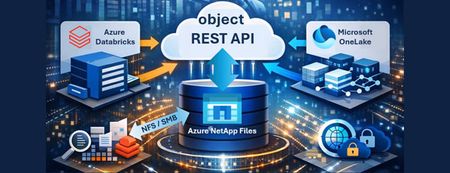
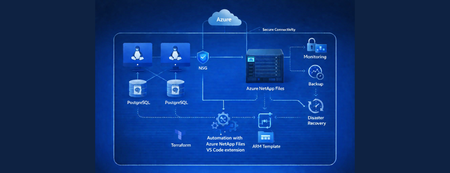
Azure NetApp Files object REST API enables object access to enterprise file data stored on Azure NetApp Files, without copying, moving, or restructuring that data. This capability allows analytics and AI platforms that expect object storage to work directly against existing NFS based datasets, while preserving Azure NetApp Files’ performance, security, and governance characteristics.414Views0likes0Comments
Building a Secure and Compliant Azure AI Landing Zone: Policy Framework & Best Practices
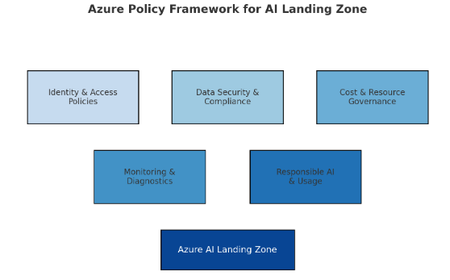
As organizations accelerate their AI adoption on Microsoft Azure, governance, compliance, and security become critical pillars for success. Deploying AI workloads without a structured compliance framework can expose enterprises to data privacy issues, misconfigurations, and regulatory risks. To address this challenge, the Azure AI Landing Zone provides a scalable and secure foundation — bringing together Azure Policy, Blueprints, and Infrastructure-as-Code (IaC) to ensure every resource aligns with organizational and regulatory standards. The Azure Policy & Compliance Framework acts as the governance backbone of this landing zone. It enforces consistency across environments by applying policy definitions, initiatives, and assignments that monitor and remediate non-compliant resources automatically. This blog will guide you through: 🧭 The architecture and layers of an AI Landing Zone 🧩 How Azure Policy as Code enables automated governance ⚙️ Steps to implement and deploy policies using IaC pipelines 📈 Visualizing compliance flows for AI-specific resources What is Azure AI Landing Zone (AI ALZ)? AI ALZ is a foundational architecture that integrates core Azure services (ML, OpenAI, Cognitive Services) with best practices in identity, networking, governance, and operations. To ensure consistency, security, and responsibility, a robust policy framework is essential. Policy & Compliance in AI ALZ Azure Policy helps enforce standards across subscriptions and resource groups. You define policies (single rules), group them into initiatives (policy sets), and assign them with certain scopes & exemptions. Compliance reporting helps surface noncompliant resources for mitigation. In AI workloads, some unique considerations: Sensitive data (PII, models) Model accountability, logging, audit trails Cost & performance from heavy compute usage Preview features and frequent updates Scope This framework covers: Azure Machine Learning (AML) Azure API Management Azure AI Foundry Azure App Service Azure Cognitive Services Azure OpenAI Azure Storage Accounts Azure Databases (SQL, Cosmos DB, MySQL, PostgreSQL) Azure Key Vault Azure Kubernetes Service Core Policy Categories 1. Networking & Access Control Restrict resource deployment to approved regions (e.g., Europe only). Enforce private link and private endpoint usage for all critical resources. Disable public network access for workspaces, storage, search, and key vaults. 2. Identity & Authentication Require user-assigned managed identities for resource access. Disable local authentication; enforce Microsoft Entra ID (Azure AD) authentication. 3. Data Protection Enforce encryption at rest with customer-managed keys (CMK). Restrict public access to storage accounts and databases. 4. Monitoring & Logging Deploy diagnostic settings to Log Analytics for all key resources. Ensure activity/resource logs are enabled and retained for at least one year. 5. Resource-Specific Guardrails Apply built-in and custom policy initiatives for OpenAI, Kubernetes, App Services, Databases, etc. A detailed list of all policies is bundled and attached at the end of this blog. Be sure to check it out for a ready-to-use Excel file—perfect for customer workshops—which includes policy type (Standalone/Initiative), origin (Built-in/Custom), and more. Implementation: Policy-as-Code using EPAC To turn policies from Excel/JSON into operational governance, Enterprise Policy as Code (EPAC) is a powerful tool. EPAC transforms policy artifacts into a desired state repository and handles deployment, lifecycle, versioning, and CI/CD automation. What is EPAC & Why Use It? EPAC is a set of PowerShell scripts / modules to deploy policy definitions, initiatives, assignments, role assignments, exemptions. Enterprise Policy As Code (EPAC) It supports CI/CD integration (GitHub Actions, Azure DevOps) so policy changes can be treated like code. It handles ordering, dependency resolution, and enforcement of a “desired state” — any policy resources not in your repo may be pruned (depending on configuration). It integrates with Azure Landing Zones (including governance baseline) out of the box. References & Further Reading EPAC GitHub Repository Advanced Azure Policy management - Microsoft Learn [Advanced A...Framework] How to deploy Azure policies the DevOps way [How to dep...- Rabobank]1.8KViews1like2Comments
Cross-Region Zero Trust: Connecting Power Platform to Azure PaaS across different regions
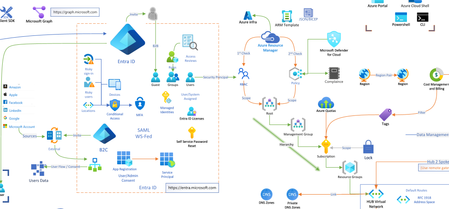
In the modern enterprise cloud landscape, data rarely sits in one place. You might face a scenario where your Power Platform environment (Dynamics 365, Power Apps, or Power Automate) is hosted in Region A for centralized management, while your sensitive SQL Databases or Storage Accounts must reside in Region B due to data sovereignty, latency requirements, or legacy infrastructure. Connecting these two worlds usually involves traversing the public internet - a major "red flag" for security teams. The Missing Link in Cloud Security When we talk about enterprise security, "Public Access: Disabled" is the holy grail. But for Power Platform architects, this setting is often followed by a headache. The challenge is simple but daunting: How can a Power Platform Environment (e.g., in Region A) communicate with an Azure PaaS service (e.g., Storage or SQL in Region B) when that resource is completely locked down behind a Private Endpoint? Existing documentation usually covers single-region setups with no firewalls. This post details a "Zero Trust" architecture that bridges this gap. This is a walk through for setting up a Cross-Region Private Link that routes traffic from the Power Platform in Region A, through a secure Azure Hub, and down the Azure Global Backbone to a Private Endpoint in Region B, without a single packet ever touching the public internet. 1. Understanding the Foundation: VNet Support Before we build, we must understand what moves: Power Platform VNet integration is an "Outbound" technology. It allows the platform to connect to data sources secured within an Azure Virtual Network and "inject" its traffic into your Virtual Network, without needing to install or manage an on-premises data gateway. According to Microsoft's official documentation, this integration supports a wide range of services: Dataverse: Plugins and Virtual Tables. Power Automate: Cloud Flows using standard connectors. Power Apps: Canvas Apps calling private APIs. This means once the "tunnel" is built, your entire Power Platform ecosystem can reach your private Azure universe. Virtual Network support overview – Power Platform | Microsoft Learn 2. The Architecture: A Cross-Region Global Bridge Based on the Hub-and-Spoke topology, this architecture relies on four key components working in unison: Source (Region A): The Power Platform environment utilizes VNet Injection. This injects the platform's outbound traffic into a dedicated, delegated subnet within your Region A Spoke VNet. The Hub: A central VNet containing an Azure Firewall. This acts as the regional traffic cop and DNS Proxy, inspecting traffic and resolving private names before allowing packets to traverse the global backbone. The Bridge (Global Backbone): We utilize Global VNet Peering to connect Region A to the Region B Spoke. This keeps traffic on Microsoft's private fiber backbone. Destination (Region B): The Azure PaaS service (e.g. Storage Account) is locked down with Public Access Disabled. It is only accessible via a Private Endpoint. The Architecture: Visualizing the Flow As illustrated in the diagram below, this solution separates the responsibilities into two distinct layers: the Network Admin (Azure Infrastructure) and the Power Platform Admin (Enterprise Policy). 3. The High Availability Constraint: Regional Pairs A common pitfall of these deployments is configuring only a single region. Power Platform environments are inherently redundant. In a geography like Europe, your environment is actually hosted across a Regional Pair (e.g., West Europe and North Europe). Why? If one Azure region in the pair experiences an outage, your Power Platform environment will failover to the second region. If your VNet Policy isn't already there, your private connectivity will break. To maintain High Availability (HA) for your private tunnel, your Azure footprint must mirror this: Two VNets: You must create a Virtual Network in each region of the pair. Two Delegated Subnets: Each VNet requires a subnet delegated specifically to Microsoft.PowerPlatform/enterprisePolicies. Two Network Policies: You must create an Enterprise Policy in each region and link both to your environment to ensure traffic flows even during a regional failover. Ensure your Azure subscription is registered for the Microsoft.PowerPlatform resource provider by running the SetupSubscriptionForPowerPlatform.ps1 script. 4. Solving the DNS Riddle with Azure Firewall In a Hub-and-Spoke model, peering the VNets is only half the battle. If your Power Platform environment in Region A asks for mystorage.blob.core.windows.net, it will receive a public IP by default, and your connection will be blocked. To fix this, we utilize the Azure Firewall as a DNS Proxy: Link the Private DNS Zone: Ensure your Private DNS Zones (e.g., privatelink.blob.core.windows.net) are linked to the Hub VNet. Enable DNS Proxy: Turn on the DNS Proxy feature on your Azure Firewall. Configure Custom DNS: Set the DNS servers of your Spoke VNets (Region A) to the Firewall’s Internal IP. Now, the DNS query flows through the Firewall, which "sees" the Private DNS Zone and returns the Private IP to the Power Platform. 5. Secretless Security with User-Assigned Managed Identity Private networking secures the path, but identity secures the access. Instead of managing fragile Client Secrets, we use User-Assigned Managed Identity (UAMI). Phase A: The Azure Setup Create the Identity: Generate a User-Assigned Managed Identity in your Azure subscription. Assign RBAC Roles: Grant this identity specific permissions on your destination resource. For example, assign the Storage Blob Data Contributor role to allow the identity to manage files in your private storage account. Phase B: The Power Platform Integration To make the environment recognize this identity, you must register it as an Application User: Navigate to the Power Platform Admin Center. Go to Environments > [Your Environment] > Settings > Users + permissions > Application users. Add a new app and select the Managed Identity you created in Azure. 6. Creating Enterprise Policy using PowerShell Scripts One of the most important things to realize is that Enterprise Policies cannot be created manually in the Azure Portal UI. They must be deployed via PowerShell or CLI. While Microsoft provides a comprehensive official GitHub repository with all the necessary templates, it is designed to be highly modular and granular. This means that to achieve a High Availability (HA) setup, an admin usually needs to execute deployments for each region separately and then perform the linking step. To simplify this workflow, I have developed a Simplified Scripts Repository on my GitHub. These scripts use the official Microsoft templates as their foundation but add an orchestration layer specifically for the Regional Pair requirement: Regional Pair Automation: Instead of running separate deployments, my script handles the dual-VNet injection in a single flow. It automates the creation of policies in both regions and links them to your environment in one execution. Focused Scenarios: I’ve distilled the most essential scripts for Network Injection and Encryption (CMK), making it easier for admins to get up and running without navigating the entire modular library. The Goal: To provide a "Fast-Track" experience that follows Microsoft's best practices while reducing the manual steps required to achieve a resilient, multi-region architecture. Owning the Keys with Encryption Policies (CMK) While Microsoft encrypts Dataverse data by default, many enterprise compliance standards require Customer-Managed Keys (CMK). This ensures that you, not Microsoft, control the encryption keys for your environments. - Manage your customer-managed encryption key - Power Platform | Microsoft Learn Key Requirements: Key Vault Configuration: Your Key Vault must have Purge Protection and Soft Delete enabled to prevent accidental data loss. The Identity Bridge: The Encryption Policy uses the User-Assigned Managed Identity (created in Step 5) to authenticate against the Key Vault. Permissions: You must grant the Managed Identity the Key Vault Crypto Service Encryption User role so it can wrap and unwrap the encryption keys. 7. The Final Handshake: Linking Policies to Your Environment Creating the Enterprise Policy in Azure is only the first half of the process. You must now "inform" your Power Platform environment that it should use these policies for its outbound traffic and identity. Linking the Policies to Your Environment: For VNet Injection: In the Admin Center, go to Security > Data and privacy > Azure Virtual Network Policies. Select your environment and link it to the Network Injection policies you created. For Encryption (CMK): Go to Security > Data and privacy > Customer-managed encryption Key. Add the Select the Encryption Enterprise Policy -Edit Policy - Add Environment. Crucial Step: You must first grant the Power Platform service "Get", "List", "Wrap" and "Unwrap" permissions on your specific key within Azure Key Vault before the environment can successfully validate the policy. Verification: The "Smoking Gun" in Log Analytics After successfully reaching a Resource from one of the power platform services you can check if the connection was private. How do you prove its private? Use KQL in Azure Log Analytics to verify the Network Security Perimeter (NSP) ID. The Proof: When you see a GUID in the NetworkPerimeter field, it is cryptographic evidence that the resource accepted the request only because it arrived via your authorized private bridge. In Azure Portal - Navigate to your Resource for example KeyVault - Logs - Use the following KQL: AzureDiagnostics | where ResourceProvider == "MICROSOFT.KEYVAULT" | where OperationName == "KeyGet" or OperationName == "KeyUnwrap" | where ResultType == "Success" | project TimeGenerated, OperationName, VaultName = Resource, ResultType, CallerIP = CallerIPAddress, EnterprisePolicy = identity_claim_xms_mirid_s, NetworkPerimeter = identity_claim_xms_az_nwperimid_s | sort by TimeGenerated desc Result: By implementing the Network, and Encryption Enterprise policy you transition the Power Platform from a public SaaS tool into a fully governed, private extension of your Azure infrastructure. You no longer have to choose between the agility of low-code and the security of a private cloud. To summarize the transformation from public endpoints to a complete Zero Trust architecture across regions, here is the end-to-end workflow: PHASE 1: Azure Infrastructure Foundation Create Network Fabric (HA): Deploy VNets and Delegated Subnets in both regional pairs. Deploy the Hub: Set up the Central Hub VNet with Azure Firewall. Connect Globally: Establish Global VNet Peering between all Spokes and the Hub. Solve DNS: Enable DNS Proxy on the Firewall and link Private DNS Zones to the Hub VNet. ↓ PHASE 2: Identity & Security Prep Create Identity: Generate a User-Assigned Managed Identity (UAMI). Grant Access (RBAC): Give the UAMI permissions on the target PaaS resource (e.g., Storage Contributor). Prepare CMK: Configure Key Vault access policies for the UAMI (Wrap/Unwrap permissions). ↓ PHASE 3: Deploy Enterprise Policies (PowerShell/IaC) Deploy Network Policies: Create "Network Injection" policies in Azure for both regions. Deploy Encryption Policy: Create the "CMK" policy linking to your Key Vault and Identity. ↓ PHASE 4: Power Platform Final Link (Admin Center) Link Network: Associate the Environment with the two Network Policies. Link Encryption: Activate the Customer-Managed Key on the environment. Register User: Add the Managed Identity as an "Application User" in the environment. ↓ PHASE 5: Verification Run Workload: Trigger a Flow or Plugin. Audit Logs: Use KQL in Log Analytics to confirm the presence of the NetworkPerimeter ID.835Views2likes2Comments
Architecting an Azure AI Hub-and-Spoke Landing Zone for Multi-Tenant Enterprises
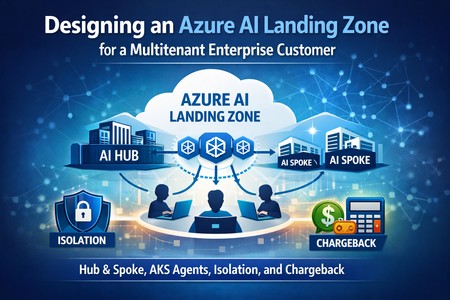
A large enterprise customer adopting AI at scale typically needs three non‑negotiables in its AI foundation: End‑to‑end tenant isolation across network, identity, compute, and data Secure, governed traffic flow from users to AI services Transparent chargeback/showback for shared AI and platform services At the same time, the platform must enable rapid onboarding of new tenants or applications and scale cleanly from proof‑of‑concept to production. This article proposes an Azure Landing Zone–aligned architecture using a Hub‑and‑Spoke model, where: The AI Hub centralizes shared services and governance AI Spokes host tenant‑dedicated AI resources Application logic and AI agents run on AKS The result is a secure, scalable, and operationally efficient enterprise AI foundation. 1. Architecture goals & design principles Goals Host application logic and AI agents on Azure Kubernetes Service (AKS) as custom deployments instead of using agents under Azure AI Foundry Enforce strong tenant isolation across all layers Support cross chargeback and cost attribution Adopt a Hub‑and‑Spoke model with clear separation of shared vs. tenant‑specific services Design principles (Azure Landing Zone aligned) Azure Landing Zone (ALZ) guidance emphasizes: Separation of platform and workload subscriptions Management groups and policy inheritance Centralized connectivity using hub‑and‑spoke networking Policy‑driven governance and automation For infrastructure as code, ALZ‑aligned deployments typically use Bicep or Terraform, increasingly leveraging Azure Verified Modules (AVM) for consistency and long‑term maintainability. 2. Subscription & management group model A practical enterprise layout looks like this: Tenant Root Management Group o Platform Management Group Connectivity subscription (Hub VNet, Firewall, DNS, ExpressRoute/VPN) Management subscription (Log Analytics, Monitor) Security subscription (Defender for Cloud, Sentinel if required) o AI Hub Management Group AI Hub subscription (shared AI and governance services) o AI Spokes Management Group One subscription per tenant, business unit, or regulated boundary This structure supports enterprise‑scale governance while allowing teams to operate independently within well‑defined guardrails. 3. Logical architecture — AI Hub vs. AI Spoke AI Hub (central/shared services) The AI Hub acts as the governed control plane for AI consumption: Ingress & edge security: Azure Application Gateway with WAF (or Front Door for global scenarios) Central egress control: Azure Firewall with forced tunneling API governance: Azure API Management (private/internal mode) Shared AI services: Azure OpenAI (shared deployments where appropriate), safety controls Monitoring & observability: Azure Monitor, Log Analytics, centralized dashboards Governance: Azure Policy, RBAC, naming and tagging standards All tenant traffic enters through the hub, ensuring consistent enforcement of security, identity, and usage policies. AI Spoke (tenant‑dedicated services) Each AI Spoke provides a tenant‑isolated data and execution plane: Tenant‑dedicated storage accounts and databases Vector stores and retrieval systems (Azure AI Search with isolated indexes or services) AKS runtime for tenant‑specific AI agents and backend services Tenant‑scoped keys, secrets, and identities 4. Logical architecture diagram (Hub vs. Spoke) 5. Network architecture — Hub and Spoke 6. Tenant onboarding & isolation strategy Tenant onboarding flow Tenant onboarding is automated using a landing zone vending model: Request new tenant or application Provision a spoke subscription and baseline policies Deploy spoke VNet and peer to hub Configure private DNS and firewall routes Deploy AKS tenancy and data services Register identities and API subscriptions Enable monitoring and cost attribution This approach enables consistent, repeatable onboarding with minimal manual effort. Isolation by design Network: Dedicated VNets, private endpoints, no public AI endpoints Identity: Microsoft Entra ID with tenant‑aware claims and conditional access Compute: AKS isolation using namespaces, node pools, or dedicated clusters Data: Per‑tenant storage, databases, and vector indexes 7. Identity & access management (Microsoft Entra ID) Key IAM practices include: Central Microsoft Entra ID tenant for authentication and authorization Application and workload identities using managed identities Tenant context enforced at API Management and propagated downstream Conditional Access and least‑privilege RBAC This ensures zero‑trust access while supporting both internal and partner scenarios. 8. Secure traffic flow (end‑to‑end) User accesses application via Application Gateway + WAF Traffic inspected and routed through Azure Firewall API Management validates identity, quotas, and tenant context AKS workloads invoke AI services over Private Link Responses return through the same governed path This pattern provides full auditability, threat protection, and policy enforcement. 9. AKS multitenancy options Model When to use Characteristics Namespace per tenant Default Cost‑efficient, logical isolation Dedicated node pools Medium isolation Reduced noisy‑neighbor risk Dedicated AKS cluster High compliance Maximum isolation, higher cost Enterprises typically adopt a tiered approach, choosing the isolation level per tenant based on regulatory and risk requirements. 10. Cost management & chargeback model Tagging strategy (mandatory) tenantId costCenter application environment owner Enforced via Azure Policy across all subscriptions. Chargeback approach Dedicated spoke resources: Direct attribution via subscription and tags Shared hub resources: Allocated using usage telemetry o API calls and token usage from API Management o CPU/memory usage from AKS namespaces Cost data is exported to Azure Cost Management and visualized using Power BI to support showback and chargeback. 11. Security controls checklist Private endpoints for AI services, storage, and search No public network access for sensitive services Azure Firewall for centralized egress and inspection WAF for OWASP protection Azure Policy for governance and compliance 12. Deployment & automation Foundation: Azure Landing Zone accelerators (Bicep or Terraform) Workloads: Modular IaC for hub and spokes AKS apps: GitOps (Flux or Argo CD) Observability: Policy‑driven diagnostics and centralized logging 13. Final thoughts This Azure AI Landing Zone design provides a repeatable, secure, and enterprise‑ready foundation for any large customer adopting AI at scale. By combining: Hub‑and‑Spoke networking AKS‑based AI agents Strong tenant isolation FinOps‑ready chargeback Azure Landing Zone best practices organizations can confidently move AI workloads from experimentation to production—without sacrificing security, governance, or cost transparency. Disclaimer: While the above article discusses hosting custom agents on AKS alongside customer-developed application logic, the following sections focus on a baseline deployment model with no customizations. This approach uses Azure AI Foundry, where models and agents are fully managed by Azure, with centrally governed LLMs(AI Hub) hosted in Azure AI Foundry and agents deployed in a spoke environment. 🚀 Get Started: Building a Secure & Scalable Azure AI Platform To help you accelerate your Azure AI journey, Microsoft and the community provide several reference architectures, solution accelerators, and best-practice guides. Together, these form a strong foundation for designing secure, governed, and cost-efficient GenAI and AI workloads at scale. Below is a recommended starting path. 1️⃣ AI Landing Zone (Foundation) Purpose: Establish a secure, enterprise-ready foundation for AI workloads. The AI Landing Zone extends the standard Azure Landing Zone with AI-specific considerations such as: Network isolation and hub-spoke design Identity and access control for AI services Secure connectivity to data sources Alignment with enterprise governance and compliance 🔗 AI Landing Zone (GitHub): https://github.com/Azure/AI-Landing-Zones?tab=readme-ov-file 👉 Start here if you want a standardized baseline before onboarding any AI workloads. 2️⃣ AI Hub Gateway – Solution Accelerator Purpose: Centralize and control access to AI services across multiple teams or customers. The AI Hub Gateway Solution Accelerator helps you: Expose AI capabilities (models, agents, APIs) via a centralized gateway Apply consistent security, routing, and traffic controls Support both Chat UI and API-based consumption Enable multi-team or multi-tenant AI usage patterns 🔗 AI Hub Gateway Solution Accelerator: https://github.com/mohamedsaif/ai-hub-gateway-landing-zone?tab=readme-ov-file 👉 Ideal when you want a shared AI platform with controlled access and visibility. 3️⃣ Citadel Governance Hub (Advanced Governance) Purpose: Enforce strong governance, compliance, and guardrails for AI usage. The Citadel Governance Hub builds on top of the AI Hub Gateway and focuses on: Policy enforcement for AI usage Centralized governance controls Secure onboarding of teams and workloads Alignment with enterprise risk and compliance requirements 🔗 Citadel Governance Hub (README): https://github.com/Azure-Samples/ai-hub-gateway-solution-accelerator/blob/citadel-v1/README.md 👉 Recommended for regulated environments or large enterprises with strict governance needs. 4️⃣ AKS Cost Analysis (Operational Excellence) Purpose: Understand and optimize the cost of running AI workloads on AKS. AI platforms often rely on AKS for agents, inference services, and gateways. This guide explains: How AKS costs are calculated How to analyze node, pod, and workload costs Techniques to optimize cluster spend 🔗 AKS Cost Analysis: https://learn.microsoft.com/en-us/azure/aks/cost-analysis 👉 Use this early to avoid unexpected cost overruns as AI usage scales. 5️⃣ AKS Multi-Tenancy & Cluster Isolation Purpose: Safely run workloads for multiple teams or customers on AKS. This guidance covers: Namespace vs cluster isolation strategies Security and blast-radius considerations When to use shared clusters vs dedicated clusters Best practices for multi-tenant AKS platforms 🔗 AKS Multi-Tenancy & Cluster Isolation: https://learn.microsoft.com/en-us/azure/aks/operator-best-practices-cluster-isolation 👉 Critical reading if your AI platform supports multiple teams, business units, or customers. 🧭 Suggested Learning Path If you’re new, follow this order: AI Landing Zone → build the foundation AI Hub Gateway → centralize AI access Citadel Governance Hub → enforce guardrails AKS Cost Analysis → control spend AKS Multi-Tenancy → scale securely1.2KViews1like0CommentsAzure Course Blueprints
Each Blueprint serves as a 1:1 visual representation of the official Microsoft instructor‑led course (ILT), ensuring full alignment with the learning path. This helps learners: see exactly how topics fit into the broader Azure landscape, map concepts interactively as they progress, and understand the “why” behind each module, not just the “what.” Formats Available: PDF · Visio · Excel · Video Every icon is clickable and links directly to the related Learn module. Layers and Cross‑Course Comparisons For expert‑level certifications like SC‑100 and AZ‑305, the Visio Template+ includes additional layers for each associate-level course. This allows trainers and students to compare certification paths at a glance: 🔐 Security Path SC‑100 side‑by‑side with SC‑200, SC‑300, AZ‑500 🏗️ Infrastructure & Dev Path AZ‑305 alongside AZ‑104, AZ‑204, AZ‑700, AZ‑140 This helps learners clearly identify: prerequisites, skill gaps, overlapping modules, progression paths toward expert roles. Because associate certifications (e.g., SC‑300 → SC‑100 or AZ‑104 → AZ‑305) are often prerequisites or recommended foundations, this comparison layer makes it easy to understand what additional knowledge is required as learners advance. Azure Course Blueprints + Demo Deploy Demos are essential for achieving end‑to‑end understanding of Azure. To reduce preparation overhead, we collaborated with Peter De Tender to align each Blueprint with the official Trainer Demo Deploy scenarios. With a single click, trainers can deploy the full environment and guide learners through practical, aligned demonstrations. https://aka.ms/DemoDeployPDF Benefits for Students 🎯 Defined Goals Learners clearly see the skills and services they are expected to master. 🔍 Focused Learning By spotlighting what truly matters, the Blueprint keeps learners oriented toward core learning objectives. 📈 Progress Tracking Students can easily identify what they’ve already mastered and where more study is needed. 📊 Slide Deck Topic Lists (Excel) A downloadable .xlsx file provides: a topic list for every module, links to Microsoft Learn, prerequisite dependencies. This file helps students build their own study plan while keeping all links organized. Download links Associate Level PDF - Demo Visio Contents AZ-104 Azure Administrator Associate R: 12/14/2023 U: 12/17/2025 Blueprint Demo Video Visio Excel AZ-204 Azure Developer Associate R: 11/05/2024 U: 12/17/2025 Blueprint Demo Visio Excel AZ-500 Azure Security Engineer Associate R: 01/09/2024 U: 10/10/2024 Blueprint Demo Visio+ Excel AZ-700 Azure Network Engineer Associate R: 01/25/2024 U: 12/17/2025 Blueprint Demo Visio Excel SC-200 Security Operations Analyst Associate R: 04/03/2025 U:04/09/2025 Blueprint Demo Visio Excel SC-300 Identity and Access Administrator Associate R: 10/10/2024 Blueprint Demo Excel Specialty PDF Visio AZ-140 Azure Virtual Desktop Specialty R: 01/03/2024 U: 12/17/2025 Blueprint Demo Visio Excel Expert level PDF Visio AZ-305 Designing Microsoft Azure Infrastructure Solutions R: 05/07/2024 U: 12/17/2025 Blueprint Demo Visio+ AZ-104 AZ-204 AZ-700 AZ-140 Excel SC-100 Microsoft Cybersecurity Architect R: 10/10/2024 U: 04/09/2025 Blueprint Demo Visio+ AZ-500 SC-300 SC-200 Excel Skill based Credentialing PDF AZ-1002 Configure secure access to your workloads using Azure virtual networking R: 05/27/2024 Blueprint Visio Excel AZ-1003 Secure storage for Azure Files and Azure Blob Storage R: 02/07/2024 U: 02/05/2024 Blueprint Excel Subscribe if you want to get notified of any update like new releases or updates. Author: Ilan Nyska, Microsoft Technical Trainer My email ilan.nyska@microsoft.com LinkedIn https://www.linkedin.com/in/ilan-nyska/ I’ve received so many kind messages, thank-you notes, and reshares — and I’m truly grateful. But here’s the reality: 💬 The only thing I can use internally to justify continuing this project is your engagement — through this survey https://lnkd.in/gnZ8v4i8 ___ Benefits for Trainers: Trainers can follow this plan to design a tailored diagram for their course, filled with notes. They can construct this comprehensive diagram during class on a whiteboard and continuously add to it in each session. This evolving visual aid can be shared with students to enhance their grasp of the subject matter. Explore Azure Course Blueprints! | Microsoft Community Hub Visio stencils Azure icons - Azure Architecture Center | Microsoft Learn ___ Are you curious how grounding Copilot in Azure Course Blueprints transforms your study journey into smarter, more visual experience: 🧭 Clickable guides that transform modules into intuitive roadmaps 🌐 Dynamic visual maps revealing how Azure services connect ⚖️ Side-by-side comparisons that clarify roles, services, and security models Whether you're a trainer, a student, or just certification-curious, Copilot becomes your shortcut to clarity, confidence, and mastery. Navigating Azure Certifications with Copilot and Azure Course Blueprints | Microsoft Community Hub34KViews15likes18CommentsBoosting Hybrid Cloud Data Efficiency for EDA: The Power of Azure NetApp Files cache volumes
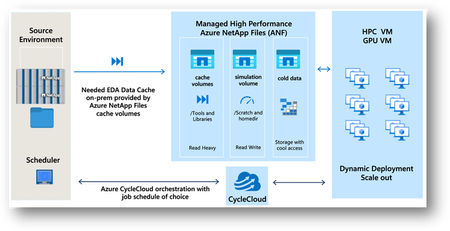
Electronic Design Automation (EDA) is the foundation of modern semiconductor innovation, enabling engineers to design, simulate, and validate increasingly sophisticated chip architectures. As designs push the boundaries of PPA (Power, Performance, and reduced Area) to meet escalating market demands, the volume of associated design data has surged exponentially with a single System-on-Chip (SoC) project generating multiple petabytes of data during its development lifecycle, making data mobility and accessibility critical bottlenecks. To overcome these challenges, Azure NetApp Files (ANF) cache volumes are purpose-built to optimize data movement and minimize latency, delivering high-speed access to massive design datasets across distributed environments. By mitigating data gravity, Azure NetApp Files cache volumes empower chip designers to leverage cloud-scale compute resources on demand and at scale, thus accelerating innovation without being constrained by physical infrastructure.595Views0likes0CommentsThe Hidden Memory Architecture of LLMs
Your LLM is not running out of intelligence. It is often hitting context and runtime memory limits. I’m Hazem Ali — Microsoft AI MVP, Distinguished AI and ML Engineer / Architect, and Founder and CEO of Skytells. I’ve built and led engineering work that turns deep learning research into production systems that survive real-world constraints. I speak at major conferences and technical communities, and I regularly deliver deep technical sessions on enterprise AI and agent architectures. If there’s one thing you’ll notice about me, it’s that I’m drawn to the deepest layers of engineering, the parts most teams only discover when systems are under real pressure. My specialization spans the full AI stack, from deep learning and system design to enterprise architecture and security. One of the most distinctive parts of that work lives in the layer most people don’t see in demos: inference runtimes, memory and KV-cache behavior, serving architecture, observability, and zero-trust governance. So this article is written from that lens: translating “unexpected LLM behavior” into engineering controls you can measure, verify, and enforce. I’ll share lessons learned and practical guidance based on my experience. Where latency is percentiles, not averages. Where concurrency is real. Where cost has a curve. Where one bad assumption turns into an incident. That is why I keep repeating a simple point across my writing. When AI fails in production, it usually isn’t because the model is weak. It is because the architecture around it was never built for real conditions. I wrote about that directly in AI Didn’t Break Your Production, Your Architecture Did. If you have not read it yet, it will give you the framing. This article goes one layer deeper, So, think of this as an engineering deep-dive grounded in published systems work. Because the subsystem that quietly decides whether your GenAI stays stable under pressure is memory. Not memory as a buzzword. Memory as the actual engineering stack you are shipping: prefill and decode behavior, KV cache growth, attention budgets, paging and fragmentation, prefix reuse, retrieval tiers, cache invalidation, and the trust boundaries that decide what is allowed into context and what is not. That stack decides time to first token, tokens per second, throughput, tail latency, and cost per request. It also decides something people rarely connect to architecture: whether the agent keeps following constraints after a long session, or slowly drifts because the constraints fell out of the effective context. If you have watched a solid agent become unreliable after a long conversation, you have seen this. If you have watched a GPU sit at low utilization while tokens stream slowly, you have seen this. If you increased context length and your bill jumped while quality did not, you have seen this. So here is the goal of this piece. Turn the hidden memory mechanics of LLMs into something you can design, measure, and defend. Not just vaguely understand. Let’s break it down. A quick grounding: What evolved, and what did not! The modern LLM wave rides on the Transformer architecture introduced in Attention Is All You Need. What changed since then is not the core idea of attention. What changed is the engineering around it: kernels got smarter about memory movement inference got separated into phases and pipelines KV cache went from a tensor to an allocator problem serving systems started looking like OS schedulers So yes, the model evolved. But the deeper truth is this: LLM performance is now strongly shaped by memory behavior, not just FLOPs. That is not a vibe. It is why whole research lines exist around IO-aware attention and KV cache management. A Story from CognitionX 2025 This happened live at CognitionX Dubai Conference 2025 Most CognitionX events are community-focused on engineering-first learning, turning modern AI and cloud capabilities, including Microsoft technologies, into practical systems people can build, measure, and operate, bringing together Microsoft MVPs and practitioners to share proven patterns and hands-on best practices. I wanted to land a point in a way engineers can’t unsee.. GenAI performance is often constrained by the serving system (memory, bandwidth, scheduling, batching, and initialization paths) before it is constrained by model quality. So I ran a live demo on an NVIDIA A100 80GB instance. Before anything, we intentionally warmed the runtime. The very first request on a fresh process or fresh GPU context can include one-time overhead that is not representative of steady-state inference things like model weight loading, CUDA context creation, kernel/module initialization, allocator warm-up, and framework-level graph/runtime setup. I didn’t want the audience to confuse “first-request overhead” with actual steady-state behavior. Then I started with a clean run: a short input, fast output, stable behavior. This is what most demos show: a model that looks powerful and responsive when prompt length is small, concurrency is low, and runtime state is minimal. > After that, I changed one variable on purpose. I kept adding constraints and context exactly the way real users do: more requirements, more follow-ups, more iterations back to back. Same model, same serving stack, same GPU. The only thing that changed was the amount of context being processed and retained by the runtime across tokens, which increases memory pressure and reduces scheduling flexibility. You could see the system react in measurable ways. As context grew and request patterns became less predictable, end-to-end latency increased and sustained throughput dropped, and the available memory headroom tightened. Nothing “mystical” happened to the model. We simply pushed the serving system into a regime where it was more constrained by memory footprint, memory bandwidth, batching efficiency, and scheduler behavior than by raw compute. Then I connected it directly to LLM inference mechanics. Text generation follows the same pattern, except the dominant runtime state has a name: the KV cache. Findings During prefill, the model processes the full prompt to initialize attention state and populate the KV cache. During decode, that state is reused and extended one token at a time. KV cache memory grows linearly with sequence length per request, and it also scales with the number of concurrent sequences and with model configuration details such as number of layers, number of attention heads, head dimension, and dtype (FP16/BF16/FP8, etc.). As prompt length and concurrency increase, the serving bottleneck often shifts from pure compute to system-level constraints: HBM bandwidth and access patterns, KV residency and paging behavior, allocator efficiency and fragmentation, and batching and scheduling dynamics. That is the mental model behind the rest of this article. The mental model that fixes most confusion LLM inference is the runtime forward pass where the model turns input tokens into a probability distribution for the next token. It runs in two phases: prefill (process the whole prompt once and build KV cache) then decode (generate tokens one-by-one while reusing KV cache). Performance and stability are dominated by context limits + KV cache memory/bandwidth, not just compute. The key is that inference is not one big compute job. It is one prompt pass, then many per-token passes. Prefill builds reusable state. Decode reuses and extends it, token by token, while repeatedly reading KV cache. Once you see it this way, production behavior becomes predictable, especially why long context and high concurrency change throughput and tail latency. LLM inference has two phases Prefill You process the full prompt tokens in parallel, and you create the KV cache. Decode You generate tokens autoregressively, one token at a time, reusing the KV cache. Now the first real punchline: Prefill is compute heavy. Decode is memory hungry. Decode reuses prior keys and values, which means you are constantly reading KV cache from GPU memory. That is why decode often becomes memory-bandwidth bound and tends to underutilize GPU compute. So when people ask why the GPU looks bored while tokens are slowly streaming, the answer is usually: Because decode is waiting on memory. Each generated token forces the model to pull past keys and values from KV cache, layer by layer, from GPU memory. So even if your GPU has plenty of compute left, throughput can stall on memory bandwidth and memory access patterns. KV cache is not an optimization. It is the runtime state In a Transformer decoder, each layer produces keys and values per token. If you had to recompute those for every new token, latency would explode. So we cache K and V. That cache grows with sequence length. That is the KV cache, Now here is the engineering detail that matters more than most people admit: The KV cache is one of the largest pieces of mutable state in LLM inference. And it is dynamic. It grows per request, per turn, per decoding strategy. This is exactly the problem statement that the vLLM PagedAttention paper attacks (arXiv) High-throughput serving needs batching, but KV cache memory becomes huge and changes shape dynamically, and naive management wastes memory through fragmentation and duplication. Why this starts behaving like distributed memory Well, A single GPU can only hold so much. At scale, you do all the usual tricks: batching continuous batching kv reuse prefix caching paging speculative decoding sharding multi GPU scheduling And once you do that, your system starts looking like a memory manager. Not metaphorically. Literally. The constraint isn’t just weights, it’s live KV cache, which grows with tokens and concurrency. So serving becomes memory admission control, can you accept this request without blowing the KV budget and collapsing batch size? PagedAttention explicitly takes the OS route: Paging KV into fixed-size blocks to avoid fragmentation and keep packing/batching stable under churn. (arXiv) That is not blog language. That is the core design. So if you want a rare angle that most people cannot talk about, here it is: GenAI serving is OS design wearing a Transformer costume. It means the hardest production problems stop being attention math and become OS problems: admission control, paging/fragmentation, scheduling (prefill vs decode), and isolation for shared caches. Paging: the KV cache allocator is the hidden bottleneck Paging shows up when you stop pretending every request has a clean, contiguous memory layout. Real traffic creates fragmentation. Variable length sequences create uneven allocations. And once you batch requests, wasted KV memory becomes lost throughput. Let’s get concrete. The classical failure mode: fragmentation If you allocate KV cache as big contiguous tensors per request, two things happen: you over allocate to plan for worst case length you fragment memory as requests come and go PagedAttention addresses this by storing KV cache in non contiguous blocks allocated on demand, eliminating external fragmentation by making blocks uniform, and reducing internal fragmentation by using smaller blocks. The vLLM paper also claims near zero waste in KV cache memory with this approach, and reports 2 to 4 times throughput improvements compared to prior systems in its evaluation. If you are building your own serving stack and you do not understand your KV allocator, you are basically shipping an OS with malloc bugs and hoping Kubernetes fixes it. It will not. Attention Budgets: The real meaning of context limits Context window is often marketed like a feature. In production it behaves like a budget that you spend. > Spend it on the wrong tokens and quality drops. > Spend too much of it and performance collapses under concurrency. Most people talk about context window like it is a product feature. Engineers should talk about it like this: Context is an attention budget with quadratic pressure. The FlashAttention paper opens with the key fact: Transformers get slow and memory hungry on long sequences because self-attention has quadratic time and memory complexity in sequence length. That pressure shows up in two places: Attention compute and intermediate memory Naive attention wants to touch (and often materialize) an N×N attention structure. As N grows, the cost curve explodes. KV cache is linear in size, but decode bandwidth scales with length KV cache grows with tokens (O(n)), but during decode every new token repeatedly reads more past KV. Longer contexts mean more memory traffic per token and higher tail-latency risk under load. FlashAttention exists because naive attention spends too much time moving data between HBM and SRAM, so it uses tiling to reduce HBM reads/writes and avoids materializing the full attention matrix. So when you choose longer contexts, you are not choosing more text. You are choosing: more KV cache to store more memory bandwidth pressure during decode more IO pressure inside attention kernels more tail latency risk under concurrency This is why context length is not a free upgrade. It is an architectural trade. Prefill decode disaggregation: when memory becomes a network problem Prefill–decode disaggregation is when you run the prefill phase on one GPU/node, then ship the resulting KV cache (or a reference to it) to a different GPU/node that runs the decode phase. So instead of one engine doing prefill → decode end-to-end, you split inference into two stages with a KV transfer boundary in the middle. The reason people do it: prefill is typically compute/throughput-oriented, while decode is latency + memory-bandwidth-oriented, so separating them lets you size and schedule hardware differently, but it turns KV into distributed state you must move, track, and retire safely. Once you treat prefill and decode as different phases, the next question is obvious: > Should they run on the same device? In many systems the answer becomes no, because the resource profiles differ. But the moment you split them, KV cache becomes a transferable object and decode is now gated by network tail latency as much as GPU speed. Some systems split them so prefill happens on one engine and decode on another. This is literally called prefill decode disaggregation, and technical reports describe it as splitting inference into a prefill stage and a decode stage across different GPUs or nodes, including cross-engine KV cache transfer. Now you have a new engineering reality: The KV cache becomes a distributed object. That means you inherit distributed systems issues: serialization / layout choices transfer overhead and tail latency correctness: ordering, cancellation, retries, duplication, versioning admission control under congestion / backpressure isolation between tenants If you are reading this as a CTO or SRE, this is the part you should care about. Because this is where systems die in production. Consistency: what it even means for KV cache Consistency is not a buzzword here, It is the difference between safe reuse and silent corruption. When you reuse KV state, you are reusing computation under assumptions. If those assumptions are wrong, you may get fast answers that are simply not equivalent to running the model from scratch. Let’s define terms carefully, In classic distributed systems, consistency is about agreement on state. In LLM serving, KV cache consistency usually means these constraints: Causal alignment The KV cache you reuse must correspond exactly to the same prefix tokens (same token IDs, same order, same positions) the model already processed. Parameter + configuration alignment KV computed under one model snapshot/config must not be reused under another: different weights, tokenizer, RoPE/positioning behavior, quantization/dtype, or other model-level settings can invalidate equivalence. Conditioning alignment If the prompt includes more than text (multimodal inputs, system/tool metadata), the cache key must include all conditioning inputs, Otherwise “same text prefix” can still be a different request. (This is a real-world footgun in practice.) This is why prefix caching is implemented as caching KV blocks for processed prefixes and reusing them only when a new request shares the same prefix, so it can skip computation of the shared part. And the vLLM docs make an explicit claim: prefix caching is widely used, is “almost a free lunch,” and does not change model outputs when the prefix matches. The moment you relax the prefix equality rule, you are not caching. You are approximating. That is a different system. So here is the consistency rule that matters: Only reuse KV state when you can prove token identity, not intent similarity. Performance without proof is just corruption with low latency. — Hazem Ali So my recommendation, treat KV reuse as a correctness feature first, not a speed feature. Cache only when you can prove token identity, and label anything else as approximation with explicit guardrails. Multi-tenancy: The memory security problem nobody wants to own Most senior engineers avoid this layer because it’s as unforgiving as memory itself, and I get why even principals miss it. This is deep-systems territory, where correctness is invisible until it breaks. However, let me break it down and make it easy for you to reason about. Memory is not only a performance layer, It is also a security surface. Yes, you read that right. Memory is not only a performance layer. It is also a security surface. I remember my session at AICO Dubai 2025, where the whole point was Zero-Trust Architecture. What most teams miss is that the exact same Zero-Trust logic applies one layer deeper, at the memory level as well. Once you batch users, cache prefixes, and reuse state, you are operating a multi-tenant platform whether you admit it or not. That means isolation and scope become first-class design constraints. If you ignore this, performance optimizations become exposure risks. Now we get to the part most GenAI articles avoid. If your serving layer does any form of cross-request reuse, batching, or shared caches, then you have a trust boundary issue. The boundary isn’t just the model. It is the serving stack: the scheduler, the cache namespace, the debug surface, and the logs. User → serving → tenant-scoped cache → tools/data. Performance wants sharing; security demands scoping. In my Zero-Trust agent article, I framed the mindset clearly: do not trust the user, the model, the tools, the internet, or the documents you ground on, and any meaningful action must have identity, explicit permissions, policy checks outside the prompt, and observability. That same mindset applies here. Because KV cache can become a leakage channel if you get sloppy: cross-tenant prefix caching without strict scoping and cache key namespaces shared batch scheduling that can leak metadata through timing and resource signals debug endpoints that expose tokenization details or cache keys logs that accidentally store prompts, prefixes, or identifiers I am not claiming a specific CVE here, I am stating the architectural risk class. And the mitigation is the same pattern I already published: Once an agent can call tools that mutate state, treat it like a privileged service, not a chatbot. - Hazem Ali I would extend that line to serving, Once your inference stack shares memory state across users, treat it like a multi-tenant platform, not a demo endpoint. Speculative decoding: latency tricks that still depend on memory Speculative decoding is a clean example of a pattern you’ll keep seeing. A lot of speedups aren’t about changing the model at all. They’re about changing how you schedule work and how you validate tokens. Speculative decoding flow. A draft model proposes N tokens; the target model verifies them in parallel; accepted tokens are committed and extend KV; rejected tokens fall back to standard decode. But even when you make decode faster, you still pay the memory bill: KV reads, KV writes, and state that keeps growing. Speculative decoding is one of the most practical ways to speed up decode without touching the target model. The idea is simple: a smaller draft model proposes N tokens, then the larger target model verifies them in parallel. If most of them get accepted, you effectively get multiple tokens per expensive target-model step, while still matching the target distribution. It helps, but it doesn’t make memory go away: verification still has to attend over the current prefix and work against KV state acceptance rate is everything: poor alignment means more rejections and less real gain batching and scheduler details matter a lot in production (ragged acceptance, bookkeeping, and alignment rules can change the outcome) Figure 12B, Speedup vs acceptance rate (and the memory floor). Higher acceptance drives real gains, but KV reads/writes and state growth remain a bandwidth floor that doesn’t disappear. So speculative decoding isn’t magic. 😅 It’s a scheduling + memory strategy dressed as an algorithm. If you turn it on, benchmark it under your actual workload. Even practical inference guides call out that results depend heavily on draft/target alignment and acceptance rate you measure it, you don’t assume it. Azure: Why it matters here? Azure matters here for one reason: it gives you production control points that map directly to the failure modes we’ve been talking about memory pressure, batching behavior, cache scope, isolation, and ops. Not because you can buy a bigger GPU. Because in production, survivability comes from control points. 1. Foundry Agent Service as a governed agent surface The point isn’t agents as a feature. The point is that orchestration changes memory patterns and operational risk. According to the product documentation, Foundry Agent Service is positioned as a platform to design, deploy, and scale agents, with built-in integration to knowledge sources (e.g., Bing, SharePoint, Fabric, Azure AI Search) and a large action surface via Logic Apps connectors. Why that matters in this article: once you add tools + retrieval + multi-step execution, you amplify token volume and state. 2. Tools + grounding primitives you can actually audit Grounding is not free. It expands context, increases prefill cost, and changes what you carry into decode. According to the latest documentation, Foundry’s tools model explicitly separates knowledge tools and public web grounding That separation is operationally important: it gives you clearer “what entered the context” boundaries, so when quality drifts, you can debug whether it’s retrieval/grounding vs serving/memory. 3. AKS + MIG: when KV cache becomes a deployment decision GPU utilization isn’t just “do we have GPUs?” It’s tenancy, isolation, and throughput under hard memory budgets. According to AKS Docs, Azure AKS supports Multi-Instance GPU (MIG), where supported NVIDIA GPUs can be partitioned into multiple smaller GPU instances, each with its own compute slices and memory. That turns KV cache headroom from a runtime detail into a deployment constraint. This is exactly where the KV cache framing becomes useful: Smaller MIG slices mean tighter KV cache budgets Batching must respect per-slice memory headroom Paging and prefix caching become more important You are effectively right-sizing memory domains 4. Managed GPU nodes: reducing the ops entropy around inference A lot of production pain lives around the model: drivers, plugins, telemetry, node lifecycle. As documented, AKS now supports fully managed GPU nodes (preview) that install the NVIDIA driver, device plugin, and DCGM metrics exporter by default, reducing the moving parts in the layer that serves your KV-heavy workloads. Architectural Design: AI as Distributed Memory on Azure Now we get to the interesting part: turning the ideas into a blueprint you can actually implement. The goal is simple, keep control plane and data plane clean, and treat memory as a first-class layer. If you do that, scaling becomes a deliberate engineering exercise instead of a firefight. The moment you treat inference as a multi-tenant memory system, not a model endpoint, you stop chasing incidents and start designing control. — Hazem Ali Control plane: The Governance Unit Use Foundry Hubs/Projects as the governance boundary: a place to group agents, model deployments, tools, and access control so RBAC, policies, and monitoring attach to a single unit of ownership. Then enforce identity + least privilege for any tool calls outside the prompt, aligned with your zero-trust framing. Data plane: Where tokens turn into latency Pick one of two concrete paths: Option A: Managed models + managed orchestration Use Foundry Models / model catalog with Foundry Agent Service orchestration when you want faster time-to-prod and more managed control points. Option B: Self-hosted inference on AKS Run inference on AKS with your serving stack (e.g., vLLM + PagedAttention), and add MIG slicing where it matches your tenancy model, because KV budget becomes an actual scheduling constraint. Memory layer decisions Long prompts + repeated prefixes: enable prefix caching, and scope it properly per tenant / per model config. OOM or low batch size: treat KV cache as an allocator problem, adopt paging strategies (PagedAttention-style thinking). Tail latency spikes: consider separating prefill and decode where it fits, but accept KV becomes a distributed object with transfer + consistency overhead. Decode feels slow / GPU looks bored: consider speculative decoding, but benchmark it honestly under your workload and acceptance rate. Runtime Observability: Inside the Serving Memory Stack Before we get into metrics, a quick warning, This is where GenAI stops being a model you call and becomes a system you operate. The truth won’t show up in prompt tweaks or averages. It shows up one layer deeper, in queues, schedulers, allocators, and the KV state that decides whether your runtime stays stable under pressure. Remember what I told you above? latency is percentiles, not averages. So if you can’t see memory behavior, you can’t tune it, and you’ll keep blaming the model for what the serving layer is doing. Most teams instrument the model and forget the runtime. That’s backwards. This whole article is about the fact that performance is often constrained by the serving system (memory, bandwidth, scheduling, batching) before it’s constrained by model quality, and the dominant runtime state is the KV cache. So if you want to run an AI like an engineer, you track: TTFT (time to first token) Mostly prefill + queueing/scheduling. This is where the system feels slow starts. TPOT / ITL (time per output token / inter-token latency) Mostly decode behavior. This is where memory bandwidth and KV reads show up hardest. KV cache footprint + headroom During decode, KV grows with sequence length and with concurrency. Track how much VRAM is living state vs available runway. KV fragmentation / allocator efficiency Because your max batch size is often limited by allocator reality, not theoretical VRAM. Batch size + effective throughput (system tokens/sec) If throughput dips as contexts get longer, you’re usually watching memory pressure and batching efficiency collapse, not model randomness. Prefix cache hit rate This is where prompt engineering becomes performance engineering. When done correctly, prefix caching skips recomputing shared prefixes. Tail latency under concurrency (p95/p99) Because production is where mostly fine still means “incident.” These are the levers that make GenAI stable, everything else is vibes. Determinism Under Load: When the Serving Runtime Changes the Output In well-controlled setups, an LLM can be highly repeatable. But under certain serving conditions, especially high concurrency and dynamic/continuous batching.. You may observe something that feels counter-intuitive.. Same model. Same request. Same parameters. Different output. First, Let me clarify something here, I'm not saying here that LLMs are unreliable by design. I'm saying something more precise, and more useful. Reproducibility is a systems property. Why? Because in real serving, the model is only one part of the computation. What actually runs is a serving runtime, batching and scheduling decisions, kernel selection, numeric precision paths, and memory pressure. Under load, those factors can change the effective execution path. And if the runtime isn’t deterministic enough for the guarantees you assume, then “same request” does not always mean “same execution.” This matters because AI is no longer a toy. It’s deployed across enterprise workflows, healthcare, finance, and safety-critical environments. Places where small deviations aren’t “interesting,” they’re risk. In precision-critical fields like healthcare, tiny shifts can matter, not because every use case requires bit-identical outputs, but because safety depends on traceability, validation, and clear operating boundaries. When systematic decisions touch people’s lives, you don’t want “it usually behaves.” You want measurable guarantees, clear operating boundaries, and engineering controls. — Hazem Ali 1. First rule: “Same request” must mean same token stream + same model configuration Before blaming determinism, verify the request is identical at the level that matters: Same tokenizer behavior and token IDs (same text ≠ same tokens across versions/config) Same system prompt/template/tool traces (anything that enters the final serialized prompt) Same weights snapshot + inference configuration (dtype/quantization/positioning settings that affect numerics) If you can’t prove token + config equivalence, don’t blame hardware yet, you may be debugging input drift. Once equivalence is proven, runtime nondeterminism becomes the prime suspect. Prove byte-level equivalence before blaming runtime: same_text_prompt ≠ same_token_ids same_model_name ≠ same_weights_snapshot + quantization/dtype + RoPE/position config same_api_call ≠ same_final_serialized_context (system + tools + history) Common failure modes in the wild: Tokenizer/version changes → different token IDs Quantization/dtype paths → different numerics (often from the earliest layers) RoPE/position config mismatches → representation drift across the sequence Verify (practically): Hash the final serialized prompt bytes Hash the token ID sequence Log/hash the model revision + tokenizer revision + dtype/quantization + RoPE/position settings + decode config across runs 2. Temperature=0 reduces randomness, but it does not guarantee bit-identical execution Greedy decoding { temperature = 0 } is deterministic only if the logits are identical at every step. What greedy actually removes is one source of variability, sampling. It does not guarantee identical results by itself, because the logits are produced by a GPU runtime that may not be strictly deterministic under all serving conditions. Deterministic only if the logits match exactly next_id = logits.argmax() # Deterministic only if logits are bit-identical. # In practice, kernel selection, parallel reductions, atomic operations, # and precision paths can introduce tiny rounding differences # that may flip a borderline argmax. Reality? greedy fixes the decision rule “pick the max”. The serving runtime still controls the forward-pass execution path that produces the logits. If you need strict repeatability, you must align the runtime: deterministic algorithm settings where available, consistent library/toolkit behavior, and stable kernel/math-mode choices across runs. But GPU stacks do not automatically guarantee bit-identical logits across runs. **PyTorch** documents that reproducibility can require avoiding nondeterministic algorithms, and it provides ``deterministic`` enforcement that forces deterministic algorithms where available and errors when only nondeterministic implementations exist. So the accurate statement is: [ temp=0 ] makes the decoding rule deterministic, but it doesn’t make the runtime deterministic. 3. Why tiny runtime differences can become big output differences Sometimes a tiny runtime delta stays tiny. Sometimes it cascades. The difference is autoregressive decoding plus sequence length (prompt + generated tokens within the context window). During decode, the model generates one token at a time, and each chosen token is appended back into the context for the next step: So if two runs differ at a single step, because two candidates were near-tied and a tiny numeric delta flipped the choice then the prefixes diverge: From that moment on, the model is conditioning on a different history, so future token distributions can drift. This is not “model mood.” It’s a direct consequence of the autoregressive feedback loop. Where the context window matters is simple and fully mechanical: A longer sequence means more decode steps. More steps means more opportunities for near-ties where a tiny delta can flip a decision. Once a token flips, the rest of the generation can follow a different trajectory because the prefix is now different. So yes: small runtime differences can become big output differences—especially in long generations and long contexts. For example, this snippet demonstrates two facts: Near-tie + tiny delta can flip argmax One flipped choice can cause trajectory divergence in an autoregressive loop. import numpy as np # 1) Near-tie: tiny perturbation can flip argmax z = np.array([0.5012, 0.5008, 0.1, -0.2]) # top-2 are close a = int(np.argmax(z)) b = int(np.argsort(z)[-2]) margin = z[a] - z[b] eps = 3e-4 # tiny perturbation scale print("Top:", a, "Second:", b, "Margin:", margin) # Worst-case-style delta: push top down, runner-up up (illustrative) delta = np.zeros_like(z) delta[a] -= eps delta[b] += eps z2 = z + delta print("Argmax before:", int(np.argmax(z)), "after tiny delta:", int(np.argmax(z2))) # 2) Autoregressive divergence (toy transition model) rng = np.random.default_rng(0) V, T = 8, 30 W = rng.normal(size=(V, V)) # logits for next token given current token def next_token(prev: int, tweak: bool = False) -> int: logits = W[prev].copy() if tweak: top = int(np.argmax(logits)) second = int(np.argsort(logits)[-2]) logits[top] -= 1e-3 logits[second] += 1e-3 return int(np.argmax(logits)) yA = [0] yB = [0] inject_step = 3 for t in range(1, T): yA.append(next_token(yA[-1], tweak=False)) yB.append(next_token(yB[-1], tweak=(t == inject_step))) # single tiny change once first_div = next((i for i, (x, y) in enumerate(zip(yA, yB)) if x != y), None) print("First divergence step:", first_div) print("Run A:", yA) print("Run B:", yB) This toy example isn’t claiming GPU deltas always happen or always flip tokens, only the verified mechanism, near-ties exist, argmax flips are possible if logits differ, and autoregressive decoding amplifies a single early difference into a different continuation. To visualize what’s happening exactly, look at this diagram. On the left, it shows the decode loop as a stateful sequence generator: at step t the model produces logits zt, We pick the next token yt (greedy or sampling), then that token is appended to the prefix and becomes part of the next step’s conditioning. That feedback loop is the key, one token is not “just one token”, it becomes future context. On the right, the diagram highlights the failure mode that surprises people in serving: when two candidates are near-tied, a tiny numeric delta (from runtime execution-path differences under load) can flip the choice once. After that flip, the two runs are no longer evaluating the same prefix, so the distributions naturally drift. With a longer context window and longer generations, you simply have more steps where near-ties can occur and more opportunity for a single flip to branch the trajectory. That’s the point to internalize. The runtime doesn’t need to “break” the model to change the output. It only needs to nudge one early decision in a near-tie autoregressive conditioning does the rest. 4. Under concurrency, serving can change the execution path (and that can change results) Once you go online, the request is not executed alone. It enters a scheduler. Under load, the serving layer is allowed to reshape work to hit latency/throughput goals: Continuous/dynamic batching: requests arrive at different times, get grouped differently, and may be processed with different batch composition or ordering. Chunked or staged execution: some systems split or chunk prefill work to keep the pipeline moving and to avoid blocking decode. Runtime features that change what’s computed and when: prefix caching, speculative decoding, verification passes, paging, and other optimizations can change the shape of the forward-pass workload for “the same” logical request. None of that automatically means outputs must differ. The point is narrower and more important: If batch shape, scheduling, or kernel/math paths can change under pressure, then the effective execution path can change. And repeatability becomes a property of that path, not of your request text. This is exactly why vLLM documents that it does not guarantee reproducibility by default for performance reasons, and points to Batch Invariance when you need outputs to be independent of batch size or request order in online serving. 5. Nondeterminism isn’t folklore. The stack literally tells you it exists If you’ve ever looked at two runs that should match and thought, let me put it very clear, “This doesn’t make sense.” 👈 That reaction is rational. Your engineering brain is detecting a missing assumption. The missing assumption is that inference behaves like a pure function call. In real serving, determinism is not a property of the model alone. It’s a property of the full compute path. Framework level: what the software stack is willing to guarantee At the framework layer, reproducibility is explicitly treated as conditional. PyTorch documents that fully reproducible results are not guaranteed across releases or platforms, and it provides deterministic controls that can force deterministic algorithms where available. The important detail is that when you demand determinism, PyTorch may refuse to run an operation if only nondeterministic implementations exist. That’s not a bug. That’s the framework being honest about the contract you asked for. This matters because it draws a clean boundary: You can make the decision rule deterministic, but you still need the underlying compute path to be deterministic for bit-identical outputs. Now lets dive deeper into the most interesting part here, The GPU Level, And yes, i do understand how complex it is, but let me break it down in details. GPU level: where tiny numeric deltas can come from Now lets go one a bit deeper. A lot of GPU deep learning kernels rely on heavy parallelism, and many of the primitives inside them are reductions and accumulations across thousands of threads. Floating-point arithmetic is not strictly order independent, so if the accumulation order changes, you can get tiny rounding differences even with identical inputs. cuDNN treats this as a real engineering topic. Its documentation explicitly discusses determinism and notes that bitwise reproducibility is not guaranteed across different GPU architectures. Most of the time, these deltas are invisible. But decode is autoregressive. If the model hits a near-tie between candidates, a tiny delta can flip one token selection once. After that, the prefixes diverge, and every subsequent step is conditioned on a different history. So the runs naturally drift. That’s mechanics, not “model mood.” Why you notice it more under concurrency Under light traffic, your serving path often looks stable. Under real traffic, it adapts. Batch shape, request interleaving, and scheduling decisions can change across runs. Some stacks explicitly acknowledge this tradeoff. vLLM, for example, documents that it does not guarantee reproducible results by default for performance reasons, and it points to batch-invariance mechanisms when you need outputs that are insensitive to batching and scheduling variation in online serving. The correct interpretation So the right interpretation is not that the model became unreliable. It’s this: You assumed repeatability was a property of the request. In serving, repeatability is a property of the execution path. And under pressure, the execution path is allowed to change. 6. What engineering determinism looks like when you take it seriously Most teams say they want determinism. What they often mean is: “I want it stable enough that nobody notices.” That’s not a guarantee. That’s a hope. If reproducibility matters, treat it like a contract. A real contract has three parts. 1. Name the guarantee you actually need Different guarantees are different problems: Repeatable run-to-run on the same host Repeatable under concurrency (batch/order effects) Repeatable across replicas and rollouts Bitwise repeatable vs “functionally equivalent within tolerance” If you don’t name the target, you can’t validate it. 2. Lock the execution envelope, not just the prompt The envelope is everything that can change the compute path: Final serialized context (system, tools, history, templates) Token IDs Model snapshot / revision Tokenizer revision Precision and quantization path Positioning / RoPE configuration Serving features that reshape work (batching policy, caching, paging, speculative verification) This is exactly why PyTorch calls out that reproducibility is conditional across platforms/releases, and why deterministic enforcement can fail fast when a deterministic implementation doesn’t exist. It’s also why vLLM documents reproducibility as something you must explicitly configure for, and highlights batch invariance for reducing batch/scheduling sensitivity. 3. Make determinism observable, so it stops being a debate This is where teams usually lose time: they only notice drift after users see it. Treat it like any other system property: instrument it. Correlate divergence with what you already measure: Batch shape and scheduling conditions TTFT and TPOT KV headroom and memory pressure signals p95 and p99 under concurrency Which serving features were active (paging, prefix cache hits, speculative verification) Then something important happens: what “doesn’t make sense” becomes a measurable incident class you can reproduce, explain, and control. And this connects directly to Runtime Observability: Inside the Serving Memory Stack. If you already track TTFT/TPOT, KV headroom, batch shape, and p95/p99, You already have the signals needed to explain and control this class of behavior. Tying memory to trust boundaries Yes, I know this is a rare part, but this is where most teams split into two camps. One camp optimizes performance and treats security as someone else’s job. The other camp locks everything down and wonders why cost explodes. In reality, memory reuse is both a performance strategy and a security decision. Most people treat performance and security as separate conversations. That is a mistake. Memory reuse, batching, prefix caching, and distributed KV transfer create shared surfaces. Shared surfaces create trust boundary demands. So the real engineering posture is: Performance asks you to reuse and share Security asks you to isolate and scope Production asks you to do both, with observability That is why I keep repeating the same line across different domains: Production ready AI is defined by survivability under uncertainty, and memory is where that uncertainty becomes measurable. Closing: What you should take away If you remember one thing, make it this: LLM inference can behave like a stateful memory system first, and a model endpoint second. The serving layer (KV cache growth, memory bandwidth during decode, allocator/paging behavior, and batching/scheduling) is what decides whether your system is stable under real traffic, or only impressive in demos. The hidden thing behind the rarest and most confusing production incidents is not “the model got smarter or dumber.” It’s when you think you’re calling a pure function, but you’re actually running a system that may not be strictly deterministic (GPU execution order, atomics, kernel selection) and/or a system that reuses/moves state (KV, prefix cache, paging, continuous batching). In those conditions, same prompt + same params is not always enough to guarantee bit-identical execution. This is why the references matter, they don’t claim magic. they give you mechanisms. PyTorch explicitly documents that some ops are nondeterministic unless you force deterministic algorithms (and may error if no deterministic implementation exists). CUDA thread scheduling/atomics can execute in different orders across runs, and modern serving stacks (e.g., PagedAttention) explicitly treat KV like virtual memory to deal with fragmentation and utilization limits under batching. What this means, depending on your role Senior Engineer Your win is to stop debugging by folklore. When behavior is “weird!” ask first: did the effective input change (grounding/tool traces), did the runtime state change (KV length/concurrency), or did the execution path change (batching/kernels)? Then prove it with telemetry. Principal Engineer Your job is to make it predictable. Design the serving invariants: cache scoping rules, allocator strategy (paging vs contiguous), admission control, and a determinism stance (what you guarantee, what you don’t, and how you detect drift). PyTorch literally gives you switches for deterministic enforcement, use them deliberately, knowing the tradeoffs. SRE Treat inference like an OS workload, queues, memory headroom, allocator efficiency, and p95/p99 under concurrency. If you can’t see TTFT/TPOT + KV headroom + batching behavior, you’re not observing the system you’re operating. CTO / Platform Owner The win isn’t buying bigger GPUs. It’s building control points: governance boundaries, isolation/scoping for shared state, determinism expectations, and operational discipline that makes rare failures survivable. My recommendation > Be explicit about what you optimize and what you guarantee. > If you need strict reproducibility, enforce deterministic modes where possible and accept performance tradeoffs. > If you need scale, treat KV as a first-class resource: paging/fragmentation and scheduling will bound throughput long before “model quality” does. > And for both: measure under concurrency, because that’s where systems stop sounding like opinions and start behaving like physics. Acknowledgments While this article dives into the hidden memory mechanics that shape LLM behavior under load, I’m grateful it was peer-reviewed and challenged before publishing. A special thank you to Hammad Atta for peer-reviewing this piece and challenging it from a security-and-systems angle. A special thank you to Luis Beltran for peer-reviewing this piece and challenging it from an AI engineering and deployment angle. A special thank you to André Melancia for peer-reviewing this piece and challenging it from an operational rigor angle. If this article resonated, it’s probably because I genuinely enjoy the hard parts, the layers most teams avoid because they’re messy, subtle, and unforgiving, If you’re dealing with real AI serving complexity in production, feel free to connect with me on LinkedIn. I’m always open to serious technical conversations and knowledge sharing with engineers building scalable production-grade systems. Thanks for reading, Hope this article helps you spot the hidden variables in serving and turn them into repeatable, testable controls. And I’d love to hear what you’re seeing in your own deployments. — Hazem Ali Microsoft AI MVP, Distinguished AI and ML Engineer / Architect1.2KViews0likes0CommentsDeploy PostgreSQL on Azure VMs with Azure NetApp Files: Production-Ready Infrastructure as Code
PostgreSQL is a popular open‑source cloud database for modern web applications and AI/ML workloads, and deploying it on Azure VMs with high‑performance storage should be simple. In practice, however, using Azure NetApp Files requires many coordinated steps—from provisioning networking and storage to configuring NFS, installing and initializing PostgreSQL, and maintaining consistent, secure, and high‑performance environments across development, test, and production. To address this complexity, we’ve built production‑ready Infrastructure as Code templates that fully automate the deployment, from infrastructure setup to database initialization, ensuring PostgreSQL runs on high‑performance Azure NetApp Files storage from day one.402Views1like0Comments