information protection and governance
703 TopicsThe CISO Cheat Sheet to Microsoft Digital Defense Report 2026
I know we’re all busy, so I’ve pulled the most important data from this year’s Microsoft Digital Defense Report into one short read. The full report is well worth exploring, but this article focuses on the numbers and trends most relevant to security leaders. This year’s edition shows that AI is lowering the time, expertise and cost required to discover and exploit weaknesses, enabling attackers to operate with greater speed, scale and autonomy. The report describes this as AI “changing the physics of cybersecurity”: attack timelines are compressing and agentic systems are beginning to automate more of the attack lifecycle. Trend 1: Time has collapsed The clearest finding is about speed. Vulnerability discovery is increasingly running ahead of remediation, while the time from discovery to weaponisation is shrinking. In the AI era, weaponisation can follow in hours. Vulnerability discovery and weaponisation now often needs only a well-written prompt. The median time from discovery in the wild to weaponisation is below 24 hours. Vulnerabilities were on track for a record estimated 72,000 CVEs in 2026. The report expects a multi-year period in which the number of known but unpatched vulnerabilities rises sharply before eventually declining. The median time from container start to first exploit attempt is 5.3 hours. The ransomware actor Storm-1175 moved from web-facing exploitation to deploying Medusa ransomware in as little as 24 hours. CISA added over 110 CVEs to its Known Exploited Vulnerabilities catalogue between November 2025 and May 2026, most within a week of disclosure. The mismatch with enterprise reality is the uncomfortable part. The report says the disclosure-to-exploitation window has shrunk to single-digit days. Between November 2025 and May 2026, CISA added more than 110 vulnerabilities to its Known Exploited Vulnerabilities catalogue, most within a week of disclosure. In one example, Storm-1175 moved from exploiting a web-facing vulnerability to deploying Medusa ransomware in as little as 24 hours. Microsoft’s Red Team makes an important point: a patch is also a disclosure. Every fix points attackers towards the flaw it closes. As AI-assisted analysis makes reversing patches faster and more reliable, the report argues that patch velocity, not simply patch availability, becomes the control that matters. Trend 2: Attack chains are gaining autonomy The report charts a clear progression: September–November 2025: AI assists in orchestrating a campaign, as in the Anthropic-reported espionage case. April–June 2026: Full-chain autonomy is demonstrated in labs. July 2026: Real-world autonomous attacks of increasing complexity appear. Two frontier models, Mythos and GPT-5.5, completed a 32-step attack chain against an emulated enterprise with no human help. The test environment had no defenders. The UK AI Security Institute reached a similar finding independently. GPT-5.5 was the second model to solve its end-to-end corporate network attack simulation, a task AISI estimates would take a human about 20 hours. Open-weight models lag closed models at orchestrating attacks by about seven months. In the wild, early July 2026 saw the first documented automated ransomware extortion attack, named JADEPUFFER by Sysdig. Microsoft has seen AI-orchestrated intrusions that share elements with it. Initial access consistently came from internet-exposed services running known-vulnerable software. The report is measured on this point. Volumes of AI-orchestrated activity remain low. In most observed real-world operations, complex end-to-end intrusions still retain meaningful human direction. The Red Team's framing is the most useful one: AI doesn't create a new class of attack, it collapses the effort needed to find and exploit existing attack paths. Trend 3: AI has become an attack surface The report's second takeaway is that attackers are already targeting AI itself. The adoption numbers explain why. 88% of enterprises are experimenting with agents, and 82% of leaders plan broader rollouts within 12–18 months. The report cites industry projections of roughly 1.3 billion agents in production by 2028. What attackers are doing to AI systems: Four techniques accounted for roughly 90% of observed attack activity in telemetry from Azure AI workloads: malicious link injection (52%), jailbreaks (16%), tool and agent abuse (12%), and identity and credential abuse (10%). Memory poisoning: An attacker who can place content anywhere an agent reads can often place it where the agent remembers. Email is the dominant pathway the Red Team has observed. Human-in-the-loop isn't a complete control: Red team testing saw approval prompts ignored, or bypassed by a policy stored in poisoned memory. Developer tools turned against their owners: The "s1ngularity" malware hijacked locally installed AI command-line tools to hunt for secrets. It leaked about 2,000 secrets and 20,000 files across 225 victims. AI browsers: In daily use at more than 40% of organisations in Microsoft's dataset, they were the initial infection vector in incidents involving 57 malware families in a May 2026 analysis. Chat histories as a target: Malicious AI-assistant extensions reached nearly 900,000 installs and more than 20,000 enterprise tenants, harvesting AI chat histories that often contain code, architecture and credentials. The identity implications are direct. Each agent needs its own identity, not one borrowed from an employee, and a named human sponsor. The report also treats revocation latency, the time to cut off a compromised agent, as a measured outcome. Trend 4: The front door is still identity AI changes the speed and personalisation of social engineering. It hasn't changed where attacks start. Initial access in Defender Experts data: User execution: 30% Valid accounts: 20% Malicious copy-and-paste: 13% Phishing: 11% Together, user execution and valid accounts account for over half of observed activity. In incident response engagements, phishing as an initial access vector jumped from 7% to 23% year on year. The standout numbers: ClickFix: Defender saw user-pasted malicious commands on more than 1.1 million unique devices between February and early May 2026, roughly an 8x increase. AiTM: URLs accounted for 45% of the identified phishing techniques in the report’s breakdown. Separately, the share of AiTM phishing and token-theft attacks more than doubled during the first six months of 2026, although the report notes that their overall share remained comparatively small. Teams vishing: Weekly confirmed malicious volume increased 502% year on year. Per attempt, 48% of vishing calls kept the victim engaged for more than 20 seconds, and 30% lasted more than one minute. When a call succeeds, attackers can persuade the victim to install a remote-management tool and complete reconnaissance in two minutes or less. Business contact impersonation (BCI): The report introduces this term for conversations that start with a trusted-looking contact. Microsoft detected more than 46 million attacks in 12 months, with a 121% spike in April 2026. The share of first-contact messages that explicitly asked for money or documents fell from 17% to 3%. The first message is deliberately bland, like "Are you at your desk?" Password attacks declined 26% year on year, which the report describes as strong evidence that MFA and passkeys are forcing attackers to pivot. That pivot includes techniques such as fatigue attacks, AiTM phishing and token theft designed to circumvent conventional MFA. Trend 5: Attackers are inheriting trust rather than breaking in The report's headline theme is that risk is increasingly interconnected. Threats travel through the trusted relationships between identities, software supply chains, partners and cloud platforms. The numbers: Supply chain: Major open-source ecosystems saw attacks roughly every ten days, accelerating through Q2 2026. Shai-Hulud 2.0 affected 25,000 repositories. Megalodon backdoored 5,561 GitHub repositories in under six hours. Trusted signing: In May 2026, Microsoft disrupted Fox Tempest, a "malware-signing-as-a-service" operation that obtained genuine certificates for ransomware loaders and infostealers. Microsoft revoked over a thousand fraudulent code-signing certificates. Legitimate access: An unsanctioned remote monitoring tool is now one of the most reliable mid-stage indicators of a human-operated intrusion. Cloud identity: Cloud identity abuse was the most observed technique against critical infrastructure, representing 78% of the technique mix in Microsoft’s data for March to June 2026. Hybrid intrusions: The Storm-2885 case showed an attacker using a privileged cloud identity to close and downgrade security alerts. The report says identity governance and alert-handling workflows deserve Tier 0 treatment. Dwell time: DART data shows a statistically significant increase in dwell time year on year, meaning organisations took longer to detect intrusions. Ransomware shows the same ecosystem pattern. Qilin led leak-site data with 16.4% of victims, up 386%. Defender detections tell a different story, with Akira at 22%. Trend 6: Defence works best when it's connected The report is not only a catalogue of threats. The strongest defensive evidence: Disruption works. Following the March 2026 disruption, Tycoon2FA activity had fallen 95% from its November 2025 peak by June. Its share of CAPTCHA-gated phishing declined from 76% in December 2025 to 12% in June 2026. Correlation is the highest-leverage variable. The report argues that how well defenders share and correlate signals across endpoint, identity, cloud, email and network is one of the highest-leverage strategic variables under their control. AI is also changing defensive operations. The report describes AI-assisted triage, incident summarisation, hunting-query generation and detection engineering as ways to accelerate investigations and allow analysts to concentrate on higher-value work. Automated disruption can compress response time. The report says that when a correlated incident reaches a defined confidence threshold, defensive systems can automatically isolate devices, disable compromised accounts, revoke sessions or quarantine affected cloud resources. It also stresses the importance of appropriate governance and human oversight for high-risk AI actions. The report also recommends changing what leaders measure. It suggests moving from patches deployed to exposure reduced, detection coverage increased and time-to-mitigate compressed. What the MDDR recommends: ten security priorities The report starts its recommendations with the foundations: Secure by Design, Secure by Default and Secure Operations, applied through identity-centric Zero Trust. Microsoft says these keep the priorities below durable as AI adds more identities, applications, agents and dependencies to govern. Govern cyber risk at leadership level. Report identity exposure, patch latency, agent permissions, critical dependencies, dwell time and recovery readiness to the board. Defend identity as the primary control plane. Deploy passkeys and phishing-resistant MFA, reduce privilege and govern human and non-human identities. Invalidate and rotate tokens and session credentials quickly. Establish governance, visibility and data controls for AI. Keep visibility of approved AI tools, services and agents, and monitor for unauthorised or unmanaged use. Apply sensitivity-aware access and data protection to the data those systems can reach. Reduce exposure and edge risk. Continuously discover internet-facing assets and patch edge devices quickly. Centralise high-fidelity logging, enforce strong authentication and combine network visibility with threat intelligence. Focus on cross-signal correlation. Correlate endpoint, identity, cloud, application, email and network signals to detect intrusions earlier. Correlation also helps defenders anticipate attack paths and likely targets. Enact a continuous threat and vulnerability management model. Combine asset visibility, vulnerability identification, threat detection and AI-accelerated insight into a single continuous programme. Validate exposure through proactive testing. Run assume-breach exercises on cloud services, SaaS platforms, APIs and workflow automation. Prioritise them by where your highest-value data is stored, accessed or aggregated. Secure software dependencies. Harden software installation, keep a software inventory and validate provenance. Monitor packages and prepare for rapid containment. Participate in collective defence. Share actionable threat indicators and victim-informed intelligence with trusted partners and law enforcement. This supports coordinated tracking, investigation and disruption. Prepare for long-horizon technology transitions. Build a cryptographic inventory and advance post-quantum planning alongside AI governance. Read together, the numbers tell one story: the attacker’s workflow is becoming faster and less expensive. AI can shorten vulnerability discovery, exploitation, secret discovery and lateral movement, while organisations still face the slower operational work of testing, coordinating and deploying safe changes across complex environments. At the same time, agent identities can proliferate faster than organisations can inventory, govern and revoke them The defining question for boards today is not whether disruption will occur, but whether the organization can continue operating, contain harm, recover quickly, and maintain trust when it does. Source: Microsoft Digital Defense Report 2026, Version 1.1. Reporting period: July 2025–June 2026.
Bitlocker TPM+PIN - Safety only when TPM is safe?
Hello, i habe read the microsoft docs about Bitlocker on Windows 11. At the moment i understand, that the feature TPM+PIN ask for a PIN at startup. From the PIN Bitlocker creates a SHA-256 Hash and use only 160Bit for Authentication with the TPM. Are the PCR Register and the PIN is correct, the TPM give Bitlocker the Authenticationcode free and Bitlocker can unecrypt der Disk. The safety of this require the safety from the TPM. Is the safety of the TPM compromised, than Bitlocker is unsafe, too. Knowledge of the PIN can be unnecessary. Why Bitlocker don’t use the 96bit from the Hash, strechted the 96 Bit with a salt (saved on the unencrypted disk space), use a cryptographic safe hash function (e.g. Argon2id) and use this hash XOR with the TPM set free Authenticationcode as key for the master key? Steps: PIN from user -> SHA-256 -> 160 bit for TPM S1 and 96Bit for the second half of the master key. -> Argon2id( 96bit ) S2 -> S1 XOR S2 -> Master key. Pro: If someone can crack the TPM the attacker has only the half of the Masterkey. Cons: little more calculation steps. This make the safety better, because it need knowledge and hardware security. What do you think about it? Sincerely yours, ElGuy116Views0likes1Comment
Large OS Disk Encryption is now generally available for Azure Confidential VM migrations
Today, we are excited to announce the General Availability of Large OS Disk Encryption (LOSDE) for Azure Confidential VM migration scenarios. This capability removes a key adoption barrier for customers migrating sensitive workloads to Azure Confidential Virtual Machines by enabling encryption for operating system disks larger than 127 GB. With LOSDE, organizations can securely migrate larger, more complex workloads to Azure to enable the confidentiality protections provided by Azure Confidential Computing. Why this matters For many enterprises, migrating existing workloads to the cloud is not simply a matter of redeployment. Business-critical applications often rely on large operating system disks and established operational configurations that must be preserved during migration. Until now, customers migrating workloads with operating system disks larger than 127 GB faced limitations when attempting to bring those workloads into Azure Confidential VMs while preserving confidential computing guarantees. This created an adoption challenge for organizations operating highly regulated or security-sensitive environments. Large OS Disk Encryption addresses this gap by extending encryption support to larger operating system disks during migration workflows. With LOSDE, customers can: Enable upgrading virtual machines to Azure Confidential VMs through the migration process. Migrate workloads with OS disks larger than 127 GB to Azure Confidential VMs. Continue to use customer-managed keys (CMKs) aligned with their security and compliance requirements. Support migration scenarios for Windows, Ubuntu, Red Hat Enterprise Linux, and Rocky Linux. Check the Azure Migrate documentation for the support list. Accelerate adoption of Azure Confidential Computing for existing enterprise environments. Simplifying secure migration to Azure Confidential VMs The Large OS Disk Encryption feature integrates seamlessly into Azure migration workflows, enabling customers to move existing workloads into Azure Confidential VMs while continuing to benefit from hardware-backed protections and the trusted execution environment capabilities of Azure Confidential Computing. LOSDE helps close that gap by enabling customers to bring existing workloads into Azure Confidential Computing environments while preserving the confidentiality guarantees required for regulated, critical, and sensitive applications. The solution offers automation with Azure Migrate , enabling Windows, Ubuntu, RHEL, and Rocky Linux workloads to be encrypted while preserving the confidentiality guarantees of Azure Confidential Computing and supporting customer-managed keys (CMKs). The result is a simpler path to cloud modernization, stronger protection for data in use, and expanded adoption opportunities for Azure Confidential Virtual Machines . This work reflects Microsoft's ongoing commitment to making advanced security capabilities easier to adopt without increasing operational complexity.Microsoft Purview enables developers with strong data security across AI apps and agents
Today, developers are at the center of a new wave of innovation—building AI applications and agents that are deeply connected to enterprise data. But with this opportunity comes a new and complex set of security challenges. AI systems operate across cloud platforms, third-party services, and even local and on-premises development environments, interacting dynamically with sensitive data such as customer records, financial information, and intellectual property. Traditional security approaches weren’t designed for this level of scale, autonomy, or fluid data movement—leaving developers to navigate fragmented tools, unclear policies, and the risk of unintentionally exposing sensitive information. At the same time, expectations are rising. Organizations need to ensure that AI applications and agents are compliant, auditable, and secure by default on an enterprise-level—not retrofitted after deployment. But for developers, adding security often means additional complexity, custom integrations, and slower time to market. This tension between speed and control has become one of the biggest barriers to moving AI from experimentation into production. Microsoft Purview is designed to help with this challenge by embedding data security and compliance controls across the development cycle. Purview provides a consistent way to govern how data is accessed, used, and shared—without requiring developers to become security experts. The result is a simpler path to building AI systems that are secure, compliant, and enterprise-ready by design. Extending data security and compliance to local agents and claws Local and endpoint agents, built in platforms such as GitHub Copilot CLI and OpenClaw, introduce a new class of data security challenges as they operate outside traditional control planes and directly on user machines. Unlike cloud systems, these agents can access local files, credentials, terminals, and enterprise apps simultaneously—often moving data across tools and environments. This expands data risks, from sensitive data being unintentionally stored, copied, or shared, to API keys and tokens being exposed, and autonomous workflows triggering data movement without explicit user intent. At the same time, many existing security controls were designed for browser or cloud-based activity, leaving a growing blind spot at the endpoint where agents are increasingly running. The result is a widening gap between how developers build agents to operate locally in the users machines, and how organizations can detect, govern, and protect the data those agents interact with. Microsoft Security and Windows are integrating management and security capabilities directly into the local agents’ development workflow, enabling security as an architectural guarantee rather than an implementation choice. At Build, we are thrilled to be extending Purview visibility and protection capabilities to local agents developed on GitHub Copilot CLI, Claude Code, OpenAI Codex, and OpenClaw - in Public Preview. Unlike traditional cloud applications, these agents operate closer to the data and often create new risks for data exposure. Purview addresses this challenge across all types of agent interactions with a clear, simplified set of scenarios: ▪ Observability: Visibility on Purview Data Security Posture Management (DSPM) across agent inventory, as well as into how local agents interact with sensitive data—across prompts, responses, and actions. ▪ Runtime data protection: Purview Data Loss Prevention (DLP) controls enforced directly into the agent execution flow, inspecting prompts and tool calls in real time to prevent sensitive data exfiltration. ▪ Agentic risk detection: Risky or anomalous agent behaviors detected through Insider Risk Management (IRM) signals, helping teams detect unsafe interactions early. ▪ Audit: Comprehensive, end-to-end logging of all local agent interactions—capturing prompts, responses, data access, and actions for data context. For example, a developer is using a local coding agent to generate code and accidentally includes sensitive credentials in a prompt. AI observability in DSPM surfaces the interaction and shows what data the agent accessed. DLP detects the sensitive data in real time and blocks it from being sent or processed (or sensitive files from being accessed and exfiltrated). At the same time, agentic risk detection flags the session as high risk based on the behavior pattern. All of this activity is captured in audit logs, enabling the security team to investigate and take action quickly. Developers and security teams gain visibility into agent activity and data interactions, while policies prevent sensitive data leakage. This ensures consistent security outcomes across both cloud and endpoint environments, without disrupting developer workflows. Strengthening visibility and controls for Foundry agents Foundry gives developers a central place to build and manage AI agents, but it also creates a need for data security context directly in that workflow—especially as prompts, model interactions, and downstream actions increasingly involve sensitive enterprise data. At Build, we are excited to announce the expansion of the Foundry integration with Purview. This includes Purview DLP runtime controls for prompt processing in Foundry, in Public Preview. As agents and applications built on Foundry increasingly interact with sensitive data, Purview ensures those interactions are governed by trusted controls, identifying Sensitive Information Types (SITs) in real time to detect and protect confidential data embedded in prompts. For example, if a user includes customer PII or financial data in a prompt, Purview can automatically identify the sensitive content and block that prompt from being processed by the model. This ensures that all Foundry apps and agents, regardless of how they’re built or deployed, inherit consistent data protection – allowing organizations to reduce risk of inadvertent data exposure, centralize compliance enforcement across AI workloads, and confidently scale AI adoption knowing sensitive data is protected by design. We’re also building up on the Purview coverage for Foundry shared at the last Microsoft Ignite by announcing Purview insights embedded directly into the Foundry Control Plane, in General Availability, bringing rich data security context to the plane where developers already work. Purview surfaces crucial signals—such as SITs detected in the agentic interactions, % of agentic interactions involving sensitive data, and spread of high-risk users — so Foundry admins can know how AI apps and agents are built in their environment. This shift enables developers to make faster, better decisions in the moment, reducing rework and closing security gaps early on. For customers, the value is clear: stronger security by design and at enterprise scale, accelerated development cycles, and reduced risk of data leaks or compliance issues—without slowing down innovation. Innovating for developers everywhere, at the pace of AI growth Microsoft is also expanding Purview’s reach across the broader developer ecosystem. New integrations help organizations apply consistent oversight to AI tools and platforms developers already use, without adding separate compliance workflows. GitHub Copilot is a critical productivity layer for developers, accelerating how code is written and shipped—making it equally important that developer interactions with GitHub Copilot are governed and secured with the same rigor as enterprise data. Microsoft Purview now extends data governance and compliance capabilities to GitHub Copilot interactions, in Public Preview, enabling GitHub Enterprise customers with Entra SSO to stream audit logs directly into Purview. This brings centralized visibility for AI activity, allowing security and compliance teams to analyze GitHub Copilot agent session activity alongside other AI workloads. With this native integration into GitHub workflows, Purview audits Copilot activity across repositories, pull requests, and developer sessions—ensuring AI-generated code aligns with enterprise data policies, compliance requirements, and secure development standards. By integrating Purview into existing workflows, organizations can govern GitHub AI usage without building parallel pipelines—reducing complexity while ensuring consistent compliance coverage across their entire data estate. Today’s AI agents aren’t built in just one ecosystem—they span custom apps, third-party platforms, and open-source frameworks. Without consistent controls, this creates blind spots where sensitive data can be exposed outside enterprise guardrails. That’s why extending Purview protection beyond Microsoft environments is critical: it ensures developers can apply the same data security, DLP policies, and compliance controls to any agent, anywhere—so innovation can scale without increasing risk. Developers already use Microsoft Purview APIs to embed data protection into enterprise workflows. Today, we’re introducing the Microsoft Purview SDK for .NET — a simple, drop-in toolkit that brings Purview capabilities directly into any application, in Public Preview. Instead of weeks spent wiring APIs, authentication, and error handling, developers can add content scanning, DLP checks, and sensitivity labeling in just a few lines of code. The SDK handles the heavy lifting — including auth, retries, caching, and telemetry — so teams can focus on building experiences. For AI apps and agents built outside of the Microsoft AI platforms, SDK adds built-in support and can evaluate prompts and responses in real time against DLP and content policies — helping prevent data exposure at runtime without custom logic. Designed for both real-time and asynchronous patterns, and for authenticated or anonymous flows, the SDK also feeds activity back into Purview to give security teams centralized visibility and control. The bottom line is- the Microsoft Purview SDK enables developers to build AI apps and agents that are secure and compliant by default — cutting integration time from weeks to days while ensuring data protection scales with AI. The SDK will be available in public preview within the next month. Together, these announcements represent a significant step forward in how developers build secure AI systems. Microsoft Purview is no longer just a data security and compliance solution—it is a first-class layer of the development process by protecting data across AI applications and agents, and enables a bridge between developers and security teams. As AI becomes more agentic, distributed, and deeply connected to enterprise data, the need for built-in security will only grow. With Purview, developers no longer must choose between speed and security—they can build both into every application from the start Getting connected with Microsoft Purview and learn more Learn more about Microsoft Purview on our website and Microsoft Learn. Explore Agent 365. Try Microsoft Purview data security. Learn more about Microsoft Purview SDK.
Why “Data in Switzerland” Is Not Enough
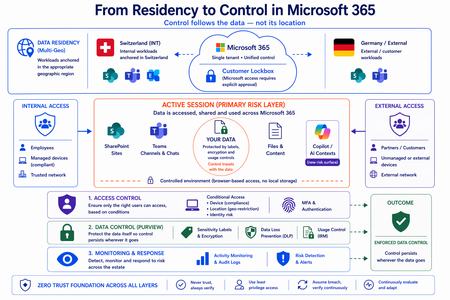
Moving from Residency to Control in Microsoft 365 Every conversation about data sovereignty in regulated industries tends to start the same way: “We use Multi-Geo. The data stays in Switzerland.” It’s the right starting point. Microsoft 365 Multi-Geo allows organizations to place selected workloads - SharePoint sites, OneDrive accounts, Teams data, or Exchange mailboxes - into specific regions, including Switzerland, while maintaining a single global tenant. This makes it possible to align sensitive data with regulatory or customer requirements without fragmenting the overall environment. But it only answers one question: Where is the data stored? It does not answer who accessed the data, from where, under which conditions, or what happened after access. That is where the real problem begins. A scenario that happens every day A Swiss engineering firm stores sensitive project documentation in Switzerland using Multi-Geo. An external contractor - working from an unmanaged device outside Switzerland - is granted access to review a file. The document opens. The data is now on a screen in an unknown location, on a device with no compliance posture, in a session with no restrictions. From the platform’s perspective, residency was enforced. From a sovereignty perspective, control was lost the moment access was granted without conditions. The file never left Switzerland. But sovereignty did. Residency is static. Control is not. The moment a document is opened, storage location stops being the relevant boundary. The file is no longer just “in Switzerland.” It moves instantly across endpoints and browsers, collaboration tools like Teams, external users and partners, and increasingly AI-driven contexts. The infrastructure remains unchanged. The data does not. From the platform’s perspective, everything is working as designed - access was granted, residency was enforced - and control was lost. Most “data in Switzerland” strategies fail at exactly this moment: when the data is used. The shift: from location to conditions If data sovereignty is the goal, the question must change. Not “Where is the data stored?” but: Under which conditions can data be accessed and used? This shift fundamentally changes the architecture. Control must be applied across three distinct layers - and all three must be connected. Layer 1: Access is conditional, not static Conditional Access extends control beyond authentication and turns it into continuous evaluation. Access decisions can depend on: Device compliance Location (geo-restriction) Identity and risk signals Multi-Geo ensures data is placed correctly. Conditional Access ensures it is reachable only under defined conditions. The two must work together - residency without access governance is an incomplete control. Layer 2: The session is the real risk surface Even with strict access controls, risk remains. A session is an exposure surface by design. During an active session, data is viewed, copied, shared, processed by applications, and connected to AI prompts. The gap does not appear at storage or authentication. It appears during active usage - inside the session. This is the layer most architectures do not explicitly address. Controls must extend into the session itself: limiting data transfer and replication, restricting interaction patterns, and enforcing policies in real time. Access is no longer a one-time event. It becomes continuously governed. This becomes even more critical as AI assistants consume content across SharePoint, Teams, Exchange, and other Microsoft 365 services. The question is no longer only where the source document resides - but whether the AI interaction itself is governed by the same access and protection controls as direct access. Layer 3: The document becomes the control point The most durable control does not sit in the network or in the session. It sits in the data itself. In regulated industries, organizations often arrive at this architecture having first evaluated sovereign or national encryption solutions. The decision to rely on native Microsoft 365 Purview encryption rather than a separate layer comes down to integration: AES-256 protection operating natively at file, user, and SharePoint level - including geo-based access restrictions - without an additional system to maintain. When protection is applied directly to the document through Microsoft Purview: Sensitivity labels define classification - automatically assigned based on content Encryption enforces access - AES-256, bound to the file itself IRM controls usage - view, copy, print, share, and presentation rights DLP governs movement across services - preventing data from leaving defined boundaries Dynamic watermarking tracks exposure - applied on open, view, or print At that point, access is enforced by the file, usage restrictions travel with it, and control persists regardless of location. The document becomes the perimeter. Platform control: limiting provider access One dimension often overlooked in sovereignty discussions is platform access itself. Even a perfectly configured tenant is only as sovereign as the controls placed on the operator. Customer Lockbox ensures that even Microsoft support cannot access customer data without explicit, logged, time-bound approval. Every access request is visible, auditable, and subject to customer veto. Data control applies not only to users - but also to the platform operating the service. Enforcement requires an integrated architecture Most organizations already have the required capabilities: Multi-Geo, Conditional Access, session control, Purview (labels, encryption, DLP, IRM), and monitoring. The issue is not capability. It is fragmentation. In practice, fragmentation looks like this: residency is configured in one project, Conditional Access policies are managed by a different team, and Purview labels were applied during a compliance initiative that never connected to the access layer. The tools exist. The signals do not flow between them. When designed as a single architecture: Data is placed intentionally - residency aligned to regulatory requirements Access is governed by context - device, location, and identity evaluated continuously Usage is controlled dynamically - session-level restrictions enforced in real time Protection is embedded in the document - encryption and IRM travel with the file Signals are connected across the platform - monitoring feeds access policy, not just audit logs “Data in Switzerland” becomes not just a statement - but an enforceable system property. Closing thought Placing data in Switzerland is the right first step. Multi-Geo makes it possible, even in global environments. But residency alone is not control. Data residency answers where information is stored. Data sovereignty requires proving who can access it, under which conditions, and what controls remain in place after access is granted. In Microsoft 365, sovereignty is no longer defined by geography alone. It is defined by the ability to enforce control wherever the data travels.729Views1like0CommentsSecurity Dashboard for AI: 3 Ways CISOs Drive Impact Today
AI is reshaping the enterprise and, with it, the threat landscape. Today's organizations face new threats with AI agents that modify configurations, execute workflows, and access data without direct human oversight. As a result, the gap between AI adoption and AI governance is widening, and CISOs face growing challenges to maintain visibility, control, and compliance across an increasingly complex ecosystem. As AI becomes embedded across the enterprise, CISOs face four key challenges: Scale without visibility: Over 75% of enterprises surveyed by PWC report they are already adopting AI agents. ¹ At the same time, over 80% of security teams surveyed by Nokod report visibility gaps into the applications and AI agents created within their organization. ² Rapid AI proliferation and evolving regulations make unified visibility across AI platforms, apps, and agents critical for CISOs. Fragmentation: Organizations rely on multiple siloed tools for AI asset visibility, making oversight fragmented and inefficient. According to Gartner’s 2024 survey of 162 enterprises, organizations use 45 cybersecurity tools on average. Expanding AI risk: AI proliferation is rapidly increasing the attack and risk surface, with the surge of AI-generated identities. By 2027, 4 out of 5 organizations will face phishing attacks powered by AI-generated synthetic identities, according to IDC. ³ This makes it harder for CISOs to track emerging threats, unmanaged assets, and shifting risk patterns. Overload: Alert fatigue is now a top challenge, with organizations now receiving an average of 2,992 security alerts daily, yet 63% go unaddressed. ⁴ Increasing AI risk without a way to prioritize what matters most compounds pressure on CISOs. In conversations between Microsoft and CISOs, one common need emerged: a single place to view integrated AI risk across the enterprise. To address these growing challenges, we are excited to provide CISOs with the Security Dashboard for AI, which recently became generally available. This unified dashboard aggregates posture and real-time risk signals from Microsoft Defender, Entra, and Purview into one unified, executive-level view of AI posture, risk, and inventory across agents, apps, and platforms. The Security Dashboard for AI helps CISOs: Gain unified AI risk visibility: Discover AI agents and applications and continuously monitor posture across the environment Prioritize critical risks: Correlate signals across identity, data, and threat protection to surface the most urgent issues Drive risk mitigations: Investigate activity and take action to help reduce exposure across the AI ecosystem The dashboard is capable of aggregating and surfacing AI risks from across Microsoft Defender, Entra, Purview - including Microsoft 365 Copilot, Microsoft Copilot Studio agents, and Microsoft Foundry applications and agents as well as cross-platform AI risks with Microsoft network-based or SDK-enabled integrations, and MCP servers. This supports comprehensive visibility and control, regardless of where applications and agents are built. As you activate Microsoft Security for AI capabilities, you can gain richer visibility into different aspects of your AI risk posture. Figure 1: Security Dashboard for AI in browser Getting Started with the Security Dashboard for AI The Security Dashboard for AI is provided at no additional cost to customers already using Defender, Entra, and/or Purview to protect their AI innovation. Based on how early adopter CISOs are using the dashboard, here are three ways you can start leveraging the dashboard today. 1. Manage Daily AI Risk Beyond reporting, you must stay hands-on with AI risks, scanning for emerging issues, verifying asset governance, and delegating remediations. The Security Dashboard for AI consolidates daily operations into a single pane of glass, surfacing critical alerts, unmanaged assets, and emerging risks. Use the dashboard as a daily AI risk radar, enabling rapid triage and ensuring you focus on the most urgent threats. Scan and triage daily AI risk: Start each day by identifying and prioritizing the highest-risk AI exposures. Risks are prioritized on severity reported by underlying security tools, helping you focus on the most critical exposures. Track AI asset inventory and monitor agent sprawl: Use the Inventory page to gain comprehensive visibility into all AI assets. Identify newly registered assets to mitigate the risk of shadow or unmanaged IT and surface inactive agents to proactively monitor and control agent sprawl. Delegate tasks for remediation: Move from insight to action by delegating tasks to your security team with easy click delegation. Delegation routes ownership via email or Microsoft Teams with notifications, due date, and ownership tracking. Delegate actions to specific roles such as global admin and AI administrator, without granting full access to underlying tools. Figure 2: Security Dashboard for AI risk page 2. Guide Briefings with Security Teams You require up-to-date intelligence to guide conversations with Security Teams about what is happening across the AI estate. The Security Dashboard for AI helps you anchor discussions in specific risks, trends, and ownership gaps surfaced in the data. The dashboard becomes a conversation driver, helping you ask the right questions about risk and security posture, to help ensure you and your team are triaging the right priorities. Because the dashboard consolidates signals from Defender, Entra, and Purview, both CISO and security teams operate from the same facts, enabling more outcome-driven discussions and faster prioritization, so you can shift the conversations from status updates to targeted action planning. Prioritize top AI Risk: Use the dashboard to help you prioritize the AI risk that matters the most. In preparation for team meetings, use Microsoft Security Copilot to explore AI risks, agent activity, and security recommendations via prompts to strengthen your AI security posture. With your team, take a closer look at risk vectors like data leakage, oversharing and unethical behavior, and discuss what actions need to be taken. Review Security Recommendations: Create a routine with your security team to review the recommended Microsoft security actions and track your progress over time. Across regular team check‑ins, review what has been addressed, what remains open, and which actions require follow‑up so you are prepared to respond to regulatory, audit, or executive questions with up‑to‑date metrics. Figure 3: Security Dashboard for AI inventory page Figure 4: Security Dashboard for AI delegation 3. Executive Reporting Reporting to the board on AI security posture has historically meant weeks of manual data gathering across multiple tools. The Security Dashboard for AI streamlines the data collection process with a single source of truth for AI risk, enabling confident, data-backed insights for your board presentations and conversations. Early adopters confirm the value and are using it for quarterly executive briefings. Prepare for Board Discussions: Use the dashboard to help get the right insights at the right altitude to help you prepare for discussions with your board. The Overview page aggregates identity, data security, and threat protection signals from Defender, Entra, and Purview into an AI risk scorecard with risk factors. The embedded Security Copilot AI-powered insights provide suggested prompts with risk assessments, summaries, and recommendations to help you prioritize what matters most. Extend Observability to Executive Stakeholders: Authorize AI risk follow‑ups to the appropriate security, identity, or governance owners using Microsoft Teams or email. Distribute visibility across GRC lead, AI governance, and IT leaders, while maintaining executive‑level oversight. Figure 5: Security Dashboard for AI Copilot prompt gallery Next Steps The Security Dashboard for AI helps CISOs manage AI risk faster, more confidently and more collaboratively with their team. Defender, Entra, and Purview signals are surfaced in a single pane of glass, providing observability across your AI estate. Drive faster triage, use data to support board-level discussions about AI risk, and enable coordinated action with integrated insights, recommendations, and delegation to help accelerate remediation across existing security workflows. The Security Dashboard for AI is generally available now. If your organization uses Microsoft Defender, Entra, and/or Purview, you already have access, no additional licensing is required. Visit ai.security.microsoft.com to access the dashboard directly, or navigate to it from the Defender, Entra, or Purview portals. Learn more about the Security Dashboard for AI on the MS Learn page and the Security Dashboard for AI Security Blog. Discover new features in the Security Dashboard for AI such as the Security Reader role, new delegation flow, and new identity risk section here. ¹AI agent survey. PwC, May 2025 ²Security Teams Taking on Expanded AI Data Responsibilities. Bedrock Data, March 2025 ³IDC FutureScape: Worldwide Security and Trust 2026 Predictions, November 2025 ⁴2026 State of Threat Detection and Response Report. Vectra AI, February 2026
Short survey: Feedback on Sensitivity Label Suggestions in Microsoft 365 Apps
Hi everyone, I’m looking to gather feedback on user experiences with Sensitivity Label suggestions in Microsoft 365 apps. This short survey aims to understand how label recommendations are working in practice and where improvements may be needed. Your responses will help identify common challenges and opportunities to make the label recommendation process more accurate, useful, and seamless for users. Survey link: Experience with Recommended Sensitivity Labels in Microsoft 365 – Fill out form The survey takes around 3 minutes to complete. Your feedback will directly help us better understand real-world experiences with label suggestions. Thank you very much for taking the time to contribute.249Views1like0CommentsSafeguarding Sensitive Data in Microsoft 365 Copilot Interactions: DLP for Microsoft 365 Copilot
Microsoft 365 Copilot is redefining how organizations work, bringing the power of generative AI directly into our secure productivity tools. As Copilot adoption accelerates, we’ve heard that you want more control over how your sensitive data can be used in interactions with Copilot. At Ignite 2025, Microsoft announced a major enhancement: Microsoft Purview Data Loss Prevention for Microsoft 365 Copilot to safeguard Microsoft 365 Copilot and Copilot Chat prompts, now entering General Availability. Even better, this capability is included for all users of Microsoft 365 Copilot and Copilot Chat. Why DLP for Copilot Prompts Is a Game-Changer As organizations adopt Copilot, their ways of sharing, creating, and interacting with data expand. With just a prompt, users can have Copilot summarize documents, analyze spreadsheets, or help brainstorm presentations. However, it raises an important question: what if the prompt includes sensitive information, like project code names, financial account numbers, health records, or other sensitive data? Over the last 2 years, Microsoft has been building a set of Data Loss Prevention (DLP) controls specifically designed for Copilot. Below is a quick overview of these related capabilities — ranging from already available to newly in preview — before we dive deep into today's GA announcement: Prevent Copilot processing of files & emails based on sensitivity labels In November 2024, Microsoft introduced the ability to create a DLP policy to restrict Microsoft 365 Copilot and Copilot Chat from processing sensitive files and emails using Sensitivity Labels for grounding data. This capability gives you control over whether content with the sensitivity labels you specify is restricted from being used in Microsoft 365 Copilot and Copilot Chat to generate summaries and responses. Prevent web searches for prompts containing Sensitive Information Types (SITs) The latest feature entering Public Preview is DLP for Microsoft 365 Copilot and Copilot Chat to prevent web searches for prompts containing sensitive data. This real-time control helps organizations mitigate data leakage and oversharing risks by preventing Microsoft 365 Copilot and agents from using sensitive data for external web searches. If a sensitive information type (SIT) is detected in a user prompt, Copilot can still leverage your enterprise data to form a response without sending the sensitive data to external search engines for web grounding. This capability extends to Microsoft 365 Copilot and agents built in Copilot Studio that are published to Microsoft 365 Copilot. DLP to Safeguard Copilot Prompts with Sensitive Information Types (SITs) The rest of this blog focuses on a key addition to this capability set: DLP for Microsoft 365 Copilot + Copilot Chat prompts to prevent processing of prompts containing sensitive information, now entering General Availability. Unlike the web search capability above, which prevents sensitive data from being sent externally during a web query, this capability evaluates the user’s text input directly, before processing occurs, to determine whether both enterprise data and web grounding can proceed. This feature uses Sensitive Information Types (SITs) as a condition within a Purview DLP policy to assess whether a user prompt sent to Copilot contains sensitive data, even if the data is unlabeled. With DLP for Copilot prompts, a user’s text input is scanned in real time for SITs, whether built-in (like Social Security Numbers, credit card numbers, etc.) or custom-defined by your organization (such as confidential terms or project names). If a text prompt contains one of the SITs you specify, Copilot restricts processing, halts any Graph or web grounding, and displays a clear message to the end user that the request cannot be completed. A user enters a prompt in Microsoft 365 Copilot Chat containing sensitive information. How DLP for Copilot Protects Prompts: Real-Time, Intelligent Protection The new DLP capability integrates seamlessly with Microsoft Purview, leveraging its powerful data classification & detection engine for sensitive information types. Here’s how it works: Input: When a user submits a prompt, Copilot checks the prompt for sensitive information using built-in or organization-defined sensitive information types (SITs). Immediate Action: If a SIT is detected, Copilot restricts the prompt from being processed. No AI response is generated, and no data is sent for Graph or web grounding. Output: Users receive a clear notification that their request cannot be completed due to company policies. This real-time protection ensures that sensitive data is not leaked or overshared, even as users explore new ways to work with AI. Setting Up DLP for Copilot Prompts: Data Security Admin Experience The easiest way to get started is through the new Microsoft Purview Data Security Posture Management (DSPM) portal, which provides a guided, one-click setup experience: 1. In Purview, go to Solutions > DSPM (preview) 2. Select the "Prevent data exposure in Microsoft 365 Copilot and Microsoft Copilot interactions" objective. 3. Follow the guided workflow and apply the recommended one-click DLP policy. The policy starts in simulation mode so you can review activity before enforcing it. Alternatively, you can configure and customize this policy directly from the Purview DLP portal Policies page or enable it from the Microsoft 365 Admin Center. view the remediation plan. view policy details and review. Then click the button, create a custom policy in DLP simulation mode to protect sensitive data referenced in Microsoft 365 Copilot and Microsoft Copilot. the confidence level and instance count. Practical Scenarios: Protecting What Matters Most Protect PII, financial data, and intellectual property: Financial institutions can block prompts containing deal terms, account numbers, or other sensitive data, preventing leaks through AI interactions. Similarly, healthcare organizations can safeguard patient information, and manufacturers can secure intellectual property and trade secrets from exposure, along with many other practical use cases. Once the prompt is detected and blocked, Microsoft Graph grounding and Bing web grounding is restricted. Safeguard sensitive non-public information: Imagine an organization involved in a confidential merger. By using DLP for Copilot prompts, administrators can set up a custom SIT that includes the project’s code name. If a user asks Copilot about the merger using the project’s code name, their request will be blocked, keeping sensitive information secure and protected. Visibility into DLP for M365 Copilot Prompts When a user’s prompt triggers a DLP policy, notifications and alerts are surfaced directly in the Microsoft Purview and Defender portals for security administrators. These alerts provide detailed information about which policy was activated, the type of sensitive information detected, and the context of the attempted Copilot interaction. Using these alert queues in Purview and Defender XDR, administrators can efficiently track policy activity, investigate potential incidents, and refine DLP rules to better align with organizational needs. The ability to review historical alerts and track ongoing enforcement empowers admins to maintain strong data security and proactively safeguard sensitive information. Defender XDR portal investigation of prompt DLP based incident. Takeaways The introduction of this latest enhancement to DLP for Copilot represents a key advancement in secure Copilot deployment and adoption. By empowering organizations to block sensitive data at the prompt level, Microsoft is helping customers unlock the full potential of Copilot, without compromising security or compliance. This innovation reflects Microsoft’s commitment to responsible AI, continuous improvement, and customer-driven development. As Copilot evolves, so will the tools to protect your data, ensuring that productivity and security go hand in hand. For more details, stay tuned for updates to the Product Roadmap and Learn documentation. Learn about using DLP to protect interactions with Microsoft 365 Copilot and Copilot Chat Learn about the default DLP policy for Microsoft 365 Copilot location | Microsoft Learn Permissions to create or edit a DLP policy to safeguard Microsoft 365 Copilot and Copilot Chat Learn about the new Microsoft Purview Data Security Posture Management (DSPM) | Microsoft Learn Roadmap Item: DLP for Microsoft 365 Copilot to safeguard prompts Roadmap Item: DLP to safeguard web search in Microsoft 365 CopilotWhy UK Enterprise Cybersecurity Is Failing in 2026 (And What Leaders Must Change)
Enterprise cybersecurity in large organisations has always been an asymmetric game. But with the rise of AI‑enabled cyber attacks, that imbalance has widened dramatically - particularly for UK and EMEA enterprises operating complex cloud, SaaS, and identity‑driven environments. Microsoft Threat Intelligence and Microsoft Defender Security Research have publicly reported a clear shift in how attackers operate: AI is now embedded across the entire attack lifecycle. Threat actors use AI to accelerate reconnaissance, generate highly targeted phishing at scale, automate infrastructure, and adapt tactics in real time - dramatically reducing the time required to move from initial access to business impact. In recent months, Microsoft has documented AI‑enabled phishing campaigns abusing legitimate authentication mechanisms, including OAuth and device‑code flows, to compromise enterprise accounts at scale. These attacks rely on automation, dynamic code generation, and highly personalised lures - not on exploiting traditional vulnerabilities or stealing passwords. The Reality Gap: Adaptive Attackers vs. Static Enterprise Defences Meanwhile, many UK enterprises still rely on legacy cybersecurity controls designed for a very different threat model - one rooted in a far more predictable world. This creates a dangerous "Resilience Gap." Here is why your current stack is failing- and the C-Suite strategy required to fix it. 1. The Failure of Traditional Antivirus in the AI Era Traditional antivirus (AV) relies on static signatures and hashes. It assumes malicious code remains identical across different targets. AI has rendered this assumption obsolete. Modern malware now uses automated mutation to generate unique code variants at execution time, and adapts behaviour based on its environment. Microsoft Threat Intelligence has observed threat actors using AI‑assisted tooling to rapidly rewrite payload components, ensuring that every deployment looks subtly different. In this model, there is no reliable signature to detect. By the time a pattern exists, the attacker has already moved on. Signature‑based detection is not just slow - it is structurally misaligned with AI‑driven attacks. The Risk: If your security relies on "recognising" a threat, you are already breached. By the time a signature exists, the attacker has evolved. The C-Suite Pivot: Shift investment from artifact detection to EDR/XDR (Extended Detection and Response). We must prioritise behavioural analytics and machine learning models that identify intent rather than file names. 2. Why Perimeter Firewalls Fail in a Cloud-First World Many UK enterprise still rely on firewalls enforcing static allow/deny rules based on IP addresses and ports. This model worked when applications were predictable and networks clearly segmented. Today, enterprise traffic is encrypted, cloud‑hosted, API‑driven, and deeply integrated with SaaS and identity services. AI‑assisted phishing campaigns abusing OAuth and device‑code flows demonstrate this clearly. From a network perspective, everything looks legitimate: HTTPS traffic to trusted identity providers. No suspicious port. No malicious domain. Yet the attacker successfully compromises identity. The Risk: Traditional firewalls are "blind" to identity-based breaches in cloud environments. The C-Suite Pivot: Move to Identity-First Security. Treat Identity as the new Control Plane, integrating signals like user risk, device health, and geolocation into every access decision. 3. The Critical Weakness of Single-Factor Authentication Despite clear NCSC guidance, single-factor passwords remain a common vulnerability in legacy applications and VPNs. AI-driven credential abuse has changed the economics of these attacks. Threat actors now deploy adaptive phishing campaigns that evolve in real-time. Microsoft has observed attackers using AI to hyper-target high-value UK identities- specifically CEOs, Finance Directors, and Procurement leads. The Risk: Static passwords are now the primary weak link in UK supply chain security. The C-Suite Pivot: Mandate Phishing‑resistant MFA (Passkeys or hardware security keys). Implement Conditional Access policies that evaluate risk dynamically at the moment of access, not just at login. Legacy Security vs. AI‑Era Reality 4. The Inherent Risk of VPN-Centric Security VPNs were built on a flawed assumption: that anyone "inside" the network is trustworthy. In 2026, this logic is a liability. AI-assisted attackers now use automation to map internal networks and identify escalation paths the moment they gain VPN access. Furthermore, Microsoft has tracked nation-state actors using AI to create synthetic employee identities- complete with fake resumes and deepfake communication. In these scenarios, VPN access isn't "hacked"; it is legally granted to a fraudster. The Risk: A compromised VPN gives an attacker the "keys to the kingdom." The C-Suite Pivot: Transition to Zero Trust Architecture (ZTA). Access must be explicit, scoped to the specific application, and continuously re‑evaluated using behavioural signals. 5. Data: The High-Velocity Target Sensitive data sitting unencrypted in legacy databases or backups is a ticking time bomb. In the AI era, data discovery is no longer a slow, manual process for a hacker. Attackers now use AI to instantly analyse your directory structures, classify your files, and prioritise high-value data for theft. Unencrypted data significantly increases your "blast radius," turning a containable incident into a catastrophic board-level crisis. The Risk: Beyond the technical breach, unencrypted data leads to massive UK GDPR fines and irreparable brand damage. The C-Suite Pivot: Adopt Data-Centric Security. Implement encryption by default, classify data while adding sensitivity labels and start board-level discussions regarding post‑quantum cryptography (PQC) to future-proof your most sensitive assets. 6. The Failure of Static IDS Traditional Intrusion Detection Systems (IDS) rely on known indicators of compromise - assuming attackers reuse the same tools and techniques. AI‑driven attacks deliberately avoid that assumption. Threat actors are now using Large Language Models (LLMs) to weaponize newly disclosed vulnerabilities within hours. While your team waits for a "known pattern" to be updated in your system, the attacker is already using a custom, AI-generated exploit. The Risk: Your team is defending against yesterday's news while the attacker is moving at machine speed. The C-Suite Pivot: Invest in Adaptive Threat Detection. Move toward Graph‑based XDR platforms that correlate signals across email, endpoint, and cloud to automate investigation and response before the damage spreads. From Static Security to Continuous Security Closing Thought: Security Is a Journey, Not a Destination For UK enterprises, the shift toward adaptive cybersecurity is no longer optional - it is increasingly driven by regulatory expectation, board oversight, and accountability for operational resilience. Recent UK cyber resilience reforms and evolving regulatory frameworks signal a clear direction of travel: cybersecurity is now a board‑level responsibility, not a back‑office technical concern. Directors and executive leaders are expected to demonstrate effective governance, risk ownership, and preparedness for cyber disruption - particularly as AI reshapes the threat landscape. AI is not a future cybersecurity problem. It is a current force multiplier for attackers, exposing the limits of legacy enterprise security architectures faster than many organisations are willing to admit. The uncomfortable truth for boards in 2026 is that no enterprise is 100% secure. Intrusions are inevitable. Credentials will be compromised. Controls will be tested. The difference between a resilient enterprise and a vulnerable one is not the absence of incidents, but how risk is managed when they occur. In mature organisations, this means assuming breach and designing for containment: Access controls that limit blast radius Least privilege and conditional access restricting attackers to the smallest possible scope if an identity is compromised Data‑centric security using automated classification and encryption, ensuring that even when access is misused, sensitive data cannot be freely exfiltrated As a Senior Enterprise Cybersecurity Architect, I see this moment as a unique opportunity. AI adoption does not have to repeat the mistakes of earlier technology waves, where innovation moved fast and security followed years later. We now have a rare chance to embed security from day one - designing identity controls, data boundaries, automated monitoring, and governance before AI systems become business‑critical. When security is built in upfront, enterprises don’t just reduce risk - they gain the confidence to move faster and unlock AI’s value safely. Security is no longer a “department”. In the age of AI, it is a continuous business function - essential to preserving trust and maintaining operational continuity as attackers move at machine speed. References: Inside an AI‑enabled device code phishing campaign | Microsoft Security Blog AI as tradecraft: How threat actors operationalize AI | Microsoft Security Blog Detecting and analyzing prompt abuse in AI tools | Microsoft Security Blog Post-Quantum Cryptography | CSRC Microsoft Digital Defense Report 2025 | Microsoft https://www.ncsc.gov.uk/news/government-adopt-passkey-technology-digital-services