ideas
26 Topics
Intune Detection and Remediation Scripts
Can I suggest a feature request for Intune remediation scripts? It would be useful to have a Requirements section that controls whether a remediation script should run. At the moment, this logic has to be handled within the detection script. In many cases, we need remediation scripts to run only after specific applications are installed, not before. For example, a Requirements or Dependencies section would allow us to configure conditions such as: “Only run this script if this application is installed, and only if it is a specific version.” This would make remediation scripts much easier to target and manage.71Views0likes0Comments
I have an amazing idea for a new and interesting software for you
Good evening Microsoft developers I have an amazing idea for a new and interesting software for you: To make software that when I upload a song from my computer into it, it will translate the language of the singer in the song into another language that I choose from the list of languages, but in the original voice of the singer himself What do you think, Microsoft developers, do this? I would love to hear your comments here Regards, Arnold Salvador Waiting for friends........68Views0likes0Comments
Sentinel IFS
SentinelIFS — High‑Level Summary for Community Discussion SentinelIFS is a conceptual next‑generation enterprise file system designed around three core goals: Performance stability even at high disk utilization Security‑enforced data movement Intelligent, hardware‑assisted defragmentation and optimization It rethinks how storage is managed by introducing a dedicated, secure, multi‑zone buffer system that acts almost like a “storage‑side memory controller.” 1. Reserved, Encrypted Optimization Buffer Instead of relying on free space inside the main partition, SentinelIFS sets aside 10–20% of the drive as a locked, encrypted buffer. This buffer is: Hidden from normal read/write operations Accessible only to system‑level processes Protected by mandatory encryption Unlocked only with explicit admin confirmation This prevents malware, sabotage, or unauthorized processes from manipulating file layout. 2. Multi‑Door Access Architecture The buffer isn’t a single pool — it’s divided into multiple access zones, each with its own “door” and rules: Defrag Door — used only for file reorganization System Maintenance Door — paging, journaling, temp operations Hot File Door — high‑priority or frequently accessed data Cold File Door — archival or low‑priority data This prevents bottlenecks and allows the system to route file movement intelligently, similar to how RAM uses channels and caches. 3. Intelligent, Predictive Defragmentation SentinelIFS includes a self‑healing engine that: Tracks fragmentation in real time Predicts when fragmentation will impact performance Schedules optimization during low‑load windows Uses the buffer to rearrange files even when the main partition is 90%+ full This avoids the classic “bog‑down” that happens when drives are nearly full. 4. Storage‑Side Processing (Optional Hardware Assist) Because SentinelIFS performs: Encryption Fragment tracking Multi‑zone routing Real‑time optimization …it benefits from a dedicated onboard processor, similar to: SSD controllers RAID cards SmartNICs This offloads work from the host CPU and ensures consistent performance. 5. Security‑First Movement Rules Every file movement is: Authenticated Logged Encrypted Policy‑controlled This prevents ransomware or malicious actors from abusing defrag logic to corrupt data. 6. Enterprise‑Focused Benefits SentinelIFS is designed for: Security teams Virtualized environments High‑availability servers Large enterprises with strict compliance needs Key advantages include: Stable performance even at high utilization Predictable optimization behavior Strong protection against unauthorized data movement More usable active storage space Reduced fragmentation‑related slowdowns 🧩 In One Sentence SentinelIFS is a conceptual enterprise file system that combines encrypted reserved buffer zones, intelligent multi‑door access, predictive optimization, and optional onboard processing to deliver secure, high‑performance storage even under heavy load.205Views0likes3CommentsHardware-Level Resilience (RMAU) (Remote Acess Management Update)to mitigate Ring 0 Kernel Outages.
Proposal: Windows RMAU (Remote Access Update) Resilience Architecture Author:CAB4devs Credits:CAB4Devs Unabbreviated name: RAMU (Remote acess management update) Project Name: RAMU the best fix for mass malware attacks and Driver failures! Head of idea: CAB4devs Professions of author: Unofficial IT Computer science Programming (Non of these are degrees) 1. Executive Summary: The "Global Kill-Switch" Problem The 2024 global outage proved that when the Windows Kernel (Ring 0) fails, the OS becomes a "brick." Current recovery requires manual, physical intervention (Safe Mode + BitLocker keys), which is impossible to scale for 8.5 million+ devices. RMAU (Remote Access Update) is a proposed system that allows Microsoft to "tap into" any bricked Windows machine via a secure, hardware-independent "Emergency Hatch." It allows a central Microsoft engineer to perform mass file deletions, registry fixes, or command execution on millions of devices simultaneously, without the local user doing anything. 2. How It Works (The "Zero-OS" Logic) To work without new physical hardware, RMAU leverages the existing UEFI (Firmware) and Windows Recovery Environment (WinRE). The "Heartbeat" Trigger: If Windows fails to boot 3 times, the UEFI triggers the "RMAU Pre-Boot Agent." The "Main Server" Connection: This agent bypasses the broken Windows OS and establishes a tiny, encrypted network tunnel directly to Microsoft’s RMAU Central Command. Zero User Interaction: The user sees a screen saying "System Recovery in Progress – Managed by Microsoft Support." They do not need to type passwords or BitLocker keys; the hardware "handshakes" with the server using the device's unique TPM (Trusted Platform Module) ID. 3. The Microsoft Employee Experience (The Admin UI) When an outage happens, a Level 4 Microsoft Engineer logs into the RMAU Master Console. The Admin UI View: Global Map: A real-time heatmap showing millions of Blue-Screened devices. Mass-Action Command Line: A console where the engineer types: TARGET: ALL_BSOD_DEVICES_WITH_DRIVER("C-00000291*.sys") ACTION: DELETE_FILE("C:\Windows\System32\Drivers\C-00000291*.sys") ACTION: REBOOT Remote Desktop (Individual): For single-user bugs, the employee sees a "Ghost Screen"—a low-latency view of the target PC’s file system and registry, allowing them to type commands as if they were sitting at the desk. 4. Security: The "Nuclear Launch" Protocol Because this system can "do anything," it must be the most secured system on Earth. The Physical Cord (Center-Side): To prevent a hacker from "mass-tapping" into computers from home, the RMAU Master Console is Air-Gapped. The only way to send a global command is to physically plug a "Golden Key" (USB-HSM) into the server inside a Microsoft high-security vault. The Quorum (3-of-5): No one person can fix the world. Five high-ranking officials (CEO, CISO, etc.) must each provide a unique biometric scan (Retina/Fingerprint) and a code from an OOB Android Device to authorize the "Global Delete" command. ID-Locked: Every keystroke an employee makes is recorded and tied to their biometric ID. If an employee tries to "spy" on a user, the system automatically flags them for federal investigation. 5. Real-World Use Case: 2024 Scenario vs. General Bugs Scenario A: The 2024 CrowdStrike Event Without RMAU: IT teams drove to offices for weeks to manually fix PCs. With RMAU: The Microsoft Engineer identifies the bad file C-00000291*.sys. They send a Mass-Tap Command. Within 60 seconds, all 8.5 million computers receive the "Delete" signal at the hardware level. The PCs reboot, and the world is back online in under 5 minutes. Scenario B: The "Random Driver" Bug If a specific brand of laptop (e.g., Dell) starts crashing due to a bad update, the PM can target only those specific Serial Numbers. They can remotely open a CMD Prompt on the bricked device, run sfc /scannow, and repair the system while the user sleeps. 6. Legal & Privacy Compliance To stay legal, RMAU follows the "Emergency-Only" doctrine: Consent by Terms: Users agree to "Emergency Remediation" in the EULA. Strict Limitation: The hardware hatch only opens if the OS is non-functional. It cannot be used to "spy" on a working computer. Immutable Audit: All logs are made available to government regulators to prove Microsoft only deleted the "Bad File" and didn't touch user data. 7. The "No-Hardware" Update (How to Deploy) This doesn't need a new PC. It can be sent as a BIOS/Firmware Update. Code Implementation: Microsoft writes a "RMAU UEFI Extension" and sends it via Windows Update. It installs into the motherboard's firmware. The "Silent Guard": Once installed, it sits dormant. It never turns on unless it detects a Kernel Panic or a Boot Loop, ensuring zero impact on battery or performance. Final Verdict for the Forum: "Microsoft, we need to stop relying on 'Safe Mode.' We need a system that assumes the OS is dead and fixes it from the outside. RMAU is the answer." (Pronunciation: Ram Moo470Views0likes3Comments
3am thought: EF/LINQ
We have SQL (pronounced sequel), but LINQ could just as easily have been IQL — Integrated Query Language — pronounced equal. Sequel and Equal. One queries data, the other expresses relationships directly in code. Missed naming opportunity… or maybe it’s time to start a trend? 😄155Views0likes1CommentOutbound Anti‑Spam Policy “Include/Exclude” Please Correct
Proposed Feedback to Microsoft: Outbound Anti‑Spam Policy UI Behavior Is Misleading and Needs Clarification Title: Outbound Anti‑Spam Policy “Include/Exclude” UI is Misleading — Policy Applies Globally Unless Exclusions Are Defined Summary of the Issue The Outbound Anti‑Spam Policy interface in the Microsoft 365 Defender portal presents an Include and Exclude user scope model that strongly implies modern scoping behavior: Include = users the policy applies to Exclude = users the policy does not apply to However, this is not how the backend policy engine behaves. In reality: If the Exclude list is empty, the policy applies to all users unless they are explicitly excluded. This is the opposite of what the UI suggests, and it leads to unexpected and incorrect assumptions by administrators. Actual Behavior (Backend Logic) The outbound anti‑spam engine still uses legacy logic: A policy applies to a user unless the user is explicitly excluded Being “not included” does not prevent the policy from applying The highest‑priority policy that does not explicitly exclude a user is the one that applies This means: If the Exclude list is empty, the policy effectively becomes global. This is not communicated anywhere in the UI. Impact on Administrators This behavior leads to: Users unintentionally being governed by the wrong policy External forwarding being allowed for users who were never intended to be included Confusion when removing a user from the Include list does not remove them from the policy Misinterpretation of policy priority and scope Hours of troubleshooting because the UI does not reflect the actual evaluation logic This is especially problematic when configuring forwarding exceptions, where security expectations are high. Example Scenario Demonstrating the Problem Admin creates a Priority 1 policy allowing external forwarding for a small set of users. Admin adds those users to Include. Admin leaves Exclude empty, assuming the policy applies only to the included users. A user not in the Include list still has forwarding allowed because the policy applies globally unless excluded. Removing a user from Include does not remove them from the policy. The admin is misled because the UI suggests the opposite behavior. This is counterintuitive and contradicts the scoping model used in other Microsoft 365 policies. Requested Fix Add a warning or informational banner when the Exclude list is empty. Suggested wording: Warning: No users or groups are excluded. This policy will apply to all users unless they are explicitly excluded. Users not listed in “Include” may still be affected by this policy. This one clarification would prevent the majority of misconfigurations and support cases related to outbound forwarding exceptions. Why This Matters Outbound forwarding is a high‑risk vector for data exfiltration. Admins rely on the UI to understand policy scope. The current UI leads to incorrect assumptions and unintended exposure. A simple warning would align the UI with the actual behavior of the policy engine and prevent misconfigurations. End of Feedback As you may have noticed, the above response is based on questions and answers I got from Copilot. This is a valid improvement that needs to be made, but furthermore Microsoft is losing a great deal of information by not allowing a direct route from Copilot to the correct area of your company when a solution or a correction to a current method is discovered. Best regards, Gary Huber259Views0likes1CommentA few suggestions for using Clarity on WordPress
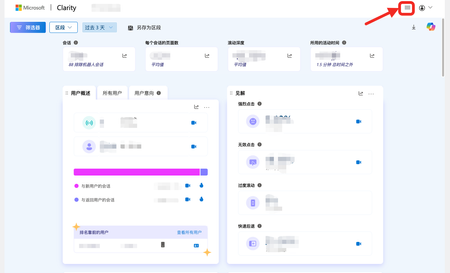
My website (http://hnwholesale.com) is built on WordPress and I'm currently using Clarity. However, on WordPress, the Clarity interface collapses the top menu, requiring a click to reveal it. This is different from the Clarity web version, which displays the menu by default. For someone who has used Clarity and WordPress for a long time, this adds an extra click. I hope it can be consistent with the Clarity web version. Note: Clarity is truly a great tool; thanks to the Microsoft team for their support.141Views0likes1Comment
Integrate Dynamic Disk Booting into windows #DynamicDisk #BootLoader #DevelopmentIdeas
**Subject:** Proposal to Enable Windows Boot Support for Dynamic Disks **Dear Microsoft Windows Engineering Team,** I am writing to respectfully propose the implementation of a long-requested feature: enabling Windows to install and boot from dynamic disks. As a dedicated user and system enthusiast, I find the current limitation both technically unnecessary and strategically misaligned with the evolving needs of advanced users. Outlined below are ten compelling reasons why enabling boot support for dynamic disks would be a valuable enhancement to the Windows platform: --- ### ✅ 1. Technically Straightforward to Implement - Integrating the Logical Disk Manager (`libdm`) into the bootloader would require approximately 200 KB of additional code, plus minimal integration logic. - The Windows bootloader already supports modular driver loading; incorporating LDM parsing would be a lightweight extension rather than a fundamental architectural change. - Windows Setup could similarly be enhanced with LDM support at negligible cost, given the existing size and modularity of setup components. --- ### 🔐 2. Proven Compatibility with Security Features - BitLocker encryption operates reliably on dynamic disks, demonstrating their stability and suitability for secure environments — including system volumes. --- ### 🧠 3. Advanced Storage Capabilities - Dynamic disks support spanned, striped, and mirrored volumes, making them ideal for: - High-performance workstations - Redundant storage configurations - Power users and IT professionals - Enabling boot from these configurations would unlock powerful new use cases. --- ### 🧱 4. Continued Presence in Windows 11 - Dynamic disks remain a supported feature in Windows 11. If they were truly obsolete, they would have been deprecated. - Maintaining support without enabling boot functionality represents an artificial and unnecessary limitation. --- ### 💾 5. Basic Disks Are Older and More Constrained - Basic disks rely on MBR and GPT partitioning schemes, which date back to the 1980s and 1990s. - Dynamic disks are a more modern and flexible alternative. Allowing boot from basic disks while disallowing it for dynamic disks is inconsistent. --- ### ☁️ 6. Alignment with Modern Storage Strategies - Dynamic disks can be formatted with ReFS, encrypted with BitLocker, and integrated into cloud-based backup workflows. - They are fully compatible with Microsoft’s broader vision for resilient, scalable, and cloud-integrated storage. --- ### 🧪 7. Improved Recovery from Accidental Conversion - Currently, if a system volume is inadvertently converted to dynamic, users are locked out of installation and recovery. - Boot support would make dynamic disks more forgiving and accessible, reducing data loss and support incidents. --- ### 💡 8. Empowerment for Advanced Users - Developers, IT professionals, and power users seek greater control over their storage configurations. - Supporting dynamic disk booting would reinforce Windows’ reputation for flexibility and technical depth. --- ### 💰 9. High Impact, Low Cost - The engineering effort required is modest relative to the potential benefits. - Microsoft already supports more complex features (e.g., ReFS, Storage Spaces, Secure Boot); this enhancement would be a logical and cost-effective addition. --- ### 🗣️ 10. Clear Community Demand - The request to boot from dynamic disks has persisted for years among technical users. - Implementing this feature would demonstrate Microsoft’s responsiveness to its most engaged and knowledgeable user base. --- ### 🛠️ Proposed Enhancements to Windows Setup To support this functionality, I respectfully suggest the following updates to the Windows Setup and boot process: 1. Integrate LDM support into Windows PE (`libdm`, `dmio.sys`, `dmboot.sys`, `dmload.sys`) 2. Update disk enumeration logic to recognize dynamic volumes as valid installation targets 3. Enable formatting with NTFS or ReFS and support BitLocker encryption 4. Modify BCD generation to accommodate dynamic boot volumes 5. Extend WinRE and recovery tools to support dynamic disk environments 6. Validate compatibility across BIOS/MBR and UEFI/GPT configurations --- I sincerely hope this proposal is given due consideration. Enabling boot support for dynamic disks would be a meaningful improvement for advanced users and professionals alike, and it aligns with Microsoft’s legacy of empowering users through innovation and flexibility. Thank you for your time and for your continued commitment to advancing the Windows platform. **Respectfully,** **Adheesh**266Views0likes0CommentsYakuake style drop down menu for windows11! +Force quite!
My favorite program for linux is yakuake. It is a drop down menu with hidden uses. It and Force quite are the two most useful linux items for me. The main use is it acts as a secondary program for a single desktop that allows you to access the desktop with a quick button push. This is more useful when you also use text to update the os. But I have the same issues with getting to the desktop without remembering windows + D. This is amazing in a single desktop setup. And as I just found out today just as useful in a multidesktop setup as the same problem happens with fullscreen or other programs in each desktop. 2. Force quite is self explanetory for the most part. Instead of openining your task manager you can hit ctrl+x(or other shortcuts) and it turns the cursor into an X and then you can click on the program to make it force quit fast. Great for troublesome games in linux where things like to break. Similarly likely useful in windows in a bad situation. It might be a nice default program for when needed. Sometimes in linux you often freeze where you can't get to the take manager and this recovers the desktop without a restart. As you may have noticed these are heavily useful for video games. Possibly not quite as useful in windows but could be nice in a bad situation. (A little linux gaming wisdom.)133Views0likes2Comments