ide
2 TopicsAnnouncing the resiliency agent in Azure Copilot, now in public preview
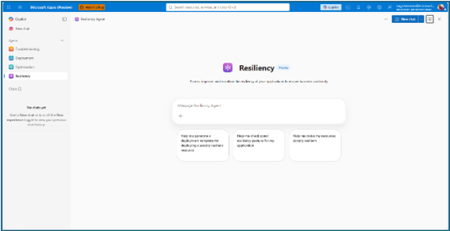
The distance between knowing and doing Most teams already know that zonal resiliency matters. What slows them down is everything in between: assessing posture across subscriptions and regions, deciding which gaps should be prioritized, writing the templates, and confirming the change actually rolled out. That is four separate workstreams, in four separate places, usually picked up long after the application is shipped. The resiliency agent closes that distance. We’re excited to announce that it is now available in public preview as part of the agents in Azure Copilot. The agent brings resiliency assessment, prioritized recommendations, and deployment-ready code into a single conversation, so resiliency becomes something your team does continuously rather than something you audit once a year. Learn more about Azure Copilot agents here. What the resiliency agent does The Resiliency agent is the conversational, action-oriented layer of Azure Infrastructure Resiliency Manager. The platform gives you a goal-driven view of your resiliency posture, and the agent lets you act on that posture in plain language. It brings together the signals you would otherwise chase manually across availability zones, Azure Backup, Azure Site Recovery, service level indicators, and Azure health models, then turns them into workload-aware guidance you can execute. Starting with zonal resiliency, it is designed to complement the resiliency capabilities you already rely on rather than replace them. The agent is built on the same foundational belief as Azure Infrastructure Resiliency Manager: application resiliency is a continuous journey, not a one-time task. That journey runs in three phases: Start Resilient Get Resilient Stay Resilient. This public preview addresses the activities associated with first two phases, frontloading the capabilities customers asked for most: direct remediation, Infrastructure as Code integration, and cost visibility. Stay Resilient comes next. What you can do in public preview Generate deployment-ready Bicep and Terraform with zone-redundant settings already enabled, before your first deployment Find the service groups and resources that are not zone resilient across your subscriptions and regions Prioritize remediation with cost-aware indicators that flag whether a fix needs extra spend, downtime, or redeployment Generate ready-to-deploy scripts to configure zone resiliency for supported resource types Create and update service groups so your applications are modeled correctly from the start Start resilient: build it in from the first line of code The most durable resiliency is the kind you never have to retrofit. Starting resilient means treating zone resiliency as an architectural requirement on day one, and the Resiliency Agent makes that the path of least resistance. Describe the application you are building, and the agent helps you generate deployment-ready Infrastructure as Code with the recommended resiliency configurations already enabled at creation time. Ask for a Bicep or Terraform template for a new workload and the agent returns one with zone-redundant settings pre-built for your databases, VMs, and load balancers, aligned to the goals you set. For example, try prompts like: “Generate a Bicep template for a zonally resilient VM setup.” “Create Terraform templates for a resilient architecture with VMs, AKS, and Storage.” The payoff: new services reach production already meeting your high availability standards, and the expensive redesign never has to happen. Get resilient: close the gaps in what you already run Applications change. The configuration that was right at first deployment is often not the one a business-critical workload needs two years later. This is where the resiliency agent turns posture insight into prioritized, executable action. Ask the agent to assess your environment, and it surfaces the resources and service groups that are not zone resilient, that are exposed to a datacenter outage, or that have key alerts waiting on attention. Every recommendation carries cost-aware decision support, qualitative indicators that flag whether a fix requires additional spend, downtime, or redeployment, so your team can sequence remediation against business value instead of guesswork. When you are ready to act, the agent generates ready-to-deploy scripts to configure zone resiliency for supported resource types, or targeted IaC snippets to close one specific gap. Try prompts like: “Assign resiliency goals for my application.” “Give me the posture of my service group: Contoso Payments.” “Enable zonal resiliency for my PostgreSQL server.” “Generate scripts to create a zonally resilient storage account.” This is a human-in-the-loop model by design. The agent brings the analysis, the recommendations, and the code. You keep full control over execution. Remediation gets faster without giving up governance. Stay resilient: what comes next Resiliency is not only about withstanding a zone outage. It is about protecting your data and knowing you can recover when something does go wrong. Recovery orchestration plans and zone drills are available today in Azure Infrastructure Resiliency Manager, and we are bringing both into the agent experience next. That closes the loop: assess, remediate, and validate recovery readiness in the same conversation. Get started with the public preview Open Azure Copilot and select the Resiliency Agent from the dropdown or the side panel. Three actions will get you value in the first session. Model your application. The agent works from your application, not a flat list of resources, so make sure it is represented as a service group that reflects your latest resource discovery. You can create service groups natively through the agent. Try: “Create a service group for my application.” Find your gaps. Ask which of your service groups and resources are not zone resilient. Most teams uncover exposure that was previously invisible. See Set resiliency goals and track compliance. Design it in. Ask for a Bicep template with zone-redundant defaults for a workload you plan to deploy and see how much retrofit effort disappears. See Generate resilient Bicep templates. What to expect in the preview Ready-to-deploy zone resiliency scripts are supported for Azure services that have zonal resiliency support in Infrastructure Resiliency Manager. See the support matrix for current coverage. Some advanced configurations, including multi-user authorization and Azure Site Recovery, may require manual steps, and the agent provides guidance to help you complete them. Where we are going This public preview is a starting line, not a finish. We are building toward end-to-end, agent-led journeys across Start, Get, and Stay Resilient, with cross-agent orchestration that reaches into migration, deployment, and observability, and multi-surface delivery so resiliency validation shows up in your IDEs, APIs, and CI/CD pipelines, not only in Azure Copilot. Service coverage will keep expanding, and the guidance will keep getting richer. The goal is simple and ambitious: make resilient-by-design the path of least resistance for every application on Azure. Preview is where that gets shaped, so tell us what is working and what you need next at azureresiliency@microsoft.com. Start here: open Azure Copilot, select the resiliency agent, and ask which of your applications are not zone resilient yet. Resources Announcing Azure Infrastructure Resiliency Manager public preview Agents in Azure Copilot public preview Resiliency capabilities in Agents (preview) in Azure Copilot, Azure Infrastructure Resiliency Manager overview Get started with service groups Microsoft Learn Questions or feedback: azureresiliency@microsoft.com