hybrid
35 Topics
Microsoft Entra Connect sync stopped, request upgrade and library not found
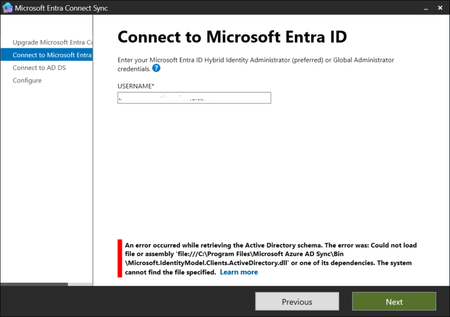
Hello, I have the latest (for our company, present on Entra blade) version of Microsoft Entra Connect Sync: 4 days ago I noticed on Synchronization Service Manager that there is no sync of data; I have started the Microsoft Entra Connect Sync and found a big button with "Upgrade" word; I tried to execute the upgrade but when the it arrives to the Connect to Microsoft Entra ID step, I fill with my global administrator account but found a stop error: An error occured while retrieving the Active Directory schema. The error was: Could not load file or assembly 'file:///C:\Program Files\Microsoft Azure AD Sync\Bin\Microsoft.IdentityModel.Clients.ActiveDirectory.dll' or one of its dependencies. The system cannot find the file specified. and when I click again on Next I have the same request of global administrator user and password and the same error. Now, the library is not present but I verified, in a test tenant where I have a working Entra Connect Sync system, that the files is not present even there (and also when I start Microsoft Connect Entra Sync I haven't the upgrade button there); I also tried to repair the installation, but obviously the file is no there. What can I do? Are there other people with the same issue? Any idea is appreciated.1.1KViews0likes3Comments
Additional Microsoft 365 users not showing as registered users on an Entra ID joined device.
Most of our clients are on M365 these days, and they consist of the following variations in how they integrate: On-prem AD with no Entra ID sync to M365. On-prem AD with Entra ID sync to M365 but no hybrid connection for devices. On-prem AD with Entra ID sync and hybrid connection for devices with Intune. No on-prem AD with all devices connected directly to Entra ID and Intune. For clients using integration methods 1 and 2, we always see multiple device registrations in Entra ID, and for clients using integration method 3, we see a primary user that was used to hybrid join the device, along with additional users showing up as registered in Entra ID. However, we have just recently discovered that clients that use method 4, i.e. they are 100% Entra ID with no on-prem AD, the only user that shows in Entra ID is the user that joined the device. Any other use that logs in and creates a profile on one of these machines is not recorded as a registered user in Entra ID for that device. So, for clients that use integration methods 1-3, if we want to remotely block access on a particular device for a specific user, we just need to delete their Entra ID registration for that device. However, for clients using method 4, we have no visibility for the additional user, nor can we remotely block a user in this scenario. Is this behaviour a current bug in the Entra ID join/register process? Or is this the expected behaviour? If the latter, then this seems to be a flaw in the join/register process.1.8KViews0likes3Comments
O365 Email Migration to Another Tenant while Deferring Migration of Sharepoint files
Hi, This is the context: ChildCompany has O365 and it has an Azure AD in hybrid mode synchronizing to a on-prem AD server. They have an internal domain ChildCompany.com, and an external domain ChildCompany.com where they also receive and send email using O365. ParentCompany is going absorb the ChildCompany some time in next year, and I was asked about the integration options. According to this https://download.microsoft.com/download/b/a/1/ba19dfe7-96e2-4983-8783-4dcff9cebe7b/microsoft-365-tenant-to-tenant-migration.pdf I could do a phased migration, where the end state is that they decomm their onprem AD and that they only use our ParentCompany systems. The business requirement is to start their integration with Email, and then in later phases do the Sharepoint integration as that requires way more analysis on their data sources, as they also have wikis and many other on prem legacy stuff. They are less than 50 users, so I can use Quest migration tools for the email part, but I wonder what needs to happen in what order. This is what I have in mind: Migrate their current O365 into our ParentCompany Office 365 subscription, so that they can continue logging in into their domain joined windows machines using childCompany.co, so they start using ParentCompany.com email addresses, but the problem then is how can they continue using their sharepoint and onedrive resources associated with the Azure and local domain at ChildCompany.com? This is more or less what I have in mind, for the intermediate step, the cutover: Child Company ParentCompany --------------------- ---------------- On-Prem | MS Cloud: | MS Cloud: ---------------|----------------------|-------------- Local AD (ADFS)| Azure Subscription | Azure Sub | Azure AD | Azure AD |--------------------- |--------------------- | O365 Sub -> | O365 Sub | Exchange mailboxes-> | Exchange mailboxes | Sharepoint? -> | ??? | -------------------- |--------------------- I wonder how could it be possible to defer the sharepoint and onedrive migration, so that the child company users can still work on their sharepoint files using their normal auth methods, while disabling childcompany.com as MX so they start using ParentCompany.com mailboxes.Is that even possible? Would make more sense to try to migrate everything at once? That is way more work, but I'm weighting my options.1.7KViews0likes7Comments
Entra hybrid join and devices in dual state
Hello, to test hybrid join, I created a lab that reproduces what we have as resources, like domain controller, notebooks and Microsoft 365 accounts and software; initially, we have all our notebooks registered as Entra registered because users have installed and configured the Office and Teams apps on their devices; with Connect agent in advanced mode, I then synced the various notebooks I had in the OUs and therefore obtained the various Entra hybrid joined devices; doing this way, I have the classic case of devices in dual state: I waited a few days as was suggested in the documentation, but nothing happened: in this case, how can I proceed? read other posts and did some tests, for example deleting the Entra registered device: in this case by restarting the notebook, when I try to launch Teams or an Office app I am asked to enter the user, or the user is incorrect and I have to sign out from the app and then sign in; Could I have problems with Outlook and all the mail I have on my devices? Is there any other solution? Another thing I noticed is this: the Entra registered device still presents some data such as the Owner, the User principal name which instead on the device in Hybrid join have as values, N/A and None respectively: in these cases, the the first is seen as a personal device and therefore this data is there and the second is seen as Corporate? Any suggestion is appreciated. -- Regards1.1KViews0likes1Comment
M365 Apps for Enterprise - Shared Activation
Hello all, I'm hoping someone can share some insight to help me out here. Recently we started receiving calls that users who log in to our conference room PCs, and Office files from OneDrive are read-only and there is a warning icon near their name at the top of the window. In looking at this we realized that Shared Activation was not enabled for these machines. We have since gone ahead and enabled Shared Activation via group policy. Now that Shared Activation is configured, it seems like every user who logs in to those conference room PCs is asked to sign in to authenticate to activate. This is a cumbersome process for our end users. We've got Azure AD Connect configured in our environment with Password Hash Sync and the Enable SSO checkbox checked. My expectation is that with Azure AD SSO enabled, the Office Apps would just SSO to activate similar to the way all of the other (non-shared) PCs do it. Is there something I am missing? Thanks Steve828Views0likes0Comments
AD Connect attribute-based filter on proxyaddresses
Hello, I would like to create an attribute-based filter. The goal is to only synchronize users with a proxyaddresses ending with @mytestdomain.com, @myothertestdomain.com and @mydomain.onmicrosoft.com. However, after reviewing the documentation from the link below, I am left with more questions. https://docs.microsoft.com/en-us/azure/active-directory/hybrid/how-to-connect-sync-configure-filtering I was thinking about implementing a "positive filter" The section for "positive filter" states that we must, "override the default filter in the out-of-box rule In from AD - User Join" After examining the default rule "In from AD - User Join" that rule has a link type set to Provision. However, the example states to set the link type to join. That default rule appears to filter out critical system objects and a few other accounts so I want to make sure I don't mess things up. I'm not sure if I should just leave this rule in place and create rules with a lower precedence, duplicate, disable the original rule, follow the instructions and change the link type, or do something else completely. Seems like it might be something fairly common to do, filter based on the proxyaddresses attribute but I can seem to find much on this topic. Anyone have any ideas?3.1KViews0likes3Comments
All Office 365 desktop programs gets account error after Microsoft update
We are using a hybrid Office 365 environment. All users are on MFA and SSO. We have a few users who updated their computers to newer Windows 10 Enterprise OS builds ver. 2004 build 19041.985, plus the 2021-06 Cumulative Updates KB5003637 and Update for Win 10 2004 KB4023057. After the updates go through about 6 of our users have issues with account on their Office programs. One issues I notice is Outlook 2016 desktop account status says disconnected, trying to connect or need password and they get that flashing sign in pop up but can't actually do anything. All the other Office programs like Word, Excel, OneNote, Access etc..all get the account error "Sorry we can't to your account right now on the top of their initials. When we try to sign in it just loops and doesn't let us sign in. The only temporary fix I have found is either remove them off of MFA or move back to the last OS build. I am not sure what happening or how to fix the issue.2KViews0likes5CommentsSelf Service Password Reset with Password Writeback
I am looking into exploring the option for Self Service Password Resets on Office 365, and since this is a hybrid I am going to enable password writeback. Everything works great but I have a question regarding the password writeback. What I have found is that once Password Writeback is enabled you don't necessarily need to be in the group to allow for SSPR. Therefore if you are able to logon to the account successfully, you can reset the password without answering any security questions, MFA, etc. I know you can restrict who can use SSPR, but is there a way to restrict who can reset their password via the portal? A few additional notes: Most (but not all) accounts are using an E3 license. Some only have a basic e-mail only license, or no license at all. MFA will be enabled but there are accounts where this won't work being a shared account. Those are the accounts I am concerned where someone can logon reset the password and have access to the local domain. Any thoughts or feedback would be appreciated.2KViews0likes3CommentsGroup write back without azure ad premium
Hi, i have trial tenant and have a plan to implement E1, this is my current tenant license. I already implement group writeback and able to sync office 365 group user to my AD with my existing license. My question is, is it true group writeback do not need azure ad premium ? i read in this article group writeback do not need premium https://c7solutions.com/2015/07/configuring-writeback-permissions-in-active-directory-for-azure-active-directory-sync but, i also read from microsoft article group writeback is need premium license https://docs.microsoft.com/en-us/azure/active-directory/hybrid/how-to-connect-group-writeback. i need to verify, is it group writeback features available in E1 ? because my existing license is similar with E1 Thanks Regards Ichwan1.4KViews0likes1CommentAzureAD sign-in and Audit log empty for some active users
Anybody else notice that for some daily active Office 365 users the AzureAD sign-in and Audit log is completely empty ? This started in some of the tenants I work with about a month or two ago. I know that the users are active in O365 because they log on to their Hybrid Azure AD joined devices, send emails, use files in Onedrive, etc.1.8KViews0likes1Comment