hugging face
9 TopicsGetting Started - Generative AI with Phi-3-mini: A Guide to Inference and Deployment
Getting started with Microsoft Phi-3-mini - Inference Phi-3-mini models, Discover how Phi-3-mini, a new series of models from Microsoft, enables deployment of Large Language Models (LLMs) on edge devices and IoT devices. Learn how to use Semantic Kernel, Ollama/LlamaEdge, and ONNX Runtime to access and infer phi3-mini models, and explore the possibilities of generative AI in various application scenarios52KViews4likes13CommentsUnderstanding the Difference in Using Different Large Language Models: Step-by-Step Guide
Unlock the secrets of deploying Large Language Models on Azure with our comprehensive guide! Learn step-by-step integration techniques for models like GPT-2, Llama 2, and Dolly v1 in your Web Applications or Power Apps. Explore detailed instructions, ready-made code, and expert tips. Join us for a live session on November 2nd, 2023, to harness the power of AI and Microsoft tools. Become an entrepreneur with Microsoft Founders Hub, offering up to $2,500 OpenAI credits and $1,000 Azure credits. Dive into the world of tech solutions and creative writing ideas today!14KViews3likes1Comment
Where should LLM weights live on AKS? Three options for GPU cold starts, measured
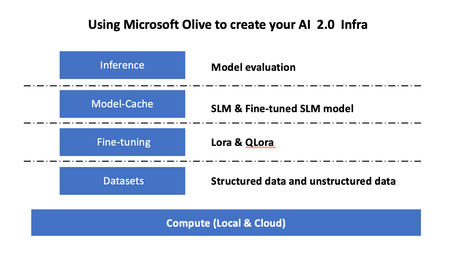
Summary When you self-host an open-weight large language model (LLM) on Azure Kubernetes Service (AKS), each new replica needs two payloads before it can answer a request: the container image that holds the inference runtime, and the model weights. That wait is the cold start. On CPU services it is usually a minor nuisance; on GPU services it can decide whether autoscaling keeps up with demand, because keeping GPU nodes warm around the clock is costly. We ran a controlled experiment on AKS designed to change one variable: where the weights live and how they reach the GPU. The model, the inference engine (vLLM), the GPU (one NVIDIA A100 80 GB) and the method (scale from zero onto a fresh node) were held constant. We compared three weight-delivery methods: downloading the weights from Hugging Face Hub to local disk at start-up, streaming them from Azure Blob Storage with the Run:ai Model Streamer, and baking them into the container image. Option Where the weights live Image size Cold start (new node) 1. Download from Hub Hugging Face Hub, copied to local disk at start 9.11 GB 15:45 2. Stream from Blob Azure Blob Storage, streamed to the GPU 9.32 GB 13:35 3. Bake into the image Inside a single container image in Azure Container Registry 39.6 GB 20:12 Three findings stand out in our test environment. First, baking the weights into the image was the slowest option on a new node, 6 minutes 37 seconds behind streaming, and it requires an image rebuild for every model revision. Second, streaming from Azure Blob Storage gave the fastest weight transfer in our runs (80 s, roughly 450 MB/s), although the overall gap to the download-to-disk option was small enough that we treat it as directional. Third, the weights are only part of the story: about 65% of the streamed cold start was node provisioning and engine initialisation, which the weight-delivery choice does not change. These are single runs per option, so read them as a direction to test, not a benchmark. Your results will vary with the model, VM size, region, storage configuration and software versions. Why cold starts matter more on GPUs For a typical CPU microservice, keeping a few replicas warm costs relatively little, so cold starts are usually rare. GPU nodes change that arithmetic. At Azure list prices at the time of testing (Linux, pay-as-you-go, Switzerland North, November 2026), a general-purpose D4s v5 node cost $0.253 per hour, while a Standard_NC24ads_A100_v4 node with one A100 GPU cost $5.252 per hour, roughly 21 times as much. Running that GPU node 24×7 comes to about $3,834 per month, against about $185 for the CPU node. Prices vary by region, offer and agreement and change over time; see the Azure Virtual Machines pricing page for current prices. Node Hourly list price Running 24×7 (730 h) CPU: D4s v5, 4 vCPU $0.253 ~$185 per month GPU: NC24ads A100 v4, 1× A100 80 GB $5.252 ~$3,834 per month Because idle GPU nodes are still billed, many teams scale GPU pools on demand, often down to zero. That puts the cold start on the critical path: scale-outs during a traffic spike, Spot VM evictions, rolling updates and model swaps all wait for a new replica to load. The direct cost of one cold start is small on a single A100 (between $1.19 and $1.77 at list price in our runs), and it grows with the node: on an ND96isr H100 v5 node (8× H100) at a list price of $98.32 per hour, a 225.57-second default load works out to about $6.16, against about $1.01 for a 37.14-second streamed load. The larger cost is capacity that arrives late. While the new replica loads, the running replicas carry the traffic, queues can grow, and requests can start to time out at the gateway. Figure 1. Why GPU cold starts matter: the hourly price gap, the cost of keeping a GPU node warm, and the GPU time billed during one cold start in each option. Azure list prices at the time of testing; illustrative. Open weights are two things: a runtime and the weights An open-weight model is a set of files anyone can download. To serve it, you pair those files with a runtime. The two parts differ enough in size and change rate that how you package and deliver them is a genuine architectural decision. Runtime Weights What it contains vLLM engine, PyTorch and CUDA, base OS and Python, packaged as container image layers config.json, tokenizer files and *.safetensors shards, which hold almost all the bytes Typical size Around 9 GB (our images: 9.11 to 9.32 GB) Tens to hundreds of GB (our test model: ~36 GB) Update rhythm Often: frequent vLLM releases, plus CUDA and security patches Rarely: only when you adopt a new model revision Where it lives Azure Container Registry (ACR), pinned by digest Hugging Face Hub, Azure Blob Storage, or baked into the image A useful rule of thumb is that weight size is roughly the parameter count multiplied by the bytes per parameter. A 35-billion-parameter model stored in FP8 (one byte per parameter) is about 35 GB; the same model in BF16 (two bytes) is about 70 GB. The three options in this paper are three ways of combining these two parts and getting the weights onto the GPU. How a model replica starts on AKS In our setup the model runs in a vLLM pod on a GPU node pool. Each node is an Azure VM, Standard_NC24ads_A100_v4, with 24 vCPUs, 220 GiB of system memory and one NVIDIA A100 with 80 GB of GPU memory. With fully managed GPU node pools, AKS installs and maintains the NVIDIA driver, the device plugin and the DCGM metrics exporter. The device plugin advertises the GPU to the scheduler, and the vLLM pod requests nvidia.com/gpu: 1 to receive the whole GPU. The weights and the KV cache must both fit in the 80 GB of GPU memory. A cold start from zero is not one number but eight phases: Phase What happens Depends on where weights live? M0 Trigger: the pod cannot be scheduled No M1 The cluster autoscaler adds a GPU node No M2 The device plugin registers the GPU No M3 The kubelet pulls the container image Yes M4 The server fetches the weights Yes M5 The engine loads and compiles No M6 The startup probe succeeds and the endpoint is ready No M7 The first token goes out No Only two of the eight phases, the image pull and the weight transfer, depend on the weight-delivery option. Node provisioning and engine initialisation should cost about the same whichever option you choose, which is why the experiment reports phases rather than a single total. The three options Figure 2. The three weight-delivery paths compared in the experiment. Option 1: download from Hugging Face Hub The runtime image (9.11 GB) is pulled from Azure Container Registry (ACR), and at start-up the weights (~36 GB) are downloaded from Hugging Face Hub over the public internet into an emptyDir volume on the node’s local disk. vLLM then reads them back from disk into GPU memory. That is two serial copies on every start, and the GPU waits through both. The approach needs nothing staged in advance, which makes it convenient for development and testing, but each start depends on the availability of the external source and on internet bandwidth. Option 2: stream from Azure Blob Storage The weights are staged once per model revision into Azure Blob Storage under an immutable path such as az://models/<key>/<rev>/. The runtime image (9.32 GB, from ACR) starts vLLM with the Run:ai Model Streamer as its loader. The streamer reads tensors from Blob concurrently into a CPU memory buffer and copies each tensor to the GPU while the next ones are still being read, so there is no local-disk hop. A new model revision is just a new path; no image rebuild is needed. The trade-off is that you store and pay for your own copy of the weights. Option 3: bake the weights into the image The weights are downloaded at build time and written into a layer of a single container image, 39.6 GB in total, pushed to ACR. On start-up the kubelet pulls the full image to the node, and vLLM loads the weights from the image’s local /models path. Loading from local disk is fast, but in our setup each new node had to pull the entire image, and each model revision means a rebuild (about 40 minutes in our pipeline), a push and a redeploy, because runtime and weights are versioned together. Experiment setup Held constant Value Model Qwen3.6-35B-A3B-FP8 (~36 GB of weights) Inference engine vLLM GPU node Standard_NC24ads_A100_v4, 1× NVIDIA A100 80 GB Platform AKS, Switzerland North Start condition Scale from zero onto a fresh node: no image cache, no warm GPU Runs One run per option For each run we recorded timestamps for the phases above, from the trigger to the endpoint becoming ready. Time to the first token (M7) and GPU registration (M2) were not timed separately. Results Phase (seconds) Option 1: Hub Option 2: Blob Option 3: Baked Node provisioning 405 343 388 Image pull (M3) 111 147 564 Weight transfer (M4) 171 80 19 Engine initialisation 195 184 257 Unattributed 63 61 none Cold start, total 945 (15:45) 815 (13:35) 1,212 (20:12) Warm restart, image cached 441 338 271 Figure 3. Cold-start phases per option, single run each on a fresh node. “Unattributed” is the time to ready minus the sum of the measured phases. For Option 3 the measured phases add up to 16 s more than the total, so no unattributed time is shown. What the results mean Figure 4. Who wins which race. Streaming from Blob won both fresh-node races; the baked image won only the warm restart, once its image was cached. Single run per option. Keep the weights out of the image. Baking was the slowest option on a new node in our test, 6:37 (397 s) behind streaming. Of that gap, 356 s came from the image pull and weight phases, while node provisioning differed by only 45 s. Container image pulls ran at roughly 63 to 82 MB/s in our runs, so a 39.6 GB image took minutes to arrive on each new node, and each model revision adds a rebuild on top. Streaming gave the fastest weight transfer. The Blob stream delivered ~36 GB in 80 s, about 450 MB/s, against 171 s for the download-to-disk path. The total difference between Options 1 and 2 was 2:10, but only 55 s of it comes from the weight phases and about 60 s in each run is unattributed, so this comparison is directional rather than proven. It reflects the delivery method and network path in our environment, not the performance of Hugging Face Hub as a service. Streaming also brings an operational benefit that the clock does not show: each revision is a new immutable path, with no rebuild. Baking helps only nodes that survive. With the image already cached, the baked option restarted in 271 s, 67 s ahead of Blob. That advantage applies only to a pod restarting on a node that keeps its image cache; in a scale-from-zero setup, a scale-out typically lands on a new node and pays the full pull. The next lever is not the weights. About 65% of the streamed cold start (527 of 815 s) was node provisioning and engine initialisation, which the weight choice does not change. Our 80 s weight transfer is also not the ceiling: the AKS engineering team reported streaming about 29 GB in about 10 s on the same VM size using Premium block blob storage. Where the first caller cannot wait, keeping one warm replica remains the most direct answer. How the Run:ai Model Streamer makes streaming work vLLM’s default loader is a two-step relay: download every weight file to the node’s local disk, then read them back into GPU memory. Nothing reaches the GPU until the last byte has landed on disk, and the network sits idle while the disk-to-GPU load runs. The Run:ai Model Streamer replaces both steps with one overlapped stream. Many threads read tensors from storage into a CPU memory buffer at once, and each tensor is copied to GPU memory as soon as it arrives while others are still being read. The streamer is built into vLLM behind a single flag, --load-format runai_streamer, and reads from Azure Blob (az://), other object stores and file systems. Azure Blob Storage support is available from vLLM v0.18.0 and runai-model-streamer v0.15.6. Authentication uses the Azure default credential chain, so on AKS a pod can read from Azure Blob Storage with Microsoft Entra Workload ID instead of a storage account key. export AZURE_STORAGE_ACCOUNT_NAME=<storage-account> vllm serve az://<container>/<model-path> \ --load-format runai_streamer \ --model-loader-extra-config '{"concurrency":16}' Before adopting it, note that the streamer reads safetensors files only (weights in .bin or GGUF must be converted), and that its concurrency (default 8) and memory limit are worth tuning for your VM and storage account. Two public Microsoft measurements show what the streamer can do with well-provisioned storage. The AKS Engineering Blog timed microsoft/phi-4 (about 29 GB) on one Standard_NC24ads_A100_v4 node with vLLM v0.23.0: the default path took about 113 s to download and about 74 s to load, roughly 187 s in total, while streaming from Premium block blob loaded the weights in about 10 s. The Azure SDK Blog compared the default loader with the streamer on an ND96isr H100 v5 node (8× H100) with Premium block blob in the same region, averaging five runs: Model Size Default loader Run:ai streamer Speed-up Llama-3.1-8B 14.99 GiB 15.48 s 3.61 s ~4.3× GPT-OSS-120B 60.8 GiB 42.29 s 12.76 s ~3.3× Qwen3.5-122B-A10B 232.8 GiB 225.57 s 37.14 s ~6.1× Figure 5. Model load time, default vLLM loader versus Run:ai Model Streamer. Source: Azure SDK Blog, May 2026 (ND96isr H100 v5, Premium block blob, mean of five runs). In that benchmark the default path’s network throughput peaked at about 40 Gbps and fell to about 10 Gbps, while the streamer held a steady ~80 Gbps for the whole load. The largest model in that test, at 232.8 GiB, saw the largest speed-up, about 6.1×. Choosing an option Situation Recommended option Why GPU pools that scale from zero; large or frequently updated models Stream from Blob Fastest weight transfer in our test, small runtime image, a new revision is a new path A runtime that needs files on local disk, such as Hugging Face Text Embeddings Inference (TEI) Copy to local disk (for example with an init container) The runtime cannot stream, so stage the files once per start A small model on an always-on node with frequent pod restarts Bake into the image Fastest warm restart in our test, once the image is cached Whichever option you choose, a few practices carry over. Version the runtime and the weights separately and release the combination: a release is a weight revision, an image digest and a serving configuration, pinned together. Write each weight revision to an immutable path and verify file hashes before promoting it. Pin runtime images by digest rather than tag. Use Microsoft Entra Workload ID rather than storage account keys. And size startup probes from measured phase times rather than guesses. Limitations and next steps These results come from one run per option, so they are directional rather than statistical. In Option 2 the pod authenticated with a storage account key rather than Microsoft Entra Workload ID. The test model was a 36 GB FP8 model; a larger BF16 model (about 55.6 GB) will shift the balance further toward the weight phases. The A100 has no native FP8 compute, so vLLM ran the FP8 checkpoint as weight-only quantisation. GPU registration and time to first token were not measured, and the prices quoted are list prices for one region at one point in time, and they will change. The next round of measurements will repeat each option several times and report p50 and p95, use Microsoft Entra Workload ID end to end, test the larger BF16 model, and record the vLLM version, storage tier and streamer settings for every run. Disclaimer The results in this article come from a single test environment and are provided for information only. Results in other environments will vary with the model, VM size, region, storage configuration and software versions. Prices are Azure list prices for one region at the time of testing; they are shown as an illustration and are subject to change. This document is provided “as-is.” Information and views expressed in this document, including URL and other internet website references, may change without notice. You bear the risk of using it. This document does not provide you with any legal rights to any intellectual property in any Microsoft product. You may copy and use this document for your internal, reference purposes. References Microsoft Learn: Use GPUs for compute-intensive workloads on AKS. https://learn.microsoft.com/azure/aks/use-nvidia-gpu Microsoft Learn: Use Microsoft Entra Workload ID with AKS. https://learn.microsoft.com/azure/aks/workload-identity-overview Azure Virtual Machines pricing (Linux, pay-as-you-go). https://azure.microsoft.com/pricing/details/virtual-machines/linux/ vLLM documentation: Loading models with Run:ai Model Streamer (v0.23.0). https://docs.vllm.ai/en/v0.23.0/models/extensions/runai_model_streamer/Journey Series for Generative AI Application Architecture - Fine-tune SLM with Microsoft Olive
For some industries and traditional enterprises, they prefer to train their own industry models based on their own underlying structures or applications combined with their own data.9.1KViews1like0Comments