hub
28 TopicsLet us paste pictures copied to clipboard in the Snipping tool app
This is a very needed feature and will make things easier. we need to be able to paste screenshots we took using Snipping tool in the Snipping tool app, and, paste any other images from Windows clipboard into the Snipping tool app. Upvote this feedback in feedback hub please: https://aka.ms/AAdgncu1.4KViews1like2CommentsAdd option to disable Night Light when Gaming Automatically
I use night light every night but I want it to automatically disable when I launch games (in full screen) and then re-enable when I exit the game. it doesn't look good in games when night light is on so it'd be great if it automatically turned itself off in games. Please Upvote this in Feedback hub: https://aka.ms/AAcg5396.2KViews5likes3CommentsLets us Middle mouse click on News and Interests links to open multiple articles in the background
I want to be able to Middle Mouse Click on multiple articles in News and Interests to open them in the background in browser, instead of opening them one by one which makes me switch between browser and News and Interest back and forth. Upvote in Feedback hub if you want the same: https://aka.ms/AAcgr6v555Views1like0CommentsLet us sign into our Personal Microsoft account when Installing/Resetting Windows 10 Enterprise
When we fresh Install or Reset our Windows 10 Enterprise edition, we only have the option to sign into our business Microsoft account (aka Microsoft 365). no option to sign into our Personal account. so the only way is to make a local account and then when we come to the desktop, sign into our Personal Microsoft account. this needs to change so we can use either business or personal account during OOBE when installing or resetting Windows 10 Enterprise edition. Upvote in feedback hub: https://aka.ms/AAc14lt1.5KViews0likes0CommentsAdd "Show Windows push notification" as a selectable action to Task Schedular
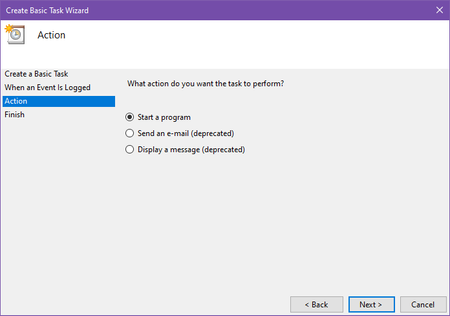
*the options for email and displaying message are unusable since they are deprecated, you get error if you try to use them. I need to create tasks in Windows Task Scheduler and see Windows push notifications in action center when that task's criteria is met or triggered. another one is that I need to attach a Task to Windows Event Viewer and once an event entry is created in the custom logs, I get notified by a notification in Windows. please upvote in feedback hub: https://aka.ms/AAbzrjw939Views1like0CommentsWindows Firewall notification for blocked Outbound connections
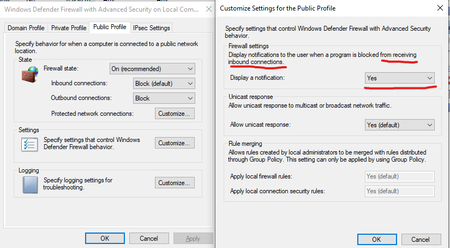
Windows Firewall should have an option to display notifications to the user when a program is blocked from sending Outbound connections. this is an important feature that Needs to be available. Currently notification is available only for blocked Inbound connections. (although I've never seen any notifications from that category, ever). please upvote in feedback hub => https://aka.ms/AAbpekw2.8KViews2likes1CommentWhen we right-click on Win32 programs in Start menu, the uninstaller should launch instead of CPanel
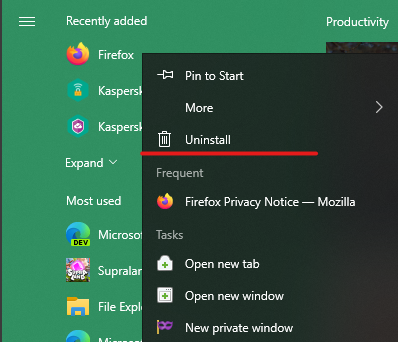
When we right-click on Win32 programs in Start menu, the uninstaller should be launched instead of control panel opening and showing us a list of programs. please upvote in feedback hub: https://aka.ms/AAbqpc1811Views1like0CommentsAdd the ability to search for a word in Clipboard of Windows 10
I often find myself in a situation where I have lots of Clipboard entries with texts and pictures, and I know what I'm looking for, but there is no easy way to search for it in the Clipboard other than going through each of them one by one and checking them manually. it won't even work for long clipboard entries as the Windows Clipboard only previews the first couple of lines of the item and not the entire thing, so I have to paste my entries in notepad one by one just to find what I'm looking for. if there was a mini search bar on Windows 10 Clipboard, I could type the word I'm looking for and find the correct entry fast. the search bar doesn't have to be visible at all times, it can be a responsive search bar, where we click on an icon and then the search bar appears. Please upvote this feedback in feedback hub: https://aka.ms/AAbj6m4771Views0likes0CommentsWindows should show a notification when VPN connection suddenly disconnects or drops
There is no notification from Windows when our built-in VPN connection (inside Windows) suddenly disconnects or VPN connections drops. it poses security risk as well as discomfort and other problems. there is a reason when user uses VPN connection, to stay protected, secure etc. so when VPN connection suddenly drops or disconnects for any reason, user must be notified. Upvote this feedback on feedback hub: https://aka.ms/AAbf7kp1.1KViews1like1Comment