host integration
29 Topics
Introducing APIOps CLI
APIOps CLI helps teams extract, version, review, preview, and publish Azure API Management configuration through source-controlled DevOps workflows. Today, we're excited to announce APIOps CLI, a new command-line experience designed to help organizations manage Azure API Management (APIM) using modern configuration-as-code and GitOps practices. As APIs become increasingly central to digital transformation, organizations need a reliable way to manage API definitions, policies, products, diagnostics, and gateway configuration across multiple environments. APIOps CLI provides a streamlined, developer-friendly approach to extract, version, review, and publish API Management configuration through familiar DevOps workflows. Why APIOps CLI? Traditional API management processes often rely on manual configuration changes, environment-specific customizations, and limited visibility into what changed and why. As API estates grow, these approaches become difficult to scale, audit, and govern. APIOps CLI addresses these challenges by enabling teams to manage API Management configuration as source-controlled artifacts. Every change can be reviewed through pull requests, tracked through Git history, and promoted consistently across development, test, and production environments. The result is improved governance, greater reliability, better collaboration between API developers and platform operators, and a simpler path toward enterprise-scale API operations. What APIOps CLI Enables APIOps CLI provides capabilities that help organizations adopt a true APIOps model: Extract API Management configuration into local artifact files Store and version configuration in Git repositories Review changes through standard pull request workflows Publish approved artifacts back into API Management environments Promote configuration consistently across environments Scaffold GitHub Actions and Azure DevOps pipelines Support automated CI/CD deployment patterns Enable auditable, repeatable API configuration management By treating API Management configuration as code, organizations gain the same operational excellence practices that software development teams have relied on for years. A Modern GitOps Workflow for APIs The APIOps CLI workflow follows a simple yet powerful pattern: Extract configuration from an existing API Management instance. Store the generated artifacts in source control. Review and approve changes through pull requests. Run automated validation and deployment pipelines. Publish approved configuration back to target API Management environments. This approach creates a clear separation between authoring, review, approval, and deployment while maintaining a complete audit trail of API platform changes. For organizations already practicing GitOps, APIOps CLI integrates naturally into existing development workflows and governance processes. Built for Real-World Enterprise Scenarios APIOps CLI is designed to support customers operating at enterprise scale. Common use cases include: Migrating away from manual API Management administration Standardizing deployments across multiple environments Establishing controlled promotion paths from development to production Implementing governance and compliance requirements Supporting platform engineering and API platform teams Managing large inventories of APIs, products, policies, and configurations Enabling self-service API development with centralized governance Whether you're operating a single API Management instance or managing a large multi-team API platform, APIOps CLI provides a foundation for consistent and repeatable operations. Integrated with Your Existing Toolchain APIOps CLI works alongside the tools teams already use: GitHub Azure DevOps Azure Pipelines GitHub Actions Azure CLI Existing Git repositories and branching strategies The tool can generate CI/CD scaffolding to accelerate adoption, helping teams move from manual operations to automated deployments with less effort. Open Source and Community Driven APIOps CLI is available as an open-source project under the Azure GitHub organization. The repository includes source code, architecture guidance, command documentation, CI/CD examples, walkthroughs, troubleshooting guidance, and reference material. By making the project open and community-driven, we are enabling customers, partners, and contributors to participate directly in the evolution of Azure API Management DevOps practices. Getting Started Getting started is straightforward: Install the APIOps CLI package. Authenticate with Azure. Extract an existing API Management instance into local artifacts. Commit those artifacts to a Git repository. Review and approve changes through pull requests. Publish approved changes back to Azure API Management. We recommend beginning with a non-production environment to establish your workflow, validate governance processes, and familiarize teams with the configuration-as-code model. Looking Ahead APIs have become a strategic asset for every organization. As API estates continue to expand, successful teams will increasingly adopt automation, governance, and GitOps practices to maintain speed without sacrificing control. APIOps CLI is an important step in that journey. It provides a modern foundation for managing Azure API Management configurations with the same rigor, automation, and reliability that organizations expect from modern software delivery practices. We invite you to explore APIOps CLI, try it in your environment, share feedback, and join us in shaping the future of API operations on Azure. Resources APIOps CLI GitHub repository: https://github.com/Azure/apiops-cli/tree/main Microsoft Learn: Manage API Management configuration with APIOps CLIBizTalk Server 2020 End-of-Sale Announcement
Executive Summary: BizTalk Server 2020 is the final release of BizTalk Server, and Microsoft expects sales of BizTalk Server 2020 and Host Integration Server 2020 to end March 31, 2027. Mainstream support for BizTalk Server 2020 continues through April 12, 2028, after which the product remains subject to Microsoft’s Fixed Lifecycle Policy. Microsoft also plans to offer eligible customers an optional, paid extended-mainstream support offering through April 10, 2030. Customers should begin planning their migration to Azure Logic Apps Standard or Azure Logic Apps Hybrid now, based on their deployment requirements. Closing a chapter Microsoft currently expects sales of BizTalk Server 2020 and Host Integration Server 2020 to end on March 31, 2027. Customers with existing valid licenses may continue to deploy and use the software in accordance with their licensing terms. Mainstream support for BizTalk Server 2020 continues through April 12, 2028. The end-of-sale date does not require customers to stop running licensed deployments, but customers should begin migration and licensing planning now because the extended-mainstream support offering described below remains subject to final eligibility, coverage, pricing, and purchasing terms. Microsoft plans to offer eligible BizTalk Server 2020 customers a paid, time-limited extended-mainstream support option from April 13, 2028, through April 10, 2030. The offering is intended to provide additional migration time, will have narrower coverage than the original mainstream-support phase, and will not add new product features. Eligibility, availability, supported components, servicing commitments, purchasing terms, and the official offering name will be published before enrollment opens. If you need to buy BizTalk Server 2020, or Host Integration Server 2020, you can do it until March 31, 2027. Recommended action Begin migrating your BizTalk Server workloads now, selecting Azure Logic Apps Standard or Azure Logic Apps Hybrid according to your organization’s hosting, networking, latency, data-residency, and operational requirements. Treat additional support coverage as contingency time rather than the default destination. Starting early gives teams time to inventory dependencies, redesign excluded capabilities, validate migrated solutions, and make commercial decisions before mainstream support ends. The Logic Apps Migration Agent can accelerate assessment and planning, convert supported artifacts, and assist with validation and deployment of refactored solutions on Azure Logic Apps Standard or Azure Logic Apps Hybrid. Extended-mainstream support scope Paid extended-mainstream support is planned as an optional, temporary bridge for eligible customers completing their migration. It is separate from the Extended Support phase available under Microsoft’s Fixed Lifecycle Policy and is expected to provide a different, narrower scope than the original mainstream-support phase. Microsoft expects the paid offering to run from April 13, 2028, through April 10, 2030. Certain BizTalk Server capabilities are expected to be excluded from the paid offering; the following list identifies the currently expected exclusions. Business Activity Monitoring (BAM) — The framework and tooling for capturing, tracking, and presenting near real-time business milestones, KPIs, and operational data from running BizTalk processes. Servicing, fixes, and updates for BAM components will not be provided under extended support. Enterprise Service Bus Toolkit (ESB Toolkit) — The libraries, itinerary services, and patterns that extend BizTalk with dynamic, itinerary-based routing, transformation, and centralized exception handling for service-oriented solutions. The ESB Toolkit will not receive servicing or support under extended support. Industry accelerators (SWIFT, HL7, and RosettaNet) — The domain-specific accelerators that provide schemas, pipelines, and validation for financial (SWIFT), healthcare (HL7), and supply-chain (RosettaNet) messaging standards. These accelerators will not receive servicing, schema updates, or support under extended support. Legacy enterprise adapters — The adapters that connect BizTalk to line-of-business and enterprise applications such as Siebel, PeopleSoft, TIBCO, and JD Edwards. These adapters will not receive servicing or support under extended support. Application Lifecycle Management (ALM) tooling and integrations — The BizTalk-specific tooling and integrations used for source control, automated build, deployment, and testing of BizTalk applications. These BizTalk-specific ALM components will not receive servicing or support under extended support. BizTalk Server images in Azure Marketplace — Microsoft currently expects to deprecate the BizTalk Server virtual-machine offer in Azure Marketplace. This affects the future availability of the Marketplace deployment image; it does not, by itself, make an otherwise eligible existing BizTalk Server 2020 deployment ineligible for paid extended-mainstream support. Microsoft will publish the effective date and guidance for existing virtual machines, new or replacement deployments, scaling, disaster recovery, customer-managed images, licensing, billing, patching, and support. New Visual Studio version support — Compatibility with Visual Studio versions newer than Visual Studio 2022 will not be added under extended support. Customers should review the Visual Studio 2022 lifecycle and support offering separately, because its coverage terms are independent of BizTalk Server extended support. Customers that depend on an excluded capability should prioritize the affected workloads in their migration plan. Use the Logic Apps Migration Agent to assess dependencies, inform target-architecture decisions, convert supported artifacts, and validate the migrated solution. Excluded BizTalk capabilities may require architectural redesign or manual implementation outside the agent. Customers are not required to purchase paid extended-mainstream support. Customers that do not enroll remain subject to Microsoft’s Fixed Lifecycle Policy and the applicable BizTalk Server 2020 lifecycle dates. The availability of technical support, non-security updates, security updates, and other services during the standard Extended Support phase depends on the policy requirements and the customer’s applicable support arrangement. The paid extended-mainstream support offering described here is an optional, separate offering for eligible customers that require additional coverage while completing their migration. After the end-of-sale date, customers that already hold valid BizTalk Server 2020 licenses may continue to deploy and use the software in accordance with the applicable licensing terms. Eligibility Paid extended mainstream support will be available to eligible customers with properly licensed BizTalk Server 2020 deployments. The final eligibility requirements will be provided in the published offering terms. Eligible products and versions: Paid extended-mainstream support is expected to be available for eligible deployments of BizTalk Server 2020 Enterprise, Standard, or Branch editions. Customers using Host Integration Server 2020 may also purchase the BizTalk Server paid extended-mainstream support offering to receive the applicable extended mainstream-support coverage for their HIS 2020 deployments, including customers that acquired BizTalk Server licences primarily to obtain HIS usage rights. BizTalk Server 2016, HIS 2016, and earlier versions will not be eligible. Azure Marketplace deployments: Existing BizTalk Server 2020 deployments created from eligible Azure Marketplace images are expected to qualify for paid extended-mainstream support, subject to the final offering terms. Customers must meet the applicable licensing, Software Assurance, supported-configuration, and complete-deployment coverage requirements. Microsoft will clarify how eligibility, licensed-core quantities, pricing, and purchasing apply when BizTalk Server software charges are included in the Azure Marketplace virtual-machine rate rather than acquired through a separate BizTalk Server licence agreement. Valid licenses: Customers are expected to maintain sufficient BizTalk Server licenses for each covered deployment in accordance with the applicable licensing model, including relevant core minimums, licensing of physical or virtual environments, and license-reassignment rules. Final extended-support licensing requirements will be stated in the published offering terms. Software Assurance: Active Software Assurance will be required at enrollment and throughout the applicable coverage period. Complete deployment coverage: Extended mainstream support must be purchased for all licensed cores in each enrolled deployment. Partial coverage of an enrolled production environment will not be permitted. Supported configuration: Covered environments must remain on a supported BizTalk Server 2020 configuration and meet published requirements for cumulative updates, operating systems, databases, and dependent components. Annual validation: Eligibility and licensed-core quantities will be confirmed for each coverage year. Customers must remain eligible to purchase Year 2 coverage. As part of the eligibility review, Microsoft may request licensing records, deployment inventories, configuration details, and migration-plan information. Complete requirements and enrollment instructions will be published before the offering becomes available. Purchasing details Paid extended mainstream support will be offered as annual coverage based on the licensed cores in each enrolled BizTalk Server 2020 deployment. Microsoft will publish final pricing, availability, enrollment dates, purchasing channels, and transaction terms before sales begin. Purchasing paid extended-mainstream support is optional and is not required for BizTalk Server 2020 to follow the Fixed Lifecycle Policy. Host Integration Server 2020: Eligible HIS 2020 customers will purchase coverage through the BizTalk Server paid extended-mainstream support offering. Customers that do not require HIS IBM Systems Network Architecture (SNA) capabilities should also evaluate Azure Logic Apps Standard or Azure Logic Apps Hybrid as a modernization alternative before purchasing additional support coverage. Azure Logic Apps Standard does not support SNA; customers that depend on HIS 2020 SNA capabilities must transition to Host Integration Server 2028. Coverage periods: Year 1 is expected to begin the next day mainstream support ends, on April 13, 2028, and continue through April 13, 2029. Year 2 is expected to run from April 14, 2029, through April 10, 2030. The final offering terms will confirm whether the boundary dates are inclusive and will specify the exact enrollment and coverage periods. Purchase sequence: Microsoft expects customers to purchase Year 1 coverage by April 11, 2028, to remain eligible to purchase Year 2 coverage. The final enrollment deadline and Year 2 eligibility conditions will be specified in the published offering terms. Price: Microsoft expects annual extended-mainstream support pricing to be 100% of the applicable BizTalk Server license cost under the customer's licensing agreement. Extended mainstream support is expected to be offered as an annual add-on for eligible BizTalk Server licenses. Final pricing and costs may vary by licensing agreement, geography, currency, available discounts, and the published offering terms. How to purchase: Customers will purchase coverage through an authorized Microsoft commercial licensing channel with support from their Microsoft account team or licensing partner. Separate support services: The annual extended-mainstream support fee is expected to cover only the servicing and support rights defined in the final offering terms. It will not include unlimited incident support, advisory services, migration delivery, solution implementation, or other professional services; customers may need a separate support plan or services agreement for those needs. Annual purchase: Coverage will not renew automatically. Customers must place a separate order and complete an eligibility review for each year. Support beyond April 10, 2030, is not planned. Contact your Microsoft account team or licensing partner to review eligible deployments, confirm licensed-core quantities, and obtain a quote when the offering becomes available. Discounts and incentives Microsoft plans to offer a targeted incentive for eligible existing BizTalk Server customers that are actively migrating to Azure Logic Apps Standard or Azure Logic Apps Hybrid. The incentive is designed to reduce near-term migration costs and support a faster move to the selected Logic Apps deployment model. It will not be automatic or broadly available; eligibility, approval, and final commercial terms must be confirmed by the customer’s Microsoft account team. Timing and important conditions Who can qualify: The incentive is intended exclusively for existing BizTalk Server 2020 customers approaching the announced BizTalk Server lifecycle milestones and actively migrating workloads to Azure Logic Apps Standard or Azure Logic Apps Hybrid. Redemption period: The incentive is expected to become available on August 31, 2026, and remain available through April 12, 2028, subject to publication of the program terms, eligibility approval, continued availability, and any applicable funding limits. Discount duration: The approved discount is expected to apply during the customer’s first qualifying Enterprise Agreement term after approval. The published program terms will define the eligible agreement types, qualifying start date, covered Azure services, discount duration, and treatment of renewals or agreement changes. Qualification: The incentive is subject to eligibility review and approval. Recommended action Ask your Microsoft account team or licensing partner to assess your migration scope, confirm which eligible migration path applies, and request consideration for the incentive. Migration support Contact your Microsoft account team to determine whether your organization is eligible for migration assistance delivered by the Azure Logic Apps product group or through another available migration-factory program. Program names, eligibility criteria, engagement scope, and availability will be confirmed through your account team. Migration options for Host Integration Server workloads Customers using Host Integration Server 2020 for application, data, messaging, or terminal integration—and who do not depend on HIS SNA capabilities—should evaluate Azure Logic Apps Standard or Azure Logic Apps Hybrid as a modernization target. Azure Logic Apps provides mainframe and midrange integration capabilities for scenarios involving IBM CICS, IMS, IBM i programs, DB2, IBM MQ, host files, and 3270 applications. Customers should assess each workload against the available connectors, supported protocols, networking, security, and operational requirements. Azure Logic Apps Standard does not support SNA. Customers running HIS 2020 workloads that depend on SNA capabilities must plan to transition to Host Integration Server 2028. Key dates March 31, 2027: Sales of BizTalk Server 2020 and Host Integration Server 2020 are expected to end. April 12, 2028: Mainstream support for BizTalk Server 2020 ends. April 13, 2028: BizTalk Server 2020 enters the Extended Support phase under Microsoft’s Fixed Lifecycle Policy, subject to the applicable policy requirements and lifecycle dates. April 13, 2028–April 10, 2030: Planned paid extended-mainstream support period for eligible BizTalk Server 2020 customers, subject to the final published offering terms. September 30, 2027: Host Integration Server 2028 is planned for release as a standalone product. Release timing is subject to change. July 7, 2030: Extended Support for Host Integration Server 2020 is currently scheduled to end. This date is separate from the planned BizTalk Server 2020 paid extended mainstream support period, which is expected to end April 10, 2030. Start your modernization journey with the Logic Apps Migration Agent. Use the agent to inventory and assess your BizTalk applications, prioritize integrations, build a phased migration plan, convert supported artifacts and workflows, and support validation, testing, and deployment to Azure Logic Apps Standard or Azure Logic Apps Hybrid. Excluded or unsupported BizTalk capabilities may require architectural redesign or manual implementation outside the agent. The agent’s AI-assisted, human-in-the-loop approach can accelerate modernization while your teams retain control of architecture and implementation decisions. Contact your Microsoft account team to discuss migration-assistance eligibility and commercial options. Learn more: BizTalk Server product lifecycle update | Bringing all your integration workloads to Logic Apps Standard | Fixed Lifecycle Policy – Extended SupportAnnouncing Microsoft Host Integration Server 2028: Modern connectivity for IBM Mainframes Midranges
Many organizations continue to rely on IBM mainframe and midrange platforms for high-value, mission-critical workloads. At the same time, application modernization, security requirements, and hybrid cloud operating models are driving the need for reliable, supported connectivity between host systems and modern Windows, Linux, and Azure-based applications. Microsoft Host Integration Server 2028 (HIS 2028) is the next release of Host Integration Server and the successor to Host Integration Server 2020. It helps enterprise IT teams and developers integrate existing IBM host systems, programs, messages, and data with modern Windows, Linux, and Azure applications—while improving security posture, developer productivity, and platform alignment for the years ahead. HIS has long provided essential capabilities across network, data, application, message, and security integration—supporting technologies such as SNA connectivity, 3270/5250 sessions, Transaction Integrator (TI) for CICS/IMS, DB2 connectivity, and IBM MQ integration. With HIS 2028, we continue this mission with targeted modernization investments and deliberate product cleanup to reduce legacy dependencies. Read on for what’s new in HIS 2028, what’s being deprecated, and how to start planning your upgrade from HIS 2020. What’s new in Host Integration Server 2028 HIS 2028 focuses on three themes: (1) platform modernization to align with current Microsoft engineering systems and developer workflows, (2) new and extended connectivity surfaces—especially via modern APIs, and (3) product cleanup to remove older dependencies and unsupported technologies. The table at the end of this document summarizes the planned feature areas and cleanup items. Some features will be available after the main release, as a Cumulative Update (CU). Platform modernization: Upgrade to .NET 10 and update the SDK to align with modern .NET development practices. This allows HIS 2028 to be the first version ever of HIS working on Linux (Post main release, as a Cumulative Update). This is only for non-SNA features via NuGet packages. Integration with Foundry (Post main release, as a Cumulative Update): Foundry integration to allow customers create agents that leverage their Mainframe and Midranges data. Modern API surfaces: Add REST APIs for key integration areas, including the DB2 managed provider, and Transaction Integrator workloads (CICS/IMS). Identity and hybrid management (Post main release, as a Cumulative Update): Add Microsoft Entra ID support and Azure Arc enablement for the HIS Gateway to improve security and manageability in hybrid environments. Developer experience (Post main release, as a Cumulative Update): Migrate the designer experience to Visual Studio Code to better fit modern developer workflows. Expanded host platform alignment: Add support for newer versions of IBM middleware and platforms, including DB2, MQ, IMS, and CICS. New provider capabilities: Introduce an IMS DB managed provider and NuGet packages for Linux scenarios where applicable. Product cleanup and deprecations Remove support for Visual Studio 2017 and Visual Studio 2019 as supported designers and tooling move forward. Remove 32-bit support to simplify engineering, testing, and security posture. Remove ODBC provider and remove DB2 Entity Provider where newer provider options are preferred. Remove WMI and WCF support to reduce reliance on legacy Windows components. Remove unsupported protocols from the SNA Gateway (including older UI paths) to streamline the product. Remove BizTalk adapter support to be aligned with the BizTalk Server end of life. Remove WCF Channel used by the BizTalk Adapters Remove DrdaClient as MsDb2Client and MsIfmxClient have functionality specifically tailored to the target databases Remove ESSO to reduce reliance on legacy Windows components. Security, identity, and hybrid management HIS 2028 modernizes how host connectivity is secured and operated in hybrid environments. With Microsoft Entra ID support and Azure Arc enablement (Post main release, as a CU), organizations can reduce credential sprawl, improve auditability, and adopt consistent governance and monitoring patterns across on-premises and cloud-connected environments. These investments are designed to complement existing enterprise identity and operational controls, helping teams manage host connectivity components as part of their broader infrastructure and security programs. Sign up for the preview today We’re currently onboarding customers and partners to Host Integration Server 2028 preview, in advance of general availability in the coming year: https://aka.ms/hiseapsignup1.4KViews1like2CommentsAnnouncing the open Public Preview of the Premium v2 tier of Azure API Management
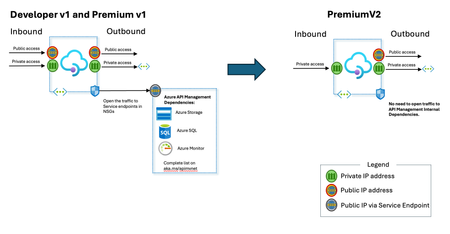
Today, we are excited to announce the public preview of Azure API Management Premium v2 tier. Superior capacity, highest entity limits, unlimited included calls, and the most comprehensive set of features set the Premium apart from other API Management tiers. Customers rely on the Premium tier for running enterprise-wide API programs at scale, with high availability, and performance. The Premium v2 tier has a new architecture that eliminates management traffic from the customer VNet, making private networking much more secure and easier to setup. During the creation of a Premium v2 instance, you can choose between VNet injection or VNet integration (introduced in the Standard v2 tier) options. New and improved VNet injection Using VNet injection in Premium v2 no longer requires any network security groups rules, route tables, or service endpoints. Customers can secure their API workloads without impacting API Management dependencies, while Microsoft can secure the infrastructure without interfering with customer API workloads. In short, the new VNet injection implementation enables both parties to manage network security and configuration setting independently and without affecting each other. You can now configure your APIs with complete networking flexibility: force tunnel all outbound traffic on-premises, send all outbound traffic through an NVA, or add a WAF device to monitor all inbound traffic to your API Management Premium v2—all without constraints. Region availability The public preview of the Premium v2 tier is available only in 6 public regions (Australia East, East US2, Germany West Central, Korea Central, Norway East and UK South) and requires creating a new service instance. For pricing information and regional availability, please visit the API Management pricing page. Learn more API Management v2 tiers documentation API Management v2 tiers FAQ API Management overview documentationGA: Inbound private endpoint for Standard v2 tier of Azure API Management
Standard v2 was announced in general availability on April 1st, 2024. Customers can now configure an inbound private endpoint for their API Management Standard v2 instance to allow clients in your private network to securely access the API Management gateway over Azure Private Link. The private endpoint uses an IP address from an Azure virtual network in which it's hosted. Network traffic between a client on your private network and API Management traverses over the virtual network and a Private Link on the Microsoft backbone network, eliminating exposure from the public internet. Further, you can configure custom DNS settings or an Azure DNS private zone to map the API Management hostname to the endpoint's private IP address. Inbound private endpoint With a private endpoint and Private Link, you can: Create multiple Private Link connections to an API Management instance. Use the private endpoint to send inbound traffic on a secure connection. Use policy to distinguish traffic that comes from the private endpoint. Limit incoming traffic only to private endpoints, preventing data exfiltration. Combine with outbound virtual network integration to provide end-to-end network isolation of your API Management clients and backend services. Today, only the API Management instance’s Gateway endpoint supports inbound private link connections. In addition, each API management instance can support at most 100 private link connections. Typical scenarios You can use an inbound private endpoint to enable private-only access directly to the API Management gateway to limit exposure of sensitive data or backends. Some of the common supported scenarios include: Pass client requests through a firewall and configure rules to route requests privately to the API Management gateway. Configure Azure Front Door (or Azure Front Door with Azure Application Gateway) to receive external traffic and then route traffic privately to the API Management gateway. For example, see Connect Azure Front Door Premium to an Azure API Management with Private Link. Learn more API Management v2 tiers FAQ API Management v2 tiers documentation API Management overview documentationWe want to hear from you: A short survey to learn from your CICS and IMS integration needs
We are looking to learn about your scenarios on using Logic Apps to integrate with CICS and IMS systems on IBM Mainframes to better define how Microsoft can address these requirements within the Azure Integration Services platform.1.9KViews0likes0Comments