healthcare
518 Topics
Amplify Healthcare Intelligence: Data, AI, and Agent-Powered Transformation
Join Microsoft for Amplify Healthcare Intelligence, a webinar and in-person workshop series designed for healthcare and life sciences organizations building the foundation for trusted AI. Every session starts from the same premise: you cannot deliver trusted AI without a trusted data foundation. Across the series you will see how leading organizations unify their data estate, ground AI agents in real business context, and turn that foundation into results they can measure. What You Will Learn How to build a unified, AI-ready data foundation across a fragmented healthcare data estate How to ground AI agents in trusted healthcare data and real business context How to modernize analytics while reducing complexity and cost How to accelerate innovation with Microsoft Fabric, Azure AI Foundry, Microsoft IQ, and Copilot technologies How to deliver measurable impact across clinical, operational, research, and business scenarios Whether you are defining your AI strategy, modernizing your analytics platform, or scaling AI across your organization, these sessions offer practical guidance, real-world customer examples, and hands-on learning to help you move from AI ambition to business impact. Webinars & In-Person Workshops 🎥 Webinars One-hour virtual sessions with actionable guidance, live demonstrations, customer stories, and best practices from Microsoft experts. Each webinar shows how leading healthcare organizations are turning data, AI, and enterprise intelligence into measurable business outcomes. All sessions are from 3-4 ET (12-1 PT) and are free to attend. Date Topic Register Oct 21 3-4 ET (12-1 PT) Finance in the Agent Era: AI-Powered Planning, Forecasting, and Insights Register Oct 28 3-4 ET (12-1 PT) Reduce BI Sprawl, Cut Cost and Build an AI-Ready Analytics Foundation Register Cannot join live? Register anyway. We will send you the recording and session materials after the event. Additional sessions will be added through the end of the year, so check back or register for one session to be notified as new dates are announced. 🏢 In-Person Workshops Our two-day workshops combine executive strategy, healthcare-specific use cases, architecture guidance, and hands-on labs designed to help teams identify and accelerate high-value AI opportunities. Attendance is free. Participants are responsible for their own travel and accommodation, and space at each location is limited. Workshops run 9am to 4pm local time on both days. Day 1: From Healthcare Data to Healthcare Intelligence Day 1 focuses on healthcare transformation strategy, customer examples, and the architectural patterns that make trusted AI possible at scale. The day closes with a networking reception and peer exchange. The Frontier Transformation imperative: from AI ambition to measurable impact Microsoft IQ: turning data into enterprise intelligence Building the unified data foundation Building trusted AI: security, governance, privacy, and compliance Healthcare transformation in action: clinical, operational, research, and finance scenarios Activating data with AI data agents and Copilot experiences Day 2: Hands-On Healthcare AI and Analytics Lab Day 2 is a guided, end-to-end lab. Participants build a working healthcare intelligence solution from raw data through to a grounded AI agent, using Microsoft Fabric, Azure AI Foundry, Copilot technologies, and modern data architectures. Build the foundation: data ingestion, lakehouse architecture, and data engineering Create actionable insights: semantic models and dashboards Prepare data for AI: AI-ready data assets and data governance Build and ground AI agents in trusted enterprise data From insight to intelligent action: planning your organization's next steps What to bring: a laptop with a current browser. Lab environments and credentials are provided on site, and no prior Fabric or Foundry experience is assumed. Date City Venue Register November 10-11, 2026 9am - 4pm Chicago Microsoft Chicago (AON Center) 200 East Randolph Drive, Suite 200 Chicago, IL 60601 Register December 8-9, 2026 9am - 4pm New York Microsoft Garage 300 Lafayette Street New York, NY 10012 Register Who Should Attend This series is built for the people who own the data estate and the people who depend on it. Sessions are technical enough for practitioners and strategic enough for the leaders who prioritize the work. Data & analytics leaders Data platform, data engineering, and business intelligence teams Data architects, engineers, and data scientists AI and innovation leaders Healthcare and life sciences executives Clinical, operational, research, and finance transformation leaders No prior Microsoft Fabric or AI experience is required for any session in this series. Questions Contact Camille Whicker if you have any questions about our upcoming events.AI where and when you need it with Dragon Copilot's ability to focus
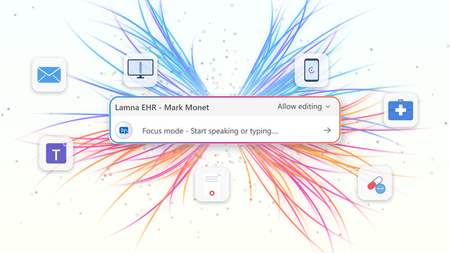
At HIMSS 2026, we showed that the most useful place to apply clinical intelligence is often not in a separate app or side window, but at the cursor, in the field where the clinician is already working. Our last post on this topic described the problem Dragon Copilot's focus capability is designed to solve: clinicians becoming data couriers, moving between windows, copying information from one system into another, and stitching together a day's work across multiple applications. That post looked ahead to what was coming. Now, it's here. What Dragon Copilot's focus capability does Dragon Copilot's focus capability brings AI directly into the text field where clinicians work, whether that's an EHR, a browser, Microsoft Word, SharePoint, or another desktop application. There is no separate application to launch and no workflow to rebuild. Simply place your cursor where you're working, select content if needed, and ask for help using natural language by voice or text. The focus capability works directly within the application you're already using, helping you stay in the flow of work. With focus, Dragon Copilot can: Read content from applications such as an EHR, browser, Microsoft Word, SharePoint, and other desktop applications. Answer questions about selected content and provide responses in context, using information from trusted sources and resources approved by the organization. Surface relevant information and insights without requiring manual searches, copying, or pasting. Generate, edit, and refine text directly where you're working. The experience is conversational and voice-first. Because the focus capability operates directly at the cursor, clinicians can take action without switching applications or rebuilding context. Questions are answered in context using information from the EHR and trusted sources, including resources approved by the organization. Focus in action The following examples illustrate how Dragon Copilot's focus capability helps clinicians read, answer, write, edit and surface information directly within their workflow. Journal and guideline Q&A Highlight a passage from a clinical guideline or journal article and ask: "Summarize the three key takeaways in patient-friendly language for the after-visit summary." The focus capability analyzes the selected content and generates a draft directly where you're working. Answer questions in context Clinicians often have the information they need in front of them but spend valuable time locating or interpreting it. Highlight relevant content and ask: "What does this recommendation mean for a patient with diabetes?" The focus capability reviews the selected information and delivers an answer within the workflow, without requiring clinicians to leave the application. The information is sourced from the EHR, a credible source such as MSD Manual, DailyMed, Medline Plus or from an organization’s internal source. Edit in place Select existing text and ask: "Convert this into a bulleted list." or "Summarize this HPI in two sentences." The focus capability reshapes the content directly where it already exists, helping clinicians refine documentation without disrupting their workflow. Surface relevant information Place your cursor inside a note and ask: "What's the patient's BMI?" The focus capability can retrieve relevant information available in context and return the answer inline, eliminating the need to navigate between screens, search for values, or perform calculations manually. Generate new content Need a referral letter, patient instruction, or summary? Simply ask. The focus capability can generate content directly within the destination field, helping clinicians create documentation where it belongs without copying and pasting between applications. Why this capability matters Bringing AI directly to the cursor is more than a convenience. It's what makes AI practical, visible, and actionable within everyday clinical workflows. Dragon Copilot's focus capability sits in a useful middle ground between ambient AI, which operates largely in the background, and traditional dictation, which requires clinicians to explicitly construct documentation themselves. Outputs are reviewable and editable before being finalized. Actions remain visible within the workflow, providing transparency and control. Clinicians can work without repeatedly navigating between applications or rebuilding context. Because the focus capability operates directly at the cursor, it creates an extensible foundation for future Dragon Copilot experiences and integrations from Microsoft and partners. When Dragon Copilot's focus capability brings AI directly to where clinicians are already working, copying, pasting, and window-switching fall away. Clinicians can access information, generate content, and take action without leaving their workflow, helping them spend less time managing technology and more time focused on patient care. Learn more about Dragon Copilot.Extend clinical workflows with Dragon Copilot AI Apps and Agents in Microsoft Marketplace
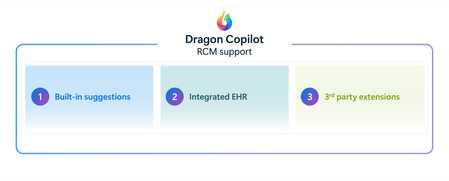
GA ANNOUNCEMENT Today, we're excited to announce the General Availability (GA) of Dragon Copilot AI Apps and Agents for physician workflows, a major milestone in building an open and trusted healthcare AI ecosystem. Healthcare organizations can now discover, build, deploy, and manage trusted AI-powered applications and agents that support specialized clinical and operational capabilities through Dragon Copilot. At the same time, partners can use self-service experiences to build, validate, certify, publish, and manage solutions that integrate directly into clinician workflows. Together, these capabilities bring healthcare organizations, clinicians, and partners onto a common platform designed to accelerate innovation while maintaining the trust, transparency, and governance required in healthcare. Why it matters to clinicians Clinicians need relevant insights delivered in the flow of care—not in another disconnected tool. Dragon Copilot AI Apps and Agents can surface specialized intelligence within existing workflows to support coding and documentation, medical decision-making, risk adjustment, prior authorization, diagnostic support, behavioral health screening, and preventive care. Dragon Copilot AI Apps and Agents for physicians provide capabilities for use cases such as: Coding and documentation optimization (Regard, RhythmX AI) Risk adjustment (RAAPID Inc) Prior authorization (Humata Health, Genzeon) Evidence-Based Hyper-Personalized Care Guidance (Atropos Health) Diagnostic support (Coming soon!) Cognitive & behavioral health screening (Canary Speech) Care Gaps & Preventive Health Reminders (Coming soon!) Clinician coaching (Whetstone Health) By bringing the right information into the physician’s existing workflow and using patient data from the EHR and the Dragon ambient context (audio, transcript and clinical note) to make insights more relevant, these capabilities can reduce context switching, streamline administrative work, and help physicians stay focused on patient care while maintaining clinical judgment and control workflows. Why it matters to healthcare organizations Healthcare organizations need a scalable way to expand the value of Dragon Copilot while maintaining enterprise governance. AI Apps and Agents provide access to a growing portfolio of specialized capabilities through a common platform, helping organizations increase return on their Dragon Copilot investment without adding fragmented solutions. Dragon Copilot AI Apps and Agents Helps increase ROI by extending Dragon Copilot across more clinical and operational use cases, seamlessly integrated into workflow Simplify solution discovery and purchase through Microsoft Marketplace Centralize deployment, policy, and lifecycle governance through the Dragon Admin Center Maintain clinician oversight and organizational standards for security, privacy, compliance, and responsible AI Reduce implementation burden with streamlined experiences that require minimal IT lift Build and deploy custom built apps/agents integrated with Dragon Copilot This creates a governed, scalable path to adopt new capabilities faster, making it easier to evaluate solutions, deploy them across teams, manage them consistently, and measure value without unnecessary operational complexity. Why it matters to partners Healthcare AI companies often have valuable, specialized capabilities but face significant complexity bringing them into clinical workflows and deploying them consistently across healthcare organizations. Dragon Copilot AI Apps and Agents give partners a standardized extensibility model for embedding their innovations where clinicians already work. Access ambient, patient and encounter context to deliver more relevant, timely experiences Integrate into the Dragon Copilot experience without building and maintaining bespoke workflow integrations for every customer Use self-service onboarding, technical validation, and applicable compliance certification to accelerate readiness Reach healthcare customers through Microsoft Marketplace and scale deployment through a trusted enterprise platform Build customer confidence with transparent solution information and consistent governance expectations By reducing the friction of workflow integration, distribution, and enterprise deployment, the platform helps partners focus on differentiated clinical value while expanding their reach at scale. Creating a trusted healthcare AI ecosystem Dragon Copilot connects specialized partner capabilities with clinical workflows through a trusted & scalable ecosystem. Streamlined self-service onboarding, package validation, compliance certification, and help partner innovations reach the market faster while giving healthcare organizations confidence to adopt and manage these AI solutions responsibly. “Healthcare moves at the speed of trust. You look at Microsoft and Dragon Copilot, we absolutely trust the combination of Microsoft and Dragon Copilot for industry leading innovation, highly trusted, responsible AI, and delivery at scale, and also the reach with the number of clinicians that Dragon Copilot has. And if you combine all these elements of innovation, your reach, track record, and the trust, that's a perfect recipe for partnership.” — Deepthi Bathina, CEO and Founder, GW RhythmX "I use Dragon Copilot in clinic every day. The extension program let me design, build, and implement the tool I wanted to make me a better clinician. It's never been this easy to be both the user and the builder." — Aaron Reinke, MD, Family Physician and Founder, Whetstone Health Explore the ecosystem For healthcare organizations – discover and deploy Explore how Dragon Copilot AI Apps and Agents on Microsoft Marketplace can deliver specialized AI solutions tailored to your clinical and operational needs through Dragon Copilot. Discover new capabilities, purchaseand deploytrusted solutions, and deliver more value to clinicians without disrupting existing workflows in Dragon Copilot, learn more here. For partners – build and publish Bring your differentiated expertise directly into Physician workflows by creating and publishing AI Apps and Agents that help healthcare organizations address high-value clinical and operational needs. Learn how to build and publish applications and agents Review our open-source code samples and start building today with Dragon Copilot’s extensibility framework and reach healthcare customers through Microsoft Marketplace. Publishyour Dragon offer on Microsoft on Marketplace Looking ahead Dragon Copilot is becoming a trusted destination for specialized healthcare AI—bringing partner innovation directly into familiar clinician workflows. As the ecosystem grows, we will expand support for Radiology and Nursing Apps and Agents, addressing the distinct role-based needs of multiple clinical personas. We will also evolve the end-user experience to be more adaptable, enabling chat-based experiences, richer interactivity, and new ways for clinicians to engage with partner capabilities in the flow of work. Streamlined self-service, transparent governance, and Marketplace distribution will help partners scale secure solutions while giving healthcare organizations confidence to adopt them. Together, we’re helping clinicians spend less time on administration and access the right intelligence at the right moment in care.
Amplify Healthcare Intelligence In-Person Workshop Series
What You'll Learn How leading organizations are navigating the Frontier Transformation journey Strategies for turning healthcare data, workflows, and expertise into organizational intelligence Best practices for building a unified, AI-ready data foundation Approaches for implementing trusted AI with strong governance and security Real-world healthcare scenarios across clinical, operational, financial, and research domains How AI agents can transform the way people interact with data and make decisions Practical skills for deploying analytics, AI, and agent-powered solutions Day 1: From Healthcare Data to Healthcare Intelligence Explore how leading healthcare organizations are creating a trusted foundation for AI and transforming data into meaningful business outcomes. The Frontier Transformation Imperative The future of healthcare in the age of AI and agents Industry trends, opportunities, and challenges Moving from AI ambition to measurable impact Microsoft IQ: Turning Data into Enterprise Intelligence Connecting data, workflows, and organizational knowledge Building organizational intelligence for AI Establishing the foundation for trusted decision-making Building the Unified Data Foundation Modernizing the healthcare data estate Creating a single source of truth for analytics and AI Leveraging Microsoft Fabric and OneLake as a unified platform Building Trusted AI Security, governance, privacy, and compliance Responsible AI considerations for healthcare and life sciences Preparing data and processes for enterprise AI adoption Healthcare Transformation in Action Clinical transformation scenarios Operational transformation scenarios Research and innovation use cases Finance and performance management opportunities Activating Data with AI Agents AI Data Agents and Copilot experiences From data to decision-making Real-world examples of agent-powered healthcare innovation Networking Reception & Peer Exchange Day 2: Hands-On Healthcare AI & Analytics Lab Gain practical experience building an end-to-end healthcare intelligence solution using Microsoft technologies. Build the Foundation Data ingestion and modernization patterns Lakehouse architecture and data engineering Establishing a scalable healthcare data platform Create Actionable Insights Semantic models and business intelligence Power BI dashboards and reporting Real-time healthcare intelligence Prepare Data for AI Building AI-ready data assets Data governance and trust Optimizing data for intelligent applications Build and Ground AI Agents Creating AI Data Agents Leveraging business context and trusted enterprise data Connecting agents to analytics and operational workflows From Insight to Intelligent Action End-to-end healthcare AI scenario Data → Insights → Agents → Outcomes Planning your organization's next steps Upcoming Workshop Locations Date City Venue Register September 9-10, 2026 9am - 4pm Dallas Microsoft Las Colinas 1 7000 N State Hwy 161 Irving, TX 75039 Register September 29-30, 2026 9am - 4pm Minneapolis Microsoft Edina 3601 West 76th Street, Suite 600 Edina, MN 55435 Register October 13-14, 2026 9am - 4pm Boston Microsoft New England One Memorial Drive Cambridge, MA 02142 Register October 27-28, 2026 9am - 4pm Silicon Valley Microsoft Silicon Valley 1045 La Avenida Street Mountain View, CA 94043 Register November 10-11, 2026 9am - 4pm Chicago Microsoft Chicago (AON Center) 200 East Randolph Drive, Suite 200 Chicago, IL 60601 Register December 8-9, 2026 9am - 4pm New York Microsoft Garage 300 Lafayette Street New York, NY 10012 Register Who Should Attend? Healthcare and Life Sciences Executives CIOs, CTOs, and Chief Data Officers Clinical and Operational Leaders Analytics and Data Platform Teams AI and Innovation Leaders Finance Transformation Teams Architects, Engineers, and Data Professionals What You'll Walk Away With By the end of the workshop, you'll have a clear understanding of how to build a unified data and AI foundation, enable trusted AI and intelligent agents, and create a roadmap for accelerating healthcare transformation within your organization.
Clinical precision starts with more complete documentation
This blog is authored by Josh Waldo, Product Manager Every patient has a story, and that story deserves to be accurately reflected in the clinical documentation. Clinicians work hard to assess, diagnose, and care for patients, often while balancing complex cases, competing priorities, and limited time. While the diagnosis itself may be clear, the documentation does not always capture every detail that helps tell the full patient story. Important clinical information about severity, complexity, acuity, or related conditions may be discussed during the encounter but not fully reflected in the medical record. These details matter. Clinical documentation serves as the foundation for communication across care teams, supports quality reporting and care coordination, and provides an accurate record of the care delivered. Dragon Copilot helps clinicians create more complete documentation by identifying potential opportunities where additional specificity may be appropriate based on information already present within the encounter. This capability helps ensure that the documentation more fully reflects the clinician's assessment and the patient's clinical story. Rather than asking clinicians to remember every documentation requirement or revisit records after the encounter, Dragon Copilot can surface contextual suggestions that highlight where additional detail may strengthen the completeness of the note. For example, when documenting certain conditions, clinicians may receive suggestions that help capture additional clinically relevant details that were discussed during the visit and support a more complete description of the patient's condition. Importantly, these suggestions do not change a diagnosis, influence clinical decision-making, or replace clinician judgment. The clinician remains responsible for every diagnosis and every documentation decision. Dragon Copilot simply helps ensure that the documentation accurately reflects what the clinician already knows and has determined. Supporting better documentation without disrupting workflow Documentation quality should not require additional chart reviews, extensive research, or time-consuming follow-up work. Dragon Copilot is designed to fit naturally into existing clinical workflows, providing documentation support within the course of the encounter. By surfacing opportunities for greater specificity at the point of documentation, clinicians can address potential gaps in the moment rather than correcting them later. This may help reduce the need for downstream clarification requests from CDI and coding teams, saving time while improving the completeness of the medical record. Most importantly, clinicians remain in control. Suggestions are simply that suggestions. The clinician decides what is relevant, appropriate, and ultimately included in the note. Why more complete documentation matters Clinical documentation is used by many people beyond the author of the note. Physicians, nurses, specialists, care coordinators, coding professionals, quality teams, and healthcare organizations all rely on documentation to understand a patient's condition and the care that was provided. When documentation more fully reflects the clinician's assessment, it can support clearer communication across teams and a more consistent understanding of the patient's clinical status throughout the care journey. More complete documentation can also help organizations better reflect patient complexity, support quality initiatives, and reduce the administrative effort associated with documentation clarification and follow-up. For clinicians, that means less time spent revisiting notes and more confidence that the patient's story has been accurately captured in the record. AI that supports clinical expertise Dragon Copilot is built on a simple principle: AI should support clinical expertise, not replace it. Diagnosis specificity suggestions is built on a foundation of proven clinical AI innovation, informed by more than a decade of real-world healthcare experience. Drawing on years of clinician interactions and documentation insights, the feature is designed to surface meaningful opportunities for greater diagnostic specificity while fitting naturally into existing workflows. The technology does not diagnose patients, recommend treatments, or override clinical judgment. Instead, it acts as an intelligent assistant that helps clinicians identify opportunities to enhance documentation based on information already available during the encounter. By reducing some of the cognitive burden associated with documentation, Dragon Copilot allows clinicians to focus their attention where it matters most: caring for patients. Helping the right patient story reach the medical record Healthcare organizations continue to look for ways to improve documentation quality while reducing administrative burden. Achieving both goals requires technology that works alongside clinicians, helping them document care more efficiently without creating additional work. By helping clinicians capture greater detail within their existing workflows, Dragon Copilot supports more complete records, more accurate documentation, and a smoother documentation experience. Because better documentation is not about changing the diagnosis. It is about helping ensure that the right patient story is reflected in the medical record with greater clarity, completeness, and confidence. Learn more about Dragon Copilot.Operationalizing AI powered medical imaging pipeline for cohort building
Authors: Jared Erwin, Senior Software Engineer, HLS Nursing AI and Data Platform, Faculty UW School of Medicine Manoj Kumar, Director, HLS - Data & AI HLS Frontiers AI Alberto Santamaria-Pang, Principal Applied Data Scientist, HLS Frontiers AI and Adjunct Faculty, Johns Hopkins Medicine Overview In Part 1, of this series, we showed how natural language could be used to define medical imaging cohorts and retrieve relevant studies in seconds instead of months. That proof-of-concept demonstrated the value of the idea — but not how to make it repeatable, or production-ready. This post focuses on how we turned that prototype into a production-oriented Azure Machine Learning pipeline — to scale execution and produce clear, versioned artifacts that could drive an interactive cohort exploration UI. If you're building ML pipelines for medical imaging, or any domain where data is large, messy, and locked behind access controls, we hope our experience saves you time. From scripts to a pipeline: Why Azure ML components? The original hackathon implementation consisted of notebooks and scripts that required careful manual execution. To make the system repeatable and auditable, we standardized it using Azure ML pipelines. Azure ML pipelines gave us: Componentized execution — each processing step is a self-contained unit with defined inputs, outputs, and dependencies Parallel branches — steps that don't depend on each other run concurrently Reproducibility — every run is versioned and logged with full lineage Compute flexibility — run on CPU for metadata extraction, GPU for model inference, without manual orchestration The pipeline architecture The pipeline consists of 5 python components arranged in a DAG with two parallel branches: [0]scans a DICOM directory and extracts metadata from headers — study/series UIDs, modality, body part, slice counts. [1]classifies each series by anatomy and orientation using a multi-tier strategy (more on this below). [2] and [3] form the search pipeline: anatomy labels are converted to natural language text templates, then encoded with BiomedCLIP into a FAISS vector index. [4]generates 2D UMAP coordinates from the embeddings for the interactive scatter plot visualization in the UI. The image depicts a flowchart detailing the process of DICOM metadata extraction, anatomy classification, visualization enrichment, and text template generation, followed by the creation of a FAISS vector index. Components 2 and 4 run in parallel after component 1 completes, saving roughly 10-15% of total execution time. It's a modest gain for a single run, but it adds up when iterating on pipeline parameters. [1] Anatomy classification, integrating MedImageInsight The Anatomy classification component in the pipeline relies on MedImageInsight (MI2). MedImageInsight is Microsoft's foundation model for medical image understanding, available through the Azure AI Foundry model catalog. Unlike generative models, MedImageInsight is an embedding model — it maps medical images and text into a shared 1024-dimensional vector space, enabling tasks like classification and similarity search by comparing image embeddings against text label embeddings. Given a DICOM image, we compare its embedding against candidate labels (e.g., "Brain", "Chest", "Abdomen") to determine the body part, scan orientation, and other imaging characteristics through zero-shot classification. We also may get directly annotated anatomy from component 0, the DICOM metadata extractor component. We can combine both data points to build our final search index. [2] [3] FAISS index construction As an input to the FAISS index, we first run component 2, the text template generator. This component takes the metadata and anatomy information from components 0 and 1 and feeds them into 5 different agents with different instructions on how to describe the DICOM study. This results in textual descriptions which some variation, referred to as text templates, which can be indexed in the next component The FAISS index builder (component 3) uses BiomedCLIP to encode all text templates into 512-dimensional vectors: MODEL_NAME = "hf-hub:microsoft/BiomedCLIP-PubMedBERT_256-vit_base_patch16_224" @torch.no_grad() def encode(self, texts: List[str], batch_size: int = 256) -> np.ndarray: embeddings = [] for i in range(0, len(texts), batch_size): batch = texts[i:i+batch_size] tokens = self.tokenizer(batch).to(self.device) batch_embeddings = self.model.encode_text(tokens) batch_embeddings = F.normalize(batch_embeddings, dim=-1) # L2 normalize embeddings.append(batch_embeddings.cpu().numpy()) return np.vstack(embeddings) We L2-normalize all vectors and use faiss.IndexFlatIP (inner product), which is equivalent to cosine similarity on normalized vectors. For our current dataset sizes (thousands of series), flat indexing is fast enough. For hospital-scale datasets with millions of images, we might switch to IndexIVFFlat or IndexHNSW for approximate nearest neighbor search. In the cohort explorer app, a user will enter a natural language query, which is then converted to embeddings using the same BiomedCLIP model. This allows a search using the FAISS index to find relevant DICOM studies. [4] Visualization: making embeddings explorable The scatter plot in the UI is often the first thing users interact with. It needs to show meaningful clusters without requiring users to understand dimensionality reduction. Component 4 takes the embeddings from component 1 and projects them to 2D with UMAP: umap = UMAP( n_components=2, n_neighbors=10, # Balances local vs. global structure min_dist=0.5, # Prevents over-clustering metric='cosine', # Matches our embedding similarity metric random_state=42 # Reproducible layouts ) coordinates_2d = umap.fit_transform(features) Each point in the scatter plot corresponds to a single DICOM series produced by the pipeline, with color, grouping, and hover metadata derived directly from the JSON artifacts emitted by components 1 and 4. Each pipeline run produces a small set of well-defined artifacts — metadata tables, embedding vectors, UMAP coordinates, and the FAISS index — which are consumed directly by the cohort exploration UI. The cohort explorer application can reload or switch between datasets. The diagram is a screen capture of an Azure ML pipeline. It includes 5 pipeline components along with connecting arrows showing incoming and outgoing data, including the final outputs of the pipeline. Pipeline execution: time, cost, and what we learned Here's what a typical pipeline run looks like for a dataset of ~4,500 DICOM series: Component Task Approximate Time (CPU) Approximate Time (GPU) 0 - DICOM Metadata Extractor Scan files, extract headers 5-10 min 5-10 min 1 - Anatomy Classification Classify anatomy/orientation 90-120 min 5-10 min 2 - Text Template Generator Generate 5 templates per series 5-10 min 5-10 min 3 - FAISS Index Builder BiomedCLIP encoding + FAISS build 60-90 min 10-15 min 4 - Visualization Enrichment UMAP + color assignment 20-40 min 5-10 min Azure ML overhead Compute provisioning, env setup 5-10 min 5-10 min Total ~200-300 min ~30-50 min Key observations: Azure ML overhead is significant when doing quick iteration and testing. Compute provisioning, conda environment builds, and data mounting add several minutes before any component code runs. We first built each component as python code to run locally and debug before our first Azure ML run. This way we quickly iterated and avoided cost until we were ready. BiomedCLIP encoding dominates on CPU. Component 3 is the bottleneck. Moving to GPU compute for this component cuts encoding time roughly in half, but GPU clusters cost more. For a pipeline you run occasionally, CPU is fine. For frequent re-indexing, GPU pays for itself. Batch size tuning matters. The default BiomedCLIP batch size of 256 balances memory and throughput. On GPU, you can push to 512. On CPU with limited RAM, drop to 128. At Scale: 120,000 Images, CPU vs. GPU We ran the full pipeline against a larger dataset of ~120,000 images to understand how compute choice affects end-to-end time and cost: CPU Pipeline GPU Pipeline Pipeline compute time 4 days, 12 hours (108 hrs) 15 hours Pipeline compute cost ~$0.25/hr × 108 hrs = ~$27 ~$3.00/hr × 15 hrs = ~$45 MedImageInsight endpoint (MaaP on Standard_NC4as_T4_v3) ~$151 ~$21 Total estimated cost ~$178 ~$66 Both pipeline runs make the same ~120,000 classification calls to the MedImageInsight endpoint, but those calls are spread out over different time periods depending on how quickly and efficiently the pipeline can make the calls to MedImageInsight. The hourly cost for MedImageInsight on a Standard_NC4as_T4_v3 VM is ~$1.40/hr. Resulting in the estimated costs for MedImageInsight in the table above. GPU compute was roughly 7× faster at about 0.37× the total cost when endpoint costs are included. This was a key learning and clearly indicates the benefits of the more powerful compute resources. MedImageInsight can be deployed in two ways, depending on dataset size and operational needs. For smaller or infrequently processed datasets, we deploy MedImageInsight as a managed Azure ML online endpoint and invoke it from the pipeline. This keeps the pipeline simpler and avoids managing the MedImageInsight compute directly, while offering comparable performance at modest scale. For larger batch workloads, an alternative approach is to load MedImageInsight directly on the Azure ML pipeline’s GPU-backed compute. In this model, the pipeline handles both model loading and classification, eliminating per-request network round trips and the fixed cost of hosting a persistent endpoint. While this approach requires slightly longer pipeline run time, it becomes more cost‑effective at scale by avoiding endpoint overhead and improving throughput during bulk processing. Possible future enhancements Additional modalities: Extending the pipeline and classification to CT, X-ray, and ultrasound imaging, and build on the pattern for pathology images Image embeddings fusion: Combining MedImageInsight image embeddings with text embeddings for hybrid search Condition-aware search: Enabling queries about findings and conditions, not just imaging parameters The gap between a hackathon demo and a production system is where the real engineering happens. We hope sharing our journey helps others building similar systems. If you’re interested in partnering with us to work toward this goal or need access to the GitHub repo with the pipeline and UI code, contact authors through your Microsoft account team or reach out to Microsoft HLS AI frontier team The healthcare AI models in Microsoft Foundry are intended for research and model development exploration. The models are not designed or intended to be deployed in clinical settings as-is nor for use in the diagnosis or treatment of any health or medical condition, and the individual models' performances for such purposes have not been established. You bear sole responsibility and liability for any use of the healthcare AI models, including verification of outputs and incorporation into any product or service intended for a medical purpose or to inform clinical decision-making, compliance with applicable healthcare laws and regulations, and obtaining any necessary clearances or approvals.Fabric Data Agents can choose Query Language based on Context
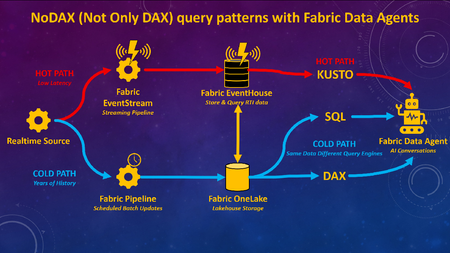
What if you could combine decades of historical analysis with live, real-time data in one seamless AI chat experience? Traditionally, analyzing large volumes of past data (Analytics / Business Intelligence) has been a separate architecture, or has at least required separate toolsets, from monitoring what’s happening right now (real-time, IoT, etc). With Fabric Data Agents, analytics for large volumes of historical data can be accessible with real-time data via a single AI query endpoint. Analytics can be used to gain understanding from historical data, and findings can be put into action for real-time scenarios, all through a single interface for the end users. Figure 1.0 – Fabric Data Agent can use different query languages for optimal performance with a lambda-style RTI architecture on Fabric Many of the demos I’ve seen for Fabric Data Agents will highlight the capability to connect to different types of queries and sources via a single endpoint such as Lakehouses (SQL), Warehouses (SQL), Semantic Models (DAX), Eventhouses (Kusto), and Ontologies. What I have not seen frequently discussed is adding different query engines on the same data for the purpose of optimizing query performance based upon the context of the query and the latency of the data, as per Figure 1.0 above. To be clear, I am not advocating duplication of data for the purpose of query performance. Rather, this architecture would enable Fabric Data Agents to choose the best query language for the context of the query. Hence the acronym I created for this blog article “NoDAX” which stands for “Not Only DAX.” NoSQL “Not Only SQL” is a real term referring to non-relational database systems designed for flexible schemas, horizontal scaling, and high-performance access to large, distributed datasets. NoDAX exists only within this blog post, and represents the availability of multiple query languages within a single Fabric Data Agent. The best query language can be used based on the context of the question and query. Not only DAX but also SQL, Kusto, and Ontologies can be queried to generate the most efficient contextual query. Figure 1.1 – Explaining the NoDAX acronym created for this article Why does this use case matter? The ability to query both the past and the present in one interface isn’t just a novel technical capability. Many analytic solutions can benefit from a pattern of [analysis + action]. Analytics by itself is great at understanding the past. We can look at years of historical data to figure out patterns, drivers of performance, and what went right or wrong. Historical context is incredibly valuable, but understanding the past doesn’t improve outcomes in the future. The real value comes when we connect findings from the past to decisions we make right now and in the future. If you discover historical data patterns that lead to an inventory shortage, a fraud event, or a patient risk score increasing, you can apply that insight to the latest operational data and act on ongoing workflows. Analytics and action have to reinforce each other. Analytics without action doesn’t create value. But action without understanding can easily make things worse. I once had a veteran analytics manager say to me “Without carefully considered and vetted KPIs you are flying blind. But be careful, because a KPI without proper context and understanding will quickly become a blunt object that an empty suit uses to whack somebody over the head.” Figure 1.2 – The purpose of this architecture is to learn from the past to improve the present and future Different Query Languages without data duplication A Fabric real-time architecture can be part of a design pattern that is similar to if not a version of a Lambda architecture. With a Lambda architecture, hot path data is available for real-time alerting and analytics while cold path data is stored for deep and complete historical analytics and data science. Figure 1.3 – NoDAX architecture can query a lambda-style architecture via multiple query endpoints Per the diagram above, real-time data is available in Fabric ASAP and cycled through an Eventhouse. Historical data can either be batched into a Fabric Lakehouse / Warehouse or copied over from the Eventhouse. A Fabric Data Agent can then generate Kusto queries against the Eventhouse, SQL queries against the Lakehouse / Warehouse, or DAX queries against the Warehouse / Lakehouse via the Direct Lake Semantic Model. DAX is often the best query language for data having deep history with complext analytic logic. SQL can be the best query language for retrieving historical row-level information from a robust relational database. Kusto can be used to query what’s happening right now via a real-time Eventhouse. Lambda architectures have been around for years, so why is this architecture a new option? Past lambda architectures would have hot path data available in a streaming toolset such as Azure Eventhub, and then store historical cold path data in a tool such as Azure Data Lake. Hot path alerting and reporting was usually disparate from historical cold path analytics. Per the diagram 3.4 below, with Microsoft Fabric, you can now: implement both the hot and cold path in a single Fabric environment (Eventstream, Eventhouse, Lakehouse / Warehouse). Ontologies are also an option. query the hot and cold path data via a single agentic endpoint using a Fabric Data agent Query either the hot or cold path using the optimal query language for the context of the question (DAX, SQL, Kusto, Ontologies) Figure 1.4 – Fabric not only unifies components of lambda-style architecture, but Data Agent also unites the query endpoints for AI unification Example use case for Healthcare Here’s an example of a Healthcare use case: A user might ask a question “Show me the percentage of patients who had their pain scores checked every hour for gall bladder removals on floor 5 over the last 3 years.” This will ideally filter three years worth of data for patients with specific procedure codes, filtered for specific rooms, and calculate the pain score check compliance for those visits. This query is ideal for the DAX language with a Semantic Model. The user might then want to see details for a specific time period, and ask “Show me the pain score results for patients who had their gall bladder removed on July 3 2024 on floor 5.” A SQL query might be the best option here against the Fabric Warehouse or Lakehouse, since SQL is better than DAX at retrieving row-level information. Then the user might want to know what is happening today. “Show me the pain score checks for inpatients right now who had their gall bladder removed on floor 5.” The Kusto language can retrieve the information that streams into a Fabric Eventhouse via an Eventstream. Based on the findings, the user may take an action. With the example above, a user was able to query deep history with analytic logic, retrieve historical row-level information from a robust relational database, and then view what’s happening right now for those patients. Action can then be taken in the here and now. Here are some additional use cases for Finance, Supply Chain, and Manufacturing in addition to Healthcare: Figure 1.5 – Industry use cases for Fabric Data Agent with multiple endpoints Video Summary Below is my video summary and demo of the Fabric Data Agent NoDAX architecture: Configure Fabric Data Agent for NoDAX query patterns When more than one source is added to a Fabric Data Agent, by default the source used for a specific query will be chosen based on interpreting available metadata. The Data Agents have a field called "Agent instructions" which can be used to provide detailed instructions about choosing the right source for the right question. Here’s a screenshot of the Agent instructions: Figure 1.6 – Agent instructions will guide the Fabric Data Agent to the best query endpoint I would recommend extensive unit testing and iterative improvements to the Agent instructions based upon your own data and use cases. Here’s a few examples that worked for my initial testing. I would recommend much more robust and carefully designed prompts for a production solution, but this is a baseline of an approach I found to work based on the demo in the video above: The KQL database named SeattleFireEventHouse is a live stream of 911 calls to the fire department in the city of Seattle. Whenever someone asks for “most recent” or “newest” or “latest” use SeattleFireEventHouse The lakehouse SeattleFireLakehouse should be queried with a SQL statement when someone asks for a list of incidents before the year 2026. Use SQL to retrieve row level requests for historical data. The semantic model SeattleFireSemantic Model should be queried when questions ask about historical analytic trends such as call volume averages, Year over year changes, and queries that aggregate data for analytic queries.