guides
74 TopicsCybersecurity in 2026: Is Zero Trust Enough to Defend Against AI-Powered Threats?
As cyber threats become more sophisticated, organizations are increasingly adopting Zero Trust architectures, identity-based security, and AI-powered threat detection. But an important question remains: Are our existing security strategies evolving fast enough to address the next generation of cyberattacks? Microsoft has developed a comprehensive security ecosystem through Microsoft Defender XDR, Microsoft Sentinel, Microsoft Entra ID, and Microsoft Intune. These technologies provide powerful capabilities for identity protection, endpoint security, threat detection, and incident response. However, attackers are also leveraging automation, generative AI, and increasingly sophisticated social engineering techniques. I'd like to open a discussion around five important questions: 1. Zero Trust implementation: Are organizations genuinely implementing Zero Trust principles, or are many simply deploying security products without changing their underlying security architecture? 2. AI-powered threats: How prepared are Microsoft security environments to detect AI-assisted phishing, identity attacks, and automated intrusion attempts? 3. Microsoft Defender and Sentinel: What practical improvements have security teams experienced by integrating Microsoft Defender XDR with Microsoft Sentinel? 4. Identity as the new perimeter: With hybrid workforces and cloud-based infrastructure, should identity security now take priority over traditional network perimeter protection? 5. Autonomous security operations: How much authority should AI-powered security agents have to investigate threats, isolate devices, disable accounts, or initiate incident response actions without human approval? One of my biggest concerns is that organizations may invest heavily in cybersecurity tools while overlooking the fundamentals: visibility, configuration management, access governance, employee awareness, and incident response readiness. Security is no longer just about preventing unauthorized access. It's about building resilient systems that can detect, contain, recover from, and continuously adapt to emerging threats. I'd be interested to hear from security architects, SOC analysts, Microsoft MVPs, and IT administrators: What do you consider the biggest cybersecurity challenge facing Microsoft-based enterprise environments today, and what practical steps should organizations prioritize in 2026? Looking forward to your insights and real-world experiences.214Views0likes3CommentsSecurity Review for Microsoft Edge version 156
We have reviewed the new settings in Microsoft Edge version 156 and determined that there are no additional security settings that require enforcement. The Microsoft Edge version 151 security baseline remains our recommended configuration and can be downloaded from the Microsoft Security Compliance Toolkit. Microsoft Edge versions 153 through 156 introduced 8 new Computer and User settings. To make these settings easier to review, we have included a spreadsheet listing each of the new settings. As a reminder, the Microsoft Edge security baseline now aligns with the Extended Stable Channel, which provides major feature updates on an eight-week cadence while continuing to receive security and quality updates between releases. This provides organizations with additional time to evaluate and deploy feature changes while keeping security protections current. As always, all available settings for Microsoft Edge are documented here, and all available settings for Microsoft Edge Update are documented here. Please continue to share your feedback through the Security Baselines Discussion site or this post.Windows 11, version 26H2 security baseline
Update: The Windows 11, version 26H2 security baseline has been updated to reflect the general availability of Administrator protection. An updated v2 package is now available, and organizations should review and test the existing Administrator protection configuration as appropriate for their environment. You can download the baseline package from the Microsoft Security Compliance Toolkit, test the recommended configurations in your environment, and customize / implement them as appropriate. Summary of Changes This release includes several changes since the Security baseline for Windows 11, version 25H2 to further strengthen enterprise security and align the baseline with current platform capabilities and industry standards. Security Policy Change Summary Printer\Configure Windows Ready Print driver ranking Configured as “Enabled” to reduce reliance on third-party print drivers in the stack, narrowing the overall print driver attack surface. Internet Explorer\Internet Control Panel\Advanced Page\Turn off encryption support Updated from TLS 1.1 and TLS 1.2 to TLS 1.2 and TLS 1.3 to align with current security standards. User Account Control: Configure type of Admin Approval Mode (updated) Configured as “Admin Approval Mode with Administrator protection” to enable Administrator protection. User Account Control: Behavior of the elevation prompt for administrators running with Administrator protection (updated) Configured as “Prompt for credentials on the secure desktop” to require credential verification for administrative elevation. Windows Ready Print driver ranking Configure Windows Ready Print driver ranking" is the newly added setting under Administrative Templates\Printers to control whether Windows prefers the modern inbox IPP class driver over third-party OEM drivers when installing new printers. We recommend enabling this policy to reduce reliance on third-party print drivers in the stack, narrowing the overall print driver attack surface. Note that driver ranking applies when printers are installed via a connection method that supports IPP, such as USB or network multicast discovery. In those cases, if the printer supports IPP, Windows will install using the class driver even if a vendor V3/V4 driver is available. If the printer doesn't support IPP, or is installed directly as a TCP/IP printer, there's no change in behavior. Encryption Support We have updated the policy "Turn off encryption support" to allow only TLS 1.2 and TLS 1.3. Previous baseline releases permitted TLS 1.1 and TLS 1.2; however, TLS 1.1 is now considered obsolete and is no longer recommended for enterprise environments. This change aligns the security baseline with modern cryptographic standards while maintaining compatibility with widely deployed services that support current TLS versions. Administrator Protection (update) Administrator protection is now generally available. Organizations can enable it through Microsoft Intune or Group Policy. Important: Organizations should review and test their existing configuration and adjust these settings as appropriate for their environment. The security baselines for Windows 11, versions 24H2, 25H2, and 26H2 include settings that enable Administrator protection. The following policies are part of the security baseline: User Account Control: Configure type of Admin Approval Mode User Account Control: Behavior of the elevation prompt for administrators running with Administrator protection An updated v2 package has been published for Windows 11, version 26H2, to reflect this change. Please let us know your thoughts by commenting on this post or through the Security Baseline Community.Security Review for Microsoft Edge version 152
We have reviewed the new settings in Microsoft Edge version 152 and determined that there are no additional security settings that require enforcement. The Microsoft Edge version 151 security baseline continues to be our recommended configuration which can be downloaded from the Microsoft Security Compliance Toolkit. Microsoft Edge version 152 introduced 4 new Computer and User settings; we have included a spreadsheet listing the new settings to make it easier for you to find. Starting with version 152 Microsoft Edge is moving to a more frequent release cycle. To better align with the needs of the enterprise customers, the Microsoft Edge security baseline is expected to align with the Extended Stable Channel, which provides major feature updates on an eight-week cadence while continuing to receive security and quality updates between releases. This approach provides organizations with additional time to evaluate and deploy feature changes while ensuring security protections remain current. Why the change? Security baselines are intended to provide guidance for managing security relevant configuration settings, not to track every feature introduced in a browser release. With the move to a two-week release cadence, publishing baseline updates for every release would increase operational overhead while providing limited security benefit. The Extended Stable cadence offers a more practical balance for enterprise customers by allowing additional time for testing and evaluation, while continuing to receive security and critical fixes between major feature releases. By aligning with Extended Stable, we can update the baselines less frequently and focus on publishing them earlier in the release cycle, giving IT administrators more time to review and plan for upcoming changes. Our goal is to make security baseline adoption more predictable and easier to manage while continuing to provide timely security guidance. As a friendly reminder, all available settings for Microsoft Edge are documented here, and all available settings for Microsoft Edge Update are documented here. Please continue to give us feedback through the Security Baselines Discussion site or this post.Security baseline for Microsoft Edge version 151
We are pleased to announce the enterprise-ready release of the security baseline for Microsoft Edge version 151! We have reviewed the settings in Microsoft Edge version 151 and updated our guidance with six new recommendations. We have also identified one additional setting that organizations should consider evaluating in their environments. A new Microsoft Edge security baseline package was just released to the Download Center. You can download the new package from the Security Compliance Toolkit. Enable Process Isolation (added) We are enforcing ‘Enable Process Isolation’ to help protect Microsoft Edge from unauthorized access, modification, and tampering by other applications running on the device. This setting strengthens browser process integrity and helps safeguard sensitive data used by Microsoft Edge. Organizations that encounter compatibility issues with software that depends on browser process injection should treat such configurations as exceptions requiring explicit risk acceptance and compatibility validation. Enable renderer in app container (added) We are enforcing the default and enabling ‘Enable renderer in app container’ to strengthen Microsoft Edge’s browser isolation protections by ensuring renderer processes run within the additional restrictions provided by AppContainer. This helps reduce the impact of browser-based attacks and limits the ability of exploited renderer processes to interact with system resources. Organizations that require this setting to be disabled due to incompatible software should treat such configurations as exceptions that require explicit risk acceptance. Enable the network service sandbox (added) We are enforcing the default and enabling ‘Enable the network service sandbox’ to ensure Microsoft Edge network-facing processes operate within sandbox isolation boundaries that help reduce the impact of exploitation and limit access to system resources. Because disabling the network service sandbox weakens a core browser security protection, organizations should treat any requirement to disable this setting as an exception scenario requiring explicit risk acceptance and compatibility validation. Configure browser process code integrity guard (added) We are enabling ‘Configure browser process code integrity guard setting’ with a value of ‘Enable code integrity guard enforcement in the browser process’. The setting strengthens protections against unauthorized code injection into Microsoft Edge browser processes. Some enterprise applications, extensions, accessibility tools, or security products may still rely on legacy injection techniques and require compatibility validation. We encourage organizations to fully test this setting in their environments and work with vendors to identify or remediate incompatible software. Enable Application Bound Encryption (added) We are enabling ‘Enable Application Bound Encryption’ to strengthen protections for browser-stored credentials, authentication tokens, and other sensitive data by binding encryption more closely to the browser process. This helps reduce the risk of unauthorized access to protected browser data by malware or other untrusted software. Because disabling this setting weakens an important protection boundary, organizations should treat any requirement to disable the feature as an exception requiring explicit risk review. Enhance the security state in Microsoft Edge (added) We are enabling ‘Enhance the security state in Microsoft Edge’ and configuring the setting to Balanced to provide additional protection against modern web-based attacks while maintaining compatibility for most enterprise users. In Balanced mode, Microsoft Edge applies additional mitigations such as disabling just-in-time (JIT) JavaScript compilation and enabling added operating system protections on processes used to load sites that users do not frequently visit, helping reduce the risk of memory-related vulnerabilities. Because these protections can introduce compatibility issues for some applications or workflows, organizations should validate critical business sites and applications during their normal testing process prior to broad deployment and configure exceptions as needed. Additional details can be found here. Configure Automatic HTTPS (worth considering) We previously released a blog discussing a new feature called Automatic HTTPS. This setting can automatically switch your connections to websites from HTTP to HTTPS on sites that are highly likely to support the more secure protocol. This option helps ensure that users' network traffic is more secure and less susceptible to SSL stripping attacks. The best part, the end user doesn’t get prompted, it just works! This new feature has two configuration options: Navigations delivered over HTTP are switched to HTTPS’ (UpgradeCapableDomains) and ‘All navigation delivered over HTTP are switched to HTTPS’ (AlwaysUpgrade). There are trade-offs for each configuration: the UpgradeCapableDomains option only upgrades to HTTPS if Microsoft believes the site is likely to work over HTTPS, and this setting is unavailable if you’ve disabled the ComponentUpdatesEnabled policy. The more secure AlwaysUpgrade option unconditionally updates all HTTP requests to HTTPS, which will result in a user-visible error page if the target site does not support HTTPS. We encourage organizations to consider implementing and testing Automatic HTTPS within their environment. Collectively, these changes continue our focus on strengthening browser isolation, sandboxing, process integrity, and protection of sensitive browser data while balancing enterprise compatibility requirements. Microsoft Edge version 151 introduced 4 new computer and user settings. We have included a spreadsheet listing the new settings in the release to make it easier for you to find them. As a friendly reminder, all available settings for Microsoft Edge are documented here, and all available settings for Microsoft Edge Update are documented here. Please continue to give us feedback through the Security Baseline Community or in comments on this post.2.4KViews0likes6CommentsSecurity Review for Microsoft Edge version 150
We have reviewed the new settings in Microsoft Edge version 150 and determined that there are no additional security settings that require enforcement. The Microsoft Edge version 139 security baseline continues to be our recommended configuration which can be downloaded from the Microsoft Security Compliance Toolkit. Microsoft Edge version 150 introduced 8 new Computer and User settings; we have included a spreadsheet listing the new settings to make it easier for you to find. As a friendly reminder, all available settings for Microsoft Edge are documented here, and all available settings for Microsoft Edge Update are documented here. Please continue to give us feedback through the Security Baselines Discussion site or this post.Security Review for Microsoft Edge version 149
We have reviewed the new settings in Microsoft Edge version 149 and determined that there are no additional security settings that require enforcement. The Microsoft Edge version 139 security baseline continues to be our recommended configuration which can be downloaded from the Microsoft Security Compliance Toolkit. Microsoft Edge version 149 introduced 7 new Computer and User settings; we have included a spreadsheet listing the new settings to make it easier for you to find. As a friendly reminder, all available settings for Microsoft Edge are documented here, and all available settings for Microsoft Edge Update are documented here. Please continue to give us feedback through the Security Baselines Discussion site or this post.Security Review for Microsoft Edge version 148
We have reviewed the new settings in Microsoft Edge version 148 and determined that there are no additional security settings that require enforcement. The Microsoft Edge version 139 security baseline continues to be our recommended configuration which can be downloaded from the Microsoft Security Compliance Toolkit. Microsoft Edge version 148 introduced 16 new Computer and User settings; we have included a spreadsheet listing the new settings to make it easier for you to find. As a friendly reminder, all available settings for Microsoft Edge are documented here, and all available settings for Microsoft Edge Update are documented here. Please continue to give us feedback through the Security Baselines Discussion site or this post.🆕 Microsoft Q&A Platform Update
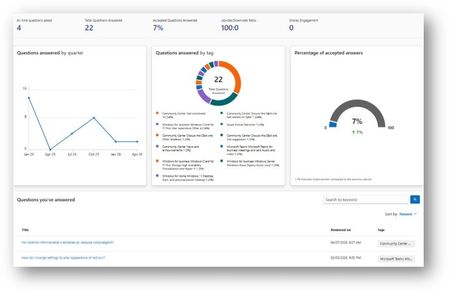
We’re excited to introduce a new capability on Microsoft Q&A that provides contributors with greater visibility into their activity and impact. 📊 Contributor Analytics Dashboard The Contributor Analytics Dashboard is now available on Microsoft Q&A within Microsoft Learn, offering a self-serve experience to track contributions and engagement. This new experience was built to improve transparency and make it easier for contributors to understand the value of their participation across the platform. 🔎 How to access Click your Learn profile avatar Select Analytics 📈 What you can track The dashboard surfaces key metrics to help you measure your impact: Number of answers provided Acceptance rate Views and votes Activity trends over time Content engagement signals These insights allow contributors to better understand performance and track progress over time. ✅ Who can use it The dashboard is currently available to contributors who have answered at least one question on Microsoft Q&A. 💡 Why this matters This update brings: Increased visibility into your contributions A centralized view of your activity (no more manual tracking) Better understanding of your impact across the community Stronger recognition and motivation for continued contributions 🔄 What’s next The experience will continue to evolve, with additional enhancements planned based on contributor feedback. 🙌 For Product Champions This dashboard is especially valuable as you: Track your growth within the program Measure impact for recognition and rewards Monitor your contribution consistency across product tracks As our program grows, transparency like this helps ensure that quantity transforms into quality and that your contributions are clearly recognized.Security Review for Microsoft Edge version 147
We have reviewed the new settings in Microsoft Edge version 147 and determined that there are no additional security settings that require enforcement. The Microsoft Edge version 139 security baseline continues to be our recommended configuration which can be downloaded from the Microsoft Security Compliance Toolkit. Microsoft Edge version 147 introduced 9 new Computer and User settings; we have included a spreadsheet listing the new settings to make it easier for you to find. Version 147 introduced the Control the availability of the XSLT feature policy (XSLTEnabled). This policy exists to support enterprise testing and transition scenarios while the Chromium project works toward deprecating and removing XSLT support from the browser due to security concerns associated with this legacy feature. XSLT support in modern browsers represents a disproportionate attack surface, and upstream Chromium has announced plans to disable and ultimately remove XSLT in a future release. As a result, organizations should treat continued reliance on client‑side XSLT as technical debt and plan migration accordingly. Additional details can be found here. Organizations are encouraged to proactively test setting XSLTEnabled = Disabled to identify application dependencies and remediation requirements ahead of any future default changes or removal of the feature. As a friendly reminder, all available settings for Microsoft Edge are documented here, and all available settings for Microsoft Edge Update are documented here. Please continue to give us feedback through the Security Baselines Discussion site or this post.2.6KViews0likes2Comments