guest configuration
28 Topics[Now Generally Available] Customizable Security Baseline Policies in Machine Configuration!
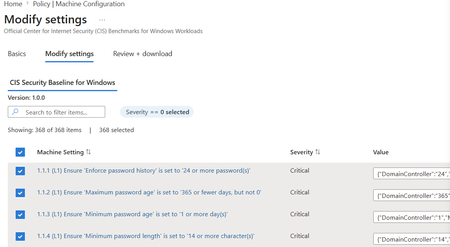
Background: Azure Machine Configuration remains committed to enabling greater security and simplicity in at-scale server management for all Azure customers. Machine Configuration (previously known as Azure Policy Guest Configuration) enables both built-in and custom configuration as code allowing you to audit and configure OS, app, and workload level settings at scale, both for machines running in Azure and hybrid Azure Arc-enabled servers. We're excited to announce the General Availability of Customizable Security Baselines in Azure Policy and Machine Configuration. What began as a Public Preview is now a mature, production-grade capability that empowers you to tailor industry security benchmarks to your organization's unique compliance standards across both Azure and Arc-connected machines, at scale. This release moves the experience from "useful" to "everyday default." Standards coverage has expanded, the customization and assignment flow is faster, full lifecycle management is now possible directly from the Azure Portal, and a new Overview page gives you a single pane of glass into which parts of your estate are unprotected. What is Baseline Customization? The core experience remains: tailor security standards through the Modify Settings wizard under Policy > Machine Configuration. You can enable, exclude, or adjust rules from existing benchmarks, apply organization-specific parameters, and export your custom configuration as a downloadable JSON file. Each baseline JSON file serves as a reusable, declarative artifact, ideal for policy-as-code workflows, version control, and CI/CD integration. What's New? GA brings four substantive shifts to the customizable baselines experience: broader standards coverage, a faster path from customization to deployment, lifecycle management directly in the portal, and a new Overview page that surfaces compliance gaps at the subscription level. Together, these changes reflect what we heard from early customers during Preview: that custom baselines need to live alongside the rest of their governance workflows, not in a one-time wizard. This cloud-native approach continues to embody Microsoft's Secure by Design and Secure by Default principles, with a sharper focus on the operational reality of running compliance at scale. Built-in Policy Standards Coverage GA expands what you can customize and where it's supported. Standard Status Notes CIS Benchmarks for Linux Generally Available Expanded distribution coverage since Public Preview. See the full list of supported distros in the official documentation. [NEW!] CIS Benchmarks for Windows Public Preview Initial release covers L1 settings for WS2025 Domain Controller and Member Server roles. Azure Compute Security Baseline for Windows Generally Available Now supports customization for Windows Server 2016 and 2019, in addition to 2022 and 2025. Azure Compute Security Baseline for Linux Generally Available Aligned with Azure Compute recommendations across supported Linux distributions. Key Scenarios Faster Time to Deployment The customization-to-assignment path is now a single continuous flow. You can: Skip the JSON download step entirely. Baseline settings are auto-populated into the Azure Policy assignment flow, so you no longer have to download a JSON file, browse for it, and upload it back. The settings ride with you from Modify Settings straight into Assign Policy. Use the improved settings editor. Role-specific values (Domain Controller, Member Server) and formatted inputs render cleanly in the UX, with validation that prevents malformed parameters from reaching the policy assignment. Still export when you need to. The JSON download remains available for teams that want to commit baselines to source control, share with reviewers, or pipe through CI/CD. The net result: what used to take a multi-step download-and-reupload sequence is now a few clicks inside one blade. Lifecycle Management in the Portal Compliance baselines are not write-once artifacts. They evolve as benchmarks update, as your controls tighten, and as your estate changes. GA introduces two capabilities that treat baselines as living configuration: Import and Modify. From the Definitions tab under Machine Configuration, you can now import an existing baseline JSON and iterate on it directly in the portal. This closes the loop between policy-as-code workflows and ad-hoc edits, so you no longer have to choose between version-controlled artifacts and in-portal convenience. Edit Settings on existing Assignments. The Assignments tab now supports updating an active baseline assignment in place. You can refine rules, adjust role-specific values, or exclude controls without tearing down and re-creating the assignment. All you have to do is select the policy assignment and the "Edit Settings" button should be enabled. Together, these turn baselines into something you maintain, not something you set and forget. New Overview Page: See Where You're Unprotected A new Overview page on Policy > Machine Configuration gives you subscription-level visibility into where Machine Configuration is enabled and where it isn't. For each subscription it surfaces status (At Risk, Not Enabled, Enabled), machines missing prerequisites, machines with prerequisites in place, and total eligible machines. From the same view you can enable Machine Configuration on selected subscriptions to onboard eligible VMs and activate baseline auditing in a single action. This shifts the first question from "is this one machine compliant?" to "which corners of my estate aren't even being assessed yet?", which is usually the more consequential gap. Integration and Automation Security baselines continue to integrate into your DevOps pipelines and configuration management workflows. Each baseline produces a declarative settings catalog (JSON) that can be versioned and deployed using Azure CLI, ARM templates, Bicep, and CI/CD automation, ensuring reproducible, traceable compliance configurations across environments. Availability Customizable security baselines are now generally available in all public Azure regions, Azure Government, and Sovereign Clouds. Getting Started Prerequisites Before you begin: Deploy the Azure Machine Configuration prerequisite policy initiative. (This installs the required Guest Configuration extension on supported VMs.) You can also do this in a single action from the new Overview page. Ensure your Azure subscription or management group includes supported Windows or Linux VMs. Have sufficient permissions (Owner or Resource Policy Contributor) to create and assign custom policy definitions. Step-by-Step Guidance Check your coverage on the Overview page to see which subscriptions are unprotected and onboard them with one click. Select a baseline from the Definitions tab in Machine Configuration or use Import and Modify to iterate on an existing baseline JSON. Modify settings to enable, exclude, or parameterize rules to match your internal policies. Assign the policy directly from the wizard. Settings are auto populated into the assignment flow, no JSON upload required. Iterate when needed. Use Edit Settings on the Assignments tab to refine active baselines in place. Review compliance results to track outcomes in Azure Policy, Azure Resource Graph, or the Guest Assignments page. Learn More Azure Machine Configuration security baselines official documentation CIS Benchmark for Windows Server (Preview) documentation CIS Benchmark for Linux documentation Azure Windows Baseline and Azure Linux Baseline documentation Please note that the use of Azure Machine Configuration on Azure Arc-enabled servers will incur a charge.
Announcing Public Preview for Essential Machine Management
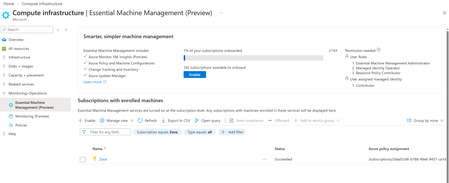
Managing servers and VMs across Azure, on premises, and multi-cloud environments often means turning on core capabilities—monitoring, updates, inventory, and configuration—through separate setup experiences. We’ve heard feedback that this makes it harder to get visibility into machine state and take actions. We’re excited to announce the public preview of Essential Machine Management experience within Compute Infrastructure Hub—a new entry point in Azure that streamlines onboarding for machines at scale and enables basic management capabilities. Start once at subscription scope, get a clear view of what’s turned on, and move from setup to operations faster across your Azure and cloud and hybrid estate. What is Essential Machine Management? Essential Machine Management is a centralized onboarding experience that helps customers enroll their machines into a set of selected cloud-native management services from Azure in a simple, scalable way, Instead of enabling monitoring, updates, inventory, and configuration independently per machine, Essential Machine Management allows you to enroll entire subscriptions at once, including both Azure Virtual Machines and Azure Arc–enabled servers. These services are pre-configured with best practices, enabling customers with out-of-the-box value right away. Once enrolled, current and future machines in the selected subscriptions are automatically onboarded to the enabled management services, helping ensure consistent visibility and operational coverage from day one. What management capabilities are enabled? Using Essential Machine Management, you can quickly onboard machines to multiple Azure management capabilities, including: Monitoring insights and recommended alerts for machine health and performance Azure Update Manager to help keep machines secure and compliant Change tracking and inventory for visibility and auditability Machine configuration for managing in-machine configuration, compliance and security Azure Security baseline policy is a set of tailored rules to assess your machine's security posture These services help keep your infrastructure secure and healthy. How much does it cost? Azure VMs: For Azure Virtual Machines only, capabilities enabled by Essential Machine Management are provided at no additional charge. Azure Arc-enabled servers: For Azure Arc-enabled servers with Windows Server Software Assurance, Windows Server PayGo, and Windows Server Extended Security Updates, capabilities enabled by Essential Machine Management are provided at no additional charge. For all other Arc-enabled servers, Essential Machine Management will be priced at $9 per server per month once billing is enabled. See more details here. Getting started If you manage Azure VMs or Arc-enabled servers and are looking to simplify how you onboard and manage machines at scale, Essential Machine Management feature is now available for you to try in public preview. Check out the preview in the Azure Portal under Compute infrastructure --> Monitoring + Operations --> Essential Machine Management (preview): Check out Essential Machine Management now and reach out to machineenrollmentsupport@microsoft.com for any feedback or support. Learn more about Essential Machine Management here.[Public Preview] Introducing Customizable Security Baseline Policies in Machine Configuration
Background: Azure Machine Configuration remains committed to enabling greater security and simplicity in at-scale server management for all Azure customers. Machine Configuration (previously known as Azure Policy Guest Configuration) enables both built-in and custom configuration as code allowing you to audit and configure OS, app, and workload level settings at scale, both for machines running in Azure and hybrid Azure Arc-enabled servers. We’re excited to announce Public Preview support for Customizable Security Baselines in Azure Policy and Machine Configuration. This feature empowers you to tailor industry security benchmarks—such as CIS benchmarks for Linux or Azure Security Baselines for Windows and Linux —to align with your organization’s unique compliance standards across both Azure and Arc-connected machines. This feature builds on top of our existing audit baseline capabilities for Windows and Linux. Now you can create, parameterize, and assign custom baselines at scale, enabling continuous compliance visibility across your entire environment. Learn more about how to get started here: Customize Security Baselines with Azure Policy and Machine Configuration. What's New? Customizable security baselines in Azure Policy and Machine Configuration bring a powerful new way to assess, monitor, and improve your security posture across both Windows and Linux servers. Built on industry benchmarks such as the Center for Internet Security (CIS) and Microsoft’s own Azure Compute Security Baselines, this capability enables you to adapt compliance frameworks to your organization’s specific needs — all while maintaining a consistent governance model across Azure and hybrid environments. By passing custom baseline parameters directly into Azure Policy, you can represent internal controls at scale, ensuring that compliance reflects your enterprise’s unique standards and regulatory requirements. This cloud-native approach embodies Microsoft’s Secure by Design and Secure by Default principles — ensuring your workloads stay compliant, wherever they run. Key Scenarios Baseline Customization Tailor your security standards through the Modify Settings wizard under Policy > Machine Configuration. You can: Enable, exclude, or adjust rules from existing benchmarks Apply organization-specific parameters Export your custom configuration as a downloadable JSON file Each baseline JSON file serves as a reusable, declarative artifact—ideal for policy-as-code workflows, version control, and CI/CD integration. Assign Audit Policies When you assign a baseline via Azure Policy, it automatically: Evaluates configurations against your defined standards Reports compliance in near real time Surfaces findings in Azure Policy, Azure Resource Graph, and the Guest Assignments view This integrated visibility helps IT administrators, security teams, and auditors track compliance status with minimal overhead. Integration and Automation Security baselines integrate seamlessly into your DevOps pipelines and configuration management workflows. Each baseline produces a declarative settings catalog (JSON) that can be versioned and deployed using: Azure CLI ARM templates Bicep CI/CD automation This ensures reproducible, traceable compliance configurations across environments. Supported Standards Standard Description CIS Linux Benchmarks Official CIS Benchmarks for Azure-endorsed Linux distributions, matching the latest CIS versions. Azure Compute Security Baseline for Windows Applies security controls for Windows Server 2022 and 2025, aligned with Azure Compute guidance. Azure Compute Security Baseline for Linux Enforces consistent controls aligned with Azure Compute recommendations. Availability Customizable security baselines are available in all public Azure regions. NOTE: Support for Azure Government and Sovereign Clouds will be added in a future release. These environments are not included in the current Public Preview. Getting Started Prerequisites Before you begin: Deploy the Azure Machine Configuration prerequisite policy initiative. (This installs the required Guest Configuration extension on supported VMs.) Ensure your Azure subscription or management group includes supported Windows or Linux VMs. Have sufficient permissions (Owner or Resource Policy Contributor) to create and assign custom policy definitions. Step-by-Step Guidance Select a baseline from the Machine Configuration tab in Azure Policy. Modify settings to enable, exclude, or parameterize rules to match your internal policies. Download JSON to export your customized baseline configuration file for programmatic and repeatable customization. Assign the policy which can be deployed through the Azure portal, CLI, or your CI/CD pipeline. Review compliance results to track outcomes in Azure Policy, Azure Resource Graph, or the Guest Assignments page. Coming Soon Leverage baseline customization to gradually remediate server security non-compliance using Azure Policy! Join the waitlist here: https://aka.ms/BaselineRemediationWaitlist Learn More Azure Machine Configuration security baselines official documentation CIS Benchmark for Linux documentation Azure Windows Baseline and Azure Linux Baseline documentation Please note that the use of Azure Machine Configuration on Azure Arc-enabled servers will incur a charge.
GA: Enhanced Audit in Azure Security Baseline for Linux
We’re thrilled to announce the General Availability (GA) of the Enhanced Azure Security Baseline for Linux—a major milestone in cloud-native security and compliance. This release brings powerful, audit-only capabilities to over 1.6 million Linux devices across all Azure regions, helping enterprise customers and IT administrators monitor and maintain secure configurations at scale. What Is the Azure Security Baseline for Linux? The Azure Security Baseline for Linux is a set of pre-configured security recommendations delivered through Azure Policy and Azure Machine Configuration. It enables organizations to continuously audit Linux virtual machines and Arc-enabled servers against industry-standard benchmarks—without enforcing changes or triggering auto-remediation. This GA release focuses on enhanced audit capabilities, giving teams deep visibility into configuration drift and compliance gaps across their Linux estate. For our remediation experience, there is a limited public preview available here: What is the Azure security baseline for Linux? | Microsoft Learn Why Enhanced Audit Matters In today’s hybrid environments, maintaining compliance across diverse Linux distributions is a challenge. The enhanced audit mode provides: Granular insights into each configuration check Industry aligned benchmark for standardized security posture Detailed rule-level reporting with evidence and context Scalable deployment across Azure and Arc-enabled machines Whether you're preparing for an audit, hardening your infrastructure, or simply tracking configuration drift, enhanced audit gives you the clarity and control you need—without enforcing changes. Key Features at GA ✅ Broad Linux Distribution Support 📘 Full distro list: Supported Client Types 🔍 Industry-Aligned Audit Checks The baseline audits over 200+ security controls per machine, aligned to industry benchmarks such as CIS. These checks cover: OS hardening Network and firewall configuration SSH and remote access settings Logging and auditing Kernel parameters and system services Each finding includes a description and the actual configuration state—making it easy to understand and act on. 🌐 Hybrid Cloud Coverage The baseline works across: Azure virtual machines Arc-enabled servers (on-premises or other clouds) This means you can apply a consistent compliance standard across your entire Linux estate—whether it’s in Azure, on-prem, or multi-cloud. 🧠 Powered by Azure OSConfig The audit engine is built on the open-source Azure OSConfig framework, which performs Linux-native checks with minimal performance impact. OSConfig is modular, transparent, and optimized for scale—giving you confidence in the accuracy of audit results. 📊 Enterprise-Scale Reporting Audit results are surfaced in: Azure Policy compliance dashboard Azure Resource Graph Explorer Microsoft Defender for Cloud (Recommendations view) You can query, export, and visualize compliance data across thousands of machines—making it easy to track progress and share insights with stakeholders. 💰 Cost There’s no premium SKU or license required to use the audit capabilities with charges only applying to the Azure Arc managed workloads hosted on-premises or other CSP environments—making it easy to adopt across your environment. How to Get Started Review the Quickstart Guide 📘 Quickstart: Audit Azure Security Baseline for Linux Assign the Built-In Policy Search for “Linux machines should meet requirements for the Azure compute security baseline” in Azure Policy and assign it to your desired scope. Monitor Compliance Use Azure Policy and Resource Graph to track audit results and identify non-compliant machines. Plan Remediation While this release does not include auto-remediation, the detailed audit findings make it easy to plan manual or scripted fixes. Final Thoughts This GA release marks a major step forward in securing Linux workloads at scale. With enhanced audit now available, enterprise teams can: Improve visibility into Linux security posture Align with industry benchmarks Streamline compliance reporting Reduce risk across cloud and hybrid environmentsEverything New in Azure Governance @ Build 2025
You've come to the right place if you're looking for everything happening with Azure Governance at Microsoft Build, May 19-22, 2025. Azure Governance is an ecosystem of neatly integrated services that provide the ability to ensure speed and control across your cloud environment. From enforcing rules in your cloud environment to querying the state of your resources at-scale, Azure Governance services keep your resources secure and compliant with corporate standards. Join us at Microsoft Build! #MSBuild Session: "Unlock developer agility with a well governed environment" - Thurs, May 22 @ 8:30 AM PDT In a world where app and env requirements are ever changing, maintaining control can be a moving target. Come learn how to empower your developers to achieve more, without compromising on security, compliance, or operational best practices through Azure Governance products. In this session we'll be discussing newly released features within Azure Policy, dive deep into Policy as code, and announce a new grouping construct called Service groups designed to optimize cross subscription management Join the session here: https://aka.ms/AzGovBuild25 Sign up for our #MSBuild Product Roundtable Sessions! Are you going to attend Build 2025 in person in Seattle? If the answer is Yes, Azure product teams would like to invite you to the following Customer Feedback Roundtable sessions at Microsoft Build 2025. Sign up here to join our roundtable sessions: https://aka.ms/AzGovRoundtable. This is a unique opportunity for you to share your insights and help shape the future of Azure. These roundtables will be filled on a first come, first serve basis, so don't miss your chance to sign up now! If you are not attending Build in person, no problem! If you are interested, we would like to invite you to participate in future online feedback sessions. New Releases @ Build 2025 The Azure Governance team is excited to share all the following new features across our product portfolio. For each of the features, you will find an accompanying announcement with scenario details, documentation and blog posts to follow along! Jump to section (New!) Azure Service Groups Azure Policy Azure Machine Configuration Azure Resource Graph (ARG) Azure Resource Manager (ARM) (New!) Azure Service Groups Azure Service Groups - Public Preview A Service Group (SG) is a new grouping structure in Azure that supports flexible grouping of cross-subscription resources and multiple hierarchies of groups. Service Groups provide a unified view and management capabilities, enabling: Low Privilege Management: Service Groups are designed to operate with minimal permissions, ensuring that users can manage resources without needing excessive access rights and appealing to multiple personas. Flexible Cross-Subscription Grouping: Azure resources and scopes, from anywhere in the tenant, can become members of one or multiple service groups. Varying Hierarchies: Service Groups can be self-nested providing the ability to have multiple hierarchy structures of resource containers. Data Aggregation & Views: Aggregate data from resources across subscriptions for practical workloads. View application health (via Health Model) and important data values centered around your wanted perspective. You can reach our team by email at mailto:azureservicegroups@microsoft.com for any questions or comments! TechCommunity Blog: https://aka.ms/servicegroupspreview MS Learn Documentation: http://aka.ms/servicegroups Azure Policy New Features currently in Private Preview Many of the Azure Policy enhancements, including user-based exemptions, caller-type based enforcement (e.g., type user or service principal) and IP filtering are currently in private preview and will soon be available to the public. Stay tuned! Azure Machine Configuration Linux SSH Posture Control Policy - Generally Available We are excited to announce additional built-in capabilities for Linux management scenarios through Azure policy and Machine Configuration. Through new built-in policies, you can manage your SSH configuration settings declaratively at-scale. SSH Posture Control enables you to use the familiar workflows of Azure Policy and Machine Configuration to: Ensure compliance with standards in your industry or organization Reduce attack surface of remote management features Ensure consistent setup across your fleet for security and productivity SSH Posture Control also provides detailed Reasons describing how compliance or non-compliance was determined. These Reasons help you to document compliance for auditors with confidence and evidence. They also enable you to take action when non-compliance is observed. MS Learn Documentation: What is SSH Posture Control? | Microsoft Learn Windows Server 2025 Audit Policy (powered by OSConfig) - Generally Available You can now deploy the Windows Server 2025 security baseline to your environment and ensures that desired security measures are in place, providing a comprehensive and standardized security framework. The Windows Server 2025 baseline includes over 300 security settings to ensure that it meets industry-standard security requirements. It also provides co-management support for both on-premises and Azure Arc-connected devices. The OSConfig tool is a security configuration stack that uses a scenario-based approach to deliver and apply the desired security measures for your environment. MS Learn documentation: Configure security baselines for Windows Server 2025 | Microsoft Learn Onboarding Arc Machines at-scale to Machine Config in Azure Portal - Public Preview With the integration of Machine Configuration audit policies in the Arc at-scale onboarding experience, you can now quickly deploy audit policies to get a deeper look at the security posture of your Arc-enabled servers. Whether you're seeking to test Machine Configuration on an Arc machine or looking to deploy a policy across a broader scope of machines, your deployment workflow just got incredibly easy with this new integration. Azure Resource Graph (ARG) ARG GET/LIST API - Private Preview Now in Private Preview is the Azure Resource Graph GET/LIST API, a highly scalable, fast, and performant alternative to existing control plane GET and List API calls within the Azure ecosystem. This API allows you to mitigate issues related to throttling, such as performance degradation and failed requests offering a 10X higher Read throttling quota to callers, ensuring faster and more efficient read operations for your critical cloud native workload. Contact argpms@microsoft.com to join the private preview program! Azure Resource Graph Copilot – Generally Available With the release of the Azure Resource Graph (ARG) skill within Copilot, customers can access the ARG query skill through Azure Portal or Github Copilot. Questions about resource governance like “how many Linux VMs do I own” will be sent to the ARG Skill. With this release, customers can easily turn natural language questions into ARG queries. ARG Copilot helps users create queries to quickly surface insights about resources and simplify operational investigations. MS Learn documentation: https://learn.microsoft.com/azure/copilot/get-information-resource-graph Azure Resource Manager (ARM) EU Data Boundary enabled by ARM - Generally Available Going beyond Azure's existing data storage commitments, you can now store and process EU Data in the EU by leveraging Azure data boundaries enabled by Azure Resource Manager. With Azure Resource Manager, you can ensure that in-scope, global Azure metadata data, including EUII, EUPI, Customer Content, and Support Data, are routed, processed, and stored entirely within EU data boundary countries and datacenter locations. This builds on Azure's existing regional metadata privacy commitments and helps our European customers achieve greater control over data locality to meet regulatory, compliance, and sovereignty requirements. MS Learn Documentation: What is the EU Data Boundary? - Microsoft Privacy | Microsoft Learn Stay Updated Keep in touch with Azure Governance products, announcements, and key scenarios. Bookmark the Azure Governance Tech Community Blog, then follow us @AzureGovernance on X (previously known as Twitter) Share Product feedback/ideas with us here- Azure Governance · Community For questions, you can reach us at: Azure Policy: policypm@microsoft.com Azure Resource Graph: argpms@microsoft.comSSH Posture Control for Linux is now GA!
With the increasing importance of reducing the attack surface of any fleet of devices, SSH Posture Control provides a comprehensive solution to ensure your servers are configured according to best practices and your environment specific requirements. This results in enhanced security, improved compliance, and increased efficiency throughout your IT infrastructure. This feature not only audits your current SSH server settings but also can auto-remediate configurations to enhance your security posture. Key Features: Comprehensive Auditing: SSH Posture Control performs a thorough audit of your SSH server settings, and identifying potential misconfigurations. Automated Configuration: Save time and reduce errors with automated configuration options that align your SSH server settings with industry best practices. Support for Multiple Distros: Whether you're using Ubuntu, Red Hat, Azure Linux, or other supported distributions, SSH Posture Control has you covered. Azure Governance: SSH Posture Control integrates seamlessly with Azure Governance services such as Azure Policy and Machine Configuration. Each compliance check includes evidence via the Reasons field, indicating how compliance or non-compliance was determined. You can customize the SSH parameters or use the policy default values, which are aligned with the Azure security baseline for Linux Getting Started Ready to enhance your SSH server security? Take the first step towards a more secure and compliant server environment. For more information and detailed documentation click on the links below: https://aka.ms/SshPostureControlOverview https://aka.ms/SshPostureControlQuickstart https://aka.ms/SshPostureControlBrownfield SSH Posture Control | Not JUST Port 22 - YouTube
Azure Change Tracking & Inventory: Simplified onboarding to manage in-guest changes on Azure Arc VMs
Explore new Azure native few clicks onboarding experience for Change Tracking & Inventory on Azure Arc servers, streamlining in-guest change management operations, while strengthening your adaptive cloud strategy.Everything New in Azure Governance @ Ignite 2024
You've come to the right place if you're looking for everything happening with Azure Governance at Microsoft Ignite, November 19-22, 2024. Azure Governance is an ecosystem of neatly integrated services that provide the ability to ensure speed and control across your cloud environment. From enforcing rules in your cloud environment to querying the state of your resources at-scale, Azure Governance services keep your resources secure and compliant with corporate standards. The Azure Governance team is excited to share all the following new features across our product portfolio. For each of the features, you will find an accompanying announcement with scenario details, documentation and blog posts to follow along! Azure Change Analysis Change Actor – Generally Available We are excited to announce the General Availability of Change Actor in Azure, a feature that enhances Change Analysis by identifying who made changes to your resources and how. With this update, you can audit changes across all tenants and subscriptions, seeing who initiated changes and with which identity. Changes are available in under five minutes and are queryable for fourteen days, allowing for timely auditing and troubleshooting. Additionally, you can craft charts and pin results to Azure dashboards based on specific change queries through Azure Resource Graph, providing a comprehensive view of changes across your environment. Change Actor experience in Azure Portal Overview of change analysis: https://learn.microsoft.com/azure/governance/resource-graph/changes/get-resource-changes?tabs=azure-cli Change analysis portal experience: https://learn.microsoft.com/azure/governance/resource-graph/changes/view-resource-changes Change actor blog announcement: https://techcommunity.microsoft.com/blog/azuregovernanceandmanagementblog/announcing-the-general-availability-of-change-actor/4171801 Azure Policy Policy Versioning support Built-in Definitions – Public Preview With Versioning, you can now gradually ingest built-in definition changes with zero-gap in enforcement! All Azure Policy built-in definitions will now follow a standardized version pattern: at assignment time, simply specify the version number of the built-in definition to enforce on your environment. Have a previous definition version already assigned? Leverage assignment-level selectors and overrides property to gradually update the assignment to the latest version of the built-in definition. Additionally, versioning awareness is displayed in compliance logs on a per-resource basis, enhancing your ability to govern and evolve your cloud governance policies with greater agility. Tech Community Blog: https://techcommunity.microsoft.com/blog/azuregovernanceandmanagementblog/public-preview-announcement-azure-policy-built-in-versioning/4186105 MS Learn Documentation: https://learn.microsoft.com/azure/governance/policy/concepts/definition-structure-basics#version-preview Query Component-level policy compliance in Azure Resource Graph Effortlessly query policy compliance down to the component-level across your AKS, Key Vault, and Managed HSM resources in Azure Resource Graph! With component-level granularity of AKS Policy compliance, you verify if your pods are using approved base images, audit the labelling of your namespaces or ensure your Managed HSM instances to configure the required security settings—all through ARG. Through a unified experience with Azure Policy and Azure Resource Graph, you can gain deeper insights into the compliance state of each AKS component with precision, ensuring your resources are always in line with your organization’s standards. AKS Policy component-level compliance in ARG CEL-based support for AKS Policy (preview) Introducing CEL and VAP support in AKS Policy! Common Expression Language (CEL) is a Kubernetes-native expression language that can be used to declare validation rules of a policy. Validating Admission Policy (VAP) feature provides in-tree policy evaluation, reduces admission request latency, and improves reliability and availability. The supported validation actions include Deny, Warn, and Audit. Custom policy authoring for CEL/VAP is allowed, and existing users won't need to convert their Rego to CEL as they will both be supported and be used to enforce policies. You'll be able to view violation messages at request time and audit results in the portal just like with Rego. MS Learn documentation: https://learn.microsoft.com/azure/governance/policy/concepts/policy-for-kubernetes#171 Support for Expansion in AKS Policy Introducing expansion, a shift left feature that lets you know up front whether your workload resources (Deployments, ReplicaSets, Jobs, etc.) will produce admissible pods. Expansion shouldn't change the behavior of your policies; rather, it just shifts Gatekeeper's evaluation of pod-scoped policies to occur at workload admission time rather than pod admission time. To enable expansion for a given policy definition, set.policyRule.then.details.source to All, and if needed, use a mutation with source Generated to mutate the what-if pods for evaluation purposes. MS Learn documentation: https://learn.microsoft.com/en-us/azure/governance/policy/concepts/policy-for-kubernetes#170 Expanded list of Policy for AKS Built-In Definitions – Generally Available Azure Policy has expanded the list of mutation built-in definitions for Azure Kubernetes Service (AKS). These new definitions allow you to automatically remediate the configuration of your AKS pods and containers at scale across your cluster. With this update, you can manage and enforce configuration changes more efficiently, ensuring consistency and compliance within your AKS environment. With Mutation policies, you can: Enforcing Resource Limits: Automatically set resource limits on pods and containers to prevent any single workload from consuming too many resources. Injecting Sidecars: Mutate pod specifications to include sidecar containers for logging, monitoring, or security purposes, without requiring changes to the original pod definitions. Setting Environment Variables: Specify the environment variables set in containers, which can be used for configuration or to pass secrets securely. MS Learn documentation: https://learn.microsoft.com/azure/aks/policy-reference Azure Machine Configuration Support for User Assigned Identity Based Access for Configuration Packages – Generally Available User Assigned Identity support for configuration package access in Azure Machine Configuration is now Generally Available, reinforcing our commitment to security and simplicity in at-scale server management for all Azure customers. This feature enhances your server configuration management lifecycle by providing a secure and straightforward alternative to the use of Shared Access Signature (SAS) Tokens for anonymous access. With User Assigned Identities, you can now privately access configuration packages stored in Azure Storage Blobs, ensuring that your server management operations are both secure and efficient. Tech Community Blog: Securely store your Machine Configuration packages in Azure Storage using User Assigned Identities MS Learn Documentation: https://learn.microsoft.com/azure/governance/machine-configuration/how-to/create-policy-definition SSH Posture control through Machine Configuration – Generally Available Additional built-in capabilities to enhance your Linux management scenarios are now generally available through Azure policy and Machine Configuration! Through new built-in policies, you can manage your SSH configuration settings declaratively at-scale. SSH Posture Control also provides detailed Reasons describing how compliance or non-compliance was determined. These Reasons help you to document compliance for auditors with confidence and evidence. They also enable you to take action when non-compliance is observed. MS Learn documentation: https://learn.microsoft.com/azure/osconfig/overview-ssh-posture-control-mc Azure Resource Graph ARG PowerBI – Generally Available We are pleased to announce General Availability of the Azure Resource Graph Power BI connector! Now, you can run queries against your Azure resources and visualize the results directly in Power BI. With seamless integration, you can connect Azure Resource Graph with Power BI Desktop or Power BI service to analyze your Azure resources, and the connector has an optional setting to return all records if your query results exceed 1,000 records. This feature provides deeper insights and more control over your Azure resources, enhancing your ability to manage and govern your cloud infrastructure. Learn documentation: https://learn.microsoft.com/azure/governance/resource-graph/power-bi-connector-quickstart?tabs=power-bi-desktop Azure Resource Graph Copilot – Public Preview With the release of the Azure Resource Graph (ARG) skill within Copilot, customers can access the ARG query skill through Azure Portal or Github Copilot. Questions about resource governance like “how many Linux VMs do I own” will be sent to the ARG Skill. With this release, customers can easily turn natural language questions into ARG queries. ARG Copilot helps users create queries to quickly surface insights about resources and simplify operational investigations. ARG Copilot in Azure Portal ARG Copilot in Github Copilot MS Learn documentation: https://learn.microsoft.com/azure/copilot/get-information-resource-graph ARG GET/LIST API - Private preview Now available for private preview is the Azure Resource Graph GET/LIST API, a highly scalable, fast, and performant alternative to existing control plane GET and List API calls within the Azure ecosystem. This API allows you to mitigate issues related to throttling, such as performance degradation and failed requests offering a 10X higher Read throttling quota to callers, ensuring faster and more efficient read operations for your critical cloud native workload. Contact argpms@microsoft.com to join the private preview program! Azure Resource Manager All New Azure Resource Manager Throttling Experience We are thrilled to announce the modernization of Azure Resource Manager throttling. This upgrade introduces a revamped throttling experience for Azure subscriptions, bringing increased limits and a token bucket algorithm for managing API requests! Throttling limits have increased by roughly 30 times for writes, 2.4 times for deletes, and 7.5 times for reads. Tech Community Blog: https://azure.microsoft.com/updates?id=azure-resource-manager-throttling Learn documentation: https://learn.microsoft.com/azure/azure-resource-manager/management/request-limits-and-throttling Azure Resource Notification ContainerserviceEventresources System Topic for AKS - Public Preview We are excited to announce public preview of the Azure Resource Notification ContainerServiceEventResources system topic that empowers customers with proactive notifications for critical AKS cluster maintenance events, covering statuses such as scheduled, started, and completed. By enhancing planning capabilities, this feature reduces operational disruptions and minimizes costs, allowing you to manage maintenance with greater confidence and efficiency. MS Learn documentation: https://learn.microsoft.com/azure/event-grid/event-schema-containerservice-resources Stay Updated Keep in touch with Azure Governance products, announcements, and key scenarios. Bookmark the Azure Governance Tech Community Blog, then follow us @AzureGovernance on X (previously known as Twitter) Share Product feedback/ideas with us here- Azure Governance · Community For questions, you can reach us at: Azure Policy: policypm@microsoft.com Azure Resource Graph: argpms@microsoft.com