gpu
32 Topics
Azure Stack Announcements at Build 2020
Although Microsoft Build 2020 is a virtual event, we’ve got lots of new announcements and features we can’t wait to get into your hands: New Container related Services on Azure Stack Hub New Development empowerment tools New Management & Operation functionality Hardware innovation New Ecosystem & Industry Solutions Here’s a peek at what we’ve talked about this week: New Container related Services on Azure Stack Hub We’re constantly working to bring Azure services on-premises via Azure Stack Hub. As we strive to enable cloud-first technologies in our customer’s datacenters, we’ve been focused on providing seamless deployment and management of container-based applications at the edge. Expanded Azure Kubernetes Service on Azure Stack Hub We’re excited to announce that we’re starting to recruit customers for the private preview of the Azure Kubernetes Service resource provider on Azure Stack Hub. If you need Kubernetes clusters in production today, you can use the AKS engine which is already generally available. But preview we are recruiting customers for is for the AKS resource provider. This is the same resource provider that enables seamless deployment and management of Kubernetes clusters in Azure today. The AKS resource provider builds on the AKS engine to further simplify the creation and maintenance of Kubernetes clusters and provide the same user experience, CLI and APIs across public cloud and private cloud environments. Users can sign up for the private preview here: https://aka.ms/ash-aks-private-preview. Azure Container Registry on Azure Stack Hub Private Preview Azure Container Registry (ACR) enables our customers to create secure, private container registries in Azure, allowing them to store and receive Open Container Initiative (OCI) compliant artifacts on Azure’s resilient infrastructure. We’re bringing this capability to Azure Stack Hub. With the private preview of ACR on Azure Stack Hub, customers will be able to use ACR to create private container registries on-premises, in connected or disconnected modes. We are recruiting customers for an upcoming private preview. Users can sign up for the private preview here: https://aka.ms/ash-acr-private-preview New Developer empowerment tools An important pillar of the Azure Stack family is developer consistency. Ensuring that developers can use the same tools to develop and deploy code in Azure and on-premises increases developer efficiency and allows developers to spend more time tackling problems relevant to their business. New Az PowerShell Modules for Azure Stack Hub Azure Stack Hub now supports the use of the Az PowerShell modules for Azure. This release enables cross-platform connectivity via PowerShell to Azure Stack Hub instances, while ensuring hybrid consistency with Azure. Azure Stack Hub will utilize the Az modules moving forward. We’re also introducing support for new resource providers on Azure Stack Hub. Users can now use PowerShell to interact with the Azure Stack Edge, Event Hub, and IoT Hub resource providers on their properly configured Azure Stack Hub deployments. This is available through the Az PowerShell installer. Users can follow the instructions at https://aka.ms/InstallPowerShell. New Support for Windows Containers & Azure CNI on Hub The Azure Containers team is always innovating to bring the latest in container technology to Azure and Azure Stack Hub. We’re enabling support for Windows containers in the Azure Kubernetes Service engine, which uses automation to deploy Kubernetes clusters into Azure and Azure Stack Hub. In keeping with our promises of Azure compatibility, we’re also releasing the Azure Container Networking Interface plug-in, enabling customers to deploy and manage their own Kubernetes clusters with native Azure networking capability by default. This release, which will come as an update to the Azure Kubernetes Service engine, expands the capabilities of Kubernetes clusters on Azure Stack Hub. New Management & Operation functionality As the number of Azure Stack Hub and Azure Stack Edge deployments grow, Microsoft and our ecosystem partners have created tools that allow centralized management of Azure Stack Hub instances from a single portal, centralized management of multiple Azure Stack-deployed Kubernetes clusters from Azure using Arc, and other on-premises cloud resources. Azure Stack Hub Administration experience from Azure Preview Initially announced at Ignite 2019 as part of the Edge Manager solution, we’re starting a preview program of our Azure Stack Hub Admin experience from Azure at the end of the summer. Azure Stack Hub Administration from Azure gives Azure Stack Hub administrators the ability to view operations data about one or more Azure Stack Hub deployments through a central interface running in Azure. Administrators will soon be able to use a single pane of glass to view alerts and take actions such as rolling out software updates across their Azure Stack Hub fleet directly from a central location in the cloud. CloudAssert Multi Stamp and Multi Cloud Management Solution for Azure Stack Hub Cloud Assert, an ISV partner, is announcing the availability of their Multi-Cloud Management toolset that runs in disconnected mode. Their solution allows Azure Stack operators to manage multiple Azure Stack Hubs through a single pane of glass either directly from the Azure Stack Hub portal or through their standalone interfaces. The offering also provides functionality for tenant users to deploy and manage resources on different Azure Stack Hubs from a single location. In addition to these management features, Cloud Assert's existing solutions such as Usage and Billing for Azure Stack Hub now support collecting usage from multiple instances and generating aggregated reports and invoices. You can read more about their offering here: https://www.cloudassert.com/Product/Microsoft-Azure-Stack-Hub/Multi-Stamp-Management Azure Arc Support for AKS Engine Clusters Today, Microsoft is bringing new capabilities to Azure Arc to help customers simplify and streamline their on-premises, edge and multi-cloud investments. Beginning in summer 2020, Azure customers using Arc will be able to manage Kubernetes clusters deployed through the Azure Kubernetes Service engine on Azure Stack Hub. This enables central management of an organization’s Kubernetes clusters from Azure using Arc, no matter where they’re hosted. ManageIQ (CloudForms) Public Preview IBM and Microsoft are excited to announce a preview of ManageIQ, formerly known as Red Hat CloudForms, for Azure Stack Hub. ManageIQ is an IBM platform that allows cloud operators to manage their resources on Azure Stack Hub platforms, such as virtual machines, and track usage data. In addition, ManageIQ enables Azure Stack Hub to be managed by IBM’s robust technical tooling. Since our partnership announcement four years ago, Red Hat, IBM and Microsoft have seen immense value delivered to our customers, from co-support of hybrid cloud deployments to waves of upstream innovation for expanded Linux capabilities. Hardware Innovation Our Azure Stack Hub hardware and system integrator partners continue to up the ante with new form factors and hardware options for Azure Stack Hub. Soon, customers will be able to select Azure Stack Hub deployments with GPUs for machine learning, and remote desktop visualization. Azure Stack Hub is also expanding beyond the datacenter, with new form factors for deployment in unconventional environments. Avanade/HPE Edgeline Small Form Factor Azure Stack Hub Avanade, a valued cloud services partner, is offering customers a way to easily deploy and manage Azure Stack in remote locations like factories, oil rigs, retail locations warehouses, and all edges in between. Avanade offers Azure Stack Hub deployments using HPE’s Edgeline EL8000, a small form factor hub which does not require external cooling, making it ideal for locations like retail or manufacturing where a data center may not be available on site. Pairing Azure Stack Hub and HPE’s Edgeline EL8000 enables Azure services to transform businesses in new and exciting locations. GPU Hardware Previews Our customers have been asking for a way to supercharge their on-premises machine learning training and inferencing workloads. We announced at NVIDIAs GPU Technology conference a private preview for GPU-accelerated ML scenarios using Nvidia GPUs on Azure Stack Hub. Enabling rapid machine learning training and inferencing on Azure Stack Hub. The NVIDIA GPUs are the NVIDIA V100 and NVIDIA T4. The GPU will be available through an Azure Stack update for systems that have compatible hardware and are enrolled in the preview. In addition to machine learning, there is a demand for Azure Stack Hub deployments that enable graphics-intensive applications in a virtual environment. We’re also announcing a private preview for AMD GPU-based Azure Stack Hub systems, designed for remote visualization. This is the AMD Mi25 GPU. We are working closely with our hardware partners to bring these new capabilities to our customers. Hewlett Packard Enterprise is supporting the Microsoft GPU preview program as part of its HPE ProLiant for Microsoft Azure Stack Hub solution. “The HPE ProLiant for Microsoft Azure Stack Hub solution with the HPE ProLiant DL380 server nodes are GPU-enabled to support the maximum CPU, RAM, and all-flash storage configurations for GPU workloads,” said Mark Evans, WW product manager, HPE ProLiant for Microsoft Azure Stack Hub, at HPE. “We look forward to this collaboration that will help customers explore new workload options enabled by GPU capabilities.” With Dell, we’re working on the Dell EMC Integrated System for Azure Stack Hub and the support for additional GPU configurations - NVIDIA V100 Tensor Core and AMD Mi25 GPU’s. As a leading cloud infrastructure provider, Dell Technologies helps organizations remove cloud complexity and extend a consistent operating model across clouds. These new configurations will provide customers increased performance density and workload flexibility for the growing predictive analytics and AI/ML markets. They will also come with automated lifecycle management capabilities and exceptional support. To participate in the Azure Stack Hub GPU preview, go to https://aka.ms/azurestackhubgpupreview today. New Ecosystem & Industry Solutions The Azure Stack family boasts an ever-growing independent software vendor (ISV) and partner ecosystem. Below are just a few of the many partners who have selected the Azure Stack family as the premier edge deployment platform for their solutions. Many of these partners have developed offerings targeted at a specific industry vertical and have a substantial knowledge of their selected industries. In addition to our partner and ISV solutions, Microsoft has developed a few first-party solutions designed to illustrate what’s possible with the Azure Stack family. Manufacturing Solution for AI in Factories As customers have become interested in edge computing, we’ve used several open-source projects to demonstrate the value of the Azure Stack family. Our latest release in this series of projects is a solution that brings low-cost computer vision to any manufacturing facility. Our solution, available on GitHub, guides customers with no data science practice or machine learning experience through the training and deployment of a machine learning model using an IP camera and objects of their choosing. Designed to run on Azure Stack Edge and Azure Stack Hub, and using Customvision.ai, Microsoft’s easy-to-use vision model training service, our customers can get up and running in hours. Our partner Linker Networks can help customers interested in deploying this solution at scale in production. We plan to add several other features and enhancements to the product over the coming weeks, so stay tuned. To try this solution, go to: https://aka.ms/factoryai Aware Group Solutions – Solutions for AI and IoT at the edge The Aware Group, an Azure Edge ISV partner based in New Zealand, is announcing solutions for the Azure Stack family that extends the power of their current offerings to the edge. Their current offerings include IoT Edge modules that use AI to detect anomalies and perform noise classification. They’ll soon begin offering products and solutions that integrate their technology into vertical-specific scenarios. FHIR Server on Azure Stack Hub and Azure Stack Edge With the renewed focus on healthcare scenarios, we’re announcing a non-production version of Microsoft’s Fast Healthcare Interoperability Resources (FHIR) server designed to be deployed at the edge, on Azure Stack Edge and Azure Stack Hub. Deploying a FHIR server at the edge enables healthcare providers to securely cache and share patient data between their facilities and make de-identified data available to other groups. These new scenarios help the healthcare community collect, aggregate, and managed data where it’s generated. For more information, go to: https://aka.ms/azshealthcare Microsoft Research Project InnerEye – Coming Soon to Azure Stack Hub Microsoft Research, Microsoft Healthcare Next, and the Azure Stack teams are collaborating to bring Project InnerEye to Azure Stack Hub, enabling machine learning and analysis of medical scans at the edge. This summer, a solution will be made available that allows healthcare providers to easily train machine learning models on their on-premises data, building on model architectures developed by Microsoft Research Cambridge. Project InnerEye at the edge will allow healthcare providers and ISVs to provide low latency medical image analysis and comply with data handling regulations. Knowledgepark GmbH Selects Azure Stack Hub for German Healthcare Solution Knowledgepark GmbH, an Azure Stack ISV partner, in collaboration with Akquinet AG and Cloudian Inc. are announcing a healthcare-oriented cloud services platform for the German market, based on Azure Stack Hub integrated with Cloudian’s HyperStore ObjectStorage. Planned offerings based on this platform include electronic health record systems, and healthcare billing solutions. To learn more about Knowledgepark’s offering, go here: https://aka.ms/azshealthcare_partnerstory_Kpark Neal Analytics, with Microsoft and Intel, Unveils StockView Neal Analytics, in partnership with Microsoft and Intel, is taking the wraps off StockView, its new out-of-stock detection solution for medical supplies. StockView leverages Microsoft’s Azure Stack Edge devices, vision-based AI, and the Azure platform to automatically detect medical supply shortages and notify hospitals. To learn more about StockView, go here: https://aka.ms/azshealthcare_partnerstory_NealAnalytics We hope that you have a great virtual Build! Let us know what you think in the comments below. To learn more about the Azure Stack family, go here: https://azure.microsoft.com/en-us/overview/azure-stack/14KViews7likes3CommentsRunning multimedia AI models on Container Apps with Serverless GPU (A100 & T4)
A video format is available for watching. Prerequisites - An Azure account with sufficient permissions to create resources. - Terraform installed on your local machine. Infrastructure Provisioning Clone the Github repository and navigate to the project directory. Initialize Terraform and apply the configuration to provision the necessary Azure resources, including a resource group, virtual network, log analytics workspace, container app environment, storage account, and container app for downloading models. terraform init terraform apply --auto-approve The following resources will be created: ComfyUI Deployment The ComfyUI application is deployed as a containerized workload on Azure Container Apps. The deployment includes a job that downloads the necessary models for ComfyUI to function properly. The aca_job_download_models.tf file defines a job that runs a container with the necessary commands to download the models for ComfyUI. The job is configured to run on Consumption worksload profile and has a timeout of 1200 seconds. The download-models-comfyui.sh script contains the commands to download the models from Hugging Face and save them to the appropriate directory in the ComfyUI application. Monitoring and Analytics The Azure Log Analytics workspace is set up to collect logs and metrics from the container app environment. You can use Azure Monitor to view and analyze the logs and metrics for your ComfyUI deployment. To view the properties and the usage of the GPU behind Container Apps, the command nvidia-smi is helpful. Start using ComfyUI Now that ComfyUI is provisioned, accessible on the FQDN exposed by Container Apps and the models are downloaded, you can run the Text to Image workflow in ComfyUI. You can also change the parameters as needed like the prompt. When ready, click the Run blue button at the top right to start generating the image. It will take some time depending on the size of the image and the complexity of the prompt. Then you should see the generated image in the output node. Using ComfyUI for Text to Video To use ComfyUI for Text to Video generation, you can select a Text to Video template from the Workflows section. Choose Wan 2.2 Text to Video as an example. This will open the workflow to generate a video based on a text input. Important Notes The storage account key is required to create the storage link in your Container Apps environment. Container Apps does not support identity-based access to Azure file shares. For that it is mandatory to disable Secure Transfer at the Storage Account (more details). Because of an issue with the Terraform provider, it won't create the Serverless GPU (A100 & T4) workload profiles. You will need to create them manually in the Azure Portal after running terraform apply. Azure File Shares supports both SMB and NFS. Container Apps also supports both. To mount NFS Azure Files, you must use a Container Apps environment with a custom VNet. The Storage account must be configured to allow access from the VNet either using Service Endpoint or Private Endpoint (more details) The NFS protocol can only be used from a machine inside of a virtual network, that is why we use a Private Endpoint. 🔍 SMB vs NFS — What’s the Difference? SMB (Server Message Block) and NFS (Network File System) are two protocols used to provide shared file storage over a network. They serve similar purposes but have different strengths, performance characteristics, and typical use cases. NFS is native for Linux. Consumption profile details Profile names vCPU range Memory range GPU type Regions Consumption 0.25 - 4 0.5 - 8 GB N.A All supported regions Consumption-GPU-NC8as-T4 0.25 - 8 0.5 - 56 GB NVIDIA T4 To see a full list of available regions, see serverless GPU supported regions Consumption-GPU-NC24-A100 0.25 - 24 0.5 – 220 GiB NVIDIA A100 In Serverless GPU profiles, the GPU cost is in addition to the active usage vCPU and RAM prices for your Container App. You pay for the entire GPU cost, even if your Container App only uses a fraction of the GPU's resources. But, for CPU and Memory, you only pay for the resources your Container App actually reserves. To reduce cost, it is very important to right-size the vCPU and Memory for your Container App when using Serverless GPU profiles. You can use Azure Monitor to track the actual resource usage of your Container App and adjust the vCPU and Memory accordingly. To get the supported profiles for a specific region, you can use the Azure CLI command: az containerapp env workload-profile list-supported --location swedencentral -o table # Location Name # ------------- ------------------------- # swedencentral D4 # swedencentral D8 # swedencentral D16 # swedencentral D32 # swedencentral E4 # swedencentral E8 # swedencentral E16 # swedencentral E32 # swedencentral Consumption # swedencentral Flex # swedencentral Consumption-GPU-NC24-A100 # swedencentral Consumption-GPU-NC8as-T4 Here is the vCPU, Memory and GPU consumption for the NC A100 v4 and NC T4 v3 Serverless GPU profiles with ComfyUI when running typical workloads. You can notice that ComfyUI doesn't consume the entire compute power in terms of vCPU and Memory. That is why in Terraform, it is specified that the resource request is less than what the VM offers. That allows to reduce the cost. Disclaimer The sample scripts are not supported under any Microsoft standard support program or service. The sample scripts are provided AS IS without warranty of any kind. Microsoft further disclaims all implied warranties including, without limitation, any implied warranties of merchantability or of fitness for a particular purpose. The entire risk arising out of the use or performance of the sample scripts and documentation remains with you. In no event shall Microsoft, its authors, or anyone else involved in the creation, production, or delivery of the scripts be liable for any damages whatsoever (including, without limitation, damages for loss of business profits, business interruption, loss of business information, or other pecuniary loss) arising out of the use of or inability to use the sample scripts or documentation, even if Microsoft has been advised of the possibility of such damages.
GPU compute within Windows Subsystem for Linux 2 supports AI and ML workloads
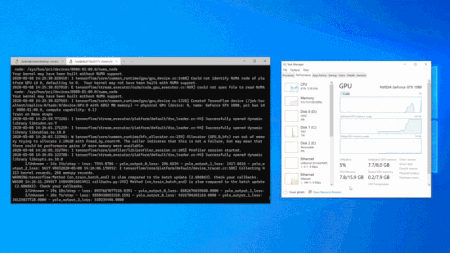
Adding GPU compute support to WSL has been our #1 most requested feature since the first release. Over the last few years, the WSL, Virtualization, DirectX, Windows Driver, Windows AI teams, and our silicon partners have been working hard to deliver this capability.6.5KViews2likes0CommentsRunning Text to Image and Text to Video with ComfyUI and Nvidia H100 GPU
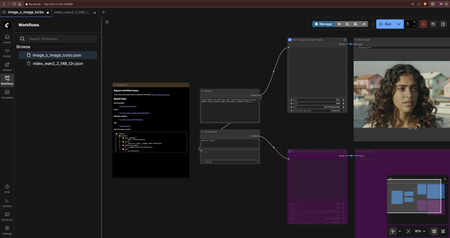
This guide provides instructions on how to set up and run Text to Image and Text to Video generation using ComfyUI with an Nvidia H100 GPU on Azure VMs. ComfyUI is a node-based user interface for Stable Diffusion and other AI models. It allows users to create complex workflows for image and video generation using a visual interface. With the power of GPUs, you can significantly speed up the generation process for high-quality images and videos. A video format is available for watching. Steps to create the infrastructure Option 1. Using Terraform (Recommended) In this guide, the provided Terraform template available here: ai-course/550_comfyui_on_vm at main · HoussemDellai/ai-course will create the following: Create the infrastructure for Ubuntu VM with Nvidia H100 GPU Install CUDA drivers on the VM Install ComfyUI on the VM Download the models for Text to Image (Z-Image-Turbo) and Text to Video generation (Wan 2.2 and LTX-2) Deploy the Terraform template using the following commands: # Initialize Terraform terraform init # Review the Terraform plan terraform plan tfplan # Apply the Terraform configuration to create resources terraform apply tfplan This should take about 15 minutes to create all the resources with the configuration defined in the Terraform files. The following resources will be created: If you choose to use Terraform, after the deployment is complete, you can access the ComfyUI portal using the output link shown in the Terraform output. It should look like this http://<VM_IP_ADDRESS>:8188. And that should be the end of the setup. You can then proceed to use ComfyUI for Text to Image and Text to Video generation as described in the later sections. Option 2. Manual Setup 0. Create a Virtual Machine with Nvidia H100 GPU Create an Azure virtual machine with Nvidia H100 GPUs like sku: Standard NC40ads H100 v5. Choose a Linux distribution of your choice like Ubuntu Pro 24.04 LTS. 1. Install Nvidia GPU and CUDA Drivers SSH into the Ubuntu VM and install the CUDA drivers by following the official Microsoft documentation: Install CUDA drivers on N-series VMs. # 1. Install ubuntu-drivers utility: sudo apt-get update sudo apt-get install ubuntu-drivers-common -y # 2. Install the latest NVIDIA drivers: sudo ubuntu-drivers install # 3. Download and install the CUDA toolkit from NVIDIA: wget https://developer.download.nvidia.com/compute/cuda/repos/ubuntu2404/x86_64/cuda-keyring_1.1-1_all.deb sudo dpkg -i cuda-keyring_1.1-1_all.deb sudo apt-get update sudo apt-get -y install cuda-toolkit-13-1 # 4. Reboot the system to apply changes sudo reboot The machine will now reboot. After rebooting, you can verify the installation of the NVIDIA drivers and CUDA toolkit. # 5. Verify that the GPU is correctly recognized (after reboot): nvidia-smi # 6. We recommend that you periodically update NVIDIA drivers after deployment. sudo apt-get update sudo apt-get full-upgrade -y 2. Install ComfyUI on Ubuntu Follow the instructions from the ComfyUI Wiki to install ComfyUI on your Ubuntu VM using Comfy CLI: Install ComfyUI using Comfy CLI. # Step 1: System Environment Preparation # ComfyUI requires Python 3.12 or higher (Python 3.13 is recommended). Check your Python version: python3 --version # If Python is not installed or the version is too low, install it following these steps: sudo apt-get update sudo apt-get install python3 python3-pip python3-venv -y # Create Virtual Environment # Using a virtual environment can avoid package conflict issues python3 -m venv comfy-env # Activate the virtual environment source comfy-env/bin/activate # Note: You need to activate the virtual environment each time before using ComfyUI. To exit the virtual environment, use the deactivate command. # Step 2: Install Comfy CLI # Install comfy-cli in the activated virtual environment: pip install comfy-cli # Step 3: Install ComfyUI using Comfy CLI with NVIDIA GPU Support # use 'yes' to accept all prompts yes | comfy install --nvidia # Step 4: Install GPU Support for PyTorch pip install torch torchvision torchaudio --extra-index-url https://download.pytorch.org/whl/cu130 # Note: Please choose the corresponding PyTorch version based on your CUDA version. Visit the PyTorch website for the latest installation commands. # Step 5. Launch ComfyUI # By default, ComfyUI will run on http://localhost:8188. # and don't forget the double -- comfy launch --background -- --listen 0.0.0.0 --port 8188 Note that you can run ComfyUI with different modes based on your hardware capabilities: --cpu: Use CPU mode, if you don't have a compatible GPU --lowvram: Low VRAM mode --novram: Ultra-low VRAM mode 3. Using ComfyUI for Text to Image Once ComfyUI is running, you can access the web interface via your browser at http://<VM_IP_ADDRESS>:8188 (replace <VM_IP_ADDRESS> with the actual IP address of your VM). Note that you should ensure that the VM's network security group (NSG) allows inbound traffic on port 8188. You can create Text to Image generation workflows using the templates available in ComfyUI. Go to Workflows and select a Text to Image template to get started. Choose Z-Image-Turbo Text to Image as an example. After that, ComfyUI will detect that there are some missing models to download. You will need to download each model into its corresponding folder. For example, the Stable Diffusion model should be placed in the models/Stable-diffusion folder. The models download links and their corresponding folders are shown in the ComfyUI interface. Let's download the required models for Z-Image-Turbo. cd comfy/ComfyUI/ wget -P models/text_encoders/ https://huggingface.co/Comfy-Org/z_image_turbo/resolve/main/split_files/text_encoders/qwen_3_4b.safetensors wget -P models/vae/ https://huggingface.co/Comfy-Org/z_image_turbo/resolve/main/split_files/vae/ae.safetensors wget -P models/diffusion_models/ https://huggingface.co/Comfy-Org/z_image_turbo/resolve/main/split_files/diffusion_models/z_image_turbo_bf16.safetensors wget -P models/loras/ https://huggingface.co/tarn59/pixel_art_style_lora_z_image_turbo/resolve/main/pixel_art_style_z_image_turbo.safetensors Note that here you can either use comfy model download command or wget to download the models into their corresponding folders. Once the models are downloaded, you can run the Text to Image workflow in ComfyUI. You can also change the parameters as needed like the prompt. When ready, click the Run blue button at the top right to start generating the image. It will take some time depending on the size of the image and the complexity of the prompt. Then you should see the generated image in the output node. 5. Using ComfyUI for Text to Video To use ComfyUI for Text to Video generation, you can select a Text to Video template from the Workflows section. Choose Wan 2.2 Text to Video as an example. Then you will need to install the required models. wget -P models/text_encoders/ https://huggingface.co/Comfy-Org/Wan_2.1_ComfyUI_repackaged/resolve/main/split_files/text_encoders/umt5_xxl_fp8_e4m3fn_scaled.safetensors wget -P models/vae/ https://huggingface.co/Comfy-Org/Wan_2.2_ComfyUI_Repackaged/resolve/main/split_files/vae/wan_2.1_vae.safetensors wget -P models/diffusion_models/ https://huggingface.co/Comfy-Org/Wan_2.2_ComfyUI_Repackaged/resolve/main/split_files/diffusion_models/wan2.2_t2v_low_noise_14B_fp8_scaled.safetensors wget -P models/diffusion_models/ https://huggingface.co/Comfy-Org/Wan_2.2_ComfyUI_Repackaged/resolve/main/split_files/diffusion_models/wan2.2_t2v_high_noise_14B_fp8_scaled.safetensors wget -P models/loras/ https://huggingface.co/Comfy-Org/Wan_2.2_ComfyUI_Repackaged/resolve/main/split_files/loras/wan2.2_t2v_lightx2v_4steps_lora_v1.1_high_noise.safetensors wget -P models/loras/ https://huggingface.co/Comfy-Org/Wan_2.2_ComfyUI_Repackaged/resolve/main/split_files/loras/wan2.2_t2v_lightx2v_4steps_lora_v1.1_low_noise.safetensors Models for LTX-2 Text to Video can be downloaded similarly. wget -P models/checkpoints/ https://huggingface.co/Lightricks/LTX-2/resolve/main/ltx-2-19b-dev-fp8.safetensors wget -P models/text_encoders/ https://huggingface.co/Comfy-Org/ltx-2/resolve/main/split_files/text_encoders/gemma_3_12B_it_fp4_mixed.safetensors wget -P models/latent_upscale_models/ https://huggingface.co/Lightricks/LTX-2/resolve/main/ltx-2-spatial-upscaler-x2-1.0.safetensors wget -P models/loras/ https://huggingface.co/Lightricks/LTX-2/resolve/main/ltx-2-19b-distilled-lora-384.safetensors wget -P models/loras/ https://huggingface.co/Lightricks/LTX-2-19b-LoRA-Camera-Control-Dolly-Left/resolve/main/ltx-2-19b-lora-camera-control-dolly-left.safetensors Models for Qwen Image 2512 Text to Image can be downloaded similarly. wget -P models/text_encoders/ https://huggingface.co/Comfy-Org/Qwen-Image_ComfyUI/resolve/main/split_files/text_encoders/qwen_2.5_vl_7b_fp8_scaled.safetensors wget -P models/vae/ https://huggingface.co/Comfy-Org/Qwen-Image_ComfyUI/resolve/main/split_files/vae/qwen_image_vae.safetensors wget -P models/diffusion_models/ https://huggingface.co/Comfy-Org/Qwen-Image_ComfyUI/resolve/main/split_files/diffusion_models/qwen_image_2512_fp8_e4m3fn.safetensors wget -P models/loras/ https://huggingface.co/lightx2v/Qwen-Image-Lightning/resolve/main/Qwen-Image-Lightning-4steps-V1.0.safetensors Models for Flux2 Klein Text to Image 9B can be downloaded similarly. wget -P models/text_encoders/ https://huggingface.co/Comfy-Org/flux2-klein-9B/resolve/main/split_files/text_encoders/qwen_3_8b_fp8mixed.safetensors wget -P models/vae/ https://huggingface.co/Comfy-Org/flux2-dev/resolve/main/split_files/vae/flux2-vae.safetensors wget -P models/diffusion_models/ https://huggingface.co/black-forest-labs/FLUX.2-klein-base-9b-fp8/resolve/main/flux-2-klein-base-9b-fp8.safetensors wget -P models/diffusion_models/ https://huggingface.co/black-forest-labs/FLUX.2-klein-9b-fp8/resolve/main/flux-2-klein-9b-fp8.safetensors Important notes Secure Boot is not supported using Windows or Linux extensions. For more information on manually installing GPU drivers with Secure Boot enabled, see Azure N-series GPU driver setup for Linux. Src: https://learn.microsoft.com/en-us/azure/virtual-machines/extensions/hpccompute-gpu-linux Sources - Install CUDA drivers on N-series VMs: https://learn.microsoft.com/en-us/azure/virtual-machines/linux/n-series-driver-setup#install-cuda-drivers-on-n-series-vms - Install ComfyUI using Comfy CLI: https://comfyui-wiki.com/en/install/install-comfyui/install-comfyui-on-linux Disclaimer The sample scripts are not supported under any Microsoft standard support program or service. The sample scripts are provided AS IS without warranty of any kind. Microsoft further disclaims all implied warranties including, without limitation, any implied warranties of merchantability or of fitness for a particular purpose. The entire risk arising out of the use or performance of the sample scripts and documentation remains with you. In no event shall Microsoft, its authors, or anyone else involved in the creation, production, or delivery of the scripts be liable for any damages whatsoever (including, without limitation, damages for loss of business profits, business interruption, loss of business information, or other pecuniary loss) arising out of the use of or inability to use the sample scripts or documentation, even if Microsoft has been advised of the possibility of such damages.Watercolor Effect rendering bug on New Microsoft Edge
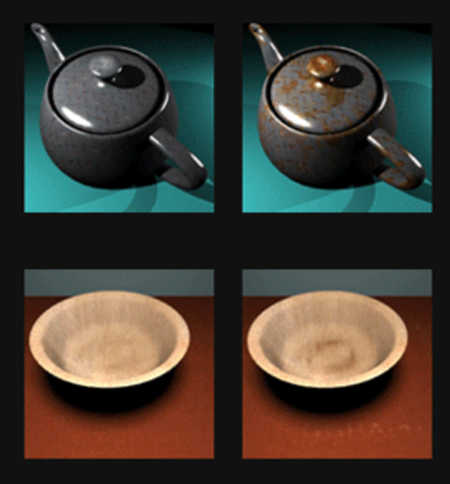
This bug is ridiculous and funny at the same time. For some reasons, the whole Edge UI and the webpage, difuses pixels, gets blurry like if you dip your watercolor paint into water, that's what it looks like to me. Prolly some antialiasing bug on the GPU. My GPU btw is AMD 10-5750M APU with Radeon HD Graphics 2.50 GHz. This is still a good and fairly new laptop to me, a midrange Asus laptop from 2014. For some reasons, the only thing that's alright is the More options menu and all the context menu. The rest gets blurry. Here's a more detailed behavior description of the bug: If something is updating on the page, e.g. a circle loader, the whole UI will gets blurry fast, but when you just stay it still, leave Edge idle, it'll still gets blurry, but at much slower rate. After so much of blurring, it always gets back and rerender it again, and the output get's clear now, but it gets blurry again after some time. It's a loop behavior. And at it's very normal state, it never gets really clear enough, unlike the how clear the context or more options menu get's rendered. Here's a https://youtu.be/biXdixIGndM detailing the bug in screen capture Please investigate this bug1.5KViews1like2CommentsAzure Cloud–GPU for DataScience and Academic Activities such as Cloud Rendering
First published on MSDN on Jan 10, 2017 I am really excited in the way some UK Universities are using Azure GPU Cloud services, back in Dec 2016 we announced the general availability of the Azure N-Series.896Views1like0Comments
How do I get windows 10 dev preview now ? as windows 11 is being tested
I would like to get windows 10 build 20150+ as I don't want an update to windows 11 which I already tested and rolled back due to several issues, I just need something that could give me the preview build without upgrading to windows 11, As I desperately need it for a project that involves GPU compute in Linux Like some kind of a enablement package. Please Help8.3KViews1like2CommentsIntel graphics driver in Windows Update for IGPU I7 7700K is OUTDATED
On Windows 10 build 20H1 Stable And also on build 19042.330 (slow/beta) ring, the graphic driver that is automatically installed from Windows Update is extremely Outdated. the latest version is 27.20.100.8280 which is officially available on Intel website. but the version that gets installed automatically from Windows Update is 26.xxxxx Feedback Hub: https://aka.ms/AA8r3yx2.6KViews1like2Comments