Digital Takeover/Lockdown
My web developer has taken over my M365 & Copilot (along with my domain, google workspace, GitHub, Manus.im account, Stripe, Shopify, my financial accounts, and so on) and made has made himself Super admin and/or created an enterprise hierarchy that then turns myself, THE OWNER, into a USER; if he allows me access at all. I have been in an active digital lockout for going on 5 months now. I am at the local library currently trying to find a solution to regaining control. I have been dealing with redirected and limited browsers, blocked accounts, email accounts forwarded and new emails created, and then, even my calls and texts are being forwarded and/or blocked. From taking over my account's admin, a malicious DNS change, using rootkit malware, harmful scripts, injected code, utilizing my API's and tokens to gain access and then lock me out, to deploying autonomous ai agents onto my desktop...It only gets worse! He is also a third-party service provider and has led this persistent attack on my business by hacking EVERY mobile device I have purchased by using my location, Bluetooth, and sharing apps to hack my network and take control. No, this is not a joke. This is my VERY REAL AND VERY CURRENT NIGHTMARE! PLEASE, HELP ME! -Brittany Hamm Diary of a Momtrepreneur/Cullmanspaces.com/brittanyhamm.base44.app360Views0likes1Comment
Google Workspace to microsoft 365 migration
When we are migrating from Google workspace to Microsoft 365 using Microsoft automated migration method, what are the chances of emails getting duplicated if in Google an email has multiple labels tagged. And also, what's the limit of user data we can migrate per day and how many concurrent users we can migrate?1.7KViews0likes8CommentsCreating a Fun Multi-Agent Content Strategy System with Microsoft Agent Framework
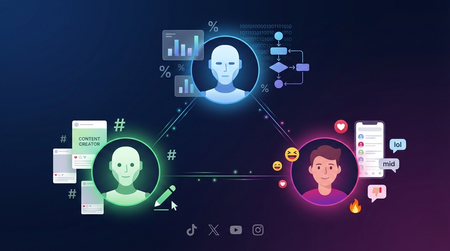
This tutorial walks you through building a multi-agent content strategy system using Microsoft's AutoGen framework. Three specialised AI agents — a Content Creator, an Algorithm Simulator, and an Audience Persona — collaborate to help gaming content creators pressure-test their social media posts before publishing. Using live Google Trends data and platform-specific scoring rubrics for TikTok, Twitter/X, YouTube, and Instagram, the system generates content, predicts how each platform's algorithm would distribute it, and simulates authentic audience reactions. The tutorial covers core multi-agent patterns including role specialisation, structured evaluation, iterative feedback loops, and resilient tool integration — all running on GitHub Models' free tier.1.1KViews0likes0CommentsGoogle Meet Links Not Opening on Intune-Managed Devices
We recently encountered an issue where Google Meet links could not be opened on devices managed via Microsoft Intune. This behavior was consistent across multiple users and devices, and it raised questions about whether this was a configuration issue, a policy conflict, or something else entirely. Symptoms Clicking a Google Meet link (e.g., https://meet.google.com/xyz-abc-def) results in no action. Tried to open it from Outlook, Gmail or Google-Calendar When Opening with the Browser, we get a Redirection to Google-Play-Store, but the Google-Meet App ist already installed. Behavior is consistent across Outlook, Teams, and other apps that handle links. We tried different Default Browers (Edge and Chrome) and Outlook, Gmail, Google Calendar and Google Meets are configured as managed Apps Is this a known Issue or can this be fixed with Intune Configurations? Looking forward to your feedback.536Views0likes5Comments
Google Play Web apps in Edge
Hi Community, We build quite a lot of Webapps in Managed Google Play and assign those to our Android devices managed in Intune as Dedicated with Entra ID Shared device mode. We run MS Edge as the default browser. Lately we have discovered that Webapps, pointing to web sites where you write text in a input field, especially if the text box is at the bottom of the screen, doesn´t behave as we expect. When the virtual keyboard is activated it often hides the text box, making it impossible to see what you write. If we open Edge and manually browse to the same site, it behaves better. I have also tested to open the Web app in Chrome which works as expected. It doesnt matter if I create the Web app with "Fullscreen" "Standalone" or "Minimal UI" display mode. First image shows the site opened manually in Edge. The textbox is moved above the keyboard Same site opened as a Web app. When activating the keyboard, the text box becomes hidden under the keyboard124Views0likes0Comments
Android enrolment stuck at installing apps
Hi, We are seeing some issues lately with device enrolment on Android with the wizard getting stuck at installing required apps, even with one app (Intune). I've seen a few posts at the start of the year where this issue also persisted which suggested it was a Google issue, which would seem true here as the issue occurs across multiple tenants. So far we've tried: Leaving the device for 2 hours to install apps Different Android enrolment profiles (Dedicated is primary method) Enrolling via Knox and QR methods Multiple devices Multiple Wi-Fi networks Multiple tenants (one being completely green-field) Removing all entries of the device in Intune and Entra ID before attempting re-enrolment Removed all apps from configuration, leaving just the Intune app as default Unassigned all enrolment restrictions Intune does create a device entry for the device despite not reaching the home screen, with configuration policies showing as successfully applied. Registering the device with Entra is more temperamental though. As mentioned, Dedicated enrolment is our primary method. We did see that a previously enrolled device did successfully enrol when using Fully Managed but this doesn't help us. A new device that had never been enrolled before did enrol successfully and quickly but have yet to it again. We are using Samsung devices running Android 14.1.9KViews0likes3Comments
Issue setting up Managed Google Play in Intune Endpoint
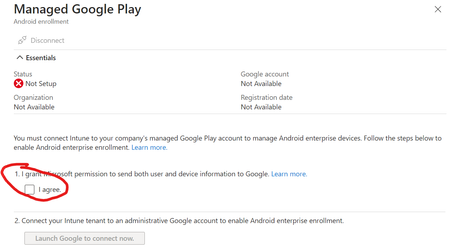
When trying to setup Managed Google Play in Intune Endpoint, it sometimes lets me check the box, and sometimes it is greyed out. After I select to Launch when I can check the box it either asks for my google account which I put in my business account after having signed in to the page per https://learn.microsoft.com/en-us/mem/intune/enrollment/connect-intune-android-enterprise and it comes up and says the page has expired. Refresh on your EMM console. Have tried a couple times and not getting anywhere. There has been some discussions on Reddit and such in the last 24 hours about this so wondering if there is an issue somewhere? I don't see anything in the M365 system health about an issue.1.5KViews0likes1CommentGoogle to Support and Empower Over 1,550 Women Developers in Pakistan
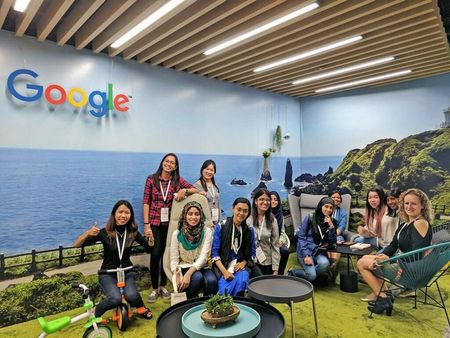
Google in this initiative is organizing around seven Women Techmakers (WTM) events in over five different cities of Pakistan Tech giant Google, as a part of its initiative, is organizing different women developer events named the Women Techmakers (WTM). According to details, Google will organize around 7 Women Techmakers (WTM) events in over five different cities of Pakistan. These events will reportedly support and empower around 1,550 women developers, all over Pakistan. Women Techmakers (WTM), as the name suggests is a Google led initiative aimed to provide visibility, community, and resources to all women in the tech industry. The first day and event of the https://developers.google.com/womentechmakers started on 8th March, which is also celebrated as the International Women’s Day. Google’s theme and hashtag for this year’s WTM event is the ‘#DareToBe’, where Google tells women to be courageous, confident and achieve big dreams. “Whether it’s bold, resilient or innovative, we invite everyone to think about all the ways they will “Dare To Be” in 2023” says WTM. According to details, the events will contain a number of different activities which include rallies, workshops, networking events and conferences. Starting on March 8, these events will continue into May. These events will provide women with training in multiple areas which includes leadership, technical skills, and how to overcome unique challenges facing women in tech. “These events, in collaboration with Women Techmakers (WTM) Ambassadors, don’t only recognize the accomplishments of women in tech, but will also encourage more women to join the fast-growing tech industry.” said Farhan S. Qureshi, Google Regional Director for Pakistan, Bangladesh and Sri Lanka “Over the years, WTM and its ambassadors have organized many events that have helped women developers reach their true and full potential. That said, the program will promote diversity, equality, and inclusion in the tech sector, which is the primary mission of Google” he added.1.6KViews1like0Comments