gmail support
1 Topic
Outlook suddenly cannot access Gmail
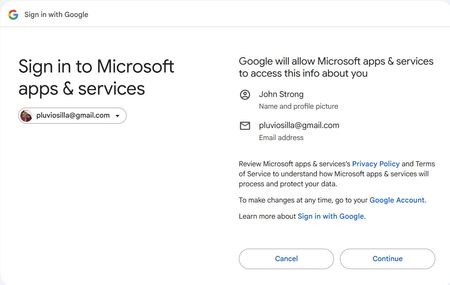
I suddenly started getting a message in Outlook saying "SIGN IN: Your account email address removed for privacy reasons needs attention, please sign in to use your account" It was followed by a button labeled "Sign in via browser". When I press that button, I'm taken to the following webpage: But when I press Continue I get the following error: You have denied Office access to Google - IMAP. Please grant Office access to Google - IMAP and try again. After a lengthy back-and-forth with ChatGPT, I ended up deleting my Gmail account in Outlook as well as my IMAP credentials in Windows 11, but it did not fix the problem. When I try to add back the account, I get all the same errors in all the same places. I found one post on the internet where a use claimed to have fixed this problem by changing the names of the IMAP & SMTP server in Outlook: In Outlook, add the account as IMAP manually: IMAP server: change imap.gmail.com to imap.googlemail.com Port: 993 SMTP server: change smtp.gmail.com to smtp . googlemail.com Port: 465 None of that helps.2.5KViews0likes1Comment