github
6 TopicsUnlocking AI-Driven Data Access: Azure Database for MySQL Support via the Azure MCP Server
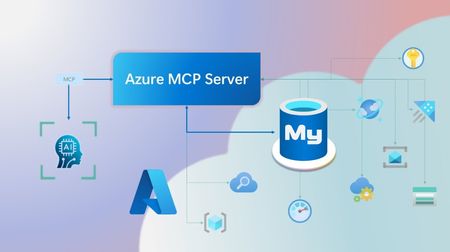
Step into a new era of data-driven intelligence with the fusion of Azure MCP Server and Azure Database for MySQL, where your MySQL data is no longer just stored, but instantly conversational, intelligent and action-ready. By harnessing the open-standard Model Context Protocol (MCP), your AI agents can now query, analyze and automate in natural language, accessing tables, surfacing insights and acting on your MySQL-driven business logic as easily as chatting with a colleague. It’s like giving your data a voice and your applications a brain, all within Azure’s trusted cloud platform. We are excited to announce that we have added support for Azure Database for MySQL in Azure MCP Server. The Azure MCP Server leverages the Model Context Protocol (MCP) to allow AI agents to seamlessly interact with various Azure services to perform context-aware operations such as querying databases and managing cloud resources. Building on this foundation, the Azure MCP Server now offers a set of tools that AI agents and apps can invoke to interact with Azure Database for MySQL - enabling them to list and query databases, retrieve schema details of tables, and access server configurations and parameters. These capabilities are delivered through the same standardized interface used for other Azure services, making it easier to the adopt the MCP standard for leveraging AI to work with your business data and operations across the Azure ecosystem. Before we delve into these new tools and explore how to get started with them, let’s take a moment to refresh our understanding of MCP and the Azure MCP Server - what they are, how they work, and why they matter. MCP architecture and key components The Model Context Protocol (MCP) is an emerging open protocol designed to integrate AI models with external data sources and services in a scalable, standardized, and secure manner. MCP dictates a client-server architecture with four key components: MCP Host, MCP Client, MCP Server and external data sources, services and APIs that provide the data context required to enhance AI models. To explain briefly, an MCP Host (AI apps and agents) includes an MCP client component that connects to one or more MCP Servers. These servers are lightweight programs that securely interface with external data sources, services and APIs and exposes them to MCP clients in the form of standardized capabilities called tools, resources and prompts. Learn more: MCP Documentation What is Azure MCP Server? Azure offers a multitude of cloud services that help developers build robust applications and AI solutions to address business needs. The Azure MCP Server aims to expose these powerful services for agentic usage, allowing AI systems to perform operations that are context-aware of your Azure resources and your business data within them, while ensuring adherence to the Model Context Protocol. It supports a wide range of Azure services and tools including Azure AI Search, Azure Cosmos DB, Azure Storage, Azure Monitor, Azure CLI and Developer CLI extensions. This means that you can empower AI agents, apps and tools to: Explore your Azure resources, such as listing and retrieving details on your Azure subscriptions, resource groups, services, databases, and tables. Search, query and analyze your data and logs. Execute CLI and Azure Developer CLI commands directly, and more! Learn more: Azure MCP Server GitHub Repository Introducing new Azure MCP Server tools to interact with Azure Database for MySQL The Azure MCP Server now includes the following tools that allow AI agents to interact with Azure Database for MySQL and your valuable business data residing in these servers, in accordance with the MCP standard: Tool Description Example Prompts azmcp_mysql_server_list List all MySQL servers in a subscription & resource group "List MySQL servers in resource group 'prod-rg'." "Show MySQL servers in region 'eastus'." azmcp_mysql_server_config_get Retrieve the configuration of a MySQL server "What is the backup retention period for server 'my-mysql-server'?" "Show storage allocation for server 'my-mysql-server'." azmcp_mysql_server_param_get Retrieve a specific parameter of a MySQL server "Is slow_query_log enabled on server my-mysql-server?" "Get innodb_buffer_pool_size for server my-mysql-server." azmcp_mysql_server_param_set Set a specific parameter of a MySQL server to a specific value "Set max_connections to 500 on server my-mysql-server." "Set wait_timeout to 300 on server my-mysql-server." azmcp_mysql_table_list List all tables in a MySQL database "List tables starting with 'tmp_' in database 'appdb'." "How many tables are in database 'analytics'?" azmcp_mysql_table_schema_get Get the schema of a specific table in a MySQL database "Show indexes for table 'transactions' in database 'billing'." "What is the primary key for table 'users' in database 'auth'?" azmcp_mysql_database_query Executes a SELECT query on a MySQL Database. The query must start with SELECT and cannot contain any destructive SQL operations for security reasons. “How many orders were placed in the last 30 days in the salesdb.orders table?” “Show the number of new users signed up in the last week in appdb.users grouped by day.” These interactions are secured using Microsoft Entra authentication, which enables seamless, identity-based access to Azure Database for MySQL - eliminating the need for password storage and enhancing overall security. How are these new tools in the Azure MCP Server different from the standalone MCP Server for Azure Database for MySQL? We have integrated the key capabilities of the Azure Database for MySQL MCP server into the Azure MCP Server, making it easier to connect your agentic apps not only to Azure Database for MySQL but also to other Azure services through one unified and secure interface! How to get started Installing and running the Azure MCP Server is quick and easy! Use GitHub Copilot in Visual Studio Code to gain meaningful insights from your business data in Azure Database for MySQL. Pre-requisites Install Visual Studio Code. Install GitHub Copilot and GitHub Copilot Chat extensions. An Azure Database for MySQL with Microsoft Entra authentication enabled. Ensure that the MCP Server is installed on a system with network connectivity and credentials to connect to Azure Database for MySQL. Installation and Testing Please use this guide for installation: Azure MCP Server Installation Guide Try the following prompts with your Azure Database for MySQL: Azure Database for MySQL tools for Azure MCP Server Try it out and share your feedback! Start using Azure MCP Server with the MySQL tools today and let our cloud services become your AI agent’s most powerful ally. We’re counting on your feedback - every comment, suggestion, or bug-report helps us build better tools together. Stay tuned: more features and capabilities are on the horizon! Feel free to comment below or write to us with your feedback and queries at AskAzureDBforMySQL@service.microsoft.com.338Views2likes0CommentsBuild AI-Ready Apps and Agents with PostgreSQL on Azure
As developers, we’re constantly looking for ways to build smarter, faster, and more scalable applications. The Microsoft Reactor series, Build AI apps with Azure Database for PostgreSQL, is a four-part livestream experience designed to help you do just that—by combining the power of PostgreSQL with Azure’s AI capabilities. Dive into the world of AI apps and agents with Azure Database for PostgreSQL in this engaging video series—your ideal starting point for building intelligent solutions and improving your workflow. Get ready to explore the fundamentals of AI and discover how vector support in databases can elevate your applications. Uncover how innovative tools like the Visual Studio Code extension for PostgreSQL and GitHub Copilot can make your database work faster and more efficient. You'll also see how to create intelligent apps and AI agents using frameworks such as LangChain and Semantic Kernel. Why This Series Matters PostgreSQL is already a favorite among developers for its flexibility and open-source strength. But when paired with Azure’s AI services, it becomes a launchpad for intelligent applications. This series walks you through how to: Orchestrate AI agents using PostgreSQL as a foundation. Enhance semantic search with vector support and indexes like DiskANN. Integrate Azure AI services to enrich your data and user experiences. Boost productivity with tools like the Visual Studio Code PostgreSQL extension and GitHub Copilot. What You'll Learn Each session is packed with practical insights: Episode 1: Laying the foundation: AI-powered apps and agents with Azure Database for PostgreSQL We introduce key AI concepts, setting the stage for a deeper understanding of Large Language Models (LLMs) and its applications, we will explore the capabilities of Azure Database for PostgreSQL, focusing on how its vector support enables advanced semantic search through technologies like DiskANN indexes. We'll also discuss the Azure AI extension, which brings powerful AI features to your data projects, helping you enrich your applications with enhanced search relevance and intelligent insights, and provide a solid foundation for leveraging these tools in your own solutions. Register here Episode 2: Accelerate your data and AI tasks with the VS Code extension for PostgreSQL and GitHub Copilot This talk will delve into how the Visual Studio Code extension for PostgreSQL can streamline your database management, while GitHub Copilot's AI-powered assistance can boost your productivity. Learn how to seamlessly integrate these tools to enhance your workflow, automate repetitive tasks, and write efficient code faster. Whether you're a developer, data scientist, or database administrator, this session will provide you with practical insights and techniques to elevate your data and AI projects. Join us to learn how to effectively use these advanced tools and take your data skills to the next level. Register here Episode 3: Build your own AI copilot for financial apps with PostgreSQL Join us to discover how to transform traditional financial applications into intelligent, AI-powered solutions with Azure Database for PostgreSQL. In this hands-on session, you'll learn to integrate generative AI for high-quality responses to financial queries using PDF-based Statements of Work and invoices, perform AI-driven data validation, apply the Azure AI extension, implement vector search with DiskANN indexes, enhance results with semantic re-ranking, use the LangChain framework, and leverage GraphRAG on Azure Database for PostgreSQL. By the end, you’ll have gained practical skills to build end-to-end AI-driven applications using your own data and projects. Register here Episode 4: Build advanced AI Agents with PostgreSQL Using a sample dataset of legal cases, we’ll show how AI technologies empower intelligent agents to provide high-quality answers to legal queries. In this session, you’ll learn to build an advanced AI agent with Azure Database for PostgreSQL, integrating generative AI for enhanced data validation, retrieval-augmented generation (RAG), semantic re-ranking, Semantic Kernel, and GraphRAG via the Apache AGE Graph extension. This practical demonstration offers insights into developing robust, intelligent solutions using your own data. Register here Join us for an inspiring and hands-on experience—don’t miss out! Get the full series details and register now: https://aka.ms/postgres-ai-reactor-series625Views2likes0Comments