github
377 Topics
Mind the Specs: Grading formal specifications and KPIs as artefacts for LLM-driven code generation
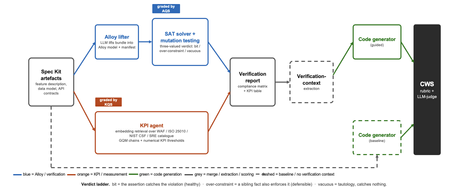
Large language models now write code straight from a prompt, but the specification in between is never checked, and a model asked to judge its own work brings the same blind spots to the review. We built a pipeline that lifts a plain-language requirements bundle into two graded specifications (a formal Alloy model and a set of numerical KPI targets), scores both before a single line of code is written, and hands the graded result to the code generator. It starts from GitHub Spec Kit and the Azure Well-Architected Framework. Here is what we built, and what we learned from running it at scale. The problem Writing software used to be four separate activities: gathering requirements, writing a specification, verifying it, and implementing it. A language model collapses all four into a single step. Two of those activities used to give us a quality signal before any code existed: a formal specification you could inspect, and measurable targets an implementation had to hit. The prompt-to-code loop inherits neither. There is no externally observable signal, before a line of code is written, that the requirements a model received are even well-formed enough to drive a correct implementation. You might think the model could just check its own work. It cannot do so reliably. Ask a language model to check the logic it just wrote: not only will it bring the same blind spot to the review, but its stochastic nature will make it produce different answers on each run. A SAT solver does not behave this way. Its verdict is deterministic: the same specification produces the same verdict every time. The thing that historically kept formal specification out of everyday development was never its rigour, it was the cost of writing the specification by hand. And that is exactly the step a language model can now do. What we built We built an agentic pipeline that sits between the requirements and the generated code. In plain terms it takes the requirements once, turns them into two things that can be checked by a machine: a precise description of rules that the system must obey, and a set of measurable targets that the system must hit. These artefacts are both graded, and are handed to the code generator. We split the work in two and gave each half to the tool that is good at it. The language model does the creative part, turning messy prose into formal structure. Deterministic checks, not the model's own opinion, grade what it produces. From a single Spec Kit artefacts bundle the pipeline builds two graded specifications before any code exists, and then carries both into code generation. Since these grades are computed deterministically rather than just generated, you can actually trust them. The input is a GitHub Spec Kit bundle. Spec Kit is an open-source, specification-first toolkit: instead of prompting for code directly, you describe what you want to build, and it produces a set of structured artefacts, a feature specification, a data model, and a set of API contracts. Our pipeline reads that bundle and turns it into the two graded specifications in parallel. overview. Spec Kit artefacts on the left. The Alloy lifter (with SAT solver and the attack step) and the KPI agent run in parallel. Their graded outputs are merged into a verification report that feeds the guided code generator. A dashed baseline path feeds the goal alone to the generator for comparison. Lift the requirements into a formal model The first half is structural. An Alloy lifter translates the requirements into a formal model written in Alloy, a specification language whose rules a SAT solver can check exhaustively, and whose verdict is deterministic, so the grade never depends on asking an LLM what it thinks. A banking requirement like "zero balance discrepancies" becomes a precise, checkable rule: the money leaving one account and the money arriving in another must always add up to the balances you started with, so a transfer can never quietly create or destroy money. The solver searches for any scenario that would break the rule. We modified Spec Kit's templates to force the model to output functional requirements and their corresponding Alloy code blocks in a structured format. Against the stock templates, that change alone nearly doubled the Alloy code compilation rate, jumping from 40 to 74 percent. A machine-written specification cannot be trusted, though, so the lifter does more than write it: it attacks it. Each load-bearing rule is deliberately broken by clearing its body and injecting a clause that forces a violation and the solver is re-run on the broken model. If the solver fails after this mutation, the original rule genuinely caught the violation it was meant to catch. If it still passes, the rule never really constrained anything on its own. Mutation testing usually grades a test suite against a specification that is assumed correct; here the roles are reversed, and the specification itself is on trial. Turn the requirements into measurable targets The second half is measurable. A KPI agent takes the same Spec Kit bundle, retrieves the most relevant principles from the Azure Well-Architected Framework, and derives numerical targets in the Goal-Question-Metric style. Each target carries an explicit threshold, a direction, and a measurement method, the kind of target a monitoring tool could actually track. Where earlier automated approaches stopped at describing quality in words, this half emits the actual numbers an implementation has to satisfy. And the knowledge base is a setting, not a fixture: swapping the Well-Architected Framework for ISO 25010, the NIST Cybersecurity Framework, or Google's SRE workbook requires zero changes to the underlying code. Review the report before any code Both graded halves merge into one human-readable verification report: the patterns the model applied, which rules passed, the counterexamples the solver found, the attack results, and the KPI threshold table. A developer reads it first and can see exactly where the specification is weak: a rule that passed for the wrong reason, or a requirement that nothing covers. After revising the specification, they re-run the lifting phase. Because the process is cached, re-runs are cheap, allowing the developer to loop until the report looks perfect, all before any code exists. The work shifts from reviewing generated code after the fact to curating a specification and reading a report before anything is built. Carry the graded context into code generation Only then does the report do its real job. In the guided pipeline, the merged report becomes the context handed to a code generator, which is asked to implement each rule, requirement, and KPI threshold and to leave markers tracing the code back to them. A baseline generator gets only the plain-language goal. Same generator, same settings; the only difference is whether it can see the graded specification. Feeding graded artefacts, rather than raw prose, into code generation is the piece that ties the whole pipeline together. So three choices separate this from simply asking a model for a spec: the specification is attacked rather than trusted, the targets are numbers rather than prose, and what reaches the code generator is graded evidence rather than raw text. How we tested it We ran the pipeline at scale: 270 Alloy lifts and 1,930 KPI records, across three application domains chosen to differ sharply (banking, software-as-a-service, and healthcare), three levels of requirement detail, four knowledge bases, and three model tiers, with ten runs of each combination so a real effect could be told apart from noise. For the code-generation half, we generated two codes for each case, once with the graded report as context and once from the plain-language goal alone, and compared the two. What we found First, the foundation: the specifications proved gradeable. The rubric cleanly separated sound specifications from degenerate ones. Because it returned the same verdict run after run, the grades are reliable enough to act on. The three key observations are as follows: The model matters more than the prompt Of the two knobs a practitioner controls, the model you choose and the amount of detail you write, the model dominated by roughly nine to one. A weak model could not be rescued by richer requirements. But you do not need the most expensive one: a mid-tier model delivered about 98 percent of the best model's quality at under a third of the cost and about half the time. The cheapest tier was a false economy, producing a model the analyser could even load only 23 percent of the time. More detail can backfire More requirements are not always better. Sparse and standard requirements scored the same, but over-specified requirements collapsed: KPI quality fell from about 0.89 to about 0.73, and the effect held across all four knowledge bases. Pile in too much numerical detail and the pipeline starts echoing the numbers it was handed instead of deriving sound ones, which is the opposite of what more detail is supposed to buy. Graded context produces far better code This is the payoff, and it is the point of the whole pipeline. Across all nine combinations of domain and detail, code generated with the graded verification context scored about 8 out of 10, against about 1 out of 10 for the same generator given only the plain-language goal. The guided code carried the traceability back to each requirement, the named rules, and the structural patterns that a bare prompt gives us no way to know about. This part of the study is a single run per combination, so we report the size and the consistency of the gap rather than a precise average, but the gap was large and it held in every case. What this means for you Four things to take from our study into your own work: Write requirements at a standard, middle level of detail. Not sparse, and not exhaustively numerical. The middle is the sweet spot on both halves of the specification. Reach for a capable mid-tier model before you invest in heavy prompt engineering. Model choice moves quality more than requirement detail does, and the mid tier is the value leader. Give the code generator externally graded context instead of letting it specify for itself. That is where most of the quality gain came from. Treat the knowledge base as a setting worth tuning, not a fixed ingredient. Each is a recommendation that data supports under the conditions we tested, not a universal law. The limit Every grade measures structure, not meaning. A high score says the specification is well-formed, discriminating, and stable. It does not say whether the invariants are the right ones, or the thresholds are the right ones for your deployment. A specification can be perfectly well-formed and still describe the wrong system. That judgement stays with a human, which is where we think it belongs. The pipeline is built to make that judgement efficient by moving it earlier, to curating the specification and reading the report, rather than to remove it. Generated code should not be shipped end to end without human validation. Try it The full pipeline, every input, and the artefacts behind every figure are in the project repository. If you want the Microsoft tools it builds on, start here: Project repository: https://github.com/RadaanMadhan/Specification-Led-Development GitHub Spec Kit: https://github.com/github/spec-kit Azure Well-Architected Framework: https://learn.microsoft.com/en-us/azure/well-architected/ If you'd like to explore the work in more detail, we've included the full technical report in the project repository, covering the related work, methodology, pipeline design, experimental setup, and extended results. About the team This project was carried out by six students at Imperial College London: Leon Hausmann, Charlotte Maxwell, Radaan Madhan, Keshav Das, Anson Huang, and Ander Cobo, in collaboration with Microsoft and supervised by Lee Stott (Microsoft) and Max Cattafi (Imperial College London)55Views1like0CommentsBuilding ShadowQuest: A Multi-Agent RPG
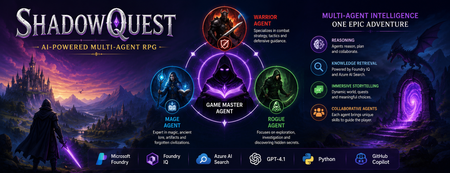
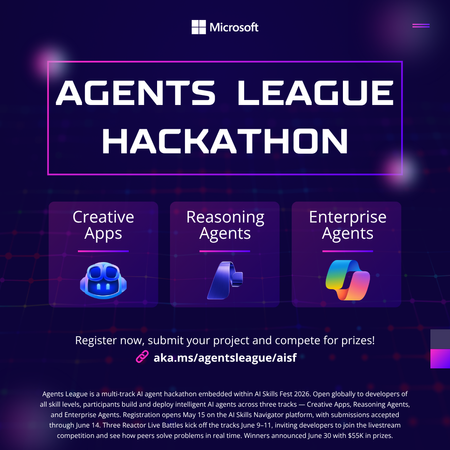
Artificial Intelligence is rapidly evolving beyond traditional chatbots. Today, developers are building intelligent systems where multiple AI agents collaborate, retrieve knowledge, and solve problems together. Microsoft's Agents League Hackathon provided the perfect opportunity to explore this new approach through the Reasoning Agents challenge. For this challenge, I built ShadowQuest, a fantasy role-playing game (RPG) powered by Microsoft Foundry, Foundry IQ, Azure AI Search, GPT-4.1, and GitHub Copilot. The project demonstrates how specialized AI agents can work together while using Retrieval-Augmented Generation (RAG) to deliver accurate and context-aware responses. About the Challenge Microsoft Agents League is a global developer challenge designed to encourage developers to build intelligent AI applications using Microsoft's latest AI technologies. Participants could choose from three tracks: Creative Apps, Reasoning Agents, and Enterprise Agents. I selected the Reasoning Agents track because I wanted to explore how multiple AI agents could collaborate instead of relying on a single large language model. Another important requirement for this year's challenge was integrating at least one Microsoft Intelligence Layer. For ShadowQuest, I chose Foundry IQ as the project's intelligence layer. The Idea Behind ShadowQuest Fantasy RPGs are built around storytelling, exploration, and collaboration between different characters. Every character usually has a unique role, whether it's a warrior protecting the team, a mage interpreting magical knowledge, or a rogue discovering hidden paths. I wanted to recreate this experience using AI. Instead of building one AI assistant responsible for everything, I designed a system where multiple specialized agents collaborate to create a richer and more immersive adventure. ShadowQuest is set in a fantasy world filled with magical artifacts, forgotten kingdoms, mysterious locations, and story-driven quests. Players can ask questions about the world, explore different locations, and learn about the game's lore through conversations with AI agents. Building the Multi-Agent Architecture The architecture follows a simple but scalable design. At the center of the system is the Game Master Agent, which acts as the orchestrator. Every player interaction starts with the Game Master. It receives the player's request, determines what information is needed, retrieves additional knowledge when required, and generates the final response. Supporting the Game Master are three specialized agents: Warrior Agent – Focuses on combat strategy and tactical decisions. Mage Agent – Provides magical knowledge, world lore, and information about ancient artifacts. Rogue Agent – Specializes in exploration, investigation, and discovering hidden information. Each agent has a clearly defined responsibility, making the system easier to understand, maintain, and extend in the future. Using Foundry IQ as the Knowledge Layer One of the most important parts of the project was integrating Foundry IQ. Instead of storing every piece of game information inside prompts, I created a dedicated knowledge base containing information about characters, magical artifacts, locations, quests, and the history of the ShadowQuest world. This approach separates knowledge from reasoning. Whenever a player asks a question, the Game Master Agent first retrieves relevant information from the knowledge base before generating a response. This ensures that answers remain consistent with the game's world while reducing hallucinations. Foundry IQ became the central source of truth for the entire project, making it easy to manage and expand the game world without constantly modifying prompts. Azure AI Search and Retrieval-Augmented Generation To enable intelligent retrieval, I connected Foundry IQ with Azure AI Search. The RPG documents were indexed, and vector embeddings were generated using Microsoft's embedding models. This enables semantic search, allowing the system to understand the meaning behind a player's question instead of relying only on keyword matching. For example, if a player asks about a magical relic without mentioning its exact name, Azure AI Search can still retrieve the correct information based on semantic similarity. The complete workflow looks like this: The player submits a question. The Game Master Agent receives the request. Foundry IQ queries Azure AI Search. Relevant documents are retrieved. GPT-4.1 generates a grounded response using the retrieved context. This Retrieval-Augmented Generation (RAG) approach significantly improves the quality and reliability of responses. Accelerating Development with GitHub Copilot GitHub Copilot played an important role throughout the development process. It helped generate Python classes, improve documentation, create helper functions, and speed up repetitive coding tasks. During the live demonstration, I also showed how Copilot could quickly generate a new Healer Agent, demonstrating how AI-assisted development makes it easier to extend a multi-agent application while maintaining a consistent architecture. Rather than replacing the developer, Copilot acted as an intelligent coding assistant, allowing me to focus more on architecture and design decisions. Demonstrating ShadowQuest During the Microsoft Agents League Reasoning Agents Battle, I demonstrated the Game Master Agent by asking questions about the ShadowQuest world, magical artifacts, and game lore. One of the most interesting parts of the demonstration was observing the retrieval process. Before generating a response, the Game Master Agent called the knowledge retrieval function through Foundry IQ. This confirmed that the system was retrieving relevant information from the indexed knowledge base rather than relying only on GPT-4.1's internal knowledge. This demonstrated how RAG can create more grounded, reliable, and context-aware AI experiences. Lessons Learned Building ShadowQuest taught me that designing multi-agent systems is as much about architecture as it is about AI models. Clearly defining responsibilities for each agent made the application easier to maintain and opened the door for future expansion. I also learned how valuable Retrieval-Augmented Generation can be for applications that depend on structured knowledge. Separating reasoning from knowledge allows AI systems to remain accurate while making it easier to update information over time. Finally, participating in the Microsoft Agents League was an incredible opportunity to experiment with Microsoft's latest AI technologies, learn from other developers, and share ideas with a global community passionate about agentic AI. Looking Ahead ShadowQuest is only the beginning. In future iterations, I plan to expand the project by introducing additional agents such as a Merchant Agent and Healer Agent, implementing persistent player memory, adding dynamic quest generation, improving combat mechanics, and enabling deeper collaboration between agents. These improvements will make the game world more immersive while continuing to explore the possibilities of agent-based AI systems. Conclusion ShadowQuest demonstrates how Microsoft Foundry, Foundry IQ, Azure AI Search, GPT-4.1, and GitHub Copilot can be combined to build intelligent multi-agent applications. More importantly, the project reinforced an important idea: the future of AI is not a single assistant performing every task, but a team of specialized agents collaborating with shared knowledge to solve increasingly complex problems. Participating in the Microsoft Agents League was an inspiring experience that allowed me to explore the next generation of AI development while building a project that combines storytelling, reasoning, and knowledge retrieval. I look forward to continuing this journey and discovering new ways to build intelligent applications using Microsoft's growing AI ecosystem.156Views1like0CommentsMake Your Copilot Credits Count: A Student's Guide to Smarter AI Usage
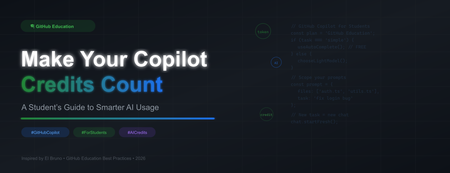
If you're a student enrolled in GitHub Education, you already have something most developers pay for: free access to GitHub Copilot and its premium features. That's incredible. But here's the thing, free access doesn't mean unlimited usage, and not all AI interactions cost the same. Every chat message, every agent task, every model call consumes something called AI Credits, and knowing how they work will help you use Copilot smarter, produce better code, and build the kind of disciplined AI habits that professional developers are only just starting to learn. This post is inspired by a fantastic deep-dive from my collegaue developer advocate Bruno: "GitHub Copilot and Tokens: How to Keep Using AI Without Burning Your Budget" . We've taken those professional lessons and tailored them specifically for students because your learning environment, your assignments, and your goals are different from a seasoned engineer at a tech company. TL;DR: Use autocomplete before chat. Choose the right model. Keep context small. Start fresh chats often. Plan before you build. These habits will make you a better developer and stretch your credits further. What Are AI Credits and Why Do They Matter? When you interact with GitHub Copilot through chat, agent mode, or inline edits the model processes tokens. Tokens are small chunks of text (roughly 3–4 characters each). Every interaction consumes: Input tokens — everything sent to the model (your message, attached files, chat history, instructions) Output tokens — everything the model generates back to you Cached tokens — context the model reuses from previous turns (cheaper) These tokens are converted to AI Credits, where 1 AI Credit = $0.01 USD. Different models have very different token costs a lightweight model like GPT-5 mini charges $0.25 per million input tokens, while a powerful model like GPT-5.5 charges $5.00 per million input tokens (20x more expensive). Using the wrong model for a simple task is like taking a taxi to a destination that's a 5-minute walk. See the official pricing table: GitHub Copilot Models and Pricing . Figure 1: The four cost tiers of Copilot interactions. Autocomplete and Next Edit Suggestions are free — they do not consume AI Credits on paid plans Strategy 1: Tab Before Chat The Free Tier is Powerful Here is the single most impactful habit you can build: always try autocomplete before opening chat. According to GitHub's official billing documentation, code completions and Next Edit Suggestions are not billed as AI Credits on paid plans. That means every time you press Tab to accept an inline suggestion, you are getting AI assistance for free. Use autocomplete (Tab) for: Completing a line or a simple function Generating repetitive boilerplate (constructors, properties, getters/setters) Completing a repeated pattern you've started Writing obvious next lines like console.log , imports, or variable declarations Adjusting variable names inline Only move to Inline Edit (Ctrl+I / Cmd+I) when autocomplete isn't enough for a local change. Only open a Chat window when you need genuine reasoning an explanation, a plan, or a multi-step solution. As Bruno puts it: "The most expensive model in the world should not be helping you write public string Name { get; set; } . That's what Tab is for. And coffee." Strategy 2: Choose the Right Model for the Job GitHub Copilot gives you access to models from OpenAI, Anthropic, and Google each at different price points and capability levels. The key insight from VS Code's official Copilot usage guide is: reserve powerful reasoning models for tasks that genuinely need them. Your Task Recommended Model Tier Example Models Simple question or boilerplate Lightweight GPT-5 mini, Gemini 3 Flash Code explanation or basic docs Lightweight GPT-5 mini, GPT-5.4 nano Writing tests or debugging a single function Medium / Versatile Claude Haiku 4.5, GPT-5.4 Multi-file refactor or code review Medium / Versatile Claude Sonnet 4.6, GPT-5.4 Complex system design or architecture Powerful Claude Opus 4.7, GPT-5.5 Long agentic workflows Powerful (scoped!) Claude Opus 4.8, GPT-5.5 Not sure what you need Auto (recommended default) Copilot selects for you GitHub Copilot's Auto Model Selection feature automatically chooses a model based on task complexity, availability, and policies. For most students, Auto should be your default only switch manually when you have a specific reason. And when the complex task is done, switch back to Auto or a lighter model. Strategy 3: Context is Currency Smaller is Smarter Here's the counterintuitive truth that surprises most developers: the expensive part of a prompt is usually not the question you type it's everything surrounding it. Every token consumed by Copilot includes: All your previous chat messages in the session Every file you have open or attached Workspace search results Copilot pulled in Build output, terminal logs, or diff content Responses from any MCP (Model Context Protocol) servers you have enabled Your custom instructions file ( .github/copilot-instructions.md ) A single question inside a conversation with 80 messages, 12 open files, and 3 tool call results can cost significantly more than the same question asked fresh in a new chat with one relevant file attached. Figure 2: The same task asked two ways. Scope your prompts to save credits and often get better answers. Practical rules for context management: Attach only 2–3 relevant files — not your entire project Don't ask Copilot to analyse the whole repo when you only need changes in one module Paste only the first relevant error from a log, not 2,000 lines of output Remove timestamps and duplicate stack traces from pasted logs State the expected output format explicitly so the model stops early Use /compact in VS Code Chat to summarise a long conversation without losing key context Use /fork to explore an alternative direction without polluting the main conversation Strategy 4: Start Fresh Chats When You Change Tasks This is one of the simplest optimisations and one of the most ignored. The VS Code Copilot usage guide is explicit about it: when a conversation grows, it carries context from all previous messages. If you switch to an unrelated task in the same session, the model still processes that irrelevant history and you pay for it in credits. Bad pattern: Chat session: - "Help me fix the JWT bug in auth.ts" [10 messages] - "Now write unit tests for my sorting algorithm" [still in same chat!] - "Can you generate the README for my project?" [still in same chat!] - "Now debug this CSS layout issue..." [still in same chat!] Smart pattern: Chat 1: "Fix JWT bug in auth.ts" - DONE, close chat. Chat 2: "Write unit tests for sorting algorithm" - DONE, close chat. Chat 3: "Generate README for project" - fresh context, fresh cost. New task = new chat. Your human brain benefits too — focused sessions produce better outcomes than sprawling multi-topic conversations. Strategy 5: Plan Before You Build Use Agent Mode Wisely Agent mode is one of the most powerful Copilot features for students working on larger assignments — it can create files, run terminal commands, edit across multiple files, and execute tests. But agent mode also carries the highest token cost, because it loops: it plans, acts, observes tool output, then plans again. The VS Code documentation recommends separating planning from implementation to reduce rework and back-and-forth. Here's a phased approach that saves credits and produces better results: Figure 3: The credit-smart workflow. Always try the cheaper option first, escalate only when needed. Phase 1: Plan (lightweight model, low cost) I need to add user authentication to my Express app. Before writing any code, give me a step-by-step plan covering which files to create, which packages to install, and what tests to write. Do not write code yet. Phase 2: Scoped Implementation (one feature at a time) Using the plan we agreed, implement only Step 1: create src/middleware/auth.ts with JWT validation. Do not modify any other files yet. Phase 3: Validate Run the existing tests in tests/auth.test.ts and report the results. Fix only test failures related to the new auth middleware. Phase 4: Cleanup The implementation is complete. Update README.md with setup instructions for the auth module. Keep it under 200 words. Each phase is small, scoped, and verifiable. You can stop at any phase, check the result, and only continue when you're satisfied. This dramatically reduces expensive re-runs where the agent reverses its own changes. Strategy 6: Review Your MCP Servers and Custom Instructions MCP Servers MCP (Model Context Protocol) servers let Copilot connect to external tools databases, GitHub issues, Jira, Slack, browser automation, and more. Each enabled server expands what the agent can do, but also adds to the context the model must consider, which increases token usage. For students, a practical rule: only enable MCP servers relevant to your current project. If you're working on a simple Python web app, you probably don't need browser automation, a Kubernetes connector, and a Slack integration all active at the same time. See the VS Code MCP servers documentation for how to enable, disable, and configure them. Custom Instructions A .github/copilot-instructions.md file in your repository lets you give Copilot standing instructions — coding standards, testing commands, architecture conventions. This is a fantastic feature. But that file is included in every prompt's context, so a bloated instructions file costs credits on every single interaction. A good custom instructions file is: Short — under 200 words for a student project Specific to this repository's real conventions Clear about test commands (e.g., npm test , pytest ) Free of generic advice that applies to every codebase on earth Example of a good student instructions file: # Copilot Instructions for MyWebApp Language: TypeScript (strict mode) Framework: Express.js with Prisma ORM Tests: Run with `npm test` (Jest) Lint: Run with `npm run lint` (ESLint + Prettier) Conventions: - Use async/await, not callbacks - Validate all request inputs with Zod - Keep controllers thin; put logic in service files - Write a test for every new public function That's it. Short, actionable, and genuinely useful — not a 500-line manifesto. Strategy 7: Use Traditional Tools First AI is excellent for reasoning, explaining, planning, and connecting ideas. It is not the right tool for every job. Before reaching for Copilot chat, ask yourself whether a traditional tool can answer your question faster, cheaper, and more reliably: Compiler / type-checker — to find type errors (TypeScript, mypy) Linter — to find style and logic issues (ESLint, Pylint, Checkstyle) Formatter — to fix formatting (Prettier, Black, gofmt) Test runner — to confirm whether your code works (Jest, pytest, JUnit) Debugger — to step through execution and inspect state Docs / Stack Overflow — for well-documented APIs and common patterns If your linter tells you there's a missing import, fix it directly — don't ask Copilot to analyse your code to find it. Let deterministic tools do deterministic work, and let AI do the reasoning where it genuinely adds value. Your GitHub Education Benefits: What You Get If you haven't already, apply for GitHub Education with your school email address. Once verified, you receive: Free GitHub Copilot including premium features — see how to enable Copilot as a student Free GitHub Codespaces — 180 core hours per month, equivalent to GitHub Pro (great for browser-based coding with Copilot built in) GitHub Student Developer Pack — free access to dozens of professional tools from GitHub's partners, including cloud credits, domains, and IDEs GitHub Classroom — your instructors can manage assignments and provide feedback GitHub Community Exchange — discover and contribute to student-built projects Campus Experts program — become a student leader in your tech community These benefits are designed to give you real-world tools in an educational setting. Copilot is the standout feature — it's the same tool professional developers use every day. Using it wisely during your studies means you'll arrive in the workforce already ahead of the curve. Pre-Prompt Checklist for Students Before you fire off your next Copilot prompt, run through this checklist. It takes 10 seconds and can save significant credits — and more importantly, it builds the mental habits of a professional AI user. Figure 4: Two-column checklist covering what to check before opening chat and when writing your prompt. Before you open chat: ☐ Can Tab / autocomplete solve this? ☐ Is inline edit (Ctrl+I) enough for this local change? ☐ Can a linter, compiler, or test runner answer this? ☐ Is this a different task from my last message? If so, start a new chat. ☐ Am I on Auto model selection (or the right tier for this task)? ☐ Should I ask for a plan before asking for code? ☐ Do I have MCP servers enabled that I don't need right now? ☐ Is my copilot-instructions.md file concise and current? When writing your prompt: ☐ Attach only 2–3 relevant files, not the whole project ☐ Paste only the first relevant error from any logs ☐ Define the files to change, the goal, and any files not to touch ☐ Ask for a plan before implementation on complex tasks ☐ Remove timestamps and duplicate stack traces from pasted logs ☐ State the expected output format and length ☐ Use /compact if the session is getting long ☐ Use /fork to explore alternatives without polluting the main thread A Note on Responsible AI Use in Education Using Copilot smartly is not just about saving credits it's about developing genuine skills. When you ask Copilot to write all your code without understanding it, you lose the learning opportunity the assignment was designed to create. When you review and understand every suggestion Copilot makes, you learn faster, build better instincts, and can confidently explain your own work. Best practices for academic integrity with AI tools: Understand before you accept — never paste code you can't explain Use Copilot to learn, not to skip learning — ask it to explain the code it generates Follow your institution's AI policy — many universities have specific guidance on AI use in assessments Treat Copilot as a senior pair-programmer, not an answer machine — question its suggestions, push back, iterate Verify facts and documentation links — AI can hallucinate; always check official sources GitHub Education exists to give you real professional tools while you learn. The goal is for you to graduate with genuine skills, a real portfolio, and the confidence that comes from building things yourself — with AI as your collaborator, not your ghostwriter. Key Takeaways Tab first — autocomplete and Next Edit Suggestions are free; use them for everything small Auto model by default — only switch to a powerful model when you have a clear reason Context is cost — fewer files, fewer messages, fewer tools = fewer tokens New task = new chat — don't carry stale context into unrelated work Plan before you build — a 10-message plan session is cheaper than 50 messages of rework Keep instructions short — your copilot-instructions.md runs on every prompt Use traditional tools first — linters and compilers are free, fast, and deterministic Understand your code — Copilot is a collaborator, not a replacement for learning Resources and Next Steps GitHub Education — apply for your free student benefits GitHub Student Developer Pack — explore free tools for students Enable GitHub Copilot as a student GitHub Copilot: Models and Pricing — understand exactly what each model costs Auto Model Selection in GitHub Copilot VS Code: Optimising GitHub Copilot Usage — the official guide that inspired many of these tips Managing MCP Servers in VS Code El Bruno: GitHub Copilot and Tokens (the original professional perspective) GitHub Education Community Discussions — connect with students and educators worldwide This post draws on insights from El Bruno's developer blog and best practices from GitHub Education. All pricing figures are sourced from the official GitHub Copilot billing documentation and are correct as of June 2026.3KViews0likes1CommentAccelerate your AI or agent build to sell on Marketplace with Quick-Start Development Toolkit
Want to skip right to coding in minutes? Start with the interactive wizard in App Advisor Building AI products quickly is becoming table stakes. Building them in a way that supports scalability, repeatability, and a path to commercialization is where software companies create advantage. The challenge now is reducing the time between identifying an opportunity and getting developers working inside a proven structure that supports real deployment outcomes. That’s where the AI, agentic, and Copilot branch of the Quick-Start Development Toolkit helps. Embedded directly within App Advisor, Quick-Start Development Toolkit helps software companies move from concept to implementation faster using guided development patterns, trusted architectures, deployable reference code, and practical resources designed to reduce friction across the development process. Build AI & agentic products faster without starting from scratch Development teams often know the customer scenario they want to solve. What slows momentum is deciding where to begin, selecting architecture patterns, and aligning implementation decisions across teams. The Quick-Start Development Toolkit helps remove that uncertainty. By answering a few focused questions about what you want to build, who it serves, and the products you’re building with, you’re matched with a development pattern designed to accelerate execution. Each development pattern includes: Self-serve, click-to-deploy reference code aligned to your scenario, Sample solution architecture to help visualize products and reduce guesswork, and Practical how-to resources and implementation guidance to overcome friction points, Everything is structured to support faster decision making and help teams move confidently into development. Accelerate development with purpose-built AI accelerators The AI and agent branch of Quick-Start Development Toolkit includes development accelerators designed around high-value scenarios, so your team can spend less time assembling foundations and more time building differentiated experiences. Each of these accelerators is built and fully maintained by Microsoft experts, so you can be confident your code template isn’t stale. Our most popular accelerators include: Multi-Agent Custom Automation Engine Accelerator: Delegate complex, repetitive tasks to AI agents that act on your behalf—executing work efficiently, reducing manual effort, and ensuring results align with your organization's standards. Conversation Knowledge Mining Accelerator: Improve contact center performance with AI-powered conversation intelligence—analyzing audio and text data on a large scale to show insights, improve service, and drive smarter decisions. Accelerate agentic applications for Unified Data Foundations (with Microsoft Fabric): Accelerate decision making at scale with secure, agentic AI built on a unified data foundation with two use cases for sales performance and customer insights. Each pattern includes common use cases, related resources, and pathways to adjacent scenarios so teams can continue progressing without losing momentum. The goal is to help your team move from experimentation to a product that can be packaged, deployed, and prepared for customers. You can see more of our accelerators here Coming this week: The Microsoft IQ solution accelerator leverages a shared intelligence layer to unify data, knowledge, and workflows, enabling AI-powered insights and coordinated actions for measurable business outcomes. Build with Microsoft Marketplace outcomes in mind Development choices shape commercial outcomes. Starting with trusted architecture and structured implementation guidance can help reduce redesign cycles later when preparing to package, publish, and scale. Quick-Start Development Toolkit helps software companies: Shorten time from idea to deployable AI product, Improve alignment across implementation decisions, Reduce development overhead through reusable foundations, and Create repeatable pathways toward publishing and selling. When development starts with clarity, commercialization becomes easier. Keep moving forward with App Advisor Quick-Start Development Toolkit is embedded within App Advisor because building is only one stage of the journey. App Advisor helps connect decisions across design, development, publishing, and growth so teams can continue moving forward with less context switching and more confidence. As your solution evolves, App Advisor provides curated, step-by-step guidance to help you prepare for Marketplace readiness and make the next decision faster. Ready to start? Explore Quick-Start Development Toolkit Start where you need help with App Advisor178Views4likes1CommentBuilding an On-Device Voice Assistant with Microsoft Foundry Local
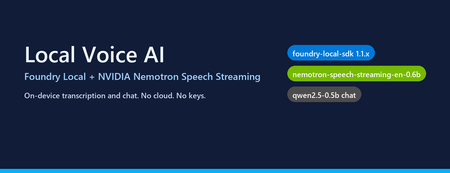
Why on-device voice still matters Most "voice AI" tutorials assume your audio leaves the machine. You ship a WAV to Whisper-API, your transcript to GPT-4, and a synthesized response back over the wire. That works — but it also means three round trips, three per-token bills, and three places your user's voice gets logged. The new wave of small, hardware-optimised models changes the trade-off. NVIDIA's Nemotron Speech Streaming En 0.6B is a 600M-parameter streaming ASR model published into the Microsoft Foundry Local catalog. Paired with a small chat model like qwen2.5-0.5b or phi-4-mini , you can run the entire capture → transcribe → reason → respond loop in-process on a developer laptop, with no API keys and no network egress. This post walks through how the fl-nemotron sample does it, the SDK pitfalls we hit on the way, and the design decisions that made the pipeline reliable. What we're building A browser-hosted assistant served by FastAPI at http://127.0.0.1:8000 . The page captures microphone audio, posts it to /api/transcribe , then streams the chat reply back over Server-Sent Events from /api/chat . All inference runs locally through two Foundry Local models loaded into the same process. The shape of the pipeline: Microphone (browser MediaRecorder) │ WebM/Opus blob ▼ Client-side WAV encoder (16 kHz, mono, PCM-16) │ multipart/form-data ▼ FastAPI /api/transcribe │ ▼ Nemotron Speech Streaming En 0.6B (Foundry Local audio client) │ transcript text ▼ Chat LLM e.g. qwen2.5-0.5b (Foundry Local chat client) │ streamed tokens ▼ FastAPI /api/chat → SSE → browser bubble The version that bit us: foundry-local-sdk >= 1.1.0 Before any code, the single most important fact about this project: The Nemotron Speech Streaming model only appears in the Foundry Local 1.1.x catalog. Older SDKs (0.5.x / 0.6.x) cannot resolve the alias nemotron-speech-streaming-en-0.6b and fail with model not found . The module name also changed in 1.1.0 — it is now foundry_local_sdk (with the underscore- sdk suffix), not foundry_local . The pip wheel for foundry-local-core is bundled, so there is no separate MSI / winget install to worry about. Pin it explicitly: pip install --upgrade "foundry-local-sdk>=1.1.0,<2" And verify before anything else: python -c "import importlib.metadata as m; print('sdk', m.version('foundry-local-sdk'))" # expect: sdk 1.1.0 Loading both models from one manager The 1.1.x SDK exposes a single FoundryLocalManager that owns the runtime. Each loaded model gives you back a per-model OpenAI-compatible client — get_chat_client() for text models and get_audio_client() for ASR. There is no need to bring your own openai Python package; the SDK ships its own thin client. The wrapper used in the repo ( src/foundry_client.py ) does this: from foundry_local_sdk import Configuration, FoundryLocalManager FoundryLocalManager.initialize(Configuration(app_name="fl-nemotron")) manager = FoundryLocalManager.instance chat_model = manager.load_model("qwen2.5-0.5b") stt_model = manager.load_model("nemotron-speech-streaming-en-0.6b") chat_client = chat_model.get_chat_client() audio_client = stt_model.get_audio_client() Both models are downloaded on first use into the Foundry Local cache and stay resident for the lifetime of the process. On a laptop with 16 GB RAM, the combined working set sits comfortably under 4 GB. The transcription surprise The first naive approach was the obvious one: with open(wav_path, "rb") as f: result = audio_client.transcribe(file=f, model="nemotron-speech-streaming-en-0.6b") That call fails on Nemotron. The bundled ONNX Runtime GenAI in foundry-local-core does not register the nemotron_speech multi-modal model type that the standard AudioClient.transcribe() path tries to instantiate. The error surfaces as a cryptic model-type registration failure deep inside the native runtime. The fix is to use the streaming session API instead — a different native entry point ( core_interop.start_audio_stream ) that the streaming model does support. The repo isolates this in src/_nemotron_live.py : def transcribe_wav_live(audio_client, wav_path, *, language="en"): with wave.open(str(wav_path), "rb") as w: sample_rate = w.getframerate() channels = w.getnchannels() sample_width = w.getsampwidth() pcm = w.readframes(w.getnframes()) session = audio_client.create_live_transcription_session() session.settings.sample_rate = sample_rate session.settings.channels = channels session.settings.bits_per_sample = sample_width * 8 session.settings.language = language session.start() # Feed PCM in ~100 ms chunks from a worker thread, then stop. bytes_per_sec = sample_rate * channels * sample_width chunk_bytes = max(bytes_per_sec // 10, 1024) def _pusher(): try: for offset in range(0, len(pcm), chunk_bytes): session.append(pcm[offset:offset + chunk_bytes]) finally: session.stop() threading.Thread(target=_pusher, daemon=True).start() parts = [] for resp in session.get_stream(): for cp in getattr(resp, "content", []) or []: text = getattr(cp, "text", "") or getattr(cp, "transcript", "") or "" if text: parts.append(text) return " ".join(p.strip() for p in parts if p.strip()).strip() Two things to notice: Push from a thread, read from the main coroutine. session.append() is a blocking write into the native stream and session.get_stream() is a blocking generator. Run one in a worker thread so the other can drain in parallel — otherwise you deadlock the session. Chunk to ~100 ms. Smaller chunks (e.g. 10 ms) spend more time crossing the FFI boundary than transcribing; larger chunks (e.g. 1 s) hold back partial results and hurt perceived latency. Always session.stop() . Without it the generator never terminates and the request hangs. The other transcription surprise: browsers don't send WAV Inside the browser, MediaRecorder defaults to audio/webm; codecs=opus . That's great for size but bad for our STT model, which expects a 16-bit mono PCM WAV at a known sample rate. Decoding WebM/Opus server-side would require ffmpeg as a runtime dependency — which is exactly the kind of friction this project exists to remove. The cleaner solution is to encode WAV on the client. AudioContext.decodeAudioData already understands WebM/Opus, so the page can decode the recording, resample to 16 kHz, mix to mono, and emit a PCM-16 WAV blob in 30 lines of JavaScript: // Inside src/static/index.html async function webmToWav(blob) { const ctx = new (window.AudioContext || window.webkitAudioContext)({ sampleRate: 16000 }); const buf = await ctx.decodeAudioData(await blob.arrayBuffer()); // Mix to mono const ch = buf.numberOfChannels; const mono = new Float32Array(buf.length); for (let c = 0; c < ch; c++) { const data = buf.getChannelData(c); for (let i = 0; i < data.length; i++) mono[i] += data[i] / ch; } return encodeWav(mono, 16000); } function encodeWav(samples, sampleRate) { const buffer = new ArrayBuffer(44 + samples.length * 2); const view = new DataView(buffer); // RIFF header writeStr(view, 0, "RIFF"); view.setUint32(4, 36 + samples.length * 2, true); writeStr(view, 8, "WAVE"); // fmt chunk writeStr(view, 12, "fmt "); view.setUint32(16, 16, true); // PCM chunk size view.setUint16(20, 1, true); // PCM format view.setUint16(22, 1, true); // mono view.setUint32(24, sampleRate, true); view.setUint32(28, sampleRate * 2, true); // byte rate view.setUint16(32, 2, true); // block align view.setUint16(34, 16, true); // bits per sample // data chunk writeStr(view, 36, "data"); view.setUint32(40, samples.length * 2, true); // PCM-16 samples let o = 44; for (let i = 0; i < samples.length; i++, o += 2) { const s = Math.max(-1, Math.min(1, samples[i])); view.setInt16(o, s < 0 ? s * 0x8000 : s * 0x7FFF, true); } return new Blob([view], { type: "audio/wav" }); } Now the server's /api/transcribe endpoint just writes the bytes to a temp file and hands them to transcribe_wav_live() — no audio decoding libraries on the Python side. Wiring it into FastAPI The server ( src/app.py ) is deliberately small. The notable detail is that the same process holds both Foundry Local model handles for its entire lifetime, so there is no warm-up cost per request: @app.post("/api/transcribe") async def transcribe(audio: UploadFile = File(...)): data = await audio.read() with tempfile.NamedTemporaryFile(suffix=".wav", delete=False) as f: f.write(data); path = f.name text = _ai_client.transcribe(path) return {"text": text} @app.post("/api/chat") async def chat(req: ChatRequest): if req.stream: return StreamingResponse( _sse(_ai_client.stream_completion(req.messages)), media_type="text/event-stream", ) return {"text": _ai_client.chat_completion(req.messages)} Streaming uses Server-Sent Events because they are trivially supported in both fetch() and the FastAPI runtime, and they don't require a WebSocket upgrade through any proxy a developer might have in front of localhost . What it looks like The repo includes screenshots of the running UI: a welcome screen with both models loaded, a streamed haiku reply, an inline code block with copy-to-clipboard, and the recording state for the microphone. Performance, honestly This is a small-model, CPU-friendly stack. On an Arm64 Surface running the x64 SDK under emulation: First model load (cold cache): tens of seconds — downloads ~600 MB for Nemotron and ~400 MB for qwen2.5-0.5b . Subsequent loads (warm cache): a few seconds per model. End-to-end transcription of a 5-second utterance: well under a second after warm-up. First chat token from qwen2.5-0.5b : typically 200–500 ms; full short reply within 1–2 s. On x64 silicon with a recent CPU the numbers improve substantially, and the SDK will pick the best execution provider it finds (CPU / DirectML / CUDA) for each model. Trade-offs to know about Model quality. qwen2.5-0.5b is a 500M-parameter model. It is fast and small enough to ship on a laptop, but it is not GPT-4. Swap in phi-4-mini or mistral-nemo-12b-instruct if you have the RAM and want better reasoning — the wrapper accepts any chat alias in the Foundry Local catalog. STT is English-only here. The current Nemotron streaming model in the catalog is ...-en-0.6b . Multilingual variants are likely to follow. Browser microphone needs a real browser. Headless / automated browsers (Playwright, Puppeteer) deny getUserMedia by default. Open the page in Edge / Chrome / Firefox to grant the permission and capture audio for real. No agent framework yet. This sample is deliberately a single-turn loop over a chat client — there is no tool calling, planning, or multi-agent orchestration. Adding the Microsoft Agent Framework on top would be a natural next step for richer behaviour. Responsible AI considerations Running locally removes the cloud-egress class of privacy concerns, but it does not remove responsibility: Disclose recording. The browser prompts for mic permission; your UI should make it obvious when capture is active. The sample shows a red ⏹ button and a "Recording…" banner for that reason. Don't log raw audio. The sample writes audio to a per-request NamedTemporaryFile and deletes it after transcription. Treat the WAV as sensitive data even when it never leaves the device. Small models hallucinate. A 0.5B chat model is great for snappy local replies, but unsuitable for high-stakes answers. Pair it with retrieval, ground it on your own data, or escalate to a larger model when accuracy matters. Try it Clone github.com/leestott/fl-nemotron. ./setup.ps1 (or ./setup.sh ) to create a virtualenv and install the pinned SDK. python scripts/prefetch.py nemotron-speech-streaming-en-0.6b qwen2.5-0.5b to download both models. .venv\Scripts\uvicorn.exe app:app --app-dir src --port 8000 Open http://127.0.0.1:8000 in a real browser and click the 🎤 button. Where to go next Foundry Local documentation — official docs for the runtime, catalog, and SDK. microsoft/Foundry-Local — upstream samples and issue tracker. NVIDIA Nemotron model family — background on the speech and language models being published into the catalog. leestott/fl-nemotron — the full source for this post. Key takeaways Pin foundry-local-sdk >= 1.1.0 . Earlier SDKs cannot see the Nemotron Speech Streaming model. Use the LiveAudioTranscriptionSession API for Nemotron, not AudioClient.transcribe() . Encode WAV in the browser. It eliminates a heavy server-side ffmpeg dependency for a few lines of JS. Push audio chunks on a worker thread and drain the response generator on the main one to avoid deadlocks. A small Foundry Local chat model plus Nemotron STT gives you a credible local voice loop in a single Python process — no cloud, no keys, no data egress.Student Devs: Build AI Agents, Compete for $55K in Prizes
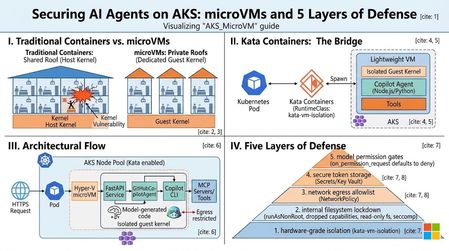
Student Devs: Build AI Agents, Compete for $55K in Prizes 🎮 AI Skills Fest • June 4–14, 2026 • Free to Enter $55K Prize Pool 3 Challenge Tracks 10 Days of Hacking Free To Enter Whether you're a first-year CS student or a final-year senior with a portfolio full of projects, Agents League is the best way to gain hands-on experience with agentic AI this summer and walk away with real skills employers are hiring for right now. What You'll Actually Learn Forget passive tutorials. Agents League is project-based learning at full speed. By the end of the hackathon, you'll have built a working AI agent and gained practical experience with the tools shaping the future of software development. 🤖 AI-Assisted Development Use GitHub Copilot to accelerate your coding workflow — from scaffolding to debugging — the way professional developers do today. 🧩 Multi-Step Reasoning Build agents with Microsoft Foundry that can plan, reason, and execute complex tasks — the core of agentic AI. 🏢 Enterprise AI Patterns Learn to build production-ready agents that integrate with Microsoft 365 and Copilot Studio — skills that translate directly to industry jobs. 🔧 Prompt Engineering Design effective prompts and orchestration flows that make AI agents reliable and useful in the real world. 📦 GitHub Workflows Submit your project through GitHub — practising version control, README writing, and open-source collaboration. 🎯 Competitive Problem-Solving Work under real constraints with deadlines, judging criteria, and peer competition — just like industry hackathons and sprints. Pick Your Track (or Try All Three) Agents League has three challenge tracks, each using different Microsoft AI tools. Choose based on your interests or stretch yourself by competing in multiple tracks. Track 01. Creative Apps Build an innovative application with AI-assisted development. This track rewards creativity, dream big and let GitHub Copilot help you bring ideas to life faster than ever. Tool: GitHub Copilot Track 02. Reasoning Agents Create intelligent agents that solve complex problems through multi-step reasoning. Think: agents that can research, plan, and act. This is the cutting edge of AI. Tool: Microsoft Foundry Track 03. Enterprise Agents Build knowledge agents that integrate with Microsoft 365 Copilot. Learn how businesses are deploying AI today and add enterprise AI to your skillset. Tool: Copilot Studio • M365 Opportunities You Won't Want to Miss Agents League isn't just a competition, it's a launchpad. Here's what's in it for you beyond the code: 💰 Win from a $55,000 USD Prize Pool Prizes are awarded across all three tracks smaller teams and solo hackers have a real shot. 📺 Watch Live Coding Battles at Microsoft Reactor See industry experts go head-to-head building AI agents live. Learn advanced techniques you can apply immediately to your own project. 🎓 Free Learning Resources on Microsoft Learn Access curated learning paths and the AI Skills Navigator, structured content designed to get you from zero to submission-ready. 🌍 Join a Global Developer Community Connect with thousands of developers on the Agents League Discord. Find teammates, ask questions, and build your professional network. 📂 Build Your Portfolio with a Real Project Every submission lives on GitHub. Walk away with a polished, public project that demonstrates your AI skills to future employers and grad schools. 🏆 Gain Recognition from Microsoft and the Community Top projects get visibility across the Microsoft developer ecosystem. Stand out from the crowd in internship and job applications. Key Dates to Remember Event Date Hacking Period Opens June 4, 2026 Registration Deadline June 12, 2026 — 12:00 PM PT Submission Deadline June 14, 2026 — 11:59 PM PT How to Get Started (Right Now) You don't have to wait until June 4th to start preparing. Here's your pre-hackathon game plan: Register for the hackathon it's free and open to everyone. Pick a track that matches your interests or curiosity. Explore the learning resources on Microsoft Learn and the AI Skills Navigator. Join the Discord community to find teammates and get early tips. Watch the Reactor event series for live coding battles and expert walkthroughs. Set up your GitHub repo and start experimenting before the hacking window opens. Helpful Links Register for Agents League Free entry, sign up now Microsoft Reactor Events Live coding battles & workshops AI Skills Fest The broader event Microsoft Learn Free learning paths The Arena Awaits 🏆 Ten days. Three tracks. $55K in prizes. Whether you go solo or squad up, this is your chance to build something real with AI and have a blast doing it. Register Now It's Free | Watch Reactor Events Agents League is part of AI Skills Fest and is open to the public at no cost. Review the Hackathon Rules and Regulations and the Microsoft Event Code of Conduct before participating.836Views0likes0Comments
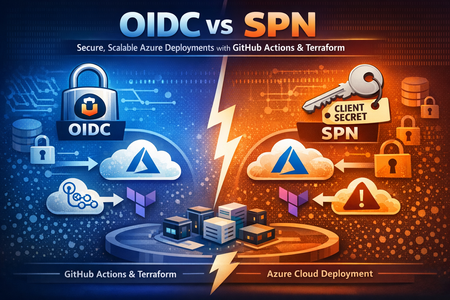
OIDC vs SPN: Securing Azure Deployments with GitHub Actions & Terraform
From Secrets to Trust: Modernizing CI/CD Authentication When building infrastructure pipelines on Microsoft Azure using GitHub Actions and Terraform, one design choice quietly determines your entire security posture: How does your pipeline authenticate to Azure? For years, the answer was simple: Use a Service Principal (SPN) Store a client secret in GitHub Authenticate using credentials It works—but it doesn’t scale securely. This article walks through a real, production-ready implementation comparing: SPN (Client Secret – legacy pattern) OIDC (Federated Identity – modern standard) Backed by a working repo: WorkFlowBasedDeployment Architecture Overview This repository implements a workflow-driven Terraform deployment model with modular Azure infrastructure. Repository Structure .github/workflows/ deploy-infrastructure.yml # OIDC deployment deploy-infrastructure-spn.yml # SPN deployment destroy-infrastructure.yml # OIDC destroy destroy-infrastructure-spn.yml # SPN destroy Deployment/ main.tf providers.tf variables.tf terraform.tfvars modules/ Azure Resources Provisioned Resource Module Resource Group Virtual Network + NSGs vnet rg-network Storage Account sa rg-data Container Apps containerapps rg-compute AI Foundry aifoundry rg-data AI Search aisearch rg-data Azure Container Registry acr rg-compute Key Vault azkeyvault rg-data Monitoring azmonitor rg-compute Private Endpoints private_endpoints rg-network Authentication Models Service Principal (SPN) – The Traditional Way How it works Create App Registration Generate client secret Store it in GitHubTerraform authenticates using environment variables env: ARM_CLIENT_ID: ${{ secrets.AZURE_CLIENT_ID }} ARM_CLIENT_SECRET: ${{ secrets.AZURE_CLIENT_SECRET }} ARM_TENANT_ID: ${{ secrets.AZURE_TENANT_ID }} The problem Risk Impact Long-lived secrets Can be leaked Manual rotation Operational burden Repo compromise Full environment exposure This model is still supported—but increasingly considered legacy for secure pipelines. OIDC (OpenID Connect) – The Modern Approach How it works GitHub Actions generates a short-lived identity token Microsoft Entra ID validates it Azure issues a temporary access token Terraform executes using that token No secrets. No storage. No rotation. Authentication Models Compared OIDC Flow (Mental Model) Think of OIDC like this: GitHub → Identity Provider Azure → Trust Authority Workflow → Temporary Identity OIDC Implementation (From the Repo) Workflow Configuration permissions: id-token: write contents: read env: ARM_CLIENT_ID: ${{ secrets.AZURE_CLIENT_ID }} ARM_SUBSCRIPTION_ID: ${{ secrets.AZURE_SUBSCRIPTION_ID }} ARM_TENANT_ID: ${{ secrets.AZURE_TENANT_ID }} ARM_USE_OIDC: true Azure Login - name: Azure Login (OIDC) uses: azure/login@v2 with: client-id: ${{ secrets.AZURE_CLIENT_ID }} tenant-id: ${{ secrets.AZURE_TENANT_ID }} subscription-id: ${{ secrets.AZURE_SUBSCRIPTION_ID }} Backend (Terraform State with OIDC) terraform init \ -backend-config="use_oidc=true" Even your state storage is secretless Azure Setup for OIDC Create App Registration No client secret required Configure Federated Credential Example: Issuer: https://token.actions.githubusercontent.com Subject: repo:<org>/<repo>:ref:refs/heads/master You can restrict by: Branch Environment Repository Assign RBAC: Grant roles like: Contributor Or scoped resource-level access CI/CD Workflow Design Both SPN and OIDC pipelines follow a 2-stage pattern: Plan Stage terraform fmt terraform validate terraform plan Upload plan artifact Apply Stage Triggered only on main Downloads plan Runs apply -auto-approve Protected via environment approvals This ensures safe, auditable deployments OIDC vs SPN — Real Comparison Feature SPN OIDC Secrets Stored in GitHub None Token lifetime Long-lived Short-lived Rotation Manual Not required Security Medium High Setup Simple Slightly complex Recommended No Yes Common Pitfalls (Real-World Lessons) Missing id-token permission Without this, OIDC fails silently. Federated credential mismatch Wrong branch Incorrect repo name Case sensitivity issues Azure rejects the token completely. RBAC delay Role assignments can take time → causes confusing failures. Backend misconfiguration Forgetting use_oidc=true breaks Terraform state auth. Debugging Tips Enable debug logs in GitHub Actions Check Sign-in logs in Microsoft Entra ID Validate federated credential subject format Always isolate: Identity issue vs Permission issue Migration Strategy (SPN → OIDC) A safe transition looks like this: Keep SPN as fallback Add OIDC alongside Test in DEV environment Remove client secret Revoke old credentials No downtime, no risk. Where This Fits in Modern Azure Architecture This pattern integrates naturally with: Azure Container Apps AI/ML workloads (AI Foundry, Search) Multi-environment deployments Zero-trust enterprise architectures Authentication becomes identity-driven, not secret-driven When NOT to Use OIDC Legacy CI/CD systems without OIDC support Organisations with strict identity federation constraints Cross-tenant scenarios with limited trust setup Note: These cases are becoming increasingly rare in modern cloud setups. Security Perspective Threat SPN Risk OIDC Risk Secret leak High None Credential reuse High Low Token replay Possible Limited Repo compromise Full access Scoped Final Takeaway This repository demonstrates a key shift in modern DevOps: Secrets were a workaround for identity. OIDC replaces that workaround with trust. By combining: GitHub Actions OIDC federation Azure RBAC You get: Secure pipelines Scalable deployments Zero secret management In enterprise environments, moving to OIDC can eliminate secret rotation pipelines entirely, reducing operational overhead and significantly lowering breach risk. Reference Implementation GitHub Repository: WorkFlowBasedDeployment Closing Thought OIDC doesn’t just improve authentication, it fundamentally changes how trust is established in cloud systems. In a world moving toward zero-trust architectures, identity is the new perimeter and OIDC is how you enforce it.Building a Controllable Inference Platform on Kubernetes with AI Runway
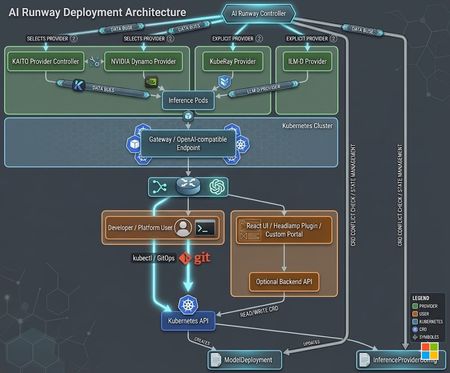
When enterprises move generative AI from demos to real business workloads, the hardest question is usually not whether a model can answer a prompt. The harder question is whether the whole system can run reliably, predictably, securely, and economically over time. This becomes especially important as major model providers continue to adjust token pricing, context-window pricing, batching discounts, and model tiering. That is where AI Runway becomes valuable. It turns model deployment into a Kubernetes-native platform capability. Instead of binding every application to a specific inference runtime, AI Runway lets teams describe model-serving intent through a unified ModelDeployment resource, while the platform selects or delegates to the right provider and engine underneath. For teams already using Kubernetes, AKS, or cloud-native platform engineering practices, AI Runway offers a practical path from “calling an external model API” to “operating an enterprise inference platform.” Why do we need a self-hosted inference platform? Many teams have already proven the value of LLMs in knowledge assistants, code generation, content creation, customer support, document processing, and agentic workflows. But once usage grows, several platform-level issues appear quickly. 1. Token cost becomes an engineering problem In a proof of concept, token usage often looks like a small budget line. In production, it becomes an architectural concern. A single RAG request may include system prompts, user input, retrieved context, tool outputs, and the final answer. An agentic workflow may call models many times for planning, routing, summarization, validation, and generation. An internal Copilot used by hundreds of employees can generate token consumption at a scale that surprises the original project team. External model API cost is also affected by model versions, input/output token ratios, context length, caching policies, batch processing, and provider pricing strategy. When model vendors change pricing, enterprises without an alternative path become price takers. Self-hosted inference does not mean replacing every external model. It means creating a controllable platform layer for high-frequency, predictable, localized, or privacy-sensitive workloads. Scenario Why self-hosted inference helps High-frequency internal Q&A Large request volume can be served by smaller or quantized models Document summarization and extraction Stable task pattern, suitable for specialized local models Agent intermediate steps Planning, classification, and rewriting may not require the strongest closed model Edge or private-network workloads Data may need to stay inside a controlled boundary Cost-sensitive applications CPU/GPU resource pools, batching, and model tiering can reduce unit cost 2. Data boundaries and compliance become clearer Many enterprises are willing to use cloud-hosted models, but they also need clear controls for data classification, access boundaries, logging, and auditing. A self-hosted inference platform allows sensitive documents, internal knowledge bases, customer interactions, and business context to remain inside a governed network and operational model. 3. Teams should not be locked into one engine Inference engines are evolving quickly. vLLM, SGLang, TensorRT-LLM, and llama.cpp serve different needs. Some are optimized for high-throughput GPU serving. Some are better for structured serving or NVIDIA GPU acceleration. Others make GGUF quantized models practical on CPU or lightweight GPU environments. A platform should not force every team into one runtime. It should provide a unified entry point and absorb runtime differences underneath. 4. Production AI requires model operations, not just endpoints Production workloads need deployment lifecycle management, status, logs, metrics, scaling, debugging, progressive rollout, resource quotas, and secure ingress. A self-hosted inference platform should prevent every team from handcrafting runtime-specific YAML and instead provide these capabilities as shared platform primitives. What is AI Runway? AI Runway is a Kubernetes-native platform for deploying and managing large language models. Its core idea is to describe model deployment intent through a unified Kubernetes CRD called ModelDeployment. The AI Runway Controller then selects or delegates to provider-specific controllers based on provider capabilities. The project describes itself as: Deploy and manage large language models on Kubernetes — no YAML required. AI Runway supports a Web UI, REST API, Headlamp Plugin, and direct CRD management with kubectl. The UI is optional and replaceable; the core platform capability lives in the controller, CRDs, and provider abstraction. Key capabilities Capability Value Unified ModelDeployment CRD One API for model, engine, resources, scaling, and gateway configuration Multiple providers Supports KAITO, NVIDIA Dynamo, KubeRay, llm-d, and provider shims Multiple engines Supports vLLM, SGLang, TensorRT-LLM, and llama.cpp Automatic provider and engine selection Matches CPU/GPU requirements, serving mode, and provider capability Web UI and Headlamp Plugin Simplifies model discovery, deployment, and monitoring Hugging Face integration Enables model catalog browsing and deployment Observability Surfaces deployment status, logs, and Prometheus metrics Gateway API integration Enables unified OpenAI-compatible routing through a gateway Cost and capacity guidance Helps with GPU fit, pricing, and capacity decisions Multi-engine support is the key differentiator AI Runway is not just another model deployment tool. Its most important value is decoupling application developers from inference runtime decisions. Applications can call an OpenAI-compatible endpoint or a unified gateway, while the platform decides which engine and provider should serve a particular model. Engine Typical use case Resource target vLLM High-throughput general LLM serving GPU SGLang Complex inference workflows and structured serving GPU TensorRT-LLM Highly optimized inference on NVIDIA GPUs GPU llama.cpp GGUF quantized models and lightweight inference CPU / GPU For teams, this is an important story: instead of forcing every team into the same runtime, AI Runway creates a common platform where different workloads can choose different engines while keeping the developer experience consistent. AI Runway architecture overview The following Mermaid diagram shows a simplified view of the AI Runway platform layers. Three design points matter most: Unified control plane: users submit ModelDeployment resources instead of handcrafting YAML for each runtime. Out-of-tree providers: KAITO, Dynamo, KubeRay, and llm-d declare their capabilities through provider shims and controllers. Replaceable runtime layer: the same platform can serve CPU-based llama.cpp models and GPU-based vLLM or TensorRT-LLM workloads. Solution 1: Local Kubernetes with AI Runway, KAITO, and CPU Local Kubernetes is ideal for learning, demos, development validation, and small-model prototyping. The goal is not maximum throughput. The goal is to prove that AI Runway + KAITO + llama.cpp can expose an OpenAI-compatible model service without requiring a GPU. When to use this pattern Scenario Description Local developer experiments Use kind, minikube, k3d, or Docker Desktop Kubernetes Platform demos Show the ModelDeployment, provider, and OpenAI-compatible API flow CPU-only validation No GPU or cloud resource required SLM / GGUF testing Use llama.cpp to serve quantized models For local CPU inference, allocate at least 4 vCPU and 12 GiB memory. Even small models need memory for runtime startup, model loading, KV cache, and context windows. Local architecture The local KAITO + CPU pattern is powerful for education and adoption: Developers learn the ModelDeployment abstraction without needing a GPU. The application does not need to know whether the backend is LocalAI, llama.cpp, or KAITO Workspace. CPU-only environments can still run lightweight and quantized models. Teams can validate models, prompts, and API behavior locally before moving to AKS or production clusters. Sample Guideline - https://gist.github.com/kinfey/28b2338845cc63139aee2ea462a3c466 Solution 2: Azure with AKS, AI Runway, KAITO, and CPU After local validation, the next step is usually a cloud-hosted inference platform. AKS provides managed Kubernetes control plane, node pools, networking, identity, monitoring, and Azure ecosystem integration. It is a natural foundation for AI Runway in production or pre-production environments. The example below uses CPU-only AKS + KAITO + Qwen3-0.6B GGUF to build a cloud-hosted inference service without GPU nodes. Azure architecture Production recommendations for AKS Area Recommendation Secure ingress Do not expose plain HTTP 80 directly; add TLS, API keys, OAuth2 Proxy, WAF, or internal LoadBalancer Model governance Pin model versions, image versions, and GGUF filenames Cost governance Use CPU for lightweight tasks and GPU for high-throughput large models Observability Integrate Azure Monitor, Prometheus, logs, and request-level metrics Quota planning Check regional vCPU/GPU quota before deployment Caching Use PVCs or model cache volumes to reduce repeated downloads GitOps Manage ModelDeployment, providers, and ingress through GitOps Access control Use namespaces, RBAC, and NetworkPolicy for team isolation Sample Guideline - https://gist.github.com/kinfey/d439a545d8c93e15d8a2854b65f03d4d How to evangelize AI Runway inside an engineering organization When introducing AI Runway, I would avoid starting with “we are building our own model platform.” A more effective narrative is: Start with cost predictability: high-frequency workloads should not all depend on the most expensive external model tier. Emphasize technical optionality: teams can use different models and engines while keeping a unified platform entry point. Highlight Kubernetes-native operations: existing AKS, RBAC, monitoring, GitOps, networking, and security practices can be reused. Use CPU demos to lower the barrier: local KAITO + CPU lets developers understand the full flow without GPUs. Use Azure as the production landing zone: AKS carries the same abstraction into cloud environments and can evolve toward GPU, gateway, monitoring, and multi-tenant governance. This path avoids starting with GPU procurement, complex scheduling, or full-scale platform governance. Start small, prove the abstraction, then add higher-performance engines and stronger governance as the platform matures. Closing thoughts As AI applications enter production, enterprises need more than a model that can answer prompts. They need an inference platform that is controllable, observable, scalable, and evolvable. AI Runway brings this problem back into the Kubernetes platform engineering world: use ModelDeployment to standardize model deployment, use providers to hide runtime differences, and use multiple engines to match different cost and performance goals. From a local Kubernetes KAITO + CPU demo to a Qwen3-0.6B CPU inference service on AKS, AI Runway provides a clear adoption path: start with a low-barrier setup, then evolve toward multi-model, multi-engine, multi-provider, unified-gateway, enterprise-governed inference. In a world where token pricing changes frequently and model ecosystems evolve rapidly, a self-hosted inference platform is not about rejecting external models. It is about giving engineering teams more control over cost, architecture, and technical choice. References AI Runway GitHub: https://github.com/kaito-project/airunway AI Runway Architecture: https://github.com/kaito-project/airunway/blob/main/docs/architecture.md AI Runway Providers: https://github.com/kaito-project/airunway/blob/main/docs/providers.md AI Runway CRD Reference: https://github.com/kaito-project/airunway/blob/main/docs/crd-reference.md KAITO: https://github.com/kaito-project/kaito LocalAI: https://localai.io AKS Application Routing: https://learn.microsoft.com/azure/aks/app-routing Qwen3-0.6B GGUF: https://huggingface.co/Qwen/Qwen3-0.6B-GGUF264Views0likes0CommentsSix Coding Agents, One Production System: A Field Guide to AgenticOps with AKS-Lab-GitHubCopilot
The shift: from "AI helps me code" to "AI authors my repo" For two years we've been talking about GitHub Copilot as an inline pair programmer — a clever autocomplete that lives in your editor. That framing is officially out of date. The new reality is agentic delivery: a team of named, scoped AI agents owns slices of your repository, each with its own tools, skills, and refusal rules. They produce pull requests. They run tests. They roll deployments. And when one finishes its turn, it hands off to the next. The microsoft/AKS-Lab-GitHubCopilot's five labs you ship ZavaShop — a multi-agent retail supply-chain control plane running on AKS + Azure Container Apps — and along the way you internalize an operating model you can carry to any project. Everything in the repo (specs, agents, MCP servers, tests, Bicep, Helm, GitHub Actions) is authored by six GitHub Copilot Custom Coding Agents working from your IDE, plus the remote GitHub Copilot Coding Agent that closes the PR loop on GitHub. This is what AgenticOps looks like in practice. Two layers of agents — don't confuse them The first cognitive hurdle in this lab is keeping two very different agent populations straight: Layer What it is When it lives Examples Application agents The product you ship — the runtime ZavaShop fleet that solves a business problem Production (AKS + ACA) InventoryAgent, SupplierAgent, LogisticsAgent, PricingAgent, OrchestratorAgent Coding agents The dev-time team that writes the application agents Your IDE + GitHub requirements-analyst, mcp-builder, agent-builder, orchestrator-architect, test-author, deploy-engineer Both are built with the Microsoft Agent Framework (MAF). Both use the GitHub Copilot SDK as their model provider. But they exist at different layers of the development lifecycle, and the entire lab is structured around that distinction. If you only remember one thing from this post: the coding agents are how you build the application agents. That is the whole AgenticOps loop, compressed into one sentence. GitHub Copilot Coding Agent vs. Custom Coding Agents There are two flavors of "coding agent" in the GitHub Copilot ecosystem, and this lab uses both. 1. The remote GitHub Copilot Coding Agent This is the GitHub-side, asynchronous, PR-driven agent. You assign it an issue, it spins up a sandboxed environment, writes the code, runs the tests, and opens a PR for human review. You don't watch it work — you review what it produces. In ZavaShop, Lab 04 (Testing) explicitly uses this agent: you take a failing eval scenario, file it as an issue, assign it to Copilot, and the agent comes back with a PR. Your job is the human bar, not the keystrokes. Important governance choice from AGENTS.md: the remote Coding Agent is allowed to open PRs against src/ and tests/ only — never against infra/ without human review. That single rule is a textbook example of agent-aware policy. 2. The local Custom Coding Agents These are scoped, in-IDE specialist agents you select <agent name> in Copilot Chat. They live as *.agent.md files inside .github/agents/ and are discovered by VS Code on reload. Each one owns exactly one slice of the repository. Six of them ship in this lab: Phase Agent Owns Refusal rule Requirements requirements-analyst specs/*.md Refuses to write code MCP tools mcp-builder src/mcp_servers/* One server per turn Specialist agents agent-builder src/agents/<specialist>/* One specialist per turn Orchestration orchestrator-architect src/agents/orchestrator/*, src/shared/*, docker-compose.yml Owns wiring, not business logic Tests test-author tests/** Never edits src/ Deploy deploy-engineer infra/**, .github/workflows/** Won't touch application code The pattern that matters here isn't just "we made some custom agents." It's that every agent declares what it owns and what it refuses to do. That refusal envelope is what makes the system safe to delegate to. Without it, you'd just have a noisier autocomplete. Three workflow prompts in .github/prompts/ chain the agents together so you don't have to remember the sequence: /feature-from-issue — issue → spec → code → tests → PR → deploy /spec-to-code — drive an existing spec through code + tests /ship-it — quality gate → build → push → ACR/ACA/AKS rollout → smoke + evals This is the closest thing I've seen to a programmable software development lifecycle. Where AgenticOps fits in DevOps gave us repeatable infrastructure. MLOps gave us repeatable model lifecycles. AgenticOps is what you need when the thing you're operating is itself a fleet of autonomous agents — both at build time and at runtime. The lab makes the four pillars of AgenticOps concrete: Specs as the contract. /requirements-analyst produces specs/<slug>.md files with goals, contracts, and eval scenarios. Nothing else in the repo is built until that spec exists. Specs are the source of truth that human reviewers actually read. Skills as living documentation. .github/skills/<skill>/SKILL.md files hold shared, agent-agnostic knowledge — Python conventions, Kubernetes patterns, MAF idioms. Every coding agent declares which skills it must consult before writing code. This is how you stop drift: knowledge lives in one place and is pulled in on demand. Evals as the quality gate. The repo runs a four-layer test pyramid plus five golden eval scenarios (S1–S5). uv run poe check runs locally and in GitHub Actions. Copilot-authored PRs must pass the same bar a human does — no exceptions. Observability tied to agent identity. Every agent emits agent.name, agent.run_id, and agent.span_id through structlog. When something misbehaves in production, you can trace the line from "this evaluation failed" all the way back to "this version of this agent, on this run, called this tool with these arguments." These four pillars aren't ZavaShop-specific. They're the contract for any AgenticOps system: scoped ownership, contracts as code, evals as gates, identity in every span. Walking through the workshop: which agent does what, when The five labs are five chapters of one story — ZavaShop going from an empty Azure subscription to a live retail control plane. Each lab activates a different subset of coding agents. Lab 01 — Environment Setup (no coding agents yet) You provision the platform: AKS cluster, ACA environment, Azure Container Registry, Key Vault, and the Workload Identity that every agent will wear. Then you install the six Custom Coding Agents into your IDE. Think of this as hiring the development team and giving them their badges. Lab 02 — Agent Creation (four agents in play) This is where it clicks. You start by requirements-analyst in Copilot Chat to produce the spec for each ZavaShop application agent. Then mcp-builder is invoked four times to scaffold the four MCP servers — one per domain (inventory DB, supplier API, shipping API, pricing API). Then agent-builder runs four more times to build the typed ChatAgent specialists. Finally orchestrator-architect wires them together with a MAF Workflow. What's stunning about this lab is the handoff discipline. Every coding agent ends its turn with a line naming the next agent to invoke. You're not orchestrating the work — the agents are. Lab 03 — Multi-Agent Orchestration & Config (two agents) The orchestrator stops being a one-shot LLM call and becomes a deterministic Workflow. Secrets move from .env to Key Vault. The whole fleet boots locally with Docker Compose. This is orchestrator-architect's star turn — wiring A2A endpoints, MCP tool registration, Key Vault hydration, OpenTelemetry. Specs come from requirements-analyst; the rest is orchestration. Lab 04 — Testing (both coding agent flavors) /test-author writes the four-layer pyramid (unit, MCP contract, integration, eval). Then you switch gears: take a failing eval scenario, file it as a GitHub issue, and assign it to the remote GitHub Copilot Coding Agent. The agent works asynchronously, opens a PR, and uv run poe check decides whether it passes. This is the lab where the local-vs-remote distinction stops being abstract and starts being operational. Lab 05 — Deployment & Run (deployment specialist) /deploy-engineer writes the Helm chart for the AKS orchestrator and the Bicep modules for the ACA specialists. The /ship-it workflow prompt then runs the full pipeline: quality gate → ACR build → ACA deploy → AKS rollout → smoke tests → evals. GitHub Actions OIDC re-runs the same pipeline on every main push. Notice the pattern across all five labs: at no point does a human write production code from scratch. Humans set goals, review specs, approve PRs, and run quality gates. The keystrokes belong to agents. How Coding Agents transform the DevOps pipeline Take a step back from the lab and ask: what actually changes in your DevOps flow when you adopt this model? The atomic unit of work shifts. In classic DevOps the unit is the commit. In AgenticOps the unit is the spec. A spec drives one or more agents; agents produce commits; commits trigger CI; CI gates promotion. The commit becomes a derived artifact, not the starting point. Code review changes shape. You're no longer reviewing "did this human understand the codebase?" — you're reviewing "did this agent follow its refusal rules, consult its skills, and produce something that passes the evals?" Reviewers spend less time on style and more time on intent. The diff is often less interesting than the spec it came from. Governance becomes structural, not procedural. Instead of writing a wiki page that says "don't touch infra without review," you encode that rule in AGENTS.md and refuse to let the agent's tool set include infra paths. Policy becomes part of the agent definition, not a checklist humans hopefully remember. The CI pipeline expands. Beyond build/test/deploy, you now have an eval stage that asks "does the system still behave correctly on the golden scenarios?" — and a Copilot-authored PR has to pass the same eval stage as a human-authored one. The pipeline is the great equalizer. Onboarding compresses. A new engineer doesn't need to read 50 wiki pages to be productive. They read AGENTS.md, select the relevant agent walks them through. Institutional knowledge lives in .agent.md and SKILL.md files instead of senior engineers' heads. The net effect is a pipeline that's faster, more uniform, and easier to audit. Faster because agents parallelize what humans serialize. More uniform because every change goes through the same six-agent template. Easier to audit because every artifact has a named author and a refusal rule it had to respect. What to take away The AKS-Lab-GitHubCopilot workshop teaches three things at once. The surface lesson is "how to build a multi-agent retail system on AKS." The middle lesson is "how to use GitHub Copilot Custom Agents and the remote Coding Agent." The deepest lesson — and the one I'd argue matters most — is how to design a development process where AI agents are first-class citizens with bounded responsibilities, not free-form copilots. If you take the model and walk away from the lab, three patterns are worth keeping: Scope before capability. Don't give an agent every tool; give it the smallest surface that makes it useful. Specs are the API between humans and agents. Invest in requirements-analyst-style flows even if the rest of your stack isn't there yet. Evals are non-negotiable. The moment an agent can open a PR, you need a quality gate that doesn't care who the author is. Clone the repo microsoft/AKS-Lab-GitHubCopilot , hit Developer: Reload Window, select agents in Copilot Chat, and watch six teammates show up. That's the future of the DevOps pipeline — and it's already shipping. Resources microsoft/AKS-Lab-GitHubCopilot — The repository this post is built on. Best practices for using Copilot to work on tasks — Governance patterns for delegating issues to Copilot. GitHub Copilot SDK (Python) — The provider used by every agent in this lab.631Views0likes0CommentsGiving the Copilot SDK Agent a "hardware-level helmet" using Kata microVM on AKS
A Moment That Made Me Pause I was recently building an Agent service with the GitHub Copilot SDK. After getting it up and running, I went back through the execution logs and something jumped out at me: In a single conversation turn, the Agent had executed a shell command, read several files, and pulled down a third-party MCP server from npm via npx — all on its own. I didn't hard-code any of that. The model decided at runtime to run those commands, read those files, and install that package. That's when it hit me: a significant chunk of the code running inside this container was written on the fly — by the model, not by me. This is fundamentally different from a traditional web service. With a regular app, every line of code is written by a human, reviewed, and tested before it reaches production. But an AI Agent? Part of its behavior is generated at runtime. You don't know in advance what it's going to execute. So the question becomes: is the container we put it in actually strong enough? How Container Isolation Actually Works (And Where It Falls Short) Let me use an analogy. Think of a traditional container as an apartment in a building. Each apartment has its own walls — namespaces and cgroups keep things separated. From the inside, it feels like you have your own place. But every apartment shares the same roof — the host Linux kernel. Most of the time, this is fine. But if someone finds a crack in the roof — a kernel vulnerability — they can climb up from their apartment, walk across the roof, and drop into any other apartment in the building. That's a container escape. For a standard web service, this risk is manageable — the code inside your container is predictable. But an AI Agent is different. The code running inside the container is inherently unpredictable — it's not an external attacker you're worried about, it's the tenant itself. Docker laid this out clearly in Comparing Sandboxing Approaches for AI Agents: AI Agents are a class of workload that inherently requires stronger sandboxing. The shared-kernel model of traditional containers isn't enough. So what is enough? Meet the microVM: A Private Roof for Every Apartment Sticking with the building analogy — if the problem is a shared roof, the fix is obvious: give every apartment its own roof. You still live in an apartment (container). The building is still managed the same way (Kubernetes). But the ceiling above your head is now yours alone. Even if you punch through it, you only reach your own roof — not your neighbor's. That's the core idea behind a microVM. Koyeb published a great explainer called What Is a microVM. Here's the essence: It's a virtual machine — with its own independent guest kernel, fully isolated from the host kernel. This is where the security comes from. But it's a stripped-down VM — only the bare essentials: CPU, memory, network, block storage. No USB controllers, no sound cards, no GPU passthrough. So it's fast and light — millisecond boot times, small memory footprint, close to the container experience. One line summary: microVM = VM-grade isolation + near-container-grade lightness. How Does Kubernetes Use microVMs? Enter Kata Containers Knowing microVMs are great is one thing — but Kubernetes schedules Pods and containers, not VMs. How do you bridge these two worlds? That's exactly what Kata Containers does. Their tagline nails it: "The speed of containers, the security of VMs." Kata acts as a translation layer between Kubernetes and microVMs: From Kubernetes' perspective, it's still a standard Pod — scheduled, managed, and monitored normally. Under the hood, that Pod is actually running inside a lightweight VM with its own kernel. You don't change your application code. You don't change your CI/CD pipeline. You just tell Kubernetes: "Run this Pod with Kata's RuntimeClass." Kata handles the rest. On AKS, Microsoft has integrated Kata out of the box under the name Pod Sandboxing. The hypervisor is Microsoft Hyper-V (not QEMU), and the RuntimeClass is called kata-vm-isolation. You create a special node pool, and AKS sets everything up automatically. Now Let's Look at a Real Example Enough theory — let me walk you through something concrete. I built a sample called AKS_MicroVM that does one thing: Run a GitHub Copilot SDK Agent service on AKS, enforced to run inside kata-vm-isolation — a microVM sandbox. Here's the architecture: HTTPS request comes in └─ AKS Node Pool (KataVmIsolation enabled) └─ Pod (runtimeClassName: kata-vm-isolation) └─ Dedicated Hyper-V microVM └─ FastAPI service (Python / uvicorn) └─ GitHubCopilotAgent └─ Copilot CLI (Node.js) └─ MCP servers / tools Isolated guest kernel + seccomp + cgroup Egress restricted by NetworkPolicy From the outside, it's just an ordinary AKS Pod. On the inside, the app runs in its own micro virtual machine with a dedicated kernel. Project Structure The entire sample is just these files: app/ ← Agent service (Python) main.py ← FastAPI endpoints agent.py ← Copilot Agent wrapper tools.py ← Example function tools requirements.txt Dockerfile ← Python 3.12 + Node 20 + Copilot CLI k8s/ ← Kubernetes manifests namespace.yaml runtimeclass.yaml ← Reference (AKS auto-creates this) secret.example.yaml ← Token placeholder deployment.yaml ← The key file: enforces kata-vm-isolation service.yaml networkpolicy.yaml ← Locks down ingress/egress infra/ ← Infrastructure scripts 01-create-aks.sh ← Create the cluster 02-build-push.sh ← Build image, push to ACR 03-deploy.sh ← Deploy everything Three shell scripts to set up infrastructure, six YAML files to deploy the service. That's it. Not Just a microVM: Five Layers of Defense I want to emphasize this: the sample doesn't just slap on a microVM and call it a day. It stacks five layers of protection: What you're worried about How this layer addresses it Malicious code escaping the container kata-vm-isolation → dedicated microVM with its own kernel Privilege escalation inside the container runAsNonRoot + drop ALL caps + read-only filesystem + seccomp Agent phoning home to unauthorized endpoints NetworkPolicy allowlist — only Copilot/GitHub/MCP egress permitted Token leakage K8s Secret injection (upgradeable to Key Vault via CSI) Model instructing the Agent to do something dangerous on_permission_request defaults to deny; only allowlisted operations proceed The microVM is the outermost wall — hardware-grade isolation. But inside that wall, there are still guards, access controls, and surveillance cameras. You need all of them. Six Steps to Deploy # ① Create an AKS cluster with Kata support bash infra/01-create-aks.sh # ② Verify the RuntimeClass is ready kubectl get runtimeclass kata-vm-isolation # ③ Build the image and push to ACR (script auto-detects your ACR) bash infra/02-build-push.sh # ④ Add your GitHub Copilot token # Edit k8s/secret.example.yaml → rename to secret.yaml (don't commit it!) # ⑤ Deploy everything bash infra/03-deploy.sh # ⑥ Access via API server proxy kubectl proxy --port=8001 Then chat with the Agent: curl -s -X POST \ http://localhost:8001/api/v1/namespaces/copilot-agent/services/copilot-agent:80/proxy/chat \ -H 'content-type: application/json' \ -d '{"message":"Briefly introduce Kata Containers."}' Want streaming output? Use the stream endpoint: curl -N -X POST \ http://localhost:8001/api/v1/namespaces/copilot-agent/services/copilot-agent:80/proxy/chat/stream \ -H 'content-type: application/json' \ -d '{"message":"List 3 Linux kernel hardening tips","stream":true}' How to Verify It's Actually Running in a microVM One command: kubectl -n copilot-agent exec deploy/copilot-agent -- uname -r If the kernel version differs from the node's kernel — your Pod is running in its own guest kernel, not sharing the host's. Proof done. Gotchas I Hit So You Don't Have To kubectl port-forward doesn't work with Kata Pods. This is the easiest trap to fall into. The app listener runs inside the microVM, but port-forward connects to the empty sandbox netns on the host — you'll get connection refused. Use kubectl proxy instead. Token environment variable names. The Copilot CLI expects GH_TOKEN or GITHUB_TOKEN — not a custom name. The Deployment already injects both from the same Secret. Read-only filesystem needs emptyDir mounts. The container runs with readOnlyRootFilesystem: true, but the Copilot CLI needs to write to /home/agent/.cache at startup. The Deployment mounts emptyDir volumes at .cache, .copilot, and /tmp — miss one and the CLI won't start. Keep on_permission_request on deny-by-default. The Agent's tool calls go through a permission gate that defaults to deny, with an allowlist for approved operations. Don't switch this to approve-all in production — ever. Wrapping Up: The Thread That Ties It All Together Let me trace the logic one more time: ① Scenario: AI Agents inherently run model-generated, untrusted code inside containers ② Problem: Traditional containers share the host kernel — one escape compromises the entire node ③ Insight: We need hardware-grade isolation, stronger than namespaces alone ④ Solution: microVMs — a dedicated guest kernel for every Pod ⑤ Integration: Kata Containers brings microVM support to Kubernetes natively; AKS Pod Sandboxing makes it turnkey ⑥ Practice: The AKS_MicroVM sample — six steps to deploy, five layers of defense In the age of AI Agents, a container isn't just a box for your application — it's a box for uncertainty. It needs a stronger shell. The microVM is that shell. Full source code: https://github.com/kinfey/Multi-AI-Agents-Cloud-Native/tree/main/code/AKS_MicroVM Further reading: What is a microVM? — Koyeb Comparing Sandboxing Approaches for AI Agents — Docker Kata Containers301Views0likes0Comments