generative orchestration
20 Topics
Agent Credit Limits and Alerts - Copilot Studio
Hi everyone, We're evaluating the use of Agent Credit Limits and alert notifications in the Power Platform Admin Center as a way to control unexpected Copilot Credit consumption. Recently, we had an agent consume 668k Copilot Credits in just 3 days, which raised concerns about how quickly usage can grow before administrators become aware of it. My questions are: How frequently is Copilot Credit consumption evaluated against an agent's credit limit? Are alert notifications generated in near real-time, or are they dependent on the same reporting pipeline used by the consumption reports? If an agent reaches its configured credit limit, is it automatically turned off or blocked from further consumption? Given that consumption reports often appear to refresh hours later (or even the next day), can alerts also be delayed? If there is a reporting delay, is there a risk that an agent could significantly exceed the intended limit before administrators receive a notification? What is the recommended approach for preventing large unexpected consumption spikes in production? Has anyone successfully implemented a governance model that provides more immediate protection against runaway usage, or are the current credit limits and alerts primarily intended for retrospective monitoring? Thanks in advance for any guidance.242Views0likes3CommentsAre bigger agents better? How to design agents that scale
There is a moment every maker hits. An agent works, so you add another tool. Then another knowledge source. Then instructions for an exception that appeared last week or an entirely new use case you want your agent to be able to tackle. Each addition is useful on its own, and the agent can now do more. But "can do more" and "reliably does the right thing" are different properties. As an agent’s scope increases, the model has more choices to distinguish, more context to process, and more possible execution paths to manage. That doesn’t mean large agents are bad. It means that as capability grows, the challenge increasingly becomes a design problem. The key to scaling an agent isn't giving it more. It's being deliberate about what it sees, what it decides, and what it delegates. What changes as an agent grows The agent scaling challenge Consider a supplier-onboarding agent. The first version collects supplier details, checks that the request is complete, and starts an approval. Over time, makers add tools for ERP records, tax validation, sanctions screening, bank verification, contract storage, service tickets, email, and reporting. They add knowledge for regional policies and instructions for exceptions. Eventually, a request such as "Onboard our newest supplier" might present the agent with several supplier-search tools, multiple ways to create or update a record, and overlapping policy sources. The agent still has all the required capabilities, but choosing the right path is harder. The agent scaling challenge tends to show up in four places: Selection: Similar tool names and descriptions make the correct action harder to identify. Context: Tool definitions, instructions, knowledge, conversation history, and tool outputs all compete for a finite context window. Execution: More possible paths create more opportunities for unnecessary calls, retries, and inconsistent outcomes. Operations: A larger capability surface is harder to evaluate, secure, govern, and maintain. A recent post from Microsoft Research discusses one part of this problem: Tools that work well independently can reduce end-to-end performance when they compete in a large or overlapping set. Often, the problem isn’t one bad tool. It is the ambiguity between several reasonable ones. Figure 1: As a supplier-onboarding agent grows, overlapping tools, instructions, and knowledge compete for attention before the agent begins the task. More context comes with a cost There is also a direct cost associated with an expanding toolset. A tool consumes tokens even when it is never called because its name, description, and parameter schema are included in the context presented to the model. When it is called, its output becomes part of the agent's ongoing context. More context can mean more spend, as well as less reliable selection. The goal isn’t a smaller agent. It is a system where each decision sees only the context, authority, and capabilities it needs. Success is measured by business outcomes, reliability, cost, and control. What our harness can handle for you Good agent architecture doesn't mean solving every scaling challenge yourself. The GitHub Copilot harness in Copilot Studio is built to manage some of the complexity as an agent grows. Model improvements that don’t require agent redesign New models are made available through the GitHub Copilot harness as they release. As more advanced frontier models become available, teams can evaluate them against their scenarios and adopt improvements without redesigning the overall solution architecture. Model choice can also be an important factor in agent cost optimization, helping makers balance the number of tokens used against the capability needed to achieve a goal. Manage complexity natively with tool search The GitHub Copilot harness includes runtime capabilities designed for reasoning-heavy, multistep work. One example is tool search. When the available tool set becomes large, tool search can hold external tool definitions back and load the relevant ones on demand instead of placing every full schema in the model's context. For the supplier-onboarding request, this can narrow a large catalog to the tools associated with finding a supplier, validating its details, and starting onboarding. The model works with a smaller, better-matched set of choices while unrelated tool definitions remain out of the way. The harness can also plan across tools, skills, workflows, MCP servers, files, and connected agents, and adjust its path as work progresses. This all makes large, reasoning-heavy automations more practical. But runtime capabilities only solve part of the scaling challenge. How you divide responsibilities across tools, workflows, skills, and connected agents still matters. How to design agents that scale in Copilot Studio A scalable design starts by deciding which part of the system should own each responsibility. For instance: Use a tool for a bounded action or lookup with a clear input and output. Use a workflow when a sequence, approval, or business rule should execute consistently. Use a skill for specialized instructions that are only needed for a particular task. Use a connected agent when a domain has distinct context, ownership, or requirements. Use the main agent to coordinate outcomes, gather information, make judgments, and handle exceptions. These are not interchangeable building blocks. Each introduces different tradeoffs in context, flexibility, latency, cost, security, and maintenance. The goal is to use the simplest component that gives each responsibility a clear owner. 1. Make choices distinct Start with the choices already available to the agent. Give tools, knowledge sources, and connected agents specific names and descriptions that explain both what they do and when they should be used. Merge or remove duplicate capabilities. Avoid several general-purpose tools that all appear to answer the same intent. In the supplier example, "Search suppliers in ERP by legal name or tax ID" is easier to select correctly than a generic tool named "Search." If two tools search the same supplier records, expose one clear route rather than asking the model to choose between implementations. Tool search itself relies on names, descriptions, and parameter metadata to find relevant tools, so good metadata improves both discovery and final selection. 2. Load specialist guidance only when it is needed Some instructions are only relevant when an agent performs a particular task. Keeping all of them in the main agent instructions means they occupy context on every turn, even when they do not apply. Skills let makers package specialized instructions separately so the agent can load them when the task requires them. For example, regional supplier due-diligence guidance can be packaged as a skill and loaded for suppliers in that region, rather than remaining in the main instructions for every supplier request. The principle is the same as tool search: keep relevant context close and leave unrelated context out of the current decision. 3. Split on real boundaries When one agent contains several distinct domains, consider separating them. To clarify: Don't split an agent simply because it has grown large. Split where there is a meaningful boundary in context, ownership, security, or requirements. In the GitHub Copilot harness, connected agents let a primary agent delegate a bounded task to another Copilot Studio agent with its own instructions, knowledge, tools, and orchestration context. The supplier-onboarding agent could remain the front door while delegating: Compliance assessment to a compliance agent owned by the risk team. Supplier record creation to a finance operations agent with access to the ERP. Contract preparation to a legal operations agent with its own templates and policies. The primary agent now chooses between a few clearly described business capabilities instead of dozens of lower-level tools. Each specialist can be evaluated, secured, deployed, and improved independently. Copilot Studio also supports open agent architectures. Depending on the runtime and scenario, solutions can compose Copilot Studio agents or connect supported external agents through the Agent2Agent protocol. In the supplier scenario, a specialist due-diligence agent hosted outside Copilot Studio could sit behind the same clear boundary, rather than being rebuilt as a collection of tools. 4. Put fixed sequences in workflows Use the agent where the next step requires judgment. Use a workflow where the sequence, approval, or control must remain consistent. This helps preserve adaptability without making every part of the process probabilistic. For example, supplier onboarding might always require the same core sequence: validate required fields, check for an existing supplier, run mandated compliance checks, create the record, and route it for approval. A workflow can own that sequence. The agent can still decide when to start it, gather missing information, and handle exceptions. This reduces the number of low-level decisions the model must make and gives makers one place to enforce approvals, retries, and audit requirements. The supplier-onboarding agent, redesigned So let’s go back to the original agent in our example. It had one long instruction set, several knowledge sources, and dozens of tools. The redesigned system doesn’t eliminate that agent. It gives it a clearer job: coordinating the overall outcome while other components take on more specialized responsibilities. That gives us a system: The main supplier-onboarding agent understands the request, collects any needed details, delegates as needed, handles exceptions, and responds. Tool search limits the external tools loaded for the current request. Clear metadata separates supplier lookup, compliance, finance operations, and contract tasks. A workflow owns the fixed onboarding and approval sequence. Skills provide regional guidance only when the supplier's location requires it. Connected agents own compliance, ERP, and legal domains where those boundaries justify separate agents. The result is the same overall capability, but as a composed system with clearer responsibilities and less for any one decision to reason over. Evaluate for the outcome Each approach discussed above has limits. A stronger model cannot compensate for unclear instructions or overlapping tools. Tool search reduces what the model sees, but it does not create boundaries that have not been designed. Workflows and skills reduce what the main agent must reason over, but they add components to maintain. And connected agents can provide clearer ownership and security boundaries, but each handoff adds token use, another failure point, and more to govern. Designing agents that scale means managing all four components of the agent scaling challenge together: making selection easier with distinct choices and clear boundaries, controlling context with tool search and skills, making execution more predictable with workflows and deliberate delegation, and strengthening operations through components that can be evaluated, secured, governed, and improved independently. Agent scale is not a tool-count contest. Models, requirements, and available tools will keep changing, but these principles give you a more durable way to evolve an agent without letting added capability become added confusion. The goal is not the biggest agent; it is a composed system that reliably does the right work, at the right cost, with clear ownership.777Views0likes0CommentsBest practice for Copilot Studio agents and SharePoint libraries with unique permissions?
We recently ran into an issue where a Copilot Studio agent was unable to retrieve content from SharePoint libraries that have unique permissions and nested folder structures. Users with elevated permissions were able to retrieve results, while users with read-only/visitor access could not, even though they had access to the underlying documents. We've observed similar behavior across multiple agents and suspect the library's unique permission structure is impacting indexing or content retrieval. For organizations that use SharePoint libraries with extensive unique permissions, nested folders, and restricted access models: What is the recommended approach when using these libraries as knowledge sources for Copilot Studio agents? Are there known limitations or best practices regarding unique permissions and nested folders? Is it better to simplify permissions, create dedicated access groups, flatten the folder structure, or maintain separate agent-specific content locations? How are others balancing security requirements with reliable agent retrieval? We'd appreciate any guidance, best practices, or lessons learned from similar implementations.285Views0likes2CommentsChild agents and local agents in Copilot Studio
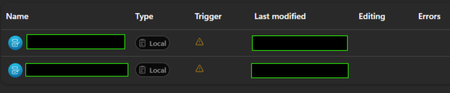
I'm AI administrator, and I have a colleague who've build an agent in Copilot Studio that uses to child agents. However on his screen they have the relationship "Local" and he can't access them or do anything. When I look at his agent, the sub agents have relationship "Child" and everything works fine. The image down below is what he sees - and the trigger also gets that orange triangle. Have anybody experienced the same? We tried to give another colleague editor permission to the agent, and that colleague experiences the same. They are both sitting at an office in another country than me.460Views0likes3Comments
White paper: Choosing between the GitHub Copilot and Standard harnesses in Copilot Studio
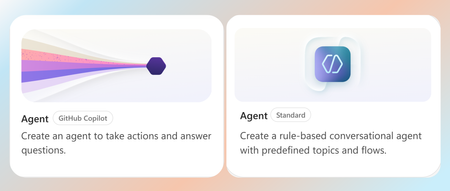
The Standard harness and GitHub Copilot harness are two authoring and runtime options within Microsoft Copilot Studio. A harness is the operating layer between the model and the agent’s configuration. It determines how the model receives context, uses instructions and tools, interprets results, and moves through a task toward completion. Put simply, the model provides the reasoning capability, while the harness equips and directs it. Both harnesses are built for task-based, multi-step agents that create real business value, but they are suited to different scenarios. The Standard harness supports consistent, reliable execution of bounded business processes, while the GitHub Copilot harness extends these capabilities to longer-running, coordination-heavy, and reasoning-intensive work at a larger scale. This paper explains the key differences, tradeoffs, and scenarios to help you choose which harness is right for your business process. Read the full paper by clicking the PDF attachment below.7.9KViews0likes2CommentsUnanswered Questions on GitHub Copilot Harness in Copilot Studio
We're piloting the GitHub Copilot harness in Copilot Studio (GA August 2026) and several operational and architectural details remain undocumented in the GA FAQ, Microsoft Learn, or licensing guides. Looking for official answers or PM contacts on: Architecture & Execution – When the harness breaks tasks into subtasks, does it use internal sub-agents or only skills/connected agents, what are the exact timeout/retry/max-execution-duration limits for long-running workflows, and are planning/context-retrieval/orchestration internals documented anywhere or is the orchestrator a black box? Model Selection – Can individual skills within one agent use different models or is selection strictly agent-level, how are models chosen internally when multiple skills execute, are any internal models developer-configurable, and what's the roadmap for models being added/retired/deprecated plus the lag between public release and Copilot Studio availability? Cost & Token Optimization – How exactly is the ~45% token reduction achieved, how much control do makers have over context/caching/retrieval/tool calls, what are per-model credit consumption characteristics, which models are most cost-effective for specific workloads, and what's the minimum credit cost for trivial interactions? Memory Management – What are retention periods for session/working/agent memory beyond the documented 28-day user-memory expiry, is true long-term memory supported, and what changed versus earlier implementations? Knowledge Retrieval – Can skills or system instructions influence retrieval strategy/document selection/prioritization/filtering, can planning stages perform conflict/duplicate/version detection before retrieval, and how does the harness decide which sources to search? Apps Feature – What is the "Apps (preview)" capability for, when does it GA, and how does it differ from workflows/skills/adaptive cards/agents? Billing & Credit Sizing – Is there a framework to classify users/agents by expected consumption and size credit allocation per group (citizen vs pro developers), and what's the minimum/typical consumption for simple/medium/heavy interactions? Governance & Admin – Can usage limits be set at user level (not just environment/agent), is there an API/IaC path for large-scale credit assignment, can non-admins view their own consumption/remaining allocation, and is there a self-service request-more-credits dashboard? ALM & Environments – What's the recommended path to move harness agents across Dev/Test/UAT/Prod (Solutions/ALM "setup differs" per parity chart—how?), does GitHub integration replace or complement solution-based deployment, are there recommended AgentOps practices for source control/releases/versioning, and what baseline credits and onboarding model are suggested for citizen developers under usage billing—any enterprise reference implementations?642Views2likes1CommentUpdate: Root Cause Identified
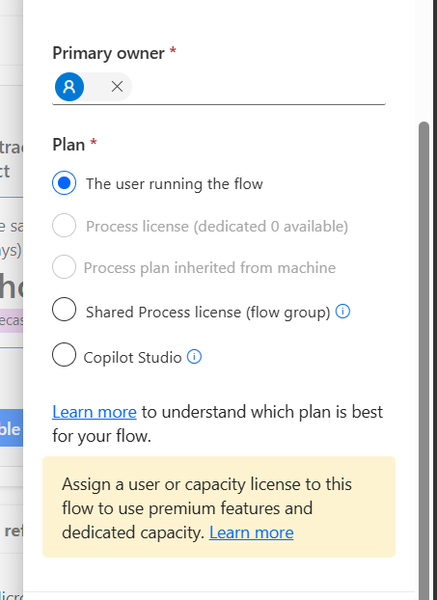
Hi everyone, I would like to share the root cause and solution in case someone else encounters the same issue. The Problem I created several agent flows directly in Power Automate using: https://make.powerautomate.com The flows were configured correctly: The flow starts with When an agent calls the flow The flow ends with Respond to the agent The flow and agent are in the same environment The flow is included in a solution The flow is published and fully functional The flows could be added to an agent and executed successfully. However, unlike flows created directly from Copilot Studio, they did not appear in the Global Tools directory. What I Investigated I verified: Trigger configuration Respond to the agent action Environment consistency Solution membership Publish all customizations Asynchronous response settings Synchronization delays between Power Automate and Copilot Studio None of these were the root cause. Root Cause The issue was related to the workflow Plan. I discovered that: Flows created directly in Power Automate were assigned: Plan = The user running the flow Flows created directly in Copilot Studio were assigned: Plan = Copilot Studio Although the Power Automate flow was fully functional and could be used by the agent, it was not visible in the Global Tools directory. Solution After changing the workflow Plan to: Plan = Copilot Studio the flow immediately appeared in the Global Tools directory. Configuration Location The setting can be found in the workflow properties under: Primary owner → Plan Important Note Based on my testing, changing the Plan to Copilot Studio appears to be a one-way operation and may not be reversible. It may be a good idea to export or save the flow before making the change. Acknowledgements Special thanks to sohnash for reproducing the scenario and providing troubleshooting suggestions, and to Patty_Velasquez for sharing similar observations that helped confirm the behavior. Hopefully this helps others who encounter the same issue. Best regards, Adhonaï KOUKA195Views1like0CommentsPower Automate Flows Created Outside Copilot Studio Not Appearing in Tools
Hello everyone, I'm facing an issue with Copilot Studio and would appreciate your advice. Context I have several Power Automate flows that I created directly from: https://make.powerautomate.com My goal is to use these flows as tools within a Copilot Studio agent. All components are in the same Power Platform environment. What I've verified The flows use the "When an agent calls a flow" trigger. The flows end with "Respond to the agent". The flows are saved and published. The agent and flows are added to the same Solution. The solution has been published. I am using the same account and environment for both Power Automate and Copilot Studio. The Issue Flows that are created directly from Copilot Studio appear correctly under: Tools → Add Tool However, flows created from Power Automate (make.powerautomate.com) do not appear in the Tools list, even though they have the same trigger and response configuration. Question Are there additional requirements for a Power Automate flow to be discoverable by Copilot Studio? For example: Does the flow need to be an Agent Flow rather than a standard Cloud Flow? Are there known synchronization or caching issues between Power Automate and Copilot Studio? Is there a specific setting, solution configuration, or publishing step that I may have missed? Any guidance or experience with a similar issue would be greatly appreciated. Thank you!722Views0likes5Comments