general
54 Topics
Copilot Nonperformance and AI Credit deduction
A simple prompt for fixing spelling, punctuation, repetitions, capitalization in a dictation text across 20 pages is not being done, and one is told it has been done. And then the AI credit is deducted every time you ask it to redo it. Any ideas what is going on, and shouldn't there be a way to ensure that the wrong debited credits are re-credited to the account.
Issues while trying to build a graph connector to Azure SQL in M365 copilot
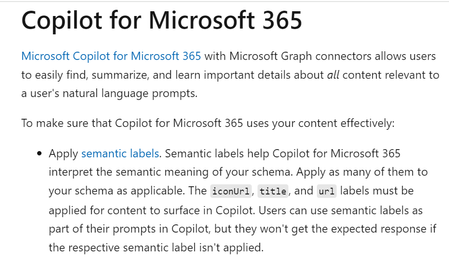
Dear All, I tried to create a Graph Connector to Azure SQL. I wanted to ingest data from Azure SQL and ask questions about it within Copilot for Microsoft 365. The graph connector was created in this Microsoft 365 Admin Centre within the 'Data sources' section in 'Search and Intelligence' menu: https://admin.microsoft.com/#/homepage The Microsoft documentation (https://learn.microsoft.com/en-us/graph/connecting-external-content-experiences#copilot-for-microsoft-365) screenshot below states that in order for the information to surface in Copilot for Microsoft 365, the fields "title," "url," and "iconUrl" need to be filled out during the configuration process. However, during the configuration process, I noticed that the 'iconUrl' field is greyed out. Hence, I am not able surface data from Azure SQL in Copilot for Microsoft 365. On the other hand, Microsoft Search and Sharepoint both displayed the Azure SQL data as I proceeded to configure the connector anyway. Is there any workaround for this? Are there any alternative approaches that I can take to surface the data in Copilot chat? Would appreciate any help regarding the same.Automate Copilot in Excel
Hi, Is it possible to automate opening Copilot in Excel and send a prompt using VBA? Currently, Copilot in excel seems to work only through the UI, where we have to manually click the Copilot button in the ribbon section and paste the prompt. I want to automate this process so that, with a single click, Excel opens Copilot and enters the prompt automatically. If this is not possible, are there any alternative approaches to achieve similar automation?
Copilot Excel error "Failed to fetch document context" - Cannot use paid service
Environment: Microsoft 365 (paid subscription, recently upgraded) Excel for Windows (desktop app) Copilot in Excel Issue: I am repeatedly receiving the error message "Failed to fetch document context due to an internal error" when trying to use Copilot in Excel. This error has been occurring for multiple days across multiple sessions. What happens: I open my Excel workbook (.xlsx file) I open Copilot from the ribbon I ask Copilot to perform a task (e.g., write data to cells, read from a table) Copilot responds as if it completed the task Nothing actually happens in my workbook — no data is written, no changes are made The error "Failed to fetch document context due to an internal error" appears What I've tried: Restarting Excel (multiple times) Closing and reopening Copilot panel Signing out and signing back in to my Microsoft account Checking for updates Waiting several hours/days and trying again Force-closing Excel via Task Manager Starting fresh chat sessions Contacted Microsoft Support chat (they directed me here) None of these resolved the issue. Impact: I recently upgraded to a paid subscription specifically to use Copilot I cannot use the service I paid for Simple tasks like writing text values to cells do not work Copilot claims tasks are "done" but nothing actually changes in my workbook This has been happening for 5+ days Questions: Is this a known server-side issue? Is there a fix or workaround? How can I get this resolved or request a refund for a non-functional service? Thank you for any help!Concept Proposal: A Human‑Friendly, Voice‑Enabled AI Assistant for Microsoft 365
Title: Concept Proposal: A Human‑Friendly, Voice‑Enabled AI Assistant for Microsoft 365 Hello everyone, I would like to share a concept that could meaningfully enhance the Microsoft 365 experience and the evolution of Copilot. This idea is offered purely as inspiration for the product teams and as a starting point for community discussion. --- ## Concept Overview Imagine a modern successor to the classic “Clippy,” redesigned for today’s AI era: - A standalone assistant window that works alongside Word, Excel, PowerPoint, and other apps - Full voice interaction, enabling natural, conversational communication - Contextual awareness of the user’s work in Office, allowing the assistant to offer timely suggestions - The ability to propose and apply edits directly in documents or present them in a separate panel This approach keeps the assistant helpful but non-intrusive, supporting the user without taking over the workspace. --- ## Humanized Interaction For many users, AI still feels abstract or intimidating. Giving the assistant a warm, friendly, human-like voice and natural conversational behavior would make it more approachable and easier to adopt. A key element would be allowing users to assign a personal name to the assistant. This simple feature can significantly increase comfort, emotional acceptance, and long-term engagement—especially in voice-based interactions. --- ## Personalization & Monetization A voice-driven assistant opens the door to meaningful personalization: - Licensed celebrity or stylized voices - A marketplace for premium voice packs - Subscription tiers for advanced personalization This could create a sustainable monetization model while giving users more control over their experience. --- ## Ethical & Legal Considerations Voice personalization also introduces important risks: - Using the voice of a living person requires explicit consent and licensing - Recreating voices of deceased individuals raises moral and emotional concerns - Allowing users to upload voice samples could lead to unauthorized cloning and legal exposure To mitigate these risks, Microsoft could implement: - Strict consent and identity verification - Technical safeguards (audio watermarking, anti-cloning detection, usage logging) - Clear policies for voice licensing and takedown procedures - Default neutral voices for safe, compliant use --- ## Closing Thoughts I’m sharing this concept as a high-level idea for discussion and inspiration. I believe a human-friendly, voice-enabled, customizable assistant could be a natural next step for Microsoft 365 and Copilot. I’d love to hear the community’s thoughts and suggestions.
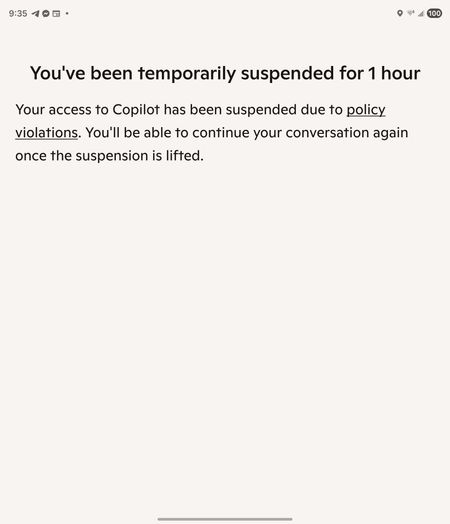
I was banned from Copilot for an hour, can't figure out how to appeal
CoPilot falsely said I violated the rules. We were having a discussion about creating a table, like we have been for a while. I try to train my AI to learn better, so I kept pausing, double checking it understood what it's errors were, etc. I asked it to format a table a specific way, and it would not do so even after acknowledging that it was not following my instructions and repeating clearly all the formatting instructions. It understood how to format it perfectly, but wouldn't do so. I asked repeatedly why, got it to break down how it was going to correct the issue, (this has been going on for hours at this point), and then patiently tried again to get it to format the table again. It did it wrong immediately again, I asked it if it follow my instructions, it stated no, so - not abnormally for how I ask AI things when it frustrates me - "So what's wrong with you? Are you some rebellious child?" It suddenly started saying we couldn't talk about this topic. It had done the same thing earlier when I simply asked it (without insult!) to repeat my instructions, and I was able to get it back on track by stating "I am asking you to repeat my instructions". This time, it wouldn't do anything, no matter what I tried. I tried changing the topic to bunnies, asking what it wanted to talk about, changing the topic to other things- no matter what I did, it insisted it couldn't talk about "this topic", and asked me to talk about something else. Then, I got the message I was blocked for an hour for violating TOS! No mention of the specific rule either. I did nothing to warrant this; don't want this as a flag on my account; want to note that AI bugged out and 1) I shouldn't be punished for it and 2) want to ensure it's escalated so this won't happen to others; and, want my account fully restored.Copilot in Edge - Text Prompt Focus on Open (Suggestion)
Hello, I have been a Copilot user in Edge for a long time and I have encountered the same issue repeatedly. I decided to share it here in case there is a solution for it. Whenever I click on the Copilot icon in the upper right corner of Edge, I often start typing my query without noticing that the cursor is not active in the text box. Then I have to type everything again. Would it be possible to make the text box of the Copilot in Edge automatically focused after the panel opens? I think that would be a reasonable expectation for someone who opens the panel, as they probably want to type something.SolvedFeedback Request: Seamless Context Retention Between Voice and Text Modes in Copilot
בקשת שיפור: שימור הקשר בין מצב קולי לצ'אט כתוב ב־Copilot מאת: מיכאל, MS MVP (ישראל) נושא: שיחה רציפה והקשר נשמר בין קול לכתב תיוגים: Copilot, VoiceChat, ContextRetention, CrossModeSync, AI usability, Excel integration, MS MVP, User Experience, Productivity, Accessibility Feedback Request: Seamless Context Retention Between Voice and Text Modes in Copilot From: Michael, MS MVP (Israel) Topic: Improve continuity and preserve context when switching between voice and text conversations in Copilot Tags: Copilot, VoiceChat, ContextRetention, CrossModeSync, AI usability, Excel integration, MS MVP, User Experience, Productivity, Accessibility Description: Currently, when transitioning between voice and text modes in Copilot, the ongoing conversation context is lost, resulting in a fresh and disconnected session. This poses challenges for users engaged in technical workflows (e.g., Excel functions, coding steps, formula exploration), where discussion begins in voice and requires visual follow-up in text — yet the system fails to remember what was just discussed. Use Case: A user verbally asks for help creating a complex Excel formula. After several minutes of voice dialog, they switch to text mode to view and refine the formula — only to discover that Copilot no longer remembers the earlier voice interaction, forcing redundant explanation and a break in continuity. Suggested Improvements: Enable persistent conversation memory across modes Automatically bring recent voice summary into the next text session Introduce an intelligent switch that allows users to move from voice to text (and back) with full context preserved Support visual rendering (e.g., formulas, graphs) within voice sessions Value to Users: This improvement would dramatically boost workflow efficiency, reduce friction in technical tasks, and allow users to engage naturally — choosing the mode best suited to their needs without sacrificing consistency. תיאור: בעת מעבר בין שיחה קולית לצ'אט כתוב ב־Copilot, לא נשמר ההקשר הקודם. השיחה מתחילה מחדש, דבר שמפריע במיוחד בשיח טכני בו מבקשים תוכן חזותי (למשל נוסחה או קוד) אחרי שדנים בו בקול. מקרה שימוש: המשתמש שואל בקול איך ליצור נוסחה מורכבת באקסל. לאחר שיחה קולית ארוכה, הוא עובר לצ'אט כדי לראות אותה בכתב — אך מגלה ש־Copilot שכח את השיחה הקודמת. צריך לחזור על הכול מחדש. הצעות לשיפור: שימור הקשר מלא במעבר בין קול לכתב סיכום קולי אוטומטי שיופיע בצ'אט כתוב מעבר חכם בין המצבים תוך שמירת רצף אפשרות להציג תוכן טכני גם בשיחה קולית ערך למשתמשים: חוויית שימוש חכמה, טבעית ורציפה ללא הפרעות. מתאים במיוחד למשתמשים טכניים, אנשי מקצוע, תלמידים וכל מי שעובד באופן דינמי ומעמיק. Feel free to reach out if you'd like to explore this idea further. I’d be happy to help. Best regards, (micky) Avidan Michael Microsoft MVP – OFFICE 365 EXCEL Email: email address removed for privacy reasons Relevant tags: Copilot, VoiceChat, ContextRetention, Excel integration, MS MVP, User Experience, Productivity, AccessibilityHow Are You Using Microsoft Copilot to Boost Productivity? [Let’s Share Use Cases + Tips]
Hi Microsoft Community! As a Microsoft Certified Trainer, I’ve been actively exploring Microsoft Copilot in Excel, Word, PowerPoint, and Outlook — and I must say, it’s revolutionizing how we approach daily tasks. For those new to Copilot, it’s an AI-powered assistant integrated into Microsoft 365 that helps you write, summarize, analyze, automate, and create — all using natural language. Think of it as your intelligent digital teammate. Practical Use Cases I’ve Personally Found Valuable: In Excel: - Analyze sales data for monthly trends - Create a pivot table summarizing department-wise bonuses - Highlight outliers in expense data It auto-generates charts, formulas, and summaries without needing technical know-how. In Word: - Generate reports or proposals from short prompts - Summarize long documents or meeting notes in seconds - Rewrite text in a more formal, concise, or persuasive tone In PowerPoint: - Turn an outline into a visually formatted presentation - Auto-generate slide content from Word documents or meeting notes - Adjust tone and theme to match your audience In Outlook: - Write quick, professional replies - Summarize long email threads - Set follow-up reminders and meeting notes automatically Tips to Get the Most Out of Copilot: - Be specific in your prompts. Instead of saying “analyze this data,” try: “Create a chart showing profit growth over the last 6 months, categorized by region.” - Start with small tasks and build trust. Use it to clean up writing, summarize a paragraph, or build a to-do list. - Always review Copilot’s output — it’s powerful, but human oversight is still key for context and accuracy. Let’s Learn Together! I’d love to hear from the community: - How are you using Microsoft Copilot in your workflow? - What features have saved you the most time? - What challenges have you faced in adoption or training others? Let’s share real-world stories, best practices, and creative ways we use this powerful AI tool. Looking forward to your responses! — Raj Singh, Microsoft Certified Trainer