gcc high
53 TopicsMicrosoft 365 Copilot is now available in GCC-High
Update December 2, 2025: This post has been revised to clarify the availability timeline for Copilot Search in the Microsoft 365 Copilot App. It will be rolling out as part of Wave 2, in the first half of 2026. We’re excited to announce that Microsoft 365 Copilot is now available for customers in GCC-High, bringing powerful work-ready AI capabilities to organizations with the highest security and compliance requirements. This announcement builds on previous launches in the GCC and DoD cloud environments over the last year. Trusted AI, built for confidence Microsoft 365 Copilot combines the capabilities of large language models with Work IQ—the intelligence layer that helps Copilot understand you, your job, and your company—and weaves this understanding into familiar Microsoft 365 apps like Word, Excel, PowerPoint, and Outlook to help you work smarter and faster. With Microsoft 365 Copilot, agencies can streamline citizen services by drafting responses and summarizing case files in minutes. They can empower staff to manage budgets effectively by analyzing spending trends and generating compliance-ready reports, all within the Microsoft 365 apps where they already work today. Copilot for GCC-High is built to meet the strict regulatory frameworks many agencies and adjacent organizations operate under, adhering to FedRAMP High, DFARS, ITAR, CMMC, and other critical compliance requirements. Key protections include: Data Residency and Isolation: All data remains within U.S.-based data centers managed by screened U.S. personnel, ensuring compliance with government mandates. Encryption and Access Controls: Data is encrypted in transit and at rest, with Microsoft Entra ID enforcing role-based access. Responsible AI by Design: Copilot incorporates Microsoft’s Responsible AI principles, including safeguards against prompt injection and misuse. To ensure sensitive government data does not leave the GCC-High compliance boundary, Microsoft 365 Copilot is delivered to GCC-High with web grounding OFF by default. Shifting this setting to ON where appropriate will improve the quality of Copilot responses. For more details, visit Data, Privacy, and Security for Microsoft 365 Copilot. Capabilities in GCC-High today – and beyond Microsoft 365 Copilot customers in GCC-High will gain access to a powerful suite of features immediately, with more to come in Wave 2. As of today, the following capabilities are available or have begun rolling out in Microsoft 365 Copilot for GCC-High: Copilot in Microsoft 365 Apps: Integrated AI experiences in Word, Excel, PowerPoint, Outlook, and Teams, enabling users to draft, analyze, and collaborate securely within familiar productivity tools. These capabilities are designed to meet the strict compliance and data residency requirements of GCC-High, with all data stored in U.S.-based data centers and managed by screened U.S. personnel. Premium features in Copilot Chat: Copilot Chat with web grounding (default OFF) and the ability to reason over uploaded files is included with eligible Microsoft 365 plans (rolling out now). Adding a Microsoft 365 Copilot license unlocks full work data reasoning with Work IQ, deeper integration with Microsoft 365 apps, and extensive customization options[1] for secure integration with external data sources and custom workflows, with administrative controls to ensure security and compliance. Learn more about the relationship between Microsoft 365 Copilot and Copilot Chat. Compliance-Ready AI and Security Controls: Copilot for GCC-High is built to meet strict regulatory frameworks, including FedRAMP High, DFARS, ITAR, and CMMC. Data is encrypted in transit and at rest, with role-based access enforced by Microsoft Entra ID. Microsoft Purview and Enterprise Data Protection (EDP) are natively integrated for security, governance, and policy enforcement. Copilot Control System: Provides IT management controls, license management, and compliance monitoring. Administrators can configure and monitor Copilot usage to ensure alignment with organizational policies. Controls are conveniently centralized within the Microsoft 365 admin center. Notebooks and Pages in the Microsoft 365 Copilot App: Use Notebooks and Pages for collaborative work within the dedicated app. Wave 2 features are expected to ship to GCC-High in the first half of 2026. These include: GPT-5: Delivers faster, more accurate, and context-aware responses for advanced analysis and problem solving, while maintaining strict compliance within GCC-High boundaries. Image Generation: Enables users to create custom visuals from text prompts directly in chat and Microsoft 365 apps, with built-in compliance controls for secure usage and sharing. Code Interpreter: Allows secure Python code execution for data analysis, visualization, and automation, supporting advanced analytics and repetitive task automation. Researcher Agent: Provides deep research capabilities, synthesizing insights from organizational content and the web (where permitted), with source-cited, well-organized reports. Analyst Agent: Acts as a virtual data scientist, analyzing structured and unstructured data, visualizing trends, and supporting strategic decision-making. Microsoft 365 Copilot Connectors: Enable integration with third-party and line-of-business data sources, enabling secure, compliant workflows that extend Copilot’s reach beyond Microsoft 365. Copilot Search in the Microsoft 365 Copilot App: Harness Copilot Search for intelligent and context-aware information retrieval within the dedicated app. All of these features will be tailored to meet the strict security, compliance, and data residency requirements of GCC-High. For the latest roadmap and availability updates, refer to the official Microsoft 365 Roadmap and Microsoft 365 Copilot Service Description. Next steps For federal agencies in GCC-High who purchase through the GSA, significant discounts are currently available under the OneGov agreement announced in September, including the opportunity to use Microsoft 365 Copilot at no additional cost for up to 12 months with Microsoft 365 G5. Additional resources are listed below. Reach out to your account team or partner to learn more, request a demo, or get started with Microsoft 365 Copilot in GCC-High today. Resources Documentation and Admin Controls: Microsoft 365 Copilot overview Copilot Control System Overview Microsoft 365 Copilot Service Description Data, Privacy, and Security for Microsoft 365 Copilot Microsoft Purview data security and compliance protections for generative AI apps Apply principles of Zero Trust to Microsoft 365 Copilot Adoption Resources for Public Sector Customers: Copilot Readiness and Adoption Guide for Public Sector Customers Copilot Government Scenarios [1] Not all customization options are currently available in GCC-High. For up-to-date feature availability information refer to the Microsoft 365 Copilot Service Description.7.7KViews1like4CommentsThe new Planner in Microsoft Teams is now available to customers in GCC High
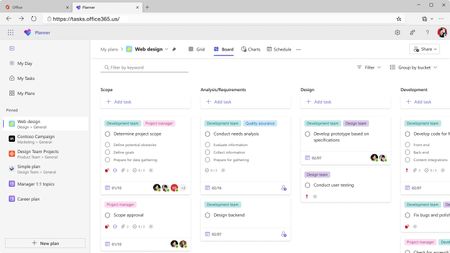
We’re excited to announce that the new Planner app in Microsoft Teams (web and desktop) is now available to customers in the Government Community Cloud (GCC) High environment! There’s no migration required—your existing tasks, basic plans, and premium plans are already in the new Planner. In August, we introduced the modern Planner experience on the web for GCC High. Now, that same experience comes to Microsoft Teams—the hub for teamwork in Microsoft 365—so your teams can plan, track, and collaborate on work right alongside their chats, meetings, and files. Add the Planner app in Teams and start managing all your work in one place You can learn more about the new Planner in our previous announcement. Your feedback helps us prioritize what to build! Share it with us via the Planner Feedback Portal. Getting started Open Planner in Teams. You can also find the Planner app in the Apps browser. Start by selecting the View more apps “…” menu in the navigation bar. Then, select the Planner icon. Once you’ve added Planner, you can pin the app (select Pin) to the left side of Teams for easy access. Differences for customers in GCC High It’s important to note that a few features are not available to customers in GCC High. These include: Copilot in Planner. Tasks assigned to you in premium plans will not appear in the My Tasks view. The ability to convert a basic plan to a premium plan. Task history in premium plans. Project Manager agent. Frequently asked questions Does the rollout include the Planner app in Teams mobile? No. The rollout to GCC High delivers the new Planner App in the Teams web and Desktop clients. Is there anything I need to migrate? No. Existing personal tasks, basic plans, and premium plans appear in the new Planner automatically. Will I see the same features as the Microsoft commercial cloud? Core planning features are consistent, but certain capabilities are not yet available in GCC High. We’ll share updates as these become available. Share your feedback We encourage you to share any feature requests by adding your ideas to the Planner Feedback Portal. Your feedback helps inform our feature updates, and we look forward to hearing from you as you try Planner’s new and existing capabilities! Resources Learn more about Planner at the Planner adoption page. Sign up to receive future communication about Planner. Check out the Microsoft 365 roadmap for feature descriptions and estimated release dates for Planner. Watch Planner demos for inspiration on how to get the most out of Planner in Teams. Visit the Planner help page to learn more about the new Planner.2.1KViews1like6CommentsWhat’s new in Microsoft Planner – August 2025
Our team has released a range of updates in Microsoft Planner’s Project Manager agent including improved suggestions, and seamless access through existing premium plans, and a new entry point in the web—enabling a more efficient planning experience. Additionally, Government Community Cloud (GCC) High customers can now access the new Planner for the web. Read on to learn more about how you can adopt these updates into your workflows! Project Manager agent now available in existing premium plans We’re excited to announce that Project Manager agent is now live and fully integrated across all existing shared premium plans in Microsoft Planner! With Project Manager agent available in the everyday context of premium plans, users can work more efficiently and collaboratively with their teammates. Project Manager agent now available in Planner for the web Project Manager agent is now integrated and available within Planner for the web, making task management and project coordination more accessible to users directly through their browser. This update allows teams to leverage Project Manager agent’s intelligent capabilities—such as plan generation, status report creation, and task execution—regardless of which endpoint they use Planner. Project Manager agent now supports web search The Project Manager agent in Planner can now search the web in real time to enhance the output of tasks it executes. It intelligently identifies which tasks can benefit from external information, performs the search, and incorporates relevant insights and references directly into the Project Manager agent output. This capability respects your organization’s existing controls—if web search is enabled for a user, it works automatically with no additional setup required. Smarter plan generation with quality improvements We’ve rolled out improvements for Project Manager agent that significantly increase the quality of generated plans. Whether you're planning a sprint or setting quarterly goals, Project Manager agent now delivers smarter, more actionable suggestions. Try it out by going to the Goals view of any premium plan and selecting Generate tasks when you input a goal. New entry point for AI chat Project Manager agent chat (previously Copilot in Planner) is now available through a new floating button at the bottom right of your plan. This update makes it easier to interact with Project Manager agent from anywhere within your plan, allowing you to ask questions, get help organizing tasks, or understand what’s next. Project Manager agent chat is available to users with a Microsoft 365 Copilot license in personal and shared premium plans. New Planner for the web available to GCC High customers The new Planner for the web experience is now available to customers in the GCC High environment, marking an important milestone for secure task management in highly regulated organizations. With this release, users can access all their tasks, basic plans, and premium plans directly on the web—no migration required. Note that a few premium features are not yet available in GCC High, such as Copilot in Planner and task history for premium plans. Read more in our announcement blog post. Share your feedback Tell us what you think about the new Planner using the Feedback button in the top right corner of the app. You can also leave thumbs up/thumbs down feedback any time you try a Project Manager agent-enabled capability. We encourage you to share any feature requests by adding your ideas to the Planner Feedback Portal. Your feedback helps inform our feature updates, and we look forward to hearing from you as you try Planner’s new and existing capabilities! Resources Check out the Planner adoption page. Sign up to receive future communication about Planner. Check out the Microsoft 365 roadmap for feature descriptions and estimated release dates for Planner. Watch Planner demos for inspiration on how to get the most out of Planner in Teams. Visit the Planner help page to learn more about the new Planner.5.3KViews0likes11CommentsThe new Planner for the web is now available to customers in GCC High
We are thrilled to share that we have started rolling out the new Microsoft Planner for the web to customers in GCC High! When rolled out to your organization, users with a Microsoft 365 license who visit Planner for the web https://tasks.office365.us/ will receive the new Microsoft Planner experience, bringing together the simplicity of Microsoft To Do, the collaboration of Microsoft Planner, and the power of Microsoft Project for the web into a simple, familiar experience with a rich set of capabilities for individual and team work management. These include: The ability to access all your plans, projects and to do lists in a single place Access all your tasks assigned to you within My Tasks and manage your priorities in a My Day view. Manage and coordinate work using various plan views (Grid, Board, Charts, Schedule, and more)! Experiencing premium capabilities in the new Planner for the web In Planner for the web, you'll be able to collaborate in plans that have premium features including Timeline (Gantt) view, dependencies, sprints, custom fields, team workload, managing goals, and more! If you already have a Planner and Project premium license, you’re already equipped with access to the new Planner’s premium capabilities corresponding to the license you have. Differences for customers in GCC High It’s important to note that a few features are not available to customers in GCC High. These include: Copilot and the Project Manager Agent in Planner. Tasks assigned to you in premium plans will not appear in My Tasks view. The ability to convert basic plans to premium plans. Task history in premium plans. Portfolios. Plan backgrounds in basic plans. Task Publishing. Coming soon The new Planner app in Teams is coming soon to customers in GCC-H! Follow the Planner Blog to stay tuned. Share your feedback We encourage you to share any feature requests by adding your ideas to the Planner Feedback Portal. Your feedback helps inform our feature updates, and we look forward to hearing from you as you try Planner’s new and existing capabilities! Resources Learn more about Planner at the Planner adoption page. Sign up to receive future communication about Planner. Check out the Microsoft 365 roadmap for feature descriptions and estimated release dates for Planner. Watch Planner demos for inspiration on how to get the most out of Planner in Teams. Visit the Planner help page to learn more about the new Planner.2KViews1like3CommentsTwo Public Sector Roundtables at PPCC25
Heading to the Power Platform Community Conference in Las Vegas? Don’t miss two sessions designed for the public sector. The Microsoft Sovereign Cloud Architect Panel gives U.S. GCC, GCC High, and DoD customers direct access to Microsoft experts for roadmap and security insights. Meanwhile, Powering Public Impact brings together global government and education leaders to share strategies for governance, AI adoption, and scaling low‑code innovation. Join these conversations to learn, connect, and shape the future of digital transformation in government.158Views0likes0CommentsJoin Microsoft at IACP 2025: Empower public safety operations with trusted AI
The International Association of Chiefs of Police (IACP) Annual Conference and Exposition is the premier global event for law enforcement leaders, bringing together more than 16,000 public safety professionals. This year, IACP 2025 takes place October 18–22 at the Colorado Convention Center in Denver, and Microsoft is proud to be part of the conversation. As your trusted partner in public safety innovation, we invite you to connect with us at booth #362 to discover how Microsoft and our ecosystem of partners are helping agencies modernize operations, improve decision-making, and build safer communities through trusted AI. Microsoft’s presence at IACP 2025 centers around three key pillars that reflect the evolving needs of law enforcement and public safety agencies: Empower the government workforce Streamline workflows with secure AI copilots, enhance collaboration across departments, and boost efficiency with intuitive digital tools. Enable AI-driven decision making Accelerate officer workflows with real-time insights and unify data to support faster, more informed decisions. Transform emergency response Modernize communications, integrate systems for real-time situational awareness, and automate operations to improve coordination and outcomes. Experience Innovation Firsthand At booth #362, attendees can explore hands-on demos of Microsoft solutions including Microsoft 365 Copilot, Researcher and Analyst agents, and Copilot Studio agents tailored for first responders. These tools are designed to help agencies work smarter, respond faster, and serve communities more effectively. You’ll also have the opportunity to connect with our partners, Altia, DisasterTech, Insight, Pimloc, Remark, Revelen.AI, Triangula, and Zencos who are showcasing their solutions that support officer workflows, evidence management, reporting, and analytics. Don’t miss the Emergency Response Platform vehicle demo, supported by Darley, Dejero, and 3AM which highlights how AI and real-time data can transform field operations and emergency response at the tactical edge. Attend Our Thought Leadership Session Join us for a featured education session in the Leadership Track: Is "Technology Sharing" the Key to Law Enforcement Innovation? 📅 Saturday, October 18 🕤 9:30 – 10:30 AM MT 📍 Room 505/506 This session explores how collaborative platforms and shared technology models can reduce costs, accelerate deployment, and improve outcomes across jurisdictions, offering a blueprint for scalable innovation. Let’s Connect We’d love to meet with you one-on-one to discuss your agency’s goals and challenges. Request a meeting with a Microsoft expert to explore how AI and cloud technologies can support your mission. Visit Microsoft at booth #362 to explore AI-powered public safety solutions and skilling opportunities. Together, we can build safer, more resilient communities through innovation.152Views0likes0CommentsUnderstanding Compliance Between Commercial, Government, DoD & Secret Offerings - July 2025 Update
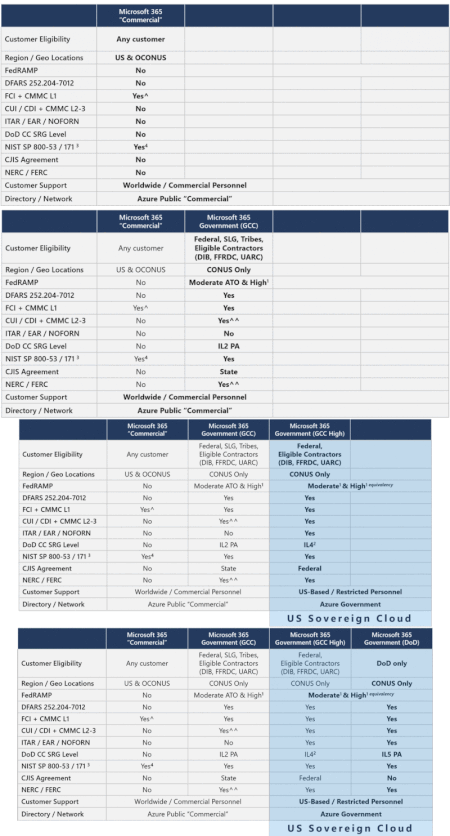
Understanding compliance between Commercial, Government, DoD & Secret Offerings: There remains much confusion as to what service supports what standards best. If you have CMMC, DFARS, ITAR, FedRAMP, CJIS, IRS and other regulatory requirements and you are trying to understand what service is the best fit for your organization then you should read this article.62KViews5likes7Comments