gcc high
4 TopicsThe new Planner in Microsoft Teams is now available to customers in GCC High
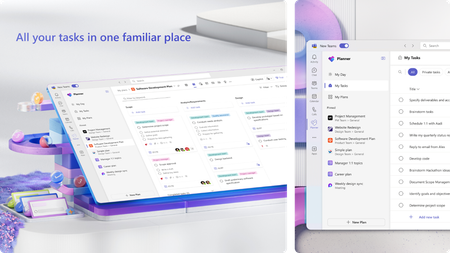
We’re excited to announce that the new Planner app in Microsoft Teams (web and desktop) is now available to customers in the Government Community Cloud (GCC) High environment! There’s no migration required—your existing tasks, basic plans, and premium plans are already in the new Planner. In August, we introduced the modern Planner experience on the web for GCC High. Now, that same experience comes to Microsoft Teams—the hub for teamwork in Microsoft 365—so your teams can plan, track, and collaborate on work right alongside their chats, meetings, and files. Add the Planner app in Teams and start managing all your work in one place You can learn more about the new Planner in our previous announcement. Your feedback helps us prioritize what to build! Share it with us via the Planner Feedback Portal. Getting started Open Planner in Teams. You can also find the Planner app in the Apps browser. Start by selecting the View more apps “…” menu in the navigation bar. Then, select the Planner icon. Once you’ve added Planner, you can pin the app (select Pin) to the left side of Teams for easy access. Differences for customers in GCC High It’s important to note that a few features are not available to customers in GCC High. These include: Copilot in Planner. Tasks assigned to you in premium plans will not appear in the My Tasks view. The ability to convert a basic plan to a premium plan. Task history in premium plans. Project Manager agent. Frequently asked questions Does the rollout include the Planner app in Teams mobile? No. The rollout to GCC High delivers the new Planner App in the Teams web and Desktop clients. Is there anything I need to migrate? No. Existing personal tasks, basic plans, and premium plans appear in the new Planner automatically. Will I see the same features as the Microsoft commercial cloud? Core planning features are consistent, but certain capabilities are not yet available in GCC High. We’ll share updates as these become available. Share your feedback We encourage you to share any feature requests by adding your ideas to the Planner Feedback Portal. Your feedback helps inform our feature updates, and we look forward to hearing from you as you try Planner’s new and existing capabilities! Resources Learn more about Planner at the Planner adoption page. Sign up to receive future communication about Planner. Check out the Microsoft 365 roadmap for feature descriptions and estimated release dates for Planner. Watch Planner demos for inspiration on how to get the most out of Planner in Teams. Visit the Planner help page to learn more about the new Planner.4.6KViews1like8CommentsThe new Planner for the web is now available to customers in GCC High
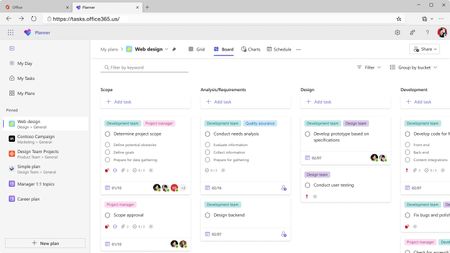
We are thrilled to share that we have started rolling out the new Microsoft Planner for the web to customers in GCC High! When rolled out to your organization, users with a Microsoft 365 license who visit Planner for the web https://tasks.office365.us/ will receive the new Microsoft Planner experience, bringing together the simplicity of Microsoft To Do, the collaboration of Microsoft Planner, and the power of Microsoft Project for the web into a simple, familiar experience with a rich set of capabilities for individual and team work management. These include: The ability to access all your plans, projects and to do lists in a single place Access all your tasks assigned to you within My Tasks and manage your priorities in a My Day view. Manage and coordinate work using various plan views (Grid, Board, Charts, Schedule, and more)! Experiencing premium capabilities in the new Planner for the web In Planner for the web, you'll be able to collaborate in plans that have premium features including Timeline (Gantt) view, dependencies, sprints, custom fields, team workload, managing goals, and more! If you already have a Planner and Project premium license, you’re already equipped with access to the new Planner’s premium capabilities corresponding to the license you have. Differences for customers in GCC High It’s important to note that a few features are not available to customers in GCC High. These include: Copilot and the Project Manager Agent in Planner. Tasks assigned to you in premium plans will not appear in My Tasks view. The ability to convert basic plans to premium plans. Task history in premium plans. Portfolios. Plan backgrounds in basic plans. Task Publishing. Coming soon The new Planner app in Teams is coming soon to customers in GCC-H! Follow the Planner Blog to stay tuned. Share your feedback We encourage you to share any feature requests by adding your ideas to the Planner Feedback Portal. Your feedback helps inform our feature updates, and we look forward to hearing from you as you try Planner’s new and existing capabilities! Resources Learn more about Planner at the Planner adoption page. Sign up to receive future communication about Planner. Check out the Microsoft 365 roadmap for feature descriptions and estimated release dates for Planner. Watch Planner demos for inspiration on how to get the most out of Planner in Teams. Visit the Planner help page to learn more about the new Planner.3.4KViews1like4Comments