gcc high
4 TopicsThe new Planner for the web is now available to customers in GCC High
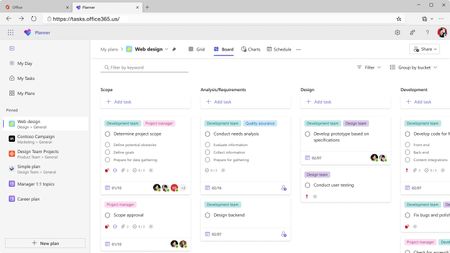
We are thrilled to share that we have started rolling out the new Microsoft Planner for the web to customers in GCC High! When rolled out to your organization, users with a Microsoft 365 license who visit Planner for the web https://tasks.office365.us/ will receive the new Microsoft Planner experience, bringing together the simplicity of Microsoft To Do, the collaboration of Microsoft Planner, and the power of Microsoft Project for the web into a simple, familiar experience with a rich set of capabilities for individual and team work management. These include: The ability to access all your plans, projects and to do lists in a single place Access all your tasks assigned to you within My Tasks and manage your priorities in a My Day view. Manage and coordinate work using various plan views (Grid, Board, Charts, Schedule, and more)! Experiencing premium capabilities in the new Planner for the web In Planner for the web, you'll be able to collaborate in plans that have premium features including Timeline (Gantt) view, dependencies, sprints, custom fields, team workload, managing goals, and more! If you already have a Planner and Project premium license, you’re already equipped with access to the new Planner’s premium capabilities corresponding to the license you have. Differences for customers in GCC High It’s important to note that a few features are not available to customers in GCC High. These include: Copilot and the Project Manager Agent in Planner. Tasks assigned to you in premium plans will not appear in My Tasks view. The ability to convert basic plans to premium plans. Task history in premium plans. Portfolios. Plan backgrounds in basic plans. Task Publishing. Coming soon The new Planner app in Teams is coming soon to customers in GCC-H! Follow the Planner Blog to stay tuned. Share your feedback We encourage you to share any feature requests by adding your ideas to the Planner Feedback Portal. Your feedback helps inform our feature updates, and we look forward to hearing from you as you try Planner’s new and existing capabilities! Resources Learn more about Planner at the Planner adoption page. Sign up to receive future communication about Planner. Check out the Microsoft 365 roadmap for feature descriptions and estimated release dates for Planner. Watch Planner demos for inspiration on how to get the most out of Planner in Teams. Visit the Planner help page to learn more about the new Planner.3.4KViews1like4CommentsThe new Planner in Microsoft Teams is now available to customers in GCC High
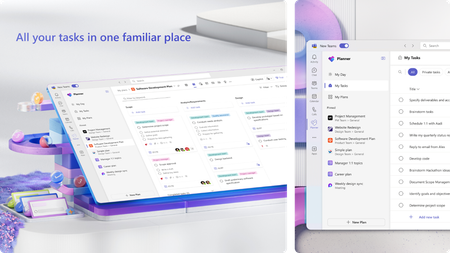
We’re excited to announce that the new Planner app in Microsoft Teams (web and desktop) is now available to customers in the Government Community Cloud (GCC) High environment! There’s no migration required—your existing tasks, basic plans, and premium plans are already in the new Planner. In August, we introduced the modern Planner experience on the web for GCC High. Now, that same experience comes to Microsoft Teams—the hub for teamwork in Microsoft 365—so your teams can plan, track, and collaborate on work right alongside their chats, meetings, and files. Add the Planner app in Teams and start managing all your work in one place You can learn more about the new Planner in our previous announcement. Your feedback helps us prioritize what to build! Share it with us via the Planner Feedback Portal. Getting started Open Planner in Teams. You can also find the Planner app in the Apps browser. Start by selecting the View more apps “…” menu in the navigation bar. Then, select the Planner icon. Once you’ve added Planner, you can pin the app (select Pin) to the left side of Teams for easy access. Differences for customers in GCC High It’s important to note that a few features are not available to customers in GCC High. These include: Copilot in Planner. Tasks assigned to you in premium plans will not appear in the My Tasks view. The ability to convert a basic plan to a premium plan. Task history in premium plans. Project Manager agent. Frequently asked questions Does the rollout include the Planner app in Teams mobile? No. The rollout to GCC High delivers the new Planner App in the Teams web and Desktop clients. Is there anything I need to migrate? No. Existing personal tasks, basic plans, and premium plans appear in the new Planner automatically. Will I see the same features as the Microsoft commercial cloud? Core planning features are consistent, but certain capabilities are not yet available in GCC High. We’ll share updates as these become available. Share your feedback We encourage you to share any feature requests by adding your ideas to the Planner Feedback Portal. Your feedback helps inform our feature updates, and we look forward to hearing from you as you try Planner’s new and existing capabilities! Resources Learn more about Planner at the Planner adoption page. Sign up to receive future communication about Planner. Check out the Microsoft 365 roadmap for feature descriptions and estimated release dates for Planner. Watch Planner demos for inspiration on how to get the most out of Planner in Teams. Visit the Planner help page to learn more about the new Planner.4.6KViews1like8CommentsIn case you missed it: A roundup of the latest Planner announcements
The Microsoft Planner team recently celebrated two pivotal milestones: International Project Management Day and Microsoft Ignite. To round out the year, here’s a quick look at some of the new and existing features we announced. 7 hidden gems to effectively manage your tasks In honor of International Project Management Day on November 6, our team published a blog post to highlight lesser-known but powerful Planner features that help teams work more efficiently across Planner and Microsoft Teams. These features include the ability to bulk edit tasks, export plans to Excel, and auto-generate status reports. To learn more, check out our blog post, “7 hidden gems to effectively manage your tasks in Microsoft Planner.” Planner at Microsoft Ignite At Microsoft Ignite 2025, we unveiled a major wave of updates that deepen the integration between Planner, Teams, and the Project Manager Agent—bringing AI-powered coordination, automation, and compliance capabilities into everyday workflows. In meetings, Facilitator now listens for spoken intent, captures decisions as actionable tasks, and generates documents using meeting context. Tasks are automatically synced to Planner, reducing manual follow-up and ensuring alignment as soon as the meeting wraps. In Teams channels, the Channel Agent can create and update tasks, answer plan-related questions, and produce richer status reports. These status reports are now enhanced with Planner data for better visibility into progress, risks, and blockers. Workback plan generation is now available in channels, helping teams quickly create reverse timelines based on a target deadline. Please note, the Teams meetings and channel capabilities mentioned above are available in public preview and require a Microsoft 365 Copilot license. To learn more about Project Manager Agent skills in Teams meetings and channels, as well as newly released compliance features, see our recent blog post, “The next chapter for AI-powered work management in Microsoft Planner.” The new Planner in Teams for GCC High Also worth mentioning is the availability of the new Planner in Teams for our customers in the GCC High environment. As of October, all existing tasks, basic plans, and premium plans have been migrated to the new Planner in Teams. GCC High customers can now plan, track, and collaborate on work alongside their chats, meetings, and files. Learn more and access some of our most frequently asked questions in our recent blog post: The new Planner in Microsoft Teams is now available to customers in GCC High. Feedback We want to hear from you about how these features and others can make working with Planner more effective. Tell us what you think using the Feedback button in the top-right corner of the web app, or by selecting the ? icon in the top-right corner of Planner in Teams, then selecting Feedback. We also encourage you to share any feature requests by adding your ideas to the Planner Feedback Portal. Your feedback helps inform our feature updates, and we look forward to hearing from you as you try Planner’s new and existing capabilities! Planner resources Watch the on-demand Breakout session from Ignite 2025. Walk through the interactive demos for Project Manager Agent in Planner and Project Manager Agent skills in Teams meetings. Learn more about Planner on the Planner adoption page. Sign up to receive future communication about Planner. Check out the Microsoft 365 roadmap for feature descriptions and estimated release dates for Planner. Visit the Planner help page to learn more about Planner.6.2KViews0likes2CommentsWhat’s new in Microsoft Planner – August 2025
Our team has released a range of updates in Microsoft Planner’s Project Manager agent including improved suggestions, and seamless access through existing premium plans, and a new entry point in the web—enabling a more efficient planning experience. Additionally, Government Community Cloud (GCC) High customers can now access the new Planner for the web. Read on to learn more about how you can adopt these updates into your workflows! Project Manager agent now available in existing premium plans We’re excited to announce that Project Manager agent is now live and fully integrated across all existing shared premium plans in Microsoft Planner! With Project Manager agent available in the everyday context of premium plans, users can work more efficiently and collaboratively with their teammates. Project Manager agent now available in Planner for the web Project Manager agent is now integrated and available within Planner for the web, making task management and project coordination more accessible to users directly through their browser. This update allows teams to leverage Project Manager agent’s intelligent capabilities—such as plan generation, status report creation, and task execution—regardless of which endpoint they use Planner. Project Manager agent now supports web search The Project Manager agent in Planner can now search the web in real time to enhance the output of tasks it executes. It intelligently identifies which tasks can benefit from external information, performs the search, and incorporates relevant insights and references directly into the Project Manager agent output. This capability respects your organization’s existing controls—if web search is enabled for a user, it works automatically with no additional setup required. Smarter plan generation with quality improvements We’ve rolled out improvements for Project Manager agent that significantly increase the quality of generated plans. Whether you're planning a sprint or setting quarterly goals, Project Manager agent now delivers smarter, more actionable suggestions. Try it out by going to the Goals view of any premium plan and selecting Generate tasks when you input a goal. New entry point for AI chat Project Manager agent chat (previously Copilot in Planner) is now available through a new floating button at the bottom right of your plan. This update makes it easier to interact with Project Manager agent from anywhere within your plan, allowing you to ask questions, get help organizing tasks, or understand what’s next. Project Manager agent chat is available to users with a Microsoft 365 Copilot license in personal and shared premium plans. New Planner for the web available to GCC High customers The new Planner for the web experience is now available to customers in the GCC High environment, marking an important milestone for secure task management in highly regulated organizations. With this release, users can access all their tasks, basic plans, and premium plans directly on the web—no migration required. Note that a few premium features are not yet available in GCC High, such as Copilot in Planner and task history for premium plans. Read more in our announcement blog post. Share your feedback Tell us what you think about the new Planner using the Feedback button in the top right corner of the app. You can also leave thumbs up/thumbs down feedback any time you try a Project Manager agent-enabled capability. We encourage you to share any feature requests by adding your ideas to the Planner Feedback Portal. Your feedback helps inform our feature updates, and we look forward to hearing from you as you try Planner’s new and existing capabilities! Resources Check out the Planner adoption page. Sign up to receive future communication about Planner. Check out the Microsoft 365 roadmap for feature descriptions and estimated release dates for Planner. Watch Planner demos for inspiration on how to get the most out of Planner in Teams. Visit the Planner help page to learn more about the new Planner.7.2KViews0likes11Comments