functions
60 TopicsDesign and Implement Complex Business Scenarios using Low Code Tools
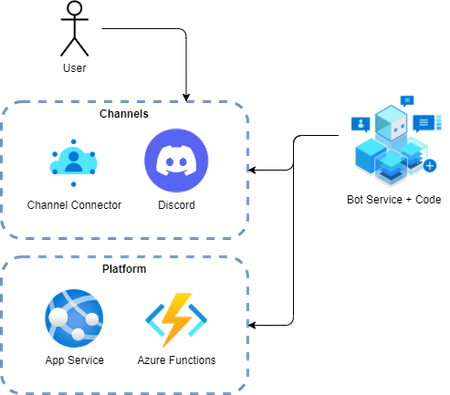
Let’s suppose you oversee any community (such as your school class) using popular chat apps such as Microsoft Teams or Discord. Whenever members join your community, you want them to on-board or – more specifically - verify them. (In case you need an example: In our case, we want competitors for Microsoft Competitions to verify their Discord account when they join the competition Discord server. Once verified, participants will receive broader access to the Discord server.)4.9KViews4likes0CommentsHow to Use Postgres MCP Server with GitHub Copilot in VS Code
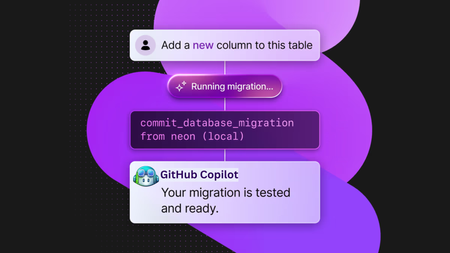
GitHub Copilot has changed how developers write code, but when combined with an MCP (Model Copilot Protocol) server, it also connects your services. With it, Copilot can understand your database schema and generate relevant code for your API, data models, or business logic. In this guide, you'll learn how to use the Neon Serverless Postgres MCP server with GitHub Copilot in VS Code to build a sample REST API quickly. We'll walk through how to create an Azure Function that fetches data from a Neon database, all with minimal setup and no manual query writing. From Code Generation to Database Management with GitHub Copilot AI agents are no longer just helping write code—they’re creating and managing databases. When a chatbot logs a customer conversation, or a new region spins up in the Azure cloud, or a new user signs up, an AI agent can automatically create a database in seconds. No need to open a dashboard or call an API. This is the next evolution of software development: infrastructure as intent. With tools like database MCP servers, agents can now generate real backend services as easily as they generate code. GitHub Copilot becomes your full-stack teammate. It can answer database-related questions, fetch your database connection string, update environment variables in your Azure Function, generate SQL queries to populate tables with mock data, and even help you create new databases or tables on the fly. All directly from your editor, with natural language prompts. Neon has a dedicated MCP server that makes it possible for Copilot to directly understand the structure of your Postgres database. Let's get started with using the Neon MCP server and GitHub Copilot. What You’ll Need Node.js (>= v18.0.0) and npm: Download from nodejs.org. An Azure subscription (create one for free) Install either the stable or Insiders release of VS Code: Stable release Insiders release Install the GitHub Copilot, GitHub Copilot for Azure, and GitHub Copilot Chat extensions for VS Code Azure Functions Core Tools (for local testing) Connect GitHub Copilot to Neon MCP Server Create Neon Database Visit the Neon on Azure Marketplace page and follow the Create a Neon resource guide to deploy Neon on Azure for your subscription. Neon has free plan is more than enough to build proof of concept or kick off a new startup project. Install the Neon MCP Server for VS Code Neon MCP Server offers two options for connecting your VS Code MCP client to Neon. We will use the Remote Hosted MCP Server option. This is the simplest setup—no need to install anything locally or configure a Neon API key in your client. Add the following Neon MCP server configuration to your user settings in VS Code: { "mcp":{ "servers":{ "Neon":{ "command":"npx", "args":[ "-y", "mcp-remote", "https://mcp.neon.tech/sse" ] } } } } Click on Start on the MCP server. A browser window will open with an OAuth prompt. Just follow the steps to give your VS Code MCP client access to your Neon account. Generate an Azure Function REST API using GitHub Copilot Step 1: Create an empty folder (ex: mcp-server-vs-code) and open it in VS Code. Step 2: Open GitHub Copilot Chat in VS Code and switch to Agent mode. You should see the available tools. Step 3: Ask Copilot something like "Create an Azure function with an HTTP trigger”: Copilot will generate a REST API using Azure Functions in JavaScript with a basic setup to run the functions locally. Step 4: Next, you can ask to list existing Neon projects: Step 5: Try out different prompts to fetch the connection string for the chosen database and set it to the Azure Functions settings. Then ask to create a sample Customer table and so on. Or you can even prompt to create a new database branch on Neon. Step 6: Finally, you can prompt Copilot to update the Azure functions code to fetch data from the table: Combine the Azure MCP Server Neon MCP gives GitHub Copilot full access to your database schema, so it can help you write SQL queries, connect to the database, and build API endpoints. But when you add Azure MCP Server into the mix, Copilot can also understand your Azure services—like Blob Storage, Queues, and Azure AI. You can run both Neon MCP and Azure MCP at the same time to create a full cloud-native developer experience. For example: Use Neon MCP for serverless Postgres with branching and instant scale. Use Azure MCP to connect to other Azure services from the same Copilot chat. Even better: Azure MCP is evolving. In newer versions, you can spin up Azure Functions and other services directly from Copilot chat, without ever leaving your editor. Copilot pulls context from both MCP servers, which means smarter code suggestions and faster development. You can mix and match based on your stack and let Copilot help you build real, working apps in minutes. Final Thoughts With GitHub Copilot, Neon MCP server, and Azure Functions, you're no longer writing backend code line by line. It is so fast to build APIs. You're orchestrating services with intent. This is not the future—it’s something you can use today.Ignite 2025: Advancing Azure Database for MySQL with Powerful New Capabilities
At Ignite 2025, we’re introducing a wave of powerful new capabilities for Azure Database for MySQL, designed to help organizations modernize, scale, and innovate faster than ever before. From enhanced high availability and seamless serverless integrations to AI-powered insights and greater flexibility for developers, these advancements reflect our commitment to delivering a resilient, intelligent data platform. Join us as we unveil what’s next for MySQL on Azure - and discover how industry leaders are already building the future with confidence. Enhanced Failover Performance with Dedicated SLB for High-Availability Servers We’re excited to announce the General Availability of Dedicated Standard Load Balancer (SLB) for HA-enabled servers in Azure Database for MySQL. This enhancement introduces a dedicated SLB to High Availability configurations for servers created with public access or private link. By managing the MySQL data traffic path, SLB eliminates the need for DNS updates during failover, significantly reducing failover time. Previously, failover relied on DNS changes, which caused delays due to DNS TTL (30 seconds) and client-side DNS caching. What’s new with GA: The FQDN consistently resolves to the SLB IP address before and after failover. Load-balancing rules automatically route traffic to the active node. Removes DNS cache dependency, delivering faster failovers. Note: This feature is not supported for servers using private access with VNet integration. Learn more Build serverless, event-driven apps at scale – now GA with Trigger Bindings for Azure Functions We’re excited to announce the General Availability of Azure Database for MySQL Trigger bindings for Azure Functions, completing the full suite of Input, Output, and Trigger capabilities. This feature lets you build real-time, event-driven applications by automatically invoking Azure Functions when MySQL table rows are created or updated - eliminating custom polling and boilerplate code. With native support across multiple languages, developers can now deliver responsive, serverless solutions that scale effortlessly and accelerate innovation. Learn more Enable AI agents to query Azure Database for MySQL using Azure MCP Server We’re excited to announce that Azure MCP Server now supports Azure Database for MySQL, enabling AI agents to query and manage MySQL data using natural language through the open Model Context Protocol (MCP). Instead of writing SQL, you can simply ask questions like “Show the number of new users signed up in the last week in appdb.users grouped by day.”, all secured with Microsoft Entra authentication for enterprise-grade security. This integration delivers a unified, secure interface for building intelligent, context-aware workflows across Azure services - accelerating insights and automation. Learn more Greater networking flexibility with Custom Port Support Custom port support for Azure Database for MySQL is now generally available, giving organizations the flexibility to configure a custom port (between 25001 and 26000) during new server creation. This enhancement streamlines integration with legacy applications, supports strict network security policies, and helps avoid port conflicts in complex environments. Supported across all network configurations - including public access, private access, and Private Link - custom port provisioning ensures every new MySQL server can be tailored to your needs. The managed experience remains seamless, with all administrative capabilities and integrations working as before. Learn more Streamline migrations and compatibility with Lower Case Table Names support Azure Database for MySQL now supports configuring lower_case_table_names server parameter during initial server creation for MySQL 8.0 and above, ensuring seamless alignment with your organization’s naming conventions. This setting is automatically inherited for restores and replicas, and cannot be modified. Key Benefits: Simplifies migrations by aligning naming conventions and reducing complexity. Enhances compatibility with legacy systems that depend on case-insensitive table names. Minimizes support dependency, enabling faster and smoother onboarding. Learn more Unlock New Capabilities with Private Preview Features at Ignite 2025 We’re excited to announce that you can now explore two powerful capabilities in early access - Reader Endpoint for seamless read scaling and Server Rename for greater flexibility in server management. Scale reads effortlessly with Reader Endpoint (Private Preview) We’re excited to announce that the Reader Endpoint feature for Azure Database for MySQL is now ready for private preview. Reader Endpoint provides a dedicated read-only endpoint for read replicas, enabling automatic connection-based load balancing of read-only traffic across multiple replicas. This simplifies application architecture by offering a single endpoint for read operations, improving scalability and fault tolerance. Azure Database for MySQL supports up to 10 read replicas per primary server. By routing read-only traffic through the reader endpoint, application teams can efficiently manage connections and optimize performance without handling individual replica endpoints. Reader endpoints continuously monitor the health of replicas and automatically exclude any replica that exceeds the configured replication lag threshold or becomes unavailable. To enroll in the preview, please submit your details using this form. Limitations During Private Preview: Only performance-based routing is supported in this preview. Certain settings such as routing method and the option to attach new replicas to the reader endpoint can only be configured at creation time. Only one reader endpoint can be created per replica group. Including the primary server as a fallback for read traffic when no replicas are available is not supported in this preview. Get flexibility in server management with Server Rename (Private Preview) We’re excited to announce the Private Preview of Server Rename for Azure Database for MySQL. This feature lets you update the name of an existing MySQL server without recreating it, migrating data, or disrupting applications - making it easier to adopt clear, consistent naming. It provides a near zero-downtime path to a new hostname of the server. To enroll in the preview, please submit your details using this form. Limitations During Private Preview: Primary server with read replicas: Renaming a primary server that has read replicas keeps replication healthy. However, the SHOW SLAVE STATUS output on the replicas will still display the old primary server's name. This is a display inconsistency only and does not affect replication. Renaming is currently unsupported for servers using Customer Managed Key (CMK) encryption or Microsoft Entra Authentication (Entra Id). Real-World Success: Azure Database for MySQL Powers Resilient Applications at Scale Factorial Factorial, a leading HR software provider, uses Azure Database for MySQL alongside Azure Kubernetes Service to deliver secure, scalable HR solutions for thousands of businesses worldwide. By leveraging Azure Database for MySQL’s reliability and seamless integration with cloud-native technologies, Factorial ensures high availability and rapid innovation for its customers. Learn more YES (Youth Employment Service) South Africa’s largest youth employment initiative, YES, operates at national scale by leveraging Azure Database for MySQL to deliver a resilient, centralized platform for real-time job matching, learning management, and career services - connecting thousands of young people and employers, and helping nearly 45 percent of participants secure permanent roles within six months. Learn more Nasdaq At Ignite 2025, Nasdaq will showcase how it uses Azure Database for MySQL - alongside Azure Database for PostgreSQL and other Azure products - to power a secure, resilient architecture that safeguards confidential data while unlocking new agentic AI capabilities. Learn more These examples demonstrate that Azure Database for MySQL is trusted by industry leaders to build resilient, scalable applications - empowering organizations to innovate and grow with confidence. We Value Your Feedback Azure Database for MySQL is built for scale, resilience, and performance - ready to support your most demanding workloads. With every update, we’re focused on simplifying development, migration, and management so you can build with confidence. Explore the latest features and enhancements to see how Azure Database for MySQL meets your data needs today and in the future. We welcome your feedback and invite you to share your experiences or suggestions at AskAzureDBforMySQL@service.microsoft.com Stay up to date by visiting What's new in Azure Database for MySQL, and follow us on YouTube | LinkedIn | X for ongoing updates. Thank you for choosing Azure Database for MySQL!637Views2likes0Comments
Building Intelligent Apps with Azure Cache for Redis, EntraID, Azure Functions, E1 SKU, and more!
We're excited to announce the latest updates to Azure Cache for Redis that will improve your data management and application performance as we kickoff for Microsoft Build 2024. Coming soon, the Enterprise E1 SKU (Preview) will offer a lower entry price, Redis modules, and enterprise-grade features. The Azure Function Triggers and Bindings for Redis are now in general availability, simplifying your workflow with seamless integration. Microsoft EntraID in Azure Cache for Redis is now in GA, providing enhanced security management. And there's more – we are also sharing added resources for developing intelligent applications using Azure Cache for Redis Enterprise, enabling you to build smarter, more responsive apps. Read the blog below to find out more about these amazing updates and how they can enhance your Azure Cache for Redis experience. 2.4KViews2likes0Comments
Azure Cache for Redis at Microsoft Build 2023
We are excited to announce that Azure Cache for Redis is receiving a major upgrade announced at Microsoft Build 2023, with several new features and enhancements that will help developers improve the performance and scalability of their applications. This release includes many significant improvements, such as integration with Azure Functions, a new Azure Marketplace template for quick web app deployment, and new enterprise features that focus on developer efficiency. Additionally, Azure Cache for Redis will now support up to 30 shards, making it even more scalable than before. With new authentication capabilities such as AAD and .NET support, this release is sure to provide developers with a powerful and versatile caching solution for their applications. To learn more, check out the full details below.5.9KViews2likes0Comments