frontline workers
8 TopicsMicrosoft 365 Community Conference: A Beacon for Builders, Innovators, and Icons of Intelligent Work
You’re passionate about what you do, and we’re passionate about empowering your potential. Microsoft 365 Community Conference - is your chance to keep up with AI, build game-changing skills, and take your career (and business) even further. With over 200 sessions, workshops, keynotes, and AMAs, you’ll learn directly from the experts and product-makers who are reimagining what’s possible in the workplace. Conference Details Join us in Las Vegas April 21-23. 2026 for the premier Microsoft 365 community event. We want to help you get the most out of the tools you use every day, so we’re bringing back the conference you know and love—with even more opportunities to learn, connect, and level up. Here’s what you can expect: Meet one-on-one with the people who create Microsoft products—ask questions, share feedback, and discover real-world solutions Explore Microsoft’s latest product updates and learn about what’s on the horizon Build and sharpen skills you can use immediately to be more productive, creative, and collaborative with the Microsoft tools you use every day Grow your network, dive deep, and have fun with the best community in tech How to Register Register today and get ready to transform the way you work. Save $150 with our exclusive customer code SAVE150. https://aka.ms/M365ConfWebsite Explore Sessions and Workshops There’s plenty of breadth—and depth—to the learning opportunities at the Microsoft 365 Community Conference. No matter your role or experience level, we've got something for everyone! https://aka.ms/M365ConfSessionsWebPage Meet the Speakers Our lineup of speakers includes some of the brightest minds behind the most powerful Microsoft innovations. You’ll hear from experts like: Jeff Teper | President, Collaborative Apps and Platforms Charles Lamanna | President, Business Apps and Agents Vasu Jakkal | Corporate Vice President, Microsoft Security Business Rohan Kumar | Corporate Vice President, Microsoft Security, Purview & Trust The Microsoft 365 Community Conference is more than an event. It’s the gateway to what’s next for your career, community, team, customers, and business—and for work itself. Claim your front-row seat to the future of work today!1.1KViews0likes1CommentAnnouncing the 2026 Microsoft 365 Community Conference Keynotes
The Microsoft 365 Community Conference returns to Orlando this April, bringing together thousands of builders, innovators, creators, communicators, admins, architects, MVPs, and product makers for three unforgettable days of learning and community. This year’s theme, “A Beacon for Builders, Innovators & Icons of Intelligent Work,” celebrates the people shaping the AI‑powered future — and the keynote lineup reflects exactly that. These leaders will set the tone for our biggest, boldest M365 Community Conference. Below is your first look at the official 2026 keynote order and what to expect from each session. Opening Keynote Jeff Teper — President, Microsoft 365 Collaborative Apps & Platforms Building for the future: Microsoft 365, Agents and AI, what's new and what's next Join Jeff Teper, to discover how AI-powered innovation across Copilot, Teams, and SharePoint is reshaping how people communicate, create, and work together. This session highlights what’s new, what’s fundamentally different, and why thoughtful design continues to matter. See the latest advances in AI and agents, gain insight into where collaboration is headed, and learn why Microsoft is the company to continue to bet on when it comes to building what’s next. Expect: New breakthroughs in collaboration powered by AI and agents Fresh innovations across Teams, Copilot, and SharePoint Practical guidance on how design continues to shape effective teamwork Real world demos that show how AI is transforming communication and content Insight into what is new, what is changing, and what is coming next Business Apps & Agents Keynote Ryan Cunningham — Corporate Vice President, Power Platform In this keynote, Ryan Cunningham will share how Microsoft 365 Copilot, Copilot Studio, Power Apps, and Agent 365 come together to help makers build powerful agents and help IT teams deploy and govern them at scale. We’ll share how organizations can design, extend, and govern a new model for the intelligent workplace – connecting data, workflows, and systems into intelligent agents that move work forward. Copilot, apps, and agents: the next platform shift for Microsoft 365 Microsoft 365 Copilot has changed how we interact with software. Now AI agents are changing how work gets done – moving from responding to prompts to taking action, across the tools and data your organization already relies on. Expect: A clear explanation of how to leverage and build with Copilot and agents How agents access data, use tools, and complete multi-step work A deeper look at the latest capabilities across Microsoft 365 Copilot, Copilot Studio, and Power Apps End-to-end demos of agents in action Security, Trust & Responsible AI Keynote Vasu Jakkal — Corporate Vice President, Microsoft Security & Rohan Kumar — Corporate Vice President, Microsoft Security, Purview & Trust In our third keynote, Vasu Jakkal and Rohan Kumar join forces to address one of the most urgent topics of the AI era: trust and security at scale. As organizations accelerate into AI‑powered work, safeguarding identities, data, compliance, and governance is mission‑critical. Securing AI: Building Trust in the Era of AI Join Vasu Jakkal and Rohan Kumar as they unveil Microsoft’s vision for securing the new frontier of AI—showing how frontier firms are protecting their data, identities, and models amid rapid AI adoption. This session highlights how Microsoft is embedding security and governance into every layer of our AI platforms and unifying Purview, Defender, Entra, and Security Copilot to defend against threats like prompt injection, model tampering, and shadow AI. You’ll see how built-in protections across Microsoft 365 enable responsible, compliant AI innovation, and gain practical guidance to strengthen your own security posture as AI transforms the way everyone works. Expect: Microsoft's unified approach to secure AI transformation Forward‑looking insights across Security, Purview & Trust Guidance for building safe, responsible AI environments How to protect innovation without slowing momentum Future of Work Fireside Keynote Dr. Jaime Teevan — Chief Scientist & Technical Fellow, Microsoft Dr. Jaime Teevan, one of the foremost thought leaders on AI, productivity, and how work is evolving. In this intimate fireside‑style session, she’ll share research, real‑world insights, and Microsoft’s learnings from being both the maker and the first customer of the AI‑powered workplace. Expect: Insights from decades of workplace research The human side of AI transformation Practical guidance for leaders, creators, and practitioners Why collaboration is essential to unlock the true potential of AI. Community Closer Keynote Karuana Gatimu - Director, Microsoft Customer Advocacy Group & Heather Cook - Principal PM, MIcrosoft Customer Advocacy Group From Momentum to Movement: Where Community Goes Next As the final moments of Microsoft 365 Community Conference come to a close, Heather Cook and Karuana Gatimu invite the community to pause, reflect, and look forward together. This Community Closer keynote connects the breakthroughs, conversations, and shared experiences of the week into a bigger story—one about people, purpose, and progress. Together, they’ll explore how community transforms technology into impact, how advocates and builders shape what’s next across Microsoft 365, and why this moment matters more than ever. More than a recap, this session is a call to action—challenging attendees to take the energy of the conference back to their teams, regions, and communities, and turn inspiration into sustained momentum. You’ll leave not just with ideas, but with clarity, confidence, and a renewed sense of belonging—because community doesn’t end when the conference does. It’s where the real work begins. More Than Keynotes: Why You’ll Want to Be in Orlando The M365 Community Conference brings together: 200+ sessions and breakouts 21 hands‑on workshops 200+ Microsoft engineers and product leaders onsite The Microsoft Innovation Hub Ask the Experts, Meet & Greets, and Community Studio Women in Tech & Allies Luncheon SharePoint’s 25th Anniversary Celebration And an epic attendee party at Universal’s Islands of Adventure Whether you create, deploy, secure, govern, design, or lead with Microsoft 365 — this is your community, and this is your moment. Join Us for the Microsoft 365 Community Conference April 21–23, 2026 Loews Sapphire Falls & Loews Royal Pacific 👉 Register now: https://aka.ms/M365Con26 Use the SAVE150 code for $150USD off current pricing Come be part of the global community building the future of intelligent work.4.2KViews3likes2Comments
You can now sync Forms response to Excel desktop
We are thrilled to introduce a powerful new feature in desktop versions of Excel that is set to transform your data collection process. With the latest update, you can now create a new Microsoft Form directly within an Excel workbook, linking the form to the workbook seamlessly. This feature, previously available in Excel for the Web, is now available in the Windows app, with Mac support coming soon. reate a new linked form from the Excel desktop app This new integration is particularly beneficial for users who frequently collect data from other people. By enabling the creation of a form directly from an Excel workbook, you can streamline the data collection process, making it more efficient and less prone to errors. Whether you are gathering survey responses, feedback, or any other form of data, this feature ensures that all information is centrally located and easily accessible. For example, consider a team working on a project that requires input from multiple stakeholders. Using this new feature, the project manager can create a form to collect updates and feedback, and all responses will be automatically reflected in the project’s Excel workbook. This eliminates the need for manual data entry and consolidation, saving valuable time and reducing the likelihood of errors. How it works On the Insert tab, select Forms > New Form A new browser tab will open, presenting you with a blank form to customize according to your needs. Simultaneously, a linked table will appear in your workbook, ready to sync with the form. As you edit the form or receive new submissions, the linked table in your workbook will automatically update, ensuring that your data is always current and accurate. After creating your form, you can access several other capabilities from the Forms menu: **Preview Form:** This option will open the form in preview mode in a new browser tab, allowing you to see how the form will look to respondents. **Edit Form:** This option will open the form in edit mode in a new browser tab, so you can make changes to the form as needed. **Send Form:** This option will open the form in a new browser tab and show the dialog letting you send the form out to respondents and begin collecting responses. Availability and System Requirements The new Microsoft Forms integration is available to all Current Channel users running Version 2410 (Build 16.0.18227.20000) or later. You can check which version you’re using by going to File > Account. If you are using an earlier version, we recommend updating your Excel app to take full advantage of this feature. Mac users can also look forward to this integration in an upcoming update. Feedback We would love to hear your thoughts on this new feature! Please send any feedback and suggestions by selecting Help > Feedback.6.7KViews3likes7CommentsMicrosoft Forms Powers Approvals Templates in Microsoft Teams, and other updates | April 2021
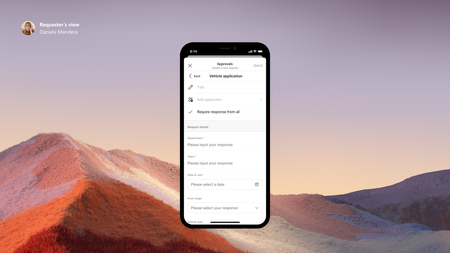
In this blog post, we are excited to share how Microsoft Forms powers Approvals templates in Microsoft Teams, an important product for frontline workers to do their job. With Hannover Messe 2021 Digital Edition taking place this week...65KViews5likes21Comments