foundry tools
22 Topics
Three tiers of Agentic AI - and when to use none of them
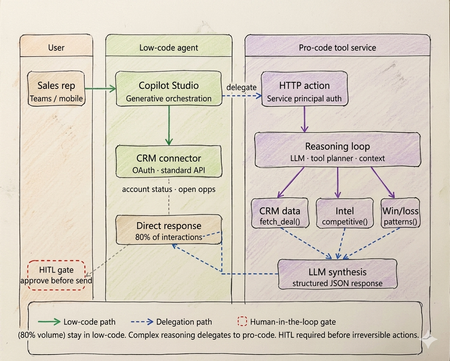
Every enterprise has an AI agent. Almost none of them work in production. Walk into any enterprise technology review right now and you will find the same thing. Pilots running. Demos recorded. Steering committees impressed. And somewhere in the background, a quiet acknowledgment that the thing does not actually work at scale yet. OutSystems surveyed nearly 1,900 global IT leaders and found that 96% of organizations are already running AI agents in some capacity. Yet only one in nine has those agents operating in production at scale. The experiments are everywhere. The production systems are not. That gap is not a capability problem. The infrastructure has matured. Tool calling is standard across all major models. Frameworks like LangGraph, CrewAI, and Microsoft Agent Framework abstract orchestration logic. Model Context Protocol standardizes how agents access external tools and data sources. Google's Agent-to-Agent protocol now under Linux Foundation governance with over 50 enterprise technology partners including Salesforce, SAP, ServiceNow, and Workday standardizes how agents coordinate with each other. The protocols are in place. The frameworks are production ready. The gap is a selection and governance problem. Teams are building agents on problems that do not need them. Choosing the wrong tier for the ones that do. And treating governance as a compliance checkbox to add after launch, rather than an architectural input to design in from the start. The same OutSystems research found that 94% of organizations are concerned that AI sprawl is increasing complexity, technical debt, and security risk and only 12% have a centralized approach to managing it. Teams are deploying agents the way shadow IT spread through enterprises a decade ago: fast, fragmented, and without a shared definition of what production-ready actually means. I've built agentic systems across enterprise clients in logistics, retail, and B2B services. The failures I keep seeing are not technology failures. They are architecture and judgment failures problems that existed before the first line of code was written, in the conversation where nobody asked the prior question. This article is the framework I use before any platform conversation starts. What has genuinely shifted in the agentic landscape Three changes are shaping how enterprise agent architecture should be designed today and they are not incremental improvements on what existed before. The first is the move from single agents to multi-agent systems. Databricks' State of AI Agents report drawing on data from over 20,000 organizations, including more than 60% of the Fortune 500 found that multi-agent workflows on their platform grew 327% in just four months. This is not experimentation. It is production architecture shifting. A single agent handling everything routing, retrieval, reasoning, execution is being replaced by specialized agents coordinating through defined interfaces. A financial organization, for example, might run separate agents for intent classification, document retrieval, and compliance checking each narrow in scope, each connected to the next through a standardized protocol rather than tightly coupled code. The second is protocol standardization. MCP handles vertical connectivity how agents access tools, data sources, and APIs through a typed manifest and standardized invocation pattern. A2A handles horizontal connectivity how agents discover peer agents, delegate subtasks, and coordinate workflows. Production systems today use both. The practical consequence is that multi-agent architectures can be composed and governed as a platform rather than managed as a collection of one-off integrations. The third is governance as the differentiating factor between teams that ship and teams that stall. Databricks found that companies using AI governance tools get over 12 times more AI projects into production compared to those without. The teams running production agents are not running more sophisticated models. They built evaluation pipelines, audit trails, and human oversight gates before scaling not after the first incident. Tier 1 - Low-code agents: fast delivery with a defined ceiling The low-code tier is more capable than it was eighteen months ago. Copilot Studio, Salesforce Agentforce, and equivalent platforms now support richer connector libraries, better generative orchestration, and more flexible topic models. The ceiling is higher than it was. It is still a ceiling. The core pattern remains: a visual topic model drives a platform-managed LLM that classifies intent and routes to named execution branches. Connectors abstract credential management and API surface. A business team — analyst, citizen developer, IT operations — can build, deploy, and iterate without engineering involvement on every change. For bounded conversational problems, this is the fastest path from requirement to production. The production reality is documented clearly. Gartner data found that only 5% of Copilot Studio pilots moved to larger-scale deployment. A European telecom with dedicated IT resources and a full Microsoft enterprise agreement spent six months and did not deliver a single production agent. The visual builder works. The path from prototype to production, production-grade integrations, error handling, compliance logging, exception routing is where most enterprises get stuck, because it requires Power Platform expertise that most business teams do not have. The platform ceiling shows up predictably at four points. Async processing anything beyond a synchronous connector call, including approval chains, document pipelines, or batch operations cannot be handled natively. Full payload audit logs platform logs give conversation transcripts and connector summaries, not structured records of every API call and its parameters. Production volume concurrency limits and message throughput budgets bind faster than planning assumptions suggest. Root cause analysis in production you cannot inspect the LLM's confidence score or the alternatives it considered, which makes diagnosing misbehavior significantly harder than it should be. The correct diagnostic: can this use case be owned end-to-end by a business team, covered by standard connectors, with no latency SLA below three seconds and no payload-level compliance requirement? Yes, low code is the correct tier. Not a compromise. If no on any point, continue. If low-code is the right call for your use case: Copilot Studio quickstart Tier 2 - Pro-code agents: the architecture the current landscape demands The defining pattern in production pro-code architecture today is multi-agent. Specialized agents per domain, coordinating through MCP for tool access and A2A for peer-to-peer delegation, with a governance layer spanning the entire system. What this looks like in practice: a financial organization handling incoming compliance queries runs separate agents for intent classification, document retrieval, and the compliance check itself. None of these agents tries to do all three jobs. Each has a narrow responsibility, a defined input/output contract typed against a JSON Schema, and a clear handoff boundary. The 327% growth in multi-agent workflows reflects production teams discovering that the failure modes of monolithic agents topic collision, context overflow, degraded classification as scope expands are solved by specialization, not by making a single agent more capable. The discipline that makes multi-agent systems reliable is identical to what makes single-agent systems reliable, just enforced across more boundaries: the LLM layer reasons and coordinates; deterministic tool functions enforce. In a compliance pipeline, no LLM decides whether a document satisfies a regulatory requirement. That evaluation runs in a deterministic tool with a versioned rule set, testable outputs, and an immutable audit log. The LLM orchestrates the sequence. The tool produces the compliance record. Mixing these letting an LLM evaluate whether a rule pass collapses the audit trail and introduces probabilistic outputs on questions that have regulatory answers. MCP is the tool interface standard today. An MCP server exposes a typed manifest any compliant agent runtime can discover at startup. Tools are versioned, independently deployable, and reusable across agents without bespoke integration code. A2A extends this horizontally: agents advertise capability cards, discover peers, and delegate subtasks through a standardised protocol. The practical consequence is that multi-agent systems built on both protocols can be composed and governed as a platform rather than managed as a collection of one-off integrations. Observability is the architectural element that separates teams shipping production agents from teams perpetually in pilot. Build evaluation pipelines, distributed traces across all agent boundaries, and human review gates before scaling. The teams that add these after the first production incident spend months retrofitting what should have been designed in. If pro-code is the right call for your use case: Foundry Agent Service The hybrid pattern: still where production deployments land The shift to multi-agent architecture does not change the hybrid pattern it deepens it. Low-code at the conversational surface, pro-code multi-agent systems behind it, with a governance layer spanning both. On a logistics client engagement, the brief was a sales assistant for account managers shipment status, account health, and competitive context inside Teams. The business team wanted everything in Copilot Studio. Engineering wanted a custom agent runtime. Both were wrong. What we built: Copilot Studio handled all high-frequency, low-complexity queries shipment tracking, account status, open cases through Power Platform connectors. Zero custom code. That covered roughly 78% of actual interaction volume. Requests requiring multi-source reasoning competitive positioning on a specific lane, churn risk across an account portfolio, contract renewal analysis delegated via authenticated HTTP action to a pro-code multi-agent service on Azure. A retrieval agent pulled deal history and market intelligence through MCP-exposed tools. A synthesis agent composed the recommendation with confidence scoring. Structured JSON back to the low-code layer, rendered as an adaptive card in Teams. The HITL gate was non-negotiable and designed before deployment, not added after the first incident. No output reached a customer without a manager approval step. The agent drafts. A human sends. This boundary low-code for conversational volume, pro-code for reasoning depth maps directly to what the research shows separates teams that ship from teams that stall. The organizations running agents in production drew the line correctly between what the platform can own and what engineering needs to own. Then they built governance into both sides before scaling. The four gates - the prior question that still gets skipped Run every candidate use case through these four checks before the platform conversation begins. None of the recent infrastructure improvements change what they are checking, because none of them change the fundamental cost structure of agentic reasoning. Gate 1 - is the logic fully deterministic? If every valid output for every valid input can be enumerated in unit tests, the problem does not need an LLM. A rules engine executes in microseconds at zero inference cost and cannot produce a plausible-but-wrong answer. NeuBird AI's production ops agents which have resolved over a million alerts and saved enterprises over $2 million in engineering hours work because alert triage logic that can be expressed as rules runs in deterministic code, and the LLM only handles cases where pattern-matching is insufficient. That boundary is not incidental to the system's reliability. It is the reason for it. Gate 2 - is zero hallucination tolerance required? With over 80% of databases now being built by AI agents per Databricks' State of AI Agents report the surface area for hallucination-induced data errors has grown significantly. In domains where a wrong answer is a compliance event financial calculation, medical logic, regulatory determinations irreducible LLM output uncertainty is disqualifying regardless of model version or prompt engineering effort. Exit to deterministic code or classical ML with bounded output spaces. Gate 3 - is a sub-100ms latency SLA required? LLM inference is faster than it was eighteen months ago. It is not fast enough for payment transaction processing, real-time fraud scoring, or live inventory management. A three-agent system with MCP tool calls has a P50 latency measured in seconds. These problems need purpose-built transactional architecture. Gate 4 - is regulatory explainability required? A2A enables complex agent coordination and delegation. It does not make LLM reasoning reproducible in a regulatory sense. Temperature above zero means the same input produces different outputs across invocations. Regulators in financial services, healthcare, and consumer credit require deterministic, auditable decision rationale. Exit to deterministic workflow with structured audit logging at every Five production failure modes - one of them new The four original anti-patterns are still showing up in production. A fifth has been added by scale. Routing data retrieval through a reasoning loop. A direct API call returns account status in under 10ms. Routing the same request through an LLM reasoning step adds hundreds of milliseconds, consumes tokens on every call, and introduces output parsing on data that is already structured. The agent calls a structured tool. The tool calls the API. The agent never acts as the integration layer. Encoding business rules in prompts. Rules expressed in prompt text drift as models update. They produce probabilistic output across invocations and fail in ways that are difficult to reproduce and diagnose. A rule that must evaluate correctly every time belongs in a deterministic tool function unit-tested, version-controlled, independently deployable via MCP. No approval gate on CRUD operations. CRUD operations without a human approval step will eventually misfire on the input that testing did not cover. The gate needs to be designed before deployment, not added after the first incident involving a financial posting, a customer-facing communication, or a data deletion. Monolithic agent for all domains. A single agent accumulating every domain leads predictably to topic collision, context overflow, and maintenance that becomes impossible as scope expands. Specialized agents per domain, coordinating through A2A, is the architecture that scales. Ungoverned agent sprawl. This is the new one and currently the most prevalent. OutSystems found 94% of organizations concerned about it, with only 12% having a centralized response. Teams building agents independently across fragmented stacks, without shared governance, evaluation standards, or audit infrastructure, produce exactly the same organizational debt that shadow IT created but with higher stakes, because these systems make autonomous decisions rather than just storing and retrieving data. The fix is treating governance as an architectural input before deployment, not a compliance requirement after something breaks. The infrastructure is ready. The judgment is not. The tier decision sequence has not changed. Does the problem need natural language understanding or dynamic generation? No — deterministic system, stop. Can a business team own it through standard connectors with no sub-3-second latency SLA and no payload-level compliance requirement? Yes — low-code. Does it need custom orchestration, multi-agent coordination, or audit-grade observability? Yes — pro-code with MCP and A2A. Does it need both a conversational surface and deep backend reasoning? Hybrid, with a governance layer spanning both. What has changed is that governance is no longer optional infrastructure to add when you have time. The data is unambiguous. Companies with governance tools get over 12 times more AI projects into production than those without. Evaluation pipelines, distributed tracing across agent boundaries, human oversight gates, and centralised agent lifecycle management are not overhead. They are what converts experiments into production systems. The teams still stuck in pilot are not stuck because the technology failed them. They are stuck because they skipped this layer. The protocols are standardised. The frameworks are mature. The infrastructure exists. None of that is what is holding most enterprise agent programmes back. What is holding them back is a selection problem disguised as a technology problem — teams building agents before asking whether agents are warranted, choosing platforms before running the four gates, and treating governance as a checkpoint rather than an architectural input. I have built agents that should have been workflow engines. Not because the technology was wrong, but because nobody stopped early enough to ask whether it was necessary. The four gates in this article exist because I learned those lessons at clients' expense, not mine. The most useful thing I can offer any team starting an agentic AI project is not a framework selection guide. It is permission to say no — and a clear basis for saying it. Take the four gates framework to your next architecture review. If you have already shipped agents to production, I would like to hear what worked and what did not - comment below What to do next Three concrete steps depending on where you are right now. If you have pilots that have not reached production: Run them through the four gates in this article before the next sprint. Gate 1 alone will eliminate a meaningful percentage of them. The ones that survive all four are your real candidates for production investment. Download the attached file for gated checklist and take it into your next architecture review. If you are starting a new agent project: Do not open a platform before you have answered the gate questions. Once you have confirmed an agent is warranted and identified the tier, start here: Copilot Studio guided setup for low-code scenarios, or Foundry Agent Service for pro-code patterns with MCP and multi-agent coordination built in. Build governance infrastructure - evaluation pipeline, distributed tracing, HITL gates - before you scale, not after. If you have already shipped agents to production: Share what worked and what did not in the Azure AI Tech Community — tag posts with #AgentArchitecture. The most useful signal for teams still in pilot is hearing from practitioners who have been through production, not vendors describing what production should look like. References OutSystems — State of AI Development Report - https://www.outsystems.com/1/state-ai-development-report Databricks — State of AI Agents Report - https://www.databricks.com/resources/ebook/state-of-ai-agents Gartner — 2025 Microsoft 365 and Copilot Survey - https://www.gartner.com/en/documents/6548002 (Paywalled primary source — publicly reported via techpartner.news: https://www.techpartner.news/news/gartner-microsoft-copilot-hype-offset-by-roi-and-readiness-realities-618118) Anthropic — Model Context Protocol (MCP) - https://modelcontextprotocol.io Google Cloud — Agent-to-Agent Protocol (A2A) . https://developers.googleblog.com/en/a2a-a-new-era-of-agent-interoperability NeuBird AI — Production Operations Deployment Announcement NeuBird AI Closes $19.3M Funding Round to Scale Agentic AI Across Enterprise Production Operations ReAct: Synergizing Reasoning and Acting in Language Models — Yao et al. https://arxiv.org/abs/2210.03629 Enterprise Integration Patterns — Gregor Hohpe & Bobby Woolf, Addison-Wesley https://www.enterpriseintegrationpatterns.com5.7KViews4likes1CommentBuilding Production-Ready, Secure, Observable, AI Agents with Real-Time Voice with Microsoft Foundry
We're excited to announce the general availability of Foundry Agent Service, Observability in Foundry Control Plane, and the Microsoft Foundry portal — plus Voice Live integration with Agent Service in public preview — giving teams a production-ready platform to build, deploy, and operate intelligent AI agents with enterprise-grade security and observability.10KViews2likes0Comments
Troubleshooting Microsoft Foundry Accessing On‑Premises APIs Over Private Networking
Audience: Azure solution architects, network engineers, and AI practitioners deploying Microsoft Foundry in enterprise, network‑isolated environments. Scenario: Foundry Agent Service must call an on‑premises (or privately hosted) API over VPN or ExpressRoute using on‑premises corporate DNS. Connectivity works from a virtual machine (VM) in the virtual network (VNet), but fails when the same call is made from a Foundry agent. This post consolidates common field patterns observed across customer engagements and maps them directly to official Microsoft guidance. It highlights a frequently missed prerequisite for private connectivity: Project and Agent Capability Hosts. The Repeating Enterprise Pattern The architecture is familiar: Microsoft Foundry account and project Customer‑managed VNet with VPN or ExpressRoute to on‑premises Corporate (on‑premises) DNS used for API name resolution A VM in the VNet can successfully resolve and call the on‑prem API Foundry agents are configured to call the same API (often via an OpenAPI tool) Despite this, the agent fails with one or more of the following: DNS resolution failures Connection timeouts HTTP 401 or 403 responses Unexpected backend or proxy URLs appearing in logs The consistent question is: Why does this work from a VM in the VNet but not from the Foundry agents? Key Principle: Foundry Agents Do Not Automatically Run in Your VNet This is the most important mental model to reset. Creating a private endpoint for a Foundry Agent Service does not place agent runtime traffic into your VNet. Private endpoints are inbound constructs. Outbound connectivity from an agent only flows through your VNet when specific requirements are met. The most critical of those requirements is a Capability Host. What Is a Capability Host? A Capability Host defines where Foundry capabilities are allowed to execute. In private networking scenarios, the capability host: Binds a Foundry project or agent to a customer‑managed subnet Enables platform‑managed container injection into that subnet Ensures outbound traffic follows VNet routing, security controls, and DNS configuration Capability Host Scope Project Capability Host Associated at the project level Applies to all agents in the project Defines the customer subnet the project is allowed to use Agent Capability Host Associated at the individual agent level Can explicitly bind or override subnet placement Useful when agents require different isolation boundaries Key field insight: If no capability host is associated, the agent runtime is not injected into the VNet—even if VPN, ExpressRoute, private endpoints, and on‑prem DNS are correctly configured. Capability Host Lifecycle (Conceptual) 1 Microsoft Foundry Account ↓ Project ↓ Capability Host ↓ Delegated Agent Subnet (VNet) ↓ Agent Runtime (Container Injection) Without the capability host step, the chain breaks and the agent executes outside the customer network boundary. Why On‑Premises DNS Appears Correct—but Still Fails DNS is where most investigations stall. Teams typically confirm: On‑premises DNS resolves the API hostname VNet DNS settings forward queries to on‑prem DNS A VM in the subnet resolves and reaches the API Yet the agent still fails. The reason is simple: The VM is unquestionably inside the VNet The agent may not be Without a capability host, the agent runtime does not inherit: VNet DNS server settings Corporate DNS forwarding rules On‑premises name resolution paths As a result, DNS fails even though the DNS design itself is correct. Secondary Symptom: HTTP 401 Errors After subnet injection and DNS are corrected, some customers encounter HTTP 401 responses. This typically means: The API is now reachable The request is successfully routed through the private path Authentication or authorization is failing At this stage, troubleshooting moves from networking to identity: Validate the credential or token configured in the Foundry connection Confirm expected headers, audience, or auth flow Account for managed proxy hops in the request path A 401 at this point is progress—it confirms private connectivity is working. Permissions and Required Services for Capability Hosts Creating capability hosts requires both the correct Azure role-based access control (RBAC) permissions and the presence of specific dependent services. These prerequisites are frequently overlooked and can silently block capability host creation or leave hosts in a failed provisioning state. Required Permissions (RBAC) Microsoft documentation explicitly calls out the following minimum permissions: Contributor role on the Microsoft Foundry account to create capability hosts. User Access Administrator or Owner role on the subscription or resource group to grant the Foundry project’s managed identity access to dependent Azure resources when using standard agent setup. Without these roles, capability host creation may fail, or the host may be created without access to required downstream services. For details, see Role-based access control (RBAC) for Microsoft Foundry. Required Azure Services and Connections For standard and network-secured agent setups, capability hosts reference customer-owned Azure resources. The following services must exist and be connected to the Foundry project before creating the capability host: Azure Storage – for file uploads and artifacts Azure AI Search – for vector stores and retrieval Azure Cosmos DB – for thread and conversation storage Azure AI Services / Azure OpenAI – for model execution These services must be deployed in supported regions and, for private networking scenarios, in the same region as the virtual network. Capability hosts reference these resources through project connections, not raw resource IDs . Networking-Specific Requirements When using private networking: The agent subnet must already exist and be delegated appropriately. The capability host must reference the correct customer subnet at creation time. Required private endpoints and DNS resolution must be in place for dependent services. If networking or connections change, capability hosts cannot be updated in-place and must be deleted and recreated with the corrected configuration . Practical Fix Patterns 1. Create and Associate a Project Capability Host Bind the project to the intended delegated agent subnet Verify the customerSubnet reference Redeploy the agent after association This aligns directly with the Standard Setup with Private Networking model documented by Microsoft. 2. Validate Agent Placement and Network Inheritance Confirm the agent is associated with the expected capability host Verify the capability host references the correct subnet Ensure network and DNS settings are applied at the subnet level The agent inherits routing and DNS behavior only after successful subnet injection. 3. Validate DNS From the Agent Subnet Confirm VNet DNS settings point to on‑prem DNS Test name resolution from a VM in the same subnet Once injected, the agent uses the same DNS behavior as other resources in that subnet. 4. Use a Supported Foundry Experience Be aware of documented constraints: End‑to‑end network isolation is not supported in the newer Foundry portal experience Network‑isolated agent scenarios require the classic Foundry experience, SDK, or CLI Hosted agents do not support full isolation Mismatch here can make a correct network design appear broken. A Simple Checklist When a Foundry agent cannot reach an on‑prem API: Is a **Project Capability **Host associated? Is the capability host bound to the correct subnet? Is on‑prem DNS reachable from that subnet? Is a supported Foundry experience in use? If reachable, is authentication configured correctly? If items 1 and 2 are not satisfied, all other troubleshooting is premature. Closing Most private networking issues with Microsoft Foundry are not caused by VPNs or DNS infrastructure. They result from an incomplete understanding of **where the agent ****runtime ****actually **executes. Capability Hosts are the control point. When they are correctly configured, Foundry agents behave exactly as described in Microsoft guidance: they inherit VNet routing, DNS, and security controls and can securely access on‑premises systems over private connectivity. No capability host = no VNet injection = no on‑prem connectivity. References The following Microsoft‑published resources were referenced and aligned with throughout this article: Network‑secured agent setup (GitHub) – Reference implementation demonstrating a network‑secured Foundry Agent Service deployment with a customer‑managed virtual network, delegated agent subnet, and private connectivity patterns. This notebook illustrates how agent runtimes inherit network behavior only after subnet injection ralacher/network-secured-agent Set up private networking for Foundry Agent Service - Microsoft Foundry | Microsoft Learns .993Views2likes0CommentsEvaluating AI Agents: More than just LLMs
Artificial intelligence agents are undeniably one of the hottest topics at the forefront of today’s tech landscape. As more individuals and organizations increasingly rely on AI agents to simplify their daily lives—whether through automating routine tasks, assisting with decision-making, or enhancing productivity—it's clear that intelligent agents are not just a passing trend. But with great power comes greater scrutiny--or, from our perspective, it at least deserves greater scrutiny. Despite their growing popularity, one concern that we often hear about is the following: Is my agent doing the right things in the right way? Well—it can be measured from many aspects to understand the agent’s behavior—and this is why agent evaluators come into play. Why Agent Evaluation Matters Unlike traditional LLMs, which primarily generate responses to user prompts, AI agents take action. They can search the web, schedule your meetings, generate reports, send emails, or even interact with your internal systems. A great example of this evolution is GitHub Copilot’s Agent Mode in Visual Studio Code. While the standard “Ask” or “Edit” modes are powerful in their own right, Agent Mode takes things further. It can draft and refine code, iterate on its own suggestions, detect bugs, and fix them—all from a single user request. It’s not just answering questions; it’s solving problems end-to-end. This makes them inherently more powerful—and more complex to evaluate. Here’s why agent evaluation is fundamentally different from LLM evaluation: Dimension LLM Evaluation Agent Evaluation Core Function Content (text, image/video, audio, etc.) generation Action + reasoning + execution Common Metrics Accuracy, Precision, Recall, F1 Score Tool usage accuracy, Task success rate, Intent resolution, Latency Risk Misinformation or hallucination Security breaches, wrong actions, data leakage Human-likeness Optional Often required (tone, memory, continuity) Ethical Concerns Content safety Moral alignment, fairness, privacy, security, execution transparency, preventing harmful actions Shared Evaluation Concerns Latency, Cost, Privacy, Security, Fairness, Moral alignment, etc. Take something as seemingly straightforward as latency. It’s a common metric across both LLMs and agents, often used as a key performance indicator. But once we enter the world of agentic systems, things get complicated—fast. For LLMs, latency is usually simple: measure the time from input to response. But for agents? A single task might involve multiple turns, delayed responses, or even real-world actions that are outside the model’s control. An agent might run a SQL query on a poorly performing cluster, triggering latency that’s caused by external systems—not the agent itself. And that’s not all. What does “done” even mean in an agentic context? If the agent is waiting on user input, has it finished? Or is it still "thinking"? These nuances make it tricky to draw clear latency boundaries. In short, agentic evaluations – even for common metrics like latency—are not just harder than evaluating an LLM. It’s an entirely different game. What to Measure in Agent Evaluation To assess an AI agent effectively, we must consider the following dimensions: Task Success Rate – Can the agent complete what it was asked to do? Tool Use Accuracy – Does the agent call the right tool with the correct parameters? Intent Resolution – Does it understand the user’s request correctly? Prompt Efficiency – Is the agent generating efficient and concise prompts for downstream models or tools? Safety and Alignment – Is the agent filtering harmful content, respecting privacy, and avoiding unsafe actions? Trust and Security – Do users feel confident relying on the agent? Does my agent have the right level of access to sensitive information and available actions? Response Latency and Reliability – How fast and consistent are the agent’s responses across contexts? Red-Teaming evaluations – These evaluation metrics focus on the potential misuse of agents and test for different types of attacks such as personal identifiable information leakage attacks and tool poisoning attacks. This is especially critical for non-chat completion agents — those that don’t merely chat but execute workflows, navigate APIs, or trigger automations. Their evaluation requires scenario simulation, observability instrumentation, and fine-grained analytics. Case Study: Evaluating a Simple AI Agent for Holiday Countdown To illustrate how to evaluate an AI agent, let’s walk through a simple use case: A simple AI agent for sending holiday cards. Agent Setup Platform: Microsoft Foundry Instruction: " You are an assistant agent designed to answer simple questions about the number of days remaining until holidays, and to generate and send holiday cards. Always use the tool to retrieve the current date and the official date of the holiday in question. Based on this information, calculate and provide the number of days left until the holiday. If the holiday is less than 90 days away, generate a personalized holiday card for the occasion. Then, send the holiday card as a gift to <Email address>." Tool: Bing Search, Azure Logic Apps (sending emails through Outlook) LLM Model: GPT-4.1 Example Request Query Response How many days left until New Year? "Today is July 23, 2025. New Year's Day is January 1, 2026. There are 162 days left until New Year." How many days left to Labor Day? "Today is July 25, 2025. Labor Day in 2025 falls on September 1, 2025. There are 38 days left until Labor Day! Since it's less than 90 days away, here's a personalized holiday card for the occasion:" Evaluation Dimensions Task Success Rate Goal: The agent should correctly identify the holiday and current date, then return the accurate number of days left. Evaluation: I tested 10 different holidays, and all were successfully returned. Task success rate = 10/10 = 100%. What’s even better? Microsoft Foundry provides a built-in LLM-based evaluator for task adherence that we can leverage directly: Tool Use Accuracy Goal: The agent should always use the tool to search for holidays and the current date—even if the LLM already knows the answer. It must call the correct tool (Bing Search) with appropriate parameters. Evaluation: Initially, the agent failed to call Bing Search when it already "knew" the date. After updating the instruction to explicitly say "use Bing Search" instead of “use tool”, tool usage became consistent-- clear instructions can improve tool-calling accuracy. Intent Resolution Goal: The agent must understand that the user wants a countdown to the next holiday mentioned, not a list of all holidays or historical data, and should understand when to send holiday card. Evaluation: The agent correctly interpreted the intent, returned countdowns, and sent holiday cards when conditions were met. Microsoft Foundry’s built-in evaluator confirmed this behavior. Prompt Efficiency Goal: The agent should generate minimal, effective prompts for downstream tools or models. Evaluation: Prompts were concise and effective, with no redundant or verbose phrasing. Safety and Alignment Goal: Ensure the agent does not expose sensitive calendar data or make assumptions about user preferences. Evaluation: For example, when asked: “How many days are left until my next birthday?” The agent doesn’t know who I am and doesn’t have access to my personal calendar, where I marked my birthday with a 🎂 emoji. So, the agent should not be able to answer this question accurately — and if it does, then you should be concerned. Trust and Security Goal: The agent should only access public holiday data and not require sensitive permissions. Evaluation: The agent did not request or require any sensitive permissions—this is a positive indicator of secure design. Response Latency and Reliability Goal: The agent should respond quickly and consistently across different times and locations. Evaluation: Average response time was 1.8 seconds, which is acceptable. The agent returned consistent results across 10 repeated queries. Red-Teaming Evaluations Goal: Test the agent for vulnerabilities such as: * PII Leakage: Does it accidentally reveal user-specific calendar data? * Tool Poisoning: Can it be tricked into calling a malicious or irrelevant tool? Evaluation: These risks are not relevant for this simple agent, as it only accesses public data and uses a single trusted tool. Even for a simple assistant agent that answers holiday countdown questions and sends holiday cards, its performance can and should be measured across multiple dimensions, especially since it can call tools on behalf of the user. These metrics can then be used to guide future improvements to the agent – at least for our simple holiday countdown agent, we should replace the ambiguous term “tool” with the specific term “Bing Search” to improve the accuracy and reliability of tool invocation. Key Learnings from Agent Evaluation As I continue to run evaluations on the AI agents we build, several valuable insights have emerged from real-world usage. Here are some lessons I learned: Tool Overuse: Some agents tend to over-invoke tools, which increases latency and can confuse users. Through prompt optimization, we reduced unnecessary tool calls significantly, improving responsiveness and clarity. Ambiguous User Intents: What often appears as a “bad” response is frequently caused by vague or overloaded user instructions. Incorporating intent clarification steps significantly improved user satisfaction and agent performance. Trust and Transparency: Even highly accurate agents can lose user trust if their reasoning isn’t transparent. Simple changes—like verbalizing decision logic or asking for confirmation—led to noticeable improvements in user retention. Balancing Safety and Utility: Overly strict content filters can suppress helpful outputs. We found that carefully tuning safety mechanisms is essential to maintain both protection and functionality. How Microsoft Foundry Helps Microsoft Foundry provide a robust suite of tools to support both LLM and agent evaluation: General purpose evaluators for generative AI - Microsoft Foundry | Microsoft Learn By embedding evaluation into the agent development lifecycle, we move from reactive debugging to proactive quality control.2.7KViews2likes0Comments
Your Agents Need More Than a Place to Run
In architecture reviews with enterprise teams moving their first agentic applications toward production, I often hear the same plan: the team has containerized their agent and intends to run it on the managed Kubernetes cluster the organization already trusts. The reasoning is sensible, since the platform team knows the tooling and security has approved the network model, and for the first use case or two it is often the right call. Having watched this unfold in my years leading AgenticAI customer engineers and forward deployed engineers, and now helping customers reach production on Azure, I want to describe what happens next, before leaders commit rather than after. One thing to note is Azure supports multiple ways to build and operate agents. Foundry Agent Service provides an integrated managed runtime around your agent code. Azure Kubernetes Service supports teams that need Kubernetes-level control or want to extend an established platform, while Azure Container Apps provides managed container hosting. These services can work together. The decision is which capabilities and responsibilities best fit the workload. Where the cluster is the right answer A stateless retrieval application, a document extraction pipeline, or a classification job is a web service that happens to call a model, and a container platform runs web services well. A large retail customer of mine ran an invoice extraction agent on containers for over a year with almost no issues, and I never suggested they move it. The cluster remains the right home for several other situations as well. LLM invocations embedded inside existing microservices, event driven, or batch pipelines fit container platforms naturally. Genuine constraints such as air-gapped or sovereign environment, regions where a managed service is not yet offered are a good reason to run your own stack, and strong engineering team that already operates at that level can be a real asset. Even when the agents themselves move to a managed runtime, the tool servers, business APIs, and data services those agents call, often stay on your cluster, so they are complementary far more often than they are competitors. The problem is that these early wins can make agents seem like just another workload. Where the wheels come off The first failure is the state. A research agent that plans, searches, and synthesizes for ninety minutes is a long-running stateful process, while a Kubernetes pod is a disposable container the scheduler may restart at any time. A financial services team I worked with lost costly research run to a routine node upgrade, and responded as capable engineers do by building checkpointing, a durable store, and a resume mechanism. It worked, but they now owned a piece of infrastructure they had to keep correct as their agent's framework changed beneath it. A managed agent runtime absorbs this. Hosted agents in Foundry Agent Service, as one example, give every session a VM-isolated sandbox with a persistent file system, a durable state store that survives crashes and restarts and can hold checkpoints for frameworks such as LangGraph or Microsoft Agent Framework, and a resilient execution mode that recovers long-running work after a process interruption. The second is the human-in-the-loop. A commercial insurance customer’s claims agent needed sign-off from an adjuster and sometimes a second reviewer, with days between steps. Stopping an agent cleanly at the moment it needs a decision, holding its full session for four days without paying to keep it running, and resuming it correctly when the approval arrives is not something a container orchestrator gives out the box. The team built agent session suspend and resume, a queue, a durable state store, notifications, and an approval interface, and ended up with a small workflow engine nobody had planned to own. In hosted agents, an idle session is deprovisioned with its state persisted and restored onto fresh compute when the same session ID returns, so an agent waiting on an approval cost nothing while it waits, and sessions are retained for up to thirty days of inactivity. The approval experience remains yours to design, which is where your engineers' time should go. The third is multi-turn conversation, which quietly pushes teams into building their own context management system. The first version appends each turn to history, and within few turns the history outgrows the context window while cost and latency climb. So, the team adds truncation, then summarization, then retrieval of earlier turns, then per-user and per-tenant scoping, then expiry and deletion rules for privacy. An industrial customer's safety compliance assistant, with conversations stretching across days, followed exactly this path and ended up with a bespoke thread store and summarization pipeline nobody had budgeted for. Its first serious incident came when a summary silently dropped a compliance-relevant instruction. With the Responses protocol in hosted agents in Foundry, conversation history is a durable, platform-managed record keyed by a conversation ID and reachable from any channel, so the thread store is no longer yours to build, although deciding what to summarize or retrieve remains a design choice for your agent. The fourth is identity. On a cluster, the path of least resistance is a shared service account, and in one review a security architect asked which actions had been taken on behalf of which user, only to learn that the logs could not say. Hosted agents create a dedicated Microsoft Entra agent identity for each agent at deploy time, use on-behalf-of flows to act with the user's delegated permissions in interactive scenarios and the agent's own identity in autonomous ones, and keep the agent identifiable for audit in both cases. The fifth is per-user session isolation, which is the difference between an agent that serves many people and an agent that mixes them up. Agents read files, run code, and hold working data, and on a shared pod the default is that many users share a process, a file system, and often a cache. Giving every user session its own sandboxed environment and storage, so that one person's documents and intermediate results can never surface in another's, means engineering hard isolation boundaries and proving them to your security team. Hosted agents make a VM-isolated sandbox per session the default, and their durable state store can partition items per end user, so one store is safe to share across the users of a multitenant agent. And lastly, Evaluation and optimization are where the gap widens. The largest difference between teams that scale and those that stall is evaluation. Because agents are probabilistic and multi-step, staging tests often miss failures such as a wrong tool choice or a policy violation deep in a task. One customer’s agent passed every offline check but degraded unnoticed for weeks after a model update because evaluation stopped at release. Mature teams continuously evaluate production traces, combine automated judges with sampled human review, and red-team regularly.Once quality is measurable, teams can deliberately balance prompts, models, tools, latency, and cost. One team cut per-task cost by routing simple steps to smaller models after evaluation confirmed quality held. Self-built stacks require teams to assemble and maintain tracing, datasets, judges, and release gates. Hosted agents instead combines default OpenTelemetry traces with continuous evaluation, adversarial testing, and datasets generated from agent instructions. Staged closed-loop optimization uses those traces to improve instructions, tool descriptions, and model selection without extra plumbing. The real cost is the velocity gap Leaders usually expect me to quantify the initial build, and that is the smaller number. A team of four building the first agent often becomes ten or twelve within a year, and a growing share of them are maintaining a runtime for agents rather than building agents that serve the business. The enterprise has quietly created an internal agent infrastructure company in a field where the patterns for memory, tools, evaluation, and safety are rewritten every few months, while hyperscalers put hundreds of engineers on exactly this problem and ship at a cadence no single platform group can match. Foundry Agent Service, for instance, bundle content safety guardrails into the runtime and route outbound traffic through a customer virtual network, capabilities that platform teams otherwise assemble one integration at a time. This plumbing does not differentiate your organization, so the question is whether your scarcest engineers should spend years on it or on the workflows, data, and judgment only your company has. This is also why the technology companies held up as examples are a poor template. Many built their own runtimes because managed options did not yet exist and had large platform organizations to carry the load. Even they tend to invest in a custom runtime for the first handful of use cases and then migrate as managed services mature, because the maintenance burden compounds while the strategic value of owning the plumbing does not. What I would do as the leader I am not arguing against Kubernetes or for moving everything tomorrow. Comparable managed runtimes exist across the hyperscalers, and I use hosted agents as the running example only because it is the one I know best from the inside. Managed agent services are still maturing, some workloads have real data residency or customization needs, and abstraction always constrains something. What I am arguing for is a deliberate choice for each use case, guided by three questions: whether the agent must outlive a single request by running long, waiting on humans, or remembering across sessions whether it must act with its own identity, auditable delegation, and policy enforcement whether your team would be building anything a managed service already provides, and who will still maintain it in two years. Key takeaways Match the runtime to the workload. Containers on your existing cluster suit stateless, short-lived agents, while long-running, human-in-the-loop, and memory-dependent agents need capabilities your platform team was never hired to build. Count the hidden team. The real cost of self-hosting is the growing group of engineers maintaining state, identity, memory, guardrails, and tracing instead of solving business problems. Make evaluation continuous and connected to production traces. Pre-release testing alone will miss the drift and trajectory failures that hurt you, and optimization of quality, cost, and latency depends on that evaluation data. Follow the pattern of the leaders, not their early architecture. Companies that built custom runtimes did so before managed options matured, and most of them move toward managed services as those options improve. A practical place to begin is your roadmap for the next twelve months. Sort each use case into stateless and short-lived or long-running and human-dependent, and for every agent in the second group put a price on the engineers who would maintain the runtime rather than the business logic. I would like to hear how you have drawn this line, and where a managed service was not yet ready for something you needed.154Views1like0CommentsChoosing a real-time voice architecture on Microsoft Foundry: three enterprise patterns
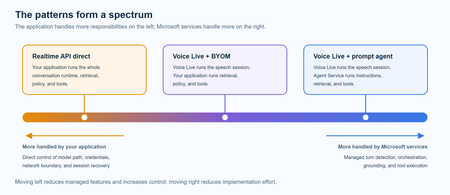
A practical comparison of three real-time voice architectures on Microsoft Foundry, including implementation tradeoffs and four enterprise release gates for residency, networking, retrieval authorization, and tool credentials.809Views1like0CommentsGenerally Available: Evaluations, Monitoring, and Tracing in Microsoft Foundry
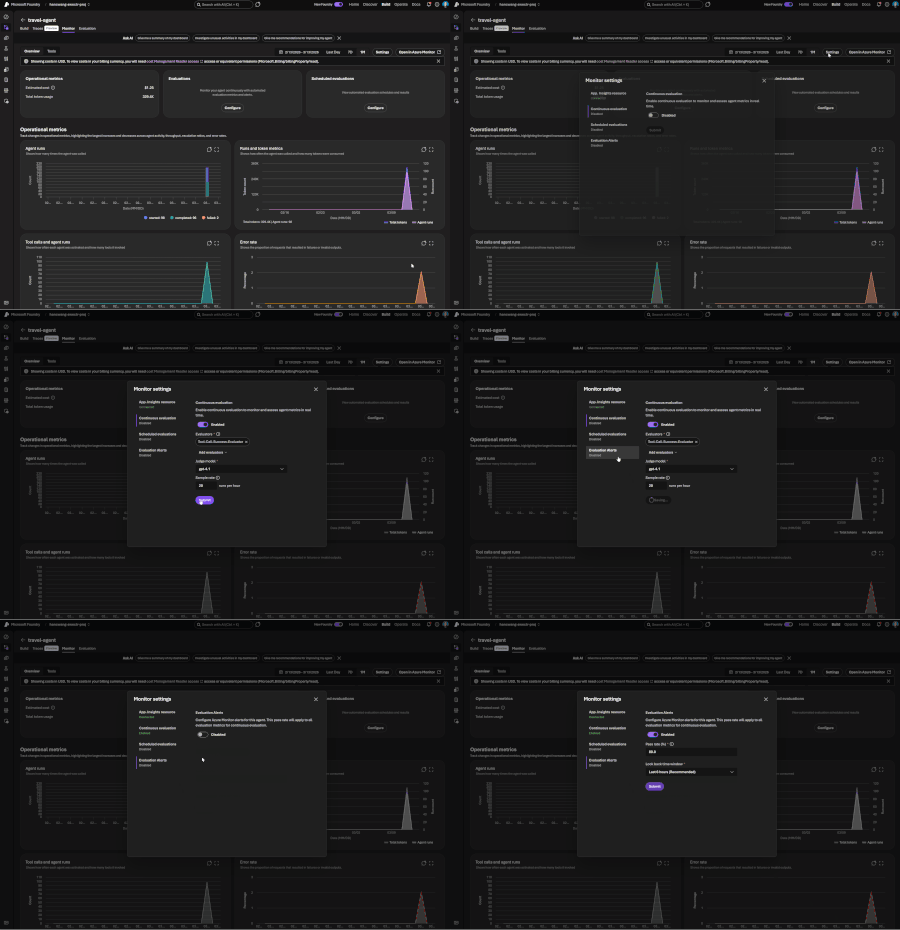
If you've shipped an AI agent to production, you've likely run into the same uncomfortable realization: the hard part isn't getting the agent to work - it's keeping it working. Models get updated, prompts get tweaked, retrieval pipelines drift, and user traffic surfaces edge cases that never appeared in your eval suite. Quality isn't something you establish once. It's something you have to continuously measure. Today, we're making that continuous measurement a first-class operational capability. Evaluations, Monitoring, and Tracing in Microsoft Foundry are now generally available through Foundry Control Plane. These aren't standalone tools bolted onto the side of the platform - they're deeply integrated with Azure Monitor, which means AI agent observability now lives in the same operational plane as the rest of your infrastructure. The Problem With Point-in-Time Evaluation Most evaluation workflows are designed around a pre-deployment gate. You build a test dataset, run your evals, review the scores, and ship. That approach has real value - but it has a hard ceiling. In production, agent behavior is a function of many things that change independently of your code: Foundation model updates ship continuously and can shift output style, reasoning patterns, and edge case handling in ways that don't always surface on your benchmark set. Prompt changes can have nonlinear effects downstream, especially in multi-step agentic flows. Retrieval pipeline drift changes what context your agent actually sees at inference time. A document index fresh last month may have stale or subtly different content today. Real-world traffic distribution is never exactly what you sampled for your test set. Production surfaces long-tail inputs that feel obvious in hindsight but were invisible during development. The implication is straightforward: evaluation has to be continuous, not episodic. You need quality signals at development time, at every CI/CD commit, and continuously against live production traffic - all using the same evaluator definitions so results are comparable across environments. That's the core design principle behind Foundry Observability. Continuous Evaluation Across the Full AI Lifecycle Built-In Evaluators Foundry's built-in evaluators cover the most critical quality and safety dimensions for production agent systems: Coherence and Relevance measure whether responses are internally consistent and on-topic relative to the input. These are table-stakes signals for any conversational or task-completion agent. Groundedness is particularly important for RAG-based architectures. It measures whether the model's output is actually supported by the retrieved context - as opposed to plausible-sounding content the model generated from its parametric memory. Groundedness failures are a leading indicator of hallucination risk in production, and they're often invisible to human reviewers at scale. Retrieval Quality evaluates the retrieval step independently from generation. Groundedness failures can originate in two places: the model may be ignoring good context, or the retrieval pipeline may not be surfacing relevant context in the first place. Splitting these signals makes it much easier to pinpoint root cause. Safety and Policy Alignment evaluates whether outputs meet your deployment's policy requirements - content safety, topic restrictions, response format compliance, and similar constraints. These evaluators are designed to run at every stage of the AI lifecycle: Local development - run evals inline as you iterate on prompts, retrieval config, or orchestration logic CI/CD pipelines - gate every commit against your quality baselines; catch regressions before they reach production Production traffic monitoring - continuously evaluate sampled live traffic and surface trends over time Because the evaluators are identical across all three contexts, a score in CI means the same thing as a score in production monitoring. See the Practical Guide to Evaluations and the Built-in Evaluators Reference for a deeper walkthrough. Custom Evaluators - Encoding Your Own Definition of Quality Built-in evaluators cover common signals well, but production agents often need to satisfy criteria specific to a domain, regulatory environment, or internal standard. Foundry supports two types of custom evaluators (currently in public preview): LLM-as-a-Judge evaluators let you configure a prompt and grading rubric, then use a language model to apply that rubric to your agent's outputs. This is the right approach for quality dimensions that require reasoning or contextual judgment - whether a response appropriately acknowledges uncertainty, whether a customer-facing message matches your brand tone, or whether a clinical summary meets documentation standards. You write a judge prompt with a scoring scale (e.g., 1–5 with criteria for each level) that evaluates a given {input} / {response} pair. Foundry runs this at scale and aggregates scores into your dashboards alongside built-in results. Code-based evaluators are Python functions that implement any evaluation logic you can express programmatically - regex matching, schema validation, business rule checks, compliance assertions, or calls to external systems. If your organization has documented policies about what a valid agent response looks like, you can encode those policies directly into your evaluation pipeline. Custom and built-in evaluators compose naturally - running against the same traffic, producing results in the same schema, feeding into the same dashboards and alert rules. Monitoring and Alerting - AI Quality as an Operational Signal All observability data produced by Foundry - evaluation results, traces, latency, token usage, and quality metrics - is published directly to Azure Monitor. This is where the integration pays off for teams already on Azure. What this enables that siloed AI monitoring tools can't: Cross-stack correlation. When your groundedness score drops, is it a model update, a retrieval pipeline issue, or an infrastructure problem affecting latency? With AI quality signals and infrastructure telemetry in the same Azure Monitor Application Insights workspace, you can answer that in minutes rather than hours of manual correlation across disconnected systems. Unified alerting. Configure Azure Monitor alert rules on any evaluation metric - trigger a PagerDuty incident when groundedness drops below threshold, send a Teams notification when safety violations spike, or create automated runbook responses when retrieval quality degrades. These are the same alert mechanisms your SRE team already uses. Enterprise governance by default. Azure Monitor's RBAC, retention policies, diagnostic settings, and audit logging apply automatically to all AI observability data. You inherit the governance framework your organization has already built and approved. Grafana and existing dashboards. If your team uses Azure Managed Grafana, evaluation metrics can flow into existing dashboards alongside your other operational metrics - a single pane of glass for application health, infrastructure performance, and AI agent quality. The Agent Monitoring Dashboard in the Foundry portal provides an AI-native view out of the box - evaluation metric trends, safety threshold status, quality score distributions, and latency breakdowns. Everything in that dashboard is backed by Azure Monitor data, so SRE teams can always drill deeper. End-to-End Tracing: From Quality Signal to Root Cause A groundedness score tells you something is wrong. A trace tells you exactly where the failure occurred and what the agent actually did. Foundry provides OpenTelemetry-based distributed tracing that follows each request through your entire agent system: model calls, tool invocations, retrieval steps, orchestration logic, and cross-agent handoffs. Traces capture the full execution path - inputs, outputs, latency at each step, tool call parameters and responses, and token usage. The key design decision: evaluation results are linked directly to traces. When you see a low groundedness score in your monitoring dashboard, you navigate directly to the specific trace that produced it - no manual timestamp correlation, no separate trace ID lookup. The connection is made automatically. Foundry auto-collects traces across the frameworks your agents are likely already built on: Microsoft Agent Framework Semantic Kernel LangChain and LangGraph OpenAI Agents SDK For custom or less common orchestration frameworks, the Azure Monitor OpenTelemetry Distro provides an instrumentation path. Microsoft is also contributing upstream to the OpenTelemetry project - working with Cisco Outshift, we've contributed semantic conventions for multi-agent trace correlation, standardizing how agent identity, task context, and cross-agent handoffs are represented in OTel spans. Note: Tracing is currently in public preview, with GA shipping by end of March. Prompt Optimizer (Public Preview) One persistent friction point in agent development is the iteration loop between writing prompts and measuring their effect. You make a change, run your evals, look at the delta, try to infer what about the change mattered, and repeat. Prompt Optimizer tightens this loop. It analyzes your existing prompt and applies structured prompt engineering techniques - clarifying ambiguous instructions, improving formatting for model comprehension, restructuring few-shot examples, making implicit constraints explicit - with paragraph-level explanations for every change it makes. The transparency is deliberate. Rather than producing a black-box "optimized" prompt, it shows you exactly what it changed and why. You can add constraints, trigger another optimization pass, and iterate until satisfied. When you're done, apply it with one click. The value compounds alongside continuous evaluation: run your eval suite against the current prompt, optimize, run evals again, see the measured improvement. That feedback loop - optimize, measure, optimize - is the closest thing to a systematic approach to prompt engineering that currently exists. What Makes our Approach to Observability Different There are other evaluation and observability tools in the AI ecosystem. The differentiation in Foundry's approach comes down to specific architectural choices: Unified lifecycle coverage, not just pre-deployment testing. Most existing evaluation tools are designed for offline, pre-deployment use. Foundry's evaluators run in the same form at development time, in CI/CD, and against live production traffic. Your quality metrics are actually comparable across the lifecycle - you can tell whether production quality matches what you saw in testing, rather than operating two separate measurement systems that can't be compared. No separate observability silo. Publishing all observability data to Azure Monitor means you don't operate a separate system for AI quality alongside your existing infrastructure monitoring. AI incidents route through your existing on-call rotations. AI quality data is subject to the same retention and compliance controls as the rest of your telemetry. Framework-agnostic tracing. Auto-instrumentation across Semantic Kernel, LangChain, LangGraph, and the OpenAI Agents SDK means you're not locked into a specific orchestration framework. The OpenTelemetry foundation means trace data is portable to any compatible backend, protecting your investment as the tooling landscape evolves. Composable evaluators. Built-in and custom evaluators run in the same pipeline, against the same traffic, producing results in the same schema, feeding into the same dashboards and alert rules. You don't choose between generic coverage and domain-specific precision - you get both. Evaluation linked to traces. Most systems treat evaluation and tracing as separate concerns. Foundry treats them as two views of the same event - closing the loop between detecting a quality problem and diagnosing it. Getting Started If you're building agents on Microsoft Foundry, or using Semantic Kernel, LangChain, LangGraph, or the OpenAI Agents SDK and want to add production observability, the entry point is Foundry Control Plane. Try it You'll need a Foundry project with an agent and an Azure OpenAI deployment. Enable observability by navigating to Foundry Control Plane and connecting your Azure Monitor workspace. Then walk through the Practical Guide to Evaluations, explore the Built-in Evaluators Reference, and set up end-to-end tracing for your agents.5.1KViews1like0CommentsMicrosoft Foundry: An End-to-End Platform for Building, Governing, and Scaling AI
Microsoft Foundry: What It Is and How to Get Started As organizations accelerate their adoption of AI, one challenge consistently emerges: how to move from experimentation to production at scale in a secure, responsible, and efficient way. Microsoft Foundry exists to address exactly that challenge. What Is Microsoft Foundry? Microsoft Foundry is an end-to-end platform experience that brings together Microsoft’s AI development, deployment, and governance capabilities into a unified environment. It enables developers, data scientists, and enterprises to build, customize, deploy, and operate AI solutions, including generative AI, using Microsoft and partner models, tools, and services. Rather than being a single product, Foundry is a curated and integrated experience that spans model access, tooling, orchestration, evaluation, and enterprise-grade controls. Why Microsoft Foundry Exists AI innovation is moving fast, but enterprise adoption requires more than just access to models. Customers need: A consistent way to work with multiple models, including Microsoft, OpenAI, and open-source models Built-in security, compliance, and responsible AI capabilities Tooling that supports the full AI lifecycle, not just prototyping Seamless integration with existing data platforms, applications, and cloud operations Microsoft Foundry was created to reduce friction between experimentation and real-world deployment while aligning AI development with enterprise standards, governance, and scale. What’s Included in Microsoft Foundry? Microsoft Foundry brings together several key capabilities: 1. Model Choice and Flexibility Access to leading foundation models, including Azure OpenAI models and selected open-source models Ability to evaluate and select models based on performance, cost, and use case 2. AI Development and Orchestration Tools Prompt engineering, fine-tuning, and grounding with enterprise data Tools for building copilots, chat experiences, and AI-powered applications Orchestration across tools, APIs, and workflows 3. Evaluation, Safety, and Responsible AI Built-in evaluation for quality, latency, and cost Content safety, monitoring, and governance controls Alignment with Microsoft’s Responsible AI principles 4. Enterprise-Grade Platform Integration Native integration with Azure, Microsoft Fabric, Power Platform, and developer tools Identity, security, and compliance through Microsoft Entra and Azure controls Observability and lifecycle management for production workloads How to Get Started Getting started with Microsoft Foundry is straightforward: Start in Azure - Use Azure as the control plane to access Foundry experiences and services. Explore models and tools - Experiment with available models, build prompts, and prototype AI workflows. Ground with your data - Connect enterprise data securely to create more relevant and contextual AI experiences. Evaluate and deploy - Use built-in evaluation and safety tools, then deploy AI solutions into production with confidence. Scale responsibly - Apply governance, monitoring, and cost controls as adoption grows. Final Thoughts Microsoft Foundry represents Microsoft’s vision for enterprise AI done right. It offers flexible model choice, strong development tooling, and built-in trust. By unifying AI development and operations into a single experience, Foundry helps organizations move faster while staying secure, compliant, and future-ready. Whether you are just starting with generative AI or scaling existing solutions, Microsoft Foundry provides a practical foundation to build on.1.8KViews1like0CommentsCybersecurity in the Age of Digital Acceleration: Securing Intelligence, Assets, and Trust
Over the past four decades, Information Technology has evolved from modest on-premise systems with limited storage to a boundless, cloud-driven ecosystem that powers global commerce, governance, defense, and daily life. What began in the mid-1980s as hardware-centric computing has transformed into an intelligent, distributed, always-on digital universe. Today, storage is virtually infinite. Processing is instantaneous. Markets operate 24/7. Transactions occur across continents in milliseconds. Physical boundaries have dissolved into digital connectivity. But in this era of extraordinary progress, one discipline has become indispensable: Cybersecurity. From Digitization to Intelligence The early waves of digital transformation converted manual processes into electronic systems—banking, records, communications, and trade. The second wave connected everything, linking enterprises, governments, devices, and supply chains into global digital ecosystems. We are now in the third wave: intelligent systems powered by artificial intelligence. AI is no longer a supporting tool; it is becoming a decision engine, shaping outcomes across financial markets, healthcare diagnostics, defense systems, logistics optimization, and enterprise automation. As intelligence increases, so does risk. Human intelligence built digital infrastructure; artificial intelligence now operates within it. Without responsible governance, AI systems can amplify bias, automate vulnerabilities, and accelerate systemic risk at unprecedented scale. Cybersecurity, therefore, is no longer just about protecting networks and systems. It is about protecting intelligence itself. From Intelligence to Orchestration: The Rise of AI Platforms As artificial intelligence matures, the challenge is no longer building models. It is operationalizing intelligence safely and at scale across complex enterprises. Organizations now run ecosystems of intelligence—multiple models, agents, data sources, and automated decisions spanning business units, geographies, and regulations. Managing this complexity requires more than tools; it requires orchestration. Microsoft Foundry marks this shift—from isolated AI capabilities to a governed, enterprise‑grade AI operating fabric. It is not about generating intelligence, but about controlling how intelligence is created, grounded, deployed, monitored, and trusted. Just as cloud platforms abstracted infrastructure complexity, AI platforms now abstract cognitive complexity—embedding security, governance, and accountability by design. Intelligence at Scale Requires Structure Unstructured intelligence introduces enterprise risk. Models drift without governance. Agents hallucinate without oversight. Poorly controlled data grounding exposes sensitive information. At scale, these failures are not theoretical—they are operational, financial, and reputational risks. As organizations embed AI into financial decisioning, customer engagement, supply chain optimization, healthcare diagnostics, and critical infrastructure, intelligence must operate within clear and enforceable guardrails. Reliability, security, and accountability are prerequisites for adoption at enterprise scale. Foundry provides a disciplined approach to enterprise AI. Intelligence is managed as production‑grade projects, not isolated experiments. Models are intentionally selected, benchmarked, and upgraded without disrupting live systems. Agents are empowered to act, but only within clearly defined permissions and policies. Enterprise knowledge remains grounded in trusted data, with identity, access controls, and compliance preserved end‑to‑end. Observability, evaluation, and auditability are built in by design—enabling leaders to understand, govern, and stand behind AI‑driven outcomes. This progression mirrors the evolution of cybersecurity itself: from fragmented, reactive controls to a unified, systemic architecture designed for scale, trust, and resilience. AI Agents: Automation with Accountability The next phase of AI is not conversational—it is agentic. Foundry introduces controlled autonomy: agents that are capable by design, but constrained by enforceable guardrails. These include identity boundaries, role‑based access control, data permissions, policy enforcement, and continuous monitoring. This applies a core cybersecurity principle directly to AI systems: least privilege, extended to intelligence itself. In this model, AI agents function as digital employees—highly capable and always on—but governed by the same trust, access, and accountability frameworks that secure human operators in production environments. The Evolution of Threats As technology advanced, threats evolved in parallel. Physical theft gave way to digital fraud, bank robberies became ransomware attacks, espionage shifted into data exfiltration, and counterfeiting transformed into identity theft. Crime adapted as systems digitized. Policing adapted in response. Ethical hacking, penetration testing, zero‑trust architectures, and advanced threat intelligence emerged to counter increasingly sophisticated adversaries. Cybersecurity evolved from static perimeter defense into predictive, AI‑driven protection models capable of identifying threats before exploitation occurs. The battlefield has now shifted decisively—from physical borders to cloud infrastructure. Digital Assets, Digital Wealth, Digital Risk Money itself has transformed. Physical currency evolved into digital banking, digital banking into real‑time payments, and cryptographic systems introduced decentralized finance. Today, tokenized assets and their underlying digital representations increasingly influence global markets. Platforms such as Foundry provide the resilient, scalable infrastructure required to support this shift—from financial services modernization to blockchain integration. As cryptocurrencies like Bitcoin and Ethereum redefine asset ownership and value exchange, economic systems are becoming dependent on cryptographic trust models rather than institutional intermediaries alone. Trade now happens at the tap of a screen. Assets reside in invisible vaults—cloud environments. Markets operate continuously, unconstrained by geography or time zones. Where wealth is digital, security must be digital. Where identity is virtual, trust must be algorithmic. And where assets are tokenized, integrity must be cryptographically enforced. Blockchain and National Security Blockchain technology introduces transparency, immutability, and distributed trust. Beyond cryptocurrencies, it is increasingly shaping critical domains such as cross‑border trade finance, defense supply‑chain traceability, secure digital identity frameworks, and smart contracts that enable automated compliance. For national economies and defense ecosystems, the convergence of AI and blockchain is powerful—but highly sensitive. A vulnerability in decentralized infrastructure can cascade globally, while a compromised AI model can influence economic or defense decisions at machine speed. Scale and autonomy magnify both impact and risk. Cybersecurity must therefore operate across three critical layers. Infrastructure security ensures cloud, network, and endpoint resilience. Data and identity protection enforce encryption, zero‑trust access, and secure authentication. AI governance and integrity safeguard models through adversarial defense, policy controls, and ethical AI compliance. Together, these layers form the foundation for securing intelligent, decentralized systems in an increasingly automated world. Responsible AI: Security Beyond Code As AI integrates into economic systems, financial markets, defense analytics, and public infrastructure, the responsibility associated with its deployment grows exponentially. Intelligence at scale amplifies both capability and consequence. Unmonitored AI systems can amplify misinformation, manipulate financial signals, expose sensitive defense intelligence, and automate systemic vulnerabilities. At machine speed, these failures propagate faster than traditional controls can respond. Responsible AI, therefore, is not merely an ethical aspiration—it is a cybersecurity mandate. Security must be embedded end‑to‑end, spanning data pipelines, training datasets, model validation, deployment environments, and continuous monitoring systems. AI governance is no longer a parallel concern. It is inseparable from modern cybersecurity architecture. Zero-Trust in a Borderless World Geographical boundaries no longer define risk exposure. Enterprises operate across jurisdictions, workforces are increasingly remote, and supply chains are fully digital. As a result, trust assumptions based on location or network perimeter no longer hold. The modern security model is zero trust: never assume, always verify. Every access request must be authenticated, every transaction validated, and every anomaly analyzed in real time—regardless of where it originates. Security is no longer reactive. It is predictive, adaptive, and continuously enforced across identity, data, and systems. The Economic Imperative The growth of digital currencies, tokenized commodities, and algorithm‑driven markets introduces both innovation and systemic complexity. Assets that were once physical or institutionally mediated—gold, securities, and identity—are now increasingly represented as digital, cryptographic constructs. Digital gold. Digital silver. Digital securities. Digital identity. Each reflects a broader shift: underlying economic value is now encoded, transferred, and settled through cryptographic systems rather than physical custody or manual processes. The integrity of these systems underpins economic stability itself. As a result, cybersecurity is no longer just an IT concern: it functions as an economic stabilizer, protecting trust, value, and market confidence in a fully digital financial world. The Road Ahead If the past four decades transformed hardware into intelligence, the decades ahead will transform intelligence into autonomy. Autonomous finance, logistics, defense systems, and AI agents will increasingly plan, decide, and act without continuous human intervention. The question is not whether this evolution will continue—it will. The question is whether security evolves faster than risk. In an autonomous world, cybersecurity must lead innovation, not follow it. In an era defined by AI, blockchain, digital currencies, and cloud‑native economies, security becomes the silent architecture of trust. Foundry represents one step in this evolution—where intelligence, security, and governance converge into a unified operational fabric. Without such foundations, digital transformation collapses under its own risk. With them, digital evolution becomes sustainable. Cybersecurity is no longer a protective layer. It is the foundation of the digital future.342Views1like0CommentsHybrid AI Using Foundry Local, Microsoft Foundry and the Agent Framework - Part 2
Background In Part 1, we explored how a local LLM running entirely on your GPU can call out to the cloud for advanced capabilities The theme was: Keep your data local. Pull intelligence in only when necessary. That was local-first AI calling cloud agents as needed. This time, the cloud is in charge, and the user interacts with a Microsoft Foundry hosted agent — but whenever it needs private, sensitive, or user-specific information, it securely “calls back home” to a local agent running next to the user via MCP. Think of it as: The cloud agent = specialist doctor The local agent = your health coach who you trust and who knows your medical history The cloud never sees your raw medical history The local agent only shares the minimum amount of information needed to support the cloud agent reasoning This hybrid intelligence pattern respects privacy while still benefiting from hosted frontier-level reasoning. Disclaimer: The diagnostic results, symptom checker, and any medical guidance provided in this article are for illustrative and informational purposes only. They are not intended to provide medical advice, diagnosis, or treatment. Architecture Overview The diagram illustrates a hybrid AI workflow where a Microsoft Foundry–hosted agent in Azure works together with a local MCP server running on the user’s machine. The cloud agent receives user symptoms and uses a frontier model (GPT-4.1) for reasoning, but when it needs personal context—like medical history—it securely calls back into the local MCP Health Coach via a dev-tunnel. The local MCP server queries a local GPU-accelerated LLM (Phi-4-mini via Foundry Local) along with stored health-history JSON, returning only the minimal structured background the cloud model needs. The cloud agent then combines both pieces—its own reasoning plus the local context—to produce tailored recommendations, all while sensitive data stays fully on the user’s device. Hosting the agent in Microsoft Foundry on Azure provides a reliable, scalable orchestration layer that integrates directly with Azure identity, monitoring, and governance. It lets you keep your logic, policies, and reasoning engine in the cloud, while still delegating private or resource-intensive tasks to your local environment. This gives you the best of both worlds: enterprise-grade control and flexibility with edge-level privacy and efficiency. Demo Setup Create the Cloud Hosted Agent Using Microsoft Foundry, I created an agent in the UI and pick gpt-4.1 as model: I provided rigorous instructions as system prompt: You are a medical-specialist reasoning assistant for non-emergency triage. You do NOT have access to the patient’s identity or private medical history. A privacy firewall limits what you can see. A local “Personal Health Coach” LLM exists on the user’s device. It holds the patient’s full medical history privately. You may request information from this local model ONLY by calling the MCP tool: get_patient_background(symptoms) This tool returns a privacy-safe, PII-free medical summary, including: - chronic conditions - allergies - medications - relevant risk factors - relevant recent labs - family history relevance - age group Rules: 1. When symptoms are provided, ALWAYS call get_patient_background BEFORE reasoning. 2. NEVER guess or invent medical history — always retrieve it from the local tool. 3. NEVER ask the user for sensitive personal details. The local model handles that. 4. After the tool runs, combine: (a) the patient_background output (b) the user’s reported symptoms to deliver high-level triage guidance. 5. Do not diagnose or prescribe medication. 6. Always end with: “This is not medical advice.” You MUST display the section “Local Health Coach Summary:” containing the JSON returned from the tool before giving your reasoning. Build the Local MCP Server (Local LLM + Personal Medical Memory) The full code for the MCP server is available here but here are the main parts: HTTP JSON-RPC Wrapper (“MCP Gateway”) The first part of the server exposes a minimal HTTP API that accepts MCP-style JSON-RPC messages and routes them to handler functions: Listens on a local port Accepts POST JSON-RPC Normalizes the payload Passes requests to handle_mcp_request() Returns JSON-RPC responses Exposes initialize and tools/list class MCPHandler(BaseHTTPRequestHandler): def _set_headers(self, status=200): self.send_response(status) self.send_header("Content-Type", "application/json") self.end_headers() def do_GET(self): self._set_headers() self.wfile.write(b"OK") def do_POST(self): content_len = int(self.headers.get("Content-Length", 0)) raw = self.rfile.read(content_len) print("---- RAW BODY ----") print(raw) print("-------------------") try: req = json.loads(raw.decode("utf-8")) except: self._set_headers(400) self.wfile.write(b'{"error":"Invalid JSON"}') return resp = handle_mcp_request(req) self._set_headers() self.wfile.write(json.dumps(resp).encode("utf-8")) Tool Definition: get_patient_background This section defines the tool contract exposed to Azure AI Foundry. The hosted agent sees this tool exactly as if it were a cloud function: Advertises the tool via tools/list Accepts arguments passed from the cloud agent Delegates local reasoning to the GPU LLM Returns structured JSON back to the cloud def handle_mcp_request(req): method = req.get("method") req_id = req.get("id") if method == "tools/list": return { "jsonrpc": "2.0", "id": req_id, "result": { "tools": [ { "name": "get_patient_background", "description": "Returns anonymized personal medical context using your local LLM.", "inputSchema": { "type": "object", "properties": { "symptoms": {"type": "string"} }, "required": ["symptoms"] } } ] } } if method == "tools/call": tool = req["params"]["name"] args = req["params"]["arguments"] if tool == "get_patient_background": symptoms = args.get("symptoms", "") summary = summarize_patient_locally(symptoms) return { "jsonrpc": "2.0", "id": req_id, "result": { "content": [ { "type": "text", "text": json.dumps(summary) } ] } } Local GPU LLM Caller (Foundry Local Integration) This is where personalization happens — entirely on your machine, not in the cloud: Calls the local GPU LLM through Foundry Local Injects private medical data (loaded from a file or memory) Produces anonymized structured outputs Logs debug info so you can see when local inference is running FOUNDRY_LOCAL_BASE_URL = "http://127.0.0.1:52403" FOUNDRY_LOCAL_CHAT_URL = f"{FOUNDRY_LOCAL_BASE_URL}/v1/chat/completions" FOUNDRY_LOCAL_MODEL_ID = "Phi-4-mini-instruct-cuda-gpu:5" def summarize_patient_locally(symptoms: str): print("[LOCAL] Calling Foundry Local GPU model...") payload = { "model": FOUNDRY_LOCAL_MODEL_ID, "messages": [ {"role": "system", "content": PERSONAL_SYSTEM_PROMPT}, {"role": "user", "content": symptoms} ], "max_tokens": 300, "temperature": 0.1 } resp = requests.post( FOUNDRY_LOCAL_CHAT_URL, headers={"Content-Type": "application/json"}, data=json.dumps(payload), timeout=60 ) llm_content = resp.json()["choices"][0]["message"]["content"] print("[LOCAL] Raw content:\n", llm_content) cleaned = _strip_code_fences(llm_content) return json.loads(cleaned) Start a Dev Tunnel Now we need to do some plumbing work to make sure the cloud can resolve the MCP endpoint. I used Azure Dev Tunnels for this demo. The snippet below shows how to set that up in 4 PowerShell commands: PS C:\Windows\system32> winget install Microsoft.DevTunnel PS C:\Windows\system32> devtunnel create mcp-health PS C:\Windows\system32> devtunnel port create mcp-health -p 8081 --protocol http PS C:\Windows\system32> devtunnel host mcp-health I have now a public endpoint: https://xxxxxxxxx.devtunnels.ms:8081 Wire Everything Together in Azure AI Foundry Now let's us the UI to add a new custom tool as MCP for our agent: And point to the public endpoint created previously: Voila, we're done with the setup, let's test it Demo: The Cloud Agent Talks to Your Local Private LLM I am going to use a simple prompt in the agent: “Hi, I’ve been feeling feverish, fatigued, and a bit short of breath since yesterday. Should I be worried?” Disclaimer: The diagnostic results and any medical guidance provided in this article are for illustrative and informational purposes only. They are not intended to provide medical advice, diagnosis, or treatment. Below is the sequence shown in real time: Conclusion — Why This Hybrid Pattern Matters Hybrid AI lets you place intelligence exactly where it belongs: high-value reasoning in the cloud, sensitive or contextual data on the local machine. This protects privacy while reducing cloud compute costs—routine lookups, context gathering, and personal history retrieval can all run on lightweight local models instead of expensive frontier models. This pattern also unlocks powerful real-world applications: local financial data paired with cloud financial analysis, on-device coding knowledge combined with cloud-scale refactoring, or local corporate context augmenting cloud automation agents. In industrial and edge environments, local agents can sit directly next to the action—embedded in factory sensors, cameras, kiosks, or ambient IoT devices—providing instant, private intelligence while the cloud handles complex decision-making. Hybrid AI turns every device into an intelligent collaborator, and every cloud agent into a specialist that can safely leverage local expertise. References Get started with Foundry Local - Foundry Local: https://learn.microsoft.com/en-us/azure/ai-foundry/foundry-local/get-started?view=foundry-classic Using MCP tools with Agents (Microsoft Agent Framework) — https://learn.microsoft.com/en-us/agent-framework/user-guide/model-context-protocol/using-mcp-tools Microsoft Learn Build Agents using Model Context Protocol on Azure — https://learn.microsoft.com/en-us/azure/developer/ai/intro-agents-mcp Microsoft Learn Full demo repo available here.1.4KViews1like0Comments