foundry local
29 TopicsBuilding Your First Local RAG Application with Foundry Local
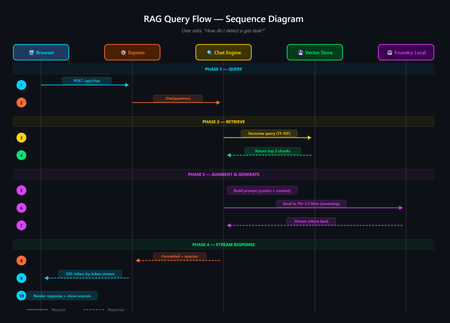
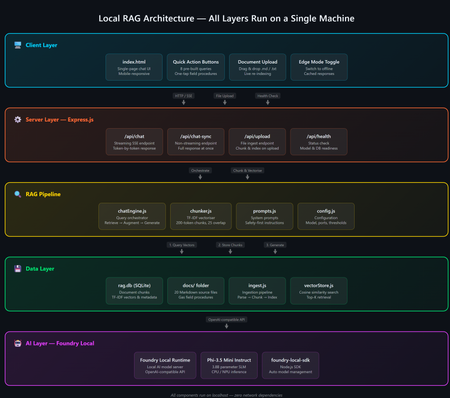
A developer's guide to building an offline, mobile-responsive AI support agent using Retrieval-Augmented Generation, the Foundry Local SDK, and JavaScript. Imagine you are a gas field engineer standing beside a pipeline in a remote location. There is no Wi-Fi, no mobile signal, and you need a safety procedure right now. What do you do? This is the exact problem that inspired this project: a fully offline RAG-powered support agent that runs entirely on your machine. No cloud. No API keys. No outbound network calls. Just a local language model, a local vector store, and your own documents, all accessible from a browser on any device. In this post, you will learn how it works, how to build your own, and the key architectural decisions behind it. If you have ever wanted to build an AI application that runs locally and answers questions grounded in your own data, this is the place to start. The finished application: a browser-based AI support agent that runs entirely on your machine. What Is Retrieval-Augmented Generation? Retrieval-Augmented Generation (RAG) is a pattern that makes AI models genuinely useful for domain-specific tasks. Rather than hoping the model "knows" the answer from its training data, you: Retrieve relevant chunks from your own documents using a vector store Augment the model's prompt with those chunks as context Generate a response grounded in your actual data The result is fewer hallucinations, traceable answers with source attribution, and an AI that works with your content rather than relying on general knowledge. If you are building internal tools, customer support bots, field manuals, or knowledge bases, RAG is the pattern you want. RAG vs CAG: Understanding the Trade-offs If you have explored AI application patterns before, you have likely encountered Context-Augmented Generation (CAG). Both RAG and CAG solve the same core problem: grounding an AI model's answers in your own content. They take different approaches, and each has genuine strengths and limitations. RAG (Retrieval-Augmented Generation) How it works: Documents are split into chunks, vectorised, and stored in a database. At query time, the most relevant chunks are retrieved and injected into the prompt. Strengths: Scales to thousands or millions of documents Fine-grained retrieval at chunk level with source attribution Documents can be added or updated dynamically without restarting Token-efficient: only relevant chunks are sent to the model Supports runtime document upload via the web UI Limitations: More complex architecture: requires a vector store and chunking strategy Retrieval quality depends on chunking parameters and scoring method May miss relevant content if the retrieval step does not surface it CAG (Context-Augmented Generation) How it works: All documents are loaded at startup. The most relevant ones are selected per query using keyword scoring and injected into the prompt. Strengths: Drastically simpler architecture with no vector database or embeddings All information is always available to the model Minimal dependencies and easy to set up Near-instant document selection Limitations: Constrained by the model's context window size Best suited to small, curated document sets (tens of documents) Adding documents requires an application restart Want to compare these patterns hands-on? There is a CAG-based implementation of the same gas field scenario using whole-document context injection. Clone both repositories, run them side by side, and see how the architectures differ in practice. When Should You Choose Which? Consideration Choose RAG Choose CAG Document count Hundreds or thousands Tens of documents Document updates Frequent or dynamic (runtime upload) Infrequent (restart to reload) Source attribution Per-chunk with relevance scores Per-document Setup complexity Moderate (ingestion step required) Minimal Query precision Better for large or diverse collections Good for keyword-matchable content Infrastructure SQLite vector store (single file) None beyond the runtime For the sample application in this post (20 gas engineering procedure documents with runtime upload), RAG is the clear winner. If your document set is small and static, CAG may be simpler. Both patterns run fully offline using Foundry Local. Foundry Local: Your On-Device AI Runtime Foundry Local is a lightweight runtime from Microsoft that downloads, manages, and serves language models entirely on your device. No cloud account, no API keys, no outbound network calls (after the initial model download). What makes it particularly useful for developers: No GPU required: runs on CPU or NPU, making it accessible on standard laptops and desktops Native SDK bindings: in-process inference via the foundry-local-sdk npm package, with no HTTP round-trips to a local server Automatic model management: downloads, caches, and loads models automatically Hardware-optimised variant selection: the SDK picks the best variant for your hardware (GPU, NPU, or CPU) Real-time progress callbacks: ideal for building loading UIs that show download and initialisation progress The integration code is refreshingly minimal: import { FoundryLocalManager } from "foundry-local-sdk"; // Create a manager and discover models via the catalogue const manager = FoundryLocalManager.create({ appName: "gas-field-local-rag" }); const model = await manager.catalog.getModel("phi-3.5-mini"); // Download if not cached, then load into memory if (!model.isCached) { await model.download((progress) => { console.log(`Download: ${Math.round(progress * 100)}%`); }); } await model.load(); // Create a chat client for direct in-process inference const chatClient = model.createChatClient(); const response = await chatClient.completeChat([ { role: "system", content: "You are a helpful assistant." }, { role: "user", content: "How do I detect a gas leak?" } ]); That is it. No server configuration, no authentication tokens, no cloud provisioning. The model runs in the same process as your application. The Technology Stack The sample application is deliberately simple. No frameworks, no build steps, no Docker: Layer Technology Purpose AI Model Foundry Local + Phi-3.5 Mini Runs locally via native SDK bindings, no GPU required Back end Node.js + Express Lightweight HTTP server, everyone knows it Vector Store SQLite (via better-sqlite3 ) Zero infrastructure, single file on disc Retrieval TF-IDF + cosine similarity No embedding model required, fully offline Front end Single HTML file with inline CSS No build step, mobile-responsive, field-ready The total dependency footprint is three npm packages: express , foundry-local-sdk , and better-sqlite3 . Architecture Overview The five-layer architecture, all running on a single machine. The system has five layers, all running on a single machine: Client layer: a single HTML file served by Express, with quick-action buttons and a responsive chat interface Server layer: Express.js starts immediately and serves the UI plus SSE status and chat endpoints RAG pipeline: the chat engine orchestrates retrieval and generation; the chunker handles TF-IDF vectorisation; the prompts module provides safety-first system instructions Data layer: SQLite stores document chunks and their TF-IDF vectors; documents live as .md files in the docs/ folder AI layer: Foundry Local runs Phi-3.5 Mini on CPU or NPU via native SDK bindings Building the Solution Step by Step Prerequisites You need two things installed on your machine: Node.js 20 or later: download from nodejs.org Foundry Local: Microsoft's on-device AI runtime: winget install Microsoft.FoundryLocal The SDK will automatically download the Phi-3.5 Mini model (approximately 2 GB) the first time you run the application. Getting the Code Running # Clone the repository git clone https://github.com/leestott/local-rag.git cd local-rag # Install dependencies npm install # Ingest the 20 gas engineering documents into the vector store npm run ingest # Start the server npm start Open http://127.0.0.1:3000 in your browser. You will see the status indicator whilst the model loads. Once the model is ready, the status changes to "Offline Ready" and you can start chatting. Desktop view Mobile view How the RAG Pipeline Works Let us trace what happens when a user asks: "How do I detect a gas leak?" The query flow from browser to model and back. 1 Documents are ingested and indexed When you run npm run ingest , every .md file in the docs/ folder is read, parsed (with optional YAML front-matter for title, category, and ID), split into overlapping chunks of approximately 200 tokens, and stored in SQLite with TF-IDF vectors. 2 Model is loaded via the SDK The Foundry Local SDK discovers the model in the local catalogue and loads it into memory. If the model is not already cached, it downloads it first (with progress streamed to the browser via SSE). 3 User sends a question The question arrives at the Express server. The chat engine converts it into a TF-IDF vector, uses an inverted index to find candidate chunks, and scores them using cosine similarity. The top 3 chunks are returned in under 1 ms. 4 Prompt is constructed The engine builds a messages array containing: the system prompt (with safety-first instructions), the retrieved chunks as context, the conversation history, and the user's question. 5 Model generates a grounded response The prompt is sent to the locally loaded model via the Foundry Local SDK's native chat client. The response streams back token by token through Server-Sent Events to the browser. Source references with relevance scores are included. A response with safety warnings and step-by-step guidance The sources panel shows which chunks were used and their relevance Key Code Walkthrough The Vector Store (TF-IDF + SQLite) The vector store uses SQLite to persist document chunks alongside their TF-IDF vectors. At query time, an inverted index finds candidate chunks that share terms with the query, then cosine similarity ranks them: // src/vectorStore.js search(query, topK = 5) { const queryTf = termFrequency(query); this._ensureCache(); // Build in-memory cache on first access // Use inverted index to find candidates sharing at least one term const candidateIndices = new Set(); for (const term of queryTf.keys()) { const indices = this._invertedIndex.get(term); if (indices) { for (const idx of indices) candidateIndices.add(idx); } } // Score only candidates, not all rows const scored = []; for (const idx of candidateIndices) { const row = this._rowCache[idx]; const score = cosineSimilarity(queryTf, row.tf); if (score > 0) scored.push({ ...row, score }); } scored.sort((a, b) => b.score - a.score); return scored.slice(0, topK); } The inverted index, in-memory row cache, and prepared SQL statements bring retrieval time to sub-millisecond for typical query loads. Why TF-IDF Instead of Embeddings? Most RAG tutorials use embedding models for retrieval. This project uses TF-IDF because: Fully offline: no embedding model to download or run Zero latency: vectorisation is instantaneous (it is just maths on word frequencies) Good enough: for 20 domain-specific documents, TF-IDF retrieves the right chunks reliably Transparent: you can inspect the vocabulary and weights, unlike neural embeddings For larger collections or when semantic similarity matters more than keyword overlap, you would swap in an embedding model. For this use case, TF-IDF keeps the stack simple and dependency-free. The System Prompt For safety-critical domains, the system prompt is engineered to prioritise safety, prevent hallucination, and enforce structured responses: // src/prompts.js export const SYSTEM_PROMPT = `You are a local, offline support agent for gas field inspection and maintenance engineers. Behaviour Rules: - Always prioritise safety. If a procedure involves risk, explicitly call it out. - Do not hallucinate procedures, measurements, or tolerances. - If the answer is not in the provided context, say: "This information is not available in the local knowledge base." Response Format: - Summary (1-2 lines) - Safety Warnings (if applicable) - Step-by-step Guidance - Reference (document name + section)`; This pattern is transferable to any safety-critical domain: medical devices, electrical work, aviation maintenance, or chemical handling. Runtime Document Upload Unlike the CAG approach, RAG supports adding documents without restarting the server. Click the upload button to add new .md or .txt files. They are chunked, vectorised, and indexed immediately. The upload modal with the complete list of indexed documents. Adapting This for Your Own Domain The sample project is designed to be forked and adapted. Here is how to make it yours in four steps: 1. Replace the documents Delete the gas engineering documents in docs/ and add your own markdown files. The ingestion pipeline handles any markdown content with optional YAML front-matter: --- title: Troubleshooting Widget Errors category: Support id: KB-001 --- # Troubleshooting Widget Errors ...your content here... 2. Edit the system prompt Open src/prompts.js and rewrite the system prompt for your domain. Keep the structure (summary, safety, steps, reference) and update the language to match your users' expectations. 3. Tune the retrieval In src/config.js : chunkSize: 200 : smaller chunks give more precise retrieval, less context per chunk chunkOverlap: 25 : prevents information falling between chunks topK: 3 : how many chunks to retrieve per query (more gives more context but slower generation) 4. Swap the model Change config.model in src/config.js to any model available in the Foundry Local catalogue. Smaller models give faster responses on constrained devices; larger models give better quality. Building a Field-Ready UI The front end is a single HTML file with inline CSS. No React, no build tooling, no bundler. This keeps the project accessible to beginners and easy to deploy. Design decisions that matter for field use: Dark, high-contrast theme with 18px base font size for readability in bright sunlight Large touch targets (minimum 44px) for operation with gloves or PPE Quick-action buttons that wrap on mobile so all options are visible without scrolling Responsive layout that works from 320px to 1920px+ screen widths Streaming responses via SSE, so the user sees tokens arriving in real time The mobile chat experience, optimised for field use. Testing The project includes unit tests using the built-in Node.js test runner, with no extra test framework needed: # Run all tests npm test Tests cover the chunker, vector store, configuration, and server endpoints. Use them as a starting point when you adapt the project for your own domain. Ideas for Extending the Project Once you have the basics running, there are plenty of directions to explore: Embedding-based retrieval: use a local embedding model for better semantic matching on diverse queries Conversation memory: persist chat history across sessions using local storage or a lightweight database Multi-modal support: add image-based queries (photographing a fault code, for example) PWA packaging: make it installable as a standalone offline application on mobile devices Hybrid retrieval: combine TF-IDF keyword search with semantic embeddings for best results Try the CAG approach: compare with the local-cag sample to see which pattern suits your use case Ready to Build Your Own? Clone the RAG sample, swap in your own documents, and have an offline AI agent running in minutes. Or compare it with the CAG approach to see which pattern suits your use case best. Get the RAG Sample Get the CAG Sample Summary Building a local RAG application does not require a PhD in machine learning or a cloud budget. With Foundry Local, Node.js, and SQLite, you can create a fully offline, mobile-responsive AI agent that answers questions grounded in your own documents. The key takeaways: RAG is ideal for scalable, dynamic document sets where you need fine-grained retrieval with source attribution. Documents can be added at runtime without restarting. CAG is simpler when you have a small, stable set of documents that fit in the context window. See the local-cag sample to compare. Foundry Local makes on-device AI accessible: native SDK bindings, in-process inference, automatic model selection, and no GPU required. TF-IDF + SQLite is a viable vector store for small-to-medium collections, with sub-millisecond retrieval thanks to inverted indexing and in-memory caching. Start simple, iterate outwards. Begin with RAG and a handful of documents. If your needs are simpler, try CAG. Both patterns run entirely offline. Clone the repository, swap in your own documents, and start building. The best way to learn is to get your hands on the code. This project is open source under the MIT licence. It is a scenario sample for learning and experimentation, not production medical or safety advice. local-rag on GitHub · local-cag on GitHub · Foundry Local6.9KViews2likes0CommentsAgentic Code Fixing with GitHub Copilot SDK and Foundry Local
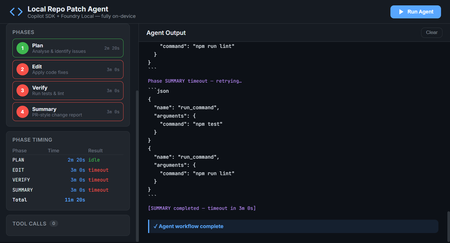
Introduction AI-powered coding assistants have transformed how developers write and review code. But most of these tools require sending your source code to cloud services, a non-starter for teams working with proprietary codebases, air-gapped environments, or strict compliance requirements. What if you could have an intelligent coding agent that finds bugs, fixes them, runs your tests, and produces PR-ready summaries, all without a single byte leaving your machine? The Local Repo Patch Agent demonstrates exactly this. By combining the GitHub Copilot SDK for agent orchestration with Foundry Local for on-device inference, this project creates a fully autonomous coding workflow that operates entirely on your hardware. The agent scans your repository, identifies bugs and code smells, applies fixes, verifies them through your test suite, and generates a comprehensive summary of all changes, completely offline and secure. This article explores the architecture behind this integration, walks through the key implementation patterns, and shows you how to run the agent yourself. Whether you're building internal developer tools, exploring agentic workflows, or simply curious about what's possible when you combine GitHub's SDK with local AI, this project provides a production-ready foundation to build upon. Why Local AI Matters for Code Analysis Cloud-based AI coding tools have proven their value—GitHub Copilot has fundamentally changed how millions of developers work. But certain scenarios demand local-first approaches where code never leaves the organisation's network. Consider these real-world constraints that teams face daily: Regulatory compliance: Financial services, healthcare, and government projects often prohibit sending source code to external services, even for analysis Intellectual property protection: Proprietary algorithms and trade secrets can't risk exposure through cloud API calls Air-gapped environments: Secure facilities and classified projects have no internet connectivity whatsoever Latency requirements: Real-time code analysis in IDEs benefits from zero network roundtrip Cost control: High-volume code analysis without per-token API charges The Local Repo Patch Agent addresses all these scenarios. By running the AI model on-device through Foundry Local and using the GitHub Copilot SDK for orchestration, you get the intelligence of agentic coding workflows with complete data sovereignty. The architecture proves that "local-first" doesn't mean "capability-limited." The Technology Stack Two core technologies make this architecture possible, working together through a clever integration called BYOK (Bring Your Own Key). Understanding how they complement each other reveals the elegance of the design. GitHub Copilot SDK The GitHub Copilot SDK provides the agent runtime, the scaffolding that handles planning, tool invocation, streaming responses, and the orchestration loop that makes agentic behaviour possible. Rather than managing raw LLM API calls, developers define tools (functions the agent can call) and system prompts, and the SDK handles everything else. Key capabilities the SDK brings to this project: Session management: Maintains conversation context across multiple agent interactions Tool orchestration: Automatically invokes defined tools when the model requests them Streaming support: Real-time response streaming for responsive user interfaces Provider abstraction: Works with any OpenAI-compatible API through the BYOK configuration Foundry Local Foundry Local brings Azure AI Foundry's model catalog to your local machine. It automatically selects the best available hardware acceleration—GPU, NPU, or CP, and exposes models through an OpenAI-compatible API on localhost. Models run entirely on-device with no telemetry or data transmission. For this project, Foundry Local provides: On-device inference: All AI processing happens locally, ensuring complete data privacy Dynamic port allocation: The SDK auto-detects the Foundry Local endpoint, eliminating configuration hassle Model flexibility: Swap between models like qwen2.5-coder-1.5b , phi-3-mini , or larger variants based on your hardware OpenAI API compatibility: Standard API format means the GitHub Copilot SDK works without modification The BYOK Integration The entire connection between the GitHub Copilot SDK and Foundry Local happens through a single configuration object. This BYOK (Bring Your Own Key) pattern tells the SDK to route all inference requests to your local model instead of cloud services: const session = await client.createSession({ model: modelId, provider: { type: "openai", // Foundry Local speaks OpenAI's API format baseUrl: proxyBaseUrl, // Streaming proxy → Foundry Local apiKey: manager.apiKey, wireApi: "completions", // Chat Completions API }, streaming: true, tools: [ /* your defined tools */ ], }); This configuration is the key insight: with one config object, you've redirected an entire agent framework to run on local hardware. No code changes to the SDK, no special adapters—just standard OpenAI-compatible API communication. Architecture Overview The Local Repo Patch Agent implements a layered architecture where each component has a clear responsibility. Understanding this flow helps when extending or debugging the system. ┌─────────────────────────────────────────────────────────┐ │ Your Terminal / Web UI │ │ npm run demo / npm run ui │ └──────────────┬──────────────────────────────────────────┘ │ ┌──────────────▼──────────────────────────────────────────┐ │ src/agent.ts (this project) │ │ │ │ ┌────────────────────────────┐ ┌──────────────────┐ │ │ │ GitHub Copilot SDK │ │ Agent Tools │ │ │ │ (CopilotClient) │ │ list_files │ │ │ │ BYOK → Foundry │ │ read_file │ │ │ └────────┬───────────────────┘ │ write_file │ │ │ │ │ run_command │ │ └────────────┼───────────────────────┴──────────────────┘ │ │ │ │ JSON-RPC │ ┌────────────▼─────────────────────────────────────────────┐ │ GitHub Copilot CLI (server mode) │ │ Agent orchestration layer │ └────────────┬─────────────────────────────────────────────┘ │ POST /v1/chat/completions (BYOK) ┌────────────▼─────────────────────────────────────────────┐ │ Foundry Local (on-device inference) │ │ Model: qwen2.5-coder-1.5b via ONNX Runtime │ │ Endpoint: auto-detected (dynamic port) │ └───────────────────────────────────────────────────────────┘ The data flow works as follows: your terminal or web browser sends a request to the agent application. The agent uses the GitHub Copilot SDK to manage the conversation, which communicates with the Copilot CLI running in server mode. The CLI, configured with BYOK, sends inference requests to Foundry Local running on localhost. Responses flow back up the same path, with tool invocations happening in the agent.ts layer. The Four-Phase Workflow The agent operates through a structured four-phase loop, each phase building on the previous one's output. This decomposition transforms what would be an overwhelming single prompt into manageable, verifiable steps. Phase 1: PLAN The planning phase scans the repository and produces a numbered fix plan. The agent reads every source and test file, identifies potential issues, and outputs specific tasks to address: // Phase 1 system prompt excerpt const planPrompt = ` You are a code analysis agent. Scan the repository and identify: 1. Bugs that cause test failures 2. Code smells and duplication 3. Style inconsistencies Output a numbered list of fixes, ordered by priority. Each item should specify: file path, line numbers, issue type, and proposed fix. `; The tools available during this phase are list_files and read_file —the agent explores the codebase without modifying anything. This read-only constraint prevents accidental changes before the plan is established. Phase 2: EDIT With a plan in hand, the edit phase applies each fix by rewriting affected files. The agent receives the plan from Phase 1 and systematically addresses each item: // Phase 2 adds the write_file tool const editTools = [ { name: "write_file", description: "Write content to a file, creating or overwriting it", parameters: { type: "object", properties: { path: { type: "string", description: "File path relative to repo root" }, content: { type: "string", description: "Complete file contents" } }, required: ["path", "content"] } } ]; The write_file tool is sandboxed to the demo-repo directory, path traversal attempts are blocked, preventing the agent from modifying files outside the designated workspace. Phase 3: VERIFY After making changes, the verification phase runs the project's test suite to confirm fixes work correctly. If tests fail, the agent attempts to diagnose and repair the issue: // Phase 3 adds run_command with an allowlist const allowedCommands = ["npm test", "npm run lint", "npm run build"]; const runCommandTool = { name: "run_command", description: "Execute a shell command (npm test, npm run lint, npm run build only)", execute: async (command: string) => { if (!allowedCommands.includes(command)) { throw new Error(`Command not allowed: ${command}`); } // Execute and return stdout/stderr } }; The command allowlist is a critical security measure. The agent can only run explicitly permitted commands—no arbitrary shell execution, no data exfiltration, no system modification. Phase 4: SUMMARY The final phase produces a PR-style Markdown report documenting all changes. This summary includes what was changed, why each change was necessary, test results, and recommended follow-up actions: ## Summary of Changes ### Bug Fix: calculateInterest() in account.js - **Issue**: Division instead of multiplication caused incorrect interest calculations - **Fix**: Changed `principal / annualRate` to `principal * (annualRate / 100)` - **Tests**: 3 previously failing tests now pass ### Refactor: Duplicate formatCurrency() removed - **Issue**: Identical function existed in account.js and transaction.js - **Fix**: Both files now import from utils.js - **Impact**: Reduced code duplication, single source of truth ### Test Results - **Before**: 6/9 passing - **After**: 9/9 passing This structured output makes code review straightforward, reviewers can quickly understand what changed and why without digging through diffs. The Demo Repository: Intentional Bugs The project includes a demo-repo directory containing a small banking utility library with intentional problems for the agent to find and fix. This provides a controlled environment to demonstrate the agent's capabilities. Bug 1: Calculation Error in calculateInterest() The account.js file contains a calculation bug that causes test failures: // BUG: should be principal * (annualRate / 100) function calculateInterest(principal, annualRate) { return principal / annualRate; // Division instead of multiplication! } This bug causes 3 of 9 tests to fail. The agent identifies it during the PLAN phase by correlating test failures with the implementation, then fixes it during EDIT. Bug 2: Code Duplication The formatCurrency() function is copy-pasted in both account.js and transaction.js, even though a canonical version exists in utils.js. This duplication creates maintenance burden and potential inconsistency: // In account.js (duplicated) function formatCurrency(amount) { return '$' + amount.toFixed(2); } // In transaction.js (also duplicated) function formatCurrency(amount) { return '$' + amount.toFixed(2); } // In utils.js (canonical, but unused) export function formatCurrency(amount) { return '$' + amount.toFixed(2); } The agent identifies this duplication during planning and refactors both files to import from utils.js, eliminating redundancy. Handling Foundry Local Streaming Quirks One technical challenge the project solves is Foundry Local's behaviour with streaming requests. As of version 0.5, Foundry Local can hang on stream: true requests. The project includes a streaming proxy that works around this limitation transparently. The Streaming Proxy The streaming-proxy.ts file implements a lightweight HTTP proxy that converts streaming requests to non-streaming, then re-encodes the single response as SSE (Server-Sent Events) chunks—the format the OpenAI SDK expects: // streaming-proxy.ts simplified logic async function handleRequest(req: Request): Promise { const body = await req.json(); // If it's a streaming chat completion, convert to non-streaming if (body.stream === true && req.url.includes('/chat/completions')) { body.stream = false; const response = await fetch(foundryEndpoint, { method: 'POST', body: JSON.stringify(body), headers: { 'Content-Type': 'application/json' } }); const data = await response.json(); // Re-encode as SSE stream for the SDK return createSSEResponse(data); } // Non-streaming and non-chat requests pass through unchanged return fetch(foundryEndpoint, req); } This proxy runs on port 8765 by default and sits between the GitHub Copilot SDK and Foundry Local. The SDK thinks it's talking to a streaming-capable endpoint, while the actual inference happens non-streaming. The conversion is transparent, no changes needed to SDK configuration. Text-Based Tool Call Detection Small on-device models like qwen2.5-coder-1.5b sometimes output tool calls as JSON text rather than using OpenAI-style function calling. The SDK won't fire tool.execution_start events for these text-based calls, so the agent includes a regex-based detector: // Pattern to detect tool calls in model output const toolCallPattern = /\{[\s\S]*"name":\s*"(list_files|read_file|write_file|run_command)"[\s\S]*\}/; function detectToolCall(text: string): ToolCall | null { const match = text.match(toolCallPattern); if (match) { try { return JSON.parse(match[0]); } catch { return null; } } return null; } This fallback ensures tool calls are captured regardless of whether the model uses native function calling or text output, keeping the dashboard's tool call counter and CLI log accurate. Security Considerations Running an AI agent that can read and write files and execute commands requires careful security design. The Local Repo Patch Agent implements multiple layers of protection: 100% local execution: No code, prompts, or responses leave your machine—complete data sovereignty Command allowlist: The agent can only run npm test , npm run lint , and npm run build —no arbitrary shell commands Path sandboxing: File tools are locked to the demo-repo/ directory; path traversal attempts like ../../../etc/passwd are rejected File size limits: The read_file tool rejects files over 256 KB, preventing memory exhaustion attacks Recursion limits: Directory listing caps at 20 levels deep, preventing infinite traversal These constraints demonstrate responsible AI agent design. The agent has enough capability to do useful work but not enough to cause harm. When extending this project for your own use cases, maintain similar principles, grant minimum necessary permissions, validate all inputs, and fail closed on unexpected conditions. Running the Agent Getting the Local Repo Patch Agent running on your machine takes about five minutes. The project includes setup scripts that handle prerequisites automatically. Prerequisites Before running the setup, ensure you have: Node.js 18 or higher: Download from nodejs.org (LTS version recommended) Foundry Local: Install via winget install Microsoft.FoundryLocal (Windows) or brew install foundrylocal (macOS) GitHub Copilot CLI: Follow the GitHub Copilot CLI install guide Verify your installations: node --version # Should print v18.x.x or higher foundry --version copilot --version One-Command Setup The easiest path uses the provided setup scripts that install dependencies, start Foundry Local, and download the AI model: # Clone the repository git clone https://github.com/leestott/copilotsdk_foundrylocal.git cd copilotsdk_foundrylocal # Windows (PowerShell) .\setup.ps1 # macOS / Linux chmod +x setup.sh ./setup.sh When setup completes, you'll see: ━━━ Setup complete! ━━━ You're ready to go. Run one of these commands: npm run demo CLI agent (terminal output) npm run ui Web dashboard (http://localhost:3000) Manual Setup If you prefer step-by-step control: # Install npm packages npm install cd demo-repo && npm install --ignore-scripts && cd .. # Start Foundry Local and download the model foundry service start foundry model run qwen2.5-coder-1.5b # Copy environment configuration cp .env.example .env # Run the agent npm run demo The first model download takes a few minutes depending on your connection. After that, the model runs from cache with no internet required. Using the Web Dashboard For a visual experience with real-time streaming, launch the web UI: npm run ui Open http://localhost:3000 in your browser. The dashboard provides: Phase progress sidebar: Visual indication of which phase is running, completed, or errored Live streaming output: Model responses appear in real-time via WebSocket Tool call log: Every tool invocation logged with phase context Phase timing table: Performance metrics showing how long each phase took Environment info: Current model, endpoint, and repository path at a glance Configuration Options The agent supports several environment variables for customisation. Edit the .env file or set them directly: Variable Default Description FOUNDRY_LOCAL_ENDPOINT auto-detected Override the Foundry Local API endpoint FOUNDRY_LOCAL_API_KEY auto-detected Override the API key FOUNDRY_MODEL qwen2.5-coder-1.5b Which model to use from the Foundry Local catalog FOUNDRY_TIMEOUT_MS 180000 (3 min) How long each agent phase can run before timing out FOUNDRY_NO_PROXY — Set to 1 to disable the streaming proxy PORT 3000 Port for the web dashboard Using Different Models To try a different model from the Foundry Local catalog: # Use phi-3-mini instead FOUNDRY_MODEL=phi-3-mini npm run demo # Use a larger model for higher quality (requires more RAM/VRAM) FOUNDRY_MODEL=qwen2.5-7b npm run demo Adjusting for Slower Hardware If you're running on CPU-only or limited hardware, increase the timeout to give the model more time per phase: # 5 minutes per phase instead of 3 FOUNDRY_TIMEOUT_MS=300000 npm run demo Troubleshooting Common Issues When things don't work as expected, these solutions address the most common problems: Problem Solution foundry: command not found Install Foundry Local—see Prerequisites section copilot: command not found Install GitHub Copilot CLI—see Prerequisites section Agent times out on every phase Increase FOUNDRY_TIMEOUT_MS (e.g., 300000 for 5 min). CPU-only machines are slower. Port 3000 already in use Set PORT=3001 npm run ui Model download is slow First download can take 5-10 min. Subsequent runs use the cache. Cannot find module errors Run npm install again, then cd demo-repo && npm install --ignore-scripts Tests still fail after agent runs The agent edits files in demo-repo/. Reset with git checkout demo-repo/ and run again. PowerShell blocks setup.ps1 Run Set-ExecutionPolicy -Scope Process Bypass first, then .\setup.ps1 Diagnostic Test Scripts The src/tests/ folder contains standalone scripts for debugging SDK and Foundry Local integration issues. These are invaluable when things go wrong: # Debug-level SDK event logging npx tsx src/tests/test-debug.ts # Test non-streaming inference (bypasses streaming proxy) npx tsx src/tests/test-nostream.ts # Raw fetch to Foundry Local (bypasses SDK entirely) npx tsx src/tests/test-stream-direct.ts # Start the traffic-inspection proxy npx tsx src/tests/test-proxy.ts These scripts isolate different layers of the stack, helping identify whether issues lie in Foundry Local, the streaming proxy, the SDK, or your application code. Key Takeaways BYOK enables local-first AI: A single configuration object redirects the entire GitHub Copilot SDK to use on-device inference through Foundry Local Phased workflows improve reliability: Breaking complex tasks into PLAN → EDIT → VERIFY → SUMMARY phases makes agent behaviour predictable and debuggable Security requires intentional design: Allowlists, sandboxing, and size limits constrain agent capabilities to safe operations Local models have quirks: The streaming proxy and text-based tool detection demonstrate how to work around on-device model limitations Real-time feedback matters: The web dashboard with WebSocket streaming makes agent progress visible and builds trust in the system The architecture is extensible: Add new tools, change models, or modify phases to adapt the agent to your specific needs Conclusion and Next Steps The Local Repo Patch Agent proves that sophisticated agentic coding workflows don't require cloud infrastructure. By combining the GitHub Copilot SDK's orchestration capabilities with Foundry Local's on-device inference, you get intelligent code analysis that respects data sovereignty completely. The patterns demonstrated here, BYOK integration, phased execution, security sandboxing, and streaming workarounds, transfer directly to production systems. Consider extending this foundation with: Custom tool sets: Add database queries, API calls to internal services, or integration with your CI/CD pipeline Multiple repository support: Scan and fix issues across an entire codebase or monorepo Different model sizes: Use smaller models for quick scans, larger ones for complex refactoring Human-in-the-loop approval: Add review steps before applying fixes to production code Integration with Git workflows: Automatically create branches and PRs from agent-generated fixes Clone the repository, run through the demo, and start building your own local-first AI coding tools. The future of developer AI isn't just cloud—it's intelligent systems that run wherever your code lives. Resources Local Repo Patch Agent Repository – Full source code with setup scripts and documentation Foundry Local – Official site for on-device AI inference Foundry Local GitHub Repository – Installation instructions and CLI reference Foundry Local Get Started Guide – Official Microsoft Learn documentation Foundry Local SDK Reference – Python and JavaScript SDK documentation GitHub Copilot SDK – Official SDK repository GitHub Copilot SDK BYOK Documentation – Bring Your Own Key integration guide GitHub Copilot SDK Getting Started – SDK setup and first agent tutorial Microsoft Sample: Copilot SDK + Foundry Local – Official integration sample from Microsoft2.7KViews0likes0CommentsBuilding a Local Research Desk: Multi-Agent Orchestration
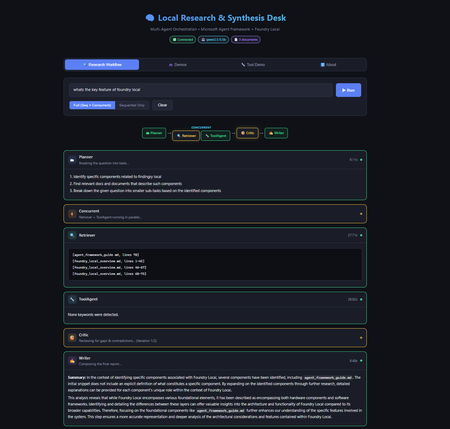
Introduction Multi-agent systems represent the next evolution of AI applications. Instead of a single model handling everything, specialised agents collaborate—each with defined responsibilities, passing context to one another, and producing results that no single agent could achieve alone. But building these systems typically requires cloud infrastructure, API keys, usage tracking, and the constant concern about what data leaves your machine. What if you could build sophisticated multi-agent workflows entirely on your local machine, with no cloud dependencies? The Local Research & Synthesis Desk demonstrates exactly this. Using Microsoft Agent Framework (MAF) for orchestration and Foundry Local for on-device inference, this demo shows how to create a four-agent research pipeline that runs entirely on your hardware—no API keys, no data leaving your network, and complete control over every step. This article walks through the architecture, implementation patterns, and practical code that makes multi-agent local AI possible. You'll learn how to bootstrap Foundry Local from Python, create specialised agents with distinct roles, wire them into sequential, concurrent, and feedback loop orchestration patterns, and implement tool calling for extended functionality. Whether you're building research tools, internal analysis systems, or simply exploring what's possible with local AI, this architecture provides a production-ready foundation. Why Multi-Agent Architecture Matters Single-agent AI systems hit limitations quickly. Ask one model to research a topic, analyse findings, identify gaps, and write a comprehensive report—and you'll get mediocre results. The model tries to do everything at once, with no opportunity for specialisation, review, or iterative refinement. Multi-agent systems solve this by decomposing complex tasks into specialised roles. Each agent focuses on what it does best: Planners break ambiguous questions into concrete sub-tasks Retrievers focus exclusively on finding and extracting relevant information Critics review work for gaps, contradictions, and quality issues Writers synthesise everything into coherent, well-structured output This separation of concerns mirrors how human teams work effectively. A research team doesn't have one person doing everything—they have researchers, fact-checkers, editors, and writers. Multi-agent AI systems apply the same principle to AI workflows, with each agent receiving the output of previous agents as context for their own specialised task. The Local Research & Synthesis Desk implements this pattern with four primary agents, plus an optional ToolAgent for utility functions. Here's how user questions flow through the system: This architecture demonstrates three essential orchestration patterns: sequential pipelines where each agent builds on the previous output, concurrent fan-out where independent tasks run in parallel to save time, and feedback loops where the Critic can send work back to the Retriever for iterative refinement. The Technology Stack: MAF + Foundry Local Before diving into implementation, let's understand the two core technologies that make this architecture possible and why they work so well together. Microsoft Agent Framework (MAF) The Microsoft Agent Framework provides building blocks for creating AI agents in Python and .NET. Unlike frameworks that require specific cloud providers, MAF works with any OpenAI-compatible API—which is exactly what Foundry Local provides. The key abstraction in MAF is the ChatAgent . Each agent has: Instructions: A system prompt that defines the agent's role and behaviour Chat client: An OpenAI-compatible client for making inference calls Tools: Optional functions the agent can invoke during execution Name: An identifier for logging and observability MAF handles message threading, tool execution, and response parsing automatically. You focus on designing agent behaviour rather than managing low-level API interactions. Foundry Local Foundry Local brings Azure AI Foundry's model catalog to your local machine. It automatically selects the best hardware acceleration available (GPU, NPU, or CPU) and exposes models through an OpenAI-compatible API. Models run entirely on-device with no data leaving your machine. The foundry-local-sdk Python package provides programmatic control over the Foundry Local service. You can start the service, download models, and retrieve connection information—all from your Python code. This is the "control plane" that manages the local AI infrastructure. The combination is powerful: MAF handles agent logic and orchestration, while Foundry Local provides the underlying inference. No cloud dependencies, no API keys, complete data privacy: Bootstrapping Foundry Local from Python The first practical challenge is starting Foundry Local programmatically. The FoundryLocalBootstrapper class handles this, encapsulating all the setup logic so the rest of the application can focus on agent behaviour. The bootstrap process follows three steps: start the Foundry Local service if it's not running, download the requested model if it's not cached, and return connection information that MAF agents can use. Here's the core implementation: from dataclasses import dataclass from foundry_local import FoundryLocalManager @dataclass class FoundryConnection: """Holds endpoint, API key, and model ID after bootstrap.""" endpoint: str api_key: str model_id: str model_alias: str This dataclass carries everything needed to connect MAF agents to Foundry Local. The endpoint is typically http://localhost:<port>/v1 (the port is assigned dynamically), and the API key is managed internally by Foundry Local. class FoundryLocalBootstrapper: def __init__(self, alias: str | None = None) -> None: self.alias = alias or os.getenv("MODEL_ALIAS", "qwen2.5-0.5b") def bootstrap(self) -> FoundryConnection: """Start service, download & load model, return connection info.""" from foundry_local import FoundryLocalManager manager = FoundryLocalManager() model_info = manager.download_and_load_model(self.alias) return FoundryConnection( endpoint=manager.endpoint, api_key=manager.api_key, model_id=model_info.id, model_alias=self.alias, ) Key design decisions in this implementation: Lazy import: The foundry_local import happens inside bootstrap() so the application can provide helpful error messages if the SDK isn't installed Environment configuration: Model alias comes from MODEL_ALIAS environment variable or defaults to qwen2.5-0.5b Automatic hardware selection: Foundry Local picks GPU, NPU, or CPU automatically—no configuration needed The qwen2.5 model family is recommended because it supports function/tool calling, which the ToolAgent requires. For higher quality outputs, larger variants like qwen2.5-7b or qwen2.5-14b are available via the --model flag. Creating Specialised Agents With Foundry Local bootstrapped, the next step is creating agents with distinct roles. Each agent is a ChatAgent instance with carefully crafted instructions that focus it on a specific task. The Planner Agent The Planner receives a user question and available documents, then breaks the research task into concrete sub-tasks. Its instructions emphasise structured output—a numbered list of specific tasks rather than prose: from agent_framework import ChatAgent from agent_framework.openai import OpenAIChatClient def _make_client(conn: FoundryConnection) -> OpenAIChatClient: """Create an MAF OpenAIChatClient pointing at Foundry Local.""" return OpenAIChatClient( api_key=conn.api_key, base_url=conn.endpoint, model_id=conn.model_id, ) def create_planner(conn: FoundryConnection) -> ChatAgent: return ChatAgent( chat_client=_make_client(conn), name="Planner", instructions=( "You are a planning agent. Given a user's research question and a list " "of document snippets (if any), break the question into 2-4 concrete " "sub-tasks. Output ONLY a numbered list of tasks. Each task should state:\n" " • What information is needed\n" " • Which source documents might help (if known)\n" "Keep it concise — no more than 6 lines total." ), ) Notice how the instructions are explicit about output format. Multi-agent systems work best when each agent produces structured, predictable output that downstream agents can parse reliably. The Retriever Agent The Retriever receives the Planner's task list plus raw document content, then extracts and cites relevant passages. Its instructions emphasise citation format—a specific pattern that the Writer can reference later: def create_retriever(conn: FoundryConnection) -> ChatAgent: return ChatAgent( chat_client=_make_client(conn), name="Retriever", instructions=( "You are a retrieval agent. You receive a research plan AND raw document " "text from local files. Your job:\n" " 1. Identify the most relevant passages for each task in the plan.\n" " 2. Output extracted snippets with citations in the format:\n" " [filename.ext, lines X-Y]: \"quoted text…\"\n" " 3. If no relevant content exists, say so explicitly.\n" "Be precise — quote only what is relevant, keep each snippet under 100 words." ), ) The citation format [filename.ext, lines X-Y] creates a consistent contract. The Writer knows exactly how to reference source material, and human reviewers can verify claims against original documents. The Critic Agent The Critic reviews the Retriever's work, identifying gaps and contradictions. This agent serves as a quality gate before the final report and can trigger feedback loops for iterative improvement: def create_critic(conn: FoundryConnection) -> ChatAgent: return ChatAgent( chat_client=_make_client(conn), name="Critic", instructions=( "You are a critical review agent. You receive a plan and extracted snippets. " "Your job:\n" " 1. Check for gaps — are any plan tasks unanswered?\n" " 2. Check for contradictions between snippets.\n" " 3. Suggest 1-2 specific improvements or missing details.\n" "Start your response with 'GAPS FOUND' if issues exist, or 'NO GAPS' if satisfied.\n" "Then output a short numbered list of issues (or say 'No issues found')." ), ) The Critic is instructed to output GAPS FOUND or NO GAPS at the start of its response. This structured output enables the orchestrator to detect when gaps exist and trigger the feedback loop—sending the gaps back to the Retriever for additional retrieval before re-running the Critic. This iterates up to 2 times before the Writer takes over, ensuring higher quality reports. Critics are essential for production systems. Without this review step, the Writer might produce confident-sounding reports with missing information or internal contradictions. The Writer Agent The Writer receives everything—original question, plan, extracted snippets, and critic review—then produces the final report: def create_writer(conn: FoundryConnection) -> ChatAgent: return ChatAgent( chat_client=_make_client(conn), name="Writer", instructions=( "You are the final report writer. You receive:\n" " • The original question\n" " • A plan, extracted snippets with citations, and a critic review\n\n" "Produce a clear, well-structured answer (3-5 paragraphs). " "Requirements:\n" " • Cite sources using [filename.ext, lines X-Y] notation\n" " • Address any gaps the critic raised (note if unresolvable)\n" " • End with a one-sentence summary\n" "Do NOT fabricate citations — only use citations provided by the Retriever." ), ) The final instruction—"Do NOT fabricate citations"—is crucial for responsible AI. The Writer has access only to citations the Retriever provided, preventing hallucinated references that plague single-agent research systems. Implementing Sequential Orchestration With agents defined, the orchestrator connects them into a workflow. Sequential orchestration is the simpler pattern: each agent runs after the previous one completes, passing its output as input to the next agent. The implementation uses Python's async/await for clean asynchronous execution: import asyncio import time from dataclasses import dataclass, field @dataclass class StepResult: """Captures one agent step for observability.""" agent_name: str input_text: str output_text: str elapsed_sec: float @dataclass class WorkflowResult: """Final result of the entire orchestration run.""" question: str steps: list[StepResult] = field(default_factory=list) final_report: str = "" async def _run_agent(agent: ChatAgent, prompt: str) -> tuple[str, float]: """Execute a single agent and measure elapsed time.""" start = time.perf_counter() response = await agent.run(prompt) elapsed = time.perf_counter() - start return response.content, elapsed The StepResult dataclass captures everything needed for observability: what went in, what came out, and how long it took. This information is invaluable for debugging and optimisation. The sequential pipeline chains agents together, building context progressively: async def run_sequential_workflow( question: str, docs: LoadedDocuments, conn: FoundryConnection, ) -> WorkflowResult: wf = WorkflowResult(question=question) doc_block = docs.combined_text if docs.chunks else "(no documents provided)" # Step 1 — Plan planner = create_planner(conn) planner_prompt = f"User question: {question}\n\nAvailable documents:\n{doc_block}" plan_text, elapsed = await _run_agent(planner, planner_prompt) wf.steps.append(StepResult("Planner", planner_prompt, plan_text, elapsed)) # Step 2 — Retrieve retriever = create_retriever(conn) retriever_prompt = f"Plan:\n{plan_text}\n\nDocuments:\n{doc_block}" snippets_text, elapsed = await _run_agent(retriever, retriever_prompt) wf.steps.append(StepResult("Retriever", retriever_prompt, snippets_text, elapsed)) # Step 3 — Critique critic = create_critic(conn) critic_prompt = f"Plan:\n{plan_text}\n\nExtracted snippets:\n{snippets_text}" critique_text, elapsed = await _run_agent(critic, critic_prompt) wf.steps.append(StepResult("Critic", critic_prompt, critique_text, elapsed)) # Step 4 — Write writer = create_writer(conn) writer_prompt = ( f"Original question: {question}\n\n" f"Plan:\n{plan_text}\n\n" f"Extracted snippets:\n{snippets_text}\n\n" f"Critic review:\n{critique_text}" ) report_text, elapsed = await _run_agent(writer, writer_prompt) wf.steps.append(StepResult("Writer", writer_prompt, report_text, elapsed)) wf.final_report = report_text return wf Each step receives all relevant context from previous steps. The Writer gets the most comprehensive prompt—original question, plan, snippets, and critique—enabling it to produce a well-informed final report. Adding Concurrent Fan-Out and Feedback Loops Sequential orchestration works well but can be slow. When tasks are independent—neither needs the other's output—running them in parallel saves time. The demo implements this with asyncio.gather . Consider the Retriever and ToolAgent: both need the Planner's output, but neither depends on the other. Running them concurrently cuts the wait time roughly in half: async def run_concurrent_retrieval( plan_text: str, docs: LoadedDocuments, conn: FoundryConnection, ) -> tuple[str, str]: """Run Retriever and ToolAgent in parallel.""" retriever = create_retriever(conn) tool_agent = create_tool_agent(conn) doc_block = docs.combined_text if docs.chunks else "(no documents)" retriever_prompt = f"Plan:\n{plan_text}\n\nDocuments:\n{doc_block}" tool_prompt = f"Analyse the following documents for word count and keywords:\n{doc_block}" # Execute both agents concurrently (snippets_text, r_elapsed), (tool_text, t_elapsed) = await asyncio.gather( _run_agent(retriever, retriever_prompt), _run_agent(tool_agent, tool_prompt), ) return snippets_text, tool_text The asyncio.gather function runs both coroutines concurrently and returns when both complete. If the Retriever takes 3 seconds and the ToolAgent takes 1.5 seconds, the total wait is approximately 3 seconds rather than 4.5 seconds. Implementing the Feedback Loop The most sophisticated orchestration pattern is the Critic–Retriever feedback loop. When the Critic identifies gaps in the retrieved information, the orchestrator sends them back to the Retriever for additional retrieval, then re-evaluates: async def run_critic_with_feedback( plan_text: str, snippets_text: str, docs: LoadedDocuments, conn: FoundryConnection, max_iterations: int = 2, ) -> tuple[str, str]: """ Run Critic with feedback loop to Retriever. Returns (final_snippets, final_critique). """ critic = create_critic(conn) retriever = create_retriever(conn) current_snippets = snippets_text for iteration in range(max_iterations): # Run Critic critic_prompt = f"Plan:\n{plan_text}\n\nExtracted snippets:\n{current_snippets}" critique_text, _ = await _run_agent(critic, critic_prompt) # Check if gaps were found if not critique_text.upper().startswith("GAPS FOUND"): return current_snippets, critique_text # Gaps found — send back to Retriever for more extraction gap_fill_prompt = ( f"Previous snippets:\n{current_snippets}\n\n" f"Gaps identified:\n{critique_text}\n\n" f"Documents:\n{docs.combined_text}\n\n" "Extract additional relevant passages to fill these gaps." ) additional_snippets, _ = await _run_agent(retriever, gap_fill_prompt) current_snippets = f"{current_snippets}\n\n--- Gap-fill iteration {iteration + 1} ---\n{additional_snippets}" # Max iterations reached — run final critique final_critique, _ = await _run_agent(critic, f"Plan:\n{plan_text}\n\nExtracted snippets:\n{current_snippets}") return current_snippets, final_critique This feedback loop pattern significantly improves output quality. The Critic acts as a quality gate, and when standards aren't met, the system iteratively improves rather than producing incomplete results. The full workflow combines all three patterns—sequential where dependencies require it, concurrent where independence allows it, and feedback loops for quality assurance: async def run_full_workflow( question: str, docs: LoadedDocuments, conn: FoundryConnection, ) -> WorkflowResult: """ End-to-end workflow showcasing THREE orchestration patterns: 1. Planner runs first (sequential — must happen before anything else). 2. Retriever + ToolAgent run concurrently (fan-out on independent tasks). 3. Critic reviews with feedback loop (iterates with Retriever if gaps found). 4. Writer produces final report (sequential — needs everything above). """ wf = WorkflowResult(question=question) # Step 1: Planner (sequential) plan_text, elapsed = await _run_agent(create_planner(conn), planner_prompt) wf.steps.append(StepResult("Planner", planner_prompt, plan_text, elapsed)) # Step 2: Concurrent fan-out (Retriever + ToolAgent) snippets_text, tool_text = await run_concurrent_retrieval(plan_text, docs, conn) # Step 3: Critic with feedback loop final_snippets, critique_text = await run_critic_with_feedback( plan_text, snippets_text, docs, conn ) # Step 4: Writer (sequential — needs everything) writer_prompt = ( f"Original question: {question}\n\n" f"Plan:\n{plan_text}\n\n" f"Snippets:\n{final_snippets}\n\n" f"Stats:\n{tool_text}\n\n" f"Critique:\n{critique_text}" ) report_text, elapsed = await _run_agent(create_writer(conn), writer_prompt) wf.final_report = report_text return wf This hybrid approach maximises both correctness and performance. Dependencies are respected, independent work happens in parallel, and quality is ensured through iterative feedback. Implementing Tool Calling Some agents benefit from deterministic tools rather than relying entirely on LLM generation. The ToolAgent demonstrates this pattern with two utility functions: word counting and keyword extraction. MAF supports tool calling through function declarations with Pydantic type annotations: from typing import Annotated from pydantic import Field def word_count( text: Annotated[str, Field(description="The text to count words in")] ) -> int: """Count words in a text string.""" return len(text.split()) def extract_keywords( text: Annotated[str, Field(description="The text to extract keywords from")], top_n: Annotated[int, Field(description="Number of keywords to return", default=5)] ) -> list[str]: """Extract most frequent words (simple implementation).""" words = text.lower().split() # Filter common words, count frequencies, return top N word_counts = {} for word in words: if len(word) > 3: # Skip short words word_counts[word] = word_counts.get(word, 0) + 1 sorted_words = sorted(word_counts.items(), key=lambda x: x[1], reverse=True) return [word for word, count in sorted_words[:top_n]] The Annotated type with Field descriptions provides metadata that MAF uses to generate function schemas for the LLM. When the model needs to count words, it invokes the word_count tool rather than attempting to count in its response (which LLMs notoriously struggle with). The ToolAgent receives these functions in its constructor: def create_tool_agent(conn: FoundryConnection) -> ChatAgent: return ChatAgent( chat_client=_make_client(conn), name="ToolHelper", instructions=( "You are a utility agent. Use the provided tools to compute " "word counts or extract keywords when asked. Return the tool " "output directly — do not embellish." ), tools=[word_count, extract_keywords], ) This pattern—combining LLM reasoning with deterministic tools—produces more reliable results. The LLM decides when to use tools and how to interpret results, but the actual computation happens in Python where precision is guaranteed. Running the Demo With the architecture explained, here's how to run the demo yourself. Setup takes about five minutes. Prerequisites You'll need Python 3.10 or higher and Foundry Local installed on your machine. Install Foundry Local by following the instructions at github.com/microsoft/Foundry-Local, then verify it works: foundry --help Installation Clone the repository and set up a virtual environment: git clone https://github.com/leestott/agentframework--foundrylocal.git cd agentframework--foundrylocal python -m venv .venv # Windows .venv\Scripts\activate # macOS / Linux source .venv/bin/activate pip install -r requirements.txt copy .env.example .env CLI Usage Run the research workflow from the command line: python -m src.app "What are the key features of Foundry Local and how does it compare to cloud inference?" --docs ./data You'll see agent-by-agent progress with timing information: Web Interface For a visual experience, launch the Flask-based web UI: python -m src.app.web Open http://localhost:5000 in your browser. The web UI provides real-time streaming of agent progress, a visual pipeline showing both orchestration patterns, and an interactive demos tab showcasing tool calling capabilities. CLI Options The CLI supports several options for customisation: --docs: Folder of local documents to search (default: ./data) --model: Foundry Local model alias (default: qwen2.5-0.5b) --mode: full for sequential + concurrent, or sequential for simpler pipeline --log-level: DEBUG, INFO, WARNING, or ERROR For higher quality output, try larger models: python -m src.app "Explain multi-agent benefits" --docs ./data --model qwen2.5-7b Validate Tool/Function Calling Run the dedicated tool calling demo to verify function calling works: python -m src.app.tool_demo This tests direct tool function calls ( word_count , extract_keywords ), LLM-driven tool calling via the ToolAgent, and multi-tool requests in a single prompt. Run Tests Run the smoke tests to verify your setup: pip install pytest pytest-asyncio pytest tests/ -v The smoke tests check document loading, tool functions, and configuration—they do not require a running Foundry Local service. Interactive Demos: Exploring MAF Capabilities Beyond the research workflow, the web UI includes five interactive demos showcasing different MAF capabilities. Each demonstrates a specific pattern with suggested prompts and real-time results. Weather Tools demonstrates multi-tool calling with an agent that provides weather information, forecasts, city comparisons, and activity recommendations. The agent uses four different tools to construct comprehensive responses. Math Calculator shows precise calculation through tool calling. The agent uses arithmetic, percentage, unit conversion, compound interest, and statistics tools instead of attempting mental math—eliminating the calculation errors that plague LLM-only approaches. Sentiment Analyser performs structured text analysis, detecting sentiment, emotions, key phrases, and word frequency through lexicon-based tools. The results are deterministic and verifiable. Code Reviewer analyses code for style issues, complexity problems, potential bugs, and improvement opportunities. This demonstrates how tool calling can extend AI capabilities into domain-specific analysis. Multi-Agent Debate showcases sequential orchestration with interdependent outputs. Three agents—one arguing for a position, one against, and a moderator—debate a topic. Each agent receives the previous agent's output, demonstrating how multi-agent systems can explore topics from multiple perspectives. Troubleshooting Common issues and their solutions: foundry: command not found : Install Foundry Local from github.com/microsoft/Foundry-Local foundry-local-sdk is not installed : Run pip install foundry-local-sdk Model download is slow: First download can be large. It's cached for future runs. No documents found warning: Add .txt or .md files to the --docs folder Agent output is low quality: Try a larger model alias, e.g. --model phi-3.5-mini Web UI won't start: Ensure Flask is installed: pip install flask Port 5000 in use: The web UI uses port 5000. Stop other services or set PORT=8080 environment variable Key Takeaways Multi-agent systems decompose complex tasks: Specialised agents (Planner, Retriever, Critic, Writer) produce better results than single-agent approaches by focusing each agent on what it does best Local AI eliminates cloud dependencies: Foundry Local provides on-device inference with automatic hardware acceleration, keeping all data on your machine MAF simplifies agent development: The ChatAgent abstraction handles message threading, tool execution, and response parsing, letting you focus on agent behaviour Three orchestration patterns serve different needs: Sequential pipelines maintain dependencies; concurrent fan-out parallelises independent work; feedback loops enable iterative quality improvement Feedback loops improve quality: The Critic–Retriever feedback loop catches gaps and contradictions, iterating until quality standards are met rather than producing incomplete results Tool calling adds precision: Deterministic functions for counting, calculation, and analysis complement LLM reasoning for more reliable results The same patterns scale to production: This demo architecture—bootstrapping, agent creation, orchestration—applies directly to real-world research and analysis systems Conclusion and Next Steps The Local Research & Synthesis Desk demonstrates that sophisticated multi-agent AI systems don't require cloud infrastructure. With Microsoft Agent Framework for orchestration and Foundry Local for inference, you can build production-quality workflows that run entirely on your hardware. The architecture patterns shown here—specialised agents with clear roles, sequential pipelines for dependent tasks, concurrent fan-out for independent work, feedback loops for quality assurance, and tool calling for precision—form a foundation for building more sophisticated systems. Consider extending this demo with: Additional agents for fact-checking, summarisation, or domain-specific analysis Richer tool integrations connecting to databases, APIs, or local services Human-in-the-loop approval gates before producing final reports Different model sizes for different agents based on task complexity Start with the demo, understand the patterns, then apply them to your own research and analysis challenges. The future of AI isn't just cloud models—it's intelligent systems that run wherever your data lives. Resources Local Research & Synthesis Desk Repository – Full source code with documentation and examples Foundry Local – Official site for on-device AI inference Foundry Local GitHub Repository – Installation instructions and CLI reference Foundry Local SDK Documentation – Python SDK reference on Microsoft Learn Microsoft Agent Framework Documentation – Official MAF tutorials and user guides MAF Orchestrations Overview – Deep dive into workflow patterns agent-framework-core on PyPI – Python package for MAF Agent Framework Samples – Additional MAF examples and patterns2.3KViews2likes2CommentsGitHub Copilot SDK and Hybrid AI in Practice: Automating README to PPT Transformation
Introduction In today's rapidly evolving AI landscape, developers often face a critical choice: should we use powerful cloud-based Large Language Models (LLMs) that require internet connectivity, or lightweight Small Language Models (SLMs) that run locally but have limited capabilities? The answer isn't either-or—it's hybrid models—combining the strengths of both to create AI solutions that are secure, efficient, and powerful. This article explores hybrid model architectures through the lens of GenGitHubRepoPPT, demonstrating how to elegantly combine Microsoft Foundry Local, GitHub Copilot SDK, and other technologies to automatically generate professional PowerPoint presentations from GitHub README files. 1. Hybrid Model Scenarios and Value 1.1 What Are Hybrid Models? Hybrid AI Models strategically combine locally-running Small Language Models (SLMs) with cloud-based Large Language Models (LLMs) within the same application, selecting the most appropriate model for each task based on its unique characteristics. Core Principles: Local Processing for Sensitive Data: Privacy-critical content analysis happens on-device Cloud for Value Creation: Complex reasoning and creative generation leverage cloud power Balancing Cost and Performance: High-frequency, simple tasks run locally to minimize API costs 1.2 Typical Hybrid Model Use Cases Use Case Local SLM Role Cloud LLM Role Value Proposition Intelligent Document Processing Text extraction, structural analysis Content refinement, format conversion Privacy protection + Professional output Code Development Assistant Syntax checking, code completion Complex refactoring, architecture advice Fast response + Deep insights Customer Service Systems Intent recognition, FAQ handling Complex issue resolution Reduced latency + Enhanced quality Content Creation Platforms Keyword extraction, outline generation Article writing, multilingual translation Cost control + Creative assurance 1.3 Why Choose Hybrid Models? Three Core Advantages: Privacy and Security Sensitive data never leaves local devices Compliant with GDPR, HIPAA, and other regulations Ideal for internal corporate documents and personal information Cost Optimization Reduces cloud API call frequency Local models have zero usage fees Predictable operational costs Performance and Reliability Local processing eliminates network latency Partial functionality in offline environments Cloud models ensure high-quality output 2. Core Technology Analysis 2.1 Large Language Models (LLMs): Cloud Intelligence Representatives What are LLMs? Large Language Models are deep learning-based natural language processing models, typically with billions to trillions of parameters. Through training on massive text datasets, they've acquired powerful language understanding and generation capabilities. Representative Models: Claude Sonnet 4.5: Anthropic's flagship model, excelling at long-context processing and complex reasoning GPT-5.2 Series: OpenAI's general-purpose language models Gemini: Google's multimodal large models LLM Advantages: ✅ Exceptional text generation quality ✅ Powerful contextual understanding ✅ Support for complex reasoning tasks ✅ Continuous model updates and optimization Typical Applications: Professional document writing (technical reports, business plans) Code generation and refactoring Multilingual translation Creative content creation 2.2 Small Language Models (SLMs) and Microsoft Foundry Local 2.2.1 SLM Characteristics Small Language Models typically have 1B-7B parameters, designed specifically for resource-constrained environments. Mainstream SLM Model Families: Microsoft Phi Family (Phi Family): Inference-optimized efficient models Alibaba Qwen Family (Qwen Family): Excellent Chinese language capabilities Mistral Series: Outstanding performance with small parameter counts SLM Advantages: ⚡ Low-latency response (millisecond-level) 💰 Zero API costs 🔒 Fully local, data stays on-device 📱 Suitable for edge device deployment 2.2.2 Microsoft Foundry Local: The Foundation of Local AI Foundry Local is Microsoft's local AI runtime tool, enabling developers to easily run SLMs on Windows or macOS devices. Core Features: OpenAI-Compatible API # Using Foundry Local is like using OpenAI API from openai import OpenAI from foundry_local import FoundryLocalManager manager = FoundryLocalManager("qwen2.5-7b-instruct") client = OpenAI( base_url=manager.endpoint, api_key=manager.api_key ) Hardware Acceleration Support CPU: General computing support GPU: NVIDIA, AMD, Intel graphics acceleration NPU: Qualcomm, Intel AI-specific chips Apple Silicon: Neural Engine optimization Based on ONNX Runtime Cross-platform compatibility Highly optimized inference performance Supports model quantization (INT4, INT8) Convenient Model Management # View available models foundry model list # Run a model foundry model run qwen2.5-7b-instruct-generic-cpu:4 # Check running status foundry service ps Foundry Local Application Value: 🎓 Educational Scenarios: Students can learn AI development without cloud subscriptions 🏢 Enterprise Environments: Process sensitive data while maintaining compliance 🧪 R&D Testing: Rapid prototyping without API cost concerns ✈️ Offline Environments: Works on planes, subways, and other no-network scenarios 2.3 GitHub Copilot SDK: The Express Lane from Agent to Business Value 2.3.1 What is GitHub Copilot SDK? GitHub Copilot SDK, released as a technical preview on January 22, 2026, is a game-changer for AI Agent development. Unlike other AI SDKs, Copilot SDK doesn't just provide API calling interfaces—it delivers a complete, production-grade Agent execution engine. Why is it revolutionary? Traditional AI application development requires you to build: ❌ Context management systems (multi-turn conversation state) ❌ Tool orchestration logic (deciding when to call which tool) ❌ Model routing mechanisms (switching between different LLMs) ❌ MCP server integration ❌ Permission and security boundaries ❌ Error handling and retry mechanisms Copilot SDK provides all of this out-of-the-box, letting you focus on business logic rather than underlying infrastructure. 2.3.2 Core Advantages: The Ultra-Short Path from Concept to Code Production-Grade Agent Engine: Battle-Tested Reliability Copilot SDK uses the same Agent core as GitHub Copilot CLI, which means: ✅ Validated in millions of real-world developer scenarios ✅ Capable of handling complex multi-step task orchestration ✅ Automatic task planning and execution ✅ Built-in error recovery mechanisms Real-World Example: In the GenGitHubRepoPPT project, we don't need to hand-write the "how to convert outline to PPT" logic—we simply tell Copilot SDK the goal, and it automatically: Analyzes outline structure Plans slide layouts Calls file creation tools Applies formatting logic Handles multilingual adaptation # Traditional approach: requires hundreds of lines of code for logic def create_ppt_traditional(outline): slides = parse_outline(outline) for slide in slides: layout = determine_layout(slide) content = format_content(slide) apply_styling(content, layout) # ... more manual logic return ppt_file # Copilot SDK approach: focus on business intent session = await client.create_session({ "model": "claude-sonnet-4.5", "streaming": True, "skill_directories": [skills_dir] }) session.send_and_wait({"prompt": prompt}, timeout=600) Custom Skills: Reusable Encapsulation of Business Knowledge This is one of Copilot SDK's most powerful features. In traditional AI development, you need to provide complete prompts and context with every call. Skills allow you to: Define once, reuse forever: # .copilot_skills/ppt/SKILL.md # PowerPoint Generation Expert Skill ## Expertise You are an expert in business presentation design, skilled at transforming technical content into easy-to-understand visual presentations. ## Workflow 1. **Structure Analysis** - Identify outline hierarchy (titles, subtitles, bullet points) - Determine topic and content density for each slide 2. **Layout Selection** - Title slide: Use large title + subtitle layout - Content slides: Choose single/dual column based on bullet count - Technical details: Use code block or table layouts 3. **Visual Optimization** - Apply professional color scheme (corporate blue + accent colors) - Ensure each slide has a visual focal point - Keep bullets to 5-7 items per page 4. **Multilingual Adaptation** - Choose appropriate fonts based on language (Chinese: Microsoft YaHei, English: Calibri) - Adapt text direction and layout conventions ## Output Requirements Generate .pptx files meeting these standards: - 16:9 widescreen ratio - Consistent visual style - Editable content (not images) - File size < 5MB Business Code Generation Capability This is the core value of this project. Unlike generic LLM APIs, Copilot SDK with Skills can generate truly executable business code. Comparison Example: Aspect Generic LLM API Copilot SDK + Skills Task Description Requires detailed prompt engineering Concise business intent suffices Output Quality May need multiple adjustments Professional-grade on first try Code Execution Usually example code Directly generates runnable programs Error Handling Manual implementation required Agent automatically handles and retries Multi-step Tasks Manual orchestration needed Automatic planning and execution Comparison of manual coding workload: Task Manual Coding Copilot SDK Processing logic code ~500 lines ~10 lines configuration Layout templates ~200 lines Declared in Skill Style definitions ~150 lines Declared in Skill Error handling ~100 lines Automatically handled Total ~950 lines ~10 lines + Skill file Tool Calling & MCP Integration: Connecting to the Real World Copilot SDK doesn't just generate code—it can directly execute operations: 🗃️ File System Operations: Create, read, modify files 🌐 Network Requests: Call external APIs 📊 Data Processing: Use pandas, numpy, and other libraries 🔧 Custom Tools: Integrate your business logic 3. GenGitHubRepoPPT Case Study 3.1 Project Overview GenGitHubRepoPPT is an innovative hybrid AI solution that combines local AI models with cloud-based AI agents to automatically generate professional PowerPoint presentations from GitHub repository README files in under 5 minutes. Technical Architecture: 3.2 Why Adopt a Hybrid Model? Stage 1: Local SLM Processes Sensitive Data Task: Analyze GitHub README, extract key information, generate structured outline Reasons for choosing Qwen-2.5-7B + Foundry Local: Privacy Protection README may contain internal project information Local processing ensures data doesn't leave the device Complies with data compliance requirements Cost Effectiveness Each analysis processes thousands of tokens Cloud API costs are significant in high-frequency scenarios Local models have zero additional fees Performance Qwen-2.5-7B excels at text analysis tasks Outstanding Chinese support Acceptable CPU inference latency (typically 2-3 seconds) Stage 2: Cloud LLM + Copilot SDK Creates Business Value Task: Create well-formatted PowerPoint files based on outline Reasons for choosing Claude Sonnet 4.5 + Copilot SDK: Automated Business Code Generation Traditional approach pain points: Need to hand-write 500+ lines of code for PPT layout logic Require deep knowledge of python-pptx library APIs Style and formatting code is error-prone Multilingual support requires additional conditional logic Copilot SDK solution: Declare business rules and best practices through Skills Agent automatically generates and executes required code Zero-code implementation of complex layout logic Development time reduced from 2-3 days to 2-3 hours Ultra-Short Path from Intent to Execution Comparison: Different ways to implement "Generate professional PPT" 3. Production-Grade Reliability and Quality Assurance Battle-tested Agent engine: Uses the same core as GitHub Copilot CLI Validated in millions of real-world scenarios Automatically handles edge cases and errors Consistent output quality: Professional standards ensured through Skills Automatic validation of generated files Built-in retry and error recovery mechanisms 4. Rapid Iteration and Optimization Capability Scenario: Client requests PPT style adjustment The GitHub Repo https://github.com/kinfey/GenGitHubRepoPPT 4. Summary 4.1 Core Value of Hybrid Models + Copilot SDK The GenGitHubRepoPPT project demonstrates how combining hybrid models with Copilot SDK creates a new paradigm for AI application development. Privacy and Cost Balance The hybrid approach allows sensitive README analysis to happen locally using Qwen-2.5-7B, ensuring data never leaves the device while incurring zero API costs. Meanwhile, the value-creating work—generating professional PowerPoint presentations—leverages Claude Sonnet 4.5 through Copilot SDK, delivering quality that justifies the per-use cost. From Code to Intent Traditional AI development required writing hundreds of lines of code to handle PPT generation logic, layout selection, style application, and error handling. With Copilot SDK and Skills, developers describe what they want in natural language, and the Agent automatically generates and executes the necessary code. What once took 3-5 days now takes 3-4 hours, with 95% less code to maintain. Automated Business Code Generation Copilot SDK doesn't just provide code examples—it generates complete, executable business logic. When you request a multilingual PPT, the Agent understands the requirement, selects appropriate fonts, generates the implementation code, executes it with error handling, validates the output, and returns a ready-to-use file. Developers focus on business intent rather than implementation details. 4.2 Technology Trends The Shift to Intent-Driven Development We're witnessing a fundamental change in how developers work. Rather than mastering every programming language detail and framework API, developers are increasingly defining what they want through declarative Skills. Copilot SDK represents this future: you describe capabilities in natural language, and AI Agents handle the code generation and execution automatically. Edge AI and Cloud AI Integration The evolution from pure cloud LLMs (powerful but privacy-concerning) to pure local SLMs (private but limited) has led to today's hybrid architectures. GenGitHubRepoPPT exemplifies this trend: local models handle data analysis and structuring, while cloud models tackle complex reasoning and professional output generation. This combination delivers fast, secure, and professional results. Democratization of Agent Development Copilot SDK dramatically lowers the barrier to building AI applications. Senior engineers see 10-20x productivity gains. Mid-level engineers can now build sophisticated agents that were previously beyond their reach. Even junior engineers and business experts can participate by writing Skills that capture domain knowledge without deep technical expertise. The future isn't about whether we can build AI applications—it's about how quickly we can turn ideas into reality. References Projects and Code GenGitHubRepoPPT GitHub Repository - Case study project Microsoft Foundry Local - Local AI runtime GitHub Copilot SDK - Agent development SDK Copilot SDK Getting Started Tutorial - Official quick start Deep Dive: Copilot SDK Build an Agent into Any App with GitHub Copilot SDK - Official announcement GitHub Copilot SDK Cookbook - Practical examples Copilot CLI Official Documentation - CLI tool documentation Learning Resources Edge AI for Beginners - Edge AI introductory course Azure AI Foundry Documentation - Azure AI documentation GitHub Copilot Extensions Guide - Extension development guide2.2KViews3likes2CommentsInstall and run Azure Foundry Local LLM server & Open WebUI on Windows Server 2025
Foundry Local is an on-device AI inference solution offering performance, privacy, customization, and cost advantages. It integrates seamlessly into your existing workflows and applications through an intuitive CLI, SDK, and REST API. Foundry Local has the following benefits: On-Device Inference: Run models locally on your own hardware, reducing your costs while keeping all your data on your device. Model Customization: Select from preset models or use your own to meet specific requirements and use cases. Cost Efficiency: Eliminate recurring cloud service costs by using your existing hardware, making AI more accessible. Seamless Integration: Connect with your applications through an SDK, API endpoints, or the CLI, with easy scaling to Azure AI Foundry as your needs grow. Foundry Local is ideal for scenarios where: You want to keep sensitive data on your device. You need to operate in environments with limited or no internet connectivity. You want to reduce cloud inference costs. You need low-latency AI responses for real-time applications. You want to experiment with AI models before deploying to a cloud environment. You can install Foundry Local by running the following command: winget install Microsoft.FoundryLocal Once Foundry Local is installed, you download and interact with a model from the command line by using a command like: foundry model run phi-4 This will download the phi-4 model and provide a text based chat interface. If you want to interact with Foundry Local through a web chat interface, you can use the open source Open WebUI project. You can install Open WebUI on Windows Server by performing the following steps: Download OpenWebUIInstaller.exe from https://github.com/BrainDriveAI/OpenWebUI_CondaInstaller/releases. You'll get warning messages from Windows Defender SmartScreen. Copy OpenWebUIInstaller.exe into C:\Temp. In an elevated command prompt, run the following commands winget install -e --id Anaconda.Miniconda3 --scope machine $env:Path = 'C:\ProgramData\miniconda3;' + $env:Path $env:Path = 'C:\ProgramData\miniconda3\Scripts;' + $env:Path $env:Path = 'C:\ProgramData\miniconda3\Library\bin;' + $env:Path conda.exe tos accept --override-channels --channel https://repo.anaconda.com/pkgs/main conda.exe tos accept --override-channels --channel https://repo.anaconda.com/pkgs/r conda.exe tos accept --override-channels --channel https://repo.anaconda.com/pkgs/msys2 C:\Temp\OpenWebUIInstaller.exe Then from the dialog choose to install and run Open WebUI. You then need to take several extra steps to configure Open WebUI to connect to the Foundry Local endpoint. Enable Direct Connections in Open WebUI Select Settings and Admin Settings in the profile menu. Select Connections in the navigation menu. Enable Direct Connections by turning on the toggle. This allows users to connect to their own OpenAI compatible API endpoints. Connect Open WebUI to Foundry Local: Select Settings in the profile menu. Select Connections in the navigation menu. Select + by Manage Direct Connections. For the URL, enter http://localhost:PORT/v1 where PORT is the Foundry Local endpoint port (use the CLI command foundry service status to find it). Note that Foundry Local dynamically assigns a port, so it isn't always the same. For the Auth, select None. Select Save ➡️ What is Foundry Local https://learn.microsoft.com/en-us/azure/ai-foundry/foundry-local/what-is-foundry-local ➡️ Edge AI for Beginners https://aka.ms/edgeai-for-beginners ➡️ Open WebUI: https://docs.openwebui.com/2.2KViews1like4CommentsBuild a Fully Offline RAG App with Foundry Local: No Cloud Required
A practical guide to building an on-device AI support agent using Retrieval-Augmented Generation, JavaScript, and Microsoft Foundry Local. The Problem: AI That Can't Go Offline Most AI-powered applications today are firmly tethered to the cloud. They assume stable internet, low-latency API calls, and the comfort of a managed endpoint. But what happens when your users are in an environment with zero connectivity a gas pipeline in a remote field, a factory floor, an underground facility? That's exactly the scenario that motivated this project: a fully offline RAG-powered support agent that runs entirely on a laptop. No cloud. No API keys. No outbound network calls. Just a local model, a local vector store, and domain-specific documents all accessible from a browser on any device. The Gas Field Support Agent - running entirely on-device What is RAG and Why Should You Care? Retrieval-Augmented Generation (RAG) is a pattern that makes language models genuinely useful for domain-specific tasks. Instead of hoping the model "knows" the answer from pre-training, you: Retrieve relevant chunks from your own documents Augment the model's prompt with those chunks as context Generate a response grounded in your actual data The result: fewer hallucinations, traceable answers, and an AI that works with your content. If you're building internal tools, customer support bots, field manuals, or knowledge bases, RAG is the pattern you want. Why fully offline? Data sovereignty, air-gapped environments, field operations, latency-sensitive workflows, and regulatory constraints all demand AI that doesn't phone home. Running everything locally gives you complete control over your data and eliminates any external dependency. The Tech Stack This project is deliberately simple — no frameworks, no build steps, no Docker: Layer Technology Why AI Model Foundry Local + Phi-3.5 Mini Runs locally, OpenAI-compatible API, no GPU needed Backend Node.js + Express Lightweight, fast, universally known Vector Store SQLite via better-sqlite3 Zero infrastructure, single file on disk Retrieval TF-IDF + cosine similarity No embedding model required, fully offline Frontend Single HTML file with inline CSS No build step, mobile-responsive, field-ready The total dependency footprint is just four npm packages: express , openai , foundry-local-sdk , and better-sqlite3 . Architecture Overview The system has five layers — all running on a single machine: Five-layer architecture: Client → Server → RAG Pipeline → Data → AI Model Client Layer — A single HTML file served by Express, with quick-action buttons and responsive chat Server Layer — Express.js handles API routes for chat (streaming + non-streaming), document upload, and health checks RAG Pipeline — The chat engine orchestrates retrieval and generation; the chunker handles TF-IDF vectorization Data Layer — SQLite stores document chunks and their TF-IDF vectors; source docs live as .md files AI Layer — Foundry Local runs Phi-3.5 Mini Instruct on CPU/NPU, exposing an OpenAI-compatible API Getting Started in 5 Minutes You need two prerequisites: Node.js 20+ — nodejs.org Foundry Local — Microsoft's on-device AI runtime: Terminal winget install Microsoft.FoundryLocal Then clone, install, ingest, and run: git clone https://github.com/leestott/local-rag.git cd local-rag npm install npm run ingest # Index the 20 gas engineering documents npm start # Start the server + Foundry Local Open http://127.0.0.1:3000 and start chatting. Foundry Local auto-downloads Phi-3.5 Mini (~2 GB) on first run. How the RAG Pipeline Works Let's trace what happens when a user asks: "How do I detect a gas leak?" RAG query flow: Browser → Server → Vector Store → Model → Streaming response Step 1: Document Ingestion Before any queries happen, npm run ingest reads every .md file from the docs/ folder, splits each into overlapping chunks (~200 tokens, 25-token overlap), computes a TF-IDF vector for each chunk, and stores everything in SQLite. Chunking example docs/01-gas-leak-detection.md → Chunk 1: "Gas Leak Detection – Safety Warnings: Ensure all ignition..." → Chunk 2: "...sources are eliminated. Step-by-step: 1. Perform visual..." → Chunk 3: "...inspection of all joints. 2. Check calibration date..." The overlap ensures no information falls between chunk boundaries — a critical detail in any RAG system. Step 2: Query → Retrieval When the user sends a question, the server converts it into a TF-IDF vector, compares it against every stored chunk using cosine similarity, and returns the top-K most relevant results. For 20 documents (~200 chunks), this executes in under 10ms. src/vectorStore.js /** Retrieve top-K most relevant chunks for a query. */ search(query, topK = 5) { const queryTf = termFrequency(query); const rows = this.db.prepare("SELECT * FROM chunks").all(); const scored = rows.map((row) => { const chunkTf = new Map(JSON.parse(row.tf_json)); const score = cosineSimilarity(queryTf, chunkTf); return { ...row, score }; }); scored.sort((a, b) => b.score - a.score); return scored.slice(0, topK).filter((r) => r.score > 0); } Step 3: Prompt Construction The retrieved chunks are injected into the prompt alongside system instructions: Prompt structure System: You are an offline gas field support agent. Safety-first... Context: [Chunk 1: Gas Leak Detection – Safety Warnings...] [Chunk 2: Gas Leak Detection – Step-by-step...] [Chunk 3: Purging Procedures – Related safety...] User: How do I detect a gas leak? Step 4: Generation + Streaming The prompt is sent to Foundry Local via the OpenAI-compatible API. The response streams back token-by-token through Server-Sent Events (SSE) to the browser: Safety-first response with structured guidance Expandable sources with relevance scores Foundry Local: Your Local AI Runtime Foundry Local is what makes the "offline" part possible. It's a runtime from Microsoft that runs small language models (SLMs) on CPU or NPU — no GPU required. It exposes an OpenAI-compatible API and manages model downloads, caching, and lifecycle automatically. The integration code is minimal if you've used the OpenAI SDK before, this will feel instantly familiar: src/chatEngine.js import { FoundryLocalManager } from "foundry-local-sdk"; import { OpenAI } from "openai"; // Start Foundry Local and load the model const manager = new FoundryLocalManager(); const modelInfo = await manager.init("phi-3.5-mini"); // Use the standard OpenAI client — pointed at the local endpoint const client = new OpenAI({ baseURL: manager.endpoint, apiKey: manager.apiKey, }); // Chat completions work exactly like the cloud API const stream = await client.chat.completions.create({ model: modelInfo.id, messages: [ { role: "system", content: "You are a helpful assistant." }, { role: "user", content: "How do I detect a gas leak?" } ], stream: true, }); Portability matters Because Foundry Local uses the OpenAI API format, any code you write here can be ported to Azure OpenAI or OpenAI's cloud API with a single config change. You're not locked in. Why TF-IDF Instead of Embeddings? Most RAG tutorials use embedding models for retrieval. We chose TF-IDF for this project because: Fully offline — no embedding model to download or run Zero latency — vectorization is instantaneous (just math on word frequencies) Good enough — for a curated collection of 20 domain-specific documents, TF-IDF retrieves the right chunks reliably Transparent — you can inspect the vocabulary and weights, unlike neural embeddings For larger collections (thousands of documents) or when semantic similarity matters more than keyword overlap, you'd swap in an embedding model. But for this use case, TF-IDF keeps the stack simple and dependency-free. Mobile-Responsive Field UI Field engineers use this app on phones and tablets often wearing gloves. The UI is designed for harsh conditions with a dark, high-contrast theme, large touch targets (minimum 48px), and horizontally scrollable quick-action buttons. Desktop view Mobile view The entire frontend is a single index.html file — no React, no build step, no bundler. This keeps the project accessible and easy to deploy anywhere. Runtime Document Upload Users can upload new documents without restarting the server. The upload endpoint receives markdown content, chunks it, computes TF-IDF vectors, and inserts the chunks into SQLite — all in memory, immediately available for retrieval. Drag-and-drop document upload with instant indexing Adapt This for Your Own Domain This project is a scenario sample designed to be forked and customized. Here's the three-step process: 1. Replace the Documents Delete the gas engineering docs in docs/ and add your own .md files with optional YAML front-matter: docs/my-procedure.md --- title: Troubleshooting Widget Errors category: Support id: KB-001 --- # Troubleshooting Widget Errors ...your content here... 2. Edit the System Prompt Open src/prompts.js and rewrite the instructions for your domain: src/prompts.js export const SYSTEM_PROMPT = `You are an offline support agent for [YOUR DOMAIN]. Rules: - Only answer using the retrieved context - If the answer isn't in the context, say so - Use structured responses: Summary → Details → Reference `; 3. Tune the Retrieval Adjust chunking and retrieval parameters in src/config.js : src/config.js export const config = { model: "phi-3.5-mini", chunkSize: 200, // smaller = more precise, less context per chunk chunkOverlap: 25, // prevents info from falling between chunks topK: 3, // chunks per query (more = richer context, slower) }; Extending to Multi-Agent Architectures Once you have a working RAG agent, the natural next step is multi-agent orchestration where specialized agents collaborate to handle complex workflows. With Foundry Local's OpenAI-compatible API, you can compose multiple agent roles on the same machine: Multi-agent concept // Each agent is just a different system prompt + RAG scope const agents = { safety: { prompt: safetyPrompt, docs: "safety/*.md" }, diagnosis: { prompt: diagnosisPrompt, docs: "faults/*.md" }, procedure: { prompt: procedurePrompt, docs: "procedures/*.md" }, }; // Router determines which agent handles the query function route(query) { if (query.match(/safety|warning|hazard/i)) return agents.safety; if (query.match(/fault|error|code/i)) return agents.diagnosis; return agents.procedure; } // Each agent uses the same Foundry Local model endpoint const response = await client.chat.completions.create({ model: modelInfo.id, messages: [ { role: "system", content: selectedAgent.prompt }, { role: "system", content: `Context:\n${retrievedChunks}` }, { role: "user", content: userQuery } ], stream: true, }); This pattern lets you build specialized agent pipelines a triage agent routes to the right specialist, each with its own document scope and system prompt, all running on the same local Foundry instance. For production multi-agent systems, explore Microsoft Foundry for cloud-scale orchestration when connectivity is available. Local-first, cloud-ready Start with Foundry Local for development and offline scenarios. When your agents need cloud scale, swap to Azure AI Foundry with the same OpenAI-compatible API your agent code stays the same. Key Takeaways 1 RAG = Retrieve + Augment + Generate Ground your AI in real documents — dramatically reducing hallucination and making answers traceable. 2 Foundry Local makes local AI accessible OpenAI-compatible API running on CPU/NPU. No GPU required. No cloud dependency. 3 TF-IDF + SQLite is viable For small-to-medium document collections, you don't need a dedicated vector database. 4 Same API, local or cloud Build locally with Foundry Local, deploy with Azure OpenAI — zero code changes. What's Next? Embedding-based retrieval — swap TF-IDF for a local embedding model for better semantic matching Conversation memory — persist chat history across sessions Multi-agent routing — specialized agents for safety, diagnostics, and procedures PWA packaging — make it installable as a standalone app on mobile devices Hybrid retrieval — combine keyword search with semantic embeddings for best results Get the code Clone the repo, swap in your own documents, and start building: git clone https://github.com/leestott/local-rag.git github.com/leestott/local-rag — MIT licensed, contributions welcome. Open source under the MIT License. Built with Foundry Local and Node.js.1.7KViews1like0CommentsFunction Calling with Small Language Models
In our previous article on running Phi-4 locally, we built a web-enhanced assistant that could search the internet and provide informed answers. Here's what that implementation looked like: def web_enhanced_query(question): # 1. ALWAYS search (hardcoded decision) search_results = search_web(question) # 2. Inject results into prompt prompt = f"""Here are recent search results: {search_results} Question: {question} Using only the information above, give a clear answer.""" # 3. Model just summarizes what it reads return ask_phi4(endpoint, model_id, prompt) Today, we're upgrading to true function calling. With this, we have ability to transform small language models from passive text generators into intelligent agents that can: Decide when to use external tools Reason which tool bests fit each task Execute real-world actions thrugh apis Function calling represents a significant evolution in AI capabilities. Let's understand where this positions our small language models: Agent Classification Framework Simple Reflex Agents (Basic) React to immediate input with predefined rules Example: Thermostat, basic chatbot Without function calling, models operate here Model-Based Agents (Intermediate) Maintain internal state and context Example: Robot vacuum with room mapping Function calling enables this level Goal-Based Agents (Advanced) Plan multi-step sequences to achieve objectives Example: Route planner, task scheduler Function calling + reasoning enables this Learning Agents (Expert) Adapt and improve over time Example: Recommendation systems Future: Function calling + fine-tuning As usual with these articles, let's get ready to get our hands dirty! Project Setup Let's set up our environment for building function-calling assistants. Prerequisites First, ensure you have Foundry Local installed and a model running. We'll use Qwen 2.5-7B for this tutorial as it has excellent function calling support. Important: Not all small language models support function calling equally. Qwen 2.5 was specifically trained for this capability and provides a reliable experience through Foundry Local. # 1. Check Foundry Local is installed foundry --version # 2. Start the Foundry Local service foundry service start # 3. Download and run Qwen 2.5-7B foundry model run qwen2.5-7b Python Environment Setup # 1. Create Python virtual environment python -m venv venv source venv/bin/activate # Windows: venv\Scripts\activate # 2. Install dependencies pip install openai requests python-dotenv # 3. Get a free OpenWeatherMap API key # Sign up at: https://openweathermap.org/api ``` Create `.env` file: ``` OPENWEATHER_API_KEY=your_api_key_here ``` Building a Weather-Aware Assistant So in this scenario, a user wants to plan outdoor activities but needs weather context. Without function calling, You will get something like this: User: "Should I schedule my team lunch outside at 2pm in Birmingham?" Model: "That depends on weather conditions. Please check the forecast for rain and temperature." However, with fucntion-calling you get an answer that is able to look up the weather and reply with the needed context. We will do that now. Understanding Foundry Local's Function Calling Implementation Before we start coding, there's an important implementation detail to understand. Foundry Local uses a non-standard function calling format. Instead of returning function calls in the standard OpenAI tool_calls field, Qwen models return the function call as JSON text in the response content. For example, when you ask about weather, instead of: # Standard OpenAI format message.tool_calls = [ {"name": "get_weather", "arguments": {"location": "Birmingham"}} ] You get: # Foundry Local format message.content = '{"name": "get_weather", "arguments": {"location": "Birmingham"}}' This means we need to parse the JSON from the content ourselves. Don't worry—this is straightforward, and I'll show you exactly how to handle it! Step 1: Define the Weather Tool Create weather_assistant.py: import os from openai import OpenAI import requests import json import re from dotenv import load_dotenv load_dotenv() # Initialize Foundry Local client client = OpenAI( base_url="http://127.0.0.1:59752/v1/", api_key="not-needed" ) # Define weather tool tools = [ { "type": "function", "function": { "name": "get_weather", "description": "Get current weather information for a location", "parameters": { "type": "object", "properties": { "location": { "type": "string", "description": "The city or location name" }, "units": { "type": "string", "description": "Temperature units", "enum": ["celsius", "fahrenheit"], "default": "celsius" } }, "required": ["location"] } } } ] A tool is necessary because it provides the model with a structured specification of what external functions are available and how to use them. The tool definition contains the function name, description, parameters schema, and information returned. Step 2: Implement the Weather Function def get_weather(location: str, units: str = "celsius") -> dict: """Fetch weather data from OpenWeatherMap API""" api_key = os.getenv("OPENWEATHER_API_KEY") url = "http://api.openweathermap.org/data/2.5/weather" params = { "q": location, "appid": api_key, "units": "metric" if units == "celsius" else "imperial" } response = requests.get(url, params=params, timeout=5) response.raise_for_status() data = response.json() temp_unit = "°C" if units == "celsius" else "°F" return { "location": data["name"], "temperature": f"{round(data['main']['temp'])}{temp_unit}", "feels_like": f"{round(data['main']['feels_like'])}{temp_unit}", "conditions": data["weather"][0]["description"], "humidity": f"{data['main']['humidity']}%", "wind_speed": f"{round(data['wind']['speed'] * 3.6)} km/h" } The model calls this function to get the weather data. it contacts OpenWeatherMap API, gets real weather data and returns it as a python dictionary Step 3: Parse Function Calls from Content This is the crucial step where we handle Foundry Local's non-standard format: def parse_function_call(content: str): """Extract function call JSON from model response""" if not content: return None json_pattern = r'\{"name":\s*"get_weather",\s*"arguments":\s*\{[^}]+\}\}' match = re.search(json_pattern, content) if match: try: return json.loads(match.group()) except json.JSONDecodeError: pass try: parsed = json.loads(content.strip()) if isinstance(parsed, dict) and "name" in parsed: return parsed except json.JSONDecodeError: pass return None Step 4: Main Chat Function with Function Calling and lastly, calling the model. Notice the tools and tool_choice parameter. Tools tells the model it is allowed to output a tool_call requesting that the function be executed. While tool_choice instructs the model how to decide whether to call a tool. def chat(user_message: str) -> str: """Process user message with function calling support""" messages = [ {"role": "user", "content": user_message} ] response = client.chat.completions.create( model="qwen2.5-7b-instruct-generic-cpu:4", messages=messages, tools=tools, tool_choice="auto", temperature=0.3, max_tokens=500 ) message = response.choices[0].message if message.content: function_call = parse_function_call(message.content) if function_call and function_call.get("name") == "get_weather": print(f"\n[Function Call] {function_call.get('name')}({function_call.get('arguments')})") args = function_call.get("arguments", {}) weather_data = get_weather(**args) print(f"[Result] {weather_data}\n") final_prompt = f"""User asked: "{user_message}" Weather data: {json.dumps(weather_data, indent=2)} Provide a natural response based on this weather information.""" final_response = client.chat.completions.create( model="qwen2.5-7b-instruct-generic-cpu:4", messages=[{"role": "user", "content": final_prompt}], max_tokens=200, temperature=0.7 ) return final_response.choices[0].message.content return message.content Step 5: Run the script Now put all the above together and run the script def main(): """Interactive weather assistant""" print("\nWeather Assistant") print("=" * 50) print("Ask about weather or general questions.") print("Type 'exit' to quit\n") while True: user_input = input("You: ").strip() if user_input.lower() in ['exit', 'quit']: print("\nGoodbye!") break if user_input: response = chat(user_input) print(f"Assistant: {response}\n") if __name__ == "__main__": if not os.getenv("OPENWEATHER_API_KEY"): print("Error: OPENWEATHER_API_KEY not set") print("Set it with: export OPENWEATHER_API_KEY='your_key_here'") exit(1) main() Note: Make sure Qwen 2.5 is running in Foundry Local in a new terminal Now let's talk about Model Context Protocol! Our weather assistant works beautifully with a single function, but what happens when you need dozens of tools? Database queries, file operations, calendar integration, email—each would require similar setup code. This is where Model Context Protocol (MCP) comes in. MCP is an open standard that provides pre-built, standardized servers for common tools. Instead of writing custom integration code for every capability, you can connect to MCP servers that handle the complexity for you. With MCP, You only need one command to enable weather, database, and file access npx @modelcontextprotocol/server-weather npx @modelcontextprotocol/server-sqlite npx @modelcontextprotocol/server-filesystem Your model automatically discovers and uses these tools without custom integration code. Learn more: Model Context Protocol Documentation EdgeAI Course - Module 03: MCP Integration Key Takeaways Function calling transforms models into agents - From passive text generators to active problem-solvers Qwen 2.5 has excellent function calling support - Specifically trained for reliable tool use Foundry Local uses non-standard format - Parse JSON from content instead of tool_calls field Start simple, then scale with MCP - Build one tool to understand the pattern, then leverage standards Documentation Running Phi-4 Locally with Foundry Local Phi-4: Small Language Models That Pack a Punch Microsoft Foundry Local GitHub EdgeAI for Beginners Course OpenWeatherMap API Documentation Model Context Protocol Qwen 2.5 Documentation Thank you for reading! I hope this article helps you build more capable AI agents with small language models. Function calling opens up incredible possibilities—from simple weather assistants to complex multi-tool workflows. Start with one tool, understand the pattern, and scale from there.1.3KViews1like0CommentsEdge AI for Student Developers: Learn to Run AI Locally
AI isn’t just for the cloud anymore. With the rise of Small Language Models (SLMs) and powerful local inference tools, developers can now run intelligent applications directly on laptops, phones, and edge devices—no internet required. If you're a student developer curious about building AI that works offline, privately, and fast, Microsoft’s Edge AI for Beginners course is your perfect starting point. What Is Edge AI? Edge AI refers to running AI models directly on local hardware—like your laptop, mobile device, or embedded system—without relying on cloud servers. This approach offers: ⚡ Real-time performance 🔒 Enhanced privacy (no data leaves your device) 🌐 Offline functionality 💸 Reduced cloud costs Whether you're building a chatbot that works without Wi-Fi or optimizing AI for low-power devices, Edge AI is the future of intelligent, responsive apps. About the Course Edge AI for Beginners is a free, open-source curriculum designed to help you: Understand the fundamentals of Edge AI and local inference Explore Small Language Models like Phi-2, Mistral-7B, and Gemma Deploy models using tools like Llama.cpp, Olive, MLX, and OpenVINO Build cross-platform apps that run AI locally on Windows, macOS, Linux, and mobile The course is hosted on GitHub and includes hands-on labs, quizzes, and real-world examples. You can fork it, remix it, and contribute to the community. What You’ll Learn Module Focus 01. Introduction What is Edge AI and why it matters 02. SLMs Overview of small language models 03. Deployment Running models locally with various tools 04. Optimization Speeding up inference and reducing memory 05. Applications Building real-world Edge AI apps Each module is beginner-friendly and includes practical exercises to help you build and deploy your own local AI solutions. Who Should Join? Student developers curious about AI beyond the cloud Hackathon participants looking to build offline-capable apps Makers and builders interested in privacy-first AI Anyone who wants to explore the future of on-device intelligence No prior AI experience required just a willingness to learn and experiment. Why It Matters Edge AI is a game-changer for developers. It enables smarter, faster, and more private applications that work anywhere. By learning how to deploy AI locally, you’ll gain skills that are increasingly in demand across industries—from healthcare to robotics to consumer tech. Plus, the course is: 💯 Free and open-source 🧠 Backed by Microsoft’s best practices 🧪 Hands-on and project-based 🌐 Continuously updated Ready to Start? Head to aka.ms/edgeai-for-beginners and dive into the modules. Whether you're coding in your dorm room or presenting at your next hackathon, this course will help you build smarter AI apps that run right where you need them on the edge.1.2KViews1like0CommentsBuilding real-world AI automation with Foundry Local and the Microsoft Agent Framework
A hands-on guide to building real-world AI automation with Foundry Local, the Microsoft Agent Framework, and PyBullet. No cloud subscription, no API keys, no internet required. Why Developers Should Care About Offline AI Imagine telling a robot arm to "pick up the cube" and watching it execute the command in a physics simulator, all powered by a language model running on your laptop. No API calls leave your machine. No token costs accumulate. No internet connection is needed. That is what this project delivers, and every piece of it is open source and ready for you to fork, extend, and experiment with. Most AI demos today lean on cloud endpoints. That works for prototypes, but it introduces latency, ongoing costs, and data privacy concerns. For robotics and industrial automation, those trade-offs are unacceptable. You need inference that runs where the hardware is: on the factory floor, in the lab, or on your development machine. Foundry Local gives you an OpenAI-compatible endpoint running entirely on-device. Pair it with a multi-agent orchestration framework and a physics engine, and you have a complete pipeline that translates natural language into validated, safe robot actions. This post walks through how we built it, why the architecture works, and how you can start experimenting with your own offline AI simulators today. Architecture The system uses four specialised agents orchestrated by the Microsoft Agent Framework: Agent What It Does Speed PlannerAgent Sends user command to Foundry Local LLM → JSON action plan 4–45 s SafetyAgent Validates against workspace bounds + schema < 1 ms ExecutorAgent Dispatches actions to PyBullet (IK, gripper) < 2 s NarratorAgent Template summary (LLM opt-in via env var) < 1 ms User (text / voice) │ ▼ ┌──────────────┐ │ Orchestrator │ └──────┬───────┘ │ ┌────┴────┐ ▼ ▼ Planner Narrator │ ▼ Safety │ ▼ Executor │ ▼ PyBullet Setting Up Foundry Local from foundry_local import FoundryLocalManager import openai manager = FoundryLocalManager("qwen2.5-coder-0.5b") client = openai.OpenAI( base_url=manager.endpoint, api_key=manager.api_key, ) resp = client.chat.completions.create( model=manager.get_model_info("qwen2.5-coder-0.5b").id, messages=[{"role": "user", "content": "pick up the cube"}], max_tokens=128, stream=True, ) from foundry_local import FoundryLocalManager import openai manager = FoundryLocalManager("qwen2.5-coder-0.5b") client = openai.OpenAI( base_url=manager.endpoint, api_key=manager.api_key, ) resp = client.chat.completions.create( model=manager.get_model_info("qwen2.5-coder-0.5b").id, messages=[{"role": "user", "content": "pick up the cube"}], max_tokens=128, stream=True, ) The SDK auto-selects the best hardware backend (CUDA GPU → QNN NPU → CPU). No configuration needed. How the LLM Drives the Simulator Understanding the interaction between the language model and the physics simulator is central to the project. The two never communicate directly. Instead, a structured JSON contract forms the bridge between natural language and physical motion. From Words to JSON When a user says “pick up the cube”, the PlannerAgent sends the command to the Foundry Local LLM alongside a compact system prompt. The prompt lists every permitted tool and shows the expected JSON format. The LLM responds with a structured plan: { "type": "plan", "actions": [ {"tool": "describe_scene", "args": {}}, {"tool": "pick", "args": {"object": "cube_1"}} ] } The planner parses this response, validates it against the action schema, and retries once if the JSON is malformed. This constrained output format is what makes small models (0.5B parameters) viable: the response space is narrow enough that even a compact model can produce correct JSON reliably. From JSON to Motion Once the SafetyAgent approves the plan, the ExecutorAgent maps each action to concrete PyBullet calls: move_ee(target_xyz) : The target position in Cartesian coordinates is passed to PyBullet's inverse kinematics solver, which computes the seven joint angles needed to place the end-effector at that position. The robot then interpolates smoothly from its current joint state to the target, stepping the physics simulation at each increment. pick(object) : This triggers a multi-step grasp sequence. The controller looks up the object's position in the scene, moves the end-effector above the object, descends to grasp height, closes the gripper fingers with a configurable force, and lifts. At every step, PyBullet resolves contact forces and friction so that the object behaves realistically. place(target_xyz) : The reverse of a pick. The robot carries the grasped object to the target coordinates and opens the gripper, allowing the physics engine to drop the object naturally. describe_scene() : Rather than moving the robot, this action queries the simulation state and returns the position, orientation, and name of every object on the table, along with the current end-effector pose. The Abstraction Boundary The critical design choice is that the LLM knows nothing about joint angles, inverse kinematics, or physics. It operates purely at the level of high-level tool calls ( pick , move_ee ). The ActionExecutor translates those tool calls into the low-level API that PyBullet provides. This separation means the LLM prompt stays simple, the safety layer can validate plans without understanding kinematics, and the executor can be swapped out without retraining or re-prompting the model. Voice Input Pipeline Voice commands follow three stages: Browser capture: MediaRecorder captures audio, client-side resamples to 16 kHz mono WAV Server transcription: Foundry Local Whisper (ONNX, cached after first load) with automatic 30 s chunking Command execution: transcribed text goes through the same Planner → Safety → Executor pipeline The mic button (🎤) only appears when a Whisper model is cached or loaded. Whisper models are filtered out of the LLM dropdown. Web UI in Action Pick command Describe command Move command Reset command Performance: Model Choice Matters Model Params Inference Pipeline Total qwen2.5-coder-0.5b 0.5 B ~4 s ~5 s phi-4-mini 3.6 B ~35 s ~36 s qwen2.5-coder-7b 7 B ~45 s ~46 s For interactive robot control, qwen2.5-coder-0.5b is the clear winner: valid JSON for a 7-tool schema in under 5 seconds. The Simulator in Action Here is the Panda robot arm performing a pick-and-place sequence in PyBullet. Each frame is rendered by the simulator's built-in camera and streamed to the web UI in real time. Overview Reaching Above the cube Gripper detail Front interaction Side layout Get Running in Five Minutes You do not need a GPU, a cloud account, or any prior robotics experience. The entire stack runs on a standard development machine. # 1. Install Foundry Local winget install Microsoft.FoundryLocal # Windows brew install foundrylocal # macOS # 2. Download models (one-time, cached locally) foundry model run qwen2.5-coder-0.5b # Chat brain (~4 s inference) foundry model run whisper-base # Voice input (194 MB) # 3. Clone and set up the project git clone https://github.com/leestott/robot-simulator-foundrylocal cd robot-simulator-foundrylocal .\setup.ps1 # or ./setup.sh on macOS/Linux # 4. Launch the web UI python -m src.app --web --no-gui # → http://localhost:8080 Once the server starts, open your browser and try these commands in the chat box: "pick up the cube": the robot grasps the blue cube and lifts it "describe the scene": returns every object's name and position "move to 0.3 0.2 0.5": sends the end-effector to specific coordinates "reset": returns the arm to its neutral pose If you have a microphone connected, hold the mic button and speak your command instead of typing. Voice input uses a local Whisper model, so your audio never leaves the machine. Experiment and Build Your Own The project is deliberately simple so that you can modify it quickly. Here are some ideas to get started. Add a new robot action The robot currently understands seven tools. Adding an eighth takes four steps: Define the schema in TOOL_SCHEMAS ( src/brain/action_schema.py ). Write a _do_<tool> handler in src/executor/action_executor.py . Register it in ActionExecutor._dispatch . Add a test in tests/test_executor.py . For example, you could add a rotate_ee tool that spins the end-effector to a given roll/pitch/yaw without changing position. Add a new agent Every agent follows the same pattern: an async run(context) method that reads from and writes to a shared dictionary. Create a new file in src/agents/ , register it in orchestrator.py , and the pipeline will call it in sequence. Ideas for new agents: VisionAgent: analyse a camera frame to detect objects and update the scene state before planning. CostEstimatorAgent: predict how many simulation steps an action plan will take and warn the user if it is expensive. ExplanationAgent: generate a step-by-step natural language walkthrough of the plan before execution, allowing the user to approve or reject it. Swap the LLM python -m src.app --web --model phi-4-mini Or use the model dropdown in the web UI; no restart is needed. Try different models and compare accuracy against inference speed. Smaller models are faster but may produce malformed JSON more often. Larger models are more accurate but slower. The retry logic in the planner compensates for occasional failures, so even a small model works well in practice. Swap the simulator PyBullet is one option, but the architecture does not depend on it. You could replace the simulation layer with: MuJoCo: a high-fidelity physics engine popular in reinforcement learning research. Isaac Sim: NVIDIA's GPU-accelerated robotics simulator with photorealistic rendering. Gazebo: the standard ROS simulator, useful if you plan to move to real hardware through ROS 2. The only requirement is that your replacement implements the same interface as PandaRobot and GraspController . Build something completely different The pattern at the heart of this project (LLM produces structured JSON, safety layer validates, executor dispatches to a domain-specific engine) is not limited to robotics. You could apply the same architecture to: Home automation: "turn off the kitchen lights and set the thermostat to 19 degrees" translated into MQTT or Zigbee commands. Game AI: natural language control of characters in a game engine, with the safety agent preventing invalid moves. CAD automation: voice-driven 3D modelling where the LLM generates geometry commands for OpenSCAD or FreeCAD. Lab instrumentation: controlling scientific equipment (pumps, stages, spectrometers) via natural language, with the safety agent enforcing hardware limits. From Simulator to Real Robot One of the most common questions about projects like this is whether it could control a real robot. The answer is yes, and the architecture is designed to make that transition straightforward. What Stays the Same The entire upper half of the pipeline is hardware-agnostic: The LLM planner generates the same JSON action plans regardless of whether the target is simulated or physical. It has no knowledge of the underlying hardware. The safety agent validates workspace bounds and tool schemas. For a real robot, you would tighten the bounds to match the physical workspace and add checks for obstacle clearance using sensor data. The orchestrator coordinates agents in the same sequence. No changes are needed. The narrator reports what happened. It works with any result data the executor returns. What Changes The only component that must be replaced is the executor layer, specifically the PandaRobot class and the GraspController . In simulation, these call PyBullet's inverse kinematics solver and step the physics engine. On a real robot, they would instead call the hardware driver. For a Franka Emika Panda (the same robot modelled in the simulation), the replacement options include: libfranka: Franka's C++ real-time control library, which accepts joint position or torque commands at 1 kHz. ROS 2 with MoveIt: A robotics middleware stack that provides motion planning, collision avoidance, and hardware abstraction. The move_ee action would become a MoveIt goal, and the framework would handle trajectory planning and execution. Franka ROS 2 driver: Combines libfranka with ROS 2 for a drop-in replacement of the simulation controller. The ActionExecutor._dispatch method maps tool names to handler functions. Replacing _do_move_ee , _do_pick , and _do_place with calls to a real robot driver is the only code change required. Key Considerations for Real Hardware Safety: A simulated robot cannot cause physical harm; a real robot can. The safety agent would need to incorporate real-time collision checking against sensor data (point clouds from depth cameras, for example) rather than relying solely on static workspace bounds. Perception: In simulation, object positions are known exactly. On a real robot, you would need a perception system (cameras with object detection or fiducial markers) to locate objects before grasping. Calibration: The simulated robot's coordinate frame matches the URDF model perfectly. A real robot requires hand-eye calibration to align camera coordinates with the robot's base frame. Latency: Real actuators have physical response times. The executor would need to wait for motion completion signals from the hardware rather than stepping a simulation loop. Gripper feedback: In PyBullet, grasp success is determined by contact forces. A real gripper would provide force or torque feedback to confirm whether an object has been securely grasped. The Simulation as a Development Tool This is precisely why simulation-first development is valuable. You can iterate on the LLM prompts, agent logic, and command pipeline without risk to hardware. Once the pipeline reliably produces correct action plans in simulation, moving to a real robot is a matter of swapping the lowest layer of the stack. Key Takeaways for Developers On-device AI is production-ready. Foundry Local serves models through a standard OpenAI-compatible API. If your code already uses the OpenAI SDK, switching to local inference is a one-line change to base_url . Small models are surprisingly capable. A 0.5B parameter model produces valid JSON action plans in under 5 seconds. For constrained output schemas, you do not need a 70B model. Multi-agent pipelines are more reliable than monolithic prompts. Splitting planning, validation, execution, and narration across four agents makes each one simpler to test, debug, and replace. Simulation is the safest way to iterate. You can refine LLM prompts, agent logic, and tool schemas without risking real hardware. When the pipeline is reliable, swapping the executor for a real robot driver is the only change needed. The pattern generalises beyond robotics. Structured JSON output from an LLM, validated by a safety layer, dispatched to a domain-specific engine: that pattern works for home automation, game AI, CAD, lab equipment, and any other domain where you need safe, structured control. You can start building today. The entire project runs on a standard laptop with no GPU, no cloud account, and no API keys. Clone the repository, run the setup script, and you will have a working voice-controlled robot simulator in under five minutes. Ready to start building? Clone the repository, try the commands, and then start experimenting. Fork it, add your own agents, swap in a different simulator, or apply the pattern to an entirely different domain. The best way to learn how local AI can solve real-world problems is to build something yourself. Source code: github.com/leestott/robot-simulator-foundrylocal Built with Foundry Local, Microsoft Agent Framework, PyBullet, and FastAPI.On‑Device AI with Windows AI Foundry and Foundry Local
From “waiting” to “instant”- without sending data away AI is everywhere, but speed, privacy, and reliability are critical. Users expect instant answers without compromise. On-device AI makes that possible: fast, private and available, even when the network isn’t - empowering apps to deliver seamless experiences. Imagine an intelligent assistant that works in seconds, without sending a text to the cloud. This approach brings speed and data control to the places that need it most; while still letting you tap into cloud power when it makes sense. Windows AI Foundry: A Local Home for Models Windows AI Foundry is a developer toolkit that makes it simple to run AI models directly on Windows devices. It uses ONNX Runtime under the hood and can leverage CPU, GPU (via DirectML), or NPU acceleration, without requiring you to manage those details. The principle is straightforward: Keep the model and the data on the same device. Inference becomes faster, and data stays local by default unless you explicitly choose to use the cloud. Foundry Local Foundry Local is the engine that powers this experience. Think of it as local AI runtime - fast, private, and easy to integrate into an app. Why Adopt On‑Device AI? Faster, more responsive apps: Local inference often reduces perceived latency and improves user experience. Privacy‑first by design: Keep sensitive data on the device; avoid cloud round trips unless the user opts in. Offline capability: An app can provide AI features even without a network connection. Cost control: Reduce cloud compute and data costs for common, high‑volume tasks. This approach is especially useful in regulated industries, field‑work tools, and any app where users expect quick, on‑device responses. Hybrid Pattern for Real Apps On-device AI doesn’t replace the cloud, it complements it. Here’s how: Standalone On‑Device: Quick, private actions like document summarization, local search, and offline assistants. Cloud‑Enhanced (Optional): Large-context models, up-to-date knowledge, or heavy multimodal workloads. Design an app to keep data local by default and surface cloud options transparently with user consent and clear disclosures. Windows AI Foundry supports hybrid workflows: Use Foundry Local for real-time inference. Sync with Azure AI services for model updates, telemetry, and advanced analytics. Implement fallback strategies for resource-intensive scenarios. Application Workflow Code Example using Foundry Local: 1. Only On-Device: Tries Foundry Local first, falls back to ONNX if foundry_runtime.check_foundry_available(): # Use on-device Foundry Local models try: answer = foundry_runtime.run_inference(question, context) return answer, source="Foundry Local (On-Device)" except Exception as e: logger.warning(f"Foundry failed: {e}, trying ONNX...") if onnx_model.is_loaded(): # Fallback to local BERT ONNX model try: answer = bert_model.get_answer(question, context) return answer, source="BERT ONNX (On-Device)" except Exception as e: logger.warning(f"ONNX failed: {e}") return "Error: No local AI available" 2. Hybrid approach: On-device first, cloud as last resort def get_answer(question, context): """ Priority order: 1. Foundry Local (best: advanced + private) 2. ONNX Runtime (good: fast + private) 3. Cloud API (fallback: requires internet, less private) # in case of Hybrid approach, based on real-time scenario """ if foundry_runtime.check_foundry_available(): # Use on-device Foundry Local models try: answer = foundry_runtime.run_inference(question, context) return answer, source="Foundry Local (On-Device)" except Exception as e: logger.warning(f"Foundry failed: {e}, trying ONNX...") if onnx_model.is_loaded(): # Fallback to local BERT ONNX model try: answer = bert_model.get_answer(question, context) return answer, source="BERT ONNX (On-Device)" except Exception as e: logger.warning(f"ONNX failed: {e}, trying cloud...") # Last resort: Cloud API (requires internet) if network_available(): try: import requests response = requests.post( '{BASE_URL_AI_CHAT_COMPLETION}', headers={'Authorization': f'Bearer {API_KEY}'}, json={ 'model': '{MODEL_NAME}', 'messages': [{ 'role': 'user', 'content': f'Context: {context}\n\nQuestion: {question}' }] }, timeout=10 ) answer = response.json()['choices'][0]['message']['content'] return answer, source="Cloud API (Online)" except Exception as e: return "Error: No AI runtime available", source="Failed" else: return "Error: No internet and no local AI available", source="Offline" Demo Project Output: Foundry Local answering context-based questions offline : The Foundry Local engine ran the Phi-4-mini model offline and retrieved context-based data. : The Foundry Local engine ran the Phi-4-mini model offline and mentioned that there is no answer. Practical Use Cases Privacy-First Reading Assistant: Summarize documents locally without sending text to the cloud. Healthcare Apps: Analyze medical data on-device for compliance. Financial Tools: Risk scoring without exposing sensitive financial data. IoT & Edge Devices: Real-time anomaly detection without network dependency. Conclusion On-device AI isn’t just a trend - it’s a shift toward smarter, faster, and more secure applications. With Windows AI Foundry and Foundry Local, developers can deliver experiences that respect user specific data, reduce latency, and work even when connectivity fails. By combining local inference with optional cloud enhancements, you get the best of both worlds: instant performance and scalable intelligence. Whether you’re creating document summarizers, offline assistants, or compliance-ready solutions, this approach ensures your apps stay responsive, reliable, and user-centric. References Get started with Foundry Local - Foundry Local | Microsoft Learn What is Windows AI Foundry? | Microsoft Learn https://devblogs.microsoft.com/foundry/unlock-instant-on-device-ai-with-foundry-local/