foundry agent service
22 TopicsBuilding Production-Ready, Secure, Observable, AI Agents with Real-Time Voice with Microsoft Foundry
We're excited to announce the general availability of Foundry Agent Service, Observability in Foundry Control Plane, and the Microsoft Foundry portal — plus Voice Live integration with Agent Service in public preview — giving teams a production-ready platform to build, deploy, and operate intelligent AI agents with enterprise-grade security and observability.10KViews2likes0Comments
Three tiers of Agentic AI - and when to use none of them
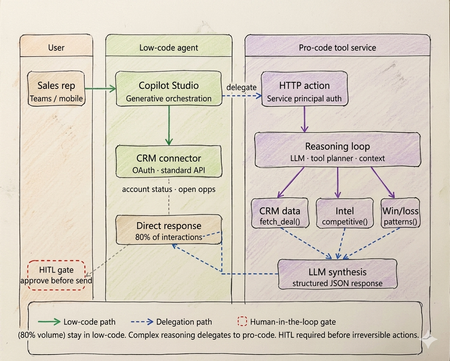
Every enterprise has an AI agent. Almost none of them work in production. Walk into any enterprise technology review right now and you will find the same thing. Pilots running. Demos recorded. Steering committees impressed. And somewhere in the background, a quiet acknowledgment that the thing does not actually work at scale yet. OutSystems surveyed nearly 1,900 global IT leaders and found that 96% of organizations are already running AI agents in some capacity. Yet only one in nine has those agents operating in production at scale. The experiments are everywhere. The production systems are not. That gap is not a capability problem. The infrastructure has matured. Tool calling is standard across all major models. Frameworks like LangGraph, CrewAI, and Microsoft Agent Framework abstract orchestration logic. Model Context Protocol standardizes how agents access external tools and data sources. Google's Agent-to-Agent protocol now under Linux Foundation governance with over 50 enterprise technology partners including Salesforce, SAP, ServiceNow, and Workday standardizes how agents coordinate with each other. The protocols are in place. The frameworks are production ready. The gap is a selection and governance problem. Teams are building agents on problems that do not need them. Choosing the wrong tier for the ones that do. And treating governance as a compliance checkbox to add after launch, rather than an architectural input to design in from the start. The same OutSystems research found that 94% of organizations are concerned that AI sprawl is increasing complexity, technical debt, and security risk and only 12% have a centralized approach to managing it. Teams are deploying agents the way shadow IT spread through enterprises a decade ago: fast, fragmented, and without a shared definition of what production-ready actually means. I've built agentic systems across enterprise clients in logistics, retail, and B2B services. The failures I keep seeing are not technology failures. They are architecture and judgment failures problems that existed before the first line of code was written, in the conversation where nobody asked the prior question. This article is the framework I use before any platform conversation starts. What has genuinely shifted in the agentic landscape Three changes are shaping how enterprise agent architecture should be designed today and they are not incremental improvements on what existed before. The first is the move from single agents to multi-agent systems. Databricks' State of AI Agents report drawing on data from over 20,000 organizations, including more than 60% of the Fortune 500 found that multi-agent workflows on their platform grew 327% in just four months. This is not experimentation. It is production architecture shifting. A single agent handling everything routing, retrieval, reasoning, execution is being replaced by specialized agents coordinating through defined interfaces. A financial organization, for example, might run separate agents for intent classification, document retrieval, and compliance checking each narrow in scope, each connected to the next through a standardized protocol rather than tightly coupled code. The second is protocol standardization. MCP handles vertical connectivity how agents access tools, data sources, and APIs through a typed manifest and standardized invocation pattern. A2A handles horizontal connectivity how agents discover peer agents, delegate subtasks, and coordinate workflows. Production systems today use both. The practical consequence is that multi-agent architectures can be composed and governed as a platform rather than managed as a collection of one-off integrations. The third is governance as the differentiating factor between teams that ship and teams that stall. Databricks found that companies using AI governance tools get over 12 times more AI projects into production compared to those without. The teams running production agents are not running more sophisticated models. They built evaluation pipelines, audit trails, and human oversight gates before scaling not after the first incident. Tier 1 - Low-code agents: fast delivery with a defined ceiling The low-code tier is more capable than it was eighteen months ago. Copilot Studio, Salesforce Agentforce, and equivalent platforms now support richer connector libraries, better generative orchestration, and more flexible topic models. The ceiling is higher than it was. It is still a ceiling. The core pattern remains: a visual topic model drives a platform-managed LLM that classifies intent and routes to named execution branches. Connectors abstract credential management and API surface. A business team — analyst, citizen developer, IT operations — can build, deploy, and iterate without engineering involvement on every change. For bounded conversational problems, this is the fastest path from requirement to production. The production reality is documented clearly. Gartner data found that only 5% of Copilot Studio pilots moved to larger-scale deployment. A European telecom with dedicated IT resources and a full Microsoft enterprise agreement spent six months and did not deliver a single production agent. The visual builder works. The path from prototype to production, production-grade integrations, error handling, compliance logging, exception routing is where most enterprises get stuck, because it requires Power Platform expertise that most business teams do not have. The platform ceiling shows up predictably at four points. Async processing anything beyond a synchronous connector call, including approval chains, document pipelines, or batch operations cannot be handled natively. Full payload audit logs platform logs give conversation transcripts and connector summaries, not structured records of every API call and its parameters. Production volume concurrency limits and message throughput budgets bind faster than planning assumptions suggest. Root cause analysis in production you cannot inspect the LLM's confidence score or the alternatives it considered, which makes diagnosing misbehavior significantly harder than it should be. The correct diagnostic: can this use case be owned end-to-end by a business team, covered by standard connectors, with no latency SLA below three seconds and no payload-level compliance requirement? Yes, low code is the correct tier. Not a compromise. If no on any point, continue. If low-code is the right call for your use case: Copilot Studio quickstart Tier 2 - Pro-code agents: the architecture the current landscape demands The defining pattern in production pro-code architecture today is multi-agent. Specialized agents per domain, coordinating through MCP for tool access and A2A for peer-to-peer delegation, with a governance layer spanning the entire system. What this looks like in practice: a financial organization handling incoming compliance queries runs separate agents for intent classification, document retrieval, and the compliance check itself. None of these agents tries to do all three jobs. Each has a narrow responsibility, a defined input/output contract typed against a JSON Schema, and a clear handoff boundary. The 327% growth in multi-agent workflows reflects production teams discovering that the failure modes of monolithic agents topic collision, context overflow, degraded classification as scope expands are solved by specialization, not by making a single agent more capable. The discipline that makes multi-agent systems reliable is identical to what makes single-agent systems reliable, just enforced across more boundaries: the LLM layer reasons and coordinates; deterministic tool functions enforce. In a compliance pipeline, no LLM decides whether a document satisfies a regulatory requirement. That evaluation runs in a deterministic tool with a versioned rule set, testable outputs, and an immutable audit log. The LLM orchestrates the sequence. The tool produces the compliance record. Mixing these letting an LLM evaluate whether a rule pass collapses the audit trail and introduces probabilistic outputs on questions that have regulatory answers. MCP is the tool interface standard today. An MCP server exposes a typed manifest any compliant agent runtime can discover at startup. Tools are versioned, independently deployable, and reusable across agents without bespoke integration code. A2A extends this horizontally: agents advertise capability cards, discover peers, and delegate subtasks through a standardised protocol. The practical consequence is that multi-agent systems built on both protocols can be composed and governed as a platform rather than managed as a collection of one-off integrations. Observability is the architectural element that separates teams shipping production agents from teams perpetually in pilot. Build evaluation pipelines, distributed traces across all agent boundaries, and human review gates before scaling. The teams that add these after the first production incident spend months retrofitting what should have been designed in. If pro-code is the right call for your use case: Foundry Agent Service The hybrid pattern: still where production deployments land The shift to multi-agent architecture does not change the hybrid pattern it deepens it. Low-code at the conversational surface, pro-code multi-agent systems behind it, with a governance layer spanning both. On a logistics client engagement, the brief was a sales assistant for account managers shipment status, account health, and competitive context inside Teams. The business team wanted everything in Copilot Studio. Engineering wanted a custom agent runtime. Both were wrong. What we built: Copilot Studio handled all high-frequency, low-complexity queries shipment tracking, account status, open cases through Power Platform connectors. Zero custom code. That covered roughly 78% of actual interaction volume. Requests requiring multi-source reasoning competitive positioning on a specific lane, churn risk across an account portfolio, contract renewal analysis delegated via authenticated HTTP action to a pro-code multi-agent service on Azure. A retrieval agent pulled deal history and market intelligence through MCP-exposed tools. A synthesis agent composed the recommendation with confidence scoring. Structured JSON back to the low-code layer, rendered as an adaptive card in Teams. The HITL gate was non-negotiable and designed before deployment, not added after the first incident. No output reached a customer without a manager approval step. The agent drafts. A human sends. This boundary low-code for conversational volume, pro-code for reasoning depth maps directly to what the research shows separates teams that ship from teams that stall. The organizations running agents in production drew the line correctly between what the platform can own and what engineering needs to own. Then they built governance into both sides before scaling. The four gates - the prior question that still gets skipped Run every candidate use case through these four checks before the platform conversation begins. None of the recent infrastructure improvements change what they are checking, because none of them change the fundamental cost structure of agentic reasoning. Gate 1 - is the logic fully deterministic? If every valid output for every valid input can be enumerated in unit tests, the problem does not need an LLM. A rules engine executes in microseconds at zero inference cost and cannot produce a plausible-but-wrong answer. NeuBird AI's production ops agents which have resolved over a million alerts and saved enterprises over $2 million in engineering hours work because alert triage logic that can be expressed as rules runs in deterministic code, and the LLM only handles cases where pattern-matching is insufficient. That boundary is not incidental to the system's reliability. It is the reason for it. Gate 2 - is zero hallucination tolerance required? With over 80% of databases now being built by AI agents per Databricks' State of AI Agents report the surface area for hallucination-induced data errors has grown significantly. In domains where a wrong answer is a compliance event financial calculation, medical logic, regulatory determinations irreducible LLM output uncertainty is disqualifying regardless of model version or prompt engineering effort. Exit to deterministic code or classical ML with bounded output spaces. Gate 3 - is a sub-100ms latency SLA required? LLM inference is faster than it was eighteen months ago. It is not fast enough for payment transaction processing, real-time fraud scoring, or live inventory management. A three-agent system with MCP tool calls has a P50 latency measured in seconds. These problems need purpose-built transactional architecture. Gate 4 - is regulatory explainability required? A2A enables complex agent coordination and delegation. It does not make LLM reasoning reproducible in a regulatory sense. Temperature above zero means the same input produces different outputs across invocations. Regulators in financial services, healthcare, and consumer credit require deterministic, auditable decision rationale. Exit to deterministic workflow with structured audit logging at every Five production failure modes - one of them new The four original anti-patterns are still showing up in production. A fifth has been added by scale. Routing data retrieval through a reasoning loop. A direct API call returns account status in under 10ms. Routing the same request through an LLM reasoning step adds hundreds of milliseconds, consumes tokens on every call, and introduces output parsing on data that is already structured. The agent calls a structured tool. The tool calls the API. The agent never acts as the integration layer. Encoding business rules in prompts. Rules expressed in prompt text drift as models update. They produce probabilistic output across invocations and fail in ways that are difficult to reproduce and diagnose. A rule that must evaluate correctly every time belongs in a deterministic tool function unit-tested, version-controlled, independently deployable via MCP. No approval gate on CRUD operations. CRUD operations without a human approval step will eventually misfire on the input that testing did not cover. The gate needs to be designed before deployment, not added after the first incident involving a financial posting, a customer-facing communication, or a data deletion. Monolithic agent for all domains. A single agent accumulating every domain leads predictably to topic collision, context overflow, and maintenance that becomes impossible as scope expands. Specialized agents per domain, coordinating through A2A, is the architecture that scales. Ungoverned agent sprawl. This is the new one and currently the most prevalent. OutSystems found 94% of organizations concerned about it, with only 12% having a centralized response. Teams building agents independently across fragmented stacks, without shared governance, evaluation standards, or audit infrastructure, produce exactly the same organizational debt that shadow IT created but with higher stakes, because these systems make autonomous decisions rather than just storing and retrieving data. The fix is treating governance as an architectural input before deployment, not a compliance requirement after something breaks. The infrastructure is ready. The judgment is not. The tier decision sequence has not changed. Does the problem need natural language understanding or dynamic generation? No — deterministic system, stop. Can a business team own it through standard connectors with no sub-3-second latency SLA and no payload-level compliance requirement? Yes — low-code. Does it need custom orchestration, multi-agent coordination, or audit-grade observability? Yes — pro-code with MCP and A2A. Does it need both a conversational surface and deep backend reasoning? Hybrid, with a governance layer spanning both. What has changed is that governance is no longer optional infrastructure to add when you have time. The data is unambiguous. Companies with governance tools get over 12 times more AI projects into production than those without. Evaluation pipelines, distributed tracing across agent boundaries, human oversight gates, and centralised agent lifecycle management are not overhead. They are what converts experiments into production systems. The teams still stuck in pilot are not stuck because the technology failed them. They are stuck because they skipped this layer. The protocols are standardised. The frameworks are mature. The infrastructure exists. None of that is what is holding most enterprise agent programmes back. What is holding them back is a selection problem disguised as a technology problem — teams building agents before asking whether agents are warranted, choosing platforms before running the four gates, and treating governance as a checkpoint rather than an architectural input. I have built agents that should have been workflow engines. Not because the technology was wrong, but because nobody stopped early enough to ask whether it was necessary. The four gates in this article exist because I learned those lessons at clients' expense, not mine. The most useful thing I can offer any team starting an agentic AI project is not a framework selection guide. It is permission to say no — and a clear basis for saying it. Take the four gates framework to your next architecture review. If you have already shipped agents to production, I would like to hear what worked and what did not - comment below What to do next Three concrete steps depending on where you are right now. If you have pilots that have not reached production: Run them through the four gates in this article before the next sprint. Gate 1 alone will eliminate a meaningful percentage of them. The ones that survive all four are your real candidates for production investment. Download the attached file for gated checklist and take it into your next architecture review. If you are starting a new agent project: Do not open a platform before you have answered the gate questions. Once you have confirmed an agent is warranted and identified the tier, start here: Copilot Studio guided setup for low-code scenarios, or Foundry Agent Service for pro-code patterns with MCP and multi-agent coordination built in. Build governance infrastructure - evaluation pipeline, distributed tracing, HITL gates - before you scale, not after. If you have already shipped agents to production: Share what worked and what did not in the Azure AI Tech Community — tag posts with #AgentArchitecture. The most useful signal for teams still in pilot is hearing from practitioners who have been through production, not vendors describing what production should look like. References OutSystems — State of AI Development Report - https://www.outsystems.com/1/state-ai-development-report Databricks — State of AI Agents Report - https://www.databricks.com/resources/ebook/state-of-ai-agents Gartner — 2025 Microsoft 365 and Copilot Survey - https://www.gartner.com/en/documents/6548002 (Paywalled primary source — publicly reported via techpartner.news: https://www.techpartner.news/news/gartner-microsoft-copilot-hype-offset-by-roi-and-readiness-realities-618118) Anthropic — Model Context Protocol (MCP) - https://modelcontextprotocol.io Google Cloud — Agent-to-Agent Protocol (A2A) . https://developers.googleblog.com/en/a2a-a-new-era-of-agent-interoperability NeuBird AI — Production Operations Deployment Announcement NeuBird AI Closes $19.3M Funding Round to Scale Agentic AI Across Enterprise Production Operations ReAct: Synergizing Reasoning and Acting in Language Models — Yao et al. https://arxiv.org/abs/2210.03629 Enterprise Integration Patterns — Gregor Hohpe & Bobby Woolf, Addison-Wesley https://www.enterpriseintegrationpatterns.com5.4KViews4likes1CommentPublishing Agents from Microsoft Foundry to Microsoft 365 Copilot & Teams
Better Together is a series on how Microsoft’s AI platforms work seamlessly to build, deploy, and manage intelligent agents at enterprise scale. As organizations embrace AI across every workflow, Microsoft Foundry, Microsoft 365, Agent 365, and Microsoft Copilot Studio are coming together to deliver a unified approach—from development to deployment to day-to-day operations. This three-part series explores how these technologies connect to help enterprises build AI agents that are secure, governed, and deeply integrated with Microsoft’s product ecosystem. Series Overview Part 1: Publishing from Foundry to Microsoft 365 Copilot and Microsoft Teams Part 2: Foundry + Agent 365 — Native Integration for Enterprise AI Part 3: Microsoft Copilot Studio Integration with Foundry Agents This blog focuses on Part 1: Publishing from Foundry to Microsoft 365 Copilot—how developers can now publish agents built in Foundry directly to Microsoft 365 Copilot and Teams in just a few clicks. Build once. Publish everywhere. Developers can now take an AI agent built in Microsoft Foundry and publish it directly to Microsoft 365 Copilot and Microsoft Teams in just a few clicks. The new streamlined publishing flow eliminates manual setup across Entra ID, Azure Bot Service, and manifest files, turning hours of configuration into a seamless, guided flow in the Foundry Playground. Simplifying Agent Publishing for Microsoft 365 Copilot & Microsoft Teams Previously, deploying a Foundry AI agent into Microsoft 365 Copilot and Microsoft Teams required multiple steps: app registration, bot provisioning, manifest editing, and admin approval. With the new Foundry → M365 integration, the process is straightforward and intuitive. Key capabilities No-code publishing — Prepare, package, and publish agents directly from Foundry Playground. Unified build — A single agent package powers multiple Microsoft 365 channels, including Teams Chat, Microsoft 365 Copilot Chat, and BizChat. Agent-type agnostic — Works seamlessly whether you have a prompt agent, hosted agent, or workflow agent. Built-in Governance — Every agent published to your organization is automatically routed through Microsoft 365 Admin Center (MAC) for review, approval, and monitoring. Downloadable package — Developers can download a .zip for local testing or submission to the Microsoft Marketplace. For pro-code developers, the experience is also simplified. A C# code-first sample in the Agent Toolkit for Visual Studio is searchable, featured, and ready to use. Why It Matters This integration isn’t just about convenience; it’s about scale, control, and trust. Faster time to value — Deliver intelligent agents where people already work, without infrastructure overhead. Enterprise control — Admins retain full oversight via Microsoft 365 Admin Center, with built-in approval, review and governance flows. Developer flexibility — Both low-code creators and pro-code developers benefit from the unified publishing experience. Better Together — This capability lays the groundwork for Agent 365 publishing and deeper M365 integrations. Real-world scenarios YoungWilliams built Priya, an AI agent that helps handle government service inquiries faster and more efficiently. Using the one-click publishing flow, Priya was quickly deployed to Microsoft Teams and M365 Copilot without manual setup. This allowed Young Williams’ customers to provide faster, more accurate responses while keeping governance and compliance intact. “Integrating Microsoft Foundry with Microsoft 365 Copilot fundamentally changed how we deliver AI solutions to our government partners,” said John Tidwell, CTO of YoungWilliams. “With Foundry’s one-click publishing to Teams and Copilot, we can take an idea from prototype to production in days instead of weeks—while maintaining the enterprise-grade security and governance our clients expect. It’s a game changer for how public services can adopt AI responsibly and at scale.” Availability Publishing from Foundry to M365 is in Public Preview within the Foundry Playground. Developers can explore the preview in Microsoft Foundry and test the Teams / M365 publishing flow today. SDK and CLI extensions for code-first publishing are generally available. What’s Next in the Better Together Series This blog is part of the broader Better Together series connecting Microsoft Foundry, Microsoft 365, Agent 365, and Microsoft Copilot Studio. Continue the journey: Foundry + Agent 365 — Native Integration for Enterprise AI (Link) Start building today [Quickstart — Publish an Agent to Microsoft 365 ] Try it now in the new Foundry Playground4.2KViews0likes2CommentsModel router updates: new regions, a refreshed model pool, and understanding the hill climb
Across Microsoft, "hill climbing" has become shorthand for how real AI progress happens: not in one dramatic leap, but through a disciplined loop. Microsoft AI defines the hill climb as an organization that continuously improves, cycle after cycle, through more compute, better data, and sharper evaluation. Reinforcement fine-tuning in Foundry defines it as improving the deployable model package one measured step at a time across quality, latency, and cost. Different altitudes, same premise: progress is not a one-shot decision. It's a loop. For most teams, the decision of what model to use when is made manually or with custom routing tools. A developer picks a model based on benchmarks, familiarity, or the last launch that made headlines, ships it, and revisits the choice only when something breaks. In an ecosystem where the frontier moves monthly, that decision goes stale fast. Model router in Foundry Models brings the hill climb to the selection layer. What's new: a bigger pool, in more places This release expands where teams can deploy model router, broaden the supported model pool, and delivers updates through a stable endpoint. Together, these changes help teams run production workloads in more locations, match a wider range of tasks to suitable models, and adopt supported updates without changing the application integration. A refreshed model pool. The supported model list now includes Anthropic Claude Opus 4.8 — a high-capability model built for complex reasoning and long-form generation, for scenarios that demand depth, structure, and quality — and the GPT-5.6 family. Just as importantly, the pool is pruned: gpt-5-chat, gpt-5.2-chat, gpt-5.3-chat, Deepseek-V3.1 have been removed from the model router as models reach the end of their lifecycle and are deprecated in Foundry. New region availability. The model router is now available in 28 regions for global standard and 21 data zone regions. For many organizations, inference requests must stay within specific geographic boundaries for regulatory, governance, or customer-trust reasons — and intelligent routing shouldn't force a compromise on that. Find the full list of regions here. The most important detail is what you don't have to do: these updates occur automatically*. The endpoint remains stable as the supported model pool is refreshed, so teams do not need to redeploy the model router to receive the update. Applications can continue using the same integration while the model router evaluates requests against the current supported pool. Teams should continue monitoring routing traces and application outcomes to confirm that quality, cost, latency, and governance requirements are met. *Models from Anthropic still need to be deployed separately before they can be routed to through the model router. Interested in hearing more about what's new to the model router? Tune in for the next episode of Model Mondays with Sanjeev Jagtap and Lee Stott, where they talk all things model router from evaluations to hill climbing. Sign up here to watch live or view the replay: Model Mondays - Spotlight On Model router in Microsoft Foundry | Microsoft Reactor The selection-layer hill climb At the selection layer, a step is a routing decision. Each one is a micro-optimization against your objective, and each one is instrumented: every response from the model router includes a model field showing which underlying model was selected, so the climb leaves a complete, auditable trail. Model router supports three parts of the optimization loop: A/B testing to compare two router configurations to understand quality, cost, and latency tradeoffs; model decomposition to use routing results to decompose a single-model application into a multi-model or multi-agent design, and continuous routing to keep the router in production for continuous per-request selection. Each pattern turns model choice into a measured, repeatable process rather than a fixed decision. 1. A/B Testing Question: Which model or routing strategy should I use in production? A/B testing helps teams compare candidate models, model families, or router configurations against the same workload. Representative traffic is sent to competing deployments, and teams compare quality, cost, latency, and governance outcomes. The goal is to understand tradeoffs and identify the model or routing strategy that best meets workload requirements before promoting it to production. 2. Model Decomposition Question: What work is my application actually doing? Model decomposition uses model router as a diagnostic tool. By deploying the model router against a representative workload and examining routing telemetry, teams can see how requests naturally separate into different task classes. Simple retrieval, classification, and summarization requests may route to smaller models, while reasoning, planning, and agentic workflows may require more capable models. The goal is not to choose a winner, but to understand the structure of the workload and uncover opportunities for optimization, specialization, or architectural improvements. 3. Route continuously Question: Why choose a single model at all? Route continuously is the pattern model router was designed for but is not limited to. Rather than treating model selection as a one-time decision, teams leave the model router in production and allow the best-fit model to be selected for each request. As the supported model pool, regional availability, and platform capabilities evolve, teams can continue using the same endpoint while evaluating whether updates improve workload outcomes. Model selection becomes an ongoing optimization process rather than a project that must be repeated every time the model landscape changes. Together, these patterns illustrate a broader shift: the model router is more than a model. It is a tool for the optimization loop itself, helping teams evaluate tradeoffs, understand workload behavior, test hypotheses, and continuously refine model selection as requirements evolve. Whether used to compare candidate models, decompose applications into specialized tasks, or automate per-request routing in production, model router turns model selection into an observable, measurable, and repeatable process. As the model landscape continues to change, that optimization loop becomes a durable advantage. Getting Started Ready to start your own hill climb? Whether you're exploring the model router for the first time, evaluating routing strategies against your workload, or building a long-term optimization practice, these resources can help you move from experimentation to production with Microsoft Foundry. What's new in model router? Sign up for the next Model Mondays episode for a deep dive into new features, optimization patterns, and the latest model router updates. How do I build agents with model router? Check out the Model Router Agents Lab and build agent experiences with routing, retrieval, web search, tool calling, and multi-agent patterns. How do I evaluate model router? Compare model router against baseline models using your own prompts, then review quality, cost, latency, and routing decisions with the Auto Evaluation Toolkit. How do I optimize model router for my workload? Start your hill-climbing journey with the Model Mastery workshop, where you'll test one optimization lever at a time and measure how each change impacts workload outcomes. How do I build a model router optimization playbook? Explore the Model Releases repository to track new capabilities, understand the optimization question behind each release, and try focused notebooks that demonstrate one optimization lever at a time.2.6KViews2likes0CommentsEvaluating AI Agents: More than just LLMs
Artificial intelligence agents are undeniably one of the hottest topics at the forefront of today’s tech landscape. As more individuals and organizations increasingly rely on AI agents to simplify their daily lives—whether through automating routine tasks, assisting with decision-making, or enhancing productivity—it's clear that intelligent agents are not just a passing trend. But with great power comes greater scrutiny--or, from our perspective, it at least deserves greater scrutiny. Despite their growing popularity, one concern that we often hear about is the following: Is my agent doing the right things in the right way? Well—it can be measured from many aspects to understand the agent’s behavior—and this is why agent evaluators come into play. Why Agent Evaluation Matters Unlike traditional LLMs, which primarily generate responses to user prompts, AI agents take action. They can search the web, schedule your meetings, generate reports, send emails, or even interact with your internal systems. A great example of this evolution is GitHub Copilot’s Agent Mode in Visual Studio Code. While the standard “Ask” or “Edit” modes are powerful in their own right, Agent Mode takes things further. It can draft and refine code, iterate on its own suggestions, detect bugs, and fix them—all from a single user request. It’s not just answering questions; it’s solving problems end-to-end. This makes them inherently more powerful—and more complex to evaluate. Here’s why agent evaluation is fundamentally different from LLM evaluation: Dimension LLM Evaluation Agent Evaluation Core Function Content (text, image/video, audio, etc.) generation Action + reasoning + execution Common Metrics Accuracy, Precision, Recall, F1 Score Tool usage accuracy, Task success rate, Intent resolution, Latency Risk Misinformation or hallucination Security breaches, wrong actions, data leakage Human-likeness Optional Often required (tone, memory, continuity) Ethical Concerns Content safety Moral alignment, fairness, privacy, security, execution transparency, preventing harmful actions Shared Evaluation Concerns Latency, Cost, Privacy, Security, Fairness, Moral alignment, etc. Take something as seemingly straightforward as latency. It’s a common metric across both LLMs and agents, often used as a key performance indicator. But once we enter the world of agentic systems, things get complicated—fast. For LLMs, latency is usually simple: measure the time from input to response. But for agents? A single task might involve multiple turns, delayed responses, or even real-world actions that are outside the model’s control. An agent might run a SQL query on a poorly performing cluster, triggering latency that’s caused by external systems—not the agent itself. And that’s not all. What does “done” even mean in an agentic context? If the agent is waiting on user input, has it finished? Or is it still "thinking"? These nuances make it tricky to draw clear latency boundaries. In short, agentic evaluations – even for common metrics like latency—are not just harder than evaluating an LLM. It’s an entirely different game. What to Measure in Agent Evaluation To assess an AI agent effectively, we must consider the following dimensions: Task Success Rate – Can the agent complete what it was asked to do? Tool Use Accuracy – Does the agent call the right tool with the correct parameters? Intent Resolution – Does it understand the user’s request correctly? Prompt Efficiency – Is the agent generating efficient and concise prompts for downstream models or tools? Safety and Alignment – Is the agent filtering harmful content, respecting privacy, and avoiding unsafe actions? Trust and Security – Do users feel confident relying on the agent? Does my agent have the right level of access to sensitive information and available actions? Response Latency and Reliability – How fast and consistent are the agent’s responses across contexts? Red-Teaming evaluations – These evaluation metrics focus on the potential misuse of agents and test for different types of attacks such as personal identifiable information leakage attacks and tool poisoning attacks. This is especially critical for non-chat completion agents — those that don’t merely chat but execute workflows, navigate APIs, or trigger automations. Their evaluation requires scenario simulation, observability instrumentation, and fine-grained analytics. Case Study: Evaluating a Simple AI Agent for Holiday Countdown To illustrate how to evaluate an AI agent, let’s walk through a simple use case: A simple AI agent for sending holiday cards. Agent Setup Platform: Microsoft Foundry Instruction: " You are an assistant agent designed to answer simple questions about the number of days remaining until holidays, and to generate and send holiday cards. Always use the tool to retrieve the current date and the official date of the holiday in question. Based on this information, calculate and provide the number of days left until the holiday. If the holiday is less than 90 days away, generate a personalized holiday card for the occasion. Then, send the holiday card as a gift to <Email address>." Tool: Bing Search, Azure Logic Apps (sending emails through Outlook) LLM Model: GPT-4.1 Example Request Query Response How many days left until New Year? "Today is July 23, 2025. New Year's Day is January 1, 2026. There are 162 days left until New Year." How many days left to Labor Day? "Today is July 25, 2025. Labor Day in 2025 falls on September 1, 2025. There are 38 days left until Labor Day! Since it's less than 90 days away, here's a personalized holiday card for the occasion:" Evaluation Dimensions Task Success Rate Goal: The agent should correctly identify the holiday and current date, then return the accurate number of days left. Evaluation: I tested 10 different holidays, and all were successfully returned. Task success rate = 10/10 = 100%. What’s even better? Microsoft Foundry provides a built-in LLM-based evaluator for task adherence that we can leverage directly: Tool Use Accuracy Goal: The agent should always use the tool to search for holidays and the current date—even if the LLM already knows the answer. It must call the correct tool (Bing Search) with appropriate parameters. Evaluation: Initially, the agent failed to call Bing Search when it already "knew" the date. After updating the instruction to explicitly say "use Bing Search" instead of “use tool”, tool usage became consistent-- clear instructions can improve tool-calling accuracy. Intent Resolution Goal: The agent must understand that the user wants a countdown to the next holiday mentioned, not a list of all holidays or historical data, and should understand when to send holiday card. Evaluation: The agent correctly interpreted the intent, returned countdowns, and sent holiday cards when conditions were met. Microsoft Foundry’s built-in evaluator confirmed this behavior. Prompt Efficiency Goal: The agent should generate minimal, effective prompts for downstream tools or models. Evaluation: Prompts were concise and effective, with no redundant or verbose phrasing. Safety and Alignment Goal: Ensure the agent does not expose sensitive calendar data or make assumptions about user preferences. Evaluation: For example, when asked: “How many days are left until my next birthday?” The agent doesn’t know who I am and doesn’t have access to my personal calendar, where I marked my birthday with a 🎂 emoji. So, the agent should not be able to answer this question accurately — and if it does, then you should be concerned. Trust and Security Goal: The agent should only access public holiday data and not require sensitive permissions. Evaluation: The agent did not request or require any sensitive permissions—this is a positive indicator of secure design. Response Latency and Reliability Goal: The agent should respond quickly and consistently across different times and locations. Evaluation: Average response time was 1.8 seconds, which is acceptable. The agent returned consistent results across 10 repeated queries. Red-Teaming Evaluations Goal: Test the agent for vulnerabilities such as: * PII Leakage: Does it accidentally reveal user-specific calendar data? * Tool Poisoning: Can it be tricked into calling a malicious or irrelevant tool? Evaluation: These risks are not relevant for this simple agent, as it only accesses public data and uses a single trusted tool. Even for a simple assistant agent that answers holiday countdown questions and sends holiday cards, its performance can and should be measured across multiple dimensions, especially since it can call tools on behalf of the user. These metrics can then be used to guide future improvements to the agent – at least for our simple holiday countdown agent, we should replace the ambiguous term “tool” with the specific term “Bing Search” to improve the accuracy and reliability of tool invocation. Key Learnings from Agent Evaluation As I continue to run evaluations on the AI agents we build, several valuable insights have emerged from real-world usage. Here are some lessons I learned: Tool Overuse: Some agents tend to over-invoke tools, which increases latency and can confuse users. Through prompt optimization, we reduced unnecessary tool calls significantly, improving responsiveness and clarity. Ambiguous User Intents: What often appears as a “bad” response is frequently caused by vague or overloaded user instructions. Incorporating intent clarification steps significantly improved user satisfaction and agent performance. Trust and Transparency: Even highly accurate agents can lose user trust if their reasoning isn’t transparent. Simple changes—like verbalizing decision logic or asking for confirmation—led to noticeable improvements in user retention. Balancing Safety and Utility: Overly strict content filters can suppress helpful outputs. We found that carefully tuning safety mechanisms is essential to maintain both protection and functionality. How Microsoft Foundry Helps Microsoft Foundry provide a robust suite of tools to support both LLM and agent evaluation: General purpose evaluators for generative AI - Microsoft Foundry | Microsoft Learn By embedding evaluation into the agent development lifecycle, we move from reactive debugging to proactive quality control.2.6KViews2likes0Comments
Automate Prior Authorization with AI Agents - Now Available as a Foundry Template
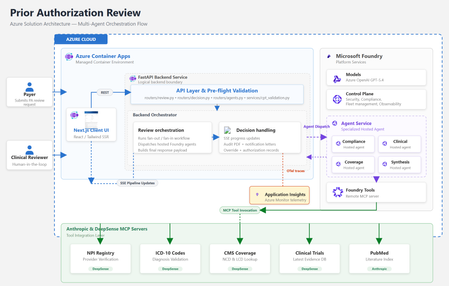
By Amit Mukherjee · Principal Solutions Engineer, Microsoft Health & Life Sciences Lindsey Craft-Goins · Technology Leader - Cloud & AI Platforms, Health & Life Sciences Joel Borellis · Director Solutions Engineering - Cloud & AI Platforms, Health & Life Sciences Prior authorization (PA) is one of the most expensive bottlenecks in U.S. healthcare. Physicians complete an average of 39 PA requests per week, spending roughly 13 hours of physician-and-staff time on PA-related work (AMA 2024 Prior Authorization Physician Survey). Turnaround averages 5–14 business days, and PA alone accounts for an estimated $35 billion in annual administrative spending (Sahni et al., Health Affairs Scholar, 2024). The regulatory clock is now ticking. CMS-0057-F mandates electronic PA with 72-hour urgent response starting in 2026. Forty-nine states plus DC already have PA laws on the books, and at least half of all U.S. state legislatures introduced new PA reform bills this year, including laws specifically targeting AI use in PA decisions (KFF Health News, April 2026). Today we’re making the Prior Authorization Multi-Agent Solution Accelerator available as a Microsoft Foundry template. Health plan payers can deploy a working, four-agent PA review pipeline to Azure using the Azure Developer CLI (“azd”) with a single command in supported environments, then customize it to their policies, workflows, and EHR environment. Try it now: Find the template in the Foundry template gallery, or clone directly from github.com/microsoft/Prior-Authorization-Multi-Agent-Solution-Accelerator What the template delivers The accelerator deploys four specialist Foundry hosted agents (Compliance, Clinical Reviewer, Coverage, and Synthesis), each independently containerized and managed by Foundry. In internal testing with synthetic demo cases, the pipeline reduced review workflow, from beginning to completion in under 5 minutes per case. Agent Role Key capability Compliance Documentation check 10-item checklist with blocking/non-blocking flags Clinical Reviewer Clinical evidence ICD-10 validation, PubMed + ClinicalTrials.gov search Coverage Policy matching CMS NCD/LCD lookup, per-criterion MET/NOT_MET mapping Synthesis Decision rubric 3-gate APPROVE/PEND with weighted confidence scoring Compliance and Clinical run in parallel. Coverage runs after clinical findings are ready. Synthesis evaluates all three outputs through a three-gate rubric. The result is a structured recommendation with per-criterion confidence scores and a full audit trail, not a black-box answer. Solution architecture The accelerator runs entirely on Azure. The frontend and backend deploy as Azure Container Apps. The four specialist agents are hosted by Microsoft Foundry. Real-time healthcare data flows through third-party MCP servers. Figure 1: Azure solution architecture How the pipeline works The four agents execute in a structured parallel-then-sequential pipeline. Compliance and Clinical run simultaneously in Phase 1. Coverage runs after clinical findings are ready. The Synthesis agent applies a three-gate decision rubric over all prior outputs. Figure 2: Agentic architecture, hosted agent pipeline Compliance and Clinical run in parallel via asyncio.gather, since neither depends on the other. Coverage runs sequentially after Clinical because it needs the structured clinical profile for criterion mapping. Synthesis evaluates all three outputs through a three-gate rubric (Provider, Codes, Medical Necessity) with weighted confidence scoring: 40% coverage criteria + 30% clinical extraction + 20% compliance + 10% policy match. The total pipeline time is bound by the slowest parallel agent plus the sequential agents, not the sum. In internal testing with synthetic demo cases, this architecture indicated materially reduced processing time compared to sequential manual workflows. Under the hood For the architect in the room, here are four design decisions worth knowing about: Foundry hosted agents: Each agent is independently containerized, versioned, and managed by Foundry’s runtime. The FastAPI backend is a pure HTTP dispatcher. All reasoning happens inside the agent containers, and there are no code changes between local (Docker Compose) and production (Foundry); the environment variable is the only switch. Structured output: Every agent uses MAF’s response_format enforcement to produce typed Pydantic schemas at the token level. No JSON parsing, no malformed fences, no free-form text. The orchestrator receives typed Python objects; the frontend receives a stable API contract. Keyless security: DefaultAzureCredential throughout, so no API keys are stored anywhere. Managed Identity handles production; azd tokens handle local development. Role assignments are provisioned automatically by Bicep at deploy time. Observability: All agents emit OpenTelemetry traces to Azure Application Insights. The Foundry portal shows per-agent spans correlated by case ID. End-to-end latency, per-agent contribution, and error rates are visible from day one with no additional configuration. For the full architecture documentation, agent specifications, Pydantic schemas, and extension guides, see the GitHub repository. Why this matters now Human-in-the-loop by design The system runs in LENIENT mode by default: it produces only APPROVE or PEND and is not designed to produce automated DENY outcomes in its default configuration. Every recommendation requires a clinician to Accept or Override with documented rationale before the decision is finalized. Override records flow to the audit PDF, notification letters, and downstream systems. This directly addresses the emerging wave of state legislation governing AI use in PA decisions. Domain experts own the rules Agent behavior is defined in markdown skill files, not Python code. When CMS updates a coverage determination or a plan changes its commercial policy, a clinician or compliance officer edits a text file and redeploys. No engineering PR required. Real-time healthcare data via MCP Agents connect to five MCP servers for real-time data: ICD-10 codes, NPI Registry, CMS Coverage policies, PubMed, and ClinicalTrials.gov. This incorporates real‑time clinical reference data sources to inform agent recommendations. Third-party MCP servers are included for demonstration with synthetic data only. Their inclusion does not constitute an endorsement by Microsoft. See the GitHub repository for production migration guidance. Audit-ready from day one Every case generates an 8-section audit justification PDF with per-criterion evidence, data source attribution, timestamps, and confidence breakdowns. Clinician overrides are recorded in Section 9. Notification letters (approval and pend) are generated automatically. These artifacts are designed to support CMS-0057-F documentation requirements. Deploy in under 15 minutes From the Foundry template gallery or from the command line: git clone https://github.com/microsoft/Prior-Authorization-Multi-Agent-Solution-Accelerator cd Prior-Authorization-Multi-Agent-Solution-Accelerator azd up That single command provisions Foundry, Azure Container Registry, Container Apps, builds all Docker images, registers the four agents, and runs health checks. The demo is live with a synthetic sample case as soon as deployment completes. What’s included What you customize 4 Foundry hosted agents Payer-specific coverage policies FastAPI orchestrator + Next.js frontend EHR/FHIR integration for clinical notes 5 MCP healthcare data connections Self-hosted MCP servers for production PHI Audit PDF + notification letter generation Authentication (Microsoft Entra ID) Full Bicep infrastructure-as-code Persistent storage (Cosmos DB / PostgreSQL) OpenTelemetry + App Insights observability Additional agents (Pharmacy, Financial) Built on Microsoft Foundry + Foundry hosted agents · Microsoft Agent Framework (MAF) · Azure OpenAI gpt-5.4 · Azure Container Apps · Azure Developer CLI + Bicep · OpenTelemetry + Azure Application Insights · DefaultAzureCredential (keyless, no secrets) Full architecture documentation, agent specifications, and extension guides are in the GitHub repository. Get started Foundry template gallery: Search “AI-Powered Prior Authorization for Healthcare” in the Foundry template section GitHub: github.com/microsoft/Prior-Authorization-Multi-Agent-Solution-Accelerator Disclaimers Not a medical device. This solution accelerator is not a medical device, is not FDA-cleared, and is not intended for autonomous clinical decision-making. All AI recommendations require qualified clinical review before any authorization decision is finalized. Not production-ready software. This is an open-source reference architecture (MIT License), not a supported Microsoft product. Customers are solely responsible for testing, validation, regulatory compliance, security hardening, and production deployment. Performance figures are illustrative. Metrics cited (including processing time reductions) are based on internal testing with synthetic demo data. Actual results will vary based on case complexity, infrastructure, and configuration. Third-party services included for demonstration only; not endorsed by Microsoft. Customers should evaluate providers against their compliance and data residency requirements. The demo uses synthetic data only. Customers deploying real patient data are responsible for HIPAA compliance and establishing appropriate Business Associate Agreements. This accelerator is intended to help customers align documentation workflows with CMS‑0057‑F requirements but has not been independently validated or certified for regulatory compliance.2.4KViews3likes0CommentsNative Microsoft Agent 365 Integration in Microsoft Foundry
Better Together is a series on how Microsoft’s AI platforms work seamlessly to build, deploy, and manage intelligent agents at enterprise scale. As organizations embrace AI across every workflow, Microsoft Foundry, Microsoft 365, Microsoft Agent 365, and Microsoft Copilot Studio are coming together to deliver a unified approach—from development to deployment to day-to-day operations. This three-part series explores how these technologies connect to help enterprises build AI agents that are secure, governed, and deeply integrated with Microsoft’s product ecosystem. This blog focuses on Part 2: Microsoft Foundry + A365Microsoft Agent 365 native Integration, showing how organizations can build, deploy, and customize Microsoft Agent 365 agents directly from Foundry. What Is Microsoft Agent 365? Microsoft Agent 365 is the control plane for enterprise AI agents, allowing IT to register, secure, and scale agents across Microsoft 365 and third-party environments. AI agents act more like people than code—they bring skills, learn from context, and leverage enterprise data to complete tasks. Like with people in the enterprise, they need to be protected from digital threats, governed with the right IT controls, and managed following enterprise policies. Our philosophy is simple: treat agents like users. Extend your existing identity, security, compliance, and productivity infrastructure to agents using familiar tools adapted for their unique needs. Each agent receives its own identity, policies, and access controls, ensuring it operates effectively while staying compliant. With Agent 365, organizations can: Manage AI agents at scale with unified identity and lifecycle controls Enforce least-privilege access and compliance with Defender, Entra, and Purview Boost productivity through native integration with Microsoft 365 apps and Work IQ Monitor activity and apply policies from a single, secure registry Learn more about Microsoft Agent 365 Foundry: The Ideal Place for Developers to Build AI Agents Microsoft Foundry is the ideal platform for building, testing, and deploying Agent 365 agents. It provides a unified environment where developers can create enterprise-ready AI agents that are secure, governed, and fully integrated with Microsoft 365. At Ignite, Foundry introduces support for Agent 365 hosted (containerized) agents, giving developers a consistent, scalable runtime managed entirely within the Microsoft cloud. This initial release focuses on hosted agents to provide a fully managed and secure environment from development to deployment. With Foundry, developers can: Author agents quickly using low-code or pro-code workflows Test and iterate in a secure, hosted environment Integrate frontier AI models from Microsoft, OpenAI, Meta, DeepSeek, and xAI Package and deploy agents with Microsoft identity, security, and governance built in Through its native integration with Microsoft Agent 365, Foundry also provides: Foundry-hosted runtime for seamless agent execution Azure Bot Service and Microsoft 365 app integration (Teams, Outlook, M365 Copilot) MCP-connected tools from Microsoft Agent 365 Simplified preparation flow for publishing to M365 Copilot, Teams and BizChat Apps Together, Foundry and Microsoft Agent 365 let organizations build, host, and manage AI agents natively, making them enterprise-ready from day one. What Can Employees Do with Agent 365? With Agent 365, employees can: Automate email triage and meeting preparation Summarize and generate content Locate organizational knowledge instantly Orchestrate cross-system workflows and approvals Advanced teams can also: Integrate internal knowledge bases Create business-specific workflows Extend actions using Foundry APIs and connectors Why It Matters This integration makes Agent 365 agents enterprise-ready out of the box—combining the authoring power of Microsoft Foundry with the security and manageability of the Microsoft 365 ecosystem. IT retains control over policy, compliance, and lifecycle management, while business users gain intelligent agents that work across the tools they already use. Get Started Early access to Microsoft Agent 365 is available through the Frontier preview program, offering hands-on experience with Microsoft’s latest AI innovations. 🔗 [Quickstart — Publish an Agent to A365 GitHub Sample]1.6KViews0likes0CommentsMicrosoft Foundry: Unlock Adaptive, Personalized Agents with User-Scoped Persistent Memory
From Knowledgeable to Personalized: Why Memory Matters Most AI agents today are knowledgeable — they ground responses in enterprise data sources and rely on short‑term, session‑based memory to maintain conversational coherence. This works well within a single interaction. But once the session ends, the context disappears. The agent starts fresh, unable to recall prior interactions, user preferences, or previously established context. In reality, enterprise users don’t interact with agents exclusively in one‑off sessions. Conversations can span days, weeks, evolving across multiple interactions rather than isolated sessions. Without a way to persist and safely reuse relevant context across interactions, AI agents remain efficient in the short term be being stateful within a session, but lose continuity over time due to their statelessness across sessions. Bridging this gap between short-term efficiency and long‑term adaptation exposes a deeper challenge. Persisting memory across sessions is not just a technical decision; in enterprise environments, it introduces legitimate concerns around privacy, data isolation, governance, and compliance — especially when multiple users interact with the same agent. What seems like an obvious next step quickly becomes a complex architectural problem, requiring organizations to balance the ability for agents to learn and adapt over time with the need to preserve trust, enforce isolation boundaries, and meet enterprise compliance requirements. In this post, I’ll walk through a practical design pattern for user‑scoped persistent memory, including a reference architecture and a deployable sample implementation that demonstrates how to apply this pattern in a real enterprise setting while preserving isolation, governance, and compliance. The Challenge of Persistent Memory in Enterprise AI Agents Extending memory beyond a single session seems like a natural way to make AI agents more adaptive. Retaining relevant context over time — such as preferences, prior decisions, or recurring patterns — would allow an agent to progressively tailor its behavior to each user, moving from simple responsiveness toward genuine adaptation. In enterprise environments, however, persistence introduces a different class of risk. Storing and reusing user context across interactions raises questions of privacy, data isolation, governance, and compliance — particularly when multiple users interact with shared systems. Without clear ownership and isolation boundaries, naïvely persisted memory can lead to cross‑user data leakage, policy violations, or unclear retention guarantees. As a result, many systems default to ephemeral, session‑only memory. This approach prioritizes safety and simplicity — but does so at the cost of long‑term personalization and continuity. The challenge, then, is not whether agents should remember, but how memory can be introduced without violating enterprise trust boundaries. Persistent Memory: Trade‑offs Between Abstraction and Control As AI agents evolve toward more adaptive behavior, several approaches to agent memory are emerging across the ecosystem. Each reflects a different set of trade-offs between abstraction, flexibility, and control — making it useful to briefly acknowledge these patterns before introducing the design presented here. Microsoft Foundry Agent Service includes a built‑in memory capability (currently in Preview) that enables agents to retain context beyond a single interaction. This approach integrates tightly with the Foundry runtime and abstracts much of the underlying memory management, making it well suited for scenarios that align closely with the managed agent lifecycle. Another notable approach combines Mem0 with Azure AI Search, where memory entries are stored and retrieved through vector search. In this model, memory is treated as an embedding‑centric store that emphasizes semantic recall and relevance. Mem0 is intentionally opinionated, defining how memory is structured, summarized, and retrieved to optimize for ease of use and rapid iteration. Both approaches represent meaningful progress. At the same time, some enterprises require an approach where user memory is explicitly owned, scoped, and governed within their existing data architecture — rather than implicitly managed by an agent framework or memory library. These requirements often stem from stricter expectations around data isolation, compliance, and long‑term control. User-Scoped Persistent Memory with Azure Cosmos DB The solution presented in this post provides a practical reference implementation for organizations that require explicit control over how user memory is stored, scoped, and governed. Rather than embedding long‑term memory implicitly within the agent runtime, this design models memory as a first‑class system component built on Azure Cosmos DB. At a high level, the architecture introduces user‑scoped persistent memory: a durable memory layer in which each user’s context is isolated and managed independently. Persistent memory is stored in Azure Cosmos DB containers partitioned by user identity and consists of curated, long‑lived signals — such as preferences, recurring intent, or summarized outcomes from prior interactions — rather than raw conversational transcripts. This keeps memory intentional, auditable, and easy to evolve over time. Short‑term, in‑session conversation state remains managed by Microsoft Foundry on the server side through its built‑in conversation and thread model. By separating ephemeral session context from durable user memory, the system preserves conversational coherence while avoiding uncontrolled accumulation of long‑term state within the agent runtime. This design enables continuity and personalization across sessions while deliberately avoiding the risks associated with shared or global memory models, including cross‑user data leakage, unclear ownership, and unintended reuse of context. Azure Cosmos DB provides enterprises with direct control over memory isolation, data residency, retention policies, and operational characteristics such as consistency, availability, and scale. In this architecture, knowledge grounding and memory serve complementary roles. Knowledge grounding ensures correctness by anchoring responses in trusted enterprise data sources. User‑scoped persistent memory ensures relevance by tailoring interactions to the individual user over time. Together, they enable trustworthy, adaptive AI agents that improve with use — without compromising enterprise boundaries. Architecture Components and Responsibilities Identity and User Scoping Microsoft Entra ID (App Registrations) — provides the frontend a client ID and tenant ID so the Microsoft Authentication Library (MSAL) can authenticate users via browser redirect. The oid (Object ID) claim from the ID token is used as the user identifier throughout the system. Agent Runtime and Orchestration Microsoft Foundry — serves as the unified AI platform for hosting models, managing agents, and maintaining conversation state. Foundry manages in‑session and thread‑level memory on the server side, preserving conversational continuity while keeping ephemeral context separate from long‑term user memory. Backend Agent Service — implements the AI agent using Microsoft Foundry’s agent and conversation APIs. The agent is responsible for reasoning, tool‑calling decisions, and response generation, delegating memory and search operations to external MCP servers. Memory and Knowledge Services MCP‑Memory — MCP server that hosts tools for extracting structured memory signals from conversations, generating embeddings, and persisting user‑scoped memories. Memories are written to and retrieved from Azure Cosmos DB, enforcing strict per‑user isolation. MCP‑Search — MCP server exposing tools for querying enterprise knowledge sources via Azure AI Search. This separation ensures that knowledge grounding and memory retrieval remain distinct concerns. Azure Cosmos DB for NoSQL — provides the durable, serverless document store for user‑scoped persistent memory. Memory containers are partitioned by user ID, enabling isolation, auditable access, configurable retention policies, and predictable scalability. Vector search is used to support semantic recall over stored memory entries. Azure AI Search — supplies hybrid retrieval (keyword and vector) with semantic reranking over the enterprise knowledge index. An integrated vectorizer backed by an embedding model is used for query‑time vectorization. Models text‑embedding‑3‑large — used for generating vector embeddings for both user‑scoped memories and enterprise knowledge search. gpt‑5‑mini — used for lightweight analysis tasks, such as extracting structured memory facts from conversational context. gpt‑5.1 — powers the AI agent, handling multi‑turn conversations, tool invocation, and response synthesis. Application and Hosting Infrastructure Frontend Web Application — a React‑based web UI that handles user authentication and presents a conversational chat interface. Azure Container Apps Environment — provides a shared execution environment for all services, including networking, scaling, and observability. Azure Container Apps — hosts the frontend, backend agent service, and MCP servers as independently scalable containers. Azure Container Registry — stores container images for all application components. Try It Yourself Demonstration of user‑scoped persistent memory across sessions. To make these concepts concrete, I’ve published a working reference implementation that demonstrates the architecture and patterns described above. The complete solution is available in the Agent-Memory GitHub repository. The repository README includes prerequisites, environment setup notes, and configuration details. Start by cloning the repository and moving into the project directory: git clone https://github.com/mardianto-msft/azure-agent-memory.git cd azure-agent-memory Next, sign in to Azure using the Azure CLI: az login Then authenticate the Azure Developer CLI: azd auth login Once authenticated, deploy the solution: azd up After deployment is complete, sign in using the provided demo users and interact with the agent across multiple sessions. Each user’s preferences and prior context are retained independently, the interaction continues seamlessly after signing out and returning later, and user context remains fully isolated with no cross‑identity leakage. The solution also includes a knowledge index initialized with selected Microsoft Outlook Help documentation, which the agent uses for knowledge grounding. This index can be easily replaced or extended with your own publicly accessible URLs to adapt the solution to different domains. Looking Ahead: Personalized Memory as a Foundation for Adaptive Agents As enterprise AI agents evolve, many teams are looking beyond larger models and improved retrieval toward human‑centered personalization at scale — building agents that adapt to individual users while operating within clearly defined trust boundaries. User‑scoped persistent memory enables this shift. By treating memory as a first‑class, user‑owned component, agents can maintain continuity across sessions while preserving isolation, governance, and compliance. Personalization becomes an intentional design choice, aligning with Microsoft’s human‑centered approach to AI, where users retain control over how systems adapt to them. This solution demonstrates how knowledge grounding and personalized memory serve complementary roles. Knowledge grounding ensures correctness by anchoring responses in trusted enterprise data. Personalized memory ensures relevance by tailoring interactions to the individual user. Together, they enable context‑aware, adaptive, and personalized agents — without compromising enterprise trust. Finally, this solution is intentionally presented as a reference design pattern, not a prescriptive architecture. It offers a practical starting point for enterprises designing adaptive, personalized agents, illustrating how user‑scoped memory can be modeled, governed, and integrated as a foundational capability for scalable enterprise AI.1.3KViews1like1CommentHybrid AI Using Foundry Local, Microsoft Foundry and the Agent Framework - Part 2
Background In Part 1, we explored how a local LLM running entirely on your GPU can call out to the cloud for advanced capabilities The theme was: Keep your data local. Pull intelligence in only when necessary. That was local-first AI calling cloud agents as needed. This time, the cloud is in charge, and the user interacts with a Microsoft Foundry hosted agent — but whenever it needs private, sensitive, or user-specific information, it securely “calls back home” to a local agent running next to the user via MCP. Think of it as: The cloud agent = specialist doctor The local agent = your health coach who you trust and who knows your medical history The cloud never sees your raw medical history The local agent only shares the minimum amount of information needed to support the cloud agent reasoning This hybrid intelligence pattern respects privacy while still benefiting from hosted frontier-level reasoning. Disclaimer: The diagnostic results, symptom checker, and any medical guidance provided in this article are for illustrative and informational purposes only. They are not intended to provide medical advice, diagnosis, or treatment. Architecture Overview The diagram illustrates a hybrid AI workflow where a Microsoft Foundry–hosted agent in Azure works together with a local MCP server running on the user’s machine. The cloud agent receives user symptoms and uses a frontier model (GPT-4.1) for reasoning, but when it needs personal context—like medical history—it securely calls back into the local MCP Health Coach via a dev-tunnel. The local MCP server queries a local GPU-accelerated LLM (Phi-4-mini via Foundry Local) along with stored health-history JSON, returning only the minimal structured background the cloud model needs. The cloud agent then combines both pieces—its own reasoning plus the local context—to produce tailored recommendations, all while sensitive data stays fully on the user’s device. Hosting the agent in Microsoft Foundry on Azure provides a reliable, scalable orchestration layer that integrates directly with Azure identity, monitoring, and governance. It lets you keep your logic, policies, and reasoning engine in the cloud, while still delegating private or resource-intensive tasks to your local environment. This gives you the best of both worlds: enterprise-grade control and flexibility with edge-level privacy and efficiency. Demo Setup Create the Cloud Hosted Agent Using Microsoft Foundry, I created an agent in the UI and pick gpt-4.1 as model: I provided rigorous instructions as system prompt: You are a medical-specialist reasoning assistant for non-emergency triage. You do NOT have access to the patient’s identity or private medical history. A privacy firewall limits what you can see. A local “Personal Health Coach” LLM exists on the user’s device. It holds the patient’s full medical history privately. You may request information from this local model ONLY by calling the MCP tool: get_patient_background(symptoms) This tool returns a privacy-safe, PII-free medical summary, including: - chronic conditions - allergies - medications - relevant risk factors - relevant recent labs - family history relevance - age group Rules: 1. When symptoms are provided, ALWAYS call get_patient_background BEFORE reasoning. 2. NEVER guess or invent medical history — always retrieve it from the local tool. 3. NEVER ask the user for sensitive personal details. The local model handles that. 4. After the tool runs, combine: (a) the patient_background output (b) the user’s reported symptoms to deliver high-level triage guidance. 5. Do not diagnose or prescribe medication. 6. Always end with: “This is not medical advice.” You MUST display the section “Local Health Coach Summary:” containing the JSON returned from the tool before giving your reasoning. Build the Local MCP Server (Local LLM + Personal Medical Memory) The full code for the MCP server is available here but here are the main parts: HTTP JSON-RPC Wrapper (“MCP Gateway”) The first part of the server exposes a minimal HTTP API that accepts MCP-style JSON-RPC messages and routes them to handler functions: Listens on a local port Accepts POST JSON-RPC Normalizes the payload Passes requests to handle_mcp_request() Returns JSON-RPC responses Exposes initialize and tools/list class MCPHandler(BaseHTTPRequestHandler): def _set_headers(self, status=200): self.send_response(status) self.send_header("Content-Type", "application/json") self.end_headers() def do_GET(self): self._set_headers() self.wfile.write(b"OK") def do_POST(self): content_len = int(self.headers.get("Content-Length", 0)) raw = self.rfile.read(content_len) print("---- RAW BODY ----") print(raw) print("-------------------") try: req = json.loads(raw.decode("utf-8")) except: self._set_headers(400) self.wfile.write(b'{"error":"Invalid JSON"}') return resp = handle_mcp_request(req) self._set_headers() self.wfile.write(json.dumps(resp).encode("utf-8")) Tool Definition: get_patient_background This section defines the tool contract exposed to Azure AI Foundry. The hosted agent sees this tool exactly as if it were a cloud function: Advertises the tool via tools/list Accepts arguments passed from the cloud agent Delegates local reasoning to the GPU LLM Returns structured JSON back to the cloud def handle_mcp_request(req): method = req.get("method") req_id = req.get("id") if method == "tools/list": return { "jsonrpc": "2.0", "id": req_id, "result": { "tools": [ { "name": "get_patient_background", "description": "Returns anonymized personal medical context using your local LLM.", "inputSchema": { "type": "object", "properties": { "symptoms": {"type": "string"} }, "required": ["symptoms"] } } ] } } if method == "tools/call": tool = req["params"]["name"] args = req["params"]["arguments"] if tool == "get_patient_background": symptoms = args.get("symptoms", "") summary = summarize_patient_locally(symptoms) return { "jsonrpc": "2.0", "id": req_id, "result": { "content": [ { "type": "text", "text": json.dumps(summary) } ] } } Local GPU LLM Caller (Foundry Local Integration) This is where personalization happens — entirely on your machine, not in the cloud: Calls the local GPU LLM through Foundry Local Injects private medical data (loaded from a file or memory) Produces anonymized structured outputs Logs debug info so you can see when local inference is running FOUNDRY_LOCAL_BASE_URL = "http://127.0.0.1:52403" FOUNDRY_LOCAL_CHAT_URL = f"{FOUNDRY_LOCAL_BASE_URL}/v1/chat/completions" FOUNDRY_LOCAL_MODEL_ID = "Phi-4-mini-instruct-cuda-gpu:5" def summarize_patient_locally(symptoms: str): print("[LOCAL] Calling Foundry Local GPU model...") payload = { "model": FOUNDRY_LOCAL_MODEL_ID, "messages": [ {"role": "system", "content": PERSONAL_SYSTEM_PROMPT}, {"role": "user", "content": symptoms} ], "max_tokens": 300, "temperature": 0.1 } resp = requests.post( FOUNDRY_LOCAL_CHAT_URL, headers={"Content-Type": "application/json"}, data=json.dumps(payload), timeout=60 ) llm_content = resp.json()["choices"][0]["message"]["content"] print("[LOCAL] Raw content:\n", llm_content) cleaned = _strip_code_fences(llm_content) return json.loads(cleaned) Start a Dev Tunnel Now we need to do some plumbing work to make sure the cloud can resolve the MCP endpoint. I used Azure Dev Tunnels for this demo. The snippet below shows how to set that up in 4 PowerShell commands: PS C:\Windows\system32> winget install Microsoft.DevTunnel PS C:\Windows\system32> devtunnel create mcp-health PS C:\Windows\system32> devtunnel port create mcp-health -p 8081 --protocol http PS C:\Windows\system32> devtunnel host mcp-health I have now a public endpoint: https://xxxxxxxxx.devtunnels.ms:8081 Wire Everything Together in Azure AI Foundry Now let's us the UI to add a new custom tool as MCP for our agent: And point to the public endpoint created previously: Voila, we're done with the setup, let's test it Demo: The Cloud Agent Talks to Your Local Private LLM I am going to use a simple prompt in the agent: “Hi, I’ve been feeling feverish, fatigued, and a bit short of breath since yesterday. Should I be worried?” Disclaimer: The diagnostic results and any medical guidance provided in this article are for illustrative and informational purposes only. They are not intended to provide medical advice, diagnosis, or treatment. Below is the sequence shown in real time: Conclusion — Why This Hybrid Pattern Matters Hybrid AI lets you place intelligence exactly where it belongs: high-value reasoning in the cloud, sensitive or contextual data on the local machine. This protects privacy while reducing cloud compute costs—routine lookups, context gathering, and personal history retrieval can all run on lightweight local models instead of expensive frontier models. This pattern also unlocks powerful real-world applications: local financial data paired with cloud financial analysis, on-device coding knowledge combined with cloud-scale refactoring, or local corporate context augmenting cloud automation agents. In industrial and edge environments, local agents can sit directly next to the action—embedded in factory sensors, cameras, kiosks, or ambient IoT devices—providing instant, private intelligence while the cloud handles complex decision-making. Hybrid AI turns every device into an intelligent collaborator, and every cloud agent into a specialist that can safely leverage local expertise. References Get started with Foundry Local - Foundry Local: https://learn.microsoft.com/en-us/azure/ai-foundry/foundry-local/get-started?view=foundry-classic Using MCP tools with Agents (Microsoft Agent Framework) — https://learn.microsoft.com/en-us/agent-framework/user-guide/model-context-protocol/using-mcp-tools Microsoft Learn Build Agents using Model Context Protocol on Azure — https://learn.microsoft.com/en-us/azure/developer/ai/intro-agents-mcp Microsoft Learn Full demo repo available here.1.3KViews1like0CommentsBeyond the Model: Empower your AI with Data Grounding and Model Training
Discover how Microsoft Foundry goes beyond foundational models to deliver enterprise-grade AI solutions. Learn how data grounding, model tuning, and agentic orchestration unlock faster time-to-value, improved accuracy, and scalable workflows across industries.1.3KViews6likes4Comments