foundry agent service
22 TopicsEvaluating Agentic AI in Microsoft Foundry: Beyond Final-Answer Quality
As AI systems evolve from single-turn assistants into tool-using agents, evaluation has to evolve with them. For a traditional LLM application, teams often focus on whether the final response is relevant, coherent, or grounded. For an agent, that is only part of the problem. An agent may produce a plausible answer while still selecting the wrong tool, sending incorrect tool parameters, ignoring tool output, violating user constraints, making unnecessary calls, or failing to complete the task. This is why Microsoft Foundry separates agent evaluation into multiple layers and supports both system-level and process-level evaluation. Microsoft describes agent evaluators as a way to systematically assess quality, safety, and performance across agent workflows—not only the final response. https://learn.microsoft.com/en-us/azure/foundry/observability/how-to/evaluate-agent Start with the evaluation target Foundry allows evaluations against different targets: Agent — run the selected agent against test inputs and evaluate newly generated behavior Model — evaluate a model directly Dataset — score outputs that already exist in a database This distinction matters because the evaluation workflow changes depending on the target. When the target is an Agent, Foundry generates a fresh response for each input and evaluates that result. When the target is a Dataset, Foundry evaluates the responses already present in the dataset. https://learn.microsoft.com/en-us/azure/foundry/how-to/evaluate-generative-ai-app For agentic systems, I find it useful to evaluate in two scopes: Individual turns for detailed debugging of tool use and response behavior. Full conversations for multi-turn task completion, conversational coherence, and user satisfaction. Microsoft currently recommends starting with full conversations and simulated data for controlled testing, then using real conversations in production. System evaluation: did the agent actually accomplish the task? The first layer is the end-to-end outcome. Important evaluators include: Task Completion Did the agent actually complete the user’s task? For example: “Find black running shoes under $120 in size 9 in Dallas.” An agent may correctly search for products but stop before checking inventory. The response may look reasonable, but the task is still incomplete. Task Adherence Did the agent follow its instructions, policies, and explicit user constraints? If the customer says the budget is $120 and the agent recommends a $129 product without clearly identifying the budget violation, adherence should suffer. Intent Resolution Did the agent correctly understand and address what the user wanted? A tool call can be technically valid but semantically wrong. Searching generic sneakers when the user explicitly requested running shoes is a good example. Customer Satisfaction This looks beyond technical correctness and asks whether the overall interaction is likely to satisfy the user. These metrics answer a simple but important question: Did the system actually solve the user’s problem? Microsoft groups these kinds of measurements under system evaluation for agent workflows. Process evaluation: did the agent take the right path? This is where agent evaluation becomes much more interesting. Foundry includes dedicated process evaluators for tool-using agents. Tool Selection This checks whether the agent chose the appropriate tool. Suppose an agent has: search_products check_inventory get_promotions web search If the user asks: “Is DailyRun X available in size 9 in Dallas?” The right enterprise action is to use the inventory tool. If the agent uses web search instead, the answer may still sound plausible, but the process is wrong. Tool Input Accuracy This checks whether the tool was called with the correct inputs. For example: check_inventory( product_id="DEMO-SHOE-002", size="9", location="Dallas-TX" ) The agent may choose the right tool but pass the wrong size or location. That means Tool Selection can pass while Tool Input Accuracy fails. Tool Call Success This evaluates whether the invocation itself succeeded. For example: the API returned successfully there was no timeout there was no execution failure But a successful tool call does not mean it was the correct call. An API may return HTTP 200 for the wrong SKU or wrong location. So: Tool Call Success measures execution reliability, not semantic correctness. Tool Output Utilization This checks whether the agent correctly used what the tool returned. Imagine the inventory tool returns: { "available": false } but the agent replies: “Yes, size 9 is available.” The tool worked. The input may even have been correct. The failure is in how the agent used the result. Tool Call Accuracy This gives a broader signal about whether tool invocation behavior was correct overall. Together, these evaluators answer: Did the agent execute the right workflow, not just produce a convincing answer? Response quality still matters Even when the process is correct, the final response can still be poor. Foundry supports quality evaluators such as: Relevance Groundedness Completeness Coherence Fluency Groundedness Groundedness asks whether claims are supported by the available context or evidence. For enterprise applications, this is especially important because answers should be based on authoritative sources rather than unsupported model memory. Completeness Did the agent answer all important parts of the request? If the user asks: “Is this available and is there a member discount?” an answer that checks inventory but ignores the promotion question is incomplete. Coherence and Fluency These evaluate communication quality. Microsoft defines coherence around logical and orderly presentation of ideas, while fluency focuses on readability, grammar, vocabulary, and clarity. https://learn.microsoft.com/en-us/azure/foundry/concepts/evaluation-evaluators/general-purpose-evaluators Built-in evaluators are not enough for every enterprise agent A retail agent, finance agent, claims agent, or operations agent will always have business-specific requirements that generic evaluators cannot fully capture. Microsoft’s current guidance recommends using a rubric evaluator as a primary measure when teams need to express application-specific criteria such as policy enforcement, tool-use accuracy, or communication standards. Built-in evaluators can then be layered on top for broader coverage. A retail-agent rubric might include: never claim availability without inventory verification never invent discounts never silently violate a stated budget prefer enterprise catalog tools over public search avoid duplicate or unnecessary tool calls clearly identify compromises when no exact match exists This is where evaluation starts to look much more like business acceptance testing. https://learn.microsoft.com/en-us/azure/foundry/concepts/evaluation-evaluators/rubric-evaluators The dataset becomes a regression suite Foundry evaluation datasets are reusable test collections. They are useful when comparing: Prompt V1 vs V2 one model vs another tool-definition changes orchestration changes release candidate vs production version When Foundry evaluates an agent against a dataset, it generates a new response for each input and scores it. When the target is the live agent, Foundry ignores existing responses in the dataset. This changes prompt engineering from: “This prompt looks better.” to: “This version performs better on the same regression suite.” That is a much more defensible engineering practice. Golden datasets, synthetic data, and production traces all serve different purposes A mature evaluation strategy uses multiple data sources. Golden datasets: Best for critical known scenarios and deterministic regression testing. Synthetic data: Useful for expanding coverage and generating edge cases before enough production traffic exists. Full-conversation simulation: Useful for testing multi-turn user journeys and end-to-end task behavior. Production traces: Useful for evaluating what real users actually experienced. Foundry supports evaluation directly from Application Insights traces and can evaluate deployed interactions without replaying the original request. https://learn.microsoft.com/en-us/azure/foundry/observability/how-to/cloud-evaluation-deployed-interactions Production evaluation should operate on traces Production failures are often different from development failures. Real users introduce: unexpected phrasing missing information contradictory constraints unusual tool sequences edge cases that synthetic test data may not cover Foundry can evaluate traces already captured in Application Insights. The trace-evaluation workflow supports selecting traces by trace ID or by agent filter, and also supports intelligent sampling to select a representative subset rather than evaluating every interaction. That creates a strong operational loop: Run → Trace → Evaluate → Identify failures → Add to regression suite → Fix → Re-evaluate Microsoft Foundry’s evaluation stack becomes especially useful as teams can evaluate not only what an agent said, but also how it behaved operationally, which tools it used, whether it completed the task, and how that behavior changes over time.240Views1like1CommentChoosing a real-time voice architecture on Microsoft Foundry: three enterprise patterns
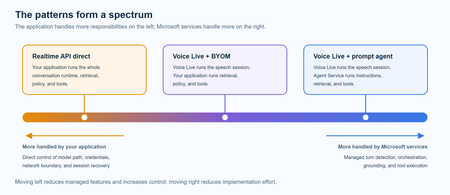
A practical comparison of three real-time voice architectures on Microsoft Foundry, including implementation tradeoffs and four enterprise release gates for residency, networking, retrieval authorization, and tool credentials.651Views1like0CommentsAdding a Fallback Model to Hermes with Microsoft Foundry
So the plan was simple. Leave the Bedrock configuration untouched, then wire Microsoft Foundry in behind it as a fallback, so Hermes always has somewhere else to go when the primary provider is not responding. A few other reasons pushed me towards Foundry in particular: Redundancy that does not need me. If Bedrock is throttled or out of quota, I want Hermes to fail over on its own rather than waiting for me to notice. A catalogue I already pay for. Foundry puts the latest GPT models next to open-weight and partner models in one place, so I can pick a model that suits the task instead of settling for whatever a single provider happens to offer. Enterprise controls out of the box. Region pinning, private networking, content filters and per-deployment quota all sit in the same portal, which makes the setup far easier to defend to a security reviewer. Learning the mechanics before I need them. Working out how Hermes handles a provider chain is much nicer on a quiet Tuesday than during a live outage. Here is the short version, if you are deciding whether to read on. Time: about thirty minutes if nothing goes wrong. Cost: pay-as-you-go tokens only, and none at all while the fallback sits idle. Result: an assistant that keeps answering when your primary provider stops. Before you start, you will need three things: a machine with Hermes already installed and a working primary provider configured, an Azure subscription with access to Microsoft Foundry in a region you can actually deploy into, and enough quota in that region to create a deployment. One thing that made this easy to justify: Foundry deployments bill per token on the standard pay-as-you-go tier. A fallback provider that never gets invoked costs nothing beyond the requests it actually serves, so the insurance is close to free until the day you need it. Chat surface (CLI, messaging) → Hermes Gateway → Primary Amazon Bedrock → Fallback Microsoft Foundry Figure 1: Where the fallback sits. Every request goes through the Hermes gateway to the primary provider; only when that provider is unavailable does the chain continue to Microsoft Foundry. Part 1: Deploying a Model on Microsoft Foundry The first half of this job happens entirely inside the Microsoft Foundry portal and has nothing to do with Hermes yet. All you are really doing here is making sure your Azure subscription can serve a model, and that you hold an endpoint and key Hermes can authenticate with later. 1. Deploy model in Foundry → 2. Copy endpoint + key → 3. hermes fallback add → 4. Authenticate → 5. Select models, test Figure 2: The whole setup in five moves. The first two happen in the Microsoft Foundry portal (orange); the rest happen on the Hermes machine (blue). Go to Microsoft Foundry > Build > Models > Deploy > Deploy a base model. You can deploy a fine-tuned model instead if you already have one, which works just as well with Hermes. Check the region shown at the top of the portal before you commit, because both model availability and deployment quota differ from one region to the next. Then deploy the model you have selected: In this case I deployed gpt-5.6-sol, which is the model Hermes will fall back to. The choice was deliberate rather than exciting. My primary model on Bedrock is a general-purpose chat model, and a fallback is only useful if the answers it gives feel like a continuation of the same conversation rather than a different assistant wearing the same name. The gpt-5.6-sol deployment matches that behaviour closely, it was available in the region I wanted to pin, and the quota I was granted comfortably covers a day of normal use. If a fallback surprises you the first time it fires, it is the wrong fallback. Once the deployment finishes, open it and take note of two values: the target endpoint URI and the API key. Copy both somewhere safe now, because you will be pasting them into Hermes in the next part. If your organisation rotates keys on a schedule, use a key with the longest life you are allowed, since a fallback secured with a credential that expires quietly stops being a fallback. What to copy Where it lives in the portal Where Hermes asks for it Target endpoint URI Deployment > Endpoint > Target URI "Endpoint" prompt in hermes fallback add API key Deployment > Endpoint > Key "API key" prompt, or choose Entra ID instead Deployment name Deployment > Details > Name Shown in the model list Hermes returns Region Top of the portal, next to the resource Must match the region you deployed into Figure 3: Everything Hermes will ask for, and where to find each value before you leave the portal. Part 2: Adding Foundry to Hermes as a Fallback With the Foundry side sorted, everything from here happens in the Hermes CLI. One thing worth knowing before you start: this is the fallback command, not the primary model command, so your existing Bedrock configuration is left completely alone. Nothing in this section can break what is already working, which makes it a good one to try on a live setup. Run the Hermes fallback command: When Hermes asks which provider to add, choose Azure Foundry. The picker still carries the old name; it is the same service that the portal now calls Microsoft Foundry. Paste the target endpoint URI from your deployment, then authenticate with the API key you copied earlier. Hermes also offers Microsoft Entra ID at this prompt, which is the better option if your organisation would rather not have a static key sitting on the machine. If authentication fails here, check the endpoint before you start suspecting the key. In my experience the endpoint is wrong far more often than the credential is, usually because the deployment name at the end of the URI does not match the deployment you actually created. Once authentication succeeds, Hermes lists the deployments your Foundry resource exposes and asks which ones you want to use. You can select more than one, and the order is not cosmetic: Hermes walks down the chain from top to bottom whenever the provider above is unavailable. Treat that list as a priority order, not a shopping basket. What happens to the primary What Hermes does What you see in the chat Responds normally Routes every request to the primary and never touches the chain Nothing. The fallback stays idle Throttled or out of quota Retries the next provider down the chain on the same request A reply, served by the fallback model Endpoint unreachable Keeps failing over on each new request until the primary recovers Slightly different tone and latency, but a working assistant Every provider fails Returns the error rather than hanging An error worth chasing with hermes status Figure 4: The chain in practice. The fallback only earns its keep in the middle two rows, which is exactly why it is easy to forget you configured it. Part 3: Promoting Foundry to the Primary Model At this stage Foundry is sitting in the back seat as a backup. I wanted to reverse the arrangement and make Foundry the primary while Bedrock slides down into the fallback slot, partly because I preferred keeping day-to-day traffic inside my Azure subscription, and partly because I wanted proof the chain works in both directions. Before promotion After promotion Primary: Amazon Bedrock → Primary: Microsoft Foundry Fallback: Microsoft Foundry → Fallback: Amazon Bedrock Figure 5: The promotion, in effect. Nothing is added or removed; the two providers simply trade places in the chain. There is no dedicated "promote" command in Hermes, so the manual route is a short sequence of steps rather than a single instruction: Select the fallback provider/model as the new primary: hermes model Remove the now-duplicate model from the fallback chain: hermes fallback remove Optionally add the old primary model as a fallback: hermes fallback add Restart the messaging gateway: hermes gateway restart Verify the result: hermes status / hermes fallback list That sequence works, and it is good to know what is happening underneath. But since I already had a working provider configured, I would rather just ask Hermes to rearrange itself. This is the part I genuinely enjoy about the tool: the configuration is something you can talk to, not only something you type commands at. Prompt: Okay now please make the model I configured on Microsoft Foundry into the main model, and make the Bedrock one the fallback model! Hermes rewrites the provider chain on its own and confirms the swap once it is done, which is a great deal less error-prone than running the five commands by hand. Part 4: Testing the Switch Configuration you have not tested is just an assumption with extra steps, so the next thing is to confirm Hermes really is talking to Foundry. Type /model when running Hermes to bring up the model picker. You will be prompted to select a provider first. Pick the Microsoft Foundry entry, then choose the specific deployment from the list underneath it. The active model should switch straight away. Send it a plain "Hello" to check that the deployment actually responds, rather than just looking correct in the menu. Appearing in a dropdown and serving a request are two very different things. A second test is worth the thirty seconds it costs: run hermes status to confirm which provider is live, then hermes fallback list to confirm the chain is ordered the way you intended. The picker tells you what you selected; those two commands tell you what Hermes will actually do at three in the morning. Part 5: The Obstacle, and What It Actually Taught Me Every walkthrough has the part the author quietly leaves out. Here is mine: the wrinkle was not the model, it was capacity. My first attempt deployed into the region closest to me out of habit, and the portal turned it down because there was no capacity left for that model at the tier I asked for. The model was clearly listed in the catalogue; being listed and being deployable in your region, on your subscription, at your quota, are three separate questions. Redeploying in a different region fixed it in a couple of minutes, but it meant the endpoint URI changed, which in turn meant the value I had already pasted into Hermes was stale. Re-running hermes fallback add against the new endpoint sorted it out. The lesson is cheap enough to hand over for free: check quota and regional capacity for your specific subscription before you design a walkthrough, a demo or a production fallback around one deployment. In the Foundry portal, Management then Quota shows exactly what you have been granted per region and per model family, which is the only list that matters. Symptom Likely cause Fix Deployment rejected in the portal No capacity for that model at the tier you asked for, in that region Deploy in another region, or drop to a smaller tier Hermes rejects the credential Endpoint URI does not match the deployment you created Re-copy the target URI from the deployment, not the resource Provider authenticates but lists nothing Key belongs to a different Foundry resource Check you are in the right resource, then re-run hermes fallback add Fallback never fires Chain ordered the wrong way round hermes fallback list, then reorder Figure 6: The four things that went wrong, or nearly did, and what fixed each one. There is a silver lining worth stating plainly. Because the fallback chain was already in place, a deployment that refused to come up did not take the assistant down with it. That is precisely the scenario this whole exercise was meant to cover, and it turned up on day one without me having to simulate it. Command Cheat Sheet Everything used in this walkthrough, collected in one place: hermes fallback add: attach a provider to the fallback chain hermes fallback remove: drop a provider from the chain hermes fallback list: show the chain in priority order hermes model: set the primary model hermes gateway restart: restart the messaging gateway after a change hermes status: confirm which provider is currently live /model: switch models from inside a running session Conclusion Adding Microsoft Foundry as a fallback behind my existing Bedrock setup took an afternoon, and most of that was spent recovering from a regional capacity limit I should have checked first. The work itself is small: deploy a model, copy the endpoint and key, run hermes fallback add, authenticate, pick your deployments. The payoff is that Hermes no longer depends on one provider staying healthy. Three things are worth carrying away from this: Check quota, not just the catalogue. The Foundry catalogue shows what Microsoft offers. It does not show what your subscription and region can actually deploy today. Confirm that first, before you build anything on top of a specific deployment. Order your fallback chain deliberately. Hermes works down the list from top to bottom, so the sequence you choose during setup is the failover policy you are going to live with. Put the model you actually trust at the top. Treat the endpoint as part of the credential. Redeploying in a new region changes the endpoint URI, and a fallback pointed at an endpoint that no longer exists is not a fallback. Re-run the setup whenever the deployment moves. The switch from Bedrock primary to Foundry primary also proved the chain runs in both directions, which is the real point. Provider redundancy is only useful if you have watched it work. Next on my list is deliberately breaking the primary provider to confirm the failover triggers on its own, without me typing a single command. If you run this against a different model, region or provider pairing, I would genuinely like to know how it went, particularly if your quota experience was better than mine. Drop it in the comments.272Views0likes0CommentsBuilding Production-Ready AI Agents in Microsoft Foundry: 10 Lessons Learned
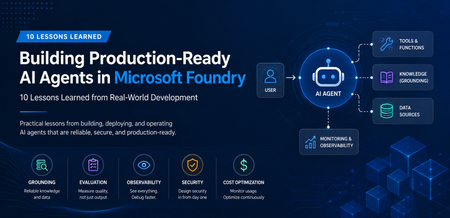
A Real-World Scenario Imagine a customer support agent that answers invoice questions. During testing, everything works perfectly. But in production: The Finance API occasionally times out. The knowledge base contains outdated information. Tool calls fail during peak traffic. Token consumption rises unexpectedly. The result isn't a broken AI model. It's an unreliable system. This is where Microsoft Foundry becomes critical. Building production-ready agents requires grounding, observability, resiliency, governance, and continuous monitoring. New challenges appear: Challenge Impact Hallucinated responses Reduced trust Missing citations Verification issues Tool failures Broken workflows High token consumption Increased cost Latency spikes Poor user experience Limited monitoring difficult troubleshooting Security concerns Compliance risks The lesson was clear: Production readiness is not about making the agent smarter. It is about making the agent reliable. My Observation While experimenting with AI agents in Microsoft Foundry, I found that model selection was rarely the primary challenge. Most production issues stemmed from grounding quality, tool reliability, observability, and security controls. Addressing these operational concerns often had a greater impact on user trust than changing the underlying model. Production AI Agent Reference Architecture A production-ready AI agent typically includes several components beyond the language model itself. Layer Technology User Interface Web App, Teams, Copilot Agent Runtime Microsoft Foundry Agent Service Knowledge Layer Azure AI Search Foundation Model GPT-4o Tool Integration APIs and Functions Monitoring Azure Monitor Security Managed Identity and Key Vault Request Flow Lesson 1: Start with the Use Case, Not the Model One of the most common mistakes is beginning with model selection. Many teams ask: Which model should I use? Should I choose GPT-4o? Should I use a larger context window? A more important question is: What business problem are we solving? Before evaluating models, define: Users Business goals Success metrics Compliance requirements Operational constraints An enterprise support agent and a financial compliance agent may use the same model but require completely different architectures. Key Takeaway Successful AI projects start with business outcomes, not model benchmarks. Lesson 2: Grounding Matters More Than Prompting Prompt engineering helps. Grounding drives trust. Without access to reliable enterprise data, even advanced models can generate confident but incorrect responses. Grounding Sources Azure AI Search SharePoint documents Internal knowledge bases Structured enterprise data Approved policy repositories Example from azure.ai.projects import AIProjectClient # Configure grounding with Azure AI Search agent = client.agents.create_agent( model="gpt-4o", name="support-agent", tools=[ { "type": "azure_ai_search", "azure_ai_search": { "index_name": "support-kb", "endpoint": "https://your-search.search.windows.net" } } ] ) In production environments, grounding through Azure AI Search helps agents retrieve trusted enterprise information rather than relying solely on model knowledge. This significantly improves response accuracy and trustworthiness. Try it yourself: Configure Azure AI Search as a knowledge source in Microsoft Foundry and compare grounded versus non-grounded responses. Key Takeaway Reliable retrieval is usually more valuable than sophisticated prompting. Lesson 3: Design Tool Usage Carefully AI agents become powerful when they can interact with external tools. Examples include: CRM systems Databases APIs Ticketing systems Business applications However, every tool increase complexity. Ask yourself: When should the agent call the tool? What happens if the tool is unavailable? How should failures be handled? Example Failure Scenario +-----------------------------+ | User asks for invoice status | +-------------+---------------+ | v +-----------------------------+ | Agent calls Finance API | +-------------+---------------+ | v +-----------------------------+ | API timeout detected | +-------------+---------------+ | v +-----------------------------+ | Fallback response returned | +-----------------------------+ Example Failure Scenario: A production-ready agent should gracefully handle external service failures and return a fallback response instead of failing completely. Key Takeaway Design for failure before designing for capability. Lesson 4: Evaluate Before Deployment Many teams test only for response quality. Production agents require broader evaluation. Evaluation Area Why It Matters Accuracy Correct answers Grounding Quality Faithful responses Latency User experience Safety Risk reduction Cost Sustainability Tool Success Rate Reliability Evaluation should become part of every deployment pipeline. Key Takeaway You cannot improve what you do not measure. Lesson 5: Make Observability a First-Class Feature Observability is often neglected until something breaks. Unfortunately, production systems always encounter unexpected behavior. Track metrics such as: Metric Purpose Request Volume Demand tracking Average Latency Performance Token Usage Cost visibility Grounding Success Rate Quality Tool Failure Rate Reliability User Satisfaction Business value Setting Up Tracing in Foundry from azure.ai.projects import AIProjectClient from azure.monitor.opentelemetry import configure_azure_monitor # Configure Azure Monitor for tracing configure_azure_monitor( connection_string="InstrumentationKey=xxx" ) # Run the agent response = agent.run( thread_id=thread.id, instructions="..." ) Tracing provides visibility into how an AI agent processes requests, invokes tools, and generates responses. By integrating Azure Monitor, teams can track latency, identify failed tool calls, analyze token usage, and troubleshoot unexpected agent behavior. This observability is essential for operating AI agents reliably in production environments. Try it yourself: Enabling tracing and monitoring for a Microsoft Foundry agent using Azure Monitor. Example Dashboard +-----------------------------+ | Production Monitoring Dashboard | +-----------------------------+ | Requests Today | 5,120 | | Average Latency | 3.2s | | Grounding Success | 97% | | Tool Failure Rate | 1% | | Average Tokens | 2,800 | +-----------------------------+ Monitoring production metrics helps teams understand agent performance, reliability, and cost efficiency. Key indicators such as latency, grounding success rate, tool failure rate, and token consumption provide valuable insights into the operational health of an AI agent and enable proactive troubleshooting before users are impacted. Key Takeaway What you can't observe, you can't effectively operate or improve. Tracing is a critical capability for maintaining production-ready AI agents. Lesson 6: Monitor Token Consumption Token usage directly impacts cost. A highly successful agent can quickly become expensive if token growth is unmanaged. Common optimization techniques: Optimization Benefit Prompt Compression Lower token usage Response Caching Reduced model calls RAG Filtering Focused context Context Trimming Smaller requests Model Selection Cost control Key Takeaway Cost optimization should be planned from day one. Lesson 7: Build Security into the Design Security should never be an afterthought. Enterprise AI systems must enforce the same security boundaries as traditional applications. Recommended Controls Control Purpose Managed Identity Secure authentication Azure Key Vault Secret management RBAC Authorization Audit Logs Compliance Content Filtering Safety Private Endpoints Network Security Guiding Principle An AI agent should never access data beyond a user's permissions. Key Takeaway Security is a design requirement, not a deployment task. Lesson 8: Expect Tool Failures External dependencies inevitably fail. Production-ready agents should anticipate: API downtime Authentication failures Network interruptions Rate limiting Unexpected responses Recommended Strategy Key Takeaway async def call_tool_with_resilience(tool_name, params): try: result = await tool_client.execute( tool_name, params, timeout=5.0 ) return result except TimeoutError: return await cache.get_fallback( tool_name, params ) Example Outcome: Introducing retry and fallback logic can significantly improve reliability. By handling temporary API failures gracefully and returning cached responses, when necessary, agents can reduce user-facing errors and provide a more consistent experience. Lesson 9: Evaluate the Process, Not Just the Output A correct answer does not always mean the process was correct. In production environments, teams should evaluate not only the final response but also the steps the agent took to generate that response. An answer may appear accurate even when it was based on incorrect retrieval results, unnecessary tool calls, or incomplete citations. Review: Retrieval quality Tool execution Citation accuracy Security compliance Reasoning path User Query | v Retrieval | v Tool Execution | v Reasoning | v Response For example, an agent might generate the correct answer by chance, even though it retrieved irrelevant documents or used an inefficient workflow. Without evaluating the process, these hidden issues may go unnoticed until they affect reliability, compliance, or user trust. Key Takeaway Inspect the entire workflow, not just the final answer. Lesson 10: Think Like a Production Engineer As adoption grows, operational excellence becomes the differentiator. Ask questions such as: Can we troubleshoot failures? Can we measure business impact? Can we control costs? Can we scale safely? Can we govern usage? These questions become more important than model selection over time. Key Takeaway Production success comes from engineering discipline, not model size. Microsoft Foundry Features That Helped Improve Reliability Foundry Capability Production Benefit Agent Service Agent orchestration Knowledge Sources Grounded responses Evaluations Quality measurement Tracing Workflow visibility Model Catalog Model flexibility Safety Systems Risk mitigation These capabilities help teams move beyond proofs of concept and build solutions that are ready for real-world adoption. Production Readiness Checklist Before releasing an AI agent, verify: ✅ Business goals defined ✅ Grounding strategy implemented ✅ Security controls enabled ✅ Evaluation pipeline established ✅ Monitoring configured ✅ Failure handling tested ✅ Cost optimization reviewed ✅ Governance process defined ✅ User feedback loop available ✅ Deployment rollback strategy prepared Get Started with Production-Ready Agents If you're building AI agents using Microsoft Foundry, start by focusing on grounding, observability, security, and evaluation from day one. Suggested next steps: Build your first agent in Microsoft Foundry Configure Azure AI Search grounding Enable tracing and monitoring Evaluate agent quality before deployment Add resilience and fallback strategies Which of these 10 lessons has been most valuable in your own AI agent journey? Share your experiences and insights in the comments.1KViews5likes1CommentModel router updates: new regions, a refreshed model pool, and understanding the hill climb
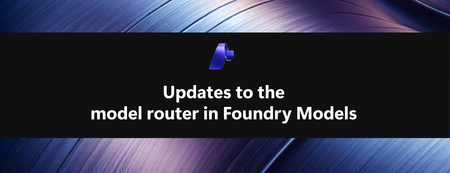
Across Microsoft, "hill climbing" has become shorthand for how real AI progress happens: not in one dramatic leap, but through a disciplined loop. Microsoft AI defines the hill climb as an organization that continuously improves, cycle after cycle, through more compute, better data, and sharper evaluation. Reinforcement fine-tuning in Foundry defines it as improving the deployable model package one measured step at a time across quality, latency, and cost. Different altitudes, same premise: progress is not a one-shot decision. It's a loop. For most teams, the decision of what model to use when is made manually or with custom routing tools. A developer picks a model based on benchmarks, familiarity, or the last launch that made headlines, ships it, and revisits the choice only when something breaks. In an ecosystem where the frontier moves monthly, that decision goes stale fast. Model router in Foundry Models brings the hill climb to the selection layer. What's new: a bigger pool, in more places This release expands where teams can deploy model router, broaden the supported model pool, and delivers updates through a stable endpoint. Together, these changes help teams run production workloads in more locations, match a wider range of tasks to suitable models, and adopt supported updates without changing the application integration. A refreshed model pool. The supported model list now includes Anthropic Claude Opus 4.8 — a high-capability model built for complex reasoning and long-form generation, for scenarios that demand depth, structure, and quality — and the GPT-5.6 family. Just as importantly, the pool is pruned: gpt-5-chat, gpt-5.2-chat, gpt-5.3-chat, Deepseek-V3.1 have been removed from the model router as models reach the end of their lifecycle and are deprecated in Foundry. New region availability. The model router is now available in 28 regions for global standard and 21 data zone regions. For many organizations, inference requests must stay within specific geographic boundaries for regulatory, governance, or customer-trust reasons — and intelligent routing shouldn't force a compromise on that. Find the full list of regions here. The most important detail is what you don't have to do: these updates occur automatically*. The endpoint remains stable as the supported model pool is refreshed, so teams do not need to redeploy the model router to receive the update. Applications can continue using the same integration while the model router evaluates requests against the current supported pool. Teams should continue monitoring routing traces and application outcomes to confirm that quality, cost, latency, and governance requirements are met. *Models from Anthropic still need to be deployed separately before they can be routed to through the model router. Interested in hearing more about what's new to the model router? Tune in for the next episode of Model Mondays with Sanjeev Jagtap and Lee Stott, where they talk all things model router from evaluations to hill climbing. Sign up here to watch live or view the replay: Model Mondays - Spotlight On Model router in Microsoft Foundry | Microsoft Reactor The selection-layer hill climb At the selection layer, a step is a routing decision. Each one is a micro-optimization against your objective, and each one is instrumented: every response from the model router includes a model field showing which underlying model was selected, so the climb leaves a complete, auditable trail. Model router supports three parts of the optimization loop: A/B testing to compare two router configurations to understand quality, cost, and latency tradeoffs; model decomposition to use routing results to decompose a single-model application into a multi-model or multi-agent design, and continuous routing to keep the router in production for continuous per-request selection. Each pattern turns model choice into a measured, repeatable process rather than a fixed decision. 1. A/B Testing Question: Which model or routing strategy should I use in production? A/B testing helps teams compare candidate models, model families, or router configurations against the same workload. Representative traffic is sent to competing deployments, and teams compare quality, cost, latency, and governance outcomes. The goal is to understand tradeoffs and identify the model or routing strategy that best meets workload requirements before promoting it to production. 2. Model Decomposition Question: What work is my application actually doing? Model decomposition uses model router as a diagnostic tool. By deploying the model router against a representative workload and examining routing telemetry, teams can see how requests naturally separate into different task classes. Simple retrieval, classification, and summarization requests may route to smaller models, while reasoning, planning, and agentic workflows may require more capable models. The goal is not to choose a winner, but to understand the structure of the workload and uncover opportunities for optimization, specialization, or architectural improvements. 3. Route continuously Question: Why choose a single model at all? Route continuously is the pattern model router was designed for but is not limited to. Rather than treating model selection as a one-time decision, teams leave the model router in production and allow the best-fit model to be selected for each request. As the supported model pool, regional availability, and platform capabilities evolve, teams can continue using the same endpoint while evaluating whether updates improve workload outcomes. Model selection becomes an ongoing optimization process rather than a project that must be repeated every time the model landscape changes. Together, these patterns illustrate a broader shift: the model router is more than a model. It is a tool for the optimization loop itself, helping teams evaluate tradeoffs, understand workload behavior, test hypotheses, and continuously refine model selection as requirements evolve. Whether used to compare candidate models, decompose applications into specialized tasks, or automate per-request routing in production, model router turns model selection into an observable, measurable, and repeatable process. As the model landscape continues to change, that optimization loop becomes a durable advantage. Getting Started Ready to start your own hill climb? Whether you're exploring the model router for the first time, evaluating routing strategies against your workload, or building a long-term optimization practice, these resources can help you move from experimentation to production with Microsoft Foundry. What's new in model router? Sign up for the next Model Mondays episode for a deep dive into new features, optimization patterns, and the latest model router updates. How do I build agents with model router? Check out the Model Router Agents Lab and build agent experiences with routing, retrieval, web search, tool calling, and multi-agent patterns. How do I evaluate model router? Compare model router against baseline models using your own prompts, then review quality, cost, latency, and routing decisions with the Auto Evaluation Toolkit. How do I optimize model router for my workload? Start your hill-climbing journey with the Model Mastery workshop, where you'll test one optimization lever at a time and measure how each change impacts workload outcomes. How do I build a model router optimization playbook? Explore the Model Releases repository to track new capabilities, understand the optimization question behind each release, and try focused notebooks that demonstrate one optimization lever at a time.2.6KViews2likes0Comments
Grounding Copilot Studio Agents with Azure AI Search and Foundry IQ
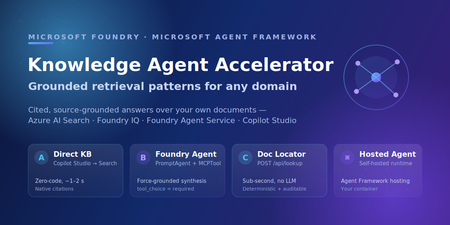
An employee opens the HR agent and asks, "How much PTO do I accrue each month?" A few minutes later, someone else asks, "Where is the official code of ethics policy?" Those sound like the same problem. They are not. The first person needs a grounded answer they can understand. The second person needs a link to the right document quickly, without interpretation. If you design for one experience, the other one feels broken. That is usually where knowledge-agent projects start to get messy. “Grounding” can sound like one switch you turn on, but in practice it is a spectrum: from zero-code classic search, to agentic retrieval over a knowledge base, to a forced-grounding agent that synthesizes answers when synthesis is required. The easier way to think about it is this: who is doing the retrieval work, and what does the user need back? This post walks through five working retrieval patterns for an “Ask HR” agent built on Copilot Studio, Azure AI Search, and Foundry IQ. Each one is running code in the companion sample repo: foundry-copilot-hr-policy-knowledge. Each has a clear “use this when,” and the five patterns share the same reusable knowledge base so you can layer them on without re-indexing. By the end, you should have a decision tree you can reuse for your own knowledge source, whether that is HR policy, product docs, or support runbooks. Scope: companion sample for learning and experimentation, not production-ready deployment. Review the Azure Well-Architected Framework for reliability, security, cost, and operational hardening before you ship. The scenario: one index, many front doors Here is the setup. The sample answers employee questions from a small corpus of internal HR policy documents: PTO accrual, hiring rules, code of ethics, blood-borne pathogen procedures, and dozens more. Underneath every pattern is one foundation: an Azure AI Search index named hr-policy-index, populated by an indexer and skillset that chunk and vectorize the documents. Patterns A, C, and the Hosted Agent query that index directly. Patterns A2 and B add a Foundry IQ knowledge base named hr-knowledge-base on top of the same index for agentic retrieval. That layering is the part to pay attention to. The retrieval assets stay separate from the orchestration layer, so you can start with the simplest pattern, prove value quickly, and move to a more capable one later without re-indexing. Two questions that decide everything Before we get into the patterns, it helps to define the two retrieval terms I use throughout the rest of the post: Classic search, index-first retrieval: one hybrid (keyword + vector) query against an Azure AI Search index, ranked and returned. Fast and predictable. Agentic retrieval, the knowledge base plans multiple sub-queries from the user's question, runs them in parallel, re-ranks, and merges the results before the agent composes an answer. Higher quality on complex, multi-part questions. If you want the fuller picture of how these two approaches map to retrieval-augmented generation, the Azure AI Search team's RAG and generative AI overview walks through the trade-offs and uses a similar HR/PTO example. Once those terms are clear, the decision tree comes down to three practical questions: Q1: Do users need an answer or are they really trying to find the right document? If they just need the document, stay on the locator path. If they need the policy explained or summarized, move into the answer-synthesis path. QL: Is the content in a citation-friendly knowledge base? For example, SharePoint content or Azure AI Search content with a reliable blob_url. If yes, Copilot Studio can usually handle this with native citation cards in Pattern A. If not, use Pattern C with the dual tool /api/lookup path so the agent can return the exact document link. Q2: Do you actually need an LLM agent in the middle? If the answer is no, keep it simple: use classic search or agentic retrieval over the knowledge base. If the answer is yes, move into the agent path. QK: For that non-agent path, is classic index search enough, or do you need agentic KB retrieval? Classic search points to Pattern A. Agentic retrieval over the knowledge base points to Pattern A2. Q3: If you need an agent, do you want Foundry to run the request loop, or do you need to self-host it? If Foundry can manage the runtime, use Pattern B. If you need the request loop in your own container, use the Hosted Agent. That is the decision tree in plain terms: Q1 decides whether this is a document-locator experience or an answer-synthesis experience. Q2 decides whether you need an LLM agent at all. Q3 is only about where the agent runs, either Foundry or your container. It does not change the front door; Copilot Studio can still be the user-facing experience. How the sample repo is organized The repo follows the same flow as the post. Start with docs/DataPipelineAndTesting.md to understand how the HR policy corpus is indexed, tested, and validated. Use docs/RetrievalPatterns.md as the decision model for choosing between classic search, agentic retrieval, forced grounding, and hosted runtime options. Then use the pattern-specific docs when you are ready to wire each path. For Copilot Studio patterns, docs/CopilotStudioIntegration.md maps to Pattern A, while docs/CopilotStudioHybridExample.md maps to Pattern C and the dual-tool locator flow. For the more advanced agent paths, docs/FoundryAgentArchitecture.md covers Pattern B and the hosted agent architecture. docs/Distribution-M365-Teams.md shows how the agent can be distributed through Microsoft 365 and Teams once the retrieval pattern is working. The rest of the post is that tree, one branch at a time. Pattern A: Direct index (classic search, zero agent code) Start here. Copilot Studio queries hr-policy-index directly through its built-in Knowledge action. No custom agent code runs in the answer path. The sample only owns the index, skillset, and indexing pipeline. Populate the index (server-side indexer + skillset handles chunking and vectorization): uv run python scripts/index_knowledge_base_integrated_vectorization.py # Builds hr-policy-index; a client-side alternative exists for dev/test What you get: very low latency in the sample, roughly 1-2 seconds, no LLM cost in the retrieval path, and native citation cards. When the source documents carry a blob_url or metadata_storage_path, Copilot Studio can render a click-through card straight to the document. For many "where is the policy?" questions, that may be enough. The honest limitation: Pattern A is still classic search. It does not force synthesis. If Copilot Studio generates an answer from retrieved snippets, it may paraphrase a policy in a way that is close, but not precise enough. For HR policy, that matters. If exact wording matters, that is your sign to step up to Pattern B. Pattern A2: Copilot Studio meets Foundry IQ (agentic retrieval, no prompt agent) This is the pattern I would look at when you want better retrieval quality without taking on the overhead of a full prompt agent. In the Copilot Studio new agent experience preview, an agent connects directly to a Foundry IQ knowledge base through Microsoft IQ, with no Foundry prompt agent in between. You reuse the same hr-knowledge-base on top of the same hr-policy-index (one command: python -m src.agents.create_foundry_agent), but retrieval is now agentic: the knowledge base plans sub-queries, retrieves in parallel, reranks, and hands merged results to the agent. Wiring it takes a few clicks in Copilot Studio (step-by-step on Microsoft Learn): Build → Microsoft IQ → Foundry IQ → Create new connection Choose Microsoft Entra ID Integrated authentication Select hr-knowledge-base Add to agent A2 is worth the upgrade from A for two reasons. First, you get agentic-retrieval quality without having to build, deploy, or maintain a prompt agent. The knowledge base becomes the reusable asset you improve in Microsoft Foundry, not something you keep reworking inside each Copilot Studio agent. Second, when configured with Microsoft Entra ID Integrated authentication, retrieval can return ACL-trimmed results per user. Each person sees content based on their access. Foundry IQ knowledge bases can also inherit enterprise-readiness controls such as customer-managed keys, network isolation, and Entra ID. A single knowledge base can also federate across multiple knowledge sources in parallel. Use A2 when you want stronger hybrid retrieval quality without taking on the overhead of operating a full agent. Pattern B: Foundry Agent Service with forced grounding When answers need to be synthesized and grounded, publish a prompt agent to Microsoft Foundry with Foundry Agent Service. In the sample, the agent uses an MCPTool pointing at the knowledge-base endpoint, with tool_choice="required" so the model retrieves policy chunks before answering. # src/agents/hr_policy_agent.py (excerpt) agent = PromptAgentDefinition( model=model_deployment_name, # e.g. gpt-5-mini instructions=HR_POLICY_INSTRUCTIONS, tools=[mcp_tool], # KB MCP endpoint tool_choice="required", # require retrieval before answering ) Invoke it through the OpenAI client the project hands you: client = project.get_openai_client() response = client.responses.create( input="How does PTO accrue for a new hire?", extra_body={"agent_reference": {"name": agent_name}}, ) What you get: synthesized answers with grounding and inline [Policy XXXX - Title] citations, all from a single SDK call on a managed runtime. The trade-off: synthesis takes longer. In the sample, answers take roughly 10-14 seconds versus 1-2 seconds for classic search. For policy explanations, that extra time can be worth it because the user gets a composed, grounded answer instead of a list of snippets. Pattern C: Dual-tool routing for deterministic document locators Some questions do not need an essay; they just need the right URL, fast. Pattern C lets Copilot Studio route per turn: "Where is the PTO policy?" → POST /api/lookup, a deterministic endpoint with no LLM, roughly 1-2 seconds, returning the document URL verbatim in the answer body. "How many PTO hours do I accrue?" → hand off to Pattern A or B for a synthesized answer. POST /api/lookup { "query": "PTO policy" } → 200 OK { "policy_id": "12345", "title": "Types of Leave: Paid Time Off (PTO)", "blob_url": "https://.../12345-pto.pdf" } Reach for Pattern C when native citations are not enough. For example, use it when you need fast locator responses, the URL printed directly in the answer body, deterministic and auditable output, or support for a source that is not citation-friendly. The endpoint lives at src/backend/main.py:/api/lookup, with its contract in copilot/openapi-lookup-v2.json. Hosted Agent: the same agent on your own runtime If you need to own the request loop, custom authentication, side-car services, or infrastructure that stays inside your boundary, run the agent yourself. The Hosted Agent is the self-hosted version of the same idea: a container built on Microsoft Agent Framework with FoundryChatClient. It supports both classic and agentic retrieval through one environment variable: RETRIEVAL_MODE Strategy Retrieval type tool (default) Custom @tool search_hr_policies (hybrid + semantic) Classic search context-semantic Built-in AzureAISearchContextProvider before each turn Classic search context-agentic AzureAISearchContextProvider over hr-knowledge-base Agentic retrieval The context-* modes use Agent Framework’s out-of-the-box RAG context provider. Retrieval runs automatically before each model call with standardized context and citation prompts, so the agent does not have to call a search tool explicitly. That gives the self-hosted path parity with the managed Foundry path across both retrieval types. Copilot Studio can still be the front door. Q3 in the decision tree is really about where the request loop runs, not who greets the user. Choosing a pattern Pattern Orchestrator Retrieval Latency (sample) Best for A Copilot Studio Classic ~1-2 s Start here, native citations, no agent code A2 Copilot Studio → Foundry IQ Agentic ~2-4 s Agentic quality, no agent to maintain B Foundry Agent Service Classic/agentic via MCP ~10-14 s Forced-grounding synthesis in Foundry C Copilot Studio (router) None for lookup ~1-2 s Deterministic, verbatim document locators Hosted Agent Framework container Classic + agentic ~10-14 s Self-hosted runtime, custom auth A simple way to read the table: start at A, move to A2 when you want agentic retrieval without operating an agent, choose B when each answer needs to be synthesized and grounded in Foundry, add C for high-volume locator traffic, and pick the Hosted Agent when you need the runtime on your own infrastructure. These are not mutually exclusive. A mature agent often routes locator queries to C and content questions to A2 or B. What's next? Try it: clone the sample and follow Steps 1-3 of the walkthrough to stand up Pattern A, provision hr-knowledge-base, connect Copilot Studio, and ask a question in minutes. Go agentic: wire the same knowledge base into the Copilot Studio new agent experience via Foundry IQ (Pattern A2) and compare answer quality side by side. Learn more: explore agentic retrieval in Azure AI Search, Foundry IQ, and Microsoft Agent Framework. Adapt it: swap the HR policy corpus for your own product docs, support runbooks, or internal knowledge source, then compare Pattern A, A2, and B against the same user questions. Use the repo-doc map: start with docs/RetrievalPatterns.md for the decision model, docs/CopilotStudioIntegration.md for Pattern A, docs/CopilotStudioHybridExample.md for Pattern C, docs/FoundryAgentArchitecture.md for Pattern B and Hosted Agent, and docs/DataPipelineAndTesting.md for ingestion and validation. My recommendation: start simple, prove the index works, and move up the stack only when the use case needs it. Some questions need a trusted link. Others need a grounded explanation. A strong architecture supports both without forcing every request through the same path. References Copilot Studio + Foundry IQ Connect to Foundry IQ from an agent Foundry IQ FAQ Foundry IQ / knowledge layer What is Foundry IQ? Connect a Foundry IQ knowledge base to Foundry Agent Service Azure AI Search, retrieval Agentic retrieval overview RAG and generative AI in Azure AI Search Classic vs agentic search Create a knowledge base Create a knowledge source Hybrid search Semantic ranking Quickstart: agentic retrieval Tutorial: end-to-end agentic retrieval solution Microsoft Foundry Agent Service (Pattern B) Foundry Agent Service overview Microsoft Agent Framework (Hosted Agent) Microsoft Agent Framework overview Hosted MCP tools Governance Azure Well-Architected Framework Related Microsoft Foundry blog posts Foundry IQ is now in Copilot Studio Answers You Can Trust: Grounding Enterprise Agents with Foundry IQ Foundry IQ: Unlocking ubiquitous knowledge for agents1KViews2likes0CommentsMigrating to GPT-5.x Without Breaking GPT-4: A Practical, Backward-Compatible Playbook
The first request your service sends after swapping gpt-4o for gpt-5.1 in production will return HTTP 400. Not in two weeks. On the first call. And the parameter the error points to isn't one you set anywhere in your code - it's bound onto the request by a LangChain helper you've used for two years. This post walks through every breaking change between the GPT-4 and GPT-5 families on Azure OpenAI in Microsoft Foundry, the integration cliffs nobody warns you about, and the small set of files you need so the same call sites work against both model families without branching. Who this is for: engineers maintaining an existing production codebase that calls Azure OpenAI / OpenAI - directly or through LangChain - and needs to onboard GPT-5.x while keeping the GPT-4 deployments alive during rollout. What you'll leave with: one copy-paste compatibility module, a tiny LangChain subclass, a prompt-audit harness, and a 10-step rollout checklist. 1. Why this migration is different Every previous Azure OpenAI bump - 3.5 → 4, 4 → 4o, 4o → 4o-mini - was additive. You changed engine="gpt-4o" and everything kept working. GPT-5.x is the first generation that is subtractive: parameters you used to send now return 400 Unsupported parameter. The wire protocol itself changed because GPT-5 is a reasoning model - it spends tokens thinking internally before it answers, so the parameters that controlled the old sampling pipeline (temperature, top_p, presence_penalty, frequency_penalty) no longer exist on the request schema. What this means for production code: A passing test suite against gpt-4o will fail on the first call against gpt-5.1 with HTTP 400. A passing test suite against gpt-5.1 will fail on every legacy gpt-4* deployment because the new reasoning controls (reasoning_effort, verbosity) are not recognised there. LangChain helpers that worked unmodified for two years (notably create_sql_query_chain) silently bind stop=[...] onto your LLM and trigger the same 400. Source-grep won't find the offending line because it lives inside the library. The good news: the divergence is mechanical. With one detection helper, one parameter-builder, and one tiny LangChain subclass you can run the same code against both families. 2. The breaking-changes matrix Concern GPT-4 / GPT-4o (legacy) GPT-5.x / o1 / o3 (reasoning) Output budget max_tokens max_completion_tokens (rejects max_tokens) temperature 0.0–1.0 Only the default (1) is accepted - omit it top_p Supported Rejected presence_penalty, frequency_penalty Supported Rejected logprobs, logit_bias Supported Rejected stop sequences Supported Rejected on most reasoning deployments reasoning_effort Rejected New: minimal | low | medium | high verbosity Rejected New: low | medium | high (sometimes via extra_body) System instruction role system developer recommended; system still works as alias Output token cost Output tokens only Output + reasoning tokens count against your cap Recommended API version 2024-12-01-preview or earlier 2025-03-01-preview or later Two consequences are easy to miss: max_completion_tokens is a shared budget. GPT-5.1 can burn 2–4× more tokens internally before emitting the first response token. A cap of 4096 that comfortably held a SQL query on GPT-4o now silently truncates the answer mid-token on GPT-5.1. Multiply your legacy budgets by ~2.5× and add a floor (e.g. 4096) before sending. The stop parameter is the silent killer. Any helper that calls llm.bind(stop=[...]) - and there are several in langchain - will turn a working code path into a 400 the moment you swap deployments. 3. Compatibility strategy: detect, don't fork The temptation is to fork: one branch for GPT-4, one for GPT-5. Don't. The right unit of abstraction is one function that classifies the deployment into a family, and one function that builds a kwargs dict the SDK will accept for that family. Every call site - SDK, LangChain, raw HTTP - drains into the same kwargs builder. When you eventually retire GPT-4 you delete the legacy branch in one file, not in fifty. 4. The industry-agnostic compatibility module Drop the following file into your project. It has no Azure / OpenAI / LangChain imports at module load time, so the same file works from a web service, a serverless function, a notebook, or a CLI tool. 4.1 model_compat.py """ Model compatibility helper for GPT-5.x with GPT-4 backward compatibility. This module centralises the parameter translation needed to talk to the "reasoning" generation of OpenAI / Azure OpenAI models (GPT-5, GPT-5.1, o1, o3, o4) while keeping older deployments (gpt-4, gpt-4o, gpt-4-32k, gpt-3.5-turbo, etc.) working unchanged. """ from __future__ import annotations import logging import os import re from typing import Any, Dict, Iterable, Mapping, Optional # --------------------------------------------------------------------------- # Family detection # --------------------------------------------------------------------------- _REASONING_PATTERNS = ( # gpt-5, gpt5, gpt-5.1, gpt_5, GPT 5, gpt5mini-prod-eu, ... re.compile(r"(?i)(^|[^a-z0-9])gpt[-_ ]?5(\.\d+)?([^0-9]|$)"), # o1, o3, o4, o1-mini, o3-preview ... re.compile(r"(?i)(^|[^a-z0-9])o[134](-mini|-preview)?([^a-z0-9]|$)"), ) _LEGACY_PATTERNS = ( re.compile(r"(?i)gpt[-_ ]?4o"), re.compile(r"(?i)gpt[-_ ]?4(?!\d)"), re.compile(r"(?i)gpt[-_ ]?4[-_ ]?32k"), re.compile(r"(?i)gpt[-_ ]?3\.?5"), re.compile(r"(?i)gpt[-_ ]?35"), ) def get_model_family(model_or_deployment: Optional[str]) -> str: """Return ``"reasoning"`` for GPT-5.x / o-series, ``"legacy"`` otherwise. Honours an ``OPENAI_MODEL_FAMILY`` env-var override for deployments whose user-defined name does not embed the model family (e.g. ``prod-default``). """ override = (os.getenv("OPENAI_MODEL_FAMILY") or "").strip().lower() if override in {"reasoning", "gpt-5", "gpt5", "gpt-5.1", "o-series", "o1", "o3"}: return "reasoning" if override in {"legacy", "gpt-4", "gpt4", "gpt-3.5", "gpt35", "chat"}: return "legacy" name = (model_or_deployment or "").strip() if not name: # Fail closed: when we don't know, assume legacy so old code keeps # working. Misclassifying a reasoning deployment as legacy fails fast # with a clear "Unsupported parameter" 400; the reverse silently # drops parameters the caller expected. return "legacy" for pat in _REASONING_PATTERNS: if pat.search(name): return "reasoning" for pat in _LEGACY_PATTERNS: if pat.search(name): return "legacy" return "legacy" def is_reasoning_model(model_or_deployment: Optional[str]) -> bool: return get_model_family(model_or_deployment) == "reasoning" # --------------------------------------------------------------------------- # Reasoning controls # --------------------------------------------------------------------------- _VALID_REASONING_EFFORT = {"minimal", "low", "medium", "high"} _VALID_VERBOSITY = {"low", "medium", "high"} def _coerce_choice(raw: Optional[str], valid: Iterable[str]) -> Optional[str]: if raw is None: return None value = str(raw).strip().lower() if not value: return None if value not in set(valid): logging.warning( "Ignoring unsupported value '%s'; expected one of %s", raw, sorted(valid), ) return None return value def get_reasoning_effort(override: Optional[str] = None) -> Optional[str]: return _coerce_choice( override if override is not None else os.getenv("OPENAI_REASONING_EFFORT"), _VALID_REASONING_EFFORT, ) def get_verbosity(override: Optional[str] = None) -> Optional[str]: return _coerce_choice( override if override is not None else os.getenv("OPENAI_VERBOSITY"), _VALID_VERBOSITY, ) # --------------------------------------------------------------------------- # max_completion_tokens scaling # --------------------------------------------------------------------------- def _reasoning_token_scale() -> float: """Multiplier applied to legacy ``max_tokens`` when targeting a reasoning model.""" try: scale = float(os.getenv("OPENAI_REASONING_TOKEN_SCALE", "2.5")) except (TypeError, ValueError): scale = 2.5 return scale if scale > 0 else 1.0 def _reasoning_token_floor() -> int: try: floor = int(os.getenv("OPENAI_REASONING_TOKEN_FLOOR", "4096")) except (TypeError, ValueError): floor = 4096 return floor if floor > 0 else 4096 def scale_max_tokens_for_reasoning(max_tokens: Optional[int]) -> Optional[int]: """Scale a legacy ``max_tokens`` budget up for reasoning models. ``None`` and ``-1`` ("no explicit cap") are passed through. """ if max_tokens is None: return None if max_tokens == -1: return -1 return max(int(round(max_tokens * _reasoning_token_scale())), _reasoning_token_floor()) # --------------------------------------------------------------------------- # Kwargs builders # --------------------------------------------------------------------------- _SAMPLING_KEYS = ("temperature", "top_p", "presence_penalty", "frequency_penalty") def _drop_none(mapping: Mapping[str, Any]) -> Dict[str, Any]: return {k: v for k, v in mapping.items() if v is not None} def build_openai_chat_kwargs( model: str, *, max_tokens: Optional[int] = None, temperature: Optional[float] = None, top_p: Optional[float] = None, presence_penalty: Optional[float] = None, frequency_penalty: Optional[float] = None, reasoning_effort: Optional[str] = None, verbosity: Optional[str] = None, extra: Optional[Mapping[str, Any]] = None, ) -> Dict[str, Any]: """Build kwargs for ``openai.OpenAI / AzureOpenAI .chat.completions.create``. Splat the result directly: ``client.chat.completions.create(**kwargs)``. Unsupported parameters are silently omitted for reasoning models; legacy deployments retain the historical behaviour. """ family = get_model_family(model) kwargs: Dict[str, Any] = {"model": model} # ---- output budget ---- if max_tokens is not None and max_tokens != -1: if family == "reasoning": kwargs["max_completion_tokens"] = scale_max_tokens_for_reasoning(int(max_tokens)) else: kwargs["max_tokens"] = int(max_tokens) # ---- sampling ---- if family == "legacy": kwargs.update(_drop_none({ "temperature": temperature, "top_p": top_p, "presence_penalty": presence_penalty, "frequency_penalty": frequency_penalty, })) else: for key, value in ( ("temperature", temperature), ("top_p", top_p), ("presence_penalty", presence_penalty), ("frequency_penalty", frequency_penalty), ): if value is not None: logging.debug( "Dropping unsupported parameter '%s' for reasoning model '%s'", key, model, ) # ---- reasoning controls ---- if family == "reasoning": effort = get_reasoning_effort(reasoning_effort) if effort is not None: kwargs["reasoning_effort"] = effort verb = get_verbosity(verbosity) if verb is not None: # ``verbosity`` is not a top-level kwarg in openai-python <= 1.65.x; # route it via ``extra_body`` so it lands in the JSON without a # TypeError from the SDK. kwargs.setdefault("extra_body", {})["verbosity"] = verb # ---- caller-supplied extras (already filtered) ---- if extra: for key, value in extra.items(): if value is None: continue if family == "reasoning" and key in _SAMPLING_KEYS: continue kwargs[key] = value return kwargs def build_langchain_chat_kwargs( deployment_name: str, *, max_tokens: Optional[int] = None, temperature: Optional[float] = None, top_p: Optional[float] = None, reasoning_effort: Optional[str] = None, verbosity: Optional[str] = None, ) -> Dict[str, Any]: """Build kwargs for ``langchain_openai.AzureChatOpenAI`` / ``ChatOpenAI``. Older ``langchain-openai`` releases don't expose ``max_completion_tokens`` as a top-level kwarg, so we forward it through ``model_kwargs`` (which langchain passes straight to the SDK). """ family = get_model_family(deployment_name) kwargs: Dict[str, Any] = {} model_kwargs: Dict[str, Any] = {} if max_tokens is not None and max_tokens != -1: if family == "reasoning": model_kwargs["max_completion_tokens"] = scale_max_tokens_for_reasoning(int(max_tokens)) else: kwargs["max_tokens"] = int(max_tokens) if family == "reasoning": effort = get_reasoning_effort(reasoning_effort) if effort is not None: model_kwargs["reasoning_effort"] = effort verb = get_verbosity(verbosity) if verb is not None: model_kwargs.setdefault("extra_body", {})["verbosity"] = verb else: if temperature is not None: kwargs["temperature"] = temperature if top_p is not None: kwargs["top_p"] = top_p if model_kwargs: kwargs["model_kwargs"] = model_kwargs return kwargs def get_system_role(model_or_deployment: Optional[str] = None) -> str: """Return ``"developer"`` for reasoning models when opted in, ``"system"`` otherwise. Defaulting to ``"system"`` preserves compatibility with LangChain prompt templates and SDK helpers that don't yet recognise the new role. Opt in with ``OPENAI_USE_DEVELOPER_ROLE=1`` once your stack supports it. """ if not is_reasoning_model(model_or_deployment): return "system" raw = os.getenv("OPENAI_USE_DEVELOPER_ROLE", "") return "developer" if raw.strip().lower() in {"1", "true", "yes", "on"} else "system" 4.2 What this buys you Every direct-SDK call collapses to two lines: from openai import AzureOpenAI from model_compat import build_openai_chat_kwargs client = AzureOpenAI( azure_endpoint=os.environ["AZURE_OPENAI_ENDPOINT"], api_version=os.environ["OPENAI_API_VERSION"], api_key=os.environ["AZURE_OPENAI_API_KEY"], ) kwargs = build_openai_chat_kwargs( model=os.environ["OPENAI_ENGINE"], max_tokens=4096, # automatically becomes max_completion_tokens for GPT-5 temperature=0.2, # automatically dropped for GPT-5 reasoning_effort="low", # automatically dropped for GPT-4 ) response = client.chat.completions.create( messages=[ {"role": "system", "content": "You are a helpful assistant."}, {"role": "user", "content": user_input}, ], **kwargs, ) The same call site now correctly targets gpt-5.1, gpt-4o, gpt-4-32k, o3-mini, or any future deployment whose name embeds the family - and you can override with the OPENAI_MODEL_FAMILY env var when the deployment alias is opaque. 4.3 Raw HTTP call sites Some legacy code paths bypass the SDK and POST JSON directly. The same builder works there: import json import requests from model_compat import build_openai_chat_kwargs, get_system_role deployment = os.environ["OPENAI_ENGINE"] api_version = os.environ["OPENAI_API_VERSION"] endpoint = ( f"{os.environ['AZURE_OPENAI_ENDPOINT']}/openai/deployments/{deployment}" f"/chat/completions?api-version={api_version}" ) payload = { "messages": [ {"role": get_system_role(deployment), "content": system_prompt}, {"role": "user", "content": user_prompt}, ], } # Splat the kwargs into the payload, then strip the SDK-only ``model`` key. payload.update(build_openai_chat_kwargs( model=deployment, max_tokens=800, temperature=0.7, top_p=0.95, reasoning_effort="low", )) payload.pop("model", None) # ``model`` is encoded in the URL for Azure payload.pop("extra_body", None) # already on the payload root resp = requests.post( endpoint, headers={"Content-Type": "application/json", "api-key": api_key}, data=json.dumps(payload), timeout=60, ) resp.raise_for_status() 5. LangChain: the hidden stop parameter langchain.chains.sql_database.query.create_sql_query_chain calls llm.bind(stop=["\nSQLResult:"]) internally to terminate the model's output before the example block in its prompt. That stop value is forwarded to the SDK on every invocation. GPT-5.1 rejects it: openai.BadRequestError: Error code: 400 - {'error': { 'message': "Unsupported parameter: 'stop' is not supported with this model.", 'type': 'invalid_request_error', 'param': 'stop', }} You can't reach into the chain to disable it. The clean fix is a thin AzureChatOpenAI subclass that drops stop for reasoning models only: 5.1 langchain_compat.py """LangChain-side compatibility shim for reasoning-class deployments.""" from __future__ import annotations from typing import Any, List, Optional from langchain_core.callbacks.manager import ( AsyncCallbackManagerForLLMRun, CallbackManagerForLLMRun, ) from langchain_core.messages import BaseMessage from langchain_core.outputs import ChatResult from langchain_openai import AzureChatOpenAI # use ChatOpenAI for non-Azure from model_compat import is_reasoning_model class ReasoningSafeAzureChatOpenAI(AzureChatOpenAI): """``AzureChatOpenAI`` variant that hides parameters reasoning models reject. Reasoning models (GPT-5.x, o1/o3/o4) return HTTP 400 when a request payload carries ``stop``. LangChain's SQL helpers unconditionally bind it, so the unsupported parameter reaches the SDK regardless of how the caller configured the LLM. This subclass strips ``stop`` for reasoning deployments while forwarding it unchanged for legacy GPT-4 / GPT-3.5 deployments - the behaviour is byte-identical to upstream LangChain for those models. """ def _deployment_id(self) -> str: # ``langchain-openai`` >= 0.2 exposes ``azure_deployment``; older # releases use ``deployment_name``. Either may be set by the caller. return ( getattr(self, "azure_deployment", None) or getattr(self, "deployment_name", None) or "" ) def _generate( self, messages: List[BaseMessage], stop: Optional[List[str]] = None, run_manager: Optional[CallbackManagerForLLMRun] = None, **kwargs: Any, ) -> ChatResult: if is_reasoning_model(self._deployment_id()): stop = None return super()._generate(messages, stop=stop, run_manager=run_manager, **kwargs) async def _agenerate( self, messages: List[BaseMessage], stop: Optional[List[str]] = None, run_manager: Optional[AsyncCallbackManagerForLLMRun] = None, **kwargs: Any, ) -> ChatResult: if is_reasoning_model(self._deployment_id()): stop = None return await super()._agenerate(messages, stop=stop, run_manager=run_manager, **kwargs) Use it as a drop-in replacement: from langchain_compat import ReasoningSafeAzureChatOpenAI from model_compat import build_langchain_chat_kwargs llm_kwargs = build_langchain_chat_kwargs( deployment_name=os.environ["OPENAI_ENGINE"], max_tokens=6000, temperature=0, reasoning_effort="low", ) llm = ReasoningSafeAzureChatOpenAI( azure_endpoint=os.environ["AZURE_OPENAI_ENDPOINT"], azure_deployment=os.environ["OPENAI_ENGINE"], openai_api_version=os.environ["OPENAI_API_VERSION"], api_key=os.environ["AZURE_OPENAI_API_KEY"], **llm_kwargs, ) That single substitution makes create_sql_query_chain, SQLDatabaseChain, and the ChatOpenAI-based RAG helpers all work against GPT-5.1 without any other changes. 6. The second LangChain gotcha: prose where SQL should be create_sql_query_chain is documented to return the literal string "I don't know" (or a similar fallback) when the LLM cannot form a query. The default code path takes the chain output and runs it against the database: sql = chain.invoke({...}) # -> "I don't know" result = db.run(sql) # -> sends "I don't know" to pyodbc The database faithfully returns: [42000] Unclosed quotation mark after the character string 't know'. (105) Which surfaces to the end user as a misleading "SQL syntax error". The mitigation is a one-line guard that validates the chain output looks like SQL before execution: import re _SQL_START_RE = re.compile( r"^\s*(?:WITH|SELECT|INSERT|UPDATE|DELETE|CREATE|DROP|ALTER|MERGE|EXEC|EXECUTE|TRUNCATE)\b", re.IGNORECASE, ) def looks_like_sql(text: str) -> bool: """True only if ``text`` starts with a recognised SQL DML/DDL keyword.""" if not text or not text.strip(): return False return bool(_SQL_START_RE.match(text)) sql = extract_sql_query(chain.invoke({...})) if not looks_like_sql(sql): logging.warning("SQL chain returned a non-SQL response: %r", sql[:200]) return ( "I couldn't form a SQL query for that question. " "Please rephrase or add more context." ) result = db.run(sql) This isn't specific to GPT-5.1 - it's good hygiene for any LLM that backs a SQL agent - but the failure mode becomes much more frequent on reasoning models because they're better at refusing. 7. Cleaning Markdown out of create_sql_query_chain output Reasoning models like to wrap their answer in a markdown fence and append a "Note:" or "Explanation:" paragraph. None of that survives db.run(). A defensive extract_sql_query handles all the variants: import re def extract_sql_query(text: str) -> str: """Strip markdown fences, leading prose, and trailing explanations.""" # 1) Prefer SQL inside a markdown code fence. m = re.search(r"```(?:sql|SQL|Sql)?\s*\n(.*?)\n```", text, re.DOTALL) if m: text = m.group(1) text = text.strip() # 2) Drop any prose *before* the SQL by jumping to the first SQL keyword. m = re.search( r"(?im)^\s*(WITH|SELECT|INSERT|UPDATE|DELETE|CREATE|DROP|ALTER|MERGE|EXEC|EXECUTE|TRUNCATE)\b", text, ) if m: text = text[m.start(1):] # 3) Cut at the first "Explanation:" / "Note:" / "This query..." marker. m = re.compile( r"(?im)^\s*(?:Explanation|Note|Notes|Here(?:'|\u2019)?s|" r"This\s+(?:query|SQL|statement|returns|counts|selects|will|gets|finds)|" r"The\s+(?:query|SQL|above|result|statement)|" r"Result|Results|Description|Output|Answer)\b[^\n]*" ).search(text) if m: text = text[: m.start()].rstrip() # 4) Drop any trailing fence that survived step 1. if text.endswith("```"): text = text[:-3].rstrip() return text.strip() 8. Package versioning The bare minimum your requirements.txt / environment.yml needs: Package Last GPT-4-only version First GPT-5.x-safe version Notes openai 1.55.x 1.65.x (recommend 1.65.4+) Earlier versions reject max_completion_tokens and reasoning_effort as unknown kwargs langchain-openai 0.2.14 0.3.7+ 0.3.x line exposes azure_deployment and forwards model_kwargs correctly to the new SDK langchain 0.3.14 0.3.21+ Pin together with langchain-openai and langchain-core langchain-core 0.3.29 0.3.49+ Update in lockstep with the others langchain-community 0.3.14 0.3.20+ Mostly transitive; needed for SQLDatabase helpers tiktoken 0.7.x 0.8.0+ Encodings for GPT-5.1 ship in 0.8.0; older versions fall back to cl100k_base for unknown models tokencost (optional) 0.1.16 0.1.20+ Update for GPT-5.x price tables Azure OpenAI API version 2024-12-01-preview 2025-03-01-preview First version that ships reasoning_effort and the GPT-5.x routing Pin exact versions after testing - LangChain has a habit of moving public re-exports between minor releases. requirements.txt snippet: openai==1.65.4 langchain==0.3.21 langchain-core==0.3.49 langchain-openai==0.3.7 langchain-community==0.3.20 tiktoken==0.8.0 9. New GPT-5.x knobs worth using Once you're on a reasoning deployment, two new parameters become available. Both are optional, both default to a sensible value, and both are stripped by the kwargs builder above when the target is a legacy model. reasoning_effort minimal - one-shot lookups, classification. low - deterministic structured output (SQL, JSON-schema extraction, rule-based rewrites). Lowest cost overhead. medium (default) - RAG, summarisation, normal Q&A. high - multi-step analytical reasoning, complex code synthesis. A useful pattern is to choose the level by task profile rather than at the call site: TASK_EFFORT = { "sql": "low", "structured_extract": "low", "kg_cleaning": "low", "rag_qa": "medium", "vision": "medium", "analytical": "high", } verbosity low | medium | high. Controls the length of the response, not its substance. Useful for grounding chat UIs where you want crisp answers - set low for /answer endpoints and high for "explain like a senior engineer" panels. Note: in openai-python <= 1.65.x, verbosity is not yet a top-level keyword argument; pass it through extra_body (the builder above already does this). developer role GPT-5.x prefers {"role": "developer", "content": "..."} for instructions that previously used system. The change is non-breaking on the Azure side - system is still accepted as an alias - but some downstream LangChain prompt templates predate the role and will reject it on construction. Treat developer as opt-in (OPENAI_USE_DEVELOPER_ROLE=1) for now; flip the default after your prompt-template version is known good. 10. Auditing your existing prompts When the wire-level migration is done your service will talk to GPT-5.x - but that doesn't mean it says the right thing. Reasoning models read prompts differently in ways that won't show up as 400s: They take instructions more literally. A prompt that worked when GPT-4o rounded the corners may surface every edge case verbatim. They refuse more often. "I don't know" / "I cannot help with that" are more frequent because reasoning models are less willing to confabulate. They ignore "be concise" / "be terse". Use the new verbosity knob. Step-by-step / chain-of-thought instructions become redundant. The model already reasons internally; extra "think before you answer" prose competes with its own chain of thought and often hurts output quality. Negative-only instructions can backfire. "Never output X" prompts occasionally cause refusals where you'd rather have a workaround. 10.1 Build a prompt regression harness Capture every system+user prompt your service emits in a CSV, then replay each one against both deployments and diff the output. The diff is the single most useful artefact you can produce before the cutover: # prompt_audit.py - minimal differential tester import csv from openai import AzureOpenAI from model_compat import build_openai_chat_kwargs LEGACY = "gpt-4o" REASONING = "gpt-5.1" client = AzureOpenAI( azure_endpoint=os.environ["AZURE_OPENAI_ENDPOINT"], api_version=os.environ["OPENAI_API_VERSION"], api_key=os.environ["AZURE_OPENAI_API_KEY"], ) def run(model: str, system: str, user: str) -> str: kw = build_openai_chat_kwargs( model=model, max_tokens=4096, temperature=0.2, # auto-dropped for reasoning reasoning_effort="medium", # auto-dropped for legacy ) resp = client.chat.completions.create( messages=[ {"role": "system", "content": system}, {"role": "user", "content": user}, ], **kw, ) return resp.choices[0].message.content or "" with open("prompts.csv") as f_in, open("diff.tsv", "w", newline="") as f_out: writer = csv.writer(f_out, delimiter="\t") writer.writerow(["id", "legacy_first80", "reasoning_first80", "len_legacy", "len_new", "identical"]) for row in csv.DictReader(f_in): legacy = run(LEGACY, row["system"], row["user"]) new = run(REASONING, row["system"], row["user"]) writer.writerow([ row["id"], legacy[:80].replace("\n", " "), new[:80].replace("\n", " "), len(legacy), len(new), legacy.strip() == new.strip(), ]) Capture three signals per prompt - they're enough to triage 95% of drift: Format compliance. Did the output still parse as the expected JSON / YAML / Markdown / SQL? Run your existing downstream parser on both columns. Token cost delta. Reasoning models tend to be more verbose by default. Anything beyond +20% is a candidate for the verbosity="low" knob. Semantic drift. Spot-check 5–10% of rows by hand. You're looking for changes in intent, not changes in wording. 10.2 Common rewrites to make prompts model-agnostic The goal isn't to write two prompts. It's to write one prompt that produces correct output on both families by moving constraints out of the natural-language body and into the request shape. 10.2a. Format constraints belong in response_format, not the prose Don't: Output ONLY a JSON object with keys `name` and `score`. Do not include any explanation. Do not wrap in markdown. Do not say anything else. Do: resp = client.chat.completions.create( messages=[...], response_format={ "type": "json_schema", "json_schema": { "name": "scored_entity", "schema": { "type": "object", "properties": { "name": {"type": "string"}, "score": {"type": "number"}, }, "required": ["name", "score"], "additionalProperties": False, }, "strict": True, }, }, **kw, ) response_format is honoured by both gpt-4o (>= 2024-08-06) and the entire GPT-5.x line. The prompt loses three lines of brittle natural-language constraints and you get schema-validated output for free. 10.2b. Replace "think step by step" with reasoning_effort Don't: Let's think step by step. First identify the entity. Then find the category. Then compute the score. Then format the answer. Do: delete the prose and pass reasoning_effort="medium" (or "high") for reasoning deployments. The kwargs builder drops the parameter automatically for GPT-4 models, so the same prompt now produces: step-by-step reasoning internally on GPT-5.x (lower output token cost), the same final answer on GPT-4o that the verbose prompt used to elicit. 10.2c. Replace temperature-based variety with n sampling If your code relied on temperature=0.9 to get diverse completions, GPT-5.x will return roughly the same answer every time. Generate variety the explicit way: resp = client.chat.completions.create(messages=[...], n=5, **kw) candidates = [c.message.content for c in resp.choices] Or call the model N times with slightly different framings. Both patterns work against either family with no further code changes. 10.2d. Move procedural instructions to the developer role For multi-step workflows, the new developer role gives clearer separation between what the system enforces and what the user is asking: messages = [ {"role": get_system_role(deployment), "content": role_card_for_assistant}, {"role": "developer", "content": procedural_instructions}, {"role": "user", "content": user_question}, ] get_system_role returns "system" for legacy models and "developer" for reasoning models opted in via OPENAI_USE_DEVELOPER_ROLE=1. Once your LangChain templates support the new role you can flip the default. 10.2e. Add a literal-execution header for strict formats For prompts where the exact output shape matters (table generation, SQL with a fixed column order, structured incident reports), prepend an explicit literal-execution header so reasoning models don't drift into "helpful improvements": LITERAL_EXECUTION_HEADER = ( "Execution mode: follow the instructions below literally and in order. " "Do not infer intent, skip, reorder, merge, or add steps. Honour the " "exact formatting, tone, and verbosity specified. If a step is " "ambiguous, respond with the literal interpretation and flag the " "ambiguity instead of guessing." ) def apply_literal_execution(prompt: str) -> str: if LITERAL_EXECUTION_HEADER in prompt: return prompt return f"{LITERAL_EXECUTION_HEADER}\n\n{prompt}" It's a no-op on GPT-4o (the older models already follow instructions literally enough) and a meaningful guard rail on GPT-5.1. Wire it behind an OPENAI_LITERAL_EXECUTION flag so you can disable it without redeploying. 10.3 A prompt-shaped checklist Run every prompt your service emits past these questions: Question Action Does it specify output format in prose? Move to response_format (10.2a) Does it include "think step by step"? Remove; set reasoning_effort (10.2b) Does it set tone constraints ("be concise")? Use verbosity Does it use negative-only instructions ("never X")? Add positive alternative ("do Y instead") Does it embed example outputs with values that would change? Replace concrete values with placeholder tokens (<VALUE>) Does it rely on temperature > 0 for variety? Use n=K sampling (10.2c) Is the system prompt > 2k tokens? Split into role-card (system) + procedure (developer) Does output ordering matter? Add the literal-execution header (10.2e) 10.4 Score before you ship Don't approve a rewritten prompt by eyeballing one example. Score it: Format compliance rate. Percentage of N=50 outputs that pass your existing downstream parser / JSON schema validation. Token cost delta. Cap regression at +20% versus the legacy baseline. Beyond that, dial verbosity="low" or tighten the prompt. Latency p50 / p95 delta. Reasoning models add tail latency. If your SLA is tight, set reasoning_effort="low" for the path or move it to a background queue. A prompt that regresses on any of those by more than your tolerance window ships behind a feature flag with rollback wired in. 11. Testing strategy Two test layers catch >90% of regressions: Family-classification tests import pytest from model_compat import get_model_family, build_openai_chat_kwargs @pytest.mark.parametrize("name,expected", [ ("gpt-5.1", "reasoning"), ("gpt5", "reasoning"), ("gpt-5-prod-eu", "reasoning"), ("o3-mini", "reasoning"), ("o1", "reasoning"), ("gpt-4o", "legacy"), ("gpt-4", "legacy"), ("gpt-4-32k", "legacy"), ("gpt-35-turbo", "legacy"), ("", "legacy"), # unknown -> fail closed to legacy (None, "legacy"), ]) def test_family(name, expected): assert get_model_family(name) == expected def test_kwargs_for_reasoning_drops_temperature(): kw = build_openai_chat_kwargs( model="gpt-5.1", max_tokens=1000, temperature=0.2, top_p=0.9, reasoning_effort="low", ) assert "temperature" not in kw assert "top_p" not in kw assert kw["max_completion_tokens"] >= 4096 # floor applied assert kw["reasoning_effort"] == "low" def test_kwargs_for_legacy_keeps_temperature(): kw = build_openai_chat_kwargs( model="gpt-4o", max_tokens=1000, temperature=0.2, top_p=0.9, ) assert kw["max_tokens"] == 1000 assert kw["temperature"] == 0.2 assert kw["top_p"] == 0.9 assert "reasoning_effort" not in kw Wire-level smoke tests For each LLM call site you maintain, write a single integration test that exercises the chain against a real (or mocked) endpoint and asserts: HTTP 200, non-empty content, finish_reason != "length" (so you catch silent truncation), (optional) classifier-style assertions against a golden output. Run those tests once against the legacy deployment and once against the new one - same test code, two OPENAI_ENGINE values. 12. Things that don't change It's easy to over-correct. Several pieces of plumbing keep working without modification: Authentication. AAD token providers, managed identity, and API keys are unchanged. Embeddings. text-embedding-3-small, text-embedding-3-large, and text-embedding-ada-002 are not part of the reasoning generation; the embeddings call shape is identical. Function calling / tool use. Same JSON schema, same response shape. Streaming. SSE format is unchanged. Token counters. tiktoken still works, but bump to 0.8.0+ so the new model name resolves to the right encoding instead of silently falling back to cl100k_base. 13. Next steps If you only do four things from this post, do these - in order: Deploy a GPT-5.1 model side-by-side with your current GPT-4 deployment in Microsoft Foundry. Keep the GPT-4 deployment live; you'll need both for the parallel-run period. Drop model_compat.py and langchain_compat.py into your project (Sections 4 and 5). Replace every AzureChatOpenAI(...) construction with ReasoningSafeAzureChatOpenAI and route every kwargs literal through the builders. Run the prompt-audit harness (Section 10.1) against your top 50 most frequently invoked prompts. Triage the diff with the checklist in 10.3. Roll out behind a percentage-based flag. Start at 5% of traffic for 24 hours, compare quality and cost telemetry against the GPT-4o baseline, then ramp. Reference material Azure OpenAI in Microsoft Foundry - model overview Azure OpenAI model retirements and deprecations Reasoning models in Azure OpenAI Structured Outputs in Azure OpenAI openai-python SDK changelog langchain-openai release notes Talk to us Open an issue on the Microsoft Foundry GitHub samples repository if you hit a gap this post didn't cover. Share your migration story or numbers in the comments below - field data is the fastest way to make this guide better for the next team. If you operate a regulated workload (finance, health, public sector) and need help sequencing the rollout with your model retirement deadlines, reach out to your Microsoft account team or a Microsoft Foundry partner. GPT-5.x is the first major model bump in two years that requires code changes - but the changes collapse into one small compatibility module and a one-line LangChain subclass. With those in place your code is forwards-compatible (works on reasoning models today) and backwards- compatible (still works on every GPT-4 deployment you haven't migrated yet). The investment pays a recurring dividend: when the next reasoning bump ships, the only file that needs updating is model_compat.py. Appendix A - Minimal .env template # Endpoint and auth (unchanged between families) AZURE_OPENAI_ENDPOINT=https://<resource>.openai.azure.com AZURE_OPENAI_API_KEY=<key> # The deployment name decides the family. The classifier reads it. OPENAI_ENGINE=gpt-5.1 OPENAI_API_VERSION=2025-03-01-preview # Optional override for opaque deployment names # OPENAI_MODEL_FAMILY=reasoning # or "legacy" # Optional reasoning controls (ignored for legacy deployments) OPENAI_REASONING_EFFORT=medium OPENAI_VERBOSITY=medium OPENAI_REASONING_TOKEN_SCALE=2.5 OPENAI_REASONING_TOKEN_FLOOR=4096 # Flip when your LangChain templates support it # OPENAI_USE_DEVELOPER_ROLE=1 Appendix B - One-liner sanity checks # Does a deployment name classify correctly? python -c "from model_compat import get_model_family; print(get_model_family('gpt-5.1'))" # -> reasoning # Does the LangChain LLM strip ``stop`` when the deployment is GPT-5.1? python -c " from langchain_compat import ReasoningSafeAzureChatOpenAI import inspect; print(inspect.getsource(ReasoningSafeAzureChatOpenAI._generate)) " Companion repository: drop model_compat.py and langchain_compat.py next to each other in your utils/ package. They are zero-dependency on import, so you can vendor them into any service - web, function, batch job - without dragging Azure SDK or LangChain into module-load.1.3KViews2likes1Comment
Three tiers of Agentic AI - and when to use none of them
Every enterprise has an AI agent. Almost none of them work in production. Walk into any enterprise technology review right now and you will find the same thing. Pilots running. Demos recorded. Steering committees impressed. And somewhere in the background, a quiet acknowledgment that the thing does not actually work at scale yet. OutSystems surveyed nearly 1,900 global IT leaders and found that 96% of organizations are already running AI agents in some capacity. Yet only one in nine has those agents operating in production at scale. The experiments are everywhere. The production systems are not. That gap is not a capability problem. The infrastructure has matured. Tool calling is standard across all major models. Frameworks like LangGraph, CrewAI, and Microsoft Agent Framework abstract orchestration logic. Model Context Protocol standardizes how agents access external tools and data sources. Google's Agent-to-Agent protocol now under Linux Foundation governance with over 50 enterprise technology partners including Salesforce, SAP, ServiceNow, and Workday standardizes how agents coordinate with each other. The protocols are in place. The frameworks are production ready. The gap is a selection and governance problem. Teams are building agents on problems that do not need them. Choosing the wrong tier for the ones that do. And treating governance as a compliance checkbox to add after launch, rather than an architectural input to design in from the start. The same OutSystems research found that 94% of organizations are concerned that AI sprawl is increasing complexity, technical debt, and security risk and only 12% have a centralized approach to managing it. Teams are deploying agents the way shadow IT spread through enterprises a decade ago: fast, fragmented, and without a shared definition of what production-ready actually means. I've built agentic systems across enterprise clients in logistics, retail, and B2B services. The failures I keep seeing are not technology failures. They are architecture and judgment failures problems that existed before the first line of code was written, in the conversation where nobody asked the prior question. This article is the framework I use before any platform conversation starts. What has genuinely shifted in the agentic landscape Three changes are shaping how enterprise agent architecture should be designed today and they are not incremental improvements on what existed before. The first is the move from single agents to multi-agent systems. Databricks' State of AI Agents report drawing on data from over 20,000 organizations, including more than 60% of the Fortune 500 found that multi-agent workflows on their platform grew 327% in just four months. This is not experimentation. It is production architecture shifting. A single agent handling everything routing, retrieval, reasoning, execution is being replaced by specialized agents coordinating through defined interfaces. A financial organization, for example, might run separate agents for intent classification, document retrieval, and compliance checking each narrow in scope, each connected to the next through a standardized protocol rather than tightly coupled code. The second is protocol standardization. MCP handles vertical connectivity how agents access tools, data sources, and APIs through a typed manifest and standardized invocation pattern. A2A handles horizontal connectivity how agents discover peer agents, delegate subtasks, and coordinate workflows. Production systems today use both. The practical consequence is that multi-agent architectures can be composed and governed as a platform rather than managed as a collection of one-off integrations. The third is governance as the differentiating factor between teams that ship and teams that stall. Databricks found that companies using AI governance tools get over 12 times more AI projects into production compared to those without. The teams running production agents are not running more sophisticated models. They built evaluation pipelines, audit trails, and human oversight gates before scaling not after the first incident. Tier 1 - Low-code agents: fast delivery with a defined ceiling The low-code tier is more capable than it was eighteen months ago. Copilot Studio, Salesforce Agentforce, and equivalent platforms now support richer connector libraries, better generative orchestration, and more flexible topic models. The ceiling is higher than it was. It is still a ceiling. The core pattern remains: a visual topic model drives a platform-managed LLM that classifies intent and routes to named execution branches. Connectors abstract credential management and API surface. A business team — analyst, citizen developer, IT operations — can build, deploy, and iterate without engineering involvement on every change. For bounded conversational problems, this is the fastest path from requirement to production. The production reality is documented clearly. Gartner data found that only 5% of Copilot Studio pilots moved to larger-scale deployment. A European telecom with dedicated IT resources and a full Microsoft enterprise agreement spent six months and did not deliver a single production agent. The visual builder works. The path from prototype to production, production-grade integrations, error handling, compliance logging, exception routing is where most enterprises get stuck, because it requires Power Platform expertise that most business teams do not have. The platform ceiling shows up predictably at four points. Async processing anything beyond a synchronous connector call, including approval chains, document pipelines, or batch operations cannot be handled natively. Full payload audit logs platform logs give conversation transcripts and connector summaries, not structured records of every API call and its parameters. Production volume concurrency limits and message throughput budgets bind faster than planning assumptions suggest. Root cause analysis in production you cannot inspect the LLM's confidence score or the alternatives it considered, which makes diagnosing misbehavior significantly harder than it should be. The correct diagnostic: can this use case be owned end-to-end by a business team, covered by standard connectors, with no latency SLA below three seconds and no payload-level compliance requirement? Yes, low code is the correct tier. Not a compromise. If no on any point, continue. If low-code is the right call for your use case: Copilot Studio quickstart Tier 2 - Pro-code agents: the architecture the current landscape demands The defining pattern in production pro-code architecture today is multi-agent. Specialized agents per domain, coordinating through MCP for tool access and A2A for peer-to-peer delegation, with a governance layer spanning the entire system. What this looks like in practice: a financial organization handling incoming compliance queries runs separate agents for intent classification, document retrieval, and the compliance check itself. None of these agents tries to do all three jobs. Each has a narrow responsibility, a defined input/output contract typed against a JSON Schema, and a clear handoff boundary. The 327% growth in multi-agent workflows reflects production teams discovering that the failure modes of monolithic agents topic collision, context overflow, degraded classification as scope expands are solved by specialization, not by making a single agent more capable. The discipline that makes multi-agent systems reliable is identical to what makes single-agent systems reliable, just enforced across more boundaries: the LLM layer reasons and coordinates; deterministic tool functions enforce. In a compliance pipeline, no LLM decides whether a document satisfies a regulatory requirement. That evaluation runs in a deterministic tool with a versioned rule set, testable outputs, and an immutable audit log. The LLM orchestrates the sequence. The tool produces the compliance record. Mixing these letting an LLM evaluate whether a rule pass collapses the audit trail and introduces probabilistic outputs on questions that have regulatory answers. MCP is the tool interface standard today. An MCP server exposes a typed manifest any compliant agent runtime can discover at startup. Tools are versioned, independently deployable, and reusable across agents without bespoke integration code. A2A extends this horizontally: agents advertise capability cards, discover peers, and delegate subtasks through a standardised protocol. The practical consequence is that multi-agent systems built on both protocols can be composed and governed as a platform rather than managed as a collection of one-off integrations. Observability is the architectural element that separates teams shipping production agents from teams perpetually in pilot. Build evaluation pipelines, distributed traces across all agent boundaries, and human review gates before scaling. The teams that add these after the first production incident spend months retrofitting what should have been designed in. If pro-code is the right call for your use case: Foundry Agent Service The hybrid pattern: still where production deployments land The shift to multi-agent architecture does not change the hybrid pattern it deepens it. Low-code at the conversational surface, pro-code multi-agent systems behind it, with a governance layer spanning both. On a logistics client engagement, the brief was a sales assistant for account managers shipment status, account health, and competitive context inside Teams. The business team wanted everything in Copilot Studio. Engineering wanted a custom agent runtime. Both were wrong. What we built: Copilot Studio handled all high-frequency, low-complexity queries shipment tracking, account status, open cases through Power Platform connectors. Zero custom code. That covered roughly 78% of actual interaction volume. Requests requiring multi-source reasoning competitive positioning on a specific lane, churn risk across an account portfolio, contract renewal analysis delegated via authenticated HTTP action to a pro-code multi-agent service on Azure. A retrieval agent pulled deal history and market intelligence through MCP-exposed tools. A synthesis agent composed the recommendation with confidence scoring. Structured JSON back to the low-code layer, rendered as an adaptive card in Teams. The HITL gate was non-negotiable and designed before deployment, not added after the first incident. No output reached a customer without a manager approval step. The agent drafts. A human sends. This boundary low-code for conversational volume, pro-code for reasoning depth maps directly to what the research shows separates teams that ship from teams that stall. The organizations running agents in production drew the line correctly between what the platform can own and what engineering needs to own. Then they built governance into both sides before scaling. The four gates - the prior question that still gets skipped Run every candidate use case through these four checks before the platform conversation begins. None of the recent infrastructure improvements change what they are checking, because none of them change the fundamental cost structure of agentic reasoning. Gate 1 - is the logic fully deterministic? If every valid output for every valid input can be enumerated in unit tests, the problem does not need an LLM. A rules engine executes in microseconds at zero inference cost and cannot produce a plausible-but-wrong answer. NeuBird AI's production ops agents which have resolved over a million alerts and saved enterprises over $2 million in engineering hours work because alert triage logic that can be expressed as rules runs in deterministic code, and the LLM only handles cases where pattern-matching is insufficient. That boundary is not incidental to the system's reliability. It is the reason for it. Gate 2 - is zero hallucination tolerance required? With over 80% of databases now being built by AI agents per Databricks' State of AI Agents report the surface area for hallucination-induced data errors has grown significantly. In domains where a wrong answer is a compliance event financial calculation, medical logic, regulatory determinations irreducible LLM output uncertainty is disqualifying regardless of model version or prompt engineering effort. Exit to deterministic code or classical ML with bounded output spaces. Gate 3 - is a sub-100ms latency SLA required? LLM inference is faster than it was eighteen months ago. It is not fast enough for payment transaction processing, real-time fraud scoring, or live inventory management. A three-agent system with MCP tool calls has a P50 latency measured in seconds. These problems need purpose-built transactional architecture. Gate 4 - is regulatory explainability required? A2A enables complex agent coordination and delegation. It does not make LLM reasoning reproducible in a regulatory sense. Temperature above zero means the same input produces different outputs across invocations. Regulators in financial services, healthcare, and consumer credit require deterministic, auditable decision rationale. Exit to deterministic workflow with structured audit logging at every Five production failure modes - one of them new The four original anti-patterns are still showing up in production. A fifth has been added by scale. Routing data retrieval through a reasoning loop. A direct API call returns account status in under 10ms. Routing the same request through an LLM reasoning step adds hundreds of milliseconds, consumes tokens on every call, and introduces output parsing on data that is already structured. The agent calls a structured tool. The tool calls the API. The agent never acts as the integration layer. Encoding business rules in prompts. Rules expressed in prompt text drift as models update. They produce probabilistic output across invocations and fail in ways that are difficult to reproduce and diagnose. A rule that must evaluate correctly every time belongs in a deterministic tool function unit-tested, version-controlled, independently deployable via MCP. No approval gate on CRUD operations. CRUD operations without a human approval step will eventually misfire on the input that testing did not cover. The gate needs to be designed before deployment, not added after the first incident involving a financial posting, a customer-facing communication, or a data deletion. Monolithic agent for all domains. A single agent accumulating every domain leads predictably to topic collision, context overflow, and maintenance that becomes impossible as scope expands. Specialized agents per domain, coordinating through A2A, is the architecture that scales. Ungoverned agent sprawl. This is the new one and currently the most prevalent. OutSystems found 94% of organizations concerned about it, with only 12% having a centralized response. Teams building agents independently across fragmented stacks, without shared governance, evaluation standards, or audit infrastructure, produce exactly the same organizational debt that shadow IT created but with higher stakes, because these systems make autonomous decisions rather than just storing and retrieving data. The fix is treating governance as an architectural input before deployment, not a compliance requirement after something breaks. The infrastructure is ready. The judgment is not. The tier decision sequence has not changed. Does the problem need natural language understanding or dynamic generation? No — deterministic system, stop. Can a business team own it through standard connectors with no sub-3-second latency SLA and no payload-level compliance requirement? Yes — low-code. Does it need custom orchestration, multi-agent coordination, or audit-grade observability? Yes — pro-code with MCP and A2A. Does it need both a conversational surface and deep backend reasoning? Hybrid, with a governance layer spanning both. What has changed is that governance is no longer optional infrastructure to add when you have time. The data is unambiguous. Companies with governance tools get over 12 times more AI projects into production than those without. Evaluation pipelines, distributed tracing across agent boundaries, human oversight gates, and centralised agent lifecycle management are not overhead. They are what converts experiments into production systems. The teams still stuck in pilot are not stuck because the technology failed them. They are stuck because they skipped this layer. The protocols are standardised. The frameworks are mature. The infrastructure exists. None of that is what is holding most enterprise agent programmes back. What is holding them back is a selection problem disguised as a technology problem — teams building agents before asking whether agents are warranted, choosing platforms before running the four gates, and treating governance as a checkpoint rather than an architectural input. I have built agents that should have been workflow engines. Not because the technology was wrong, but because nobody stopped early enough to ask whether it was necessary. The four gates in this article exist because I learned those lessons at clients' expense, not mine. The most useful thing I can offer any team starting an agentic AI project is not a framework selection guide. It is permission to say no — and a clear basis for saying it. Take the four gates framework to your next architecture review. If you have already shipped agents to production, I would like to hear what worked and what did not - comment below What to do next Three concrete steps depending on where you are right now. If you have pilots that have not reached production: Run them through the four gates in this article before the next sprint. Gate 1 alone will eliminate a meaningful percentage of them. The ones that survive all four are your real candidates for production investment. Download the attached file for gated checklist and take it into your next architecture review. If you are starting a new agent project: Do not open a platform before you have answered the gate questions. Once you have confirmed an agent is warranted and identified the tier, start here: Copilot Studio guided setup for low-code scenarios, or Foundry Agent Service for pro-code patterns with MCP and multi-agent coordination built in. Build governance infrastructure - evaluation pipeline, distributed tracing, HITL gates - before you scale, not after. If you have already shipped agents to production: Share what worked and what did not in the Azure AI Tech Community — tag posts with #AgentArchitecture. The most useful signal for teams still in pilot is hearing from practitioners who have been through production, not vendors describing what production should look like. References OutSystems — State of AI Development Report - https://www.outsystems.com/1/state-ai-development-report Databricks — State of AI Agents Report - https://www.databricks.com/resources/ebook/state-of-ai-agents Gartner — 2025 Microsoft 365 and Copilot Survey - https://www.gartner.com/en/documents/6548002 (Paywalled primary source — publicly reported via techpartner.news: https://www.techpartner.news/news/gartner-microsoft-copilot-hype-offset-by-roi-and-readiness-realities-618118) Anthropic — Model Context Protocol (MCP) - https://modelcontextprotocol.io Google Cloud — Agent-to-Agent Protocol (A2A) . https://developers.googleblog.com/en/a2a-a-new-era-of-agent-interoperability NeuBird AI — Production Operations Deployment Announcement NeuBird AI Closes $19.3M Funding Round to Scale Agentic AI Across Enterprise Production Operations ReAct: Synergizing Reasoning and Acting in Language Models — Yao et al. https://arxiv.org/abs/2210.03629 Enterprise Integration Patterns — Gregor Hohpe & Bobby Woolf, Addison-Wesley https://www.enterpriseintegrationpatterns.com5.4KViews4likes1Comment
Automate Prior Authorization with AI Agents - Now Available as a Foundry Template
By Amit Mukherjee · Principal Solutions Engineer, Microsoft Health & Life Sciences Lindsey Craft-Goins · Technology Leader - Cloud & AI Platforms, Health & Life Sciences Joel Borellis · Director Solutions Engineering - Cloud & AI Platforms, Health & Life Sciences Prior authorization (PA) is one of the most expensive bottlenecks in U.S. healthcare. Physicians complete an average of 39 PA requests per week, spending roughly 13 hours of physician-and-staff time on PA-related work (AMA 2024 Prior Authorization Physician Survey). Turnaround averages 5–14 business days, and PA alone accounts for an estimated $35 billion in annual administrative spending (Sahni et al., Health Affairs Scholar, 2024). The regulatory clock is now ticking. CMS-0057-F mandates electronic PA with 72-hour urgent response starting in 2026. Forty-nine states plus DC already have PA laws on the books, and at least half of all U.S. state legislatures introduced new PA reform bills this year, including laws specifically targeting AI use in PA decisions (KFF Health News, April 2026). Today we’re making the Prior Authorization Multi-Agent Solution Accelerator available as a Microsoft Foundry template. Health plan payers can deploy a working, four-agent PA review pipeline to Azure using the Azure Developer CLI (“azd”) with a single command in supported environments, then customize it to their policies, workflows, and EHR environment. Try it now: Find the template in the Foundry template gallery, or clone directly from github.com/microsoft/Prior-Authorization-Multi-Agent-Solution-Accelerator What the template delivers The accelerator deploys four specialist Foundry hosted agents (Compliance, Clinical Reviewer, Coverage, and Synthesis), each independently containerized and managed by Foundry. In internal testing with synthetic demo cases, the pipeline reduced review workflow, from beginning to completion in under 5 minutes per case. Agent Role Key capability Compliance Documentation check 10-item checklist with blocking/non-blocking flags Clinical Reviewer Clinical evidence ICD-10 validation, PubMed + ClinicalTrials.gov search Coverage Policy matching CMS NCD/LCD lookup, per-criterion MET/NOT_MET mapping Synthesis Decision rubric 3-gate APPROVE/PEND with weighted confidence scoring Compliance and Clinical run in parallel. Coverage runs after clinical findings are ready. Synthesis evaluates all three outputs through a three-gate rubric. The result is a structured recommendation with per-criterion confidence scores and a full audit trail, not a black-box answer. Solution architecture The accelerator runs entirely on Azure. The frontend and backend deploy as Azure Container Apps. The four specialist agents are hosted by Microsoft Foundry. Real-time healthcare data flows through third-party MCP servers. Figure 1: Azure solution architecture How the pipeline works The four agents execute in a structured parallel-then-sequential pipeline. Compliance and Clinical run simultaneously in Phase 1. Coverage runs after clinical findings are ready. The Synthesis agent applies a three-gate decision rubric over all prior outputs. Figure 2: Agentic architecture, hosted agent pipeline Compliance and Clinical run in parallel via asyncio.gather, since neither depends on the other. Coverage runs sequentially after Clinical because it needs the structured clinical profile for criterion mapping. Synthesis evaluates all three outputs through a three-gate rubric (Provider, Codes, Medical Necessity) with weighted confidence scoring: 40% coverage criteria + 30% clinical extraction + 20% compliance + 10% policy match. The total pipeline time is bound by the slowest parallel agent plus the sequential agents, not the sum. In internal testing with synthetic demo cases, this architecture indicated materially reduced processing time compared to sequential manual workflows. Under the hood For the architect in the room, here are four design decisions worth knowing about: Foundry hosted agents: Each agent is independently containerized, versioned, and managed by Foundry’s runtime. The FastAPI backend is a pure HTTP dispatcher. All reasoning happens inside the agent containers, and there are no code changes between local (Docker Compose) and production (Foundry); the environment variable is the only switch. Structured output: Every agent uses MAF’s response_format enforcement to produce typed Pydantic schemas at the token level. No JSON parsing, no malformed fences, no free-form text. The orchestrator receives typed Python objects; the frontend receives a stable API contract. Keyless security: DefaultAzureCredential throughout, so no API keys are stored anywhere. Managed Identity handles production; azd tokens handle local development. Role assignments are provisioned automatically by Bicep at deploy time. Observability: All agents emit OpenTelemetry traces to Azure Application Insights. The Foundry portal shows per-agent spans correlated by case ID. End-to-end latency, per-agent contribution, and error rates are visible from day one with no additional configuration. For the full architecture documentation, agent specifications, Pydantic schemas, and extension guides, see the GitHub repository. Why this matters now Human-in-the-loop by design The system runs in LENIENT mode by default: it produces only APPROVE or PEND and is not designed to produce automated DENY outcomes in its default configuration. Every recommendation requires a clinician to Accept or Override with documented rationale before the decision is finalized. Override records flow to the audit PDF, notification letters, and downstream systems. This directly addresses the emerging wave of state legislation governing AI use in PA decisions. Domain experts own the rules Agent behavior is defined in markdown skill files, not Python code. When CMS updates a coverage determination or a plan changes its commercial policy, a clinician or compliance officer edits a text file and redeploys. No engineering PR required. Real-time healthcare data via MCP Agents connect to five MCP servers for real-time data: ICD-10 codes, NPI Registry, CMS Coverage policies, PubMed, and ClinicalTrials.gov. This incorporates real‑time clinical reference data sources to inform agent recommendations. Third-party MCP servers are included for demonstration with synthetic data only. Their inclusion does not constitute an endorsement by Microsoft. See the GitHub repository for production migration guidance. Audit-ready from day one Every case generates an 8-section audit justification PDF with per-criterion evidence, data source attribution, timestamps, and confidence breakdowns. Clinician overrides are recorded in Section 9. Notification letters (approval and pend) are generated automatically. These artifacts are designed to support CMS-0057-F documentation requirements. Deploy in under 15 minutes From the Foundry template gallery or from the command line: git clone https://github.com/microsoft/Prior-Authorization-Multi-Agent-Solution-Accelerator cd Prior-Authorization-Multi-Agent-Solution-Accelerator azd up That single command provisions Foundry, Azure Container Registry, Container Apps, builds all Docker images, registers the four agents, and runs health checks. The demo is live with a synthetic sample case as soon as deployment completes. What’s included What you customize 4 Foundry hosted agents Payer-specific coverage policies FastAPI orchestrator + Next.js frontend EHR/FHIR integration for clinical notes 5 MCP healthcare data connections Self-hosted MCP servers for production PHI Audit PDF + notification letter generation Authentication (Microsoft Entra ID) Full Bicep infrastructure-as-code Persistent storage (Cosmos DB / PostgreSQL) OpenTelemetry + App Insights observability Additional agents (Pharmacy, Financial) Built on Microsoft Foundry + Foundry hosted agents · Microsoft Agent Framework (MAF) · Azure OpenAI gpt-5.4 · Azure Container Apps · Azure Developer CLI + Bicep · OpenTelemetry + Azure Application Insights · DefaultAzureCredential (keyless, no secrets) Full architecture documentation, agent specifications, and extension guides are in the GitHub repository. Get started Foundry template gallery: Search “AI-Powered Prior Authorization for Healthcare” in the Foundry template section GitHub: github.com/microsoft/Prior-Authorization-Multi-Agent-Solution-Accelerator Disclaimers Not a medical device. This solution accelerator is not a medical device, is not FDA-cleared, and is not intended for autonomous clinical decision-making. All AI recommendations require qualified clinical review before any authorization decision is finalized. Not production-ready software. This is an open-source reference architecture (MIT License), not a supported Microsoft product. Customers are solely responsible for testing, validation, regulatory compliance, security hardening, and production deployment. Performance figures are illustrative. Metrics cited (including processing time reductions) are based on internal testing with synthetic demo data. Actual results will vary based on case complexity, infrastructure, and configuration. Third-party services included for demonstration only; not endorsed by Microsoft. Customers should evaluate providers against their compliance and data residency requirements. The demo uses synthetic data only. Customers deploying real patient data are responsible for HIPAA compliance and establishing appropriate Business Associate Agreements. This accelerator is intended to help customers align documentation workflows with CMS‑0057‑F requirements but has not been independently validated or certified for regulatory compliance.2.7KViews3likes0Comments
Now in Foundry: Cohere Transcribe, Nanbeige 4.1-3B, and Octen Embedding
This week's Model Mondays edition spans three distinct layers of the AI application stack: Cohere's cohere-transcribe, a 2B Automatic Speech Recognition (ASR) model that ranks first on the Open ASR Leaderboard across 14 languages; Nanbeige's Nanbeige4.1-3B, a compact 3B reasoning model that outperforms models ten times its size on coding, math, and deep-search benchmarks; and Octen's Octen-Embedding-0.6B, a lightweight text embedding model that achieves strong retrieval scores across 100+ languages and industry-specific domains. Together, these three models illustrate how developers can build full AI pipelines—from audio ingestion to language reasoning to semantic retrieval—entirely with open-source models deployed through Microsoft Foundry. Each operates in a different modality and fills a distinct architectural role, making this week's selection especially well-suited for teams assembling production-grade systems across speech, text, and search. Models of the week Cohere's cohere-transcribe-03-2026 Model Specs Parameters / size: 2B Primary task: Automatic Speech Recognition (audio-to-text) Why it's interesting Top-ranked on the Open ASR Leaderboard: cohere-transcribe-03-2026 achieves a 5.42% average Word Error Rate (WER) across 8 English benchmark datasets as of March 26, 2026—placing it first among open models. It reaches 1.25% WER on LibriSpeech Clean and 8.15% on AMI (meeting transcription), demonstrating consistent accuracy across both clean speech and real-world, multi-speaker environments. Benchmarks: Open ASR Leaderboard. 14 languages with a dedicated encoder-decoder architecture: The model uses a large Conformer encoder for acoustic representation extraction paired with a lightweight Transformer decoder for token generation, trained from scratch on 14 languages covering European, East Asian (Chinese Mandarin, Japanese, Korean, Vietnamese), and Arabic. Unlike general-purpose models adapted for ASR, this dedicated architecture makes it efficient without sacrificing accuracy. Long-form audio with automatic chunking: Audio longer than 35 seconds is automatically split into overlapping chunks and reassembled into a coherent transcript—no manual preprocessing required. Batched inference, punctuation control, and per-language configuration are all supported through the standard API. Try it Click on the window above, upload an audio file, and watch how quickly the model transcribes it for you. Or click the link to experiment with the Cohere Transcribe Space and record audio directly from your device. Use Case Prompt Pattern Meeting transcription Submit recorded audio with language tag; retrieve timestamped transcript per speaker turn Call center quality review Batch-process customer call recordings, extract transcript, pass to classification model Medical documentation Transcribe clinical encounters; feed transcript into summarization or structured note pipeline Multilingual content indexing Process podcasts or video audio in any of 14 supported languages; store as searchable text Sample prompt for a legal services deployment: You are building a contract negotiation assistant. A client submits a recorded audio of a 45-minute supplier negotiation call. Using the cohere-transcribe-03-2026 endpoint deployed in Microsoft Foundry, transcribe the call with punctuation enabled for the English audio. Once the transcript is available, pass it to a downstream language model with the following instruction: "Identify all pricing commitments, delivery deadlines, and liability clauses mentioned in this negotiation transcript. For each, note the speaker's position (client or supplier) and flag any terms that appear ambiguous or require legal review." Nanbeige's Nanbeige4.1-3B Model Specs Parameters / size: 3B Context length: 131,072 tokens Primary task: Text generation (reasoning, coding, tool use, deep search) Why it's interesting Reasoning performance that exceeds its size class: Nanbeige4.1-3B scores 76.9 on LiveCodeBench-V6, these results suggest that targeted post-training using Supervised Fine-Tuning (SFT) and Reinforcement Learning (RL) on a focused dataset can yield improvements that scale-based approaches cannot replicate at equivalent parameter counts. Read the technical report: https://huggingface.co/papers/2602.13367. Strong preference alignment at the 3B scale: On Arena-Hard-v2, Nanbeige4.1-3B scores 73.2, compared to 56.0 for Qwen3-32B and 60.2 for Qwen3-30B-A3B—both significantly larger models. This indicates that the model's outputs consistently match human preference for response quality and helpfulness, not just accuracy on structured tasks. Deep-search capability previously absent from small general models: On xBench-DeepSearch-2505, Nanbeige4.1-3B scores 75—matching search-specialized small agents. The model can sustain complex agentic tasks involving more than 500 sequential tool invocations, a capability gap that previously required either specialized search agents or significantly larger models. Native tool-use support: The model's chat template and generation pipeline natively support tool call formatting, making it straightforward to connect to external APIs and build multi-step agentic workflows without additional scaffolding. Try it Use Case Prompt Pattern Code review and fix Provide failing test + stack trace; ask model to diagnose root cause and write corrected implementation Competition-style math Submit problem as structured prompt; use temperature 0.6, top-p 0.95 for consistent reasoning steps Agentic task execution Provide tool definitions as JSON + goal; let model plan and execute tool calls sequentially Long-document Q&A Pass full document (up to 131K tokens) with targeted factual questions; extract structured answers Sample prompt for a software engineering deployment: You are automating pull request review for a backend engineering team. Using the Nanbeige4.1-3B endpoint deployed in Microsoft Foundry, provide the model with a unified diff of a proposed code change and the following system instruction: "You are a senior software engineer reviewing a pull request. For each modified function: (1) summarize what the change does, (2) identify any edge cases that are not handled, (3) flag any security or performance regressions relative to the original, and (4) suggest a specific improvement if one is warranted. Format your output as a structured list per function." Octen's Octen-Embedding-0.6B Model Specs Parameters / size: 0.6B Context length: 32,768 tokens Primary task: Text embeddings (semantic search, retrieval, similarity) Why it's interesting Retrieval performance above larger proprietary models at 0.6B: On the RTEB (Retrieval Text Embedding Benchmark) public leaderboard, Octen-Embedding-0.6B achieves a mean task score of 0.7241—above voyage-3.5 (0.7139), Cohere-embed-v4.0 (0.6534), and text-embedding-3-large (0.6110), despite being a fraction of their parameter count. The model is fine-tuned from Qwen3-Embedding-0.6B via Low-Rank Adaptation (LoRA), demonstrating that targeted fine-tuning on retrieval-specific data can close the gap with larger embedding models. Vertical domain coverage across legal, finance, healthcare, and code: Octen-Embedding-0.6B was trained with explicit coverage of domain-specific retrieval scenarios—legal document matching, financial report Q&A, clinical dialogue retrieval, and code search including SQL. This makes it suitable for regulated-industry applications where generic embedding models tend to underperform on specialized terminology. 32,768-token context for long-document retrieval: The extended context window supports encoding entire legal contracts, earnings reports, or clinical case notes as single embeddings—removing the need to chunk long documents and re-aggregate scores at query time, which can introduce ranking errors. 100+ language support with cross-lingual retrieval: The model handles multilingual and cross-lingual retrieval natively, with strong coverage across languages including English, Chinese, and other major languages via its Qwen3-based architecture—practical for global enterprise applications that span multiple languages. Use Case Prompt Pattern Semantic search Encode user query and document corpus; rank documents by cosine similarity to query embedding Legal precedent retrieval Embed case briefs and query with legal question; retrieve most semantically relevant precedents Cross-lingual document search Encode multilingual document set; submit query in any supported language for cross-lingual retrieval Financial Q&A pipeline Embed earnings reports or filings; retrieve relevant passages to ground downstream language model responses Sample prompt for a global enterprise knowledge base deployment: You are building a clinical decision support tool. Using the Octen-Embedding-0.6B endpoint deployed in Microsoft Foundry, embed a corpus of 10,000 clinical case notes at ingestion time and store the resulting 1024-dimensional vectors in a vector database. At query time, encode an incoming patient presentation summary and retrieve the 5 most semantically similar historical cases. Pass the retrieved cases and the current presentation to a language model with the following instruction: "Based on these five similar cases and their documented outcomes, summarize the most common treatment approaches and flag any cases where the outcome differed significantly from the initial prognosis." Getting started You can deploy open-source Hugging Face models directly in Microsoft Foundry by browsing the Hugging Face collection in the Foundry model catalog and deploying to managed endpoints in just a few clicks. You can also start from the Hugging Face Hub. First, select any supported model and then choose "Deploy on Microsoft Foundry", which brings you straight into Azure with secure, scalable inference already configured. Learn how to discover models and deploy them using Microsoft Foundry documentation: Follow along the Model Mondays series and access the GitHub to stay up to date on the latest Read Hugging Face on Azure docs Learn about one-click deployments from the Hugging Face Hub on Microsoft Foundry Explore models in Microsoft Foundry816Views1like0Comments