focus
38 TopicsYour guide to FinOps for AI at Microsoft Ignite 2026
AI has moved from pilots to production, and the questions have changed with it. It is no longer enough to know what AI costs. Leaders want to know whether spend is predictable, who is driving it, and which investments are delivering real business value. That is the job of FinOps for AI: bringing finance, IT, engineering and business teams together to plan, control and optimize AI spend and value. At Microsoft Ignite, November 17–20, 2026, in San Francisco and online, FinOps for AI shows up across the agenda, from keynotes to breakouts, demos, lightning talks, table talks and hands-on labs. Whether you manage Microsoft 365 Copilot and agents, build on Microsoft Foundry and GitHub, or own the AI budget, there is a session for you. We've gathered them all in one place so you can plan your week. Innovation sessions Start with the big picture. These sessions will showcase how cost and value fit into Microsoft's broader AI vision, and what's new across the stack. INV642: Observability at every layer of the stack As AI and agents scale, visibility, trust, and security become business imperatives. Join Charles Lamanna, Executive Vice President, Copilot, Agents, and Platform, and Hayete Gallot, Executive Vice President, Microsoft Security, to explore how observability at every layer of the stack helps organizations understand where AI is being used, how agents are operating, what risks are emerging, and whether investments are delivering results. See how organizations can turn visibility into action to scale AI with confidence. Session page: https://ignite.microsoft.com/en-US/sessions/INV642 INV641: Harnessing Your IQ with a continuously improving agent platform Join Arun Ulag and Jay Parikh to discover how Microsoft IQ helps your organization activate, protect, and build on the knowledge that makes it unique. Learn how to keep improving as models evolve, with model choice and control intact. Explore how your data and expertise become AI that understands your business, so work runs faster, more accurately, and at lower cost. Session page: https://ignite.microsoft.com/en-US/sessions/INV641 Breakout sessions Breakouts go deeper, with technical content and live demos. We've grouped them by topics and scopes. Understand economics and value BRK537: From AI Ambition to Value at Scale As AI moves from experimentation into everyday business operations, growing usage alone does not tell leaders whether an investment is working. Learn how organizations can connect AI consumption to measurable business value, establish the visibility and accountability needed to manage it, and determine whether the economics continue to hold as adoption grows. Leave with a practical approach for deciding where AI has earned the right to scale, where to adjust, and where continued investment may not be justified. Session page: https://ignite.microsoft.com/en-US/sessions/BRK537 BRK308: How Microsoft IQ shapes the cost of enterprise AI Enterprise AI does not have one cost model. It has three: people, consumption, and capacity. Through a retail AI scenario and a live cost estimation demo, this session shows how Work IQ, Foundry IQ, Fabric IQ, and Web IQ create different cost shapes, and how to optimize each one for scale, value, and control. Session page: https://ignite.microsoft.com/en-US/sessions/BRK308 BRK260: The next evolution of AI FinOps: From cost to value Visibility into AI spend is just the beginning. Learn how leading organizations optimize investments across Microsoft 365 Copilot, Copilot Studio, and GitHub Copilot to maximize business impact. Discover how new capabilities, help you manage costs, prove value, and scale the AI initiatives that deliver the biggest results. Session page: https://ignite.microsoft.com/en-US/sessions/BRK260 Establish governance and guardrails BRK263: Master AI spend management with Agent 365: Govern your AI budget See the tools IT needs to govern, control, and optimize AI spend at scale. Join this deep dive into Agent 365 and Microsoft 365 Admin Center capabilities for AI FinOps. Learn how to establish guardrails with policies, monitor consumption across AI vendors, measure value, and confidently scale AI across your organization. This is the essential session for IT to understand the latest innovations in AI cost management and governance. Session page: https://ignite.microsoft.com/en-US/sessions/BRK263 BRK262: Scale agents, not risk: Governance and FinOps for the enterprise As agents move from experimentation to enterprise-wide deployment, IT needs a new approach to governance and FinOps. Learn how to build a scalable operating model across agent inventory, lifecycle, security, cost management, and optimization, giving teams the freedom to innovate while maintaining the visibility, guardrails, and financial discipline IT needs. Session page: https://ignite.microsoft.com/en-US/sessions/BRK262 BRK290: Humans, agents, and a game plan: AI governance with GitHub Enterprise Give developers, knowledge workers, and AI agents room to innovate with enterprise control. Follow an admin journey in GitHub Enterprise and Copilot: set model policies and managed settings, customize for teams, onboard fast, and manage access and spend. Review config changes via pull requests and use agent activity data to assess governance. See the roadmap linking policy, usage, and cost. Leave with a plan to set guardrails, measure impact, and grow AI adoption without friction. Session page: https://ignite.microsoft.com/en-US/sessions/BRK290 Optimize spend and technical choices BRK266: Maximize your Copilot Investment: Scale with flexibility and control AI investments are growing, but are organizations getting the most value from them? Learn not only how to gain visibility and control over AI spend, but also how to measure business value and continuously optimize. Explore new capabilities designed to help organizations manage spend against budget, allocate resources effectively, and maximize the value of their AI investments. Session page: https://ignite.microsoft.com/en-US/sessions/BRK266 BRK271: Manage GitHub Copilot spending and understand team adoption Make informed decisions about your Copilot investment. Explore how model choices, agent workflows, and GitHub Actions contribute to development costs, then use billing reports, budgets, and alerts to manage spending. Learn to interpret adoption and engagement trends, spot underused capabilities, and target support where teams need it. IT admins and engineering leaders will leave with practical steps to manage costs and help developers use Copilot effectively. Session page: https://ignite.microsoft.com/en-US/sessions/BRK271 BRK216: Multi-model AI in Copilot: Performance and value with built-in trust No single AI model is best for every task. As AI advances, organizations need access to the latest models without adding complexity for users, cost uncertainty for leaders, or administrative risk for administrators. Join us to see how Microsoft Copilot provides one governed front door to multi-model AI, with Microsoft evaluation and integration, intelligent routing with Auto, and cost management tools to you optimize AI value while maintaining security, compliance, and control. Session page: https://ignite.microsoft.com/en-US/sessions/BRK216 BRK280: Designing an agent harness that orchestrates models Choosing a model is becoming less important than deciding how and when models are used. Explore how routing can match models to different tasks, constraints, and stages of development. We’ll examine the signals and tradeoffs that guide these decisions, and approaches such as HydraFusion that coordinate models as a portfolio. Leave with a framework for building adaptable agent systems across quality, latency, cost, and control. Session page: https://ignite.microsoft.com/en-US/sessions/BRK280 BRK249: From traces to better agents: The Foundry improvement loop Building an agent is the start. Improving it in production is the real work. See how Microsoft Foundry connects traces, evaluations, and optimization to help teams find high-impact issues, test improvements, and re-measure results. Learn a repeatable loop to improve quality, manage cost, and ship better agents while developers stay in control. Session page: https://ignite.microsoft.com/en-US/sessions/BRK249 Session for partners BRK482: FinOps for AI: Partner Playbook for Building AI Solutions and Services AI is creating unprecedented opportunities for partners, but success requires more than innovative solutions. It requires managing the economics behind AI. In this session, Microsoft leaders and industry experts share a practical FinOps framework for AI to help partners anticipate and govern costs, optimize token consumption, and build repeatable, profitable services. Hear real-world partner examples and leave with actionable guidance to turn AI cost management into a competitive advantage. Session page: https://ignite.microsoft.com/en-US/sessions/BRK482 Theater sessions, lightning talks, table talks and labs Short on time or want to get hands-on? These shorter formats include product demos, focused talks, small-group discussions and labs. Labs require an RSVP, so reserve your seat early. Code Session Format Session page PREB23 Optimize your Copilot Investment Pre-day session https://ignite.microsoft.com/en-US/sessions/PREB23 THR865 Navigating AI spend across your organization Theater https://ignite.microsoft.com/en-US/sessions/THR865 THR895 AI for FinOps, continuous optimization for every workload Theater https://ignite.microsoft.com/en-US/sessions/THR895 LTG1170 AI That Pays Off: New Ways to Measure Value and Optimize Spend Lightning talk https://ignite.microsoft.com/en-US/sessions/LTG1170 LTG1165 Preparing for usage-based billing Lightning talk https://ignite.microsoft.com/en-US/sessions/LTG1165 LTG1193 A practical guide to FinOps for GitHub Copilot Lightning talk https://ignite.microsoft.com/en-US/sessions/LTG1193 LTG1342 FinOps for AI: Unlocking value across the AI lifecycle Lightning talk https://ignite.microsoft.com/en-US/sessions/LTG1342 LTG1206 Agent FinOps: Designing agents that scale responsibly Lightning talk https://ignite.microsoft.com/en-US/sessions/LTG1206 TT1669 Agent ROI, optimization and FinOps Table talk https://ignite.microsoft.com/en-US/sessions/TT1669 LAB660 Configuring, monitoring, and managing AI spend with Agent 365 Hands-on lab https://ignite.microsoft.com/en-US/sessions/LAB660 LTG1201 Optimizing AI decisions with the model router in Foundry Models Lightning talk https://ignite.microsoft.com/en-US/sessions/LTG1201 Plan your FinOps for AI week Every session above maps to the same journey: plan AI spend so it's predictable, control it so costs stay visible and accountable, and optimize it to get more value from every AI investment. Add the sessions that match your role to your Ignite schedule and stop by to talk with our team. We look forward to seeing you at Ignite. Next steps Join us at Microsoft Ignite, November 17–20 in San Francisco to see it in action and go hands-on with the team that built it. Catch us on 'Live at Microsoft Ignite' which will be broadcasted on Ignite.com, starting Tuesday, November 17th, through Thursday, November 19th.471Views0likes0CommentsManaging Azure OpenAI costs with the FinOps toolkit and FOCUS: Turning tokens into unit economics
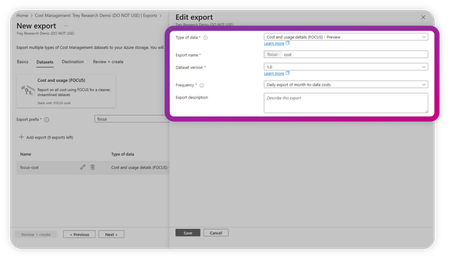
By Robb Dilallo Introduction As organizations rapidly adopt generative AI, Azure OpenAI usage is growing—and so are the complexities of managing its costs. Unlike traditional cloud services billed per compute hour or storage GB, Azure OpenAI charges based on token usage. For FinOps practitioners, this introduces a new frontier: understanding AI unit economics and managing costs where the consumed unit is a token. This article explains how to leverage the Microsoft FinOps toolkit and the FinOps Open Cost and Usage Specification (FOCUS) to gain visibility, allocate costs, and calculate unit economics for Azure OpenAI workloads. Why Azure OpenAI cost management is different AI services break many traditional cost management assumptions: Billed by token usage (input + output tokens). Model choices matter (e.g., GPT-3.5 vs. GPT-4 Turbo vs. GPT-4o). Prompt engineering impacts cost (longer context = more tokens). Bursty usage patterns complicate forecasting. Without proper visibility and unit cost tracking, it's difficult to optimize spend or align costs to business value. Step 1: Get visibility with the FinOps toolkit The Microsoft FinOps toolkit provides pre-built modules and patterns for analyzing Azure cost data. Key tools include: Microsoft Cost Management exports Export daily usage and cost data in a FOCUS-aligned format. FinOps hubs Infrastructure-as-Code solution to ingest, transform, and serve cost data. Power BI templates Pre-built reports conformed to FOCUS for easy analysis. Pro tip: Start by connecting your Microsoft Cost Management exports to a FinOps hub. Then, use the toolkit’s Power BI FOCUS templates to begin reporting. Learn more about the FinOps toolkit Step 2: Normalize data with FOCUS The FinOps Open Cost and Usage Specification (FOCUS) standardizes billing data across providers—including Azure OpenAI. FOCUS Column Purpose Azure Cost Management Field ServiceName Cloud service (e.g., Azure OpenAI Service) ServiceName ConsumedQuantity Number of tokens consumed Quantity PricingUnit Unit type, should align to "tokens" DistinctUnits BilledCost Actual cost billed CostInBillingCurrency ChargeCategory Identifies consumption vs. reservation ChargeType ResourceId Links to specific deployments or apps ResourceId Tags Maps usage to teams, projects, or environments Tags UsageType / Usage Details Further SKU-level detail Sku Meter Subcategory, Sku Meter Name Why it matters: Azure’s native billing schema can vary across services and time. FOCUS ensures consistency and enables cross-cloud comparisons. Tip: If you use custom deployment IDs or user metadata, apply them as tags to improve allocation and unit economics. Review the FOCUS specification Step 3: Calculate unit economics Unit cost per token = BilledCost ÷ ConsumedQuantity Real-world example: Calculating unit cost in Power BI A recent Power BI report breaks down Azure OpenAI usage by: SKU Meter Category → e.g., Azure OpenAI SKU Meter Subcategory → e.g., gpt 4o 0513 Input global Tokens SKU Meter Name → detailed SKU info (input/output, model version, etc.) GPT Model Usage Type Effective Cost gpt 4o 0513 Input global Tokens Input $292.77 gpt 4o 0513 Output global Tokens Output $23.40 Unit Cost Formula: Unit Cost = EffectiveCost ÷ ConsumedQuantity Power BI Measure Example: Unit Cost = SUM(EffectiveCost) / SUM(ConsumedQuantity) Pro tip: Break out input and output token costs by model version to: Track which workloads are driving spend. Benchmark cost per token across GPT models. Attribute costs back to teams or product features using Tags or ResourceId. Power BI tip: Building a GPT cost breakdown matrix To easily calculate token unit costs by GPT model and usage type, build a Matrix visual in Power BI using this hierarchy: Rows: SKU Meter Category SKU Meter Subcategory SKU Meter Name Values: EffectiveCost (sum) ConsumedQuantity (sum) Unit Cost (calculated measure) Unit Cost = SUM(‘Costs’[EffectiveCost]) / SUM(‘Costs’[ConsumedQuantity]) Hierarchy Example: Azure OpenAI ├── GPT 4o Input global Tokens ├── GPT 4o Output global Tokens ├── GPT 4.5 Input global Tokens └── etc. Power BI Matrix visual showing Azure OpenAI token usage and costs by SKU Meter Category, Subcategory, and Name. This breakdown enables calculation of unit cost per token across GPT models and usage types, supporting FinOps allocation and unit economics analysis. What you can see at the token level Metric Description Data Source Token Volume Total tokens consumed Consumed Quantity Effective Cost Actual billed cost BilledCost / Cost Unit Cost per Token Cost divided by token quantity Effective Unit Price SKU Category & Subcategory Model, version, and token type (input/output) Sku Meter Category, Subcategory, Meter Name Resource Group / Business Unit Logical or organizational grouping Resource Group, Business Unit Application Application or workload responsible for usage Application (tag) This visibility allows teams to: Benchmark cost efficiency across GPT models. Track token costs over time. Allocate AI costs to business units or features. Detect usage anomalies and optimize workload design. Tip: Apply consistent tagging (Cost Center, Application, Environment) to Azure OpenAI resources to enhance allocation and unit economics reporting. How the FinOps Foundation’s AI working group informs this approach The FinOps for AI overview, developed by the FinOps Foundation’s AI working group, highlights unique challenges in managing AI-related cloud costs, including: Complex cost drivers (tokens, models, compute hours, data transfer). Cross-functional collaboration between Finance, Engineering, and ML Ops teams. The importance of tracking AI unit economics to connect spend with value. By combining the FinOps toolkit, FOCUS-conformed data, and Power BI reporting, practitioners can implement many of the AI Working Group’s recommendations: Establish token-level unit cost metrics. Allocate costs to teams, models, and AI features. Detect cost anomalies specific to AI usage patterns. Improve forecasting accuracy despite AI workload variability. Tip: Applying consistent tagging to AI workloads (model version, environment, business unit, and experiment ID) significantly improves cost allocation and reporting maturity. Step 4: Allocate and Report Costs With FOCUS + FinOps toolkit: Allocate costs to teams, projects, or business units using Tags, ResourceId, or custom dimensions. Showback/Chargeback AI usage costs to stakeholders. Detect anomalies using the Toolkit’s patterns or integrate with Azure Monitor. Tagging tip: Add metadata to Azure OpenAI deployments for easier allocation and unit cost reporting. Example: tags: CostCenter: AI-Research Environment: Production Feature: Chatbot Step 5: Iterate Using FinOps Best Practices FinOps capability Relevance Reporting & analytics Visualize token costs and trends Allocation Assign costs to teams or workloads Unit economics Track cost per token or business output Forecasting Predict future AI costs Anomaly management Identify unexpected usage spikes Start small (Crawl), expand as you mature (Walk → Run). Learn about the FinOps Framework Next steps Ready to take control of your Azure OpenAI costs? Deploy the Microsoft FinOps toolkit Start ingesting and analyzing your Azure billing data. Get started Adopt FOCUS Normalize your cost data for clarity and cross-cloud consistency. Explore FOCUS Calculate AI unit economics Track token consumption and unit costs using Power BI. Customize Power BI reports Extend toolkit templates to include token-based unit economics. Join the conversation Share insights or questions with the FinOps community on TechCommunity or in the FinOps Foundation Slack. Advance Your Skills Consider the FinOps Certified FOCUS Analyst certification. Further Reading Managing the cost of AI: Understanding AI workload cost considerations Microsoft FinOps toolkit Learn about FOCUS Microsoft Cost Management + Billing FinOps Foundation Appendix: FOCUS column glossary ConsumedQuantity: The number of tokens or units consumed for a given SKU. This is the key measure of usage. ConsumedUnit: The type of unit being consumed, such as 'tokens', 'GB', or 'vCPU hours'. Often appears as 'Units' in Azure exports for OpenAI workloads. PricingUnit: The unit of measure used for pricing. Should match 'ConsumedUnit', e.g., 'tokens'. EffectiveCost: Final cost after amortization of reservations, discounts, and prepaid credits. Often derived from billing data. BilledCost: The invoiced charge before applying commitment discounts or amortization. PricingQuantity: The volume of usage after applying pricing rules such as tiered or block pricing. Used to calculate cost when multiplied by unit price.2.6KViews2likes1CommentWhat’s new in FinOps toolkit 12 – July 2025
This month, you’ll find support for FOCUS 1.2, autostart in FinOps hubs which can reduce your hub costs, a new page in the Cost summary Power BI report, and various small fixes, improvements, and documentation updates across the board. Read on for details.1.6KViews3likes5CommentsNews and updates from FinOps X 2024: How Microsoft is empowering organizations
Last year, I shared a broad set of updates that showcased how Microsoft is embracing FinOps practitioners through education, product improvements, and innovative solutions that help organizations achieve more. with AI-powered experiences like Copilot and Microsoft Fabric. Whether you’re an engineer working in the Azure portal or part of a business or finance team collaborating in Microsoft 365 or analyzing data in Power BI, Microsoft Cloud has the tools you need to accelerate business value for your cloud investments.12KViews8likes0CommentsWhat’s new in FinOps toolkit 0.4 – July 2024
In July, the FinOps toolkit 0.4 added support for FOCUS 1.0, updated tools and resources to align with the FinOps Framework 2024 updates, introduced a new tool for cloud optimization recommendations called Azure Optimization Engine, and more!4KViews4likes1CommentFOCUS: An open specification for cloud cost transparency
When it comes to FinOps, the data is of the utmost importance. Data is the key to understanding your cloud cost and usage patterns, and pivotal to making smart decisions about your cloud strategy and operations. This is why Microsoft is proud to be a founding member of the FinOps Open Cost and Usage Specification (FOCUS) project and why we’re dedicated to defining and evolving the specification alongside our customers, partners, and industry peers. And with FOCUS 1.0 support in Cost Management exports being announced at FinOps X 2024, you may be wondering what FOCUS is, why you should care, and where to get started. Look no further. I’ll give you a crash course in FOCUS 1.0.6.4KViews2likes0CommentsMoving from FOCUS 1.0 preview to FOCUS 1.0
Using FOCUS 1.0 preview in Cost Management already? Curious about what's changed in the 1.0 release? We've got you covered! Read on to learn about the changes to regions, cost, usage, and charge categorization in the latest FOCUS release.2.2KViews2likes0Comments