focus
37 TopicsManaging Azure OpenAI costs with the FinOps toolkit and FOCUS: Turning tokens into unit economics
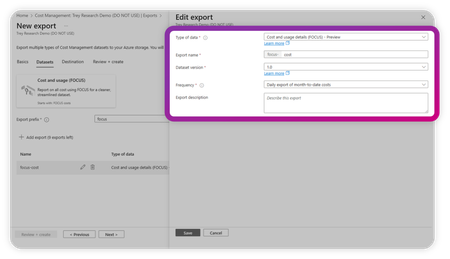
By Robb Dilallo Introduction As organizations rapidly adopt generative AI, Azure OpenAI usage is growing—and so are the complexities of managing its costs. Unlike traditional cloud services billed per compute hour or storage GB, Azure OpenAI charges based on token usage. For FinOps practitioners, this introduces a new frontier: understanding AI unit economics and managing costs where the consumed unit is a token. This article explains how to leverage the Microsoft FinOps toolkit and the FinOps Open Cost and Usage Specification (FOCUS) to gain visibility, allocate costs, and calculate unit economics for Azure OpenAI workloads. Why Azure OpenAI cost management is different AI services break many traditional cost management assumptions: Billed by token usage (input + output tokens). Model choices matter (e.g., GPT-3.5 vs. GPT-4 Turbo vs. GPT-4o). Prompt engineering impacts cost (longer context = more tokens). Bursty usage patterns complicate forecasting. Without proper visibility and unit cost tracking, it's difficult to optimize spend or align costs to business value. Step 1: Get visibility with the FinOps toolkit The Microsoft FinOps toolkit provides pre-built modules and patterns for analyzing Azure cost data. Key tools include: Microsoft Cost Management exports Export daily usage and cost data in a FOCUS-aligned format. FinOps hubs Infrastructure-as-Code solution to ingest, transform, and serve cost data. Power BI templates Pre-built reports conformed to FOCUS for easy analysis. Pro tip: Start by connecting your Microsoft Cost Management exports to a FinOps hub. Then, use the toolkit’s Power BI FOCUS templates to begin reporting. Learn more about the FinOps toolkit Step 2: Normalize data with FOCUS The FinOps Open Cost and Usage Specification (FOCUS) standardizes billing data across providers—including Azure OpenAI. FOCUS Column Purpose Azure Cost Management Field ServiceName Cloud service (e.g., Azure OpenAI Service) ServiceName ConsumedQuantity Number of tokens consumed Quantity PricingUnit Unit type, should align to "tokens" DistinctUnits BilledCost Actual cost billed CostInBillingCurrency ChargeCategory Identifies consumption vs. reservation ChargeType ResourceId Links to specific deployments or apps ResourceId Tags Maps usage to teams, projects, or environments Tags UsageType / Usage Details Further SKU-level detail Sku Meter Subcategory, Sku Meter Name Why it matters: Azure’s native billing schema can vary across services and time. FOCUS ensures consistency and enables cross-cloud comparisons. Tip: If you use custom deployment IDs or user metadata, apply them as tags to improve allocation and unit economics. Review the FOCUS specification Step 3: Calculate unit economics Unit cost per token = BilledCost ÷ ConsumedQuantity Real-world example: Calculating unit cost in Power BI A recent Power BI report breaks down Azure OpenAI usage by: SKU Meter Category → e.g., Azure OpenAI SKU Meter Subcategory → e.g., gpt 4o 0513 Input global Tokens SKU Meter Name → detailed SKU info (input/output, model version, etc.) GPT Model Usage Type Effective Cost gpt 4o 0513 Input global Tokens Input $292.77 gpt 4o 0513 Output global Tokens Output $23.40 Unit Cost Formula: Unit Cost = EffectiveCost ÷ ConsumedQuantity Power BI Measure Example: Unit Cost = SUM(EffectiveCost) / SUM(ConsumedQuantity) Pro tip: Break out input and output token costs by model version to: Track which workloads are driving spend. Benchmark cost per token across GPT models. Attribute costs back to teams or product features using Tags or ResourceId. Power BI tip: Building a GPT cost breakdown matrix To easily calculate token unit costs by GPT model and usage type, build a Matrix visual in Power BI using this hierarchy: Rows: SKU Meter Category SKU Meter Subcategory SKU Meter Name Values: EffectiveCost (sum) ConsumedQuantity (sum) Unit Cost (calculated measure) Unit Cost = SUM(‘Costs’[EffectiveCost]) / SUM(‘Costs’[ConsumedQuantity]) Hierarchy Example: Azure OpenAI ├── GPT 4o Input global Tokens ├── GPT 4o Output global Tokens ├── GPT 4.5 Input global Tokens └── etc. Power BI Matrix visual showing Azure OpenAI token usage and costs by SKU Meter Category, Subcategory, and Name. This breakdown enables calculation of unit cost per token across GPT models and usage types, supporting FinOps allocation and unit economics analysis. What you can see at the token level Metric Description Data Source Token Volume Total tokens consumed Consumed Quantity Effective Cost Actual billed cost BilledCost / Cost Unit Cost per Token Cost divided by token quantity Effective Unit Price SKU Category & Subcategory Model, version, and token type (input/output) Sku Meter Category, Subcategory, Meter Name Resource Group / Business Unit Logical or organizational grouping Resource Group, Business Unit Application Application or workload responsible for usage Application (tag) This visibility allows teams to: Benchmark cost efficiency across GPT models. Track token costs over time. Allocate AI costs to business units or features. Detect usage anomalies and optimize workload design. Tip: Apply consistent tagging (Cost Center, Application, Environment) to Azure OpenAI resources to enhance allocation and unit economics reporting. How the FinOps Foundation’s AI working group informs this approach The FinOps for AI overview, developed by the FinOps Foundation’s AI working group, highlights unique challenges in managing AI-related cloud costs, including: Complex cost drivers (tokens, models, compute hours, data transfer). Cross-functional collaboration between Finance, Engineering, and ML Ops teams. The importance of tracking AI unit economics to connect spend with value. By combining the FinOps toolkit, FOCUS-conformed data, and Power BI reporting, practitioners can implement many of the AI Working Group’s recommendations: Establish token-level unit cost metrics. Allocate costs to teams, models, and AI features. Detect cost anomalies specific to AI usage patterns. Improve forecasting accuracy despite AI workload variability. Tip: Applying consistent tagging to AI workloads (model version, environment, business unit, and experiment ID) significantly improves cost allocation and reporting maturity. Step 4: Allocate and Report Costs With FOCUS + FinOps toolkit: Allocate costs to teams, projects, or business units using Tags, ResourceId, or custom dimensions. Showback/Chargeback AI usage costs to stakeholders. Detect anomalies using the Toolkit’s patterns or integrate with Azure Monitor. Tagging tip: Add metadata to Azure OpenAI deployments for easier allocation and unit cost reporting. Example: tags: CostCenter: AI-Research Environment: Production Feature: Chatbot Step 5: Iterate Using FinOps Best Practices FinOps capability Relevance Reporting & analytics Visualize token costs and trends Allocation Assign costs to teams or workloads Unit economics Track cost per token or business output Forecasting Predict future AI costs Anomaly management Identify unexpected usage spikes Start small (Crawl), expand as you mature (Walk → Run). Learn about the FinOps Framework Next steps Ready to take control of your Azure OpenAI costs? Deploy the Microsoft FinOps toolkit Start ingesting and analyzing your Azure billing data. Get started Adopt FOCUS Normalize your cost data for clarity and cross-cloud consistency. Explore FOCUS Calculate AI unit economics Track token consumption and unit costs using Power BI. Customize Power BI reports Extend toolkit templates to include token-based unit economics. Join the conversation Share insights or questions with the FinOps community on TechCommunity or in the FinOps Foundation Slack. Advance Your Skills Consider the FinOps Certified FOCUS Analyst certification. Further Reading Managing the cost of AI: Understanding AI workload cost considerations Microsoft FinOps toolkit Learn about FOCUS Microsoft Cost Management + Billing FinOps Foundation Appendix: FOCUS column glossary ConsumedQuantity: The number of tokens or units consumed for a given SKU. This is the key measure of usage. ConsumedUnit: The type of unit being consumed, such as 'tokens', 'GB', or 'vCPU hours'. Often appears as 'Units' in Azure exports for OpenAI workloads. PricingUnit: The unit of measure used for pricing. Should match 'ConsumedUnit', e.g., 'tokens'. EffectiveCost: Final cost after amortization of reservations, discounts, and prepaid credits. Often derived from billing data. BilledCost: The invoiced charge before applying commitment discounts or amortization. PricingQuantity: The volume of usage after applying pricing rules such as tiered or block pricing. Used to calculate cost when multiplied by unit price.2.5KViews2likes1CommentWhat’s new in FinOps toolkit 12 – July 2025
This month, you’ll find support for FOCUS 1.2, autostart in FinOps hubs which can reduce your hub costs, a new page in the Cost summary Power BI report, and various small fixes, improvements, and documentation updates across the board. Read on for details.1.5KViews3likes5CommentsNews and updates from FinOps X 2024: How Microsoft is empowering organizations
Last year, I shared a broad set of updates that showcased how Microsoft is embracing FinOps practitioners through education, product improvements, and innovative solutions that help organizations achieve more. with AI-powered experiences like Copilot and Microsoft Fabric. Whether you’re an engineer working in the Azure portal or part of a business or finance team collaborating in Microsoft 365 or analyzing data in Power BI, Microsoft Cloud has the tools you need to accelerate business value for your cloud investments.12KViews8likes0CommentsWhat’s new in FinOps toolkit 0.4 – July 2024
In July, the FinOps toolkit 0.4 added support for FOCUS 1.0, updated tools and resources to align with the FinOps Framework 2024 updates, introduced a new tool for cloud optimization recommendations called Azure Optimization Engine, and more!4KViews4likes1CommentFOCUS: An open specification for cloud cost transparency
When it comes to FinOps, the data is of the utmost importance. Data is the key to understanding your cloud cost and usage patterns, and pivotal to making smart decisions about your cloud strategy and operations. This is why Microsoft is proud to be a founding member of the FinOps Open Cost and Usage Specification (FOCUS) project and why we’re dedicated to defining and evolving the specification alongside our customers, partners, and industry peers. And with FOCUS 1.0 support in Cost Management exports being announced at FinOps X 2024, you may be wondering what FOCUS is, why you should care, and where to get started. Look no further. I’ll give you a crash course in FOCUS 1.0.6.4KViews2likes0CommentsMoving from FOCUS 1.0 preview to FOCUS 1.0
Using FOCUS 1.0 preview in Cost Management already? Curious about what's changed in the 1.0 release? We've got you covered! Read on to learn about the changes to regions, cost, usage, and charge categorization in the latest FOCUS release.2.1KViews2likes0CommentsWhat’s new in FinOps toolkit 0.5 – August 2024
In August, the FinOps toolkit 0.5 added support for Power BI reports on top of Cost Management exports without needing to deploy FinOps hubs; expanded optimization options in workbooks; improved optimization, security, and resiliency in Azure Optimization Engine; a new FOCUS article to help compare with actual/amortized data; and many smaller fixes and improvements across the board.2KViews1like0Comments