flexible server
97 TopicsScaling Write Throughput in Azure Database for MySQL Using Application-Level Sharding
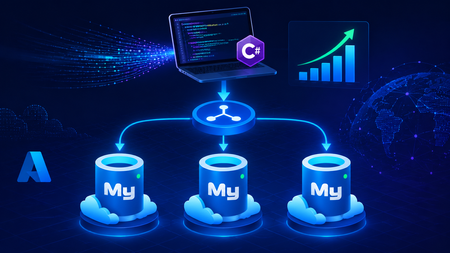
This blog post walks through scaling write throughput in Azure Database for MySQL using application level sharding. It starts with the why behind sharding and then builds a complete C# implementation that spreads writes across three Azure Database for MySQL Flexible Servers. Why Shard in the First Place? This post focuses specifically on scaling write throughput. A well-tuned single primary node can take you remarkably far, and techniques such as indexing strategies, write batching, redo log optimization, and vertical compute scaling each deliver real, lasting value. For many workloads, these optimizations are all you will ever need. That said, as write volume continues to grow, a single primary eventually approaches its practical capacity, and at that point the most durable way to keep scaling is to distribute the write workload across multiple primary instances. This architecture is what we call sharding. When you reach this inflection point, there are two primary patterns for managing multiple write nodes: Proxy or Middleware Layer Sharding: A sharding aware proxy sits between the application and a pool of Azure Database for MySQL instances, routing queries based on a shard key. While this abstracts the underlying topology from the application layer, it introduces an additional, complex component to operate, secure, scale, and patch. Application Layer Sharding: The application itself resolves the destination shard key and determines which of the N Azure Database for MySQL instances should receive a write before ever opening a database connection. Each backend target remains a completely standard, independent Azure Database for MySQL instance. This post explores the second approach. The core appeal of application layer sharding is architectural simplicity: it introduces zero infrastructure overhead and eliminates an extra network hop. Every shard behaves exactly like a standalone instance, meaning your existing backup, restore, monitoring pipelines, and the Azure portal function seamlessly without modification. The explicit tradeoff is that you forgo cross shard joins and distributed transactions in exchange for absolute predictability and control over data access patterns. The Plan We will build a small order management service that distributes its data across three Azure Database for MySQL instances that already exist. The application, written in C# on .NET 8, owns the partitioning logic. The premise: the three servers are already provisioned, the firewalls are configured, the network paths are established, and each server has its own administrative credentials. We are not provisioning infrastructure in this post. we are writing the application code that consumes it. mysql-shard-0.mysql.database.azure.com user: shard0_admin pwd: <secret-0> mysql-shard-1.mysql.database.azure.com user: shard1_admin pwd: <secret-1> mysql-shard-2.mysql.database.azure.com user: shard2_admin pwd: <secret-2> Each server hosts an identical appdb database with the same schema: CREATE TABLE users ( user_id BIGINT NOT NULL PRIMARY KEY, email VARCHAR(255) NOT NULL, created_at DATETIME NOT NULL DEFAULT CURRENT_TIMESTAMP, UNIQUE KEY uq_email (email) ); CREATE TABLE orders ( order_id BIGINT NOT NULL PRIMARY KEY, user_id BIGINT NOT NULL, amount_cents INT NOT NULL, created_at DATETIME NOT NULL DEFAULT CURRENT_TIMESTAMP, KEY ix_user (user_id) ); Two design decisions in this schema warrant explanation: No AUTO_INCREMENT for user_id or order_id. Two shards would otherwise generate the same value 42 independently. Instead, we assign identifiers in the application, using a scheme such as Snowflake, ULID, or UUIDv7. orders carries user_id, and we route by it. This is the single most important rule of sharding: choose a shard key that keeps related data colocated, so that the common queries remain on a single shard. A note on UNIQUE KEY uq_email. A unique index enforces uniqueness only within a single physical shard. Because we route by user_id, two users with different IDs and the same email may land on different shards, and both inserts will succeed. If you require globally unique emails, two options exist: (a) maintain a separate email → user_id lookup table on a single "directory" server and write to it first within an idempotent flow, or (b) shard the users table by a hash of email instead. We retain user_id routing throughout this post because it is the correct choice for orders, and we treat per shard email uniqueness as a best effort guard rather than a hard global invariant. How the Partitioning Works The naive approach to sharding is shard = hash(key) % N. This works until you need to add a fourth server, at which point roughly 75% of your data must move. In any system of meaningful size, that is prohibitively expensive. The established solution is virtual buckets. You hash the key into a large, fixed bucket space (here, 1024), then map buckets to physical shards. When you add capacity, you relocate only buckets; you never rehash the entire dataset. In production, the bucket_to_shard_map typically resides in a system such as Azure App Configuration or etcd, so that you can rebalance without redeploying. For this post, we keep it as an in-memory array seeded at startup, which is straightforward to replace later. The Project ShardingDemo/ ├── ShardingDemo.csproj ├── appsettings.json ├── Models.cs ├── ShardRouter.cs ├── UserRepository.cs └── Program.cs ShardingDemo.csproj <Project Sdk="Microsoft.NET.Sdk"> <PropertyGroup> <OutputType>Exe</OutputType> <TargetFramework>net8.0</TargetFramework> <Nullable>enable</Nullable> <ImplicitUsings>enable</ImplicitUsings> </PropertyGroup> <ItemGroup> <PackageReference Include="MySqlConnector" Version="2.6.0" /> <PackageReference Include="Microsoft.Extensions.Hosting" Version="8.0.0" /> <PackageReference Include="Microsoft.Extensions.Configuration.Binder" Version="8.0.0" /> </ItemGroup> <ItemGroup> <Content Include="appsettings.json" CopyToOutputDirectory="PreserveNewest" /> </ItemGroup> </Project> appsettings.json Shards is an ordered list, and a shard's position in the array is its logical ID. { "Shards": [ { "Host": "mysql-shard-0.mysql.database.azure.com", "Database": "appdb", "User": "shard0_admin", "Password": "REPLACE_ME_0" }, { "Host": "mysql-shard-1.mysql.database.azure.com", "Database": "appdb", "User": "shard1_admin", "Password": "REPLACE_ME_1" }, { "Host": "mysql-shard-2.mysql.database.azure.com", "Database": "appdb", "User": "shard2_admin", "Password": "REPLACE_ME_2" } ] } Models.cs namespace ShardingDemo; public sealed record User(long UserId, string Email, DateTime CreatedAt); public sealed record Order(long OrderId, long UserId, int AmountCents, DateTime CreatedAt); public sealed class ShardConfig { public required string Host { get; init; } public required string Database { get; init; } public required string User { get; init; } public required string Password { get; init; } } ShardRouter.cs using System.Security.Cryptography; using System.Text; using MySqlConnector; namespace ShardingDemo; public sealed class Shard : IAsyncDisposable { public int Id { get; } public MySqlDataSource DataSource { get; } public Shard(int id, ShardConfig cfg) { Id = id; var csb = new MySqlConnectionStringBuilder { Server = cfg.Host, Port = 3306, Database = cfg.Database, UserID = cfg.User, Password = cfg.Password, SslMode = MySqlSslMode.Required, Pooling = true, MinimumPoolSize = 2, MaximumPoolSize = 100, ConnectionTimeout = 10, DefaultCommandTimeout = 30, }; DataSource = new MySqlDataSourceBuilder(csb.ConnectionString).Build(); } public ValueTask DisposeAsync() => DataSource.DisposeAsync(); } public sealed class ShardRouter : IAsyncDisposable { private const int VirtualBuckets = 1024; private readonly IReadOnlyList<Shard> _shards; private readonly int[] _bucketToShardId; public ShardRouter(IEnumerable<ShardConfig> configs) { _shards = configs.Select((c, i) => new Shard(i, c)).ToList(); // Even distribution. Replace with a map loaded from your control plane for live rebalancing. _bucketToShardId = new int[VirtualBuckets]; for (int i = 0; i < VirtualBuckets; i++) _bucketToShardId[i] = i % _shards.Count; } public IReadOnlyList<Shard> AllShards => _shards; private static int BucketFor(long shardKey) { byte[] hash = MD5.HashData(Encoding.ASCII.GetBytes(shardKey.ToString())); // Use the first byte pair as an unsigned value, then map it into the bucket space. int value = (hash[0] << 8) | hash[1]; return value % VirtualBuckets; } public Shard ShardForKey(long shardKey) { int bucket = BucketFor(shardKey); return _shards[_bucketToShardId[bucket]]; } public async ValueTask DisposeAsync() { foreach (var s in _shards) await s.DisposeAsync(); } } UserRepository.cs Observe that every per user method calls ShardForKey(userId), even when inserting an order. This is the colocation rule at work. An order and its owning user always reside on the same shard, so queries for a single user only ever reach one shard. Only the cross-shard aggregate (TotalRevenueCentsAsync) must fan out. using MySqlConnector; namespace ShardingDemo; public sealed class UserRepository { private readonly ShardRouter _router; public UserRepository(ShardRouter router) { _router = router; } public async Task CreateUserAsync(long userId, string email, CancellationToken ct = default) { var shard = _router.ShardForKey(userId); await using var conn = await shard.DataSource.OpenConnectionAsync(ct); await using var cmd = conn.CreateCommand(); cmd.CommandText = "INSERT INTO users (user_id, email) VALUES (@id, Email)"; cmd.Parameters.AddWithValue("@id", userId); cmd.Parameters.AddWithValue("@email", email); await cmd.ExecuteNonQueryAsync(ct); } public async Task<User?> GetUserAsync(long userId, CancellationToken ct = default) { var shard = _router.ShardForKey(userId); await using var conn = await shard.DataSource.OpenConnectionAsync(ct); await using var cmd = conn.CreateCommand(); cmd.CommandText = "SELECT user_id, email, created_at FROM users WHERE user_id = ID"; cmd.Parameters.AddWithValue("@id", userId); await using var reader = await cmd.ExecuteReaderAsync(ct); if (!await reader.ReadAsync(ct)) return null; return new User(reader.GetInt64(0), reader.GetString(1), reader.GetDateTime(2)); } public async Task AddOrderAsync(long orderId, long userId, int amountCents, CancellationToken ct = default) { // Routed by user_id, so orders colocate with their owning user. var shard = _router.ShardForKey(userId); await using var conn = await shard.DataSource.OpenConnectionAsync(ct); await using var cmd = conn.CreateCommand(); cmd.CommandText = """ INSERT INTO orders (order_id, user_id, amount_cents) VALUES (@oid, @uid, amt) """; cmd.Parameters.AddWithValue("@oid", orderId); cmd.Parameters.AddWithValue("@uid", userId); cmd.Parameters.AddWithValue("@amt", amountCents); await cmd.ExecuteNonQueryAsync(ct); } public async Task<IReadOnlyList<Order>> GetOrdersForUserAsync(long userId, CancellationToken ct = default) { var shard = _router.ShardForKey(userId); await using var conn = await shard.DataSource.OpenConnectionAsync(ct); await using var cmd = conn.CreateCommand(); cmd.CommandText = """ SELECT order_id, user_id, amount_cents, created_at FROM orders WHERE user_id = @uid """; cmd.Parameters.AddWithValue("@uid", userId); var list = new List<Order>(); await using var reader = await cmd.ExecuteReaderAsync(ct); while (await reader.ReadAsync(ct)) { list.Add(new Order( reader.GetInt64(0), reader.GetInt64(1), reader.GetInt32(2), reader.GetDateTime(3))); } return list; } /// <summary>Cross shard fanout.</summary> public async Task<long> TotalRevenueCentsAsync(CancellationToken ct = default) { var tasks = _router.AllShards.Select(async shard => { await using var conn = await shard.DataSource.OpenConnectionAsync(ct); await using var cmd = conn.CreateCommand(); cmd.CommandText = "SELECT COALESCE(SUM(amount_cents), 0) FROM orders"; var result = await cmd.ExecuteScalarAsync(ct); return Convert.ToInt64(result); }); var perShard = await Task.WhenAll(tasks); return perShard.Sum(); } } Program.cs using Microsoft.Extensions.Configuration; using Microsoft.Extensions.DependencyInjection; using Microsoft.Extensions.Hosting; using ShardingDemo; var builder = Host.CreateApplicationBuilder(args); // Bind Shards:[] from appsettings.json (override with user-secrets / env vars / Key Vault) var shardConfigs = builder.Configuration .GetSection("Shards") .Get<List<ShardConfig>>() ?? throw new InvalidOperationException("No 'Shards' section configured."); if (shardConfigs.Count == 0) throw new InvalidOperationException("At least one shard must be configured."); builder.Services.AddSingleton(_ => new ShardRouter(shardConfigs)); builder.Services.AddSingleton<UserRepository>(); using var host = builder.Build(); var repo = host.Services.GetRequiredService<UserRepository>(); var router = host.Services.GetRequiredService<ShardRouter>(); (long Id, string Email)[] users = { (1001, "ada@example.com"), (2002, "linus@example.com"), (3003, "grace@example.com"), (4004, "alan@example.com"), }; foreach (var (id, email) in users) { await repo.CreateUserAsync(id, email); Console.WriteLine($"user {id} -> shard {router.ShardForKey(id).Id}"); } await repo.AddOrderAsync(orderId: 9001, userId: 1001, amountCents: 4999); await repo.AddOrderAsync(orderId: 9002, userId: 1001, amountCents: 1299); await repo.AddOrderAsync(orderId: 9003, userId: 2002, amountCents: 8800); Console.WriteLine($"\nAda: {await repo.GetUserAsync(1001)}"); Console.WriteLine($"Ada's orders: {(await repo.GetOrdersForUserAsync(1001)).Count}"); Console.WriteLine($"\nTotal revenue across 3 shards: " + $"${await repo.TotalRevenueCentsAsync() / 100m:F2}"); await router.DisposeAsync(); Tracing One Request End to End Consider GetOrdersForUserAsync(1001): ShardForKey(1001) → MD5("1001") → first two bytes as a number → % 1024 → a bucket in the range 0..1023. bucket % 3 → a physical shard → for example mysql-shard-2.mysql.database.azure.com. The MySqlDataSource provides a pooled, TLS encrypted connection authenticated as shard2_admin. The query runs against shard 2's local ix_user index, with no fan out and at single server speed. Every call with userId = 1001, whether GetUser, AddOrder, or GetOrdersForUser, lands on the same shard. That is why orders JOIN users ON orders.user_id = users.user_id WHERE user_id = 1001 executes within a single shard, with no cross-shard traffic. Conclusion The essential point is this. Once a single primary can no longer absorb your write load, sharding becomes a durable answer, and implementing it at the application layer keeps every part of the system explicit and comprehensible. When write volume or dataset size outgrows a single primary, application layer sharding provides several benefits. N independent Azure Database for MySQL instances, each absorbing 1/N of the write traffic. Queries by user that remain on a single shard and behave like an ordinary, modestly sized database. A bucket map approach that allows you to add a fourth, fifth, or Nth shard later by relocating slices of data rather than rehashing the entire dataset. A failure of one shard that affects 1/N of your users rather than all of them. These benefits come at a genuine cost. You must generate identifiers in the application, global uniqueness requires a secondary lookup table, and aggregate queries fan out across shards. A cross shard write, one that must atomically update data on two different shards, can no longer rely on a single database transaction. Instead it needs an orchestrated sequence of local transactions, where each step carries a compensating action that undoes its effect if a later step fails. None of these are insurmountable. They are simply responsibilities you now assume. Sharding is a deliberate step to take only once a single primary has genuinely exhausted its write headroom. When you reach that point, the implementation in this post is a representative blueprint. Stay Connected We welcome your feedback and invite you to share your experiences or suggestions at AskAzureDBforMySQL@service.microsoft.com Thank you for choosing Azure Database for MySQL!353Views2likes0CommentsAnnouncing new security, maintenance and analytics features for PostgreSQL at Microsoft Build 2026
At Microsoft Build 2026, we’re announcing a major wave of PostgreSQL innovation across Azure. Alongside the public preview of Azure HorizonDB, we’re delivering a broad set of enhancements for our fully managed open-source PostgreSQL service: Azure Database for PostgreSQL flexible server. These updates span performance, analytics, security, operations, resilience and migration - helping you build faster, operate with more control, secure your workloads, and modernize with confidence. Here’s a quick tour of the top flexible server announcements at Build 2026. Feature Highlights pg_ivm Extension Defender Security assessments temporal_tables Extension Cross-tenant CMK Automatic Entra token refresh libraries New Powershell module: Az.PostgreSQLFlexibleServer More control over planned maintenance Pre-Upgrade validation checks New Built-in Grafana dashboards Chaos Studio supports Azure Database for PostgreSQL AI-assisted Oracle to PostgreSQL migration Migration Service for Azure Database for PostgreSQL improvements (EDB, AlloyDB) Performance, Scale & Analytics pg_ivm Extension Generally Available Materialized views are a useful way to optimize performance for queries that run regularly, but if underlying data becomes stale the result set needs to be recomputed. With the pg_ivm extension you can automatically maintain materialized views as the underlying data changes. This is particularly valuable for large datasets with small incremental changes that need real-time freshness, like dashboards, catalog analytics and SaaS usage reporting. We are pleased to announce the pg_ivm extension is now generally available in Azure Database for PostgreSQL. Learn more: pg_ivm. Security, Auditing & Identity Defender security assessments Preview Microsoft Defender Security Assessments for Azure Database for PostgreSQL enables continuous evaluation of your database security posture, helping identify vulnerabilities and misconfigurations across server and database configurations. Previously limited to reactive threat detection, in the latest preview release, Defender now provides proactive, risk-based insights through assessments tailored to PostgreSQL-specific best practices, delivering more relevant and actionable guidance. This helps you strengthen your security baseline, prioritize remediation, and align with best practices and compliance requirements. Learn more: https://aka.ms/Defender-Assessments-for-PG-Preview temporal_tables Extension Generally Available We’ve had many customer requests to support the temporal_tables extension, which provides built-in support for tracking and querying historical changes to data over time. Temporal tables are now generally available in Azure Database for PostgreSQL. With this extension enabled you can easily perform time-based queries, audit data changes, and maintain historical records without building custom tracking logic, simplifying application development and compliance scenarios. Learn more: temporal_tables Cross-tenant CMK Preview Azure Database for PostgreSQL now supports cross-tenant customer-managed keys (CMK) in public preview, allowing you to encrypt your data at rest using an Azure Key Vault key that resides in a separate Microsoft Entra tenant from the database service. This feature is designed for SaaS providers and enterprises that need to maintain strict separation of duties and ownership of encryption keys, enabling you to retain full control over key lifecycle management while PostgreSQL runs in a service provider’s tenant. Learn more: Data encryption at rest in Azure Database for PostgreSQL Automatic Entra token refresh libraries Preview We’re making it easier to use Entra ID authentication with Azure Database for PostgreSQL throughout the application stack by introducing new token refresh libraries for .NET, JavaScript, and Python. With Entra ID, access tokens are short-lived which can make managing their lifecycle complex in real-world applications. Developers need to be aware of token refresh and build additional handling around token expiration, connection retry, and session continuity. These new libraries remove that friction. By handling Entra token refresh seamlessly in the background, they allow applications to stay connected without interruption and with no custom logic required. The result is a simpler development experience and more resilient applications, especially for long-running or connection-heavy workloads. Across languages, the libraries provide a consistent and streamlined way to adopt secure, passwordless authentication, helping teams focus more on building their applications and less on managing authentication. Learn more: .NET, JavaScript, and Python. Operations, Maintenance & Monitoring New Powershell module: Az.PostgreSQLFlexibleServer Generally Available We’re excited to introduce the newly renamed Az.PostgreSQLFlexibleServer PowerShell module, delivering a streamlined experience for managing Azure Database for PostgreSQL with PowerShell. Building on the capabilities of the previous Az.PostgreSql module, the updated module aligns with the new features in the 2026-01-01 preview REST API. This module brings support for PostgreSQL 18, elastic clusters for scalable workloads and a range of enhancements designed to simplify management and improve performance. Whether you're provisioning new deployments or managing complex environments, this module ensures you can take full advantage of the latest platform capabilities directly from PowerShell. To learn more, visit our official documentation on PowerShell: Az.PostgreSql Module | Microsoft Learn More control over planned maintenance Generally Available We’ve seen many requests to provide more control when a maintenance update is applied to Azure Database for PostgreSQL. Sometimes when a critical workload is running you want to apply the maintenance when you’re ready. Announcing general availability this week, we’re building on the existing System and Custom maintenance window options and adding new self-service maintenance capabilities to the Azure portal. You can now reschedule upcoming maintenance updates for up to two weeks and apply maintenance on demand at a time that suits you. You can also view scheduled maintenance and review your server’s maintenance history after updates are complete. These options help you better align maintenance with your business schedules, reduce disruption during critical workload periods, and minimize the need for support-driven deferral requests. CLI and API support are coming soon. Learn more: https://aka.ms/azure-postgres-reschedule-maintenance Pre-Upgrade validation checks Preview Major version upgrades are critical for staying current with PostgreSQL features, security updates, and performance improvements, but you often discover blockers only after starting the upgrade workflow. Pre-Upgrade Validation Checks lets you validate upgrade readiness before initiating the actual upgrade by running Azure-specific upgrade checks and PostgreSQL pg_upgrade --check validations independently. The shift is simple: you can identify and fix upgrade blockers before the upgrade window begins. The feature surfaces actionable issues across configurations, extensions, dependencies, replication slots, event triggers, and other upgrade-sensitive objects. You can fix blockers, re-run validation until all checks pass, and proceed with the upgrade with greater predictability. Learn more: https://aka.ms/pg-flex-upgrade-checks New Built-in Grafana dashboards Generally Available Grafana dashboards are now built directly into the Azure portal for Azure Database for PostgreSQL - no setup, no extra cost, and no separate service to manage. You can open your PostgreSQL resource in the portal and immediately access prebuilt dashboards for key health and performance signals such as CPU, memory, storage, IOPS, connections, transactions, and availability. The key value is metrics + logs in one place. You can quickly correlate performance spikes with PostgreSQL logs, understand what changed, and troubleshoot faster using the familiar Grafana experience. Dashboards can also be customized, saved to your subscription, and shared across teams for ongoing operations. Learn more: https://aka.ms/azure-postgres-dashboards-grafana Resilience & Business Continuity Chaos Studio supports Azure Database for PostgreSQL Preview No matter how much you prepare, you only really know how good your database disaster recovery plan is when something breaks. With Chaos Studio support for Azure Database for PostgreSQL, you can simulate zone-down scenarios on PostgreSQL HA-enabled instances and validate the resilience of your mission-critical workloads. With Chaos Studio integration, you can proactively test failover behavior and gain confidence in how your applications respond to real-world zonal failures. This feature is currently available through a gated private preview. To get started, submit your subscription details using the form. Once reviewed, our team will enable the feature for your subscription, with guidance to help you begin testing. Getting started is simple: Create a Chaos Studio workspace via the Chaos Studio portal and configure your subscription, resource group, and region. Define the scope and assign the required managed identity and permissions. Review and verify your workspace setup. Browse available scenarios and select the PostgreSQL zone-down scenario. Configure the test (name, duration), then run it from My Library to begin validating failover behavior. With just a few steps, you’ll be able to simulate real-world failure conditions and gain confidence in your application’s resilience. To get started, please submit your details using this link: Private Preview Support for Chaos Studio Migration & Modernization AI-assisted Oracle to PostgreSQL migration Generally Available AI-assisted migration tooling has dramatically lowered the bar for moving between different databases and is changing the way people look at the return on investment for migration. The VS Code PostgreSQL extension comes with AI-Assisted migration tooling which converts Oracle schema and application code to Azure Database for PostgreSQL. This tooling uses GitHub Copilot, Microsoft Foundry, and custom Language Model tools to convert Oracle schema, database code and client applications into the PostgreSQL equivalents, and validates every change against a running flexible server instance. Learn more: Schema conversion, App conversion. Migration Service for Azure Database for PostgreSQL improvements (EDB, AlloyDB) Generally Available We’ve added AlloyDB and EDB Extended Server as new sources for migrating to PostgreSQL in the Azure Database for PostgreSQL Migration Service, with support for both online and offline migration support. Learn more: Migrate from AlloyDB, Migrate from EDB. Looking ahead That wraps up the Build 2026 announcements for Azure Database for PostgreSQL flexible server. There are also many great PostgreSQL technical sessions at Build this week, covering cloud-native app & AI development and migration. To find out more, here's a link to the Build session catalog for PostgreSQL sessions: https://aka.ms/Postgres-on-Azure_Build-2026. We'll continue to build out our roadmap over the coming months to deliver on your asks to improve the performance, security and stability of your PostgreSQL workloads. Check the Microsoft Blog for PostgreSQL for a regular monthly recap where we share the latest enhancements and product updates.1.7KViews2likes0CommentsBidirectional Replication with pglogical on Azure Database for PostgreSQL - a VNET guide
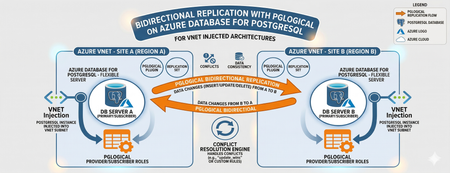
Editor’s Note: This article was written by Raunak Jhawar, a Chief Architect. Paula Berenguel and Guy Bowerman assisted with the final review, formatting and publication. Overview Bidirectional replication is one of the most requested topologies requiring writes in multiple locations, selective sync, geo-distributed active-active, or even accepting eventual consistency. This is a deep technical walkthrough for implementing bidirectional (active‑active) replication on private Azure Database for PostgreSQL Server using pglogical, with a strong emphasis on VNET‑injected architectures. It explains the underlying networking and execution model covering replication worker placement, DNS resolution paths, outbound connectivity, and conflict resolution mechanics to show why true private, server‑to‑server replication is only achievable with VNET injection and not with Private Endpoints. It also analyzes the operational and architectural trade‑offs needed to safely run geo distributed, multi write PostgreSQL workloads in production. This blog post focus on pglogical however, if you are looking for steps to implement it with logical replication or pros and cons of which approach, please refer to my definitive guid to bi-directional replication in Azure Database for PostgreSQL blog post Why this is important? This understanding prevents fundamental architectural mistakes (such as assuming Private Endpoints provide private outbound replication), reduces deployment failures caused by hidden networking constraints, and enables teams to design secure, compliant, low‑RPO active/active or migration architectures that behave predictably under real production conditions. It turns a commonly misunderstood problem into a repeatable, supportable design pattern rather than a trial‑and‑error exercise. Active-Active bidirectional replication between instances Architecture context This scenario targets a multi-region active-active write topology where both nodes are injected into the same Azure VNET (example - peered VNETs on Azure or even peered on-premises), both accept writes. Common use case: Geo distributed OLTP with regional write affinity. Step 1: Azure Infrastructure Prerequisites Both server instances must be deployed with VNET injection. This is a deploy time decision and you cannot migrate a publicly accessible instance (with or without private endpoint) to VNET injection post creation without rebuilding it. Each instance must live in a delegated subnet: Microsoft.DBforPostgreSQL/Servers. The subnet delegation is non-negotiable and prevents you from placing other resource types in the same subnet, so plan your address space accordingly. If nodes are in different VNETs, configure VNET peering before continuing along with private DNS integration. Ensure there are no overlapping address spaces amongst the peered networks. NSG rules must allow port 5432 between the two delegated subnets, both inbound and outbound. You may choose to narrow down the NSG rules to meet your organization requirements and policies to a specific source/target combination allow or deny list. Step 2: Server Parameter Configuration On both nodes, configure the following server parameters via the Azure Portal (Server Parameters blade) or Azure CLI. These cannot be set via ALTER SYSTEM SET commands. wal_level = logical -- This setting enables logical replication, which is required for pglogical to function. max_worker_processes = 16 -- This setting allows for more worker processes, which can help with replication performance. max_replication_slots = 10 -- This setting allows for more replication slots, which are needed for pglogical to manage replication connections. max_wal_senders = 10 -- This setting allows for more WAL sender processes, which are responsible for sending replication data to subscribers. track_commit_timestamp = on -- This setting allows pglogical to track commit timestamps, which can be useful for conflict resolution and monitoring replication lag. shared_preload_libraries = pglogical -- This setting loads the pglogical extension at server startup, which is necessary for it to function properly. azure.extensions = pglogical -- This setting allows the pglogical extension to be used in the Azure Postgres PaaS environment. Both nodes require a restart after shared_preload_libraries and wal_level changes. Note that max_worker_processes is shared across all background workers in the instance. Each pglogical subscription consumes workers. If you are running other extensions, account for their worker consumption here or you will hit startup failures for pglogical workers. Step 3: Extension and Node Initialization Create a dedicated replication user on both nodes. Do not use the admin account for replication. CREATE ROLE replication_user WITH LOGIN REPLICATION PASSWORD 'your_password'; GRANT USAGE ON SCHEMA public TO replication_user; GRANT SELECT ON ALL TABLES IN SCHEMA public TO replication_user; ALTER DEFAULT PRIVILEGES IN SCHEMA public GRANT SELECT ON TABLES TO replication_user; Log into Server A either via a VM in the specified VNET or Azure Bastion Host and run the following which creates the extension, a replication set and policies. CREATE EXTENSION IF NOT EXISTS pglogical; SELECT pglogical.create_node(node_name := 'node_a', dsn := 'host.fqdn-for-server-a port=5432 dbname=preferred-database user=replication_user password=<strong_password>'); -- Define the replication set for Server A, specifying which tables to replicate and the types of operations to include (inserts, updates, deletes). SELECT pglogical.create_replication_set(set_name := 'node_a_set', replicate_insert := true, replicate_update := true, replicate_delete := true, replicate_truncate := false); -- Add sales_aus_central table explicitly SELECT pglogical.replication_set_add_table(set_name := 'node_a_set', relation := 'public.sales_aus_central', synchronize_data := true); -- Add purchase_aus_central table explicitly SELECT pglogical.replication_set_add_table(set_name := 'node_a_set', relation := 'public.purchase_aus_central', synchronize_data := true); -- OR add all tables in the public schema SELECT pglogical.replication_set_add_all_tables('default', ARRAY['public']); -- This command adds all tables in the public schema to the default replication set. -- Now, repeat this on Server B using the same method above i.e. via a VM in the specified VNET or Azure Bastion Host CREATE EXTENSION IF NOT EXISTS pglogical; -- Define the replication set for Server B, specifying which tables to replicate and the types of operations to include (inserts, updates, deletes) SELECT pglogical.create_node(node_name := 'node_b', dsn := 'host-fqdn-for-server-b port=5432 dbname=preferred-database user=replication_user password=<strong_password>'); SELECT pglogical.create_replication_set( set_name := 'node_b_set', replicate_insert := true, replicate_update := true, replicate_delete := true, replicate_truncate := false); -- Add sales_aus_east table explicitly SELECT pglogical.replication_set_add_table( set_name := 'node_b_set', relation := 'public.sales_aus_east', synchronize_data := true); -- Add purchase_aus_east table explicitly SELECT pglogical.replication_set_add_table( set_name := 'node_b_set', relation := 'public.purchase_aus_east', synchronize_data := true); -- OR add all tables in the public schema SELECT pglogical.replication_set_add_all_tables('default', ARRAY['public']); -- This command adds all tables in the public schema to the default replication set. It is recommended that you confirm the DNS resolution on all server’s involved as part of the replication process. For a VNET injected scenarios – you must get back the private IP. As a sanity check, you can run the nslookup on the target server’s FQDN or even use the \conninfo command to see the connection details. One such example is here: Step 4: Configuring the subscribers SELECT pglogical.create_subscription ( -- Create a subscription on Server A to receive changes from Server B subscription_name := 'node_a_to_node_b', replication_sets := array['default'], synchronize_data := true, forward_origins := '{}', provider_dsn := 'host=fqdn-for-server-b port=5432 dbname=preferred-database user=replication_user password=<strong_password>'); -- Run this on Server B to subscribe to changes from Server A SELECT pglogical.create_subscription ( -- Create a subscription on Server B to receive changes from Server A subscription_name := 'node_b_to_node_a', replication_sets := array['default'], synchronize_data := true, forward_origins := '{}', provider_dsn := 'host=fqdn-for-server-a port=5432 dbname=preferred-database user=replication_user password=<strong_password>'); For most OLTP workloads, last_update_wins using the commit timestamp is the most practical choice. It requires track_commit_timestamp = on, which you must set as a server parameter. The FQDN must be used rather than using the direct private IP of the server itself. Bidirectional replication between server instances with private endpoints – does this work and will this make your server security posture weak? Where do pglogical workers run? With VNET injection, the server's network interface lives inside your delegated subnet which is a must do. The PostgreSQL process including all pglogical background workers starts connections from within your VNET (delegated subnet). The routing tables, NSGs, and peering apply to both inbound and outbound traffic from the server. With Private Endpoint, the architecture is fundamentally different: Private endpoint is a one-way private channel for your clients or applications to reach the server securely. It does not give the any of server’s internal processes access to your VNET for outbound connectivity. pglogical subscription workers trying to connect to another server are starting those connections from Microsoft's managed infrastructure and not from your VNET. What works? Scenario A: Client connectivity via private endpoint Here you have application servers or VMs in your VNET connecting to a server configured with a private endpoint, your app VM connects to 10.0.0.15 (the private endpoint NIC), traffic flows over Private Link to the server, and everything stays private. This is not server-to-server replication. Scenario B: Two servers, both with private endpoints Here both servers are in Microsoft's managed network. They can reach each other's public endpoints, but not each other's private endpoints (which are in customer VNETs). The only path for bidirectional replication worker connections is to enable public network access on both servers with firewall rules locked down to Azure service IP. Here you have private endpoints deployed alongside public access. Inside your VNET, SERVER A resolves to the private endpoint IP via the privatelink.postgres.database.azure.com private DNS zone. But the pglogical worker running in Microsoft's network does not have access to your private DNS zone and it resolves via public DNS, which returns the public IP. This means if you are using the public FQDN for replication, the resolution path is consistent from the server's perspective (always public DNS, always public IP using the allow access to Azure services flag as shown above). Your application clients in the VNET will still resolve to the private endpoint. If your requirement is genuinely private replication with no public endpoint exposure, VNET injection is the correct answer, and private endpoint cannot replicate that capability for pglogical. Conclusion The most compelling benefit in the VNET-injected topology is network isolation without sacrificing replication capability. You get the security posture of private connectivity i.e. no public endpoints, NSG controlled traffic, private DNS resolution all while keeping a live bidirectional data pipeline. This satisfies most enterprise compliance requirements around data transit encryption and network boundary control. The hub/spoke migration (specifically, on-premises or external cloud to Azure) scenarios are where this approach shines. The ability to run both systems in production simultaneously, with live bidirectional sync during the cutover window, reduces migration risk when compared to a hard cutover. From a DR perspective, bidirectional pglogical gives you an RPO measured in seconds (replication lag dependent) without the cost of synchronous replication. For workloads that can tolerate eventual consistency and have well-designed conflict avoidance this is a compelling alternative to synchronous streaming replication via read replicas, which are strictly unidirectional.744Views2likes0CommentsFebruary 2026 Recap: Azure Database for MySQL
We're excited to share a summary of the Azure Database for MySQL updates from the last couple of months. Extended Support Timeline Update Based on customer feedback requesting additional time to complete major version upgrades, we have extended the grace period before extended support billing begins for Azure Database for MySQL: MySQL 5.7: Extended support billing start date moved from April 1, 2026 to August 1, 2026. MySQL 8.0: Extended support billing start date moved from June 1, 2026 to January 1, 2027. This update provides customers additional time to plan, validate, and complete upgrades while maintaining service continuity and security. We continue to recommend upgrading to a supported MySQL version as early as possible to avoid extended support charges and benefit from the latest improvements. Learn more about performing a major version upgrade in Azure Database for MySQL. When upgrading using a read replica, you can optionally use the Rename Server feature to promote the replica and avoid application connection‑string updates after the upgrade completes. Please note that the Rename Server feature is currently in Private Preview. Private Preview - Fabric Mirroring for Azure Database for MySQL This capability enables real‑time replication of MySQL data into Microsoft Fabric with a zero‑ETL experience, allowing data to land directly in OneLake in analytics‑ready formats. Customers can seamlessly analyse mirrored data using Microsoft Fabric experiences, while isolating analytical workloads from their operational MySQL databases. Stay Connected We welcome your feedback and invite you to share your experiences or suggestions at AskAzureDBforMySQL@service.microsoft.com Stay up to date by visiting What's new in Azure Database for MySQL, and follow us on YouTube | LinkedIn | X for ongoing updates. Thank you for choosing Azure Database for MySQL!644Views0likes0Comments
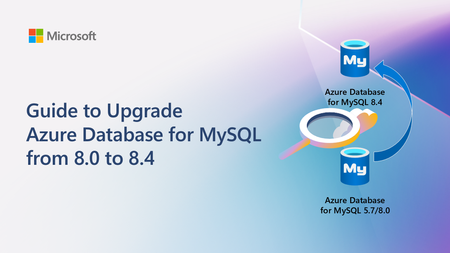
Guide to Upgrade Azure Database for MySQL from 8.0 to 8.4
A practical, end‑to‑end guide for safely upgrading Azure Database for MySQL to 8.4 LTS, covering prerequisites, breaking changes, upgrade paths, downtime considerations, and rollback strategies based on real‑world experience.4.6KViews2likes0CommentsPostgreSQL 18 is now GA on Azure Database for PostgreSQL
PostgreSQL 18 is now GA on Azure Database for PostgreSQL Excited to announce that Flexible Server now offers full general availability of #PostgreSQL18 - the fastest GA we’ve ever shipped after community release. This means: 𝘸𝘰𝘳𝘭𝘥𝘸𝘪𝘥𝘦 𝘳𝘦𝘨𝘪𝘰𝘯 𝘴𝘶𝘱𝘱𝘰𝘳𝘵, 𝘪𝘯-𝘱𝘭𝘢𝘤𝘦 𝘮𝘢𝘫𝘰𝘳-𝘷𝘦𝘳𝘴𝘪𝘰𝘯 𝘶𝘱𝘨𝘳𝘢𝘥𝘦𝘴 (𝘗𝘎11-𝘗𝘎17 → 𝘗𝘎18), 𝘔𝘪𝘤𝘳𝘰𝘴𝘰𝘧𝘵 𝘌𝘯𝘵𝘳𝘢 𝘐𝘋 𝘢𝘶𝘵𝘩𝘦𝘯𝘵𝘪𝘤𝘢𝘵𝘪𝘰𝘯, and 𝘘𝘶𝘦𝘳𝘺 𝘚𝘵𝘰𝘳𝘦 𝘸𝘪𝘵𝘩 𝘐𝘯𝘥𝘦𝘹 𝘛𝘶𝘯𝘪𝘯𝘨. Check out the full blog for a deep dive 👉https://techcommunity.microsoft.com/blog/adforpostgresql/postgresql-18-now-ga-on-azure-postgres-flexible-server/4469802 #Microsoft #Azure #Cloud #Database #Postgres #PG18Ignite 2025: Advancing Azure Database for MySQL with Powerful New Capabilities
At Ignite 2025, we’re introducing a wave of powerful new capabilities for Azure Database for MySQL, designed to help organizations modernize, scale, and innovate faster than ever before. From enhanced high availability and seamless serverless integrations to AI-powered insights and greater flexibility for developers, these advancements reflect our commitment to delivering a resilient, intelligent data platform. Join us as we unveil what’s next for MySQL on Azure - and discover how industry leaders are already building the future with confidence. Enhanced Failover Performance with Dedicated SLB for High-Availability Servers We’re excited to announce the General Availability of Dedicated Standard Load Balancer (SLB) for HA-enabled servers in Azure Database for MySQL. This enhancement introduces a dedicated SLB to High Availability configurations for servers created with public access or private link. By managing the MySQL data traffic path, SLB eliminates the need for DNS updates during failover, significantly reducing failover time. Previously, failover relied on DNS changes, which caused delays due to DNS TTL (30 seconds) and client-side DNS caching. What’s new with GA: The FQDN consistently resolves to the SLB IP address before and after failover. Load-balancing rules automatically route traffic to the active node. Removes DNS cache dependency, delivering faster failovers. Note: This feature is not supported for servers using private access with VNet integration. Learn more Build serverless, event-driven apps at scale – now GA with Trigger Bindings for Azure Functions We’re excited to announce the General Availability of Azure Database for MySQL Trigger bindings for Azure Functions, completing the full suite of Input, Output, and Trigger capabilities. This feature lets you build real-time, event-driven applications by automatically invoking Azure Functions when MySQL table rows are created or updated - eliminating custom polling and boilerplate code. With native support across multiple languages, developers can now deliver responsive, serverless solutions that scale effortlessly and accelerate innovation. Learn more Enable AI agents to query Azure Database for MySQL using Azure MCP Server We’re excited to announce that Azure MCP Server now supports Azure Database for MySQL, enabling AI agents to query and manage MySQL data using natural language through the open Model Context Protocol (MCP). Instead of writing SQL, you can simply ask questions like “Show the number of new users signed up in the last week in appdb.users grouped by day.”, all secured with Microsoft Entra authentication for enterprise-grade security. This integration delivers a unified, secure interface for building intelligent, context-aware workflows across Azure services - accelerating insights and automation. Learn more Greater networking flexibility with Custom Port Support Custom port support for Azure Database for MySQL is now generally available, giving organizations the flexibility to configure a custom port (between 25001 and 26000) during new server creation. This enhancement streamlines integration with legacy applications, supports strict network security policies, and helps avoid port conflicts in complex environments. Supported across all network configurations - including public access, private access, and Private Link - custom port provisioning ensures every new MySQL server can be tailored to your needs. The managed experience remains seamless, with all administrative capabilities and integrations working as before. Learn more Streamline migrations and compatibility with Lower Case Table Names support Azure Database for MySQL now supports configuring lower_case_table_names server parameter during initial server creation for MySQL 8.0 and above, ensuring seamless alignment with your organization’s naming conventions. This setting is automatically inherited for restores and replicas, and cannot be modified. Key Benefits: Simplifies migrations by aligning naming conventions and reducing complexity. Enhances compatibility with legacy systems that depend on case-insensitive table names. Minimizes support dependency, enabling faster and smoother onboarding. Learn more Unlock New Capabilities with Private Preview Features at Ignite 2025 We’re excited to announce that you can now explore two powerful capabilities in early access - Reader Endpoint for seamless read scaling and Server Rename for greater flexibility in server management. Scale reads effortlessly with Reader Endpoint (Private Preview) We’re excited to announce that the Reader Endpoint feature for Azure Database for MySQL is now ready for private preview. Reader Endpoint provides a dedicated read-only endpoint for read replicas, enabling automatic connection-based load balancing of read-only traffic across multiple replicas. This simplifies application architecture by offering a single endpoint for read operations, improving scalability and fault tolerance. Azure Database for MySQL supports up to 10 read replicas per primary server. By routing read-only traffic through the reader endpoint, application teams can efficiently manage connections and optimize performance without handling individual replica endpoints. Reader endpoints continuously monitor the health of replicas and automatically exclude any replica that exceeds the configured replication lag threshold or becomes unavailable. To enroll in the preview, please submit your details using this form. Limitations During Private Preview: Only performance-based routing is supported in this preview. Certain settings such as routing method and the option to attach new replicas to the reader endpoint can only be configured at creation time. Only one reader endpoint can be created per replica group. Including the primary server as a fallback for read traffic when no replicas are available is not supported in this preview. Get flexibility in server management with Server Rename (Private Preview) We’re excited to announce the Private Preview of Server Rename for Azure Database for MySQL. This feature lets you update the name of an existing MySQL server without recreating it, migrating data, or disrupting applications - making it easier to adopt clear, consistent naming. It provides a near zero-downtime path to a new hostname of the server. To enroll in the preview, please submit your details using this form. Limitations During Private Preview: Primary server with read replicas: Renaming a primary server that has read replicas keeps replication healthy. However, the SHOW SLAVE STATUS output on the replicas will still display the old primary server's name. This is a display inconsistency only and does not affect replication. Renaming is currently unsupported for servers using Customer Managed Key (CMK) encryption or Microsoft Entra Authentication (Entra Id). Real-World Success: Azure Database for MySQL Powers Resilient Applications at Scale Factorial Factorial, a leading HR software provider, uses Azure Database for MySQL alongside Azure Kubernetes Service to deliver secure, scalable HR solutions for thousands of businesses worldwide. By leveraging Azure Database for MySQL’s reliability and seamless integration with cloud-native technologies, Factorial ensures high availability and rapid innovation for its customers. Learn more YES (Youth Employment Service) South Africa’s largest youth employment initiative, YES, operates at national scale by leveraging Azure Database for MySQL to deliver a resilient, centralized platform for real-time job matching, learning management, and career services - connecting thousands of young people and employers, and helping nearly 45 percent of participants secure permanent roles within six months. Learn more Nasdaq At Ignite 2025, Nasdaq will showcase how it uses Azure Database for MySQL - alongside Azure Database for PostgreSQL and other Azure products - to power a secure, resilient architecture that safeguards confidential data while unlocking new agentic AI capabilities. Learn more These examples demonstrate that Azure Database for MySQL is trusted by industry leaders to build resilient, scalable applications - empowering organizations to innovate and grow with confidence. We Value Your Feedback Azure Database for MySQL is built for scale, resilience, and performance - ready to support your most demanding workloads. With every update, we’re focused on simplifying development, migration, and management so you can build with confidence. Explore the latest features and enhancements to see how Azure Database for MySQL meets your data needs today and in the future. We welcome your feedback and invite you to share your experiences or suggestions at AskAzureDBforMySQL@service.microsoft.com Stay up to date by visiting What's new in Azure Database for MySQL, and follow us on YouTube | LinkedIn | X for ongoing updates. Thank you for choosing Azure Database for MySQL!751Views2likes0CommentsCustom Port Support in Azure Database for MySQL – Flexible Server is Now Generally Available
We are excited to announce that custom port support for Azure Database for MySQL – Flexible Server is now generally available (GA). This long-requested feature gives you greater flexibility to align MySQL server deployments with your network and security requirements. By default, MySQL uses TCP port 3306; with this GA release, you can configure a custom port (between 25001 and 26000) when creating a new Azure Database for MySQL flexible server. This enables easier integration with legacy applications, helps comply with strict network security policies, and avoids port conflicts in complex environments. What’s new in GA (vs. Public Preview): In the Public Preview (July 2025), custom ports were only supported for VNet-injected (private access) servers, with no support for public access or Private Link connectivity. Now, with GA, you can create custom-port servers in any network configuration – including both publicly accessible servers and those using Private Link (private endpoint) connectivity. In short, all new MySQL flexible servers can be created with a custom port, whether they are configured for public network access or deployed into a private virtual network. Feature Highlights Custom Port Range: Choose a port between 25001 and 26000 during server provisioning. (Only one custom port is supported per server.) This is in addition to the default MySQL port 3306, which remains available for use if needed. Supported Scenarios: Custom ports are fully supported for new server creation, point-in-time restore (including cross-port restores), read replica setup, and High Availability (HA) deployments. You can perform a restore or set up a replica even if the source and target servers use different ports, and you can enable HA on a server configured with a non-default port. Networking Flexibility: Supported on both public access and private access configurations. You can create servers with a custom port in public access mode (accessible via the internet with firewall rules) or in private access mode (injected into a VNet). Azure Private Link is also supported – meaning you can connect via a private endpoint to a MySQL server running on a custom port. This enhancement broadens the feature’s applicability beyond the preview’s limited scope, allowing usage in all network scenarios. Managed Experience: The custom port feature is built into the managed service experience. Aside from specifying a different port number for client connections, there is no change in how you manage or operate the MySQL flexible server – all administrative capabilities and integrations (backup, monitoring, etc.) work as they do with the default port. Current Limitations Be aware of a couple of limitations at GA: Port Immutable After Creation: You cannot change the server’s port after the server is created. If you need to use a different port, you will have to create a new server with that port. As a workaround, you can use Point-in-Time Restore (PITR) to quickly clone your database into a new server with the desired port (since cross-port restores are supported), rather than performing a full manual migration. Geo-Replication/Geo-Restore: Cross-region operations like geo-restore and geo-replication are not yet supported for servers using a custom port. In other words, you cannot perform a geo-restore of a backup from a custom-port server, and you cannot create cross-region read replicas on custom port servers at this time. These capabilities are on the roadmap but remain unsupported in the current release. Why Custom Ports? Many enterprise developers and DBAs have asked for custom port support to accommodate specialized network scenarios. For example, some organizations enforce strict firewall rules or use non-standard ports for databases to meet internal security compliance requirements. Others may have legacy applications or multi-database setups that require MySQL to run on a port other than 3306 to avoid conflicts. The custom port feature addresses these needs by allowing you to select a non-default port during server creation, while Azure continues to handle all the usual PaaS management tasks. In short, you get the flexibility of a custom network configuration without losing the benefits of a fully managed database service. Getting Started Using a custom port is straightforward. At GA, the Azure portal’s create experience is the way to set a custom port (support in CLI/PowerShell/ARM will come later). In the portal, when you create a new Azure Database for MySQL – Flexible Server, you’ll find an option to specify the “Database port.” Provide any value between 25001 and 26000 as the port number for your server. Once the server is deployed, client applications should connect using the <servername>.mysql.database.azure.com hostname and the port you chose, instead of the default 3306. All other connection settings (such as SSL enforcement and credentials) remain the same. Make sure to configure network access rules to allow traffic on your chosen port. For public access servers, this means updating the firewall rules or network security groups to permit the custom port. For private access or Private Link setups, ensure that your networking (NSGs, on-premises firewall rules, etc.) permits traffic on the custom port to reach the database. Learn More Custom port support is now GA and ready for production use, so we encourage you to try it out if your environment can benefit from it. For more details on Azure Database for MySQL – Flexible Server connectivity and custom ports, refer to the official documentation: Networking Overview - Azure Database for MySQL | Microsoft Learn We look forward to seeing how you use this new capability to tailor your MySQL deployments. With custom port support now generally available, Azure Database for MySQL – Flexible Server offers even more flexibility to meet your organizational policies and integration needs, all while delivering a fully managed experience. Happy deploying!415Views0likes0CommentsSeptember 2025 Recap: Azure Database for MySQL
Join us live on our YouTube channel on October 15, 2025 for an exclusive webinar where we’ll dive deeper into the latest Azure Database for MySQL updates and answer your questions! Watch it live here. Support for In-Place Major Version Upgrade from 8.0 to 8.4 We previously announced that Azure Database for MySQL version 8.4 is now generally available. We’re now happy to share that in-place major version upgrade is supported for MySQL servers from 8.0 to 8.4. If you’re currently on MySQL 5.7, you’ll first need to perform an in-place upgrade from 5.7 to 8.0, and then upgrade from 8.0 to 8.4. Learn more. Near-Zero-Downtime Maintenance - General Availability You can now take advantage of near-zero-downtime maintenance for Azure Database for MySQL with high availability (HA) enabled. This capability is now generally available and is supported by our new HA architecture based on a dedicated Azure Standard Load Balancer design. Thanks to the dedicated Standard Load Balancer design, maintenance is now faster and no longer impacted by client-side DNS caching, which previously caused brief connection drops in some scenarios. This enhancement ensures that your mission-critical workloads remain continuously available, even during infrastructure updates, helping you meet strict uptime requirements and maintain operational continuity. Learn more. We would love your feedback We look forward to your feedback as you explore these enhancements and continue building with Azure Database for MySQL. If you have any suggestions or queries about our service, please let us know by emailing us at AskAzureDBforMySQL@service.microsoft.com. To learn more about what's new with Flexible Server, see What's new in Azure Database for MySQL - Flexible Server. Stay tuned for more updates and announcements by following us on social media: YouTube | LinkedIn | X. Thanks for being part of our community!331Views0likes0Comments