feedback
129 TopicsAdd a Blur tool to the Snip & Sketch
There are many times when we need to take a screenshot and show it to someone but it contains other info, sensitive or personal, so we have to draw on them with colors and it makes it look ugly. please add a blur tool so we can be able to blur those details. also be able to change the thickness of blur tool. Please Upvote this feedback on Feedback hub app: https://aka.ms/AA6zag932KViews29likes9CommentsI want to be able to group app icons on Start menu - Windows 11
for example I want to put PWAs icons in one group, put Photo related app/software icons in another group and so on. Ideally I want to do this by dragging an icon on start menu and dropping it on another icon to form a group - Windows 11 insider Upvote in feedback hub: https://aka.ms/AAdps2r28KViews27likes22CommentsAllow Call feature on Your Phone app to work WITHOUT Bluetooth. use it over INTERNET or WIFI
Allow Call feature on Your Phone app to work WITHOUT Bluetooth. use it over INTERNET or WIFI my PC has no Bluetooth, majority of PCs don't, only laptops have it. it shouldn't be necessary to use Bluetooth to use call functionality in the Your Phone app. please let us answer or initiate calls over Internet/4G/WiFi/Local network. Thank you. Please Upvote this feedback if you want the same: https://aka.ms/AA863fj10KViews6likes0CommentsAdd option to disable Night Light when Gaming Automatically
I use night light every night but I want it to automatically disable when I launch games (in full screen) and then re-enable when I exit the game. it doesn't look good in games when night light is on so it'd be great if it automatically turned itself off in games. Please Upvote this in Feedback hub: https://aka.ms/AAcg5396.2KViews5likes3CommentsPhotos app needs to support and play APNG image file format
Currently when you open an Animated PNG file with Photos app, you see a still image, it has no animation. opening the same image in a browser shows the animation. Photos app needs to be able to fully support APNG image files and show their animation. Please upvote this feedback in feedback hub: https://aka.ms/AAaxyb07KViews5likes9Comments
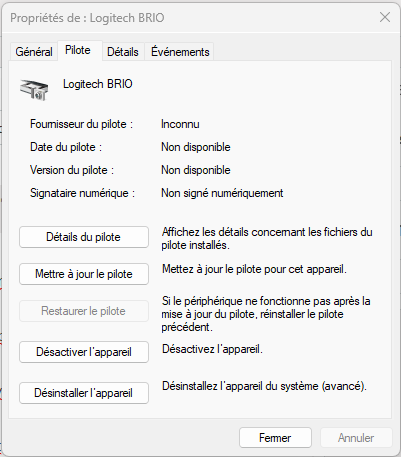
Logitech Brio stop working after windows 11 build 22581 update (Beta channel)
Hello, I've just installed Windows 11 build 22581 from the Windows Insider Beta channel last night. Since then, my Logitech Brio camera stop working. My Logitech Brio was configured on my computer for Windows Hello facial authentication, so I'm sure it was working just fine before the update since I use it each time I'm logging in. I've tested the camera on antoher compter, it works fine. I've updated the camera to the latest firmware on this other computer just in case, but it doesn't help. Back on my main computer, the camera still appears in the Device Manager, but the device is not accessible from apps like the Camera app. I've tried the uninstall the device, then perform a scan to add it back in. The device is added but is not working... When I try the "Restore driver" option, it says that "the driver is not build for this plateform" Finally, I've tried to switch from the Beta to the Dev channel, just in case a fix was already available. But this seems not to be the case. So here I am Thanks in advance for you help.46KViews4likes33CommentsBring back the ability to hold Shift + click on pinned icons on Taskbar to open multiple instances
Bring back the ability to hold Shift + click on pinned icons on Taskbar to open multiple instances of the app Windows 10 has this useful feature but it's missing in Windows 11, where you could hold Shift and then click (left-click) on a pinned app icon on taskbar that is already open, in order to open another instance of the app. for example the file explorer, browser, media player, text editor, calculator and so on. Upvote in feedback hub: https://aka.ms/AAdps2n3.3KViews4likes1CommentShow available digital licenses in our Microsoft account in Windows 10 settings, activation
There needs to be a way to view available digital licenses inside our Microsoft account, I think in Windows settings => update and security => Activation would be the most suitable place. it has benefits, the most important one is so user can see their available licenses in their Microsoft account and make a wise decision based on that info. please upvote this feedback in feedback hub: https://aka.ms/AAbdhft50KViews4likes2Comments
General Improvements to Windows and Apps
I’ve been thinking about how Windows could improve, especially around Fluent Design. I wrote down six ideas that I’d love to hear opinions on. I will be sharing them here to see what you all think: 1: Two branches for Windows and content updates; Trying to please everyone with a single version of Windows is difficult, so Microsoft could maintain two official branches of the system: a “Vintage Windows” (like Windows 10), for those who prefer the classic interface and a more traditional look, with extended support indefinitely. And a “Modern Windows” (Windows 11), consistent with Fluent Design, constantly updated, and focused on introducing new features. Both would use the same kernel and APIs for developer compatibility. This approach would offer users greater freedom of choice and demonstrate that a trillion-dollar company is dedicating teams to simultaneously deliver traditional features and modernity. I’ve seen many people complain about the lack of consistency and lack of content. Additionally, I miss feature updates for Windows and hope that Microsoft brings more flexibility, apps, and Fluent 2-style fixes in future updates. And, yes, this would increase the efforts and costs, but it's a cost that a trillionary company could take. 2: Modern Flyouts and Windows volume limits; In Windows 11, the multimedia controls displayed by apps like Fluent Flyouts are very limited; they only allow you to pause or skip tracks, with no option to adjust the volume or use repeat or shuffle buttons. This makes the experience less convenient compared to Android, where users can control the app’s volume or the music’s volume separately, and the operating system allows third-party apps to do so. My suggestion is that Microsoft should be more flexible and give apps like Modern Flyout the ability to adjust the volume, so you could turn the music up or down without affecting the overall system volume. Honestly, it’s surprising that something as basic as this hasn’t been implemented yet in the most widely used operating system. 3: Lack of flexibility in the Windows 11 search bar; It’s unbelievable that even in Windows 11, the system still limits users and developers to a rigid and impractical search bar. Apps like Fluent Search, Flow Search, and Everything Toolbar are much faster and more powerful, but they’re confined to taskbar icons or floating search bars, while the native search bar takes up space without offering the same efficiency. Microsoft needs to be more flexible and release an API that allows third-party apps to appear as a search bar directly on the taskbar. This isn’t a complex feature; it’s something simple and obvious that should already exist. If the official search bar itself isn’t improved, the least they could do is give other apps the freedom to offer a superior experience. It’s frustrating to see Windows remain limited in such basic aspects, while other systems offer more modern and practical solutions. Microsoft needs to listen to users and stop holding Windows back with an outdated model. 4: Windows Task Scheduler and other menus and tools need to be updated The native Windows Task Scheduler is completely outdated and inconsistent with the Fluent 2 style. Independent projects like the Fluent Task Scheduler show that it’s possible to have a modern, organized, and much more user-friendly interface. It’s frustrating that these apps have to coexist with outdated system tools, without being able to replace them or integrate with the system. Microsoft, as a trillion-dollar company, should invest in modernizing its own utilities or hire independent developers who have already proven capable of creating superior solutions, such as the Fluent Task Scheduler. The lack of visual and functional consistency in Windows is glaring and needs to be addressed 5: Lack of flexibility in naming user folders Compared to the Android system; Windows is very inflexible and lacks practicality in many ways. Here’s one example: C:\Users\eagl<- Here for example, I can’t correct my name—which would simply involve adding an “e”—; I have to create an entirely new account and move all my files to that account because of a typo. This should be a basic and simple fix. On Android, I was already so used to the system’s practicality that when I switched to Windows—which was supposed to be a more robust and powerful system—I was surprised to find it lacks even such a basic feature. 6: Differences in user experience between home and business users, and inconsistencies in Fluent 2; Microsoft seems to be focusing more and more on businesses, consistently applying Fluent 2 to apps like Teams, Outlook, and Office, while everyday users are left with a Windows full of outdated and inconsistent menus. This contradicts the marketing that promotes Fluent 2 as the standard, yet is frequently violated by the official apps themselves. It’s frustrating to see that Microsoft can’t deliver on its promises. If it really wants to preserve old elements for the sake of businesses, then it should separate the systems: a legacy one for compatibility and a modern one for home users. Or, at the very least, adhere to the Fluent 2 style across all of Windows. I love Fluent 2 and really want to see significant progress in this area, but seeing that Microsoft itself hasn’t made much effort in this regard has been a disappointment. The trillion-dollar company that talks so much about innovation shouldn’t be delivering a fragmented and outdated system. 7: Digital Wellness and productivity; Microsoft should make a native app with fluent style to help users watch their screen/app time. In 2026 there haven't any app that's free, solid and that feels native in Windows 11, because there aren't any API for that. Apps like Activity Watch for some reason don't work in my PC and apps like SolidTime are paid and not really fluent. Naturally, something like this should be made by Microsoft itself. Android has it since the beginning, why Windows doesn't have it yet?424Views3likes4Comments