features
79 TopicsSS48: don't remove MacOS Mojave support on Edge, even if Google now announced to us that they will
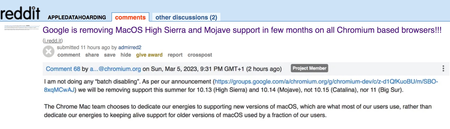
Suggestion (SS): 48 Classification: Browser Compatibility PRIORITY IN MY OPINION: 10 on a scale from 1 (low) to 10 (high) Few hours ago Senior Dev reported us the no interest of keeping MacOS Mojave support on Chrome. In 2 years they are removing the 2 best MacOS ever released, before Apple started to downgrade features in MacOS (and obviously adding some other too), especially related to all backup workflows, that now are more complex, but even to permissions and multiple other things. We reported the new downgrade for external drives implemented in MacOS 12/13 https://old.reddit.com/r/appledatahoarding/comments/11ikj38/next_macos_downgrade_available_with_monterey/, but this is not the point now. We explained already https://bugs.chromium.org/p/chromium/issues/detail?id=1413784&q=sierra%20chrome&can=1 why they should keep support for such MacOS, and later again https://bugs.chromium.org/p/chromium/issues/detail?id=1322548#c68 Now the point is: we are trying our best to revert such decision, like we wrote https://old.reddit.com/r/appledatahoarding/comments/11jufgo/google_chrome_support_will_end_in_few_months_for/, but it's important that other chromium based devs know about such problematic and evaluate to continue support, if this is technically possible. Remember that MacOS 10.14 is not like all other MacOS released by Apple, so removing such MacOS is not like removing Catalina, High Sierra etc. If there are question why MacOS Mojave support is so important, just write directly to us. We already experienced the direct consequence of removing MacOS on Chromium on all browsers and apps few months ago with Sierra. Please keep in mind that this is not just related to Chrome, but even Chromium based browsers, Mac Apps using Electron, and all other Mac Apps too (because if one is starting to remove support, especially big brands, the other will follow much easier*). So be open with your mind and don't write "i'm not using Chrome or Mojave, doesn't matter for me". There is the possibility that Google maybe know about some changes with Xcode, like we wrote https://old.reddit.com/r/appledatahoarding/comments/11jho7y/meanwhile_the_batch_deletion_of_other_2_macos_by/ but probably is not the case. If this is true, then the situation would be much worse, if now Apple really decides to remove multiple MacOS, like we previously reported with out https://old.reddit.com/r/appledatahoarding/comments/114o7zt/remember_2023_will_be_the_most_crucial_year_of/ *Keep in mind that almost 70%+ of all browsers available for MacOS (80+) are Chromium based. ------------ In case you will not doing that and Google will not keep support for Mojave, please provide directly link to download a browser version compatible with up to MacOS Sierra and one up to MacOS Mojave, instead of just download last version. Avoid auto update of the app too. So don't install new incompatible app automatically, which make no sense at all.2.2KViews0likes0CommentsPicture in Picture settings options missing in Edge
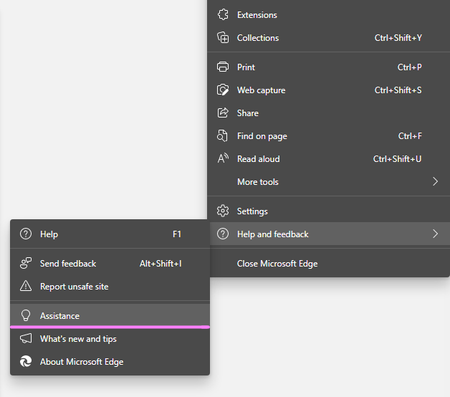
Hello, I would like to permanently disable the picture in picture feature for Edge Chromium. I have the most recent update - Version 94.0.992.50 (Official build) (64-bit) and I have searched for instructions but they all say Cookies & Site Permissions and toggle off the picture in picture option but there is no listing for picture in picture. I have also tried searching the settings for picture in picture and the search results come up with zero results. This feature while pleasant and maybe useful to others is annoying to me and I would like to permanently disable it but cannot find the settings to do so. Can anyone please help? Sincerely, Wonder Woman3.2KViews0likes1CommentEdge-to-edge concept for New Edge Canary for Android
I'd like to give a suggestion too: please, set the nav bar as transparent, using the Edge-to-edge concept from Android 10, like you guys already does on iOS (here: codelabs.developers.google.com/codelabs/gesture-navigation#3 , here http://www.youtube.com/watch?v=Nf-fP2u9vjI, and here developer.android.com/training/gestures/gesturenav?hl=pt-br ) Look how this bar is ugly, makes the screen smaller and pollutes the screen as well... Look how it's very better, like the Edge works on iOS and how it should be on Android as well. The little home bar change its color depending from the background. This division of the interface is also ugly. Another suggestion that I'd like to see in the future is the "force dark mode" in sites that don't have support to the changing color API. Various browsers already have it. And, congratulations! The new Edge for Android is incredible 😄 you've gone a good job.874Views1like0CommentsMicrosoft Edge Kids! - Kids mode added to Edge - What an Amazing feature! (●'◡'●)
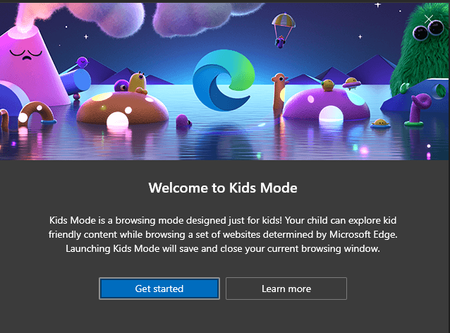
Microsoft Edge version 90.0.800.0 (Official build) canary (64-bit) introducing Kids mode which can be accessed from the browser settings: edge://settings/family you can learn all about it here in this official page a brief description: Kids Mode is a convenient browsing mode inside Microsoft Edge that’s designed for kids. With its kid-friendly features and safety guardrails in place, Kids Mode is a great place for children to safely explore the web. Kids Mode includes features like custom browser themes, kid-friendly content, browsing based on an allow list, Bing SafeSearch set to strict, and a password requirement to exit. Also, Kids Mode doesn't require a child account or profile. Currently, Kids Mode is limited to US English on Windows and MacOS. Kids mode is full screen mode, in order to exit it, kids need to have Windows Pin or Password and you can see, all the appropriate content and links are added to the home page ^^ Bonus content:6.4KViews5likes19Comments
How do I disable the Tabs in Taskbar function
After some searching for a solution, it seems I'm unlike most and I prefer to have only the active tab show in the task switcher. Having all my open, active tabs makes it much more difficult to find the app I need. For tabs that I switch to often, I simply turn them into apps. I disliked this feature so much I turned it off in IE, too. I don't see an issue with the feature, but it would be nice if when new features are added, there's a way to turn them off. I've already checked the flags page and it's not in there. It seems baked in, which is... weird. Anyway, if anyone has any suggestions, I'd love to hear them.Solved12KViews0likes4CommentsI just want to tell you that i suggested other 50-100 improvements to Edge Devs in the last time
I don't share such things here, because there are a lot of personal information that i don't want to share with the public, maybe soon i will make a summary of the most important points, if you wish that. Or just wait, until Edge implement it. Then you will see it xD Example of topics: bookmarks, search bar, toolbar, settings, edge in small size, using edge with low resolution display setting, smart search, other smart buttons (i already talked about some previously), better tab management, better domain based features, etc. I submitted different problems that i discovered too. So be ready to see another boost for edge. For different suggestions devs are already on working. Good day Ciao1.5KViews1like3CommentsSS47: resize toolbar / search bar
Suggestion (SS): 47 Classification: TOOLBAR PRIORITY IN MY OPINION: 2-3 on a scale from 1 (low) to 10 (high) If we want to move it to the left is not possible (if we don't have 40 extensions for example). instead you should show me in such way where the extension is visible more to the left and after that i see a white space.3.2KViews0likes7CommentsSS46: Hey Edge - voice control
Suggestion (SS): 46 Classification: VOICE CONTROL PRIORITY IN MY OPINION: 2-3 on a scale from 1 (low) to 10 (high) Bing already has some integration of voice control, Firefox too. Now i think it's time for Hey Edge function. Examples of tasks Hey Edge should be able to do: -Hey Edge, move tabs to the right to another window, hide it in macos, save PDF and add all links to bookmark folder IMPORT for all tabs in this new window; once done close the window. - Hey Edge, reload all techcommunity.microsoft - Hey Edge, change to Bing as default - Hey Edge, mute all - Hey Edge, volume 50% - Hey Edge, go to minute 3.45 - Hey Edge, loop mode - Hey Edge, loop from x to y - Hey Edge, set download path to configuration 1 - Hey Edge, search this with %s1 %s2 ... at the same time - Hey Edge, open %s settings - Hey Edge, add this search to %s and use abbreviation <ed - Hey Edge, duplicate 5 tabs from this - Hey Edge, change my profile image now - Hey Edge, launch xxx (an extension) - Hey Edge, quit Edge in 10 minutes - Hey Edge, open random website from folder XXX - Hey Edge, disable all extensions for 5 seconds. - Hey Edge, random open my most visited youtube links - Hey Edge, write new instagram post (by opening a 3. app for posting) - Hey Edge, activate all disabled extensions. - Hey Edge, reopen last closed session - Hey Edge, reopen last 7 tabs - Hey Edge, move tab to first - Hey Edge, color tab to red - Hey Edge, go back to the source (example when you open webpage a then b ... to z, go back to a) - Hey Edge, pipmode - Hey Edge, go to next video - Hey Edge, save to collections (last used) - Hey Edge, close tabs to left - Hey Edge, merge windows - Hey Edge, quit - Hey Edge, open flags - Hey Edge, activate flag xx - Hey Edge, restart - Hey Edge, share this page to xxx - Hey Edge, new mail to xxx - Hey Edge, install xxx - Hey Edge, create new profile for account mailto:a@a.com - Hey Edge, delete this profile - Hey Edge, activate vpn now (once integrated) - Hey Edge, change background new tab pictures from onedrive folder AA to BB - Hey Edge, open all links inside folder XXX - Hey Edge, download all images that i click in the future, stop it once i say stop - Hey Edge, launch beta profile xxx - Hey Edge, show me when i visited this page in the past - Hey Edge, add this page to bookmarks (using recent folder) as shortcut <emis - Hey Edge open 6x incognito pages with url http://www.... - Hey Edge, ban all selected email from outlook - Hey Edge, start new chat support session - Hey Edge, new feedback - Hey Edge, share this file (in onedrive = this mean you copy directly the url) - Hey Edge, save all picture to onedrive - Hey Edge, open word - Hey Edge, find similar websites - Hey Edge, show me my IP - Hey Edge, export this image as png - Hey Edge, save this files to xxx and rename it as yyy - Hey Edge, open Missy Edge profile - Hey Edge, run workspace 4 now - Hey Edge, run highlight mode now (once integrated) - Hey Edge, save next selected texts to collections - Hey Edge, search hello in youtube as playlist - Hey Edge, disable notifications from all future visited pages - Hey Edge, activate flash always - Hey Edge, open all selected urls in edge dev profile 3 (if we use canary for example) - Hey Edge, copy all urls from tabs - Hey Edge, add selected tabs to my vertical favorite tabs (once integrated) - Hey Edge, open with profile 2 .... (once container is integrated) - Hey Edge, download all images from tabs - Hey Edge, create merge all tab groups and move to new window by hiding it in macos - Hey Edge, download all files in this website with torrent (once integrated) - Hey Edge, open in tabs selected links - Hey Edge, export bookmarks every 5 minutes to my mac - Hey Edge, reverse search this image - Hey Edge, show me social accounts of this person (from a video/photo) - Hey Edge, create new outlook alias mailto:b@.... - Hey Edge, change outlook recovery email to .... - Hey Edge, ban all social accounts for 4 hours - Hey Edge, add label xxx to this page (for history panel, once integrated) - Hey Edge export last 7 days of history to my desktop folder xxx - Hey Edge, activate kids mode - Hey Edge, create new rule for this email and use setting 1 (example forward to 3 emails ...) - etc. If we can run such multiple rules without Hey Edge would be cool too, so something in keyboard maestro style. Obviously first we need to support a better way to run such actions and similar actions without Hey Edge, but once this is done, different action can be implemented in Hey Edge too. Then it depends, sometimes is much faster to do manually instead of saying Hey Edge... (and maybe Hey Edge doesn't understand what we say too...., like Bing does) To be more faster instead of saying "Hey Edge, save pdf for all tabs to the right" or similar, we just say "Hey Edge, pdf right". The same for all other examples You can even integrate a smart Hey Edge, where i can combine my manual and Hey Edge actions. Example: i'm reading a pdf. at the same time i say "Hey Edge, pdf right once i say NOW". then i read pdf on tab 2, 3, 4, 5. Once done i say "NOW" and you export all pdf to the right (based on the tabs where i requested this rule). This means in the same time i can close and open new tabs, you do the action only once i say "NOW". Such "NOW" actions can be implemented in so many workflows and would be a great productivity boost.3.3KViews0likes4Comments