features
41 Topics
what happened to Notebook mode in Copilot (formerly Bing Chat Enterprise)
Looks like in the latest updates for Bing Chat Enterprise, the Notebook mode that allowed longer prompt sizes got deprecated. How can we realize the same Notebook functionality within the MSFT AI offering? Specifically, longer context window and prompt size offered by the Notebook mode in one shot mode. If I am not wrong, the Notebook mode also had the ability to generate a longer output with more words than the limitation within chatbot mode.
Issues while trying to build a graph connector to Azure SQL in M365 copilot
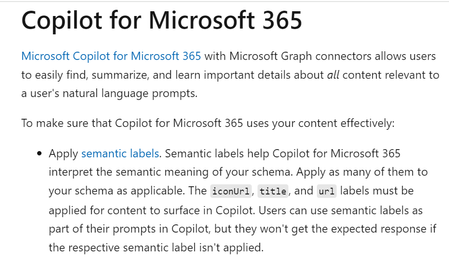
Dear All, I tried to create a Graph Connector to Azure SQL. I wanted to ingest data from Azure SQL and ask questions about it within Copilot for Microsoft 365. The graph connector was created in this Microsoft 365 Admin Centre within the 'Data sources' section in 'Search and Intelligence' menu: https://admin.microsoft.com/#/homepage The Microsoft documentation (https://learn.microsoft.com/en-us/graph/connecting-external-content-experiences#copilot-for-microsoft-365) screenshot below states that in order for the information to surface in Copilot for Microsoft 365, the fields "title," "url," and "iconUrl" need to be filled out during the configuration process. However, during the configuration process, I noticed that the 'iconUrl' field is greyed out. Hence, I am not able surface data from Azure SQL in Copilot for Microsoft 365. On the other hand, Microsoft Search and Sharepoint both displayed the Azure SQL data as I proceeded to configure the connector anyway. Is there any workaround for this? Are there any alternative approaches that I can take to surface the data in Copilot chat? Would appreciate any help regarding the same.Add a Usage Dashboard for Copilot Task Tokens and AI Limits
Microsoft Copilot currently provides no way for users to monitor how many task tokens or scheduled task runs they have consumed, nor how many remain within their monthly allotment. This is a significant gap in the product experience and runs counter to the principles of responsible, transparent AI use. Users who rely on Copilot Tasks for productivity workflows have no visibility into their consumption until they hit a limit, which can disrupt time-sensitive work without warning. This lack of transparency creates frustration and erodes trust in the product. From a digital citizenship standpoint, informed AI use requires that users understand what resources they are consuming. Just as responsible internet use involves awareness of data usage, storage limits, and privacy settings, responsible AI use should include clear, real-time visibility into AI resource consumption. Microsoft has publicly committed to principles of transparency and accountability in AI. A usage dashboard would be a direct, practical expression of those values. The requested feature would include a visible indicator within the Copilot interface showing current task token usage, remaining tokens for the billing or subscription period, a reset date for the monthly limit, and optionally, a usage history or trend view. Notifications or warnings when approaching the limit would further support informed decision-making. This is not simply a convenience feature. It is a baseline expectation for any platform that asks users to integrate AI into their daily workflows. Microsoft has an opportunity to set a strong industry standard here by making AI consumption as transparent and user-controlled as any other measurable resource in the Microsoft 365 ecosystem.
Multiple Copilot notebooks disappeared immediately after sync
Today, after a Copilot synchronisation event, multiple notebooks disappeared from my account. I observed the notebooks briefly appear on a second device (MacBook Air) and then disappear during synchronisation. One missing notebook is called VIT. Several other notebooks also disappeared at the same time. Chats associated with those notebooks are no longer visible in chat history. Other notebooks remain visible. One remaining notebook ("8 STEM") displays the message: "Limit reached: Copilot can chat about the 20 oldest items in your notebook." The timing strongly suggests a synchronisation or migration issue rather than accidental deletion. This content represents a substantial amount of teaching-related work and planning material. Can Microsoft confirm whether the missing notebook and chat data still exists on the backend and whether there is a way to force a resynchronisation? Additional observations: The notebooks existed prior to the sync. Notebooks were briefly visible, then disappeared. The issue occurs across multiple devices. Associated chats are also missing.Copilot Chat in Office Tools
Hit of the press! Copilot Chat will start to be published in the Office Apps. Copilot Chat will still have no access to Graph. admins can pin it for all users to have a nice experience. have a look on my announcement https://www.linkedin.com/posts/andre-thiemann-bb888646_microsoft365copilot-copilotchat-microsoft365-activity-7341100014070378498-xhxE?utm_source=share&utm_medium=member_ios&rcm=ACoAAAm9dzwB9gBW8cfBuj0IBk3MpR03ArNpnaY
Can't Access Copilot GPT Builder
Hi all, I have a Copilot for Microsoft 365 licence on my work account. Ever since the launch of GPT Builder I could not manage to find it. All the relevant documentation says it should be accessed through the GPT's menu, but there is no such menu on my screen: Has anyone else encountered this issue?
Copilot in Edge - Text Prompt Focus on Open (Suggestion)
Hello, I have been a Copilot user in Edge for a long time and I have encountered the same issue repeatedly. I decided to share it here in case there is a solution for it. Whenever I click on the Copilot icon in the upper right corner of Edge, I often start typing my query without noticing that the cursor is not active in the text box. Then I have to type everything again. Would it be possible to make the text box of the Copilot in Edge automatically focused after the panel opens? I think that would be a reasonable expectation for someone who opens the panel, as they probably want to type something.Solved