failover cluster
4 TopicsHyper-V replication
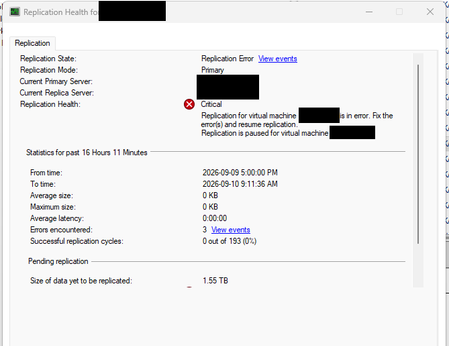
I have two Hyper-V failover clusters (primary and secondary) with replication enabled. I got a server replication error: But recently, the only way to fix it has been to remove the replication and enable it again. Is there another way to fix the Hyper-V replication?Solved175Views0likes2Comments
Windows Server 2025 Failover Cluster Live Migration Issue
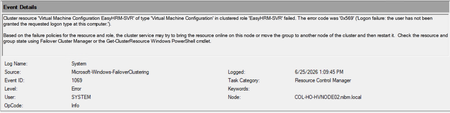
Hi Everyone, I am facing an issue in a Hyper-V Failover Cluster environment where Live Migration intermittently fails due to a service logon-related problem. The environment was previously working normally, but now whenever we attempt to Live Migrate a VM between cluster nodes, the migration fails unless we manually run “gpupdate /force” on the Hyper-V host first. After running gpupdate /force, the migration works temporarily, but the issue returns again during the next migration attempt. This makes it appear that some policy or permission is not being applied consistently on the cluster nodes. During troubleshooting, I attempted to add “NT VIRTUAL MACHINE\Virtual Machines” to the “Log on as a service” policy under Local Security Policy > Local Policies > User Rights Assignment. However, the account does not appear or resolve in the Object Picker when trying to add it manually. At this stage, I am trying to understand whether this is related to a domain GPO overwriting local policy settings, a Failover Cluster permission issue, or something specific to Hyper-V virtual machine accounts. Has anyone encountered a similar issue where Live Migration only works after running gpupdate /force? Also, is there a correct method to add “NT VIRTUAL MACHINE\Virtual Machines” to the “Log on as a service” policy, or should this permission already exist by default on Hyper-V hosts? Any guidance or recommendations would be greatly appreciated.333Views0likes1CommentStorage Replica on Failover Cluster as a means of storage replication on iSCSI
Hello, I have implemented a Failover Cluster / File Server (node1 and node2) on Server 2019 Datacenter. Shared storage is fulfilled by iSCSI (iSCSI1). Everything works well. Now, I have another iSCSI target on another physical storage system (iSCSI2) identical to iSCSI1. I want to enable SR so to replicate iSCSI1 with iSCSI2 so this happens through the Failover Cluster manager and it is the supported configuration for Stretched Clusters. My use case though is differnet. I only want to use the 2 nodes I have and I wish to use the Storage Replica as a means to make my two storage highly available. So if iSCSI1 goes down, FC will failover to isCSI2 storage. Is this a valid/supported scenario? Thank you1.4KViews0likes0Comments
windows 2016 failover 2 node cluster shared disk data issue
Description of the problem: Failover cluster in windows 2016 under simplivity has issue with the shared disk, for example anything written on "shared disk cluster" owned under node01 cannot be reflected on node02 while takenover by the node02. Engineer Response: " Looked into it thoroughly and tested all option to resolve the issue, looks to me now that HP cluster configuration itself have shared disk problem. HP need to see this issue, create any test file in cluster shared disk and write some files from node1 and then for test purpose node1 need to be switchover to node2 and see if the file written by node1 is visible through node2. "1.7KViews0likes1Comment