failover cluster
11 Topics
Hyper-V Ubuntu VM: Memory Demand Different at Hyper-V and OS Level
Hello all, Looking for advice and insight for a strange problem we are experiencing. We have a cluster of Windows Server 2025 hosts, on which we are using Hyper-V manager to run mostly Windows VMs. To access these VMs, we are using Apache Guacamole which is hosted on a Ubuntu VM on our cluster. We originally assigned 32GB memory to this VM. Recently, we have noticed an increased memory demand for this VM at the Hyper-V level which prompted us to increase the assigned memory of the VM to 64GB. Despite this, the memory demand has continued rising despite no apparent change in the usage of Guacamole. When logging into the VM and observing the memory usage here, the VM is using no where near the amount that is assigned. As shown in the attached images which were taken at the same time: Memory Demand Hyper-V Level (And seems to be continuing to increase...): Memory Demand OS Level: This morning, the memory demand spiked to 95GB on Hyper-V but at OS level was only 12GB and we were forced to restart the VM. The biggest concern is where this discrepancy is coming from and the potential unnecessary disruptions that will be caused from having to restart/rebuild the VM. Has anyone experienced this sort of issue before and found a fix? Can anyone suggest how to debug this issue? TIA69Views0likes1CommentHyper-V replication
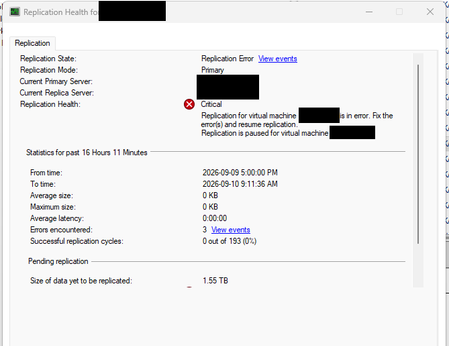
I have two Hyper-V failover clusters (primary and secondary) with replication enabled. I got a server replication error: But recently, the only way to fix it has been to remove the replication and enable it again. Is there another way to fix the Hyper-V replication?Solved286Views0likes2Comments
Windows Server 2025 Failover Cluster Live Migration Issue
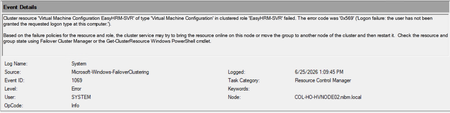
Hi Everyone, I am facing an issue in a Hyper-V Failover Cluster environment where Live Migration intermittently fails due to a service logon-related problem. The environment was previously working normally, but now whenever we attempt to Live Migrate a VM between cluster nodes, the migration fails unless we manually run “gpupdate /force” on the Hyper-V host first. After running gpupdate /force, the migration works temporarily, but the issue returns again during the next migration attempt. This makes it appear that some policy or permission is not being applied consistently on the cluster nodes. During troubleshooting, I attempted to add “NT VIRTUAL MACHINE\Virtual Machines” to the “Log on as a service” policy under Local Security Policy > Local Policies > User Rights Assignment. However, the account does not appear or resolve in the Object Picker when trying to add it manually. At this stage, I am trying to understand whether this is related to a domain GPO overwriting local policy settings, a Failover Cluster permission issue, or something specific to Hyper-V virtual machine accounts. Has anyone encountered a similar issue where Live Migration only works after running gpupdate /force? Also, is there a correct method to add “NT VIRTUAL MACHINE\Virtual Machines” to the “Log on as a service” policy, or should this permission already exist by default on Hyper-V hosts? Any guidance or recommendations would be greatly appreciated.448Views0likes1Comment
SQL Server AG Failover - Automatic Failover
Hello, I am looking for a straight and definitive answer that I was hoping someone could answer for me. I want to trust what Copilot says, but I really need to hear it from Microsoft and I can't find any documentation from Microsoft confirming my question. My Environment: 2 replicas in datacenter 1 1 replica in datacenter 2 All three (3) replicas are set to synchronous-commit mode with automatic failover. I tested the failover manually between all three (3) replicas without issue. When I test the automatic failover - I take down both replicas in datacenter 1 at the same time to simulate a datacenter outage. I look at the replica in datacenter 2 and it is just says (Resolving...) next to the replica name. The replica does not come online and the DB is not moved. When I was searching I couldn't find out why. So I turned to Copilot not solve the issue, but to see if it could point me in the right direction. I tell Copilot my setup and what happened. Copilot responded stating that by design from Microsoft you cannot have more than two (2) replicas set to synchronous-commit mode with automatic failover in a SQL Server AG instance. That if more than two (2) are set for automatic failover. The SQL Server AG will use the first two (2) replicas it sees in its metadata and ignore the rest. Copilot went into detail about why this is designed this way, but the amount of information would make this post longer than it already is. If this is true - then when I took down both replicas in datacenter 1, SQL Server AG only saw those two (2) replicas in datacenter 1 as the available replicas to use for an automatic failover and thus why the replica in datacenter 2 did not come online and the DB not being moved So let's do a test. I brought back up the two (2) replicas in datacenter 1. Then I made a change in the AG proprieties. I set the 2nd replica in datacenter 1 to manual. So 1 replica is set to automatic failover and 1 replica is set to manual failover in datacenter 1. The replica in datacenter 2 is set to automatic failover I then take down both replicas in datacenter 1 again to simulate the "outage" and the replica in datacenter 2 comes online and the DB is moved. So is Copilot right? Can there only be two (2) replicas allowed to have/use automatic failover? I cannot find a definitive answer confirming this. Or is my configuration wrong/missing something and if it is, could you please point me in the right direction on how to get this resolved?539Views0likes4Comments
SCCM / MEMCM support CAU "Cluster Aware Updating" Feature of Failover Cluster Feature
Please build a plugin for CAU Tool to work with SCCM Agent to install the updates from SCCM Agent UpdateDeploymentAgent. In the CAU Tool is only a WindowsUpdateAgent and Hotfix plugin, this plugins dont support SCCM. i need a solution to make CAU and SCCM work together.Solved4KViews0likes3Comments
Facing issue in forming failover cluster
Hello all, i am facing issue in forming failover cluster getting below error Beginning to configure the cluster hyperv-clr12. Initializing Cluster hyperv-clr12. Validating cluster state on node revmaxsr7.revmax.co.in. Find a suitable domain controller for node revmaxsr7.revmax.co.in. Searching the domain for computer object 'hyperv-clr12'. Bind to domain controller \\revmaxsr8.revmax.co.in. Check whether the computer object hyperv-clr12 for node revmaxsr7.revmax.co.in exists in the domain. Domain controller \\revmaxsr8.revmax.co.in. Computer object for node revmaxsr7.revmax.co.in does not exist in the domain. Creating a new computer account (object) for 'hyperv-clr12' in the domain. Check whether the computer object revmaxsr7 for node revmaxsr7.revmax.co.in exists in the domain. Domain controller \\revmaxsr8.revmax.co.in. Creating computer object in organizational unit CN=Computers,DC=revmax,DC=co,DC=in where node revmaxsr7.revmax.co.in exists. Create computer object hyperv-clr12 on domain controller \\revmaxsr8.revmax.co.in in organizational unit CN=Computers,DC=revmax,DC=co,DC=in. Check whether the computer object hyperv-clr12 for node revmaxsr7.revmax.co.in exists in the domain. Domain controller \\revmaxsr8.revmax.co.in. Configuring computer object 'hyperv-clr12 in organizational unit CN=Computers,DC=revmax,DC=co,DC=in' as cluster name object. Get GUID of computer object with FQDN: CN=HYPERV-CLR12,CN=Computers,DC=revmax,DC=co,DC=in Validating installation of the Network FT Driver on node revmaxsr7.revmax.co.in. Validating installation of the Cluster Disk Driver on node revmaxsr7.revmax.co.in. Configuring Cluster Service on node revmaxsr7.revmax.co.in. Validating installation of the Network FT Driver on node REVMAXSR4.revmax.co.in. Validating installation of the Cluster Disk Driver on node REVMAXSR4.revmax.co.in. Configuring Cluster Service on node REVMAXSR4.revmax.co.in. Waiting for notification that Cluster service on node revmaxsr7.revmax.co.in has started. Forming cluster 'hyperv-clr12'. Unable to successfully cleanup. An error occurred while creating the cluster and the nodes will be cleaned up. Please wait... An error occurred while creating the cluster and the nodes will be cleaned up. Please wait... There was an error cleaning up the cluster nodes. Use Clear-ClusterNode to manually clean up the nodes. There was an error cleaning up the cluster nodes. Use Clear-ClusterNode to manually clean up the nodes. An error occurred while creating the cluster. An error occurred creating cluster 'hyperv-clr12'. This operation returned because the timeout period expired To troubleshoot cluster creation problems, run the Validate a Configuration wizard on the servers you want to cluster.1.6KViews0likes1CommentStorage Replica on Failover Cluster as a means of storage replication on iSCSI
Hello, I have implemented a Failover Cluster / File Server (node1 and node2) on Server 2019 Datacenter. Shared storage is fulfilled by iSCSI (iSCSI1). Everything works well. Now, I have another iSCSI target on another physical storage system (iSCSI2) identical to iSCSI1. I want to enable SR so to replicate iSCSI1 with iSCSI2 so this happens through the Failover Cluster manager and it is the supported configuration for Stretched Clusters. My use case though is differnet. I only want to use the 2 nodes I have and I wish to use the Storage Replica as a means to make my two storage highly available. So if iSCSI1 goes down, FC will failover to isCSI2 storage. Is this a valid/supported scenario? Thank you1.5KViews0likes0Commentsnode server down failover cluster fail to move VM to other node
Dear Support, We have 4 nodes server forming the failover cluster. When I unplug two power cord of one of node, the VM on that node will become unmonitor state, and it failed to move those VMs to other host. and the node will become isolated. svr1: 2 VMs (mgtsvr1 (CPU x 8 and 24G Ram) , adsvr1 (CPU x 8 and 16G RAM)) svr2: 2 VMs (recsvr1 (CPU X14 and 16G Ram), failsvr2 (CPU X14 and 16G Ram)) svr3: 2 VMs (recsvr2 (CPU X14 and 16G Ram), failsvr1 (CPU X14 and 16G Ram)) svr4: 1 VMs (fmgtsvr1 (CPU x 8 and 24G Ram)) svr1 -4 server spec as follows; ram: 64G CPU: Xeon Gold 6134 3.20GHz x2 ROM: 600GB Please advise6.1KViews0likes3Commentswindows 2016 failover 2 node cluster shared disk data issue
Description of the problem: Failover cluster in windows 2016 under simplivity has issue with the shared disk, for example anything written on "shared disk cluster" owned under node01 cannot be reflected on node02 while takenover by the node02. Engineer Response: " Looked into it thoroughly and tested all option to resolve the issue, looks to me now that HP cluster configuration itself have shared disk problem. HP need to see this issue, create any test file in cluster shared disk and write some files from node1 and then for test purpose node1 need to be switchover to node2 and see if the file written by node1 is visible through node2. "1.7KViews0likes1Comment